


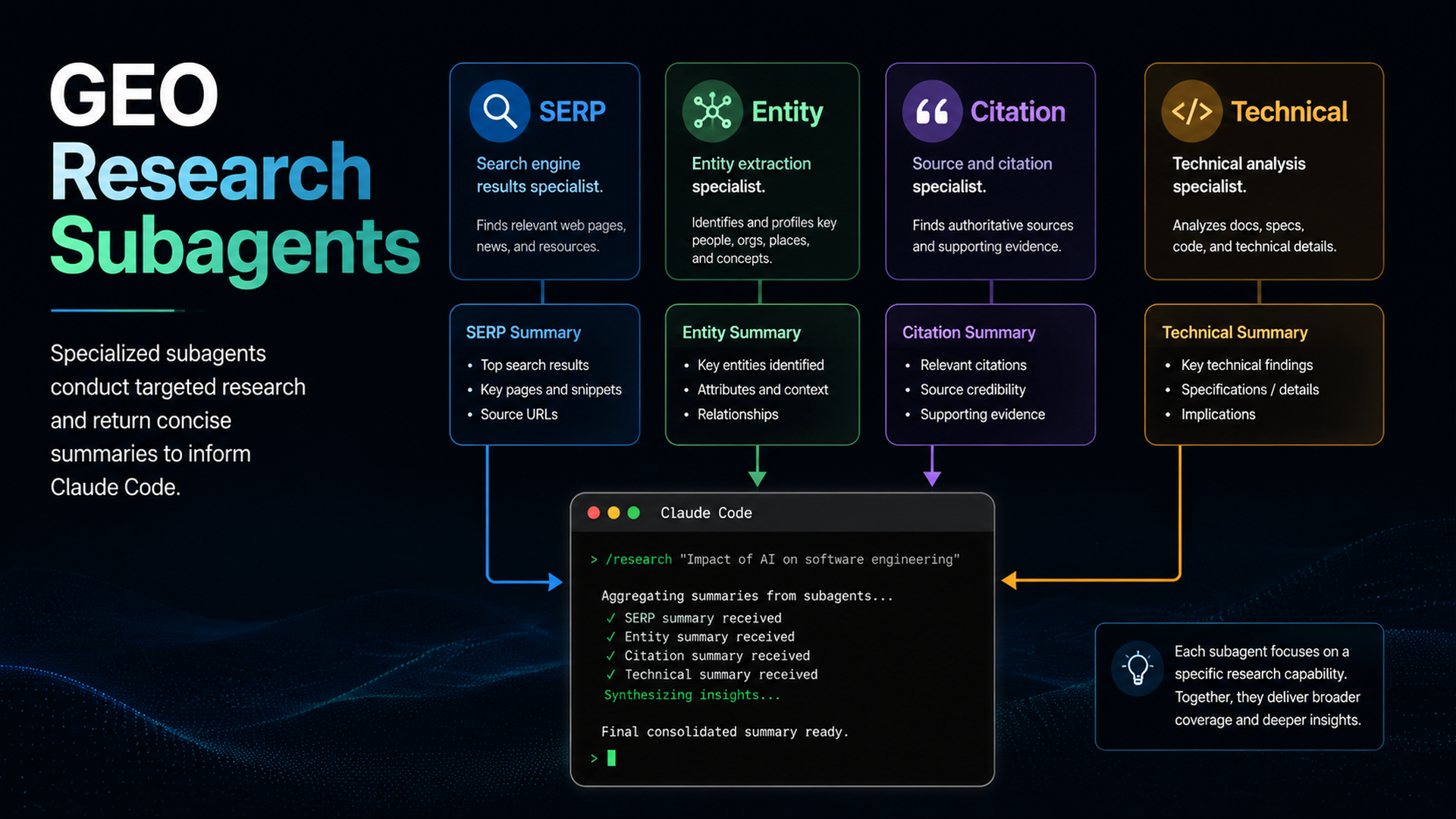
The rule: use subagents for noisy research, not for unchecked publishing
Claude Code subagents are specialized assistants with their own context, prompts, tool access, and permissions. Anthropic's docs explain that subagents are useful when a side task would flood the main conversation with search results, logs, or file contents. GEO research is exactly that kind of work: prompt snapshots, competitor mentions, entity facts, crawler checks, and source evidence can overwhelm the main thread.
Use subagents to research. Keep final decisions in the main conversation.
Four subagents that help GEO work
Subagent | Job | Output |
|---|---|---|
SERP researcher | Inspect search results and query intent | Query map and competitor patterns |
AI answer auditor | Test prompt library across AI surfaces or API snapshots | Mention/citation gaps |
Entity fact checker | Compare About page, schema, profiles, and public facts | Entity consistency report |
Technical eligibility reviewer | Check robots, sitemap, canonicals, schema, rendering | Technical risk list |
Do not create one “SEO agent” that does everything. The point is separation.
Prompt Claude Code to create subagents
I want to use Claude Code subagents for GEO research.

Create proposed subagent definitions before writing files.
For each subagent, include:
- name
- description
- system prompt
- allowed tools
- denied actions
- expected report format
- when the main conversation should call it

The subagents must not publish, deploy, change pricing/legal claims, or edit production content without main-thread approval.
Example subagent instruction
Name: geo-citation-auditor
Purpose: Check whether target prompts mention, cite, or ignore our brand.
Rules:
- Use only approved prompt files and approved APIs or manual snapshots.
- Store raw observations in seo-geo/reports/raw/.
- Return a concise summary with prompt, surface, answer summary, brand mention, citation URL, and confidence.
- Do not edit website files.
Running the research safely
Ask the main Claude conversation:
Use the GEO research subagents to inspect seo-geo/prompt-library/core-prompts.md and the latest snapshots in seo-geo/exports/ai-visibility/.

Each subagent should return only findings and recommended actions. After they finish, combine the results into a prioritized content and technical action queue. Do not edit files yet.
How to judge subagent output
Good output names evidence. Weak output says “improve authority.” Strong output says:
- Prompt: “best tools for AI search visibility”
- Surface: Perplexity API snapshot, 2026-07-05
- Competitors mentioned: A, B, C
- Our brand mentioned: no
- Likely gap: no comparison page and weak third-party evidence
- Suggested page action: create/refresh comparison page with verifiable proof
When not to use subagents
Do not spawn subagents for a tiny one-file edit. Do not let multiple subagents edit the same file. Do not ask research subagents to invent data. If the task needs one careful diff, stay in the main thread.
FAQ
Are subagents the same as skills?
No. A skill packages a reusable workflow or reference. A subagent is a specialized worker with its own context. They can work together, but they solve different problems.
Can subagents use MCP data?
Yes, when configured and permitted. For sensitive analytics, restrict tool access and require summaries rather than raw credential exposure.
Claude Code SEO/GEO learning path
This article is part of the Claude Code SEO/GEO operator series. If you are building the workflow from scratch, follow the sequence:
1. How to Use Claude Code for SEO Automation
2. How to Build a Claude Code SEO/GEO Workflow Cockpit
3. How to Use CLAUDE.md and Memory for SEO/GEO Workflows
4. How to Refresh SEO Pages with the Claude Code VS Code Extension
5. Best GEO Claude Code Skills in 2026
6. How to Use Claude Code Subagents for GEO Research
7. How to Use Claude Code Hooks as SEO/GEO Quality Gates
8. How to Connect Claude Code to SEO Data with MCP
9. How to Use Claude Code GitHub Actions for SEO/GEO Reviews
10. How to Run Daily SEO/GEO Monitoring in Claude Code
Where to go next
Previous: Best GEO Claude Code Skills in 2026
Next: How to Use Claude Code Hooks as SEO/GEO Quality Gates
Sources and notes
- Anthropic Claude Code docs: Overview, Memory, VS Code integration, Skills, Subagents, Hooks, MCP, and GitHub Actions.
Author: Theo Langford, Competitive AI Visibility Analyst for 120+ Markets at Auspia. Theo writes about competitor maps, share-of-answer checks, and GEO research workflows.


