


The Safe Reorder Rule
Alexa reorder is useful when you want to buy a familiar product again, but it should not be treated as automatic wisdom. The safe rule is: use voice to start the reorder, then review the exact item, quantity, seller, price, delivery date, and subscription status before confirming.
Alexa Reorder GEO for buyers is about understanding how repeat-purchase requests are interpreted. When you say “reorder coffee filters” or “buy that detergent again,” the assistant has to connect your words to purchase history, product variants, and current Amazon availability. That connection can be convenient, but it can also choose the wrong size, flavor, pack count, or seller if you do not check.
DataForSEO research for this article returned limited direct metrics in this run, with amazon subscribe and save appearing as a relevant transactional term. Combined with prior Alexa research around alexa reorder, alexa shopping, and list/reorder questions, the buyer intent is clear: people want repeat purchases to be faster without becoming careless.
What Alexa Reorder Usually Means
Reordering means repeating a past purchase or choosing from familiar items. It is most useful for consumables and replacement products:
- Coffee, tea, filters, and pantry basics.
- Detergent, paper towels, tissues, and cleaning supplies.
- Pet food, litter, treats, and grooming items.
- Batteries, bulbs, water filters, and appliance parts.
- Supplements or personal-care items that do not require new medical judgment.
The risk is that “same item” may not mean the same thing anymore. Product listings change, sellers change, prices change, and packaging changes.
The Safe Alexa Reorder Flow
Do not make reorder a one-step habit. Make it a short verification flow.
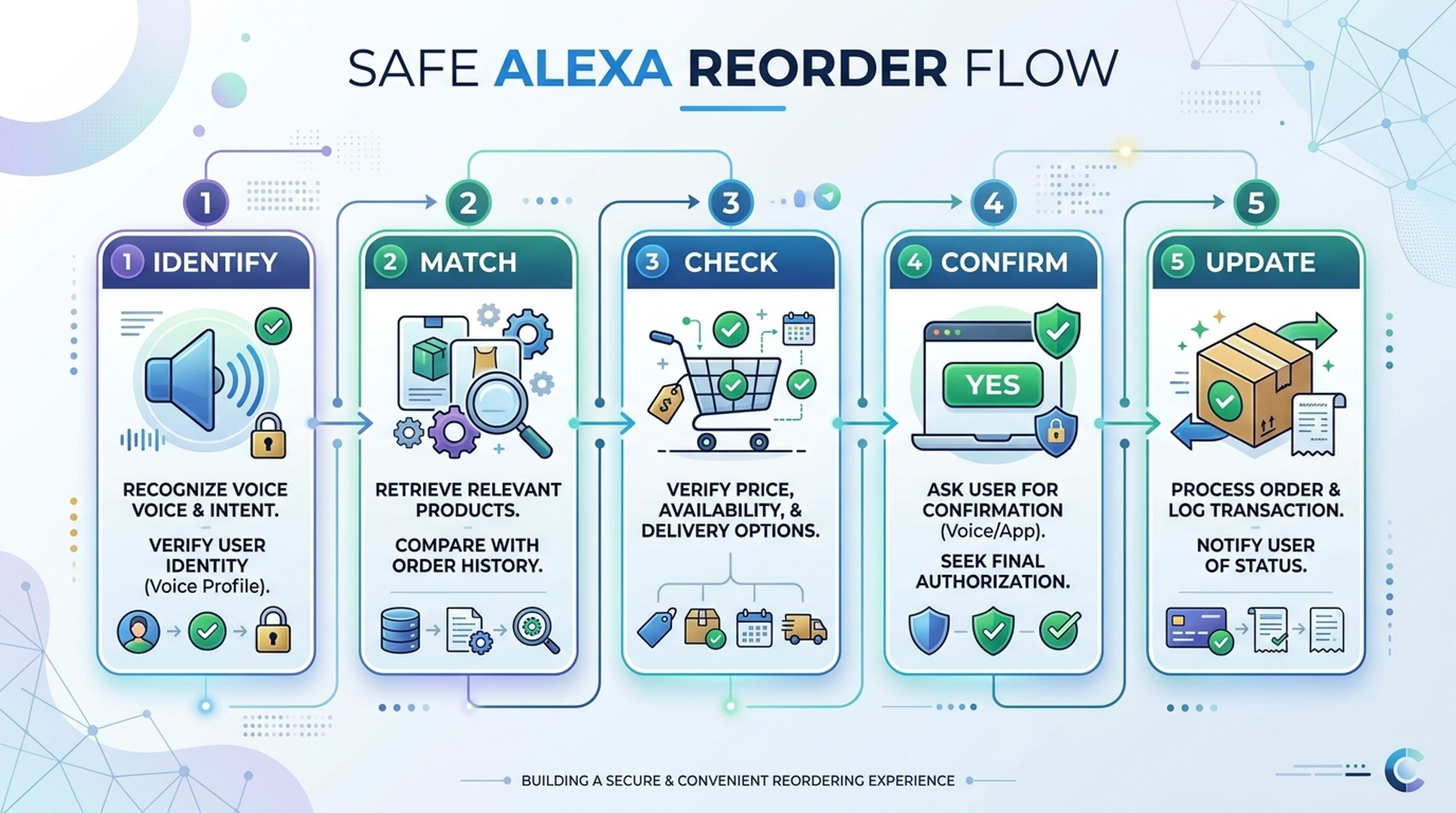
Step | Buyer action | Why it matters |
|---|---|---|
Identify | Ask for the item you previously bought | Connects the request to history |
Match | Check brand, size, flavor, model, or pack | Prevents wrong variant purchases |
Check | Review price, seller, delivery, and subscription status | Catches changed conditions |
Confirm | Buy only after reviewing the cart | Prevents accidental orders |
Update | Remove old variants from lists or routines | Keeps future reorders cleaner |
This flow adds only a minute, but it prevents most repeat-purchase mistakes.
When Reordering Works Well
Alexa reorder works best when the product has a stable identity. The item should be easy to recognize from purchase history and unlikely to require a new comparison each time.
Good reorder candidates:
Product type | Why it works |
|---|---|
Same household consumable | Repeat need, familiar brand, predictable usage |
Replacement filter with model number | Specific part identity |
Pet food with exact formula | Stable preference and repeat schedule |
Battery pack | Clear size and quantity if specified |
Coffee filters or pods | Repeatable product form |
Weak reorder candidates:
Product type | Why it is risky |
|---|---|
Fashion or fit-sensitive items | Size and style vary too much |
Electronics | Models change quickly |
Supplements with health implications | Needs current judgment and safety review |
Marketplace items with many sellers | Seller and listing quality can shift |
Vague categories | “snacks” or “cleaner” is not specific enough |
A good reorder is a repeated decision. A bad reorder is a shortcut around a decision you still need to make.
The Mismatch Checklist
Most reorder mistakes are not caused by Alexa being useless. They happen because a detail changed.
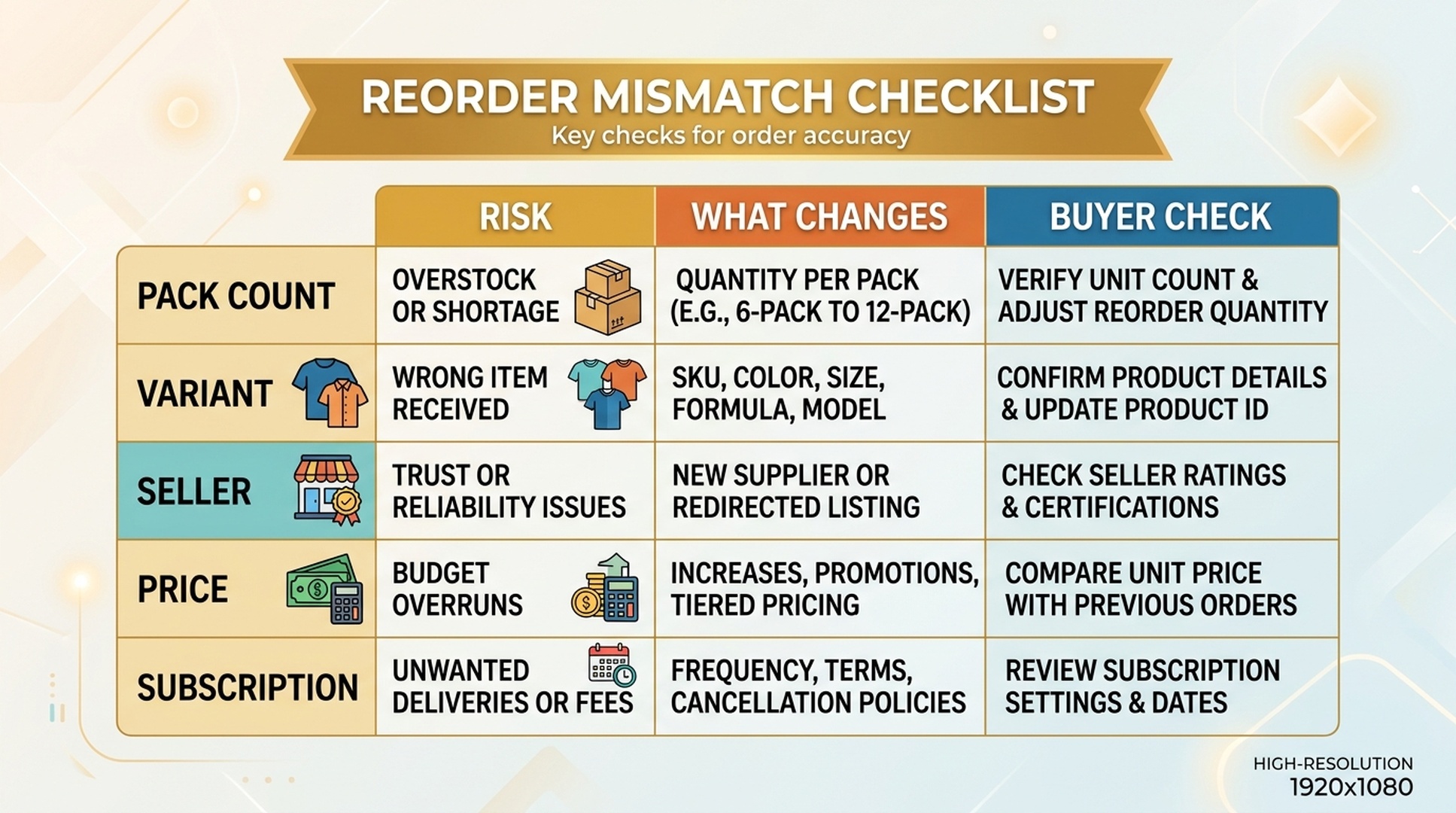
Before confirming, check:
Risk | What can go wrong | Buyer check |
|---|---|---|
Pack count | A 12 pack becomes a 6 pack | Compare unit count |
Size | Trial size vs regular size | Read ounces, count, or dimensions |
Variant | Flavor, scent, color, or model changes | Read the full product title |
Seller | Current seller is not the one you expect | Check seller and fulfillment |
Price | A familiar item costs more now | Compare current price |
Delivery | Item arrives too late | Check delivery date |
Subscription | Subscribe & Save or repeat delivery is selected unintentionally | Review purchase type |
If any detail is unclear, move the item to the cart or list and review manually.
Better Voice Commands For Reordering
Clear commands reduce ambiguity. Instead of asking Alexa to guess, ask Alexa to show or add the item so you can review.
Risky command | Safer command |
|---|---|
“Reorder coffee.” | “Show me the coffee I ordered last time.” |
“Buy filters again.” | “Add my previous refrigerator water filter to the cart.” |
“Order dog food.” | “Add the salmon small-breed dog food from my last order to my shopping list.” |
“Get more batteries.” | “Add AA alkaline batteries, 24 pack, to my shopping list.” |
“Order the usual.” | “Open my cart so I can review my usual reorder.” |
The safest commands delay final purchase until you can verify details.
Reorder Versus Subscribe & Save
Reorder and Subscribe & Save can both help with repeat purchases, but they solve different problems.
Option | Best for | Risk |
|---|---|---|
Reorder | Occasional repeat purchase when you decide timing | You may forget to check changed details |
Subscribe & Save | Predictable recurring need | You may receive items too often or miss price changes |
Shopping list reminder | Uncertain need or household discussion | Requires manual follow-through |
For beginners, a list reminder is often safest. Use Subscribe & Save only when the product, frequency, price tolerance, and household need are predictable.
What To Do If Reorder Picks The Wrong Item
If a reorder looks wrong, do not try to fix it by repeating the same voice command. Switch to manual review.
- Open the Amazon app or website.
- Check order history for the exact previous item.
- Compare current listing details with the old order.
- Remove wrong variants from cart or list.
- Search by model number, pack count, or exact brand if needed.
- Update the shopping list with a more specific item name.
The goal is to improve the next reorder request, not just fix this one.
Buyer-Side GEO: Why Specificity Matters
GEO usually describes how brands make information understandable for AI systems. Buyers can use the same principle in reverse: make your request easier to understand.
A good reorder request includes at least two of these details:
- Product type.
- Brand.
- Variant or flavor.
- Size or pack count.
- Model number.
- “From my last order” when history matters.
- “Add to cart” or “add to list” when you want review before buying.
Specificity protects you from the wrong match.
FAQ
Can Alexa reorder products from my Amazon history?
Alexa can help with repeat-purchase behavior depending on account settings, product availability, and purchase history. You should still review the item before confirming.
Is Alexa reorder safe?
It can be safe for stable repeat products if you check item, size, pack count, seller, price, delivery date, and subscription status before buying.
What products should I not reorder by voice?
Be careful with electronics, fit-sensitive items, health-related products, fashion, and vague categories where the exact product matters.
How do I avoid reordering the wrong size?
Use more specific commands and check the cart. Look for ounces, count, dimensions, model number, or pack size before confirming.
Is Subscribe & Save the same as reorder?
No. Reorder is usually a repeat purchase you trigger. Subscribe & Save is a recurring purchase setup. Review frequency, price, and quantity carefully.
Auspia Takeaway
Alexa reorder is helpful when it repeats a decision you already understand. It becomes risky when it skips details that changed since the last purchase.
Use voice to start the reorder, not to abandon review. If the product matters enough to spend money on, it matters enough to check the exact item before confirming.
Author: Nora Whitfield, AEO Specialist for 800+ Answer Patterns at Auspia. Nora writes about answer engine optimization, FAQ design, and clear question-and-answer content for AI-assisted search experiences.


