なぜClaude CodeでSEO pageを更新するならVS Codeが最も安全なのか
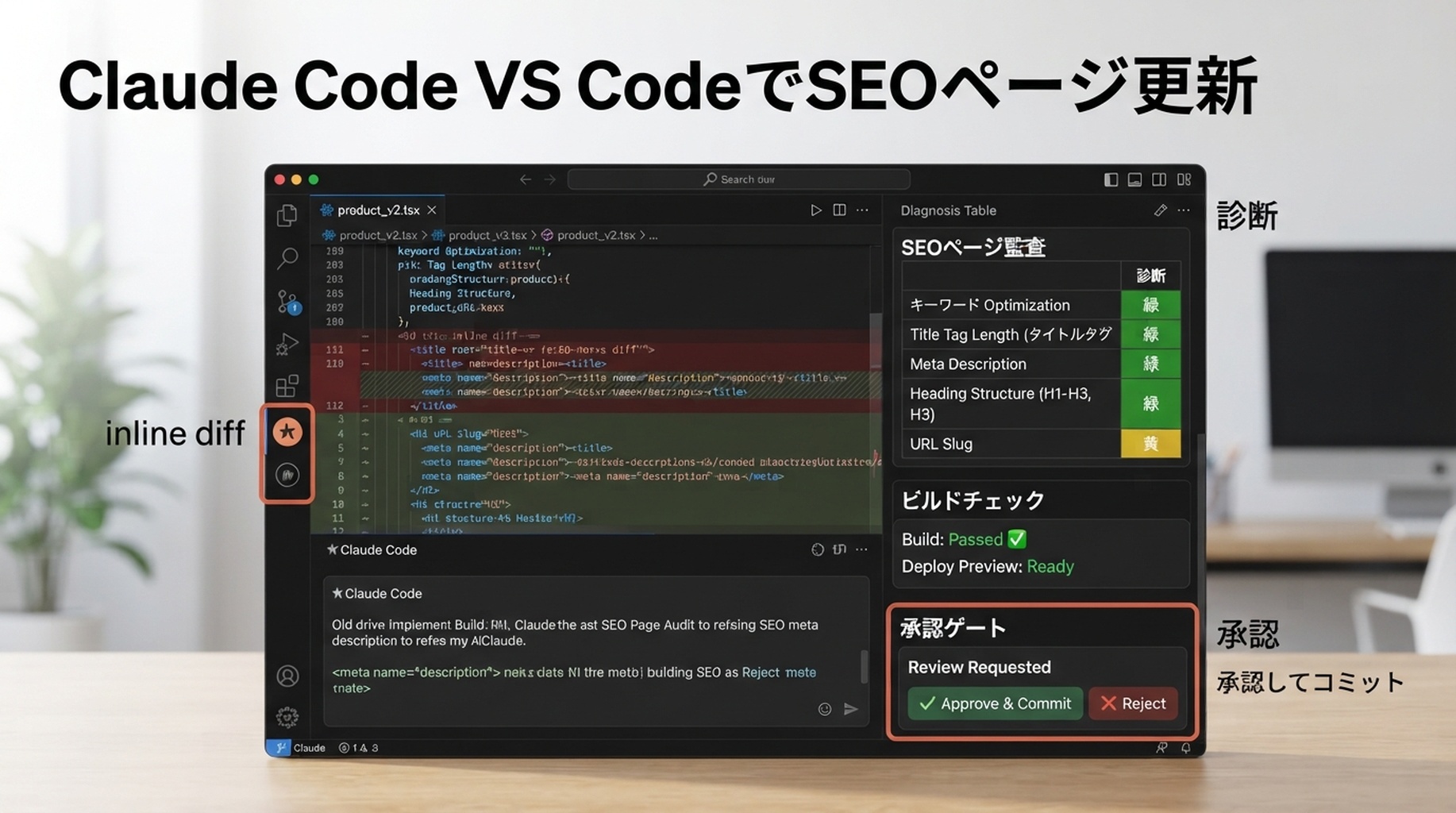
Claude CodeのVS Code extensionは、SEO workに有用です。page files、selected text、diffs、review decisionsが見えるeditor内にClaudeを持ち込めるからです。Anthropicのdocsでは、このextensionはVS Code内でinline diffs、@mentions、plan review、conversation historyを提供すると説明されています。初心者にとっては、別chatでAIにpageを書き換えさせ、その内容を手作業で戻すより安全です。
既存pageを1つrefreshしたいときにVS Codeを使います。title/metaの改善、answer blocksの追加、schema更新、internal links修復、build実行などです。
page refresh setup
VS Codeでwebsite repoを開きます。page file、metadata file、関連componentを開きます。その後、Spark iconからClaude Code panelを開きます。
Claudeには狭いscopeを渡します。
I want to refresh only the currently open SEO page.

Use the selected/open files as context. Do not edit other pages unless you ask first.

Goal:
- Improve the page for SEO and GEO extraction.
- Preserve the original offer and factual claims.
- Add clearer answer blocks, internal links, and metadata where appropriate.
- Run the build command after edits.

Before editing, produce a short page diagnosis and wait for approval.
Claudeに最初に診断させること
曖昧なcritiqueではなく、tableを求めます。
Area | Claudeが確認すべきこと |
|---|---|
Search intent | pageがtarget queryに答えているか |
GEO extractability | definitions、comparisons、proof、FAQsが引用しやすいか |
Metadata | title、description、canonical、Open Graph |
Structure | H1/H2 hierarchyとsection order |
Internal links | related pagesとconversion pagesへのlinks |
Schema | 正しいtypeで、fake dataがないか |
Conversion | CTAがpage intentに合っているか |
Technical risk | build、imports、broken components |
その後、実行したいfixだけを承認します。
実用的なrefresh prompt
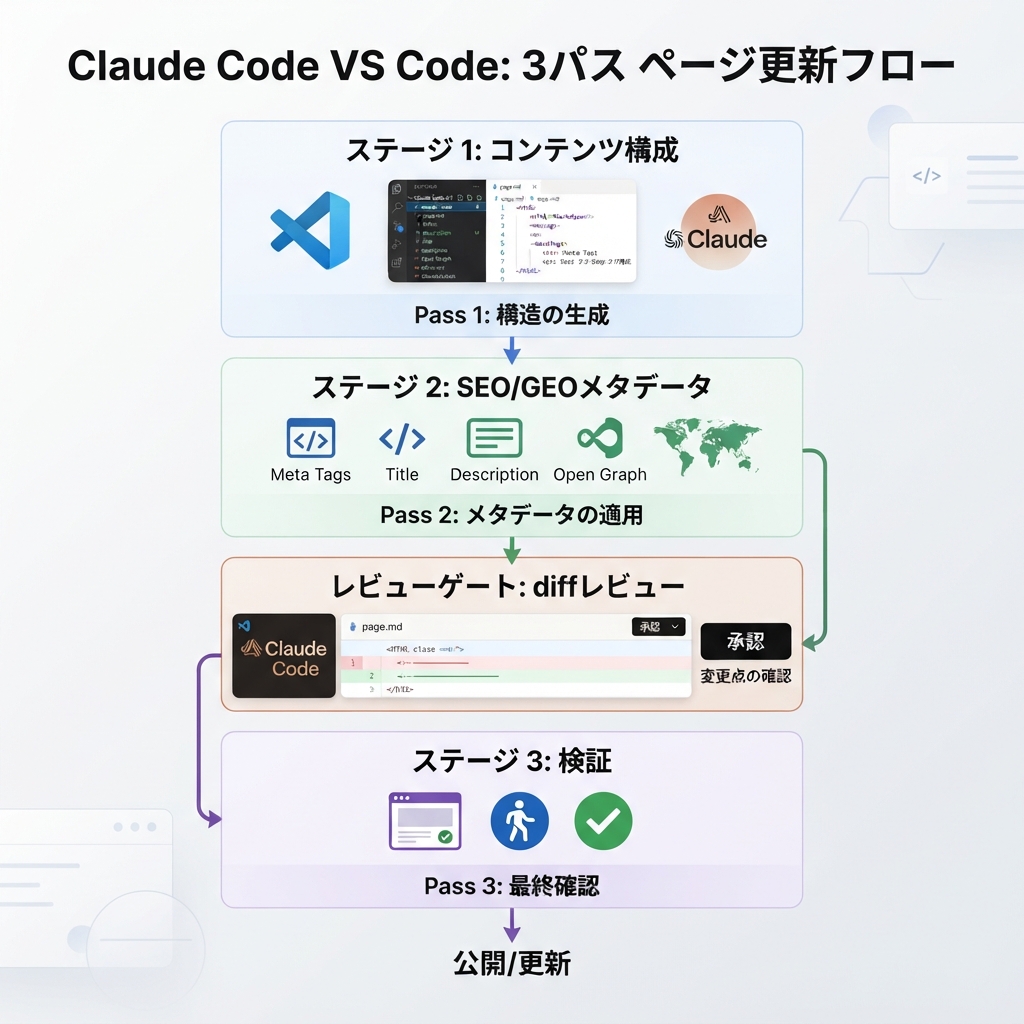
Refresh this page in three passes.

Pass 1: Content structure
- Keep the factual claims conservative.
- Add a direct answer near the top.
- Add one comparison table or checklist if it helps the reader.
- Add FAQ only if the questions are real buyer/search questions.

Pass 2: SEO/GEO metadata
- Improve title and meta description.
- Check canonical and Open Graph fields.
- Add or update schema only if the page type supports it.
- Do not create fake ratings, reviews, prices, or organizations.

Pass 3: Validation
- Show the diff.
- Run lint/typecheck/build if available.
- Summarize files changed, risks, and follow-up metrics.
inline diffsをapproval layerとして使う
ClaudeがVS Codeでeditsを提案したら、diffをpull requestのようにreviewします。次のような変更はrejectします。
- unsupported proofを追加する。
- approvalなしでproduct positioningを変える。
- headingsにkeywordsを詰め込む。
- specific examplesをgeneric copyへ置き換える。
- taskがpage-specificなのにshared componentsを変更する。
- robots、canonical、redirects、analyticsを予期せず変更する。
VS Codeを使う目的はconvenienceだけではありません。作業をreviewable filesへ戻すことです。
例:弱いuse-case pageをrefreshする
Before:
H1: AI Automation for Marketing
Sections: Overview, Benefits, Features, FAQ
Claudeにdiagnoseさせた後、より良いpage planは次のようになります。
H1: AI SEO Automation for B2B Content Teams
Sections:
- Direct answer: what the workflow does
- Symptoms: when manual SEO review breaks down
- Workflow: data, brief, edit, review, publish, measure
- Comparison: spreadsheet process vs repo-based Claude Code process
- Evidence needed: GSC export, examples, screenshots, workflow logs
- FAQ: setup, safety, analytics, human approval
これは単なるcopy editingではありません。intent、entity language、answer extractionを明確にしています。
diff後のvalidation prompt
Review your own diff as a skeptical SEO/GEO reviewer.

Return:
1. Changed files.
2. SEO improvements.
3. GEO improvements.
4. Claims that still need proof.
5. Technical risks.
6. Commands run and results.
7. What I should measure in GSC, Bing, GA4, and AI answer checks after publishing.
FAQ
1つのVS Code taskで複数pageをrefreshしてよいですか?
最初は避けます。まず1ページだけを更新し、レビュー手順を学び、SOPが安定してから似たページをまとめて扱います。
Claude Codeはselected textを見られますか?
VS Code integrationはopen filesやselected rangesなどのeditor contextと連携するよう設計されています。それでも、promptでfilesとscopeを明示してください。
Claudeが理解できないschemaを提案したらどうしますか?
accept前に、schema type、required fields、risksを説明させます。fake dataを使ってProduct、Review、FAQ schemaを追加しないでください。
Claude Code SEO/GEO 学習パス
この記事は Claude Code SEO/GEO オペレーターシリーズの一部です。ゼロから構築する場合は、次の順番で進めてください。
- Claude CodeでSEOを自動化する方法
- Claude Code SEO/GEO workflow cockpitを作る方法
- CLAUDE.mdとMemoryをSEO/GEO workflowに使う方法
- Claude Code VS Code extensionでSEO pageを更新する方法
- 2026年版:Best GEO Claude Code Skills
- Claude Code SubagentsをGEO researchに使う方法
- Claude Code HooksをSEO/GEO quality gatesとして使う方法
- MCPでClaude CodeをSEO dataに接続する方法
- Claude Code GitHub ActionsでSEO/GEO reviewsを行う方法
- Claude Codeで毎日のSEO/GEO monitoringを行う方法
次に読むべき記事
前の記事: CLAUDE.mdとMemoryをSEO/GEO workflowに使う方法
次の記事: 2026年版:Best GEO Claude Code Skills
参考情報
- Anthropic Claude Code docs: Overview、Memory、VS Code integration、Skills、Subagents、Hooks、MCP、GitHub Actions。
Author: Elise Morgan, Auspiaで15年のeditorial SEO経験を持つstrategist。Eliseはcontent refresh、editorial quality、search-focused page improvementsについて執筆しています。