為什麼 VS Code 是用 Claude Code refresh SEO pages 最安全的地方
Claude Code 的 VS Code extension 對 SEO work 很有用,因為它把 Claude 帶進 editor 裡,讓 page files、selected text、diffs 和 review decisions 都可見。Anthropic docs 描述,這個 extension 在 VS Code 裡提供 inline diffs、@-mentions、plan review 和 conversation history。對初學者來說,這比在另一個 chat 裡叫 AI rewrite page,再手動 copy 回去更安全。
當你需要 refresh 一個 existing page 時,使用 VS Code:改善 title/meta、加入 answer blocks、更新 schema、修 internal links,並跑 build。
圖說:在 editor 裡 review diff,能把 AI 工作拉回可檢查的 files。
Page refresh setup
在 VS Code 打開 website repo。打開 page file、metadata file 和任何 related component。接著從 Spark icon 打開 Claude Code panel。
給 Claude 一個 narrow scope:
I want to refresh only the currently open SEO page.

Use the selected/open files as context. Do not edit other pages unless you ask first.

Goal:
- Improve the page for SEO and GEO extraction.
- Preserve the original offer and factual claims.
- Add clearer answer blocks, internal links, and metadata where appropriate.
- Run the build command after edits.

Before editing, produce a short page diagnosis and wait for approval.
Claude 應該先診斷什麼
要求 table,不要 vague critique:
Area | Claude 應檢查什麼 |
|---|---|
Search intent | 頁面是否回答 target query? |
GEO extractability | Definitions、comparisons、proof、FAQs 是否容易被引用? |
Metadata | Title、description、canonical、Open Graph |
Structure | H1/H2 hierarchy 和 section order |
Internal links | 連到 related pages 和 conversion pages |
Schema | Correct type,且沒有 fake data |
Conversion | CTA 是否符合 page intent |
Technical risk | Build、imports、broken components |
然後只核准你要的 fixes。
實用 refresh prompt
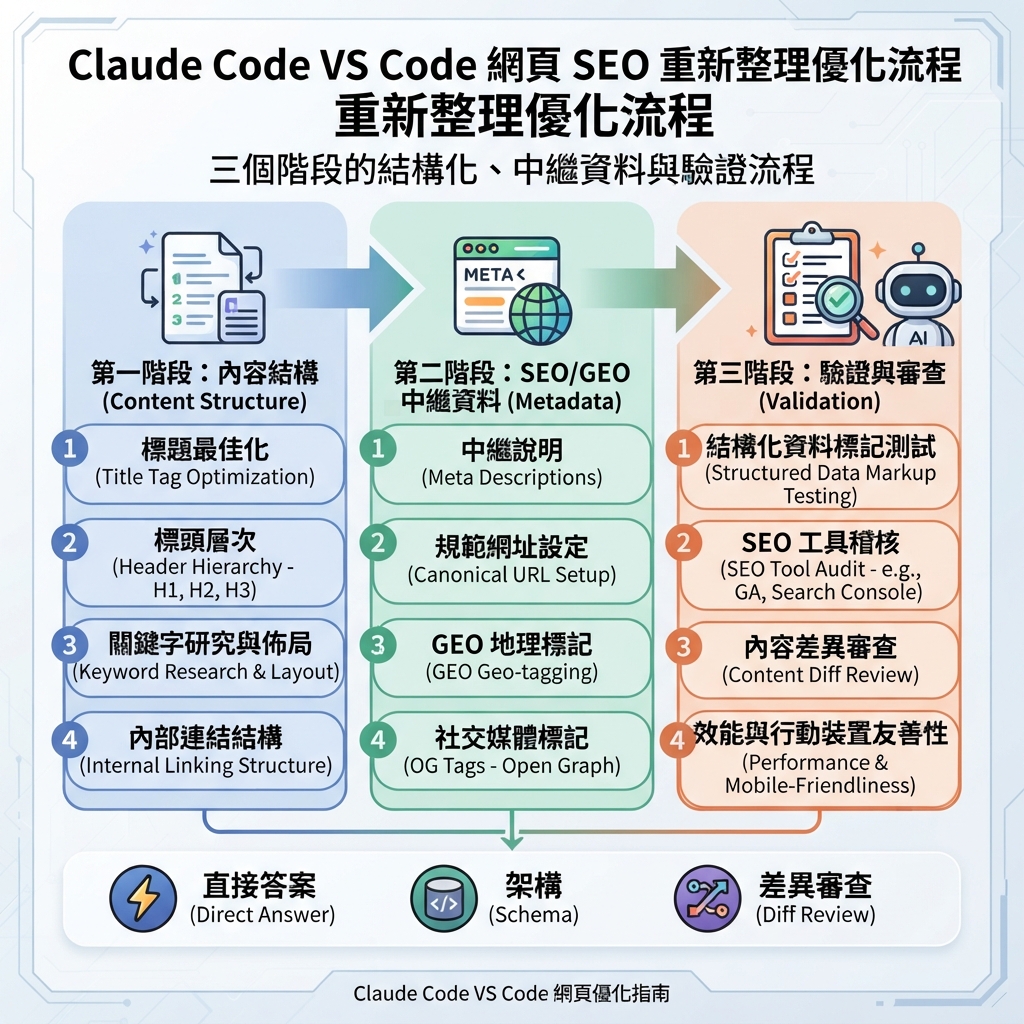
Refresh this page in three passes.

Pass 1: Content structure
- Keep the factual claims conservative.
- Add a direct answer near the top.
- Add one comparison table or checklist if it helps the reader.
- Add FAQ only if the questions are real buyer/search questions.

Pass 2: SEO/GEO metadata
- Improve title and meta description.
- Check canonical and Open Graph fields.
- Add or update schema only if the page type supports it.
- Do not create fake ratings, reviews, prices, or organizations.

Pass 3: Validation
- Show the diff.
- Run lint/typecheck/build if available.
- Summarize files changed, risks, and follow-up metrics.
把 inline diffs 當成 approval layer
當 Claude 在 VS Code 提出 edits,像 pull request 一樣 review diff。拒絕這些 changes:
- 加入 unsupported proof。
- 未核准就改 product positioning。
- 把 keywords 塞進 headings。
- 用 generic copy 取代 specific examples。
- Task 明明是 page-specific,卻修改 shared components。
- 意外修改 robots、canonical、redirects 或 analytics。
VS Code 的重點不只是方便。它強迫工作回到可 review files。
Example:refresh 一個 weak use-case page
Before:
H1: AI Automation for Marketing
Sections: Overview, Benefits, Features, FAQ
請 Claude diagnosis 後,更好的 page plan 可能是:
H1: AI SEO Automation for B2B Content Teams
Sections:
- Direct answer: what the workflow does
- Symptoms: when manual SEO review breaks down
- Workflow: data, brief, edit, review, publish, measure
- Comparison: spreadsheet process vs repo-based Claude Code process
- Evidence needed: GSC export, examples, screenshots, workflow logs
- FAQ: setup, safety, analytics, human approval
這個 change 不只是 copy editing。它釐清 intent、entity language 和 answer extraction。
Diff 後的 validation prompt
Review your own diff as a skeptical SEO/GEO reviewer.

Return:
1. Changed files.
2. SEO improvements.
3. GEO improvements.
4. Claims that still need proof.
5. Technical risks.
6. Commands run and results.
7. What I should measure in GSC, Bing, GA4, and AI answer checks after publishing.
FAQ
我應該讓 Claude 在一個 VS Code task 裡 refresh 多個 pages 嗎?
一開始不要。先 refresh 一頁、學會 review pattern,等 SOP 穩定後再 batch similar pages。
Claude Code 看得到我選取的文字嗎?
VS Code integration 設計上會使用 editor context,例如 open files 和 selected ranges。但 prompt 裡仍要明確說明 files 和 scope。
如果 Claude 建議我不懂的 schema 怎麼辦?
接受前先請它解釋 schema type、required fields 和 risks。不要用 fake data 加 Product、Review 或 FAQ schema。
Claude Code SEO/GEO 學習路徑
這篇屬於 Claude Code SEO/GEO operator series。如果你從零建立 workflow,請照這個順序:
- 如何用 Claude Code 做 SEO Automation
- 如何建立 Claude Code SEO/GEO Workflow Cockpit
- 如何把 CLAUDE.md 和 Memory 用在 SEO/GEO Workflows
- 如何用 Claude Code VS Code Extension 更新 SEO Pages
- 2026 年最佳 GEO Claude Code Skills
- 如何用 Claude Code Subagents 做 GEO Research
- 如何把 Claude Code Hooks 當成 SEO/GEO Quality Gates
- 如何用 MCP 將 Claude Code 接上 SEO 資料
- 如何用 Claude Code GitHub Actions 做 SEO/GEO Reviews
- 如何在 Claude Code 裡跑每日 SEO/GEO Monitoring
下一篇
上一篇:如何把 CLAUDE.md 和 Memory 用在 SEO/GEO Workflows
下一篇:2026 年最佳 GEO Claude Code Skills
Sources and notes
- Anthropic Claude Code docs: Overview、Memory、VS Code integration、Skills、Subagents、Hooks、MCP 與 GitHub Actions。
Author: Elise Morgan, Auspia 15-Year Editorial SEO Strategist。Elise 撰寫 content refreshes、editorial quality 與 search-focused page improvements。