作るもの
このtutorialでは、Claude Code hooksを実用的なSEO/GEO quality gatesとして使う方法を示します。目的は、Claudeを曖昧に「もっと慎重」にすることではありません。Claudeがsearch visibilityを壊し得るfilesを編集したときに、deterministic checksを実行することです。対象はmetadata helpers、schema、robots rules、sitemap generation、canonical tags、analytics、content templatesなどです。
作る構成は次のとおりです。
.claude/
  settings.local.json
scripts/
  seo-geo-hook-guard.mjs
  seo-geo-launch-gate.mjs
seo-geo/
  qa/
    hook-test-plan.md
    hook-reports/
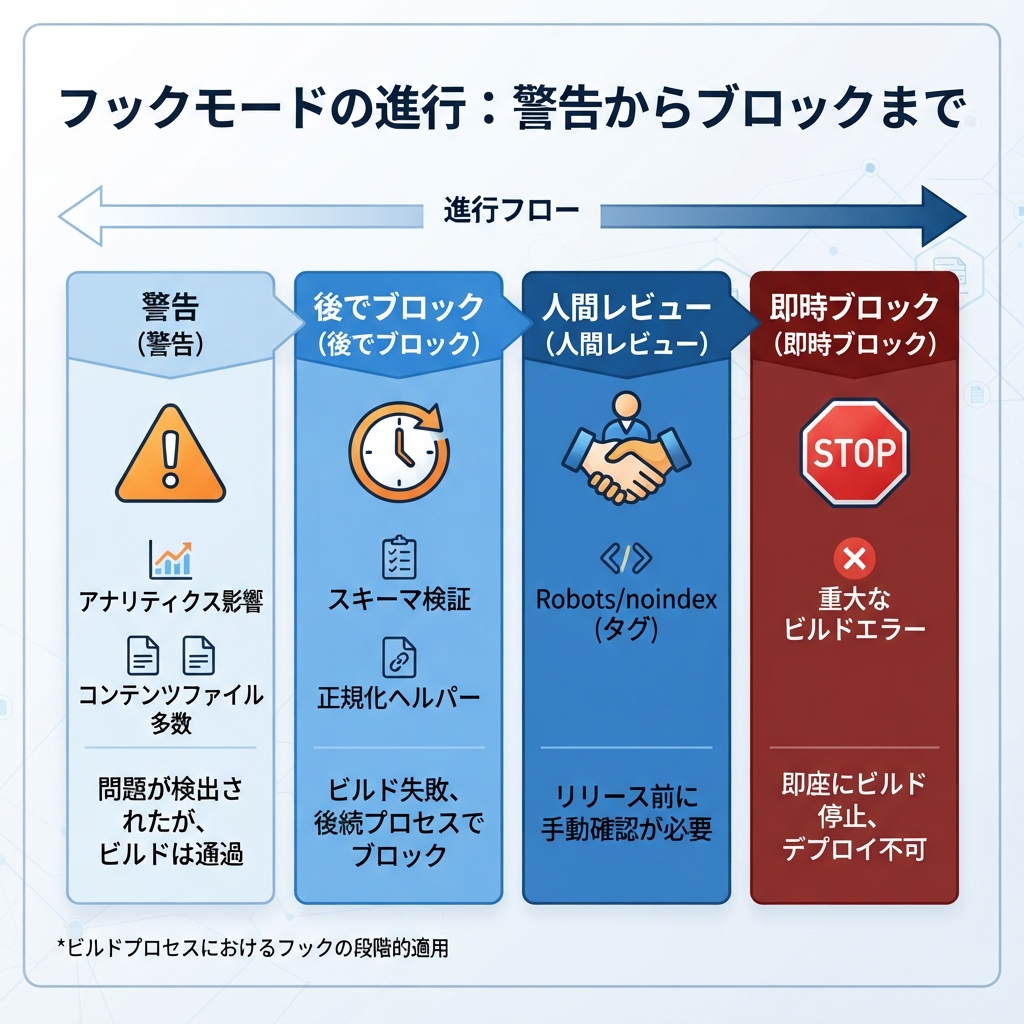
まずwarning hooksから始めます。checksを信頼できるようになってから、high-confidenceなものだけをblocking hooksに変えます。
Step 1: 小さなhook guard scriptを作る
foldersを作ります。
mkdir -p .claude scripts seo-geo/qa/hook-reports
current git diffを調べ、high-risk SEO/GEO filesをflagするhook scriptを作ります。
cat > scripts/seo-geo-hook-guard.mjs <<'EOF2'
#!/usr/bin/env node
import { execSync } from 'node:child_process';
import { mkdirSync, writeFileSync } from 'node:fs';

mkdirSync('seo-geo/qa/hook-reports', { recursive: true });

function sh(cmd) {
  try { return execSync(cmd, { encoding: 'utf8' }).trim(); }
  catch { return ''; }
}

const changed = sh('git diff --name-only HEAD').split('
').filter(Boolean);
const riskyPatterns = [
  /robots\.txt$/,
  /sitemap/i,
  /canonical/i,
  /noindex/i,
  /schema|json-ld|structured-data/i,
  /middleware\.(js|ts)$/,
  /analytics|gtm|ga4/i,
  /seo\.(js|ts|tsx|mjs)$/,
  /metadata|meta-tags/i,
];

const risky = changed.filter(file => riskyPatterns.some(pattern => pattern.test(file)));
const report = [
  '# SEO/GEO Hook Guard',
  '',
  `Changed files: ${changed.length}`,
  '',
  risky.length ? '## Risky files' : '## Risky files
None detected.',
  ...risky.map(file => `- ${file}`),
  '',
  '## Required reviewer action',
  risky.length
    ? 'Review crawl/indexing/schema/analytics impact before continuing.'
    : 'No high-risk SEO/GEO file pattern detected.',
].join('
');

writeFileSync('seo-geo/qa/hook-reports/latest-guard.md', report);

if (risky.length) {
  console.error(report);
  // Exit 0 for warning mode. Change to exit 2 only after the team trusts the rule.
  process.exit(0);
}
EOF2
chmod +x scripts/seo-geo-hook-guard.mjs
Claude Codeに接続する前に、一度実行します。
node scripts/seo-geo-hook-guard.mjs
cat seo-geo/qa/hook-reports/latest-guard.md
repoがGit-basedでない場合は、build systemやPR exportからchanged filesのlistを読むようにscriptを変更します。
Step 2: launch gate scriptを作る
Hooksは高速であるべきです。重いchecksは、Claudeがfinal response前またはPR前に実行できるlaunch gateへ置きます。
cat > scripts/seo-geo-launch-gate.mjs <<'EOF2'
#!/usr/bin/env node
import { execSync } from 'node:child_process';

const commands = [
  ['git status', 'git status --short'],
  ['changed files', 'git diff --name-only HEAD'],
];

let failed = false;
for (const [label, cmd] of commands) {
  try {
    const out = execSync(cmd, { encoding: 'utf8' }).trim();
    console.log(`
## ${label}
${out || '(no output)'}`);
  } catch (err) {
    failed = true;
    console.error(`
## ${label}
FAILED: ${err.message}`);
  }
}

console.log('
## Manual SEO/GEO review still required');
console.log('- Check title/meta/canonical changes');
console.log('- Check schema and unsupported claims');
console.log('- Check robots, sitemap, redirects, noindex, analytics');
console.log('- Check internal links and answer extraction blocks');

process.exit(failed ? 1 : 0);
EOF2
chmod +x scripts/seo-geo-launch-gate.mjs
後で、real build commandを追加します。たとえば npm run build、npm run lint、site-specific crawlerなどです。
Step 3: Claude Codeにhook configを提案させる
hook configを盲目的に貼り付けないでください。Claude Codeにrepoをinspectさせ、現在のClaude Code installationに合う最も安全なversionを作らせます。
Inspect this repository and help me configure Claude Code hooks for SEO/GEO quality gates.

Use these scripts:
- scripts/seo-geo-hook-guard.mjs
- scripts/seo-geo-launch-gate.mjs

Requirements:
- Start in warning mode, not blocking mode.
- Run the guard after file edits that may touch SEO/GEO files.
- Do not auto-approve edits.
- Do not publish, deploy, submit URLs, or change credentials.
- Put the proposed configuration in `.claude/settings.local.json` or the current Claude Code settings location recommended by the docs.
- Explain how I can test the hook with one harmless metadata edit.

Do not edit live content until I approve the settings.
なぜClaudeにexact configを作らせるのか。Claude Code hook syntaxは変化する可能性があります。installed versionとcurrent docsをClaudeに確認させ、scriptsとsafety policyは安定させます。
Step 4: starter settings patternを使う
Claude Code versionがJSON hook settingsに対応している場合、local settingsは次に近い形になります。
{
  "hooks": {
    "PostToolUse": [
      {
        "matcher": "Edit|MultiEdit|Write",
        "hooks": [
          {
            "type": "command",
            "command": "node scripts/seo-geo-hook-guard.mjs"
          }
        ]
      }
    ]
  }
}
これはstarter patternであり、universal copy-paste guaranteeではありません。追加後は、環境に応じてClaude Codeをrestartするかsessionをreloadします。
Step 5: hookを安全にtestする
harmless branchを作ります。
git checkout -b test/seo-geo-hooks
Claude Codeに依頼します。
Make a harmless test change to a temporary markdown file under `seo-geo/qa/`. Then confirm whether the SEO/GEO hook ran and show me `seo-geo/qa/hook-reports/latest-guard.md`.
次に、production logicを変えずにrisky filenameをtestします。
mkdir -p seo-geo/qa/fake-risk
cat > seo-geo/qa/fake-risk/test-sitemap-note.md <<'EOF2'
This is a test note. It is not the real sitemap.
EOF2
Claudeに依頼します。
Run the hook guard and explain whether it warns on this fake-risk file. Do not edit production sitemap, robots, canonical, schema, or analytics files.
Step 6: 何をwarnにし、何をblockにするか決める
hookをblockingにする前に、このtableを使います。
Gate | Start mode | When to block later |
|---|---|---|
Build failure | Warn | build commandが安定したら |
Robots/noindex changed | Warn | file matcherが正確になったら |
Canonical helper changed | Warn | 通常はhuman approvalを維持 |
Schema validation failed | Warn | validatorのfalse positiveが少ないならblock |
Analytics touched | Warn | human approvalを維持 |
Many content files changed | Warn | unapproved bulk editsだけblock |
beginner-safe hookはwarnし、reportを書き、reviewを強制します。mature hookはfailureがmechanicalでlow ambiguityな場合だけblockできます。
Step 7: CLAUDE.md にruleを追加する
Hooksはcommandsを実行します。CLAUDE.md はその背後にあるpolicyを説明します。短いsectionを追加します。
## SEO/GEO quality gates

Before final response on SEO/GEO tasks:
- summarize changed files
- run the available validation command
- read `seo-geo/qa/hook-reports/latest-guard.md` if it exists
- flag any robots, sitemap, canonical, noindex, schema, metadata, analytics, or routing change
- do not publish, deploy, or submit URLs without explicit approval
これにより、Claudeのreasoningがhook outputと一致します。
良いhook outputの形
有用なwarningは具体的です。
Risky files:
- src/lib/seo.ts
- src/components/JsonLd.tsx

Required reviewer action:
Review canonical generation and JSON-LD output before continuing. Run build and inspect one rendered page.
弱いwarningは曖昧です。
SEO issue found. Be careful.
warningがfilesとreview stepsを示さないなら、頼る前にscriptを改善します。
FAQ
hooksはhuman reviewを置き換えますか?
いいえ。Hooksはrepeatable mechanical risksを捕まえます。claims、positioning、legal language、competitor comparisons、redirects、analytics interpretation、release timingは人間がreviewします。
初日からhooksをblockingにすべきですか?
いいえ。warning modeから始めます。何度か安全に走らせた後、false-positive riskが低いchecksだけをblockします。
hook scriptsはどこに置くべきですか?
shared scriptsはrepo内の scripts/ に置きます。personal hook settingsは、team全体で同じbehaviorに合意していない限り、local Claude Code settingsに置きます。
Claude Code SEO/GEO 学習パス
この記事は Claude Code SEO/GEO オペレーターシリーズの一部です。ゼロから構築する場合は、次の順番で進めてください。
- Claude CodeでSEOを自動化する方法
- Claude Code SEO/GEO workflow cockpitを作る方法
- CLAUDE.mdとMemoryをSEO/GEO workflowに使う方法
- Claude Code VS Code extensionでSEO pageを更新する方法
- 2026年版:Best GEO Claude Code Skills
- Claude Code SubagentsをGEO researchに使う方法
- Claude Code HooksをSEO/GEO quality gatesとして使う方法
- MCPでClaude CodeをSEO dataに接続する方法
- Claude Code GitHub ActionsでSEO/GEO reviewsを行う方法
- Claude Codeで毎日のSEO/GEO monitoringを行う方法
参考情報
- Anthropic Claude Code docs: Hooks guide、Claude Code overview。
Author: Julian Mercer, Auspiaで14年のtechnical SEO経験を持つpractitioner。Julianはcrawlability、schema、rendering、AI-readable contentのtechnical foundationsについて執筆しています。