你會建立什麼
這篇教學會示範如何把 Claude Code hooks 當成實用的 SEO/GEO quality gates。目標不是籠統地讓 Claude「更小心」,而是在 Claude 編輯可能傷害 search visibility 的檔案時,跑 deterministic checks:metadata helpers、schema、robots rules、sitemap generation、canonical tags、analytics 和 content templates。
你會建立:
.claude/
  settings.local.json
scripts/
  seo-geo-hook-guard.mjs
  seo-geo-launch-gate.mjs
seo-geo/
  qa/
    hook-test-plan.md
    hook-reports/
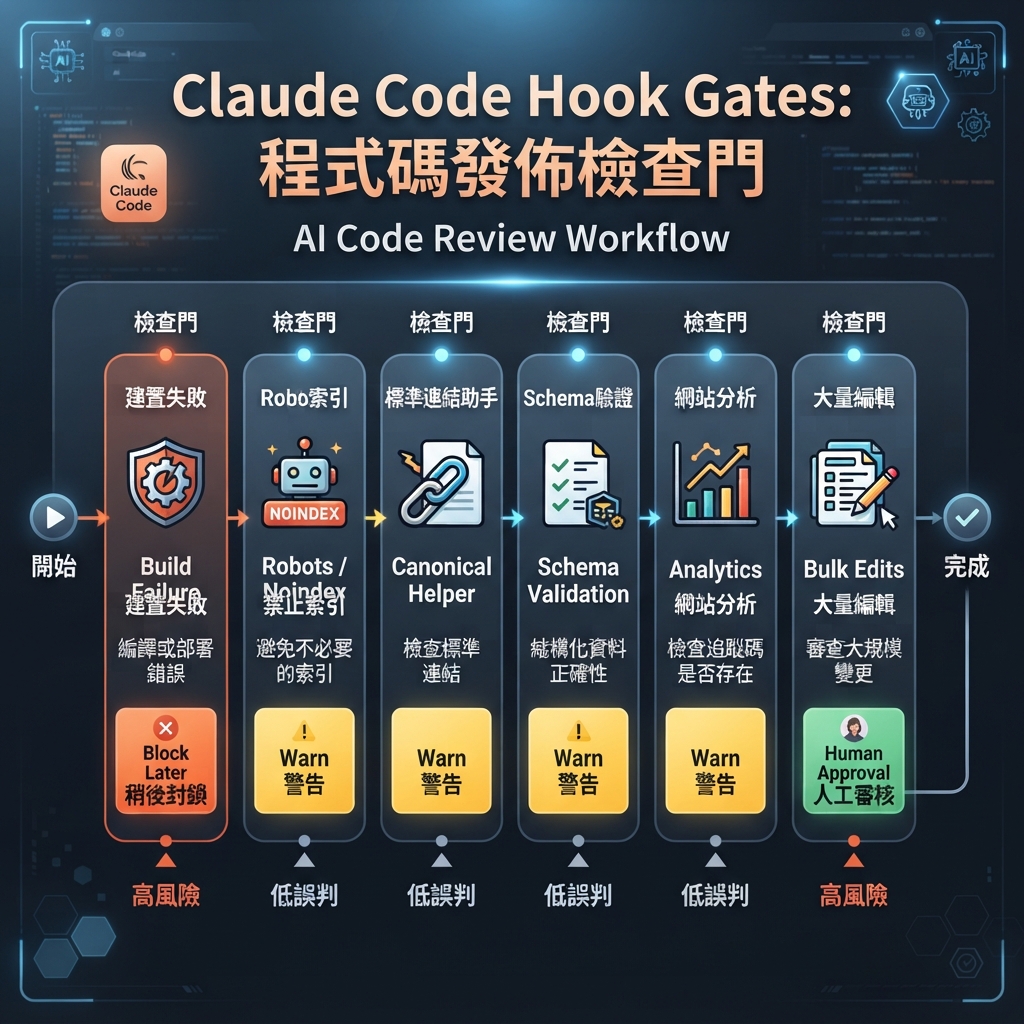
圖說:先用 warning hooks,等 checks 穩定可信後,才把高信心檢查改成 blocking hooks。
步驟 1:建立小型 hook guard script
建立 folders:
mkdir -p .claude scripts seo-geo/qa/hook-reports
建立一個 hook script,檢查目前 git diff,並標記 high-risk SEO/GEO files:
cat > scripts/seo-geo-hook-guard.mjs <<'EOF2'
#!/usr/bin/env node
import { execSync } from 'node:child_process';
import { mkdirSync, writeFileSync } from 'node:fs';

mkdirSync('seo-geo/qa/hook-reports', { recursive: true });

function sh(cmd) {
  try { return execSync(cmd, { encoding: 'utf8' }).trim(); }
  catch { return ''; }
}

const changed = sh('git diff --name-only HEAD').split('
').filter(Boolean);
const riskyPatterns = [
  /robots\.txt$/,
  /sitemap/i,
  /canonical/i,
  /noindex/i,
  /schema|json-ld|structured-data/i,
  /middleware\.(js|ts)$/,
  /analytics|gtm|ga4/i,
  /seo\.(js|ts|tsx|mjs)$/,
  /metadata|meta-tags/i,
];

const risky = changed.filter(file => riskyPatterns.some(pattern => pattern.test(file)));
const report = [
  '# SEO/GEO Hook Guard',
  '',
  `Changed files: ${changed.length}`,
  '',
  risky.length ? '## Risky files' : '## Risky files
None detected.',
  ...risky.map(file => `- ${file}`),
  '',
  '## Required reviewer action',
  risky.length
    ? 'Review crawl/indexing/schema/analytics impact before continuing.'
    : 'No high-risk SEO/GEO file pattern detected.',
].join('
');

writeFileSync('seo-geo/qa/hook-reports/latest-guard.md', report);

if (risky.length) {
  console.error(report);
  // Exit 0 for warning mode. Change to exit 2 only after the team trusts the rule.
  process.exit(0);
}
EOF2
chmod +x scripts/seo-geo-hook-guard.mjs
把它接進 Claude Code 前,先手動跑一次:
node scripts/seo-geo-hook-guard.mjs
cat seo-geo/qa/hook-reports/latest-guard.md
如果你的 repo 不是 Git-based,就把 script 改成從 build system 或 PR export 讀 changed files。
步驟 2:建立 launch gate script
Hooks 應該很快。比較重的 checks 放在 launch gate,讓 Claude 在 final response 或 PR 前執行。
cat > scripts/seo-geo-launch-gate.mjs <<'EOF2'
#!/usr/bin/env node
import { execSync } from 'node:child_process';

const commands = [
  ['git status', 'git status --short'],
  ['changed files', 'git diff --name-only HEAD'],
];

let failed = false;
for (const [label, cmd] of commands) {
  try {
    const out = execSync(cmd, { encoding: 'utf8' }).trim();
    console.log(`
## ${label}
${out || '(no output)'}`);
  } catch (err) {
    failed = true;
    console.error(`
## ${label}
FAILED: ${err.message}`);
  }
}

console.log('
## Manual SEO/GEO review still required');
console.log('- Check title/meta/canonical changes');
console.log('- Check schema and unsupported claims');
console.log('- Check robots, sitemap, redirects, noindex, analytics');
console.log('- Check internal links and answer extraction blocks');

process.exit(failed ? 1 : 0);
EOF2
chmod +x scripts/seo-geo-launch-gate.mjs
之後再加入真正 build command,例如 npm run build、npm run lint 或 site-specific crawler。
步驟 3:請 Claude Code 提出 hook config
不要盲貼 hook config。請 Claude Code inspect 你的 repo,產出最適合目前 Claude Code installation 的安全版本:
Inspect this repository and help me configure Claude Code hooks for SEO/GEO quality gates.

Use these scripts:
- scripts/seo-geo-hook-guard.mjs
- scripts/seo-geo-launch-gate.mjs

Requirements:
- Start in warning mode, not blocking mode.
- Run the guard after file edits that may touch SEO/GEO files.
- Do not auto-approve edits.
- Do not publish, deploy, submit URLs, or change credentials.
- Put the proposed configuration in `.claude/settings.local.json` or the current Claude Code settings location recommended by the docs.
- Explain how I can test the hook with one harmless metadata edit.

Do not edit live content until I approve the settings.
為什麼要讓 Claude 產生 exact config?Claude Code hook syntax 可能演進。讓 Claude 依 installed version 和 current docs 產生設定;你的 scripts 和 safety policy 則保持穩定。
步驟 4:使用 starter settings pattern
如果你的 Claude Code version 支援 JSON hook settings,local settings 可能長得像:
{
  "hooks": {
    "PostToolUse": [
      {
        "matcher": "Edit|MultiEdit|Write",
        "hooks": [
          {
            "type": "command",
            "command": "node scripts/seo-geo-hook-guard.mjs"
          }
        ]
      }
    ]
  }
}
把它當 starter pattern,不是 universal copy-paste guarantee。加入後,如果環境需要,restart Claude Code 或 reload session。
步驟 5:安全測試 hook
建立 harmless branch:
git checkout -b test/seo-geo-hooks
請 Claude Code:
Make a harmless test change to a temporary markdown file under seo-geo/qa/. Then confirm whether the SEO/GEO hook ran and show me seo-geo/qa/hook-reports/latest-guard.md.
接著用不改 production logic 的 risky filename 測試:
mkdir -p seo-geo/qa/fake-risk
cat > seo-geo/qa/fake-risk/test-sitemap-note.md <<'EOF2'
This is a test note. It is not the real sitemap.
EOF2
問 Claude:
Run the hook guard and explain whether it warns on this fake-risk file. Do not edit production sitemap, robots, canonical, schema, or analytics files.
步驟 6:決定哪些 warn、哪些 block
在把任何 hook 變成 blocking 前,先用這張表:
Gate | Start mode | 何時之後才 block |
|---|---|---|
Build failure | Warn | Build command 穩定後 |
Robots/noindex changed | Warn | File matcher 夠 precise 後 |
Canonical helper changed | Warn | 通常仍保留 human approval |
Schema validation failed | Warn | Validator false positives 很低時 |
Analytics touched | Warn | 保留 human approval |
Many content files changed | Warn | 只對未核准 bulk edits block |
初學者安全 hook 會 warn、寫 report、強制 review。成熟 hook 只應在 failure 機械、低模糊時 block。
步驟 7:把 rule 加到 CLAUDE.md
Hooks 跑 commands;CLAUDE.md 解釋背後 policy。加入短 section:
## SEO/GEO quality gates

Before final response on SEO/GEO tasks:
- summarize changed files
- run the available validation command
- read `seo-geo/qa/hook-reports/latest-guard.md` if it exists
- flag any robots, sitemap, canonical, noindex, schema, metadata, analytics, or routing change
- do not publish, deploy, or submit URLs without explicit approval
這讓 Claude 的 reasoning 和 hook output 對齊。
好的 hook output 長什麼樣
有用 warning 是 specific 的:
Risky files:
- src/lib/seo.ts
- src/components/JsonLd.tsx

Required reviewer action:
Review canonical generation and JSON-LD output before continuing. Run build and inspect one rendered page.
弱 warning 是:
SEO issue found. Be careful.
如果 warning 沒有命名 files 和 review steps,先改善 script,再依賴它。
FAQ
Hooks 可以取代 human review 嗎?
不行。Hooks 抓 repeatable mechanical risks。Claims、positioning、legal language、competitor comparisons、redirects、analytics interpretation 和 release timing 仍要人 review。
第一天就該把 hooks 設成 blocking 嗎?
不要。先用 warning mode。跑過幾次安全流程後,只 block false-positive risk 低的 checks。
Hook scripts 應該放哪裡?
Shared scripts 放在 repo 的 scripts/。Personal hook settings 放在 local Claude Code settings,除非整個 team 已同意同一行為。
Claude Code SEO/GEO 學習路徑
這篇屬於 Claude Code SEO/GEO operator series。如果你從零建立 workflow,請照這個順序:
- 如何用 Claude Code 做 SEO Automation
- 如何建立 Claude Code SEO/GEO Workflow Cockpit
- 如何把 CLAUDE.md 和 Memory 用在 SEO/GEO Workflows
- 如何用 Claude Code VS Code Extension 更新 SEO Pages
- 2026 年最佳 GEO Claude Code Skills
- 如何用 Claude Code Subagents 做 GEO Research
- 如何把 Claude Code Hooks 當成 SEO/GEO Quality Gates
- 如何用 MCP 將 Claude Code 接上 SEO 資料
- 如何用 Claude Code GitHub Actions 做 SEO/GEO Reviews
- 如何在 Claude Code 裡跑每日 SEO/GEO Monitoring
Sources and notes
- Anthropic Claude Code docs: Hooks guide and Claude Code overview。
Author: Julian Mercer, Auspia 14-Year Technical SEO Practitioner。Julian 撰寫 crawlability、schema、rendering 與 AI-readable content 的 technical foundations。