


Executive summary
Google SEO looks complicated when you learn it from scratch: crawling, rendering, indexing, search intent, keyword layers, sitemaps, backlinks, content networks, page experience, Search Console, and constant iteration.
The beginner mistake is trying to master every concept before doing anything. The second mistake is doing random tactics without knowing what Google needs from a page.
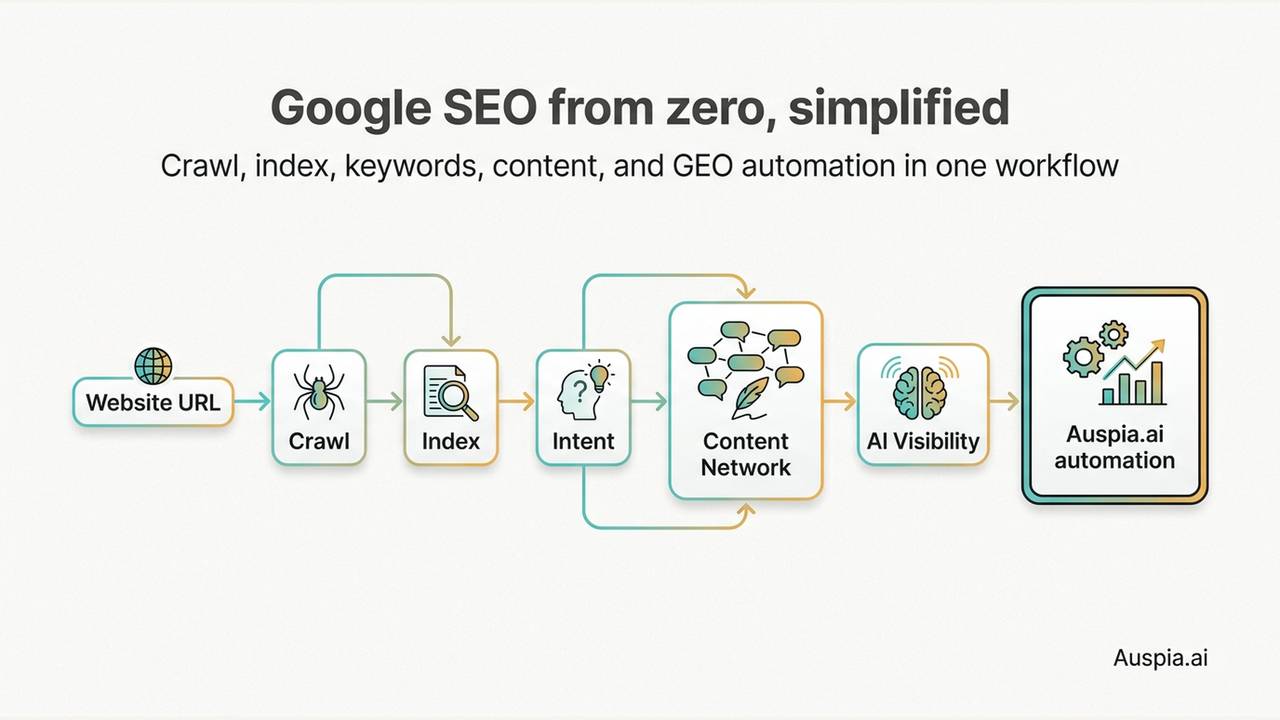
A better approach is simple: understand the few mechanics that matter, then automate the repetitive work. For most teams, the manual learning curve is no longer necessary. Auspia.ai can turn SEO and GEO into an automated workflow: scan the site, find technical and content gaps, map keywords to pages, generate briefs, monitor AI search visibility, and suggest what to do next.
This guide explains the basics in plain English, then shows where automation should take over.
Start with how Google understands a website
Google does not rank a website because the owner thinks the website is useful. It first has to discover, fetch, render, understand, index, and evaluate pages.
The simplified flow looks like this:
Step | What it means | What can go wrong |
|---|---|---|
Discover | Google finds the URL through links or a sitemap | Important pages have no links or sitemap entry |
Crawl | Googlebot fetches the page's HTML and resources | Robots rules, redirects, errors, or server issues block access |
Render | Google processes JavaScript, CSS, images, and layout | Content only appears after heavy client-side rendering |
Index | Google stores the page if it is useful enough | Thin, duplicate, blocked, or low-quality pages are skipped |
Rank | Google matches the page to a query and user intent | The page answers the wrong question or lacks trust signals |
A page cannot rank if it is not discoverable and indexable. That sounds obvious, but many SEO problems start there.
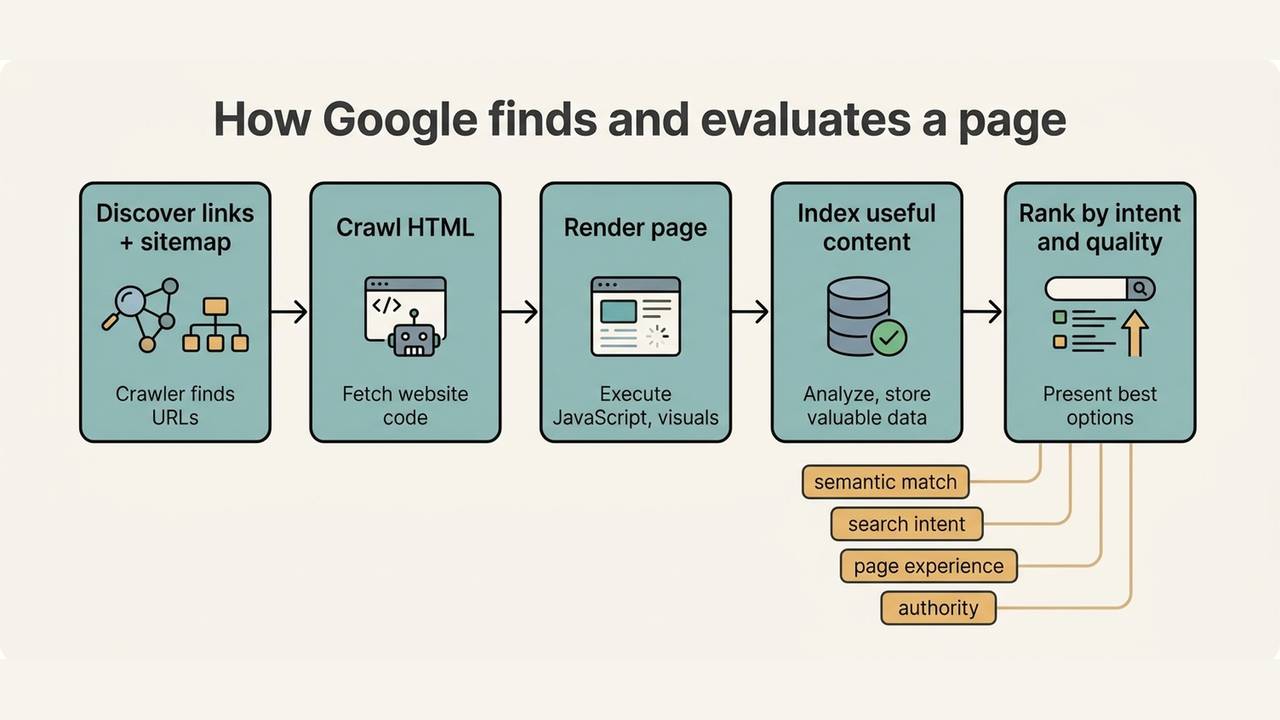
Caption: Google SEO starts with access and understanding before rankings become possible.
What makes a page worth ranking
For a beginner, it helps to separate ranking work into four buckets.
First, the page must match the topic semantically. Google is not only looking for one exact keyword repeated several times. It looks at the page title, headings, body, related phrases, entities, examples, links, and overall context to decide what the page is about.
Second, the page must match search intent. A user searching "how to summarize a research paper with AI" wants a tutorial. A user searching "AI paper summary tool pricing" probably wants a product or pricing page. If you put the wrong page type in front of the wrong intent, the content may get impressions but poor engagement and weak conversion.
Third, the site needs clear structure. Navigation, internal links, URL paths, page templates, sitemaps, and canonical tags all help search engines understand which pages matter and how they relate.
Fourth, the site needs credibility. That can come from useful original content, author expertise, trusted references, third-party mentions, customer proof, backlinks, product listings, and consistent brand signals.
None of this is magic. It is mostly clarity.
Get indexed before chasing rankings
If the site is new, start with the basics.
Create and submit a sitemap in Google Search Console. The common format is:
https://example.com/sitemap.xml
Then inspect important URLs in Search Console and request indexing when needed. Do this for the homepage, core product pages, major landing pages, and new pages that matter for traffic or conversion.
Indexing does not guarantee ranking. It only means Google can consider the page. But without indexing, all keyword work is theory.
A beginner checklist:
Check | Why it matters |
|---|---|
Sitemap submitted | Helps Google discover important URLs |
Robots.txt reviewed | Prevents accidental blocking |
Core pages indexable | Confirms important pages can enter search results |
Internal links added | Helps discovery and authority flow |
Duplicate pages reviewed | Reduces confusion about which URL should rank |
Page speed checked | Protects user experience and crawl efficiency |
This is the kind of work that should be automated. A tool should check these issues for you and turn them into a short action list.
Keywords are not just words
Keywords describe demand. The job is not to collect as many as possible. The job is to map demand to the right page.
A useful keyword structure has three layers:
Layer | Purpose | Best page type |
|---|---|---|
Core keywords | Define the category and product identity | Homepage, main product page, category page |
Primary keywords | Cover important functions, audiences, and use cases | Feature pages, use-case pages, solution pages |
Long-tail keywords | Capture specific problems, comparisons, and how-to searches | Blog posts, guides, comparison pages, templates |
A common mistake is putting the same core keyword on every page. That creates keyword cannibalization: Google cannot easily decide which URL should rank. Another mistake is chasing high-volume keywords that do not match the product. Traffic that never converts is not a growth strategy.
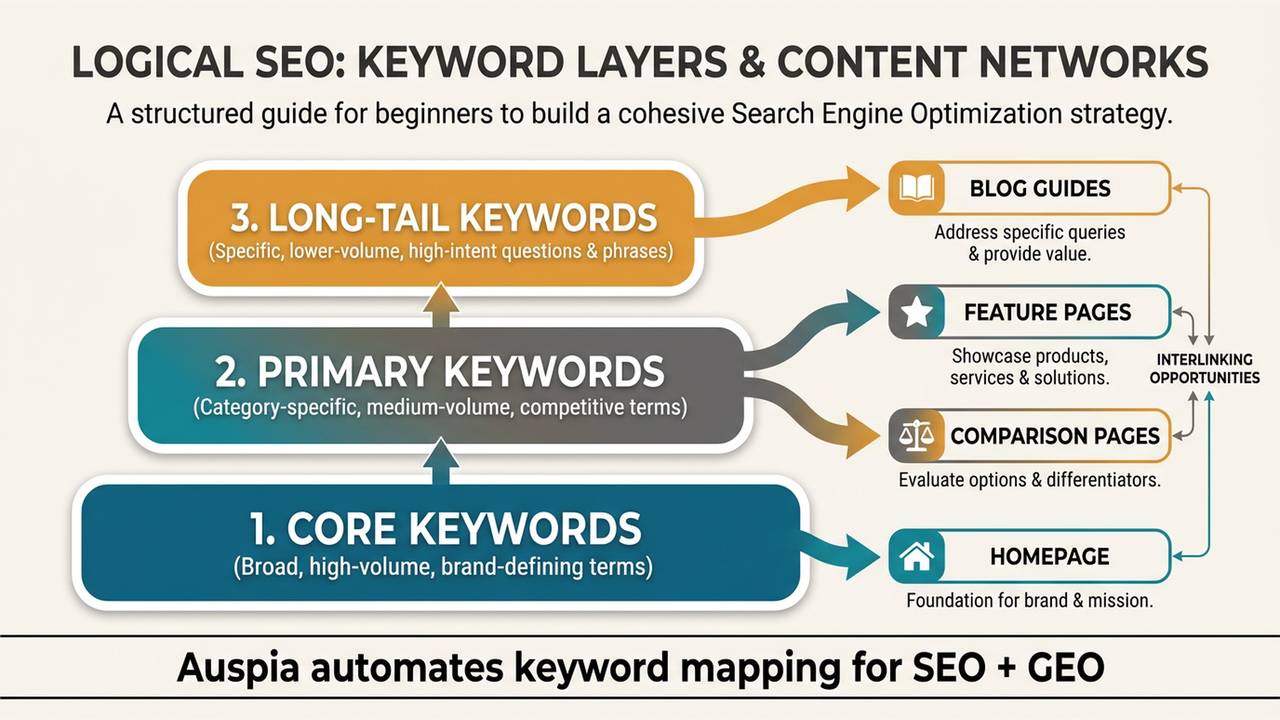
Caption: Keyword strategy works when each demand layer has the right page type and a clear role in the site.
How to choose keywords without getting lost
Start with the product, the user, and the market.
From the product, list the category, features, integrations, use cases, and alternatives. From the user, list problems, jobs to be done, objections, and buying questions. From the market, inspect competitor titles, H1s, comparison pages, directories, Reddit threads, Product Hunt listings, and review platforms.
Then clean the list with four filters:
Filter | Question |
|---|---|
Relevance | Would the right customer search this? |
Intent | Is the user learning, comparing, buying, or navigating? |
Difficulty | Can this site realistically compete now? |
Business value | If we rank, could this lead to a useful action? |
Keep a small set of core keywords, a manageable group of primary keywords, and a larger pool of long-tail keywords. Revisit the list every one or two months using data from Search Console, ranking tools, and conversion reports.
The winning keyword is not always the biggest one. Often it is the one that matches a real customer problem better than everyone else's page.
Build a content network, not isolated articles
A blog post is not useful just because it exists. It should support a page, a keyword cluster, a buyer question, or a product use case.
A basic content network includes:
Content type | Job |
|---|---|
Core product pages | Explain what the product does and who it is for |
Use-case pages | Connect user scenarios to the product |
Comparison pages | Help buyers evaluate alternatives |
How-to guides | Capture informational searches and teach the workflow |
FAQ pages | Answer specific objections and support AI answer extraction |
Templates or tools | Give users something practical to use |
Each article should have a target intent, a primary keyword, a few semantic variants, internal links to relevant pages, useful visuals, and a reason to be better than the current search results.
Do not write generic content just to fill a calendar. Search engines and AI answer systems already have enough generic explanations. Pages need examples, structure, screenshots, data, templates, or clear operational advice.
SEO now overlaps with GEO
Traditional SEO is about being found in search results. GEO, or Generative Engine Optimization, is about being understood and cited in AI-generated answers.
The overlap is large. AI systems still need accessible pages, clear entities, credible references, and content that answers real questions. A site with weak SEO structure will usually struggle with AI visibility too.
For GEO readiness, add a few habits:
- write direct answers near the top of important pages;
- make entities, product names, categories, and use cases explicit;
- include comparison tables, checklists, and examples;
- publish original evidence where possible;
- keep pages crawlable and indexable;
- track whether AI answer systems mention, cite, or misdescribe the brand.
This is where manual SEO learning becomes especially inefficient. The team now has to think about Google rankings, search intent, technical health, content quality, and AI answer visibility at the same time.
What beginners should stop doing
Avoid these traps:
Trap | Why it fails |
|---|---|
Repeating the same keyword everywhere | Creates cannibalization and unnatural writing |
Choosing only high-volume terms | Often attracts broad, low-converting traffic |
Ignoring search intent | The page may rank for the wrong reason or fail to convert |
Publishing isolated blog posts | Content has no role in the site's conversion path |
Forgetting indexing basics | Pages cannot rank if Google cannot access or index them |
Treating SEO as one-time setup | Rankings and intent change over time |
The best beginner SEO is not clever. It is consistent, organized, and connected to real customer demand.
A simple 30-day beginner plan
If you still want to do this manually, start here:
Days | Work |
|---|---|
1-3 | Submit sitemap, inspect important URLs, check robots.txt and indexability |
4-7 | List core, primary, and long-tail keywords |
8-10 | Map keywords to homepage, product pages, use-case pages, and articles |
11-15 | Rewrite titles, H1s, meta descriptions, and internal links for existing pages |
16-22 | Publish two or three pages that target real search intent |
23-26 | Add visuals, FAQs, schema where useful, and stronger conversion paths |
27-30 | Review Search Console, rankings, traffic quality, and AI visibility baseline |
This plan works, but it still requires SEO knowledge, tooling, and discipline. Many teams do not have time for that.
Auspia's take
SEO is learnable, but most businesses do not need to become SEO experts before they can grow.
The practical path is to use an intelligent operating layer. Auspia.ai automates SEO and GEO work: site audits, crawl and index checks, keyword mapping, content planning, brief generation, AI visibility monitoring, and next-step recommendations.
That means a team can move toward intelligent SEO without mastering every concept first. Auspia handles the repeatable analysis and workflow. The team focuses on the product, customer insight, and publishing better proof.
FAQ
What is the first thing a beginner should do for Google SEO?
Make sure Google can discover and index the site's important pages. Submit a sitemap, inspect key URLs in Search Console, and check that robots rules or technical issues are not blocking access.
How many keywords should one page target?
One page should usually focus on one primary keyword or intent, with a few natural semantic variants. Trying to rank one page for unrelated intents usually weakens clarity.
Is SEO only about keywords?
No. Keywords help map demand, but SEO also depends on crawlability, site structure, search intent, content usefulness, page experience, authority, and continuous improvement.
How is GEO different from SEO?
GEO focuses on visibility in AI-generated answers, while SEO focuses on search rankings and organic traffic. The foundations overlap: clear pages, useful content, credible evidence, and technical accessibility.
Can Auspia automate SEO and GEO for beginners?
Yes. Auspia.ai is designed to automate much of the SEO and GEO workflow, including audits, keyword mapping, content planning, technical checks, AI visibility tracking, and action recommendations.


