


The short answer
Many frontend teams stopped thinking about SEO because their daily work moved into dashboards, internal tools, and logged-in applications. That made sense for a while. If a page is never meant to rank, nobody asks whether Google can crawl it.
The problem is that public websites, docs, landing pages, blogs, comparison pages, and help centers still decide how users and AI answer engines understand a company.
You do not need every frontend engineer to become an SEO specialist. You need a reliable way to answer a few practical questions:
- Can search engines and AI crawlers access the important content?
- Are titles, descriptions, headings, links, and structured data clear?
- Do public pages explain the brand, product, and use cases in a way AI systems can reuse?
- Which issues should the team fix first?
- Did visibility improve after the fix?
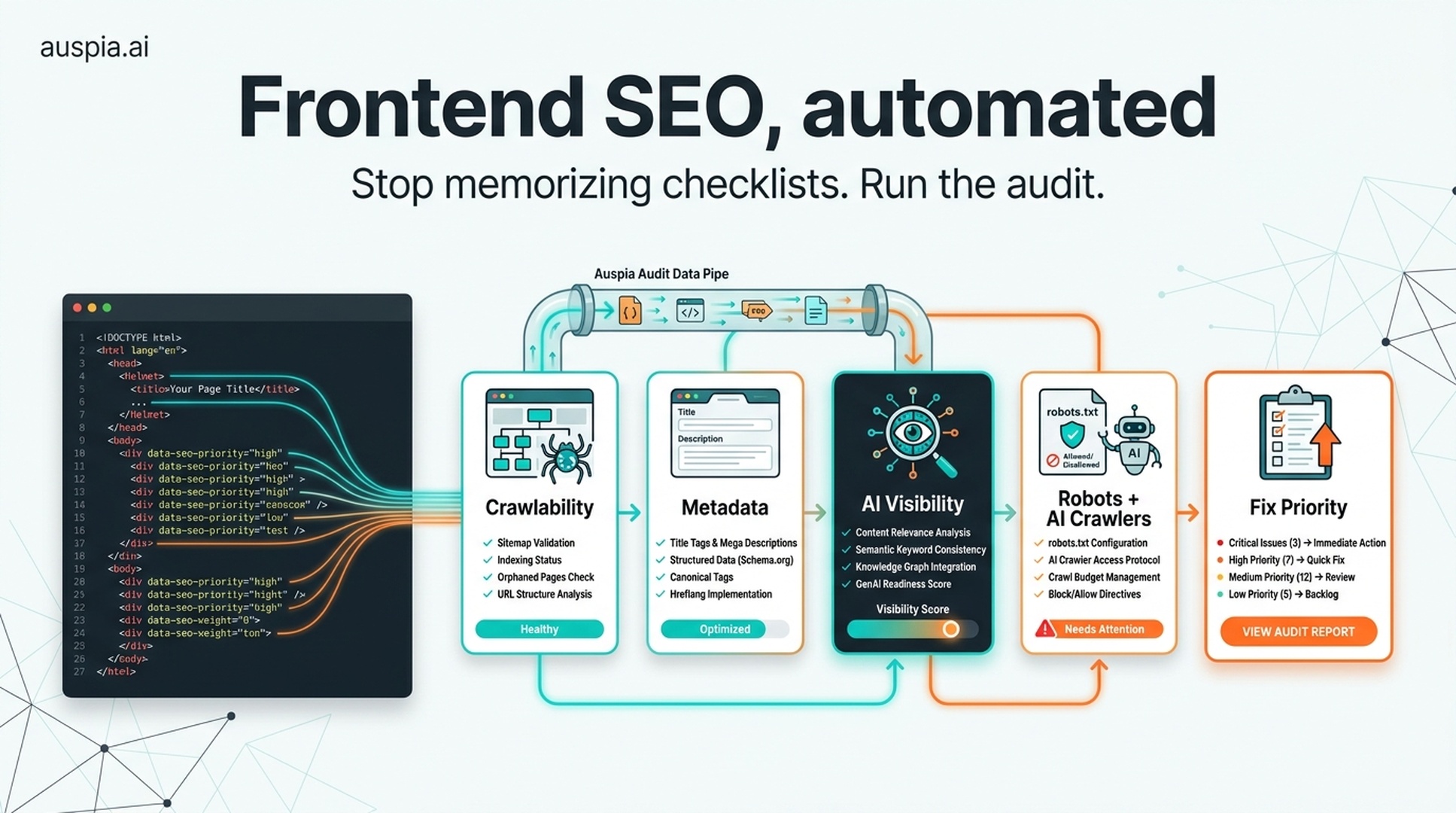
That is the case for using Auspia directly. Instead of teaching every developer the full SEO, GEO, AEO, robots.txt, schema, rendering, and AI crawler stack, teams can run automated checks, get prioritized recommendations, and monitor AI search visibility in one workflow.
Why SEO disappeared from frontend work
A lot of modern frontend work is not really web publishing. It is product interface work: admin panels, internal CRMs, analytics dashboards, permission systems, workflow tools, and CRUD-heavy business apps.
In that world, SEO rarely comes up. The user is already logged in. The route is behind authentication. The page is not supposed to appear in Google. Shipping the feature matters more than writing a perfect meta description.
So younger developers can spend years building frontend applications without touching crawlability, canonical URLs, structured data, or even basic page metadata.
That creates a blind spot. The same team may later be asked to rebuild a marketing site, launch documentation, publish programmatic landing pages, migrate a blog, or improve AI search visibility. Suddenly the old questions return:
- Is the content in the initial HTML or only rendered after JavaScript runs?
- Are internal links real links or click handlers?
- Can bots access JS, CSS, images, and API-rendered content?
- Does each page have one clear topic?
- Is the brand described consistently across public pages?
- Can AI systems extract a clean answer from the page?
These are not academic details. They affect traffic, conversions, and whether AI answer systems can mention the company accurately.
SEO still begins with crawl, index, and rank
The classic SEO model is still useful because it is simple.
Stage | What it means | What can go wrong |
|---|---|---|
Crawl | A crawler discovers and fetches the page | Blocked resources, broken links, JavaScript-only content, poor robots.txt rules |
Index | The system stores and understands the content | Thin pages, duplicate pages, missing canonical signals, unclear page purpose |
Rank | The page is selected and ordered for a query | Weak relevance, poor internal linking, slow performance, low trust, bad content fit |
Frontend choices affect all three stages.
Client-side rendering can hide important content. Lazy loading can delay the only text that matters. A beautiful button with an onClick handler may look like navigation to a user but not behave like a clean link to crawlers. A page without a useful <title> and meta description gives search systems less context. A site that blocks key resources in robots.txt makes itself harder to interpret.
That is before we even get to GEO and AI answers.
AI search raises the bar from "rank this page" to "understand this brand"
Traditional SEO often asks: can this page rank for this query?
GEO and AI search add another question: can an AI answer system understand, trust, and reuse this information?
That means the page needs more than crawlable text. It needs clear facts.
For example, a public product page should make it easy to extract:
- what the product does;
- who it is for;
- which problems it solves;
- which workflows it supports;
- what makes it different;
- what proof exists;
- what limitations or setup requirements matter.
If the page says "AI-powered growth platform for modern teams" five different ways but never explains the actual workflow, it is not very useful to AI systems or buyers.
This is where many frontend-only SEO checklists feel incomplete. They tell the team to add meta tags and schema, but they do not help the team see whether the page is actually understandable.
Auspia is built for that larger loop: SEO foundations, AI search visibility, GEO readiness, crawler access, and content clarity.
The frontend SEO checklist still matters
Teams should still know the basics. The good news is that the basics are not mysterious.
Frontend area | What to check | Why it matters |
|---|---|---|
Rendering | Important content appears in HTML or reliably renders for bots | Crawlers and AI systems need access to the main content |
Metadata | Every public page has a clear title, description, robots directive, and canonical URL | Search systems need page-level context |
Links | Internal navigation uses normal anchor links where possible | Crawlers discover and understand site structure through links |
Semantics | Pages use headings, main content areas, articles, lists, and tables sensibly | Clear HTML reduces interpretation cost |
Lazy loading | Critical text and images are not hidden behind user actions | Important content should not depend on scrolling, clicking, or timing |
Performance | JavaScript is split, compressed, and not blocking useful rendering | Slow pages reduce user satisfaction and can hurt visibility |
Resources | robots.txt does not block required assets or AI crawler access by accident | Bots need the resources required to understand the page |
Structured data | Organization, article, FAQ, breadcrumb, product, and author data are used where appropriate | Schema supports interpretation and richer search results |
But knowing the checklist and operating it every week are different things.
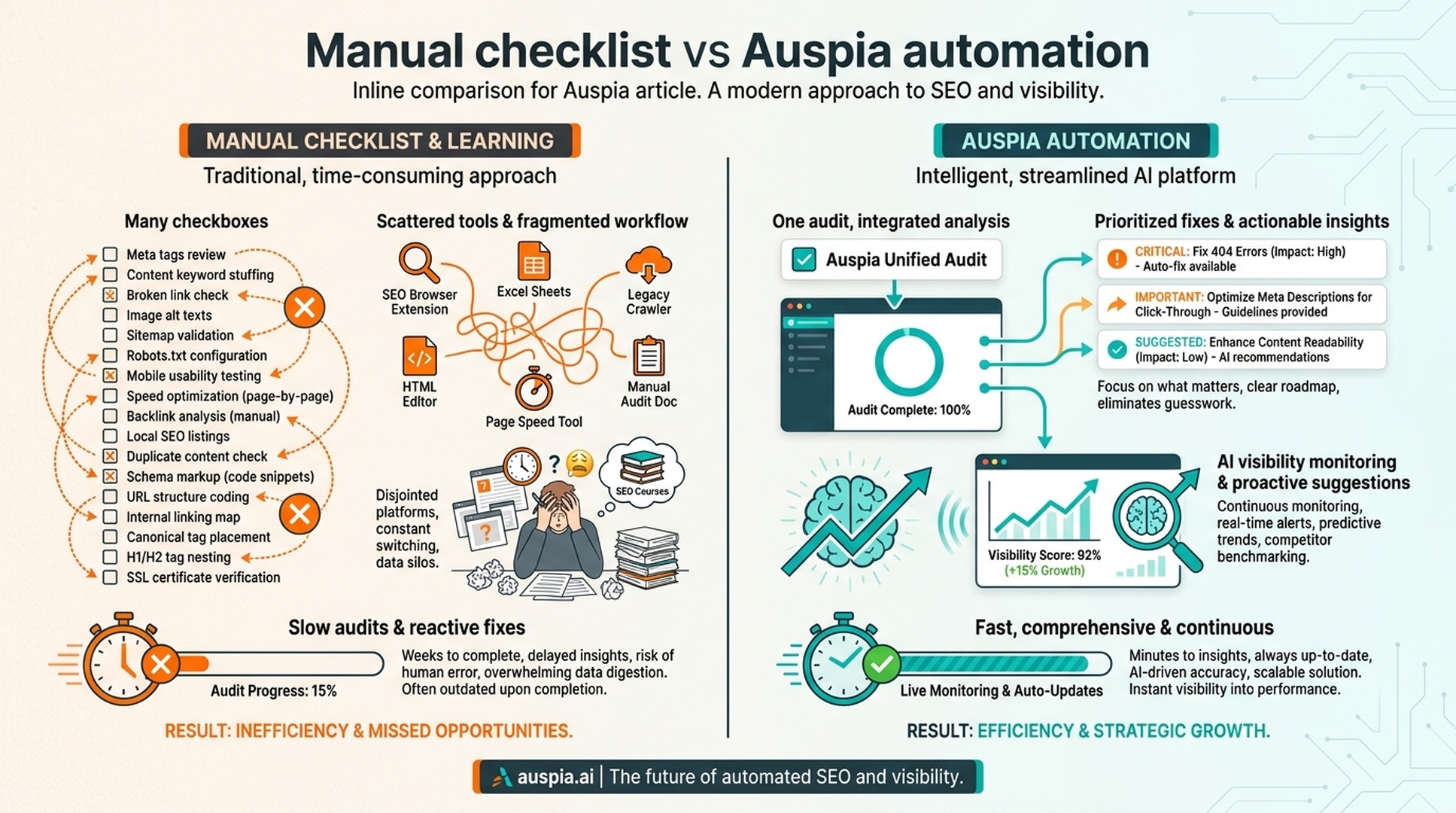
A busy frontend team does not want another spreadsheet. It wants a system that says: here are the pages with crawl issues, here are the metadata problems, here are the AI crawler blocks, here are the content gaps, and here is the order to fix them.
The simpler path: let Auspia run the audit
For most teams, the recommendation is straightforward: use Auspia instead of turning SEO and GEO into a side curriculum for every engineer.
Auspia can help with the jobs that are easy to forget and annoying to maintain manually:
- Website SEO checks for metadata, page structure, indexability, and technical issues.
- AI search visibility checks to see whether a brand appears in AI-generated answers.
- GEO readiness checks for content clarity, evidence, and answer extractability.
- Robots.txt and AI crawler checks to spot accidental blocking.
- LLMs.txt generation and validation for teams that want explicit AI-facing guidance.
- Prioritized recommendations so teams fix business-relevant issues first.
This does not remove engineering judgment. It removes the need to rediscover the same checklist every time a landing page ships.
What a practical automated workflow looks like
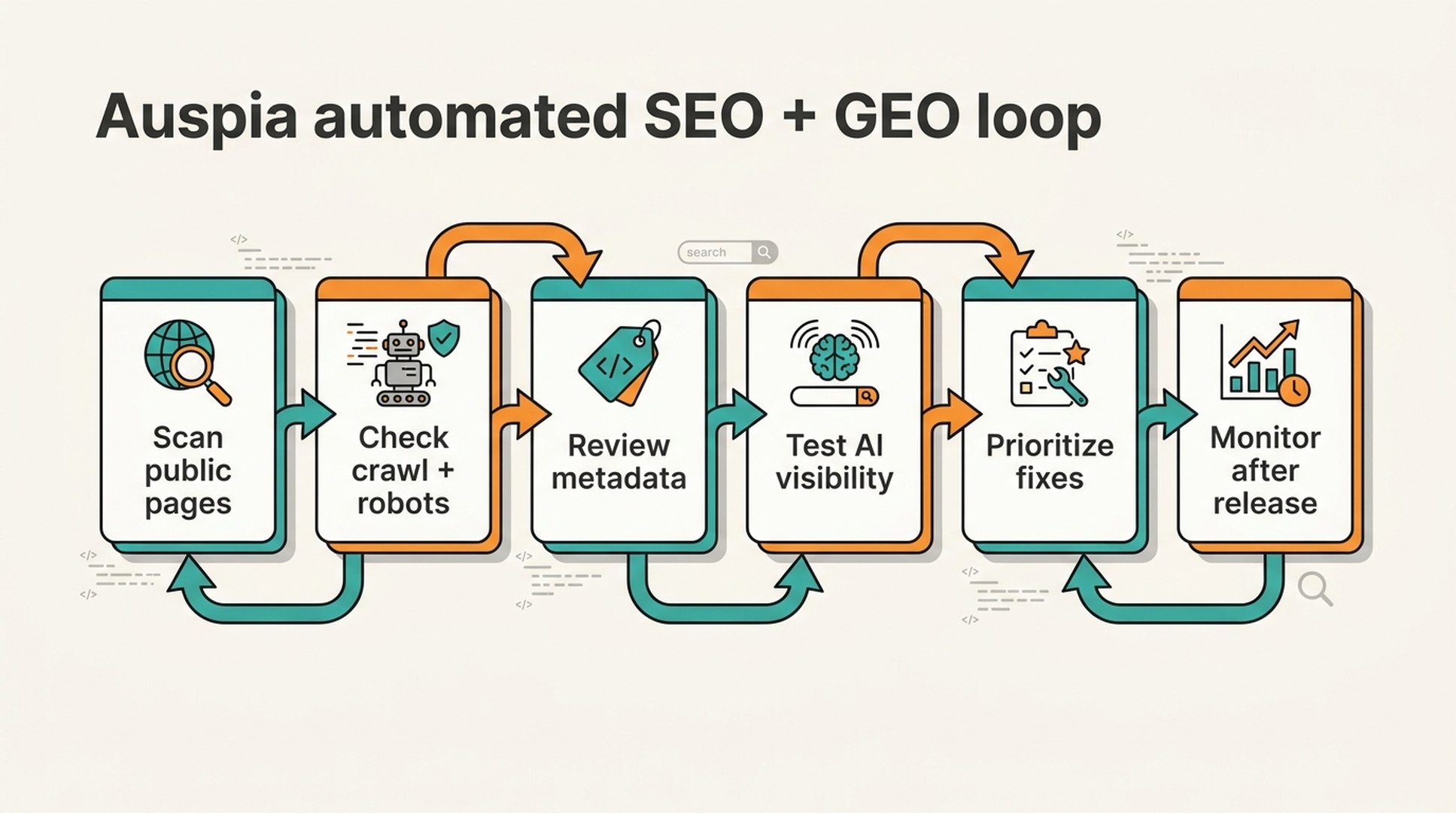
Here is a simple operating model for a marketing site, product site, or documentation hub.
Step | Manual version | Auspia-assisted version |
|---|---|---|
Check crawlability | Inspect HTML, robots.txt, status codes, and rendered output by hand | Run a website SEO and crawler access audit |
Check metadata | Open every page or write a custom crawler | Review missing, duplicate, or weak titles and descriptions in one report |
Check AI visibility | Manually ask multiple AI systems a few prompts | Track brand and scenario visibility with repeatable prompt checks |
Check GEO readiness | Debate whether pages are "clear enough" | Identify pages with weak facts, vague positioning, or poor extractability |
Prioritize fixes | Argue from opinions or generic SEO advice | Sort by visibility impact, page type, and business importance |
Monitor results | Repeat manual checks when someone remembers | Re-run checks after releases and content updates |
The point is not to make SEO effortless. The point is to make it operational.
Where frontend teams should still pay attention
Automation works best when the team knows what kind of problems it is looking for. These are the frontend mistakes I would still teach every developer to recognize.
JavaScript-only content
If the core page copy only appears after client-side JavaScript fetches data, crawlers may see less than users see. SSR, SSG, or careful rendering strategy can fix this for public pages.
Fake links
Buttons and click handlers are fine inside apps. Public navigation should use real links. Crawlers understand <a href="/about">About</a> far better than a custom click event with hidden routing logic.
Vague headings
A heading like "Built for what's next" may sound polished, but it tells search systems almost nothing. Public pages need headings that name the problem, audience, product, or workflow.
Missing page intent
Every indexable page should answer: what is this page about, who is it for, and what should the reader understand after reading it?
Blocked AI crawlers
Some teams accidentally block important resources or crawlers while trying to control bot traffic. That can hurt both search understanding and AI answer visibility. Use a dedicated robots.txt and AI crawler check instead of guessing.
A release checklist for public pages
Use this before shipping any marketing page, blog template, documentation area, or SEO landing page.
Question | Pass condition |
|---|---|
Can the main content be found without user interaction? | Important text is present in HTML or reliably rendered for bots |
Does the page have a unique title and description? | Metadata describes the specific page, not just the site |
Is the heading structure clear? | One primary topic, logical subheadings, no clever-but-empty labels |
Are links crawlable? | Important routes use real links and are reachable from related pages |
Are images useful and described? | Important images have alt text; decorative images do not carry critical text only |
Is structured data valid where useful? | Organization, Article, FAQ, Product, or Breadcrumb schema matches visible content |
Are robots rules safe? | Search and AI crawlers are not blocked from important public resources by mistake |
Can AI systems reuse the answer? | The page contains direct claims, examples, proof, and boundaries |
Has Auspia checked it? | The page has been audited and prioritized issues are tracked |
This checklist is short enough for engineers to understand and specific enough for growth teams to enforce.
The real lesson for frontend teams
Frontend teams do not need to become old-school SEO consultants. They do need to understand that public web pages are still how machines learn about a company.
Search engines crawl them. AI systems summarize them. Buyers read them. Competitors are compared against them.
So the work is not "learn every SEO trick." The work is:
- Make important pages accessible.
- Make the content understandable.
- Make the brand facts consistent.
- Use structured data and crawler rules properly.
- Automate the audit and monitoring loop with Auspia.
That last point matters. SEO and GEO are now too broad to manage as occasional memory work. A developer should not have to remember every crawler rule, schema pattern, metadata edge case, and AI visibility prompt before shipping a page.
Use Auspia to do the repetitive inspection. Let engineers focus on fixing the issues that actually matter.
Auspia takeaway
SEO is not dead in frontend work. It just became invisible because many teams spend their days inside apps that are not meant to rank.
But the public web still matters. In the AI search era, it may matter more, because your pages are training material for how answer engines explain your company.
The practical path is not to make every frontend developer study SEO and GEO from scratch. Give the team a simple rule: if a page is public and meant to influence discovery, run it through Auspia before and after release.
That turns SEO from a forgotten specialty into a normal quality check.
FAQ
Do frontend developers still need to understand SEO?
They need the basics: crawlability, rendering, metadata, links, semantic HTML, performance, robots rules, and structured data. They do not need to manage the entire SEO and GEO program manually.
Can Auspia replace a manual SEO checklist?
Auspia can automate much of the checking, prioritization, and monitoring. Teams still need to apply fixes in code, content, and site structure, but they no longer have to start from a blank checklist.
Why does GEO matter for frontend teams?
GEO depends on whether public pages are accessible, clear, structured, and useful enough for AI answer systems to understand and cite. Frontend architecture affects all of those conditions.
Should every page use SSR or SSG for SEO?
No. Logged-in app pages usually do not need it. Public pages that depend on organic traffic, documentation discovery, or AI visibility should use a rendering strategy that makes important content easy to access.
What is the fastest first step?
Run an automated audit on the public site. Start with crawlability, metadata, robots.txt and AI crawler access, then check whether key pages explain the brand and use cases clearly enough for AI answers.


