ルール:安定したSEO/GEO behaviorは毎回のpromptではなく CLAUDE.md に入れる
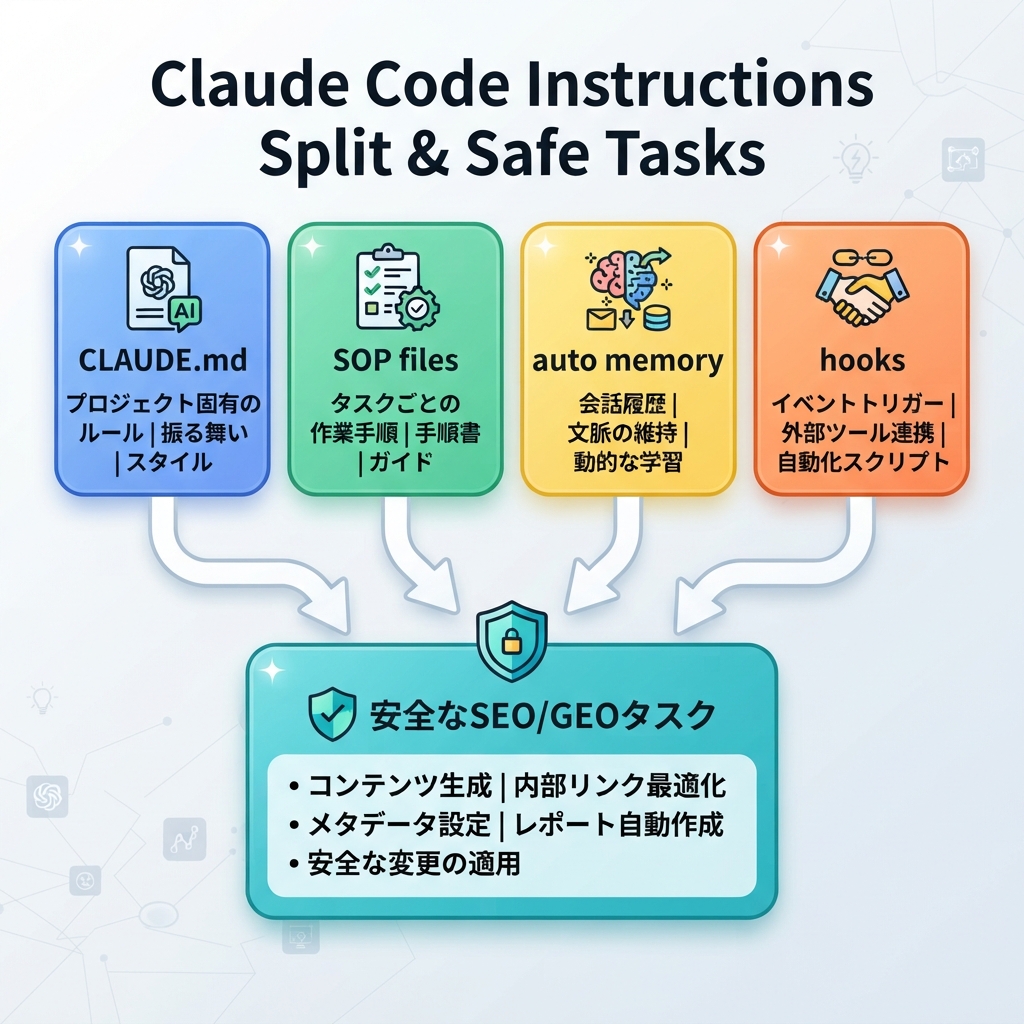
Claude Codeには、SEO/GEO workで重要なmemory surfaceが2つあります。CLAUDE.md filesとauto memoryです。Anthropicのdocsでは、CLAUDE.md はsession開始時に読み込まれるmarkdown instruction filesであり、auto memoryはcorrectionsからの学びを保持できるものとして説明されています。growth team向けの実務ルールは単純です。project standardsは CLAUDE.md に入れます。auto memoryには小さなpersonal preferencesを任せ、business-critical policyは入れません。
この記事では、Claude CodeをSEO、GEO、content refresh、schema edits、analytics-driven reviewsで役立たせる CLAUDE.md の書き方を解説します。
CLAUDE.md に入れるべきもの
良いSEO/GEO CLAUDE.md は、役に立つ程度に短く、generic outputを防げる程度に具体的であるべきです。
このstarter fileを使います。
# CLAUDE.md

## Website context
- Brand: [brand]
- Category: [category]
- Primary audience: [audience]
- Main offer: [demo / tool / consultation / product]
- Production domain: https://example.com

## SEO/GEO standards
- Do not invent customer logos, statistics, testimonials, awards, or legal claims.
- Prefer clear answer blocks, comparison tables, evidence sections, and FAQ only when useful.
- Every important page should have title, meta description, canonical, H1, internal links, and schema review.
- For GEO, make brand facts, product category, use cases, alternatives, and proof easy to extract.

## Files and commands
- Pages live in: [path]
- Metadata lives in: [path]
- Components live in: [path]
- Content lives in: [path]
- Run before final answer: [npm run build / pnpm build / etc.]

## Approval boundaries
- Ask before changing pricing, legal copy, redirects, robots.txt, canonical strategy, analytics scripts, or schema type.
- Never publish or deploy without explicit approval.
- Mark missing evidence as TODO instead of filling it in.
/memory は魔法ではなくauditに使う
Claude Codeのmemory docsでは、memoryを表示・編集する方法として /memory が紹介されています。SEO/GEO teamでは、monthly memory auditを予定に入れます。
Open /memory and help me audit whether any saved memory is outdated, too broad, or unsafe for SEO/GEO work. Suggest deletions or edits, but do not change project files yet.
これが重要なのは、memoryは繰り返し作業を滑らかにできますが、古いbrand positioningや古いdeployment commandsが悪い編集を生む可能性があるからです。memoryはcontextとして扱い、complianceとして扱わないでください。hard ruleが必要なら、hooksやreview gatesを使います。
durable rulesとproceduresを分ける
CLAUDE.md に長いSOPを詰め込まないでください。constitutionとして短く保ちます。長いproceduresは、Claudeが参照できる別fileに置きます。
seo-geo/qa/content-refresh-sop.md
seo-geo/qa/schema-review-sop.md
seo-geo/qa/ai-visibility-check.md
seo-geo/briefs/page-brief-template.md
そして、CLAUDE.md に次を追加します。
## Reusable SOPs
- For content refresh tasks, read `seo-geo/qa/content-refresh-sop.md` first.
- For schema edits, read `seo-geo/qa/schema-review-sop.md` first.
- For AI visibility checks, read `seo-geo/qa/ai-visibility-check.md` first.
これにより、active memoryを小さく保ちながら、詳細なoperating knowledgeを残せます。
SEO/GEO memoryを初期化するprompt
projectごとに一度使います。
Read the repository and draft a project-specific CLAUDE.md for SEO/GEO work.

Do not overwrite files yet. Propose the file first.

Include:
1. Website context inferred from the repo, marked as inferred.
2. Paths for pages, content, metadata, schema, and routing.
3. Build/lint/test commands detected from package files.
4. SEO/GEO standards for content, metadata, schema, internal links, llms.txt, robots, and sitemap.
5. Approval boundaries for risky changes.
6. A section listing unknowns I must confirm.
review後に、Claudeへfile作成と小さなverification taskを依頼します。
Create CLAUDE.md from the approved draft. Then summarize the instructions you loaded and explain how they will change your next SEO/GEO task.
大規模siteのnested memory
大規模siteでは、docs、blog、product pages、localized pagesでrulesが違うことがよくあります。platformが対応しているならspecialized workの近くにlocal instruction filesを置くか、main fileからfolder-specific SOPsを参照します。
例です。
Site area | 変えるべきrule |
|---|---|
| editorial tone、author byline、FAQ rules、internal link policy |
| API accuracy、version warnings、code sample validation |
| claimsとplan wordingにはapprovalが必要 |
| localization、hreflang、translated image policy |
Claudeには次を依頼します。
Inspect the site sections and recommend whether we need folder-specific SEO/GEO instructions. Keep the global CLAUDE.md short; propose separate SOP files only where they reduce mistakes.
避けるべき失敗
- secretsを
CLAUDE.mdに入れる。 - 古いpositioningを保存したままreviewしない。
- “make content high quality” のような曖昧なrulesを書く。
- memoryをtests、hooks、人間承認の代わりにする。
- 過去のpreferenceを全部追加してfileを読めなくする。
FAQ
CLAUDE.md にkeywordsを入れるべきですか?
core category languageとstrategic query themesは入れてよいです。ただし、full keyword listsはdated filesに分けます。keyword dataは変わります。project rulesは安定しているべきです。
Claude Codeはanalytics credentialsを覚えてよいですか?
いいえ。credentialsはapproved local environment files、MCP configuration、platform secretsに置きます。memory filesには絶対に貼り付けないでください。
CLAUDE.md はどのくらいの頻度で更新すべきですか?
同じmistakeが繰り返されたとき、architectureが変わったとき、commandが変わったとき、positioningが変わったときに更新します。それ以外はmonthly reviewで十分です。
Claude Code SEO/GEO 学習パス
この記事は Claude Code SEO/GEO オペレーターシリーズの一部です。ゼロから構築する場合は、次の順番で進めてください。
- Claude CodeでSEOを自動化する方法
- Claude Code SEO/GEO workflow cockpitを作る方法
- CLAUDE.mdとMemoryをSEO/GEO workflowに使う方法
- Claude Code VS Code extensionでSEO pageを更新する方法
- 2026年版:Best GEO Claude Code Skills
- Claude Code SubagentsをGEO researchに使う方法
- Claude Code HooksをSEO/GEO quality gatesとして使う方法
- MCPでClaude CodeをSEO dataに接続する方法
- Claude Code GitHub ActionsでSEO/GEO reviewsを行う方法
- Claude Codeで毎日のSEO/GEO monitoringを行う方法
次に読むべき記事
前の記事: Claude Code SEO/GEO workflow cockpitを作る方法
次の記事: Claude Code VS Code extensionでSEO pageを更新する方法
参考情報
- Anthropic Claude Code docs: Overview、Memory、VS Code integration、Skills、Subagents、Hooks、MCP、GitHub Actions。
Author: Camille Rhodes, Auspiaで300以上のAIコンテンツワークフローを設計してきたアーキテクト。CamilleはAI支援publishing systems、workflow design、editorial quality controlについて執筆しています。