Daily monitoringは退屈で、繰り返し可能で、file-basedであるべき
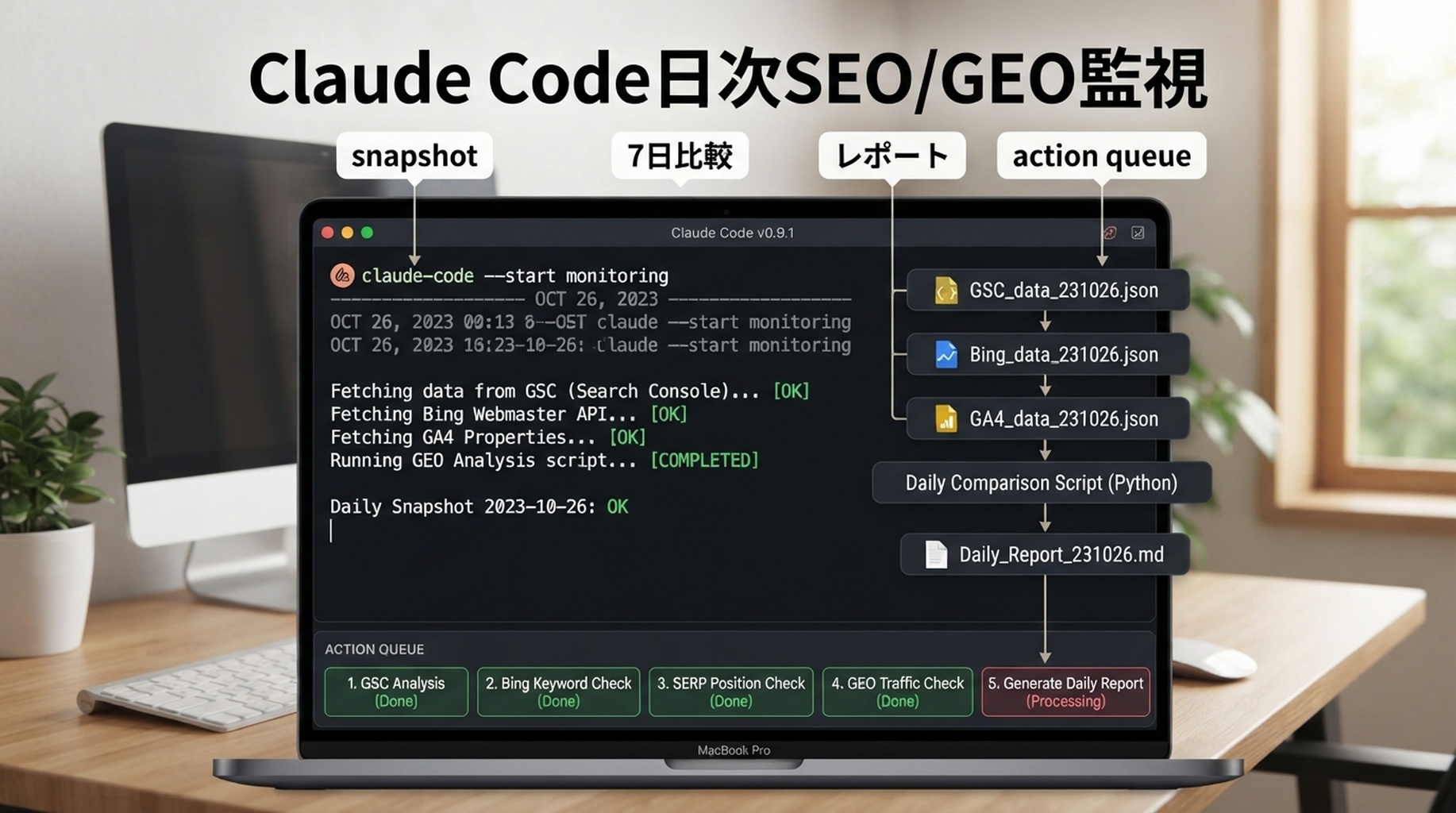
Claude Codeはterminal workflowで実行できます。filesを読み、commandsを実行し、reportsを作れます。daily SEO/GEO monitoringでは、「全部をcheckして」と頼まないでください。小さなdata pipelineを渡します。approved APIsまたはexports、dated snapshots、prompt library、comparison script、daily reportです。
目的は、変化を早く見つけることです。indexing drops、CTR opportunities、AI answer mentions、missing citations、broken pages、refreshが必要なpagesなどです。

daily folder structure
seo-geo/monitoring/
  prompts/core-prompts.md
  snapshots/
    2026-07-05/
      gsc-pages.csv
      bing-queries.csv
      ga4-pages.csv
      ai-answers.json
  reports/
    2026-07-05.md
  scripts/
    fetch-search-data.mjs
    fetch-ai-visibility.mjs
    compare-snapshots.mjs
使うdata sources
Source | Daily question |
|---|---|
GSC | impressions、clicks、CTR、indexed pagesは動いているか |
Bing Webmaster | Bing queriesやcrawl issuesは変わっているか |
GA4 | landing pagesのconversionやbounceに変化があるか |
Felo Search / Perplexity API / SERP APIs | 今日、brandはAI/search answersに出ているか |
Site crawl | 重要URLがまだ200を返し、indexableか |
daily monitoring用terminal prompt
Run today's SEO/GEO monitoring workflow.

Inputs:
- Use scripts in seo-geo/monitoring/scripts/.
- Store raw outputs in seo-geo/monitoring/snapshots/YYYY-MM-DD/.
- Compare against yesterday and the 7-day baseline when available.
- Produce seo-geo/monitoring/reports/YYYY-MM-DD.md.

Report:
1. Indexing and crawl changes.
2. Query/page changes from GSC and Bing.
3. Landing page engagement changes from GA4.
4. AI/search answer mentions and citation changes from approved APIs.
5. Suspicious drops or new opportunities.
6. Recommended actions with priority and owner.
7. What data was missing or failed.

Do not edit website content unless I explicitly approve a follow-up task.
daily report template
# SEO/GEO Daily Monitor - YYYY-MM-DD

## Executive signal
- Status: green / yellow / red
- Main change:
- Biggest opportunity:
- Biggest risk:

## Search data
| URL/query | Source | Change | Interpretation | Action |

## AI visibility
| Prompt | Surface/API | Brand mentioned | Citation URL | Change |

## Technical checks
| URL/check | Result | Risk | Next step |

## Action queue
| Priority | Owner | Action | Evidence | Due |
recommendationsは保守的にする
Daily monitoringでpanicを作ってはいけません。Claudeにはactionsを分類させます。
Priority | Meaning |
|---|---|
P0 | technical breakageまたはindexing issue |
P1 | high-value pageがtrafficまたはAI visibilityを失っている |
P2 | content refresh opportunity |
P3 | watchlistのみ |
1日のdipはnoiseであることが多いです。7日間繰り返されるpatternならactionに値します。
FAQ
毎日実行すべきですか、それとも毎週ですか?
daily snapshotsをmonitoringに使い、weekly reviewでdecisionを行います。daily reportsはissueを捕まえ、weekly reportsは作業を選びます。
Claude CodeはFelo SearchやPerplexity APIsを呼べますか?
approved scripts、MCP tools、environment configurationを用意すれば可能です。API keysはpromptsの外に置き、outputsだけをsnapshotsに保存します。
Claudeがissueを見つけた後はどうすべきですか?
別taskを作ります。1 pageをdiagnoseし、diffを提案し、checksを実行し、人間のapprovalを待ちます。
Claude Code SEO/GEO 学習パス
この記事は Claude Code SEO/GEO オペレーターシリーズの一部です。ゼロから構築する場合は、次の順番で進めてください。
- Claude CodeでSEOを自動化する方法
- Claude Code SEO/GEO workflow cockpitを作る方法
- CLAUDE.mdとMemoryをSEO/GEO workflowに使う方法
- Claude Code VS Code extensionでSEO pageを更新する方法
- 2026年版:Best GEO Claude Code Skills
- Claude Code SubagentsをGEO researchに使う方法
- Claude Code HooksをSEO/GEO quality gatesとして使う方法
- MCPでClaude CodeをSEO dataに接続する方法
- Claude Code GitHub ActionsでSEO/GEO reviewsを行う方法
- Claude Codeで毎日のSEO/GEO monitoringを行う方法
次に読むべき記事
前の記事: Claude Code GitHub ActionsでSEO/GEO reviewsを行う方法
参考情報
- Anthropic Claude Code docs: Overview、Memory、VS Code integration、Skills、Subagents、Hooks、MCP、GitHub Actions。
Author: Ethan Marlowe, Auspiaで500以上のpromptsを扱うGEO measurement lead。Ethanはprompt tracking、citation reporting、AI visibility dashboardsについて執筆しています。