


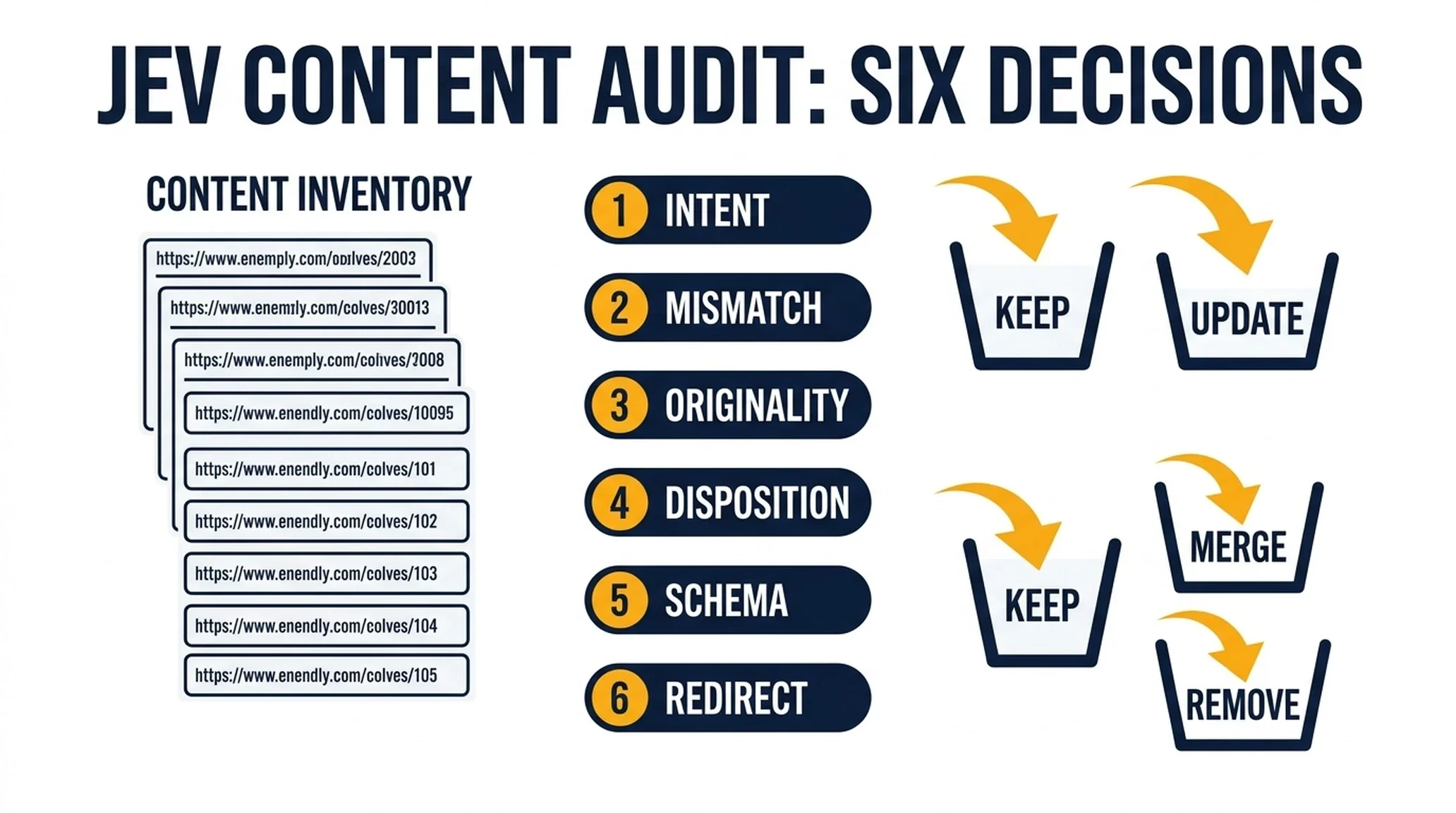
Every content team eventually faces the same spreadsheet problem. You have 400 URLs, a target query for each, and no consistent answer to the question that matters: what should happen to each one?
The usual approach is a quarterly audit where someone opens pages in batches, makes a gut call, and writes a note. It takes weeks, it is inconsistent between reviewers, and by the time it finishes, a third of the inventory has changed.
Content auditing is mostly a decision problem. Each URL needs a small number of judgments: what intent does it serve, does it match its target, is it original enough, and should it be kept, updated, merged, or removed. Those are decisions with fixed answer sets. That is the shape Jev handles well.
This guide gives you six jobs you can run against a content inventory. Each one is a self-contained block: what goes in, what question to ask, what you get out, how to check it, and what to do when it goes wrong.
What you will finish with
A routed content inventory where every URL carries:
- An intent label (learn, compare, buy, brand, or support)
- A mismatch flag if the page does not serve its target query
- An originality score
- A disposition: keep, update, merge, or remove
- A confidence score for each of those decisions
- A named owner for anything that needs action
Who this is for: a content lead or SEO managing a library of a few hundred to a few thousand pages, with a list of target queries and edit access.
Prerequisites:
- A URL inventory with, at minimum: URL, title, H1, target query, and body text.
- A Jev API key, or an agent with the TypeSafe skill installed.
- A place to store the output that the people acting on it can read.
Time estimate: the first run on a few hundred URLs is an afternoon of setup plus a review pass. Subsequent runs are much faster because the schema is already written.
Definition of done: every URL has a disposition and a confidence score, low-confidence rows are routed to a human, and nothing has been deleted or redirected based on an unreviewed model decision.
Prepare the inventory and the label set
Two preparation decisions determine whether this works.
First, freeze the label set before you run anything. If you let the model invent categories, you will get forty near-duplicate labels and no way to sort them. Decide now what "learn," "compare," "buy," "brand," and "support" mean for your site, and write one sentence of criteria for each.
Second, include the target query for every URL. Without it, you cannot detect mismatch. A page about CRM migration is perfectly good content, but if its target query is "what is a CRM," it is failing at its actual job.
The intent labels most teams need:
Label | What it means | Typical query shape |
|---|---|---|
| Reader wants to understand something | "how does X work," "what is X" |
| Reader is weighing options | "best X for Y," "X vs Z" |
| Reader is ready to act | "X pricing," "buy X" |
| Reader is looking for a specific company or product | "X login," "X reviews" |
| Reader needs help using something | "how to fix X," "X not working" |
If you are new to Jev, the three question types used throughout this workflow are explained in what Jev is and how to install it. Reported intent classification on clear examples has landed around 96% confidence, which is high enough to auto-tag. Harder cases land much lower. One reported example — a reader saying they are outgrowing spreadsheets and considering a CRM but unsure what it is worth — scored 54% and was routed to review rather than auto-tagged. That is the system working correctly.

The confidence score decides the route. The label alone does not.
Job 1: Tag search intent
State in: the page title, H1, target query, and the first few hundred words of body text.
Question type: choice.
{
  "model": "jev-latest",
  "state": {
    "url": "/blog/crm-migration-guide",
    "title": "How to Migrate Your CRM Without Losing Data",
    "target_query": "how to migrate a crm",
    "body_excerpt": "Before you export anything, audit which custom fields are actually in use..."
  },
  "questions": {
    "intent": {
      "type": "choice",
      "instructions": "What is the dominant search intent this page is written to satisfy?",
      "criteria": {
        "learn": "The reader wants to understand a concept or process",
        "compare": "The reader is evaluating options against each other",
        "buy": "The reader is ready to purchase or sign up",
        "brand": "The reader is looking for a specific named company or product",
        "support": "The reader needs help operating something they already use"
      }
    },
    "confidence_note": {
      "type": "noul",
      "instructions": "Is the page's intent clearly expressed in the title and opening section?",
      "criteria": {
        "true": "The intent is obvious within the first two paragraphs",
        "false": "The page opens ambiguously or mixes multiple intents"
      }
    }
  }
}
Output: an intent label, a confidence score, and a flag for pages with ambiguous openings.
Quality check: sample twenty pages across your library and confirm the labels match what you would have chosen.
Recovery: if more than a quarter of labels look wrong, your criteria are too vague. Rewrite them with examples from your own pages before re-running.
Job 2: Detect intent-to-page mismatch
This is the highest-value job in the set, because it finds pages that are well-written but pointed at the wrong query.
State in: the target query, the page's intent label from Job 1, and a summary of what the page actually delivers.
Question type: noul plus choice.
{
  "model": "jev-latest",
  "state": {
    "target_query": "best crm for small teams",
    "page_intent": "learn",
    "page_delivers": "A step-by-step explanation of how to set up a CRM, with no comparison or pricing content"
  },
  "questions": {
    "matches_target": {
      "type": "noul",
      "instructions": "Does this page satisfy the intent behind the target query?",
      "criteria": {
        "true": "The page delivers what a searcher for this query expects",
        "false": "The page serves a different intent than the query implies"
      }
    },
    "mismatch_type": {
      "type": "choice",
      "instructions": "If there is a mismatch, what kind is it?",
      "criteria": {
        "intent_mismatch": "The page serves a different intent than the query",
        "depth_gap": "The page serves the right intent but not deeply enough",
        "format_mismatch": "The query expects a list, comparison, or tool, and the page is prose",
        "no_mismatch": "The page matches the query"
      }
    }
  }
}
Output: a mismatch flag and a specific mismatch type that tells you what to fix.
Quality check: the mismatch type should suggest an obvious action. format_mismatch means restructure. depth_gap means expand. intent_mismatch means either retarget the page or rewrite it.
Recovery: if everything comes back as a mismatch, your target queries are probably stale. Re-check the keyword mapping before you trust the output.
Job 3: Score originality before publish
Thin content is easy to define in theory and hard to detect at scale. A page can be long, well-formatted, and still say nothing that a dozen other pages do not already say.
State in: the page's main argument, plus a short summary of what the top-ranking pages for the same query cover.
Question type: score.
{
  "model": "jev-latest",
  "state": {
    "page_summary": "Explains the standard three-step CRM migration process with generic advice about backups and testing",
    "competitor_coverage": "Top results cover the same three steps, plus data cleanup, field mapping, and post-migration validation",
    "unique_elements": "None identified beyond standard advice"
  },
  "questions": {
    "originality": {
      "type": "score",
      "instructions": "How original is this page compared with existing coverage of the same topic?",
      "criteria": [
        "Rewritten commodity content with no distinct angle",
        "Standard coverage with slightly better structure",
        "Some original framing, examples, or analysis",
        "First-hand data, experience, or a genuinely distinct point of view"
      ]
    },
    "publishable": {
      "type": "noul",
      "instructions": "Should this page be published as-is?",
      "criteria": {
        "true": "The page offers something the existing coverage does not",
        "false": "The page repeats existing coverage without adding value"
      }
    }
  }
}
Output: an originality score and a publish/no-publish flag.
Quality check: read three pages that scored at the top level and three that scored at the bottom. If you cannot tell them apart, the criteria need work.
Recovery: a low score is not an automatic rejection. It usually means the page needs a distinct angle, not that it should be deleted. Route low scores to an editor, not to the trash.
Job 4: Assign keep, update, merge, or remove
This is the disposition job, and it is the one that changes your site.
State in: the page's intent label, mismatch type, originality score, traffic trend if you have it, and whether other pages in the library cover the same topic.
Question type: choice, plus score for priority.
{
  "model": "jev-latest",
  "state": {
    "url": "/blog/crm-migration-guide",
    "intent": "learn",
    "mismatch": "depth_gap",
    "originality": 1,
    "overlapping_pages": ["/blog/crm-data-cleanup"],
    "traffic_trend": "flat for 6 months"
  },
  "questions": {
    "disposition": {
      "type": "choice",
      "instructions": "What should happen to this URL?",
      "criteria": {
        "keep": "The page is performing and needs no structural change",
        "update": "The page should be expanded, refreshed, or restructured in place",
        "merge": "The page should be consolidated into another URL",
        "remove": "The page should be removed and redirected"
      }
    },
    "priority": {
      "type": "score",
      "instructions": "How urgent is this action?",
      "criteria": ["No action needed", "Low priority", "Medium priority", "High priority"]
    }
  }
}
Output: a disposition and a priority level.
Quality check: never auto-merge or auto-remove. Those are destructive. Route every merge and remove recommendation to a human, regardless of confidence.
Recovery: if you see a wave of remove recommendations, stop and check your input. A disposition model working from thin data will default to removal because it sees no reason to keep the page. Add traffic and conversion data to the state.

Merge and remove change URLs and traffic. Route both to a human every time, regardless of confidence.
Job 5: Check schema against the page
Structured data that does not match the page is worse than no structured data. This job catches the mismatch.
State in: the page's visible content summary and its current JSON-LD schema.
Question type: noul plus choice.
{
  "model": "jev-latest",
  "state": {
    "visible_content": "A how-to guide with six numbered steps and a FAQ section",
    "schema_types": ["Article"],
    "schema_claims": "Article type with headline, author, and datePublished. No HowTo or FAQPage markup present."
  },
  "questions": {
    "schema_matches": {
      "type": "noul",
      "instructions": "Does the structured data accurately describe what is on the page?",
      "criteria": {
        "true": "The schema types and claims match the visible content",
        "false": "The schema is missing, inaccurate, or claims content that is not present"
      }
    },
    "missing_type": {
      "type": "choice",
      "instructions": "If schema is missing or incomplete, which type is most clearly absent?",
      "criteria": {
        "howto": "The page is a step-by-step guide and should carry HowTo markup",
        "faq": "The page has a real FAQ section without FAQPage markup",
        "article": "The page needs basic article markup",
        "none": "No schema addition is warranted"
      }
    }
  }
}
Output: a match flag and a specific missing type.
Quality check: validate the recommended schema against the page by hand before implementing. A model recommendation is a starting point, not a spec.
Recovery: if the model recommends markup for content that is not actually on the page, do not add it. That is the exact failure this job exists to prevent.
Job 6: Match redirect targets for retired URLs
When you remove or merge pages, you need to send the old URL somewhere sensible.
State in: the old URL, its title and topic, and a list of candidate destination URLs.
Question type: choice.
{
  "model": "jev-latest",
  "state": {
    "old_url": "/blog/crm-setup-old",
    "old_title": "CRM Setup: Getting Started",
    "old_topic": "Initial CRM configuration and field setup",
    "candidates": [
      { "id": "a", "url": "/blog/crm-migration-guide", "title": "How to Migrate Your CRM" },
      { "id": "b", "url": "/blog/crm-data-cleanup", "title": "CRM Data Cleanup Checklist" },
      { "id": "c", "url": "/blog/crm-implementation-timeline", "title": "CRM Implementation Timeline" }
    ]
  },
  "questions": {
    "redirect_target": {
      "type": "choice",
      "instructions": "Which candidate is the most appropriate redirect destination for this retired URL?",
      "criteria": {
        "a": "Covers migration, which includes initial setup",
        "b": "Covers data cleanup specifically",
        "c": "Covers scheduling, not setup",
        "none": "No candidate is a reasonable match"
      }
    }
  }
}
Output: a redirect target with confidence.
Quality check: every redirect below 0.85 confidence should be reviewed manually. A wrong redirect sends users to irrelevant content and wastes whatever authority the old URL had.
Recovery: if no candidate scores well, add more candidates or accept that the old URL should redirect to a category page rather than a specific article.
Batching and cost control
A few practical rules that keep this affordable and fast.
Send related questions together. Jobs 1 and 2 use the same page context. Send them in one request. Questions run in parallel, so the second one costs you almost nothing in latency.
Process in batches of a few hundred URLs. Large enough to be efficient, small enough that a bad schema does not waste a full run.
Do not send the full page body. The first few hundred words plus a summary of the argument is usually enough for these decisions. Sending entire pages inflates cost and adds noise.
Store the distributions. For every choice question, keep the full probability spread. A merge at 0.52 across four options is not the same signal as a merge at 0.91, and you will want to tell them apart when you review.
Verification pass
Before anyone acts on this inventory, run five checks.
- Hand-review twenty rows end to end. Confirm the intent, mismatch, originality, and disposition all make sense together. If a page is labeled
learn, has no mismatch, scores high on originality, and is still markedremove, something is broken. - Check the destructive recommendations separately. Pull every merge and remove. Read them as a group. Do they cluster around a real topic overlap, or are they scattered noise?
- Confirm the intent distribution is plausible. If 80% of your library is labeled
learn, either you have a genuinely educational site or your criteria are too broad. - Re-run a small sample twice. Run fifty URLs, then run the same fifty again. If the labels change substantially between runs, your criteria are not specific enough.
- Compare against your last manual audit. Where the two disagree, read the page yourself. Those disagreements are where you learn whether the model or your old process is wrong.
Maintain the loop
Content inventories drift. A useful cadence:
- Monthly: run Jobs 1 and 2 on new and updated pages only.
- Quarterly: run the full six-job pass across the library.
- After any major refresh cycle: re-run Job 4 to catch pages that should now be merged.
- Continuously: log every disposition and what actually happened to the page. Over two or three quarters, that log tells you how accurate your thresholds really are.
FAQ
Do I need all six jobs? No. Start with Jobs 1 and 2. Intent tagging and mismatch detection deliver the most value for the least setup, and they do not touch your live site.
Can I auto-apply the dispositions? Auto-apply keep. Route update to an editor. Never auto-apply merge or remove. Those change URLs and traffic, and they need a human decision.
What if my pages do not have target queries? Add them before you run this. Without a target, mismatch detection is impossible and the disposition job has nothing to compare against.
How accurate is the intent tagging? Reported results show around 96% confidence on clear examples, with harder cases dropping into the 50s and getting routed to review. Your own accuracy will depend on how specific your criteria are. Measure it against a manual sample rather than assuming.
Can Jev read my pages directly? No. It has no web access. You extract the text and pass it in as the state.
What about pages in multiple languages? Run each language separately with its own label criteria. Intent conventions differ by market, and a threshold validated in one language may not hold in another.
Will this replace my content audit? It replaces the sorting and first-pass judgment. The decisions that change URLs, redirect traffic, or delete content still belong to a human until you have enough logged outcomes to trust a narrow, specific threshold.
What to do next
Start with Job 1 on a hundred URLs. Set your intent criteria, run it, and check twenty results by hand. If the labels hold up, add Job 2 and let the mismatch flags find the pages that are well-written but pointed at the wrong query.
That combination alone will usually surface more useful work than a full manual audit, and it will do it in an afternoon.
Read the rest of the series
This article is part of a six-part series on using Jev for SEO and GEO work.
- Start here: what Jev is and how to install it
- How to build a Jev internal-linking and cannibalization workflow
- How to run AI-visibility checks with Jev as the scoring layer
- Where Jev breaks in SEO work
- How one team built a Jev internal-link analyzer for 78 yen
Author: Clara Bennett, 10-Year Content Strategy Practitioner at Auspia. Clara writes about editorial systems, topic maps, repeatable content operations, and SEO/GEO production workflows.


