


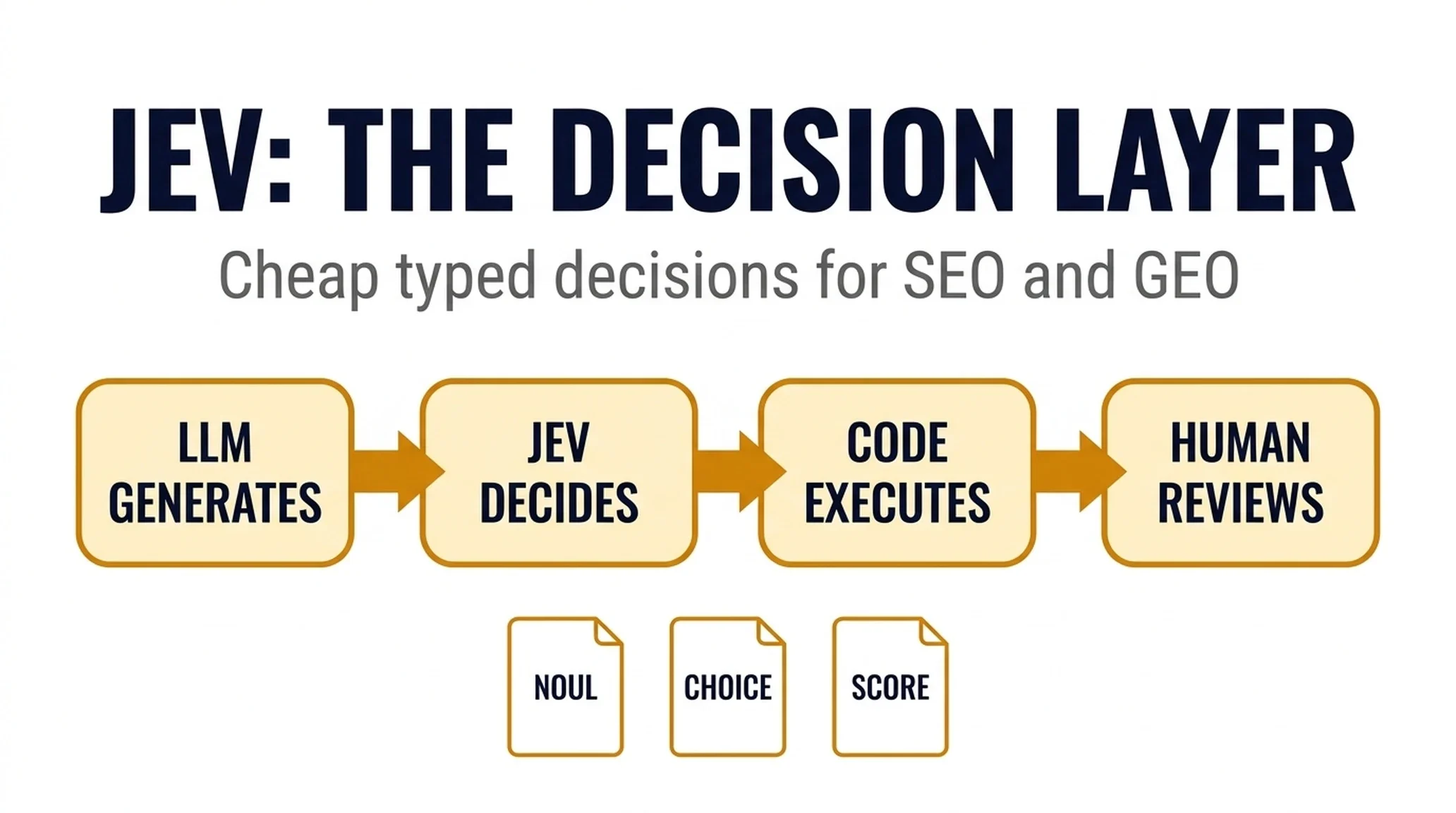
If you have spent any time on AI Twitter in the past week, you have seen Jev described as everything from "the model that kills chat APIs" to "200x faster and 400x cheaper." Almost none of that framing helps you decide whether it belongs anywhere near your SEO work.
Here is the short version, and it is the version this entire article is built on: Jev is not a better writer. It is a cheap judge.
You hand it a piece of context and a set of predefined questions. It does not write you a paragraph. It picks an option, returns a probability, or places something on a scale — and then it gets out of the way. That is the whole product.
For SEO and GEO teams, that sounds underwhelming until you count how many small decisions your work actually contains. Which of these fifteen pages should this sentence link to? Is this query learn-intent or buy-intent? Should this URL be kept, updated, merged, or removed? Does this AI answer mention our brand, a competitor, or neither? Most of those decisions are currently made by a human skimming a spreadsheet, or by an expensive frontier model burning tokens to output one word.
Jev is built for exactly that middle layer. This guide explains what it is, how to install it into the agents you already run, and, just as importantly, where it will confidently lead you wrong.
The short answer
Jev is a "System One" model released by TypeSafe AI on September 15, 2026. It does not generate text. You send it a state (your context) and a map of typed questions, and it returns typed decisions with calibrated probabilities.
There are only three question types, and you should memorize them before anything else:
Type | What it answers | What you get back | SEO example |
|---|---|---|---|
| Is this statement true? | A single probability from 0 to 1 | "Does this page actually satisfy the query 'how to migrate a CRM'?" |
| Pick one of up to 255 options | The chosen option, a full probability distribution, and a confidence score | "Which of these 15 pages should this paragraph link to?" |
| Place this on an ordered scale | A numeric score, the scale legend, and probabilities | "Rate this draft's originality from 0 to 4." |
That is the entire interface. If you have used a classifier, this will feel familiar. If you have only used chat models, the important mental shift is this: you define the answer space, and Jev can never leave it.
That last property is why people are excited. A chat model asked to classify a page into "keep, update, merge, remove" can invent a fifth category, return malformed JSON, or hallucinate a tool name that breaks your pipeline downstream. Jev structurally cannot do that. It can only return one of the options you gave it.
What it can do is pick the wrong one. Hold onto that distinction, because it is the source of nearly every mistake teams are about to make with this model.

Jev has exactly three question types. You define the options; it can never return anything outside them.
What makes Jev different from the LLM you already use
The fastest way to understand Jev is to stop thinking of it as a model and start thinking of it as a piece of infrastructure.
A frontier LLM is a generalist. It reasons, writes, plans, and generates. It is also slow and expensive per call, which is fine when you need a 1,500-word article and absurd when you need the word "billing."
Jev sits on the other side of that trade. It does one narrow job, evaluating a defined question against a given context, and it does that job in tens to hundreds of milliseconds at a cost that makes per-row decisions feel free.
A few operating characteristics matter for how you build with it:
Questions run in parallel. If you send one request with five questions against the same state, you get five answers back. Adding a question barely changes latency. This is the single most underused feature. Teams send five separate calls when one would do.
Confidence comes back with every choice and score. You get the pick and the full probability distribution across all options. A choice that returns "merge" at 0.51 confidence across four options is a very different signal from one that returns "merge" at 0.94. If your pipeline only reads the label and throws away the distribution, you have thrown away the most useful part of the response.
It has no live web access. Jev cannot browse, cannot check a SERP, cannot look up today's AI answer. Everything it knows about the world has to be inside the state you send. This is a hard architectural constraint, not a limitation that will be patched next week. If a decision depends on current data, you fetch the data first and pass it in.
It is a black box. You get a number, never a reason. There is no chain of thought to read, no explanation field, no "here's why I chose this." For high-volume routing that is fine. For anything you need to defend in a meeting, you need a human or a generative model to produce the rationale.
It is bad at arithmetic, dates, and literal edge cases. Reported failure modes include literal reading of instructions, arithmetic, date comparison, and adversarial input. A score is a rubric judgment, not a calculator. If you need "which of these two dates is later," that is code, not Jev.
Where the SEO and GEO use cases actually come from
The reason this model landed in search circles specifically is that SEO and GEO work is unusually full of small, repeated, judgment-shaped decisions with a clear set of possible answers. That is the exact shape Jev is built for.
Practitioners have been mapping those decisions publicly over the past week. The most-cited list of SEO workflows includes internal linking, keyword cannibalization, thin-content scoring, search intent tagging, content audits, redirect mapping, schema consistency, and AI visibility checks. That is not a coincidence: every one of those is a classification or scoring task wearing an SEO costume.
Let me make that concrete with the numbers that have been circulating, because they explain the sudden interest:
- An internal link map rebuilt across 586 pages in about 45 seconds for roughly $0.21, checking the closest candidate pages for each URL and linking only where there was an honest reason.
- Search intent classification hitting about 96% confidence on clear examples — "how does CRM work" reads as learn-intent, "best CRM for startups" as compare-intent, "HubSpot subscription" as purchase-intent, "Salesforce login" as brand-intent.
- A harder prompt — someone saying they are outgrowing spreadsheets and considering a CRM but unsure what it is worth — landing at 54% confidence and getting routed to human review instead of being auto-tagged.
- A meta description scored at 61% confidence for relevance and flagged for review rather than auto-applied.
- AI visibility monitoring across roughly 1,450 buyer questions and three AI engines, with Jev deciding where the brand was cited, who was cited instead, and which page to fix first.
Treat all of those as reported figures, not independently verified benchmarks. The vendor's own claims of 40–200x speed and 40–400x cost improvement are also vendor-reported. What matters for your planning is not the exact multiplier, but the order of magnitude. Decisions that used to require a frontier model call now cost less than the electricity it takes to log them.
The pattern that shows up again and again in the real projects is the same four-stage loop:
LLM generates and reasons -> Jev decides -> code executes -> humans review low confidenceNotice what is not in that loop. Jev does not write your content, does not improve your rankings, and does not earn you a single AI citation. It makes decisions. The outcomes still depend entirely on the content you have and the actions your code takes afterward.
How to install Jev into your agent
This is the part most explainers skip, and it is the part you actually need. Jev is not something you sit and chat with. You wire it into an agent that already has your files, your crawl data, or your prompt logs, and you let that agent call Jev when it hits a decision fork.
There are three ways to connect, roughly in order of how much control you want:
- The official skill: the fastest path, and it teaches your agent the correct API shape.
- An MCP server: lets any MCP-compatible agent call Jev as a tool.
- Direct API calls: full control, best for pipelines and batch jobs.
Start with the skill. It exists specifically so your agent stops writing malformed Jev calls.
Step 1: Get access
Jev is hosted, not open-weight. You need a key from one of these paths:
- TypeSafe directly: join the waitlist at TypeSafe's site. Reported wait times have been short.
- Vercel AI Gateway: listed as
typesafe-ai/jev, reportedly no waitlist. - Cloudflare Workers AI: listed as
typesafe/jev.
If you are already inside Cloudflare or Vercel infrastructure, going through the gateway is usually the least friction. If you want the native API with the full question schema, go direct.
Store the key as an environment variable. Do not paste it into a prompt or a committed config file.
export TYPESAFE_API_KEY="your-key-here"Step 2: Install the official skill
TypeSafe publishes an official skill for coding agents. The install differs by agent.
For Codex, Pi, and most skill-aware agents:
npx skills add typesafe-ai/skills --skill typesafe-aiThe installer will ask which agent to target. Add -g if you want it available globally instead of project-local.
For Claude Code, it is a plugin, not a skill install:
claude plugin marketplace add typesafe-ai/skills
claude plugin install typesafe@typesafe-ai
Then, in your prompt, tell the agent explicitly: "use the typesafe skill." In Claude Code you can also invoke it directly with /typesafe:typesafe-ai.
A practical note for teams running both Codex and Claude Code: Claude Code reads CLAUDE.md, Codex reads AGENTS.md, and they do not share configuration by default. The cleanest fix is to keep your real instructions in AGENTS.md and put a single line, @AGENTS.md, at the top of CLAUDE.md. Both agents then read the same project rules, and you maintain one file instead of two.
Step 3: Wire it into Hermes Agent
Hermes-style agent stacks benefit from Jev in a specific place: memory and skill selection. There is a community integration (hermes-jev-skills) built around exactly this, and the useful pattern is to let Jev handle three decisions your agent currently makes badly:
- Which skill should run for this request? First filter the skill list down to candidates, then have Jev pick one, or explicitly pick "none."
- Is this memory worth keeping? Score it before it enters long-term storage.
- Which model tier does this task need? Route cheap tasks away from expensive models.
The install follows the same skill-aware path:
npx skills add typesafe-ai/skills --skill typesafe-aiThen add a short instruction block to your Hermes agent config telling it to consult the TypeSafe skill whenever it is choosing between predefined options. The failure mode to watch for is a skill list that is too large for one choice question — filter first with a keyword or embedding pass, then let Jev make the final call on a shortlist.
Step 4: Wire it into OpenClaw
OpenClaw runs on the same skill-aware install path, so the command is identical:
npx skills add typesafe-ai/skills --skill typesafe-aiThe integration value for OpenClaw is in task gating. OpenClaw agents tend to accumulate long tool histories and repeated yes/no checks: "is this task complete," "should I retry," "is this output good enough." Those are noul questions, and they are the cheapest possible thing to delegate to Jev.
Two guardrails matter here specifically:
- Do not let Jev decide whether an irreversible action is safe. A confident "yes, delete it" is not a safety proof. Keep destructive permissions in code, gated on explicit human approval.
- Log the state, the decision, and the confidence together. OpenClaw sessions are long; without a decision log you cannot tell whether a bad outcome came from bad judgment or bad input.
Step 5: Wire it into Pi
Pi has a dedicated community adapter (pi-jev) that connects Jev directly for tool-execution control and typed output. The standard skill install works too:
npx skills add typesafe-ai/skills --skill typesafe-aiFor Pi, the highest-value first integration is tool-call gating. Instead of letting the agent decide freely which tool to invoke next, define the available tools as a choice question and let Jev select from the current state. The reported pattern is to regenerate the option menu after every tool call, so Jev is always choosing from actions that are actually valid right now, not from a stale list built at the start of the session.
Step 6: Or skip the skill and call the API directly
If you are building a pipeline rather than driving an agent, call the API yourself. The body has two parts: a state and a map of questions.
curl https://api.typesafe.ai/v1/evaluate \
  --header "Authorization: Bearer $TYPESAFE_API_KEY" \
  --header "Content-Type: application/json" \
  --data '{
    "model": "jev-latest",
    "state": "Page: /blog/crm-migration-guide — Title: How to Migrate Your CRM — Body: ...",
    "questions": {
      "intent": {
        "type": "choice",
        "instructions": "What is the dominant search intent of this page?",
        "criteria": {
          "learn": "The reader wants to understand a concept",
          "compare": "The reader is weighing options",
          "buy": "The reader is ready to purchase",
          "support": "The reader needs help using something"
        }
      },
      "matches_query": {
        "type": "noul",
        "instructions": "Does this page fully satisfy the query it targets?",
        "criteria": {
          "true": "The page answers the query directly and completely",
          "false": "The page is off-topic or incomplete"
        }
      },
      "originality": {
        "type": "score",
        "instructions": "How original is this page compared with generic coverage of the topic?",
        "criteria": ["Rewritten commodity content", "Some original framing", "Clearly original analysis", "First-hand data or experience"]
      }
    }
  }'
You get back a typed answer per question, with confidence and the full probability distribution. The model alias jev-latest is what you want unless you are pinning a specific version for reproducibility.
One design rule that will save you a week: build the option list in your code, not in the prompt. Generate the candidate pages from your crawl data, pass them in as the criteria map, and let Jev choose. If you ask the model to invent its own options, you have rebuilt the problem you were trying to solve.
Your first real workflow: a five-minute link decision
Do not start by rebuilding your whole SEO stack. Start with one decision that is already living in your code as an LLM call that never writes text: the "which of these" call. Here is a complete first workflow.
The setup. Take one paragraph from a published article. Pull five candidate target pages from your site, each with its title and a two-sentence summary. Build the option list in code.
The question. Send one choice question: "Which of these pages, if any, should this paragraph link to, given the reader's likely next step?" Include "none of these" as a real option. This matters: if every question forces a choice, you will get confident nonsense.
The state. Send the paragraph, the page it lives on, and the five candidates. Do not summarize or rewrite the context yet. Send it as it is, so you can compare against your old approach honestly.
The read. Look at two things: the pick and the confidence. If the top option is at 0.9, you have a candidate. If the top two are at 0.4 and 0.38, you have a genuinely ambiguous case, which is useful information in itself.
The gate. Set a threshold before you look at results, not after. A workable starting point:
Confidence | Action |
|---|---|
0.85 and above | Auto-apply, log it, spot-check weekly |
0.60 – 0.85 | Queue for human review |
Below 0.60 | Do not act; re-examine the input or the option set |

A confidence gate is the difference between automating a decision and automating a mistake.
The fallback. Leave your old method running. Delete nothing on day one. If Jev's confidence falls below your threshold, fall through to the previous behavior. That fallback is a few lines of code, and it is the reason you can ship this on a Tuesday instead of planning it for next quarter.
The log. Store the model version, the state, the decision, the confidence, and the final outcome. Without the outcome column, you are collecting opinions rather than evidence.
Run that on fifty paragraphs before you run it on five thousand pages. If you want the full version of this pipeline, including the cannibalization pass and the confidence-routing table, see how to build a Jev internal-linking workflow.
Where Jev will quietly mislead you
This section is not a disclaimer. It is the most operationally important part of the article.
No hallucination is not no error. Jev cannot return an option you did not define. It absolutely can return the wrong one, with high confidence. There is no reason attached, so you cannot audit the logic, only the outcome. The correct response is not "trust it less," but "build a verification layer that does not depend on the model's own confidence."
A high score is not proof the work is good. This is the lesson from one of the more honest practitioner write-ups of the past week: running Jev across content, recruiting evidence, and video output, the author's conclusion was that a high score tells you the model is certain, not that the artifact is correct. If your pipeline auto-publishes on a 0.9, you have automated confidence, not quality.
Confidence is the model's certainty, not a quality measure. A 0.95 on a badly framed question is still a badly framed question. Teams keep discovering this the hard way when they ask Jev to judge "is this content good?" and get back a confident number that means nothing.
Cheap per call is not cheap per decision. At roughly $0.042 per million input tokens with free output, the raw cost is negligible. But a decision that is wrong 15% of the time and requires human rework is not cheap. Price the review step, not only the inference.
The context is the whole ballgame. Jev has no live data and no memory. If you send a thin state, you get a confident answer built on nothing. The most common production failure is not a bad model decision, but a good model decision made from an incomplete state.
There is also a real bias risk, and it deserves a plain warning: do not use Jev to rank people, screen candidates, or make decisions about individuals. A black-box probability model with no explanation is the wrong tool for anything with legal or ethical exposure.
A checklist before you wire Jev into production
- [ ] I have identified one specific repeated decision, not a general "use Jev for SEO" goal.
- [ ] The option list is generated in code and includes a "none of these" or "no action" path where appropriate.
- [ ] I send real, unsanitized context as the
state, not a summary. - [ ] I read confidence and the full probability distribution, not only the label.
- [ ] I set thresholds before seeing results and route low confidence to a human.
- [ ] Hard rules (spend limits, destructive actions, permissions, arithmetic) stay in code.
- [ ] I log model version, state, decision, confidence, and eventual outcome.
- [ ] I have a fallback path if Jev is slow, unavailable, or below threshold.
- [ ] I verified the outcome independently rather than trusting a confident "done."
- [ ] I am not using Jev to make decisions about individual people.
FAQ
Is Jev replacing my LLM? No. The working architecture keeps them separate. The LLM generates and reasons; Jev classifies, scores, and routes; code executes; humans review the uncertain cases. You are adding a judgment layer, not swapping out your model.
Can Jev write content for me? No. It does not generate text at all. If you need content written, that is still your LLM's job.
Can Jev check live SERPs or current AI answers? No. It has no web access. You fetch the data first and pass it in as the state.
What does a confidence score actually mean? It is the model's calibrated probability that its answer is correct. It is not a quality rating, and it is not a guarantee. Use it to decide what gets automated versus reviewed, not to decide what is true.
How much does it cost? Reported at roughly $0.042 per million input tokens with free output tokens, which is why per-row decisions become viable. Verify current pricing before you budget; this is a fast-moving product.
Which agents can I use it with? The official skill supports Claude Code and Codex directly, and the skill-aware install path covers Pi and similar agents. Hermes and OpenClaw have community integrations built around memory management, skill selection, and task gating. MCP servers exist for agents that prefer tool-based access.
Do I need to be a developer? You need to be comfortable installing a skill and editing a config file. For the first workflow, you do not need to write an API integration; you can drive it through your agent with the skill installed.
What to do next
Pick one decision from your current SEO or GEO workflow that has a small, fixed set of possible answers. Search intent labels. Keep/update/merge/remove dispositions. Which of these pages should link. Whether an AI answer mentions your brand.
Define the options in code. Write the question precisely. Send real context. Set a confidence gate. Log everything.
Then run it on fifty rows and read the log before you trust it on fifty thousand.
Read the rest of the series
This article is the first in a six-part series on using Jev for SEO and GEO work.
- How to build a Jev internal-linking and cannibalization workflow
- How to use Jev to audit and route your content library
- How to run AI-visibility checks with Jev as the scoring layer
- Where Jev breaks in SEO work
- How one team built a Jev internal-link analyzer for 78 yen
Author: Maya Ellison, 12-Year GEO Strategy Researcher at Auspia. Maya writes about AI search visibility, brand entity clarity, and practical GEO operating systems for growth teams.


