Ask an SEO what they did with their last Search Console export and you will usually hear some version of "I sorted by impressions and looked at the top few hundred rows."
That is not a criticism. It is what the tooling forces. A site with real traffic produces tens of thousands of query rows, and there is no practical way for a person to classify all of them by intent, map them to pages, and spot the overlaps. So teams sample, and the sample is biased toward whatever they sorted by.
The reason this matters is that the interesting problems are not in the top rows. They are in the long tail, where a query has enough impressions to matter but nobody has looked at it, and where two pages are quietly competing for the same intent.
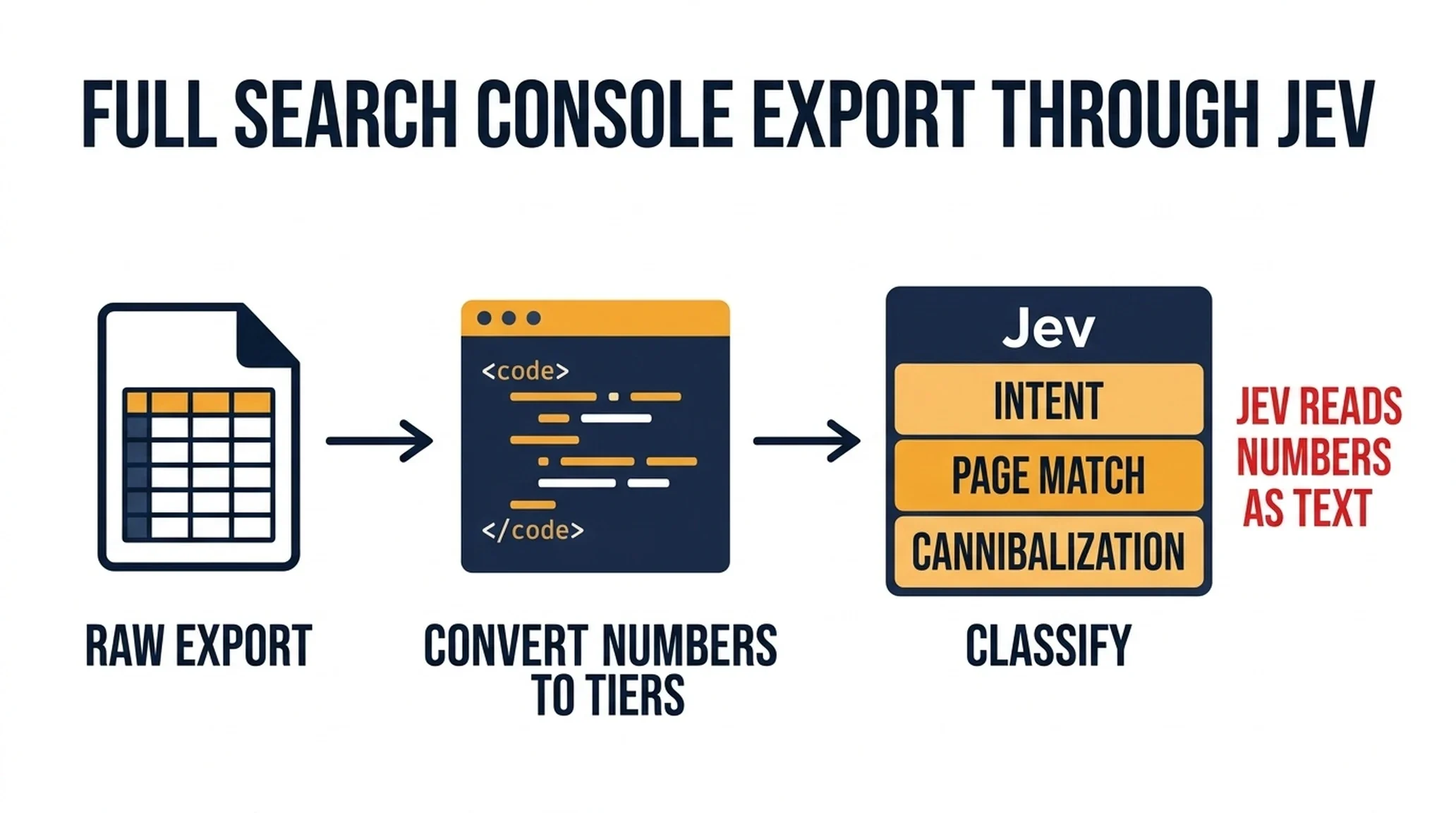
Classifying a full export is a decision problem with a fixed answer set. That is what makes it a good fit for Jev. This guide walks through the complete workflow first, then the three traps that will quietly produce confident wrong answers, and finally the directions worth exploring once the basics are running.
What you will finish with
A classified export where every query row carries:
- An intent label from your own taxonomy
- A matched page, or a flag that no page serves it
- A cannibalization flag where multiple pages compete
- A priority score for action
- A confidence value, routed to auto-apply or review
Who this is for: an SEO or content lead with a Search Console property and a few thousand query rows to sort.
Prerequisites:
- A Search Console export with query, page, impressions, clicks, position, and date range
- Your intent taxonomy, written down before you start
- A Jev API key, or an agent with the TypeSafe skill installed
Definition of done: every row has an intent label and a page match, low-confidence rows are routed to a human, and you have a prioritized list of gaps and conflicts.
Before you start: prepare the export properly
Two preparation steps determine whether the output is usable.
Pull the export at the query-and-page level, not just the query level. If you only export queries, you cannot detect cannibalization, because you cannot see which page is ranking for what. The query-plus-page view is the one that matters.
Decide your intent taxonomy first. Write one sentence of criteria for each label. If you let the model invent categories, you will get forty near-duplicate labels and no way to sort them. A workable set for most sites:
Label | What it means |
|---|---|
| The searcher wants to understand something |
| The searcher is weighing options |
| The searcher is ready to act |
| The searcher is looking for a specific company or product |
| The searcher needs help using something |
The workflow, step by step
Here is the complete pass. The traps section below explains why each step is designed the way it is, but you can run this end to end first and read the traps afterward.
Step 1: Prepare the export in code
Pull query-and-page level data. Compute impression tiers, position tiers, click-through rate, and trend in code. Convert every number to a label before anything reaches Jev.
{
  "query": "best crm for small teams",
  "page": "/blog/best-crm-small-teams",
  "impression_tier": "high",
  "position_tier": "top_10",
  "trend": "declining"
}
The raw numbers are gone by design. Code did the counting; Jev will do the classification.
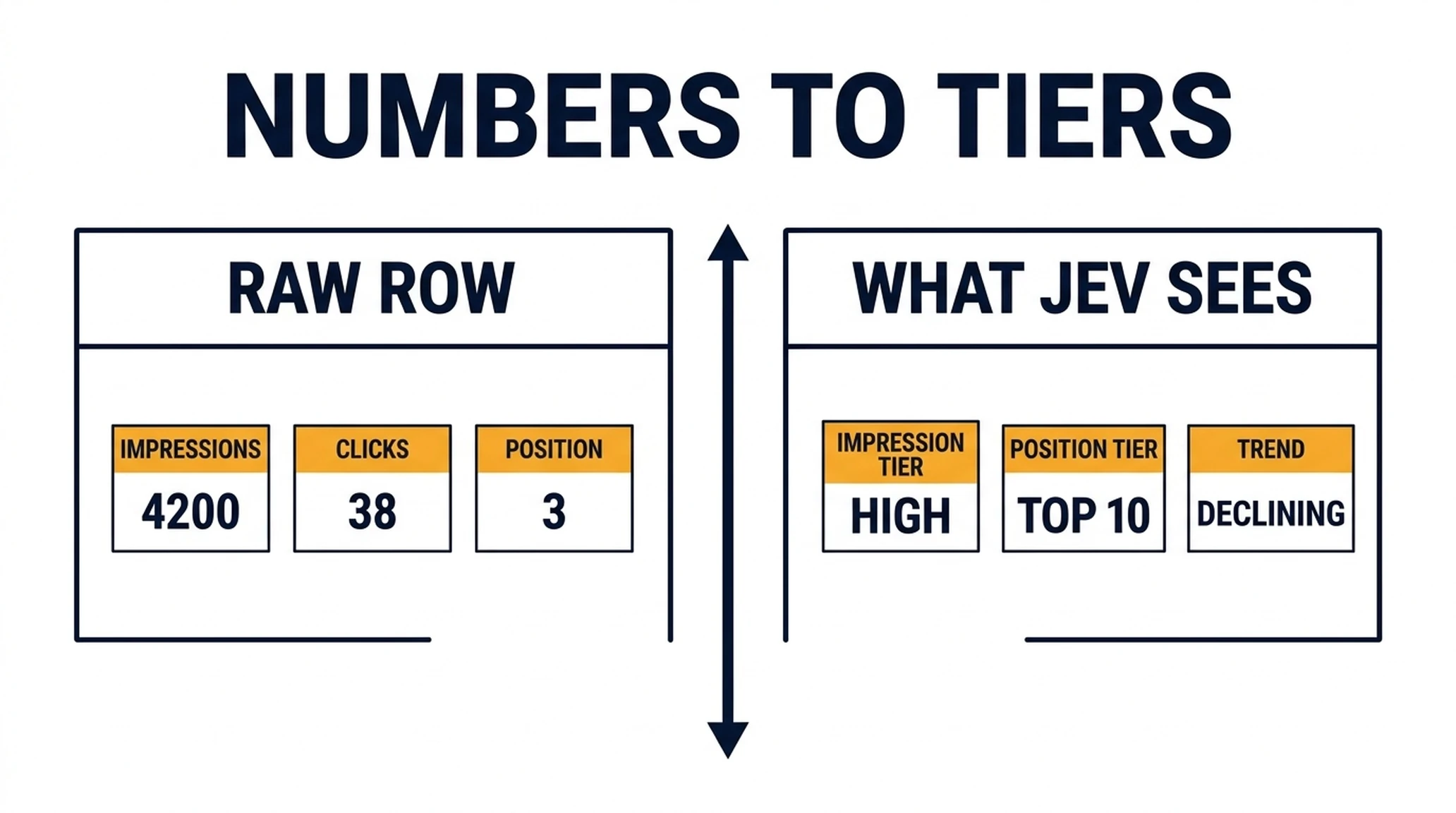
Numbers in, tiers out. Jev never sees the raw counts.
Step 2: Classify intent
Send each query with precise criteria and one concrete example per label.
{
  "model": "jev-latest",
  "state": {
    "query": "best crm for small teams",
    "page_title": "Best CRM for Small Teams"
  },
  "questions": {
    "intent": {
      "type": "choice",
      "instructions": "What does a person searching this exact query most likely want to do next?",
      "criteria": {
        "learn": "They want to understand a concept or process, and would be satisfied by an explanation. Example: 'how does a crm work'",
        "compare": "They are weighing two or more options and want a comparison. Example: 'hubspot vs salesforce for small teams'",
        "buy": "They have chosen a product and want to purchase, price, or sign up. Example: 'hubspot pricing'",
        "brand": "They are looking for a specific named company or product. Example: 'salesforce login'",
        "support": "They already use something and need help. Example: 'hubspot email not sending'"
      }
    }
  }
}
Step 3: Match queries to pages
For queries where the ranking page does not match the intent, send the query plus candidate page summaries and ask which page should serve it. Include a "no page serves this" option.
{
  "query": "best crm for small teams",
  "candidate_pages": [
    { "url": "/blog/best-crm-small-teams", "title": "Best CRM for Small Teams", "summary": "A comparison of five CRMs with pricing and feature tables" },
    { "url": "/blog/crm-guide", "title": "The Complete CRM Guide", "summary": "A general explanation of what a CRM is and how to choose one" },
    { "url": "/pricing", "title": "Pricing", "summary": "Plan comparison and per-seat pricing" }
  ],
  "questions": {
    "best_page": {
      "type": "choice",
      "instructions": "Which page should serve this query?",
      "criteria": {
        "p1": "The comparison page directly matches the query intent",
        "p2": "The general guide is broader and less specific",
        "p3": "The pricing page is commercial and does not answer the query",
        "none": "No existing page serves this query well"
      }
    }
  }
}
Step 4: Detect cannibalization
Group rows by query. Where two or more pages rank for the same query, ask Jev which one should be the canonical target.
{
  "query": "crm for small business",
  "competing_pages": [
    { "url": "/blog/best-crm-small-teams", "title": "Best CRM for Small Teams", "position_tier": "top_10" },
    { "url": "/blog/crm-guide", "title": "The Complete CRM Guide", "position_tier": "page_2" }
  ],
  "questions": {
    "canonical": {
      "type": "choice",
      "instructions": "Which page should be the canonical target for this query?",
      "criteria": {
        "p1": "The comparison page directly matches the query intent",
        "p2": "The general guide is broader and less specific",
        "none": "Neither page is a good target"
      }
    }
  }
}
Step 5: Score priority
Ask for a priority score on each gap or conflict, using criteria that include business value rather than just search volume.
Step 6: Route by confidence
Auto-apply the high-confidence intent labels. Route page matches, cannibalization decisions, and anything below threshold to a human.
Decision | Auto-apply threshold | Below threshold |
|---|---|---|
Intent label | 0.85 | Human review |
Page match | 0.90 | Human review |
Cannibalization canonical | 0.90 | Always human review |
Priority score | n/a | Always human review |
Step 7: Export and act
Write the classified rows to a spreadsheet with the query, page, intent, match, cannibalization flag, priority, and confidence. That sheet is the deliverable.
The three traps
The workflow above works, but only if you avoid three specific failure modes. Each one produces confident wrong answers rather than obvious errors, which is what makes them dangerous.
Trap 1: Jev reads numbers as text
This is the trap that catches almost everyone, and it is worth understanding precisely.
Jev does not do arithmetic. It also does not reliably interpret numeric values as quantities. When you send it a row that contains an impression count, a click count, and a position, it reads those as text. It can tell you that a query looks commercially valuable. It cannot reliably tell you that 4,200 impressions is more than 380 impressions, or that position 3 is better than position 11.
If you ask a question that depends on numeric comparison, you will get an answer, and it will be confident, and it may be wrong.
The fix is structural, not a prompt tweak. Do all numeric work in code before the data reaches Jev. Sort rows by impressions in code. Compute click-through rate in code. Compute position change over time in code. Bucket rows into tiers in code. Then send Jev the result of that computation as a label.
Notice what happens in the Step 1 example above. The numbers are gone. Code converted them into tiers, and Jev only sees the tiers. Now the model is classifying intent, which is what it is actually good at, and it is not being asked to do math it cannot do.
This one change fixes the majority of "Jev gave me a wrong answer" complaints in Search Console work.
Trap 2: A badly worded question produces a confident wrong answer
Jev cannot say "I don't know." A choice question forces a pick from the options you define. If your criteria are vague, it will choose the least-wrong option and return it with whatever confidence it has.
The failure is not that the model is uncertain. It is that the model is certain about a question you asked badly.
Compare these two versions of the same question.
Weak:
{
  "intent": {
    "type": "choice",
    "instructions": "What is the intent of this query?",
    "criteria": {
      "learn": "Learning",
      "compare": "Comparing",
      "buy": "Buying"
    }
  }
}
Strong:
{
  "intent": {
    "type": "choice",
    "instructions": "What does a person searching this exact query most likely want to do next?",
    "criteria": {
      "learn": "They want to understand a concept or process, and would be satisfied by an explanation. Example: 'how does a crm work'",
      "compare": "They are weighing two or more options and want a comparison. Example: 'hubspot vs salesforce for small teams'",
      "buy": "They have chosen a product and want to purchase, price, or sign up. Example: 'hubspot pricing'",
      "brand": "They are looking for a specific named company or product. Example: 'salesforce login'",
      "support": "They already use something and need help. Example: 'hubspot email not sending'"
    }
  }
}
The strong version has three things the weak one lacks: a precise instruction, one concrete example per option, and enough options to cover the real distribution.
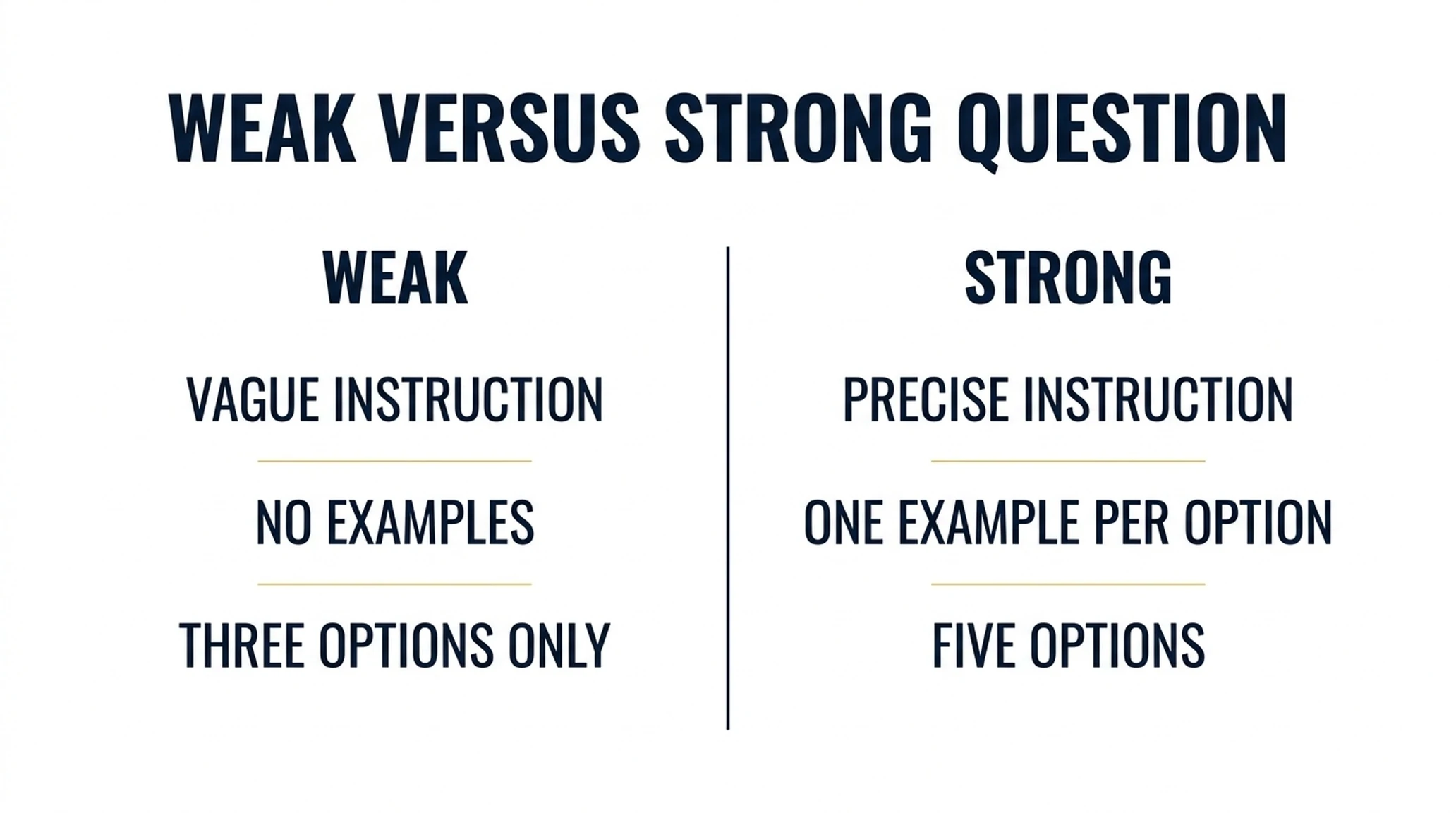
The difference between a useful label and a confident wrong one is usually the criteria.
Reported intent classification on clear examples has landed around 96% confidence, which is high enough to auto-tag. Harder cases land much lower. One reported example, a reader describing a vague buying situation, scored 54% and was routed to review. That spread is the system working. If everything comes back at 0.95, your criteria are too easy or your sample is too clean.
Trap 3: The model has no idea what your site looks like
Jev has no web access. It cannot open your pages. Everything it knows about your site is what you put in the state.
This produces a specific failure in Search Console work. If you ask "which page should serve this query," and you only send the query, the model will guess based on the URL slug. Sometimes that guess is right. Often it is not, because slugs lie and pages drift.
The fix is to send real page context. For each candidate page, include the title and a short summary of what the page actually covers, as shown in the Step 3 example. Now the model is choosing between described pages rather than guessing from slugs. The difference in output quality is large, and it costs almost nothing because the summaries are short.
Verify before you act
Run these checks on the first full pass.
- Read fifty auto-labeled rows by hand. If more than a few are wrong, tighten the criteria before you scale.
- Check the cannibalization list separately. These decisions change which page you invest in, so they deserve their own review.
- Confirm the numeric tiers in code. Spot-check that your impression and position tiers match the raw numbers. This is where a code bug would silently corrupt everything downstream.
- Re-run a sample twice. If labels move substantially, the criteria are not specific enough.
- Look for the flat-distribution signal. If most rows come back with near-identical confidence, the questions are too vague to discriminate.
Directions worth exploring next
Once the basic pass is running, these are the extensions that tend to produce the most additional value.
Connect the export to your AI visibility data. A query that gets impressions but no AI citation is a different problem from one that gets neither. Joining the two datasets tells you which pages need extractability work rather than ranking work. The AI visibility scoring workflow covers how to build that second dataset.
Feed the "no page serves this" rows into content planning. Those rows are the cleanest content gaps you will ever get, because they are demand you can already measure and you have no page competing for it. Route them into the content audit process rather than treating them as a byproduct.
Track intent distribution over time. If the share of compare queries in your export is rising while your content is mostly learn, that is a slow-moving strategic signal. It is invisible in any single snapshot and obvious over six months.
Test the confidence thresholds against outcomes. Log which auto-applied labels turned out to be wrong, then check whether those errors clustered in a particular confidence band. That tells you whether your threshold is set correctly or just set comfortably.
Try a stricter taxonomy on a subset. A five-label taxonomy is easy to run and easy to trust. A fifteen-label taxonomy gives you more actionable output but needs more validation. Run both on the same thousand rows and compare.
Maintain it
- Monthly: re-run the full pass and compare intent distribution over time.
- Quarterly: review the cannibalization list, since intent drift creates new conflicts slowly.
- After any site restructure: re-run the page-match pass, because URLs and content change.
- Continuously: feed the "no page serves this" rows into your content pipeline. Those are your clearest content gaps.
FAQ
Can Jev analyze the raw Search Console export directly? No. Convert the numbers to tiers in code first. Jev reads numbers as text and cannot reliably compare them.
How many rows can I process? The decision layer is cheap enough for tens of thousands of rows. The practical limit is your review capacity for the low-confidence decisions.
Should I send the whole export or a sample? The whole export. The value is in the long tail, and sampling is what made this problem hard in the first place.
What if the intent labels do not match my taxonomy? That means your criteria are not specific enough. Add one concrete example per label from your own data and re-run.
Can I auto-apply the page matches? Only above a high threshold, and only after you have verified a full batch by hand. Cannibalization decisions should always have a human owner.
Does this replace my keyword research tool? No. It classifies and routes what you already have. It does not discover new keywords or estimate volume.
What about queries with no impressions data? Exclude them or bucket them separately. A query with no measurable volume is a different problem from one with real impressions and no clicks.
What to do next
Export your Search Console data at the query-and-page level. Convert the numbers to tiers in code. Write your intent criteria with one example per label. Then run the classification pass on the full export, not a sample.
Read fifty rows by hand before you trust the rest. The long tail is where the work is, and it is the part nobody has looked at.
Read the rest of the series
This article is part of a twelve-part series on using Jev for SEO and GEO work.
- Start here: what Jev is and how to install it
- How to build a Jev internal-linking and cannibalization workflow
- How to use Jev to audit and route your content library
- How to run AI-visibility checks with Jev as the scoring layer
- Where Jev breaks in SEO work
- How one team built a Jev internal-link analyzer for 78 yen
- How to turn Jev citation gaps into page fixes
- Is Jev actually accurate for SEO? What the evidence really shows
- How to monitor Reddit as a GEO citation source with Jev
- We rebuilt a 566-page internal link map with Jev, and only 287 links survived review
- Ghost citations: the AI visibility failure your dashboard hides
Author: Simon Vale, 11-Year Search Intent Researcher at Auspia. Simon writes about buyer queries, SERP patterns, intent mapping, and content alignment.