Most internal linking tools stop at the pair. They tell you that page A should link to page B, and then leave you to find the sentence, write the anchor text, and figure out whether the link is actually a good idea. That last mile is where internal linking projects die, because it is the part that takes human time on every single link.
A team building on Jev recently published a walkthrough of a tool that closes that gap. It crawls a site, narrows the candidate pairs, then for each pair identifies the specific sentence to attach the link to, proposes anchor text drawn from words that already exist in the article, and exports the whole thing to a spreadsheet.
The reported cost for analyzing 100 articles: about 78 yen. Roughly the price of a coffee.
This is a teardown of how that tool works, why the architecture is smarter than it first looks, and what you would need to change to build your own version. If you want the general version of this pipeline first, read how to build a Jev internal-linking workflow.
What the tool actually does
The tool takes a single input: a site URL. From there it runs a full pipeline and produces a downloadable analysis.
Its reported outputs:
- Every article's body text and existing internal links
- Proposed source-to-target link pairs
- The specific sentence in the source article where the link should go
- Suggested anchor text
- A visualization of the current versus improved internal link structure
- An Excel or CSV export of the results
The headline finding from the team that built it was not the cost. It was the accuracy. Their assessment after reviewing real output was that the tool proposed links to genuinely relevant destinations, including places they would have considered "reasonable" but had not thought of themselves.
That is the interesting claim. Not that a model can pick a related page, but that it can pick the specific sentence and anchor that a human editor would accept.
The architecture, step by step
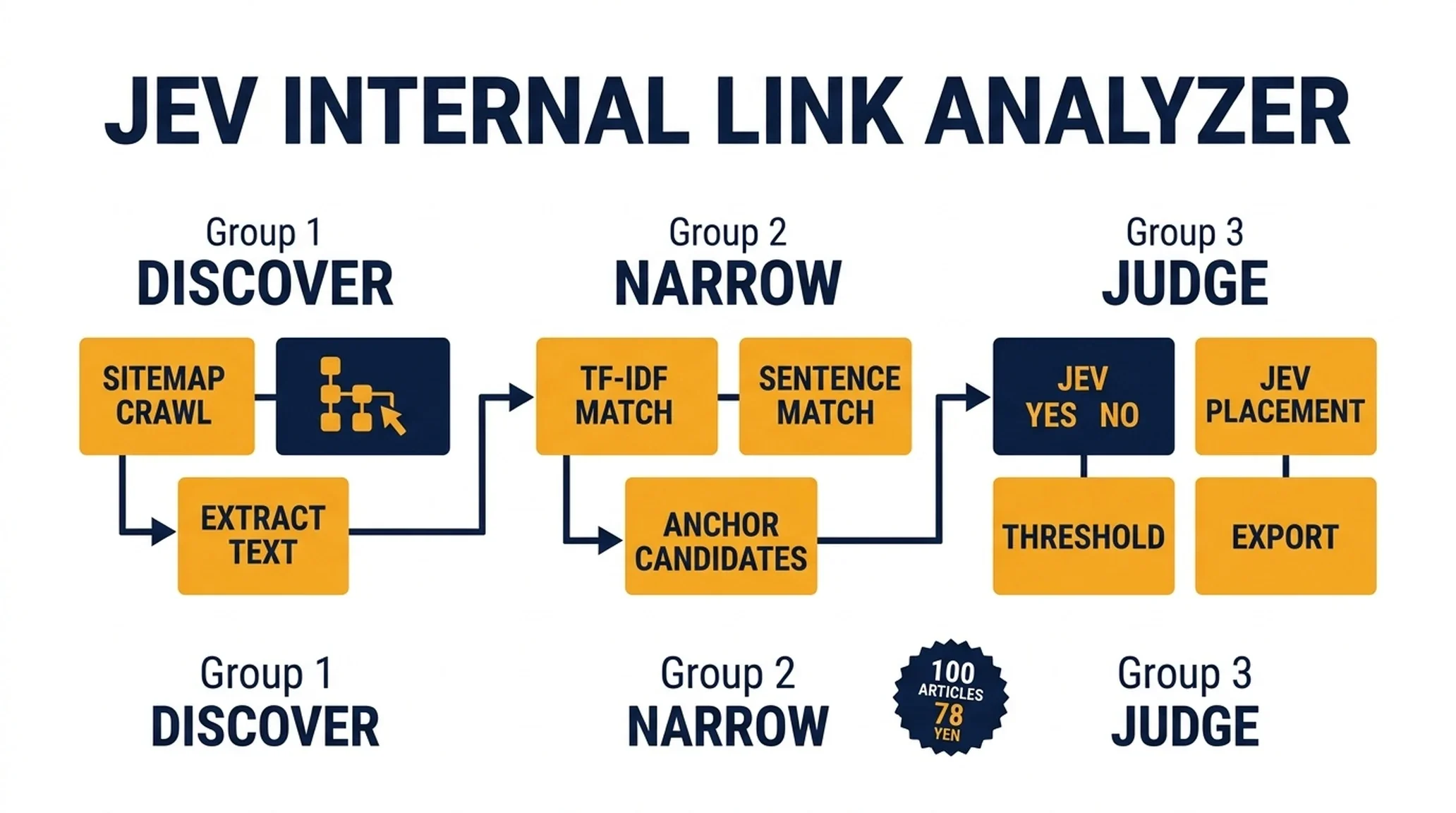
Here is the pipeline as described, broken into its nine stages.
1. Collect article URLs from robots.txt and the sitemap
The tool does not crawl blindly. It reads robots.txt and the sitemap to discover the article set. This is the right first move for two reasons: it respects the site's own crawl rules, and it gives you a clean, finite URL list instead of a spider that wanders into pagination and tag archives.
2. Extract structure and existing links from each article
For every URL, the tool pulls the title, the H1 through H3 headings, the body text, and the existing internal links.
That heading extraction matters more than it looks. Headings are the cheapest available signal of what a page is actually about, and they are far more reliable than a bag of body words. Pulling them separately gives the candidate-matching stage something clean to work with.
3. Narrow candidate pairs with TF-IDF and similarity scoring
This is the stage that makes the economics work.
Instead of asking Jev to evaluate every possible article pair, the tool uses TF-IDF and similarity scoring to pre-filter down to the pairs that are plausibly related. Only those go forward.
On a 100-article site, the full pair space is 9,900 ordered pairs. Most of them are obviously irrelevant. TF-IDF removes that bulk before a single model call happens.
4. Extract the most relevant sentences from the source article
For each surviving pair, the tool finds the sentences in the source article that are most relevant to the target page.
This is the step most internal linking tools skip entirely, and it is the reason this one produces usable output. A link recommendation without a location is homework. A link recommendation with a specific sentence is a task you can complete in thirty seconds.
5. Generate anchor candidates from words that already exist on the page
Here is the design decision that deserves the most attention.
The tool does not ask the model to write anchor text. It builds anchor candidates from phrases that already appear in the article body, then lets the model choose among them.
That constraint solves a real problem. Model-generated anchor text tends to drift toward generic phrasing that does not match the surrounding sentence. Anchor text pulled from the actual page copy always reads naturally, because it was already written by the author.
6. Ask Jev whether the link should exist at all
Now the model enters. The first question is binary: should this link be added, yes or no?
This is a noul question in Jev terms. It returns a probability that the statement is true, and it is the cheapest possible filter. Most candidate pairs that survived TF-IDF will still fail here, and catching them at this stage costs almost nothing.
7. Ask Jev to choose the placement, anchor, and link role
For the pairs that pass, a second round of questions picks the specific sentence, the anchor text from the pre-built candidate list, and the role the link plays.
The link role is the subtle part. A link can be a definition pointer, a deeper-dive reference, a comparison aid, or a next-step suggestion. Naming the role gives the reviewer a reason to accept or reject the recommendation, which matters when a human is scanning hundreds of rows.
8. Keep only candidates above a confidence threshold
The tool applies a threshold to both the recommendation probability and the confidence score. Only candidates that clear the bar are kept.
This is the guardrail that makes the output usable. Without it, you get a list of every link the model considered. With it, you get a list of links the model is willing to stand behind.
9. Map existing and proposed links, then visualize
Finally, the tool combines the current internal link graph with the proposed additions and renders the difference. The export gives you the raw data; the visualization gives you the shape of the change.
That combination is what turns an analysis into a decision. You can see whether the proposals would concentrate links on a few hub pages or distribute them more evenly, before you change anything.

Nine stages, two model calls. Everything else is ordinary code.
Why this architecture is smarter than it looks
Three design choices carry most of the value here, and each one is worth copying.
Code does the narrowing; the model does the judging. The team's own summary of the design is the clearest statement of the principle: do not send every article pair to Jev, use ordinary code to narrow the candidates, and reserve the model for the part that genuinely requires understanding meaning.
That split is why the cost stays low. TF-IDF is free and fast. Jev is cheap but not free. Putting the cheap filter first and the paid judgment second is the difference between an affordable tool and an expensive one.
Anchor text is constrained to real page copy. This is the single best idea in the build. By generating anchor candidates from phrases that already exist in the article, the tool eliminates the most common failure of automated linking: anchors that read like they were written by a machine. The model still chooses, but it chooses from options the author already approved by writing them.
The output is a worklist, not an action. The tool does not modify the site. It produces a spreadsheet with specific, actionable rows. That is the correct scope for a first version, because it keeps a human in the loop on every link while removing almost all of the discovery work.
What the cost actually tells you
The reported figure is about 78 yen for 100 articles. That is roughly half a dollar.
It is worth being precise about what that number does and does not include.
What it includes: the model calls for the candidate pairs that survived the TF-IDF filter, across both the yes/no judgment and the placement and anchor selection.
What it does not include: the crawl, the text extraction, the TF-IDF computation, the sentence matching, the spreadsheet generation, and the visualization. Those are ordinary code, and they cost essentially nothing beyond the compute you already have.
The lesson is not "AI is cheap." The lesson is that the expensive part of a system like this is the judgment, and the judgment is only a small fraction of the total work if you structure the pipeline correctly. A team that sent all 9,900 pairs to a frontier model would spend orders of magnitude more and get worse results, because the model would be doing work that a similarity score does better.

The filter is what makes the economics work. Only the survivors reach the model.
What you would need to build your own
If you want to replicate this, here is the practical build order.
Start with the crawler and the extractor. Get URLs from the sitemap, then pull title, headings, body, and existing internal links for each page. This is unglamorous and it is where most of the debugging time goes. HTML structure varies, and your extractor needs to handle it.
Add TF-IDF or an embedding pass. Either works for the narrowing stage. TF-IDF is simpler and needs no external service. Embeddings handle paraphrased topics better. Pick based on your content, not on fashion.
Build the sentence extractor before you touch the model. For each candidate pair, find the source sentences most relevant to the target page. This is a similarity problem, not a judgment problem, and it does not need Jev.
Generate anchor candidates from the page text. Extract noun phrases and repeated key terms from the source article, filter them for length and readability, and pass the shortlist to the model. Do not let the model write free-form anchors.
Write the Jev questions. One noul question for "should this link exist," then choice questions for placement, anchor selection, and link role. Include a "none" option on every choice question, because the honest answer is sometimes that none of the candidates fit.
Set the threshold and export. Keep only candidates above your confidence bar, write them to a spreadsheet with the source URL, target URL, sentence, anchor, role, and confidence, and hand it to a human.
Add the visualization last. It is the most visible feature and the least important for getting value. Build it after the pipeline produces good rows.
Where this approach can go wrong
Three risks are worth naming before you build.
TF-IDF can miss paraphrased relationships. If two pages cover the same topic in completely different vocabulary, a term-frequency approach will not connect them. If your content is written by many different authors with inconsistent terminology, add an embedding pass alongside TF-IDF.
Sentence extraction can pick a sentence that does not need a link. Relevance to the target page is not the same as a natural place to send the reader onward. This is exactly why the model's yes/no judgment sits after the extraction step rather than before it.
A confidence threshold is not a correctness guarantee. A high-confidence recommendation can still be wrong. The tool's output is a worklist for a human, and it should stay that way until you have logged enough outcomes to trust a narrow threshold. The team behind this build treated the output as suggestions to review, which is the right posture.
There is also a limit worth stating plainly: this tool finds links that should exist between pages you already have. It cannot tell you that you are missing a page entirely, and it cannot tell you whether a link is worth adding for reasons beyond topical relevance.
What this build demonstrates about Jev
The interesting thing about this case is not that it uses an AI model. It is where the model sits.
Jev appears twice in a nine-stage pipeline, and both appearances are narrow judgment calls: should this link exist, and if so, where and how. Everything else — discovery, extraction, matching, filtering, export — is ordinary code.
That is the pattern worth taking from this build. The teams getting good results from Jev are not the ones asking it to do the whole job. They are the ones who figured out which two or three decisions in their workflow genuinely require judgment, and left everything else to code.
Internal linking happens to be an unusually good fit, because the judgment is real and the answer space is small. But the same structure applies to almost any SEO workflow: narrow with code, judge with the model, review with a human.
FAQ
Do I need Jev specifically, or would any model work? A general model could handle the yes/no and selection questions, but it would cost more per decision and could return off-schema output. Jev's advantage here is that the answer space is fixed, so the output is always parseable, and the per-decision cost is low enough to run across a whole site.
Why TF-IDF instead of embeddings? TF-IDF is simpler, free, and needs no external service. It works well when your content uses consistent terminology. If your site has varied vocabulary across authors, add embeddings alongside it.
How many articles can this scale to? The reported run covered 100 articles. The architecture scales because the expensive stage is gated behind a cheap filter. The practical limit is your crawler and your review capacity, not the model cost.
Is the output safe to apply automatically? No. The tool produces a worklist. Every recommendation should be reviewed before it goes live, at least until you have measured your own accuracy against a manual sample.
What is the hardest part to build? The HTML extraction. Getting clean title, heading, body, and link data out of a real site is where most of the engineering time goes, and it is the part that determines whether everything downstream works.
Can this handle multiple languages? The pipeline structure works for any language, but TF-IDF and sentence extraction need language-appropriate tokenization. Run each language separately rather than mixing them in one candidate pool.
What to do next
If you want to build this, start with the extractor. Get clean text and headings out of a hundred pages before you write a single model call. Then add the similarity filter, then the sentence matcher, then the Jev questions.
Build the worklist before you build the visualization. The rows are the value. The chart is the demo.
Read the rest of the series
This article is part of a six-part series on using Jev for SEO and GEO work.
- Start here: what Jev is and how to install it
- How to build a Jev internal-linking and cannibalization workflow
- How to use Jev to audit and route your content library
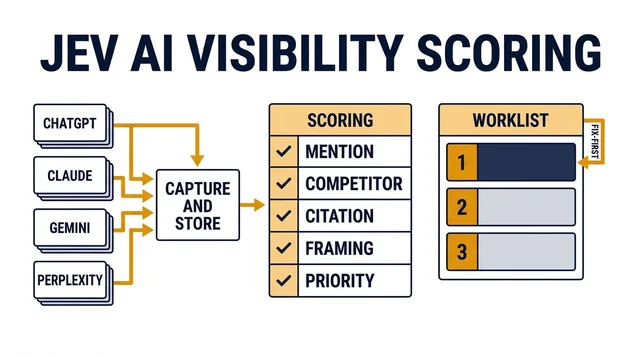
- How to run AI-visibility checks with Jev as the scoring layer
- Where Jev breaks in SEO work
Author: Julian Mercer, 14-Year Technical SEO Practitioner at Auspia. Julian writes about crawlability, site architecture, internal linking, and the technical foundations that make content readable to both search engines and AI systems.