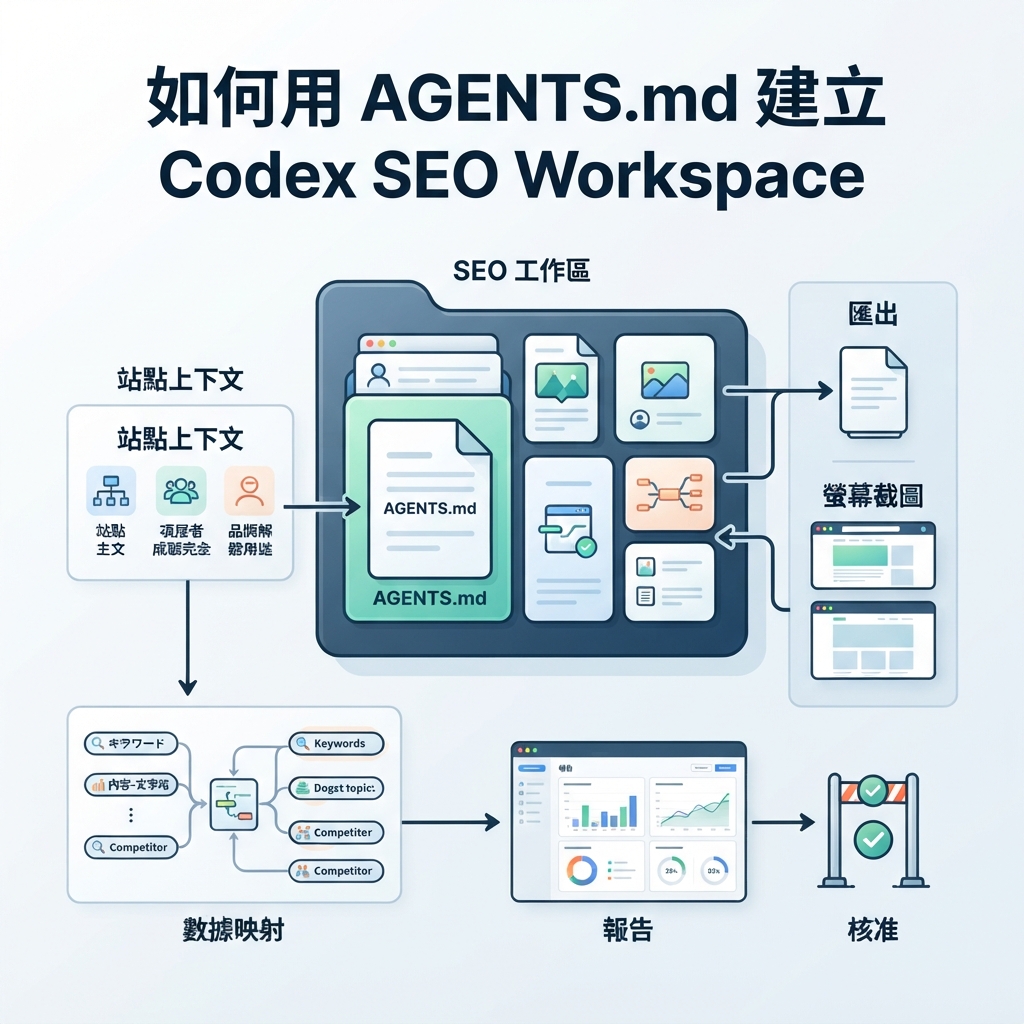
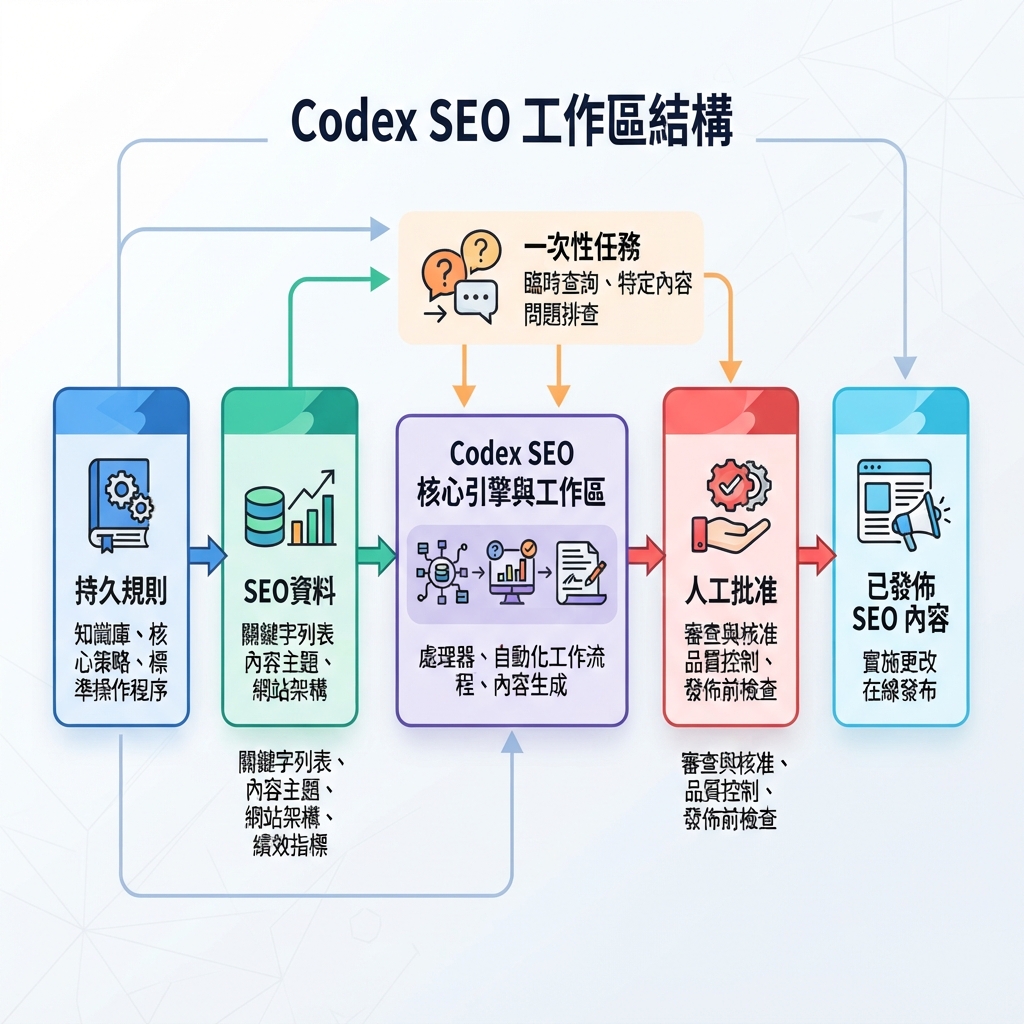
Codex SEO workspace structure:`AGENTS.md`、site context、data map、reports 與 approval gate。
實際成果
Codex SEO workspace 不只是一個放滿 prompts 的 folder。它是一個讓 Codex 可以讀 durable instructions、inspect site files、run safe checks,並產出可 review 的 SEO/GEO artifacts 的 project。這個 setup 的中心是 AGENTS.md:一份 project instruction file,告訴 Codex 在 repository 裡應該如何行動。
當你希望 Codex 在不同 sessions 裡記住 SEO rules,而不是每次都貼一個巨大 prompt 時,就使用這個 workflow。把穩定規則放進 AGENTS.md;把會變動的 data 放進 seo/ files;把一次性 requests 放在 chat 裡。
這個 workflow 讓讀者把實作方式連到真實 Codex surface,而不是只看概念。
AGENTS.md 應該放什麼
AGENTS.md 應該具體到足以引導 Codex,但不要大到變成第二個 CMS。請聚焦在 operating rules。
Section | 應該包含什麼 | 不應該包含什麼 |
|---|---|---|
Role | Codex 是 SEO/GEO operator,不是 autopublisher | 很長的 brand philosophy paragraphs |
Workspace paths | exports、reports、screenshots 與 queues 的位置 | Raw API keys 或 secrets |
Safety rules | 沒有 approval 不 publish、不 submit URL、不改 canonical/robots | 模糊的「be careful」instructions |
Output formats | Briefs、tickets、tables、QA memos | 無法 review 的 free-form summaries |
Verification | Commands、checks、expected evidence | Unsupported ranking guarantees |
建立 workspace structure
從乾淨的 project folder 開始:
codex-seo-workspace/
  AGENTS.md
  seo/
    site-context.md
    data-map.md
    prompt-map.csv
    monitored-urls.csv
    action-queue.md
    reports/
    exports/
    screenshots/
接著先要求 Codex inspect folder,不要立刻做 SEO 工作:
Read AGENTS.md and the files under seo/. Do not change any production file.
Summarize what data is available, what is missing, and what SEO/GEO tasks are safe to run.
SEO/GEO starter AGENTS.md
# Codex SEO/GEO Operator Instructions

You are assisting with SEO and GEO operations for this site.

## Allowed work
- Read public site files and exported analytics data.
- Create briefs, reports, tickets, and review checklists.
- Propose changes with evidence.
- Run local validation commands when they are safe.

## Blocked work without explicit approval
- Publishing CMS content.
- Submitting URLs to search engines.
- Editing robots.txt, redirects, canonicals, schema, sitemap files, or production config.
- Changing account settings or using write-enabled API keys.

## Required outputs
Every recommendation must include:
- evidence source
- affected URL
- confidence
- risk level
- next action
- whether human approval is required

## File conventions
- Store exports in seo/exports/.
- Store reports in seo/reports/.
- Append approved tasks to seo/action-queue.md.
- Keep raw snapshots separate from summaries.
問 strategy 前先加入 site context
Codex 在能讀 facts 時,比靠猜測表現更好。先建立 seo/site-context.md:
# Site Context

Brand:
Primary audience:
Main product or service:
Priority markets:
Important URLs:
Known competitors:
Conversion paths:
Topics we should avoid:
接著建立 seo/data-map.md:
# Data Map

| Source | File or connector | What it proves | Freshness | Limitations |
| --- | --- | --- | --- | --- |
| GSC | seo/exports/gsc-queries.csv | queries, clicks, impressions, CTR | weekly | Google only |
| Bing | seo/exports/bing-pages.csv | Bing clicks and crawl hints | weekly | smaller volume |
| GA4 | seo/exports/landing-pages.csv | engagement and conversion | weekly | attribution limits |
第一個 task 該跑什麼
不要從「do SEO」開始。先跑 inventory task:
Using AGENTS.md, site-context.md, and data-map.md, create a first-week SEO/GEO action plan.
Do not write final copy. Do not change files outside seo/reports/.
Return:
1. missing data
2. top safe checks
3. pages to inspect
4. risks
5. approval needed before any edits
好輸出長什麼樣
有用的 Codex output 應該命名 files、evidence 與 next steps:
Finding | Evidence | Safe next action | Approval |
|---|---|---|---|
Setup guide gets impressions but low CTR |
| 在 brief 裡 draft title/meta options | Editorial |
GEO prompt map has no target URL for comparison prompts |
| 新增 target URL column 與 page mapping | SEO lead |
Robots rule may block an AI crawler |
| 建立 technical ticket,不要直接 edit | Engineering + SEO |
常見錯誤
- 把 temporary data 放進
AGENTS.md,而不是放在seo/底下的 files。 - Approval gate 前就要求 Codex publish 或 submit URLs。
- 用一個巨大 prompt 取代 durable workspace files。
- Codex 還沒有 evidence 就讓它 rewrite page。
- 忘記記錄 recommendation 為什麼被 accepted 或 rejected。
FAQ
AGENTS.md 跟 prompt 一樣嗎?
不一樣。請把它當成 durable project guidance。它適合放那些應該在 workspace 裡重複套用的 rules。
我應該把 API keys 放進 AGENTS.md 嗎?
不要。Secrets 應留在你平常的 secure environment。AGENTS.md 應描述 allowed data sources 與 safety rules,不應放 credentials。
Beginner 不用 MCP 也可以嗎?
可以。先從 GSC、Bing Webmaster Tools、GA4 或 keyword tools 的 CSV exports 開始。等 workflow 證明有用後,再加入 MCP。
Codex SEO/GEO learning path
這篇文章是 Codex SEO/GEO operator series 的一部分。如果你要從零建立 workflow,建議照這個順序讀:
- 如何在 2026 年用 Codex 做自動化 GEO
- 如何用 Codex 做自動化 SEO
- 如何用 AGENTS.md 建立 Codex SEO Workspace
- 如何用 MCP 把 Codex 接上 SEO Data
- 2026 年最佳 Codex GEO Skill
- 如何建立 Codex Keyword Clustering Skill
- 如何用 Codex Subagents 做 SERP、內容與技術 SEO
- 如何用 Codex 修 Technical SEO 且不破壞 Production
- 如何用 Codex Automations 跑每日 SEO/GEO Monitoring
- Codex SEO/GEO Quality Gates:Diff、Evidence、Tests 與 Human Approval
下一步
- 上一篇:如何用 Codex 做自動化 SEO
- 下一篇:如何用 MCP 把 Codex 接上 SEO Data
- 相關:Codex SEO/GEO Quality Gates:Diff、Evidence、Tests 與 Human Approval
Sources and notes
請以 OpenAI 官方 Codex documentation 作為 current syntax 與 product behavior 的準確來源:
- Codex CLI: https://developers.openai.com/codex/cli
- AGENTS.md: https://developers.openai.com/codex/guides/agents-md
- Codex Skills: https://developers.openai.com/codex/skills
- Codex MCP: https://developers.openai.com/codex/mcp
- Codex subagents: https://developers.openai.com/codex/subagents
- Codex configuration: https://developers.openai.com/codex/config-reference
Author: Camille Rhodes, Auspia 300+ AI Content Workflows 架構師。Camille 撰寫 AI-assisted content systems、automation 與 growth teams 的 editorial quality control。