你會建立什麼
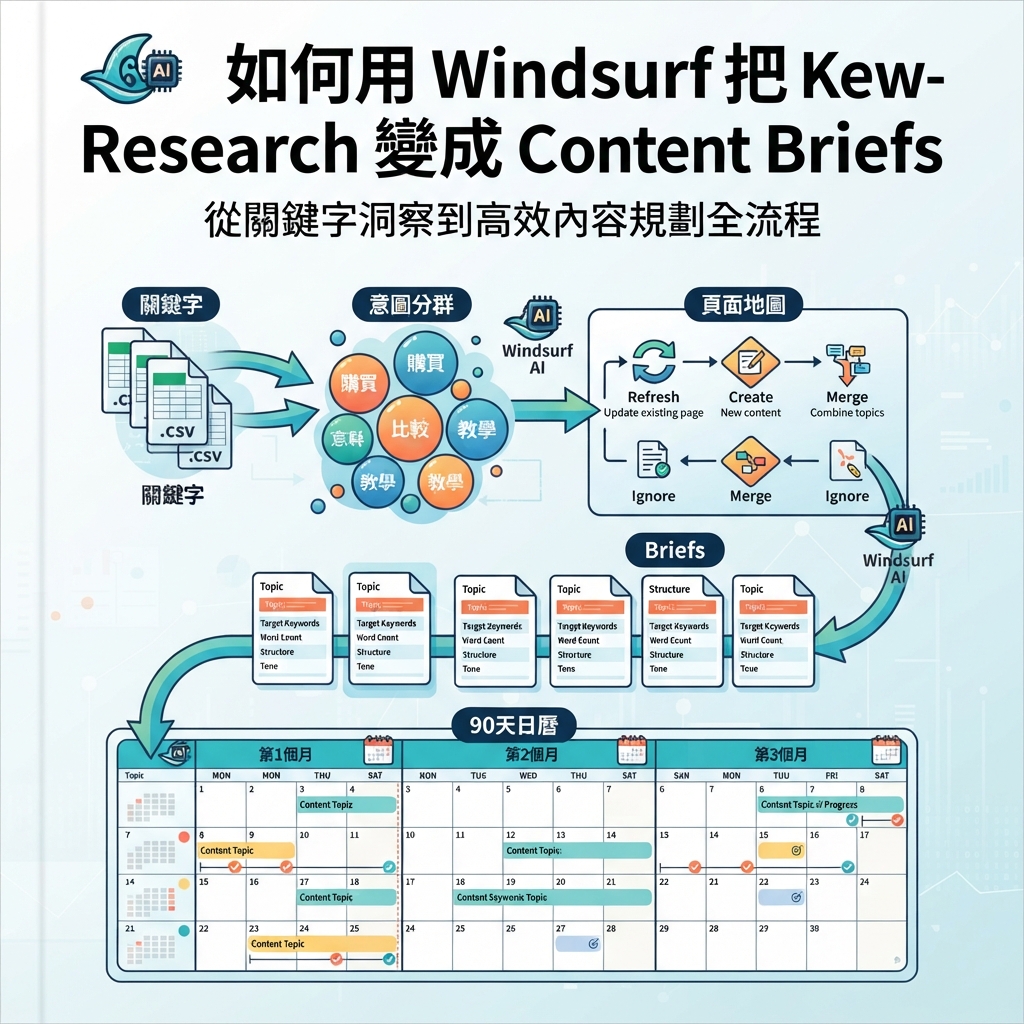
這篇教學會示範如何用 Windsurf 把 keyword data 轉成 content briefs 和可執行的 publishing calendar。目標不是把 keywords 丟給 AI writer。目標是建立一個 workflow,告訴你哪些 pages 要 refresh、哪些 pages 要 create、哪些 ideas 要 ignore,以及每一頁需要什麼 evidence。
你會建立:
.windsurf/workflows/keyword-to-content-brief.md
seo-geo/keyword-workflow/
  inputs/
    keywords.csv
    gsc-queries.csv
    bing-queries.csv
    existing-urls.csv
    competitor-pages.csv
  outputs/
    cleaned-keywords.md
    clusters.md
    page-map.md
    briefs/
    calendar.md
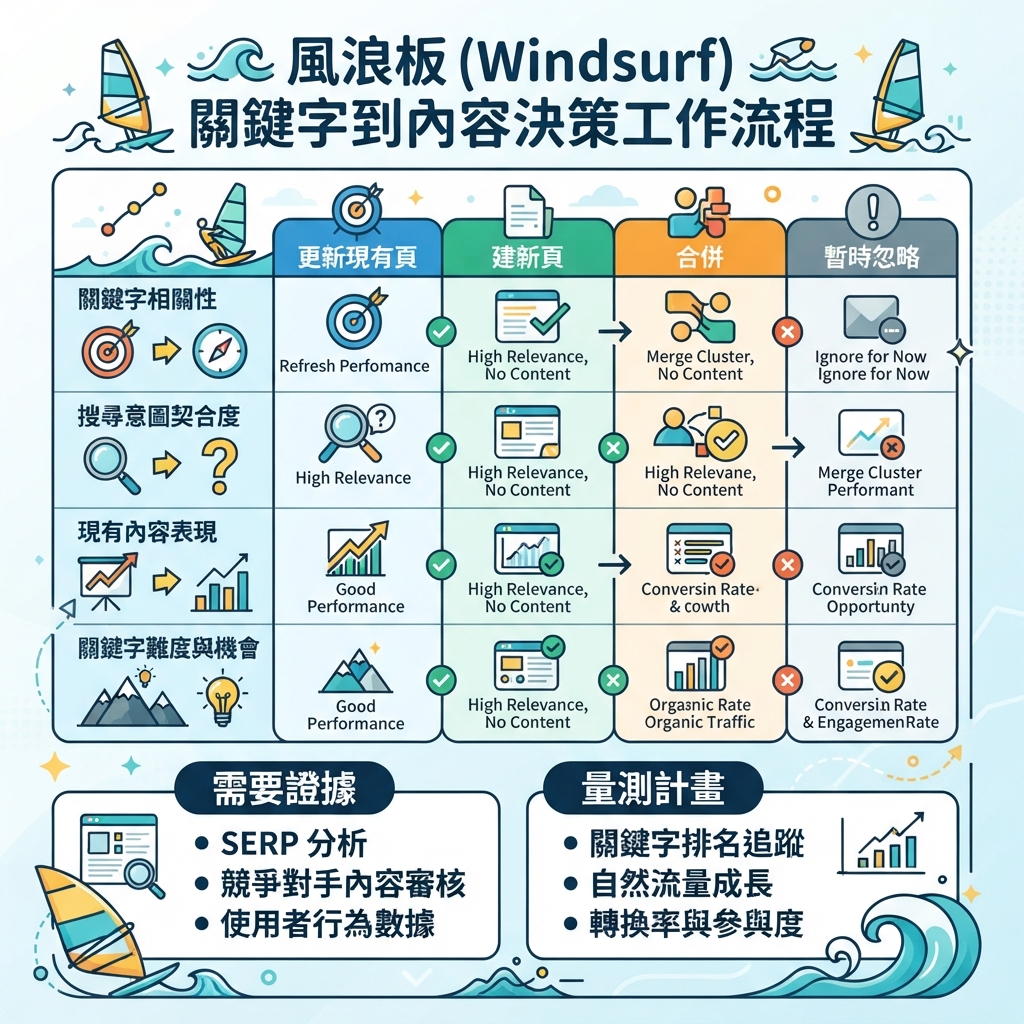
圖說:先檢查 existing URLs,再決定 refresh、create、merge 或 ignore,避免為同一 intent 建太多頁。
步驟 1:準備 input files
建立 folders:
mkdir -p .windsurf/workflows seo-geo/keyword-workflow/inputs seo-geo/keyword-workflow/outputs/briefs
如果你已經使用 SEO tools,就從平常的工具匯出 CSV files。如果沒有,先用小樣本手動開始也可以,workflow 仍然能跑。
建立一個簡單 keyword file:
cat > seo-geo/keyword-workflow/inputs/keywords.csv <<'EOF2'
keyword,volume,difficulty,intent,source
ai reporting dashboard,900,42,commercial,keyword_tool
reporting automation software,500,38,commercial,keyword_tool
how to automate weekly reports,700,27,informational,keyword_tool
best reporting tools for startups,350,31,comparison,keyword_tool
EOF2
建立 existing URL inventory:
cat > seo-geo/keyword-workflow/inputs/existing-urls.csv <<'EOF2'
url,title,page_type,last_updated
/features/reporting,Reporting Automation,landing,2026-05-10
/blog/weekly-report-automation,How to Automate Weekly Reports,blog,2025-11-18
/tools/report-template-generator,Report Template Generator,tool,2026-02-03
EOF2
Optional 但有用的 inputs:
File | 內容 | 幫助 |
|---|---|---|
gsc-queries.csv | queries、clicks、impressions、CTR、position | 找出低 CTR 和接近排名的 opportunities |
bing-queries.csv | Bing clicks and impressions | 補上非 Google demand signals |
competitor-pages.csv | competitor URL、title、angle | 避免產生弱的 copycat briefs |
ai-prompts.md | 從 ChatGPT/Perplexity/Gemini checks 得到的 buyer prompts | 把 SEO clusters 轉成 GEO questions |
步驟 2:建立 Windsurf workflow
建立 workflow file:
cat > .windsurf/workflows/keyword-to-content-brief.md <<'EOF2'
# Keyword to Content Brief

Goal: convert keyword, search, competitor, and AI-prompt inputs into a page map, content briefs, and a 90-day content calendar.

Required inputs:
- `seo-geo/keyword-workflow/inputs/keywords.csv`
- `seo-geo/keyword-workflow/inputs/existing-urls.csv`

Optional inputs:
- `gsc-queries.csv`
- `bing-queries.csv`
- `competitor-pages.csv`
- `ai-prompts.md`

Steps:
1. Read all available inputs.
2. Clean obvious duplicates and merge keyword variants.
3. Group queries by user intent, not by exact wording only.
4. Label each cluster as informational, commercial, comparison, support, technical, local, or GEO prompt.
5. Map every cluster to one of four decisions: refresh existing page, create new page, merge with another cluster, or ignore for now.
6. For approved clusters, create a brief under `seo-geo/keyword-workflow/outputs/briefs/`.
7. Create `seo-geo/keyword-workflow/outputs/page-map.md`.
8. Create `seo-geo/keyword-workflow/outputs/calendar.md`.

Approval gate:
- Stop after the page map.
- Ask the user to approve which briefs to create.
- Do not draft full articles unless the user approves the page map.

Brief requirements:
- target cluster
- search intent
- GEO prompt version
- page type
- existing URL or proposed slug
- reader problem
- outline
- proof needed
- internal links
- screenshots or examples needed
- quality risks
- measurement plan

Forbidden actions:
- do not publish
- do not invent search volume
- do not invent customer proof
- do not create multiple pages for the same intent
- do not recommend a new page before checking existing URLs
EOF2
步驟 3:第一次執行 workflow
在 Windsurf 裡,用精準 request 呼叫 workflow:
Run /keyword-to-content-brief using `seo-geo/keyword-workflow/inputs/`.

First output only:
1. cleaned keyword notes
2. intent clusters
3. page map with refresh/create/merge/ignore decisions

Do not draft articles yet. Do not edit website pages. Stop after `page-map.md` and ask me what to approve.
有用的 first output 應該像這樣:
Cluster: reporting automation software
Intent: commercial evaluation
GEO prompt: "What is the best reporting automation software for a small startup?"
Decision: refresh existing page
Target URL: /features/reporting
Reason: existing landing page matches the commercial intent but lacks comparison criteria and proof.
Risk: do not claim integrations that are not documented.
Priority: high
如果 Windsurf 沒有檢查 existing URLs,就直接建立十個新文章 idea,代表 workflow 失敗。把這行加進 workflow:No new page may be recommended until existing-urls.csv has been checked.
步驟 4:只核准小範圍 page map
不要全部核准。先選一個 refresh 和一個 new page。
使用這段 prompt:
Approve only these two actions:
1. Refresh `/features/reporting` for the cluster "reporting automation software".
2. Create one blog brief for "how to automate weekly reports".

Create briefs for only these two. Do not draft final articles. Include evidence needed, screenshots needed, internal links, FAQ candidates, and measurement plan.
步驟 5:要求 writer 真的能用的 brief
好的 Windsurf brief 應該是 operational,不只是 title 和 outline。使用這個格式:
Brief field | Windsurf 應該寫什麼 |
|---|---|
Target reader | 誰有這個問題 |
Query cluster | 覆蓋哪些 keywords 和 AI prompts |
Page role | 部落格、著陸頁、比較頁、工具頁、文件頁、支援頁 |
Search intent | 讀者想決定或完成什麼 |
GEO angle | AI system 應該能抽取的答案 |
Required proof | 截圖、資料、範例、文件,以及可公開使用的客戶證據 |
Existing internal links | 應自然連到哪些頁面 |
Missing asset | 圖片、demo、表格、範本、calculator、checklist |
Quality risk | 內容太薄、intent 重複、claim 沒證據、資訊過期 |
Measurement | 發布後檢查 GSC、Bing、GA4 與 AI 能見度 |
要求 Windsurf 把每份 brief 存成檔案:
Save the approved briefs under seo-geo/keyword-workflow/outputs/briefs/ using short filenames. Include a final checklist at the bottom of each brief.
步驟 6:briefs 通過後再建立 90 天 calendar
只有在 page map 和 first briefs 存在後才建立 calendar。否則 calendar 只是虛構。
Prompt:
Create `seo-geo/keyword-workflow/outputs/calendar.md` for 90 days.
Use only approved clusters and briefs.
For each item include: week, page type, target URL or proposed slug, owner, required proof, difficulty, expected business value, GEO prompt target, and validation metric.
Limit the calendar to work a small team can actually finish.
Example row:
Week | Work | URL | Proof needed | Metric |
|---|---|---|---|---|
1 | Refresh landing page | /features/reporting | product screenshots、integration list | CTR、demo clicks、AI prompt inclusion |
2 | New how-to article | /blog/automate-weekly-reports | example workflow、template screenshot | impressions、assisted conversions、citations |
步驟 7:brief 核准後才用 Windsurf 起草
準備 draft 時,request 仍然要 narrow:
Using only the approved brief `seo-geo/keyword-workflow/outputs/briefs/automate-weekly-reports.md`, draft the article in a new markdown file under `seo-geo/drafts/`.
Do not edit the live website.
Do not invent proof.
Mark missing screenshots or product facts as TODO.
Include natural internal links only where the brief allows them.
這可以避免 Windsurf 把 keyword research 變成 unsupported content。
Troubleshooting
問題 | 可能原因 | 修法 |
|---|---|---|
太多 新頁面想法 | 現有 URL 清單 被忽略 | 要求先做 page map,再做 briefs |
Clusters 重疊 | 只照文字分組,沒有照 intent 分組 | 要求一個 intent 對一頁 |
Brief 太 generic | 沒有證據欄位 | 要求截圖、範例和證據欄位 |
Calendar 不 realistic | 沒有負責人或難度 | 加上負責人、投入量和核准門檻 |
GEO angle 模糊 | 缺少 prompts | 把每個 cluster 轉成買家問題 |
初學者可直接複製的 prompt
I want to use Windsurf to turn keyword data into content briefs, not final articles.

Please create `.windsurf/workflows/keyword-to-content-brief.md` and use the files in `seo-geo/keyword-workflow/inputs/`.

Rules:
- Check existing URLs before recommending new pages.
- Group keywords by intent.
- Map each cluster to refresh, create, merge, or ignore.
- Stop after the page map and ask for approval.
- After approval, create briefs with proof needed, internal links, GEO prompt targets, screenshots needed, quality risks, and measurement plan.
- Do not publish. Do not edit live pages. Do not invent volume, proof, or customer claims.
FAQ
Windsurf 可以自己找 keywords 嗎?
如果你的 environment 有連接工具,它可以協助處理 files 或使用 connected tools。但初學者安全 workflow 應該從 exports 或小型手動 CSV 開始。缺少 search volume 時,就標成 unknown,不要讓它捏造。
每個 keyword 都應該變成一頁嗎?
不是。很多 keywords 應該 merge 到現有頁、ignore,或留到之後再做。一個 page 應該擁有一個清楚 intent。
這對 GEO 有什麼幫助?
每個 keyword cluster 都會轉成 buyer-style prompt。Brief 接著指定 page 應支援什麼答案、需要什麼 evidence,以及之後如何檢查 AI visibility。
AI coding agents for SEO/GEO 學習路徑
Windsurf track:
- Cursor vs Windsurf vs Gemini CLI:SEO/GEO 自動化怎麼選
- 如何建立 Windsurf Cascade Workflows 做 SEO/GEO
- 如何把 Windsurf Rules and Memories 用在 SEO/GEO Projects
- 如何用 Windsurf 把 Keyword Research 變成 Content Briefs
- 如何用 Windsurf 處理 SEO/GEO PR Comments
- Cursor、Windsurf、Gemini CLI、Codex、Claude Code 的 SEO/GEO 營運模型
Sources and notes
- Windsurf/Devin Desktop documentation: Cascade Workflows。
- Related Auspia guide: Cursor vs Windsurf vs Gemini CLI for SEO/GEO Automation。
Author: Clara Bennett, Auspia 10-Year Content Strategy Practitioner。Clara 撰寫 editorial systems、topic maps 與 repeatable SEO/GEO production workflows。