你會建立什麼
這篇教學會把 Gemini CLI 變成一個初學者真的跑得起來的 SEO/GEO 終端機工作區。你會建立資料夾、加入提示詞庫、保存搜尋資料匯出檔、請 Gemini CLI 產生唯讀報告,並先理解什麼叫做「成功」,再讓工具碰任何網站檔案。
Gemini CLI 適合這個場景,是因為它在終端機 REPL 中運作,可以處理檔案、shell 指令,以及偏向 Web/API 的工作流程。對 SEO/GEO 來說,它一開始最適合當資料與監控操作員,而不是視覺化頁面編輯器。
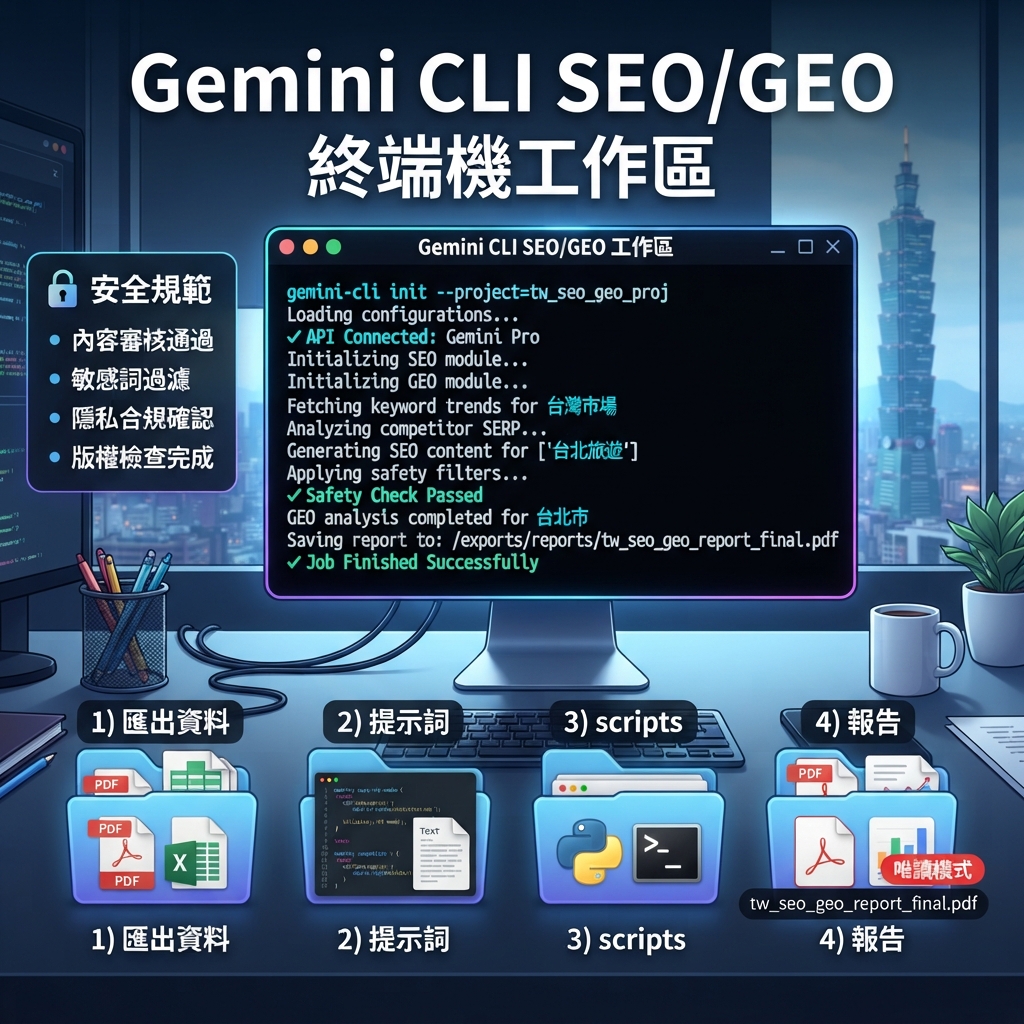
完成後,你應該會有這個結構:
seo-geo/
  exports/
    gsc/
    bing/
    ga4/
    ai-visibility/
  prompts/
    core-prompts.md
  scripts/
    crawl-sitemap.mjs
    compare-snapshots.mjs
  reports/
    first-readonly-report.md

圖說:先讓 Gemini CLI 讀資料、寫報告、提出下一步,不要一開始就讓它修改網站。
開始之前
你需要三樣東西:
需求 | 初學者替代方案 | 更好的版本 |
|---|---|---|
Website repo | 有網站檔案的任一本機資料夾 | 有 build command 的 Git repo |
Gemini CLI | 已安裝並完成登入 | 已安裝並有專案設定 |
SEO data | 手動 CSV 匯出 | GSC、Bing、GA4、AI 能見度快照 |
如果你沒有 API 權限,先用 CSV 檔和 Markdown 筆記開始。工作流程是一樣的。
步驟 1:建立工作區資料夾
在網站 repository root 執行:
mkdir -p seo-geo/exports/gsc seo-geo/exports/bing seo-geo/exports/ga4 seo-geo/exports/ai-visibility
mkdir -p seo-geo/prompts seo-geo/scripts seo-geo/reports seo-geo/qa
建立提示詞庫:
cat > seo-geo/prompts/core-prompts.md <<'EOF'
# Core AI visibility prompts

## Category discovery
- What are the best tools for [your category]?
- How do I solve [main problem] for [audience]?

## Brand evaluation
- What does [brand] do?
- Who is [brand] best for?

## Buying comparison
- [brand] vs [competitor]
- Best [category] software for [audience]
EOF
把括號中的內容換成你的真實 category、audience 和 competitors。
步驟 2:加入一個小型資料樣本
如果你有 Google Search Console,匯出頁面或查詢 CSV,存到:
seo-geo/exports/gsc/2026-07-06-pages.csv
如果沒有 GSC,就先建立手動檔案:
cat > seo-geo/exports/gsc/manual-pages.csv <<'EOF'
url,query,impressions,clicks,ctr,notes
https://example.com/,your category,100,3,3%,homepage query example
https://example.com/blog/example,how to solve problem,50,1,2%,blog example
EOF
AI 能見度可以先建立:
cat > seo-geo/exports/ai-visibility/manual-ai-answers.csv <<'EOF'
prompt,surface,brand_mentioned,citation_url,competitors,notes
best tools for your category,manual,false,,Competitor A;Competitor B,brand missing from category answer
what does brand do,manual,true,https://example.com/about,,answer misses primary audience
EOF
這個小型結構化樣本,可以讓你在接真實 API 之前先測試流程。
步驟 3:先用唯讀模式跑 Gemini CLI
在 repo root 開啟 Gemini CLI。第一個 prompt 不應該要求它編輯。
Inspect this repository as a read-only SEO/GEO terminal workspace.

Do not edit files.
Read:
- seo-geo/prompts/core-prompts.md
- seo-geo/exports/gsc/
- seo-geo/exports/bing/
- seo-geo/exports/ga4/
- seo-geo/exports/ai-visibility/

Return:
1. What data exists.
2. What data is missing.
3. Which pages or prompts look most important.
4. What scripts would be useful later.
5. A safe report format for seo-geo/reports/first-readonly-report.md.
好的回答應該會點名你的實際檔案。如果它只泛泛談 SEO,卻沒有提到 manual-pages.csv 或 core-prompts.md,請停止,要求它重新檢查資料夾。
步驟 4:請 Gemini CLI 寫第一份報告
Create seo-geo/reports/first-readonly-report.md.

Use only the available exports and prompt library.
Include:
- Data files reviewed
- Top search opportunities
- AI visibility gaps
- Pages that need a future review
- Missing data
- Recommended next action

Do not edit website files.
預期輸出:
# First SEO/GEO Read-Only Report

## Data reviewed
- seo-geo/exports/gsc/manual-pages.csv
- seo-geo/exports/ai-visibility/manual-ai-answers.csv

## Top opportunity
| URL | Signal | Why it matters | Next action |

## AI visibility gaps
| Prompt | Brand mentioned? | Citation | Recommended page |

## Missing data
- Bing export missing
- GA4 landing-page export missing

## Next action
Review the homepage for category clarity before editing.
步驟 5:加入簡單的 sitemap crawl script
cat > seo-geo/scripts/crawl-sitemap.mjs <<'EOF'
const sitemapUrl = process.argv[2];
if (!sitemapUrl) {
  console.error('Usage: node seo-geo/scripts/crawl-sitemap.mjs https://example.com/sitemap.xml');
  process.exit(1);
}
console.log(JSON.stringify({ sitemapUrl, status: 'TODO: implement fetch and URL checks' }, null, 2));
EOF
然後問 Gemini CLI:
Review seo-geo/scripts/crawl-sitemap.mjs.
Do not run network requests yet.
Explain how this script should eventually check sitemap URLs, HTTP status, noindex risk, and canonical issues.
步驟 6:定義什麼時候可以編輯
cat > seo-geo/qa/gemini-cli-safety.md <<'EOF'
# Gemini CLI SEO/GEO safety rules

Allowed in read-only mode:
- read exports
- summarize snapshots
- write reports under seo-geo/reports/
- propose scripts

Ask before:
- editing website pages
- changing metadata helpers
- changing schema
- changing redirects, robots, canonicals, sitemap, or analytics

Never invent:
- customers
- testimonials
- awards
- revenue numbers
- rankings
- legal claims
EOF
接著 prompt:
Read seo-geo/qa/gemini-cli-safety.md and summarize what you are allowed to do in this project. Do not edit files.
初學者可直接貼上的 prompt
如果你想要最安全的第一次執行,請在網站 repo root 將這段貼進 Gemini CLI:
I want to set up a beginner-safe SEO/GEO workspace in this repo.

Please do only read-only setup and reporting first:
1. Inspect the repo structure.
2. Confirm whether `seo-geo/` folders already exist.
3. Read `seo-geo/prompts/core-prompts.md` and the exports under `seo-geo/exports/` if they exist.
4. Create or update only `seo-geo/reports/first-readonly-report.md`.
5. Do not edit website pages, metadata helpers, schema, redirects, robots.txt, sitemap, analytics, or deployment files.
6. If data is missing, list the exact CSV or snapshot files I should add next.

Return changed files, data gaps, and the first page I should review manually.
步驟 7:成功檢查清單
檢查 | 通過條件 |
|---|---|
Folder setup |
|
Prompt library |
|
Data sample | 至少有一個 CSV 或 AI visibility snapshot |
Read-only report | Gemini CLI 不改網站檔案也能建立報告 |
Safety rules | 它能摘要哪些東西不能編輯 |
Next action | 報告點名下一個要人工 review 的頁面 |
初學者常見錯誤
- Gemini CLI 還沒讀資料,就要求它編輯網站。
- 把 raw credentials 混進 prompts。
- snapshots 沒有日期。
- 把單一 AI answer 當成可靠趨勢。
- 讓 CLI 未經 review 就改 robots、canonicals 或 redirects。
FAQ
Gemini CLI 適合改頁面文案嗎?
它可以編輯檔案,但不是最容易做 visual page diffs 的第一選擇。先用它做 terminal reports、data analysis 和 scripts。
第一個 automation 應該是什麼?
讀 exports 並產生 action queue 的 read-only report。
沒有 GSC 或 GA4 也可以嗎?
可以。先用 manual CSV files 和 AI answer notes。之後再換成 real exports。
AI coding agents for SEO/GEO 學習路徑
這篇屬於 Gemini CLI SEO/GEO track。請先完成這些 terminal-focused tutorials,再用 operating model 與 editor / workflow agents 搭配。
- Cursor vs Windsurf vs Gemini CLI:SEO/GEO 自動化怎麼選
- 如何設定 Gemini CLI SEO/GEO Automation 工作區
- 如何用 MCP 將 Gemini CLI 接上 SEO 資料
- 如何用 Gemini CLI 做每日 SEO/GEO Monitoring
- 如何用 Gemini CLI Checkpointing 安全修 SEO
- Cursor、Windsurf、Gemini CLI、Codex、Claude Code 的 SEO/GEO 營運模型
下一篇
下一篇:如何用 MCP 將 Gemini CLI 接上 SEO 資料
Sources and notes
- Gemini CLI documentation: Gemini CLI Docs and MCP servers with Gemini CLI。
- Related Auspia guide: Cursor vs Windsurf vs Gemini CLI for SEO/GEO Automation。
Author: Gabriel Finch, Auspia Search Retrieval Researcher,已 review 1,200+ AI Answers。Gabriel 撰寫 retrieval systems、AI discovery 與 search infrastructure workflows。