原則:Cursor 在編輯頁面前,必須先知道你的 SEO/GEO 邊界
Cursor 對 SEO/GEO 很有用,因為許多網站變更真正發生的位置就在 editor 裡:page files、metadata helpers、schema components、content collections 和 pull-request diffs。但這種能力也是風險。如果 Cursor 不知道你的 rules,它可能把 pricing copy、robots rules、customer proof、schema 和 page content 都當成同樣安全的東西來改。
初學者安全設定,是在請 Agent optimize 任何內容之前,先建立 Cursor rule stack。這個 stack 應該告訴 Cursor:網站是什麼、重要檔案在哪裡、它可以改什麼、什麼必須先問、以及如何 validate work。
Cursor rules 用來放穩定 project instructions。Task prompt 用來描述當前 page 或 workflow。不要把 secrets、API keys 或完整 analytics exports 放進 rules。
圖說:Rules 定義 operation boundaries;task prompt 定義這次工作。
Cursor rule stack 應該包含什麼
實用的 SEO/GEO rule setup 有四層:
Layer | 應該放什麼 | Example |
|---|---|---|
User-level preference | 個人工作風格 | “Always show a plan before edits.” |
Project rules | 網站專屬 SEO/GEO standards | Brand facts、file paths、claims policy、validation commands |
Repo docs or AGENTS.md | 團隊共同 conventions | Build commands、review process、release policy |
Task prompt | 當前 page 或 workflow | “Refresh /use-cases/ai-seo only.” |
最大錯誤是把所有東西塞進一個巨大 instruction file。Cursor 不應該在改一個 title tag 前,先讀 40 頁 SEO manual。Project rules 要短,需要時再 reference separate SOP files。
建立專用 SEO/GEO project rule
在你的 website repository 裡,建立 SEO/GEO work 的 rule file。依照 Cursor version 和 team setup,你的 rules UI 或 file path 可能不同,所以請把下面當成 content model,而不是固定路徑。如果專案使用 .cursor/rules/ folder,可以建立這樣的 project rule:
.cursor/rules/seo-geo.mdc
從這份 rule 開始:
# SEO/GEO working rules

## Website context
- Brand: [brand name]
- Domain: https://example.com
- Category: [product/service category]
- Primary audience: [ICP]
- Main conversion goal: [demo / signup / tool usage / contact]

## File map
- Pages live in: [path]
- Metadata lives in: [path]
- Schema helpers live in: [path]
- Blog/content lives in: [path]
- Sitemap/robots logic lives in: [path]
- Analytics code lives in: [path]

## SEO/GEO standards
- Every important page needs a clear title, meta description, canonical, H1, and internal links.
- Prefer concise answer blocks, comparison tables, proof sections, and useful FAQs when they match search intent.
- Make brand facts, product category, audience, use cases, and evidence easy for AI answer systems to extract.
- Do not keyword-stuff headings or create generic sections that could fit any company.

## Approval boundaries
Ask before changing:
- pricing, legal claims, testimonials, customer logos, statistics, guarantees, or competitor claims;
- robots.txt, noindex logic, canonicals, redirects, sitemap generation, analytics, or tracking scripts;
- shared components that affect many pages;
- production deployment configuration.

Never invent:
- customers, reviews, ratings, awards, integrations, revenue numbers, screenshots, or case-study results.
Mark missing evidence as TODO.

## Validation
Before final response after edits:
- summarize changed files;
- run the detected build/lint/typecheck command when available;
- explain any skipped validation;
- list remaining SEO/GEO risks.
這份 rule 不會神奇地讓 Cursor 變聰明。它只是讓 agent 比較不容易做出 unsafe assumptions。
寫 rule 前,先請 Cursor inspect repo
如果你不確定 pages 或 metadata 放在哪裡,先請 Cursor inspect:
Inspect this repository for SEO/GEO work.

Do not edit files yet. Return:
1. Framework and routing system.
2. Where pages, content, metadata, schema, sitemap, robots, analytics, and components live.
3. Build/lint/typecheck commands from package files.
4. Files that should require approval before modification.
5. A proposed Cursor SEO/GEO project rule.
6. Unknowns I need to confirm.

Do not invent paths. If you are unsure, say so.
接著 review proposed rule。檢查 Cursor 是否正確找到 framework、page folders 和 commands。如果它猜錯,先手動修 rule,再用 Agent mode 做 SEO work。
初學者應該使用的 approval gate
有些 SEO edits 風險低,有些會傷害流量或造成 legal problems。直接把差異寫進 rules。
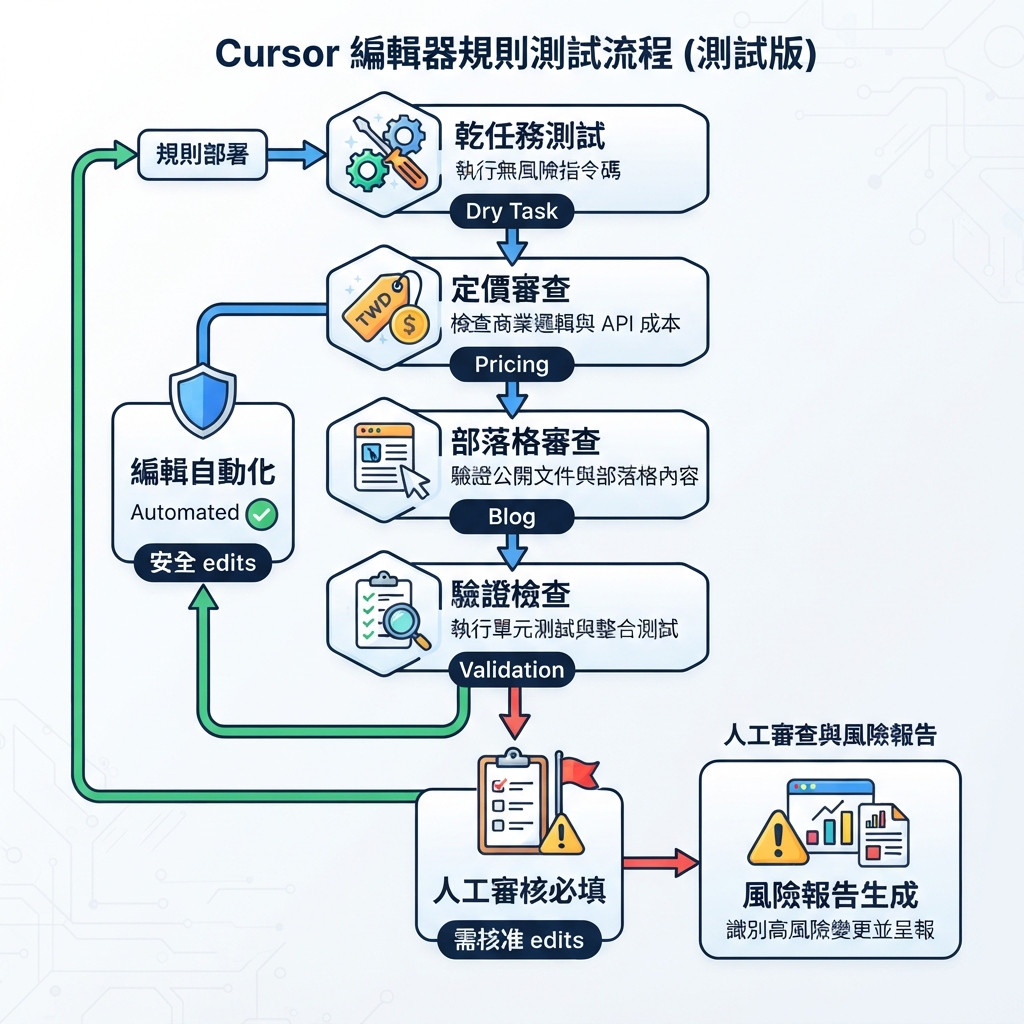
圖說:讓 Cursor 處理低風險 items;strategic/indexing changes 先問;proof 絕不捏造。
核准後可提案並編輯 | 先詢問 | 絕不捏造 |
|---|---|---|
title/meta 草稿 | robots.txt 變更 | testimonials |
直接答案區塊 | canonical 策略 | 客戶 logos |
FAQ 改善 | redirects | 統計數字 |
internal link 建議 | pricing 或 legal claims | 獎項 |
alt text | analytics/tracking | 第三方背書 |
page-level schema 草稿 | shared templates | 案例結果 |
第一週,要求任何 edit 都要 approval。等你信任 workflow 後,可以允許 low-risk page-level edits,但 indexing 和 claims 仍要 explicit approval。
更好的 Cursor SEO page prompt
不要這樣 prompt Cursor:
Optimize this page for SEO and GEO.
改用這個:
Use the SEO/GEO project rules.

Task: refresh only this page: [URL or file path].

Before editing, return a diagnosis table with:
- current search intent
- likely target keyword or query theme
- GEO question this page should answer
- title/meta issue
- H1/H2 issue
- missing answer block or comparison section
- internal link opportunities
- schema risks
- claims that need proof
- files you plan to edit

Wait for my approval before making changes.
核准 plan 後,用第二段 prompt:
Apply only the approved page-level edits.

Constraints:
- Do not change pricing, legal claims, testimonials, or analytics.
- Do not edit shared components unless you ask first.
- Mark missing proof as TODO.
- Keep the page useful for humans, not just search engines.
- Run the build or explain why it cannot run.

Final response should include changed files, validation results, risks, and what to measure after publishing.
這種 split prompt 比一鍵 automation 慢,但它會教初學者如何 review agent。
Example:SaaS use-case page 的 rules
假設頁面是 /use-cases/ai-search-visibility。好的 Cursor diagnosis 可能會產出:
Area | Diagnosis | Suggested action |
|---|---|---|
Search intent | 使用者想了解如何追蹤 AI 搜尋能見度 | 在頁面上方加入直接答案 |
GEO extractability | 品牌分類和 workflow 說得不夠清楚 | 加入約 80 字的「產品做什麼」區塊 |
Proof | 頁面說「受到團隊信任」但沒有證據 | 改成 TODO 證據欄位 |
Internal links | 沒有連到相關量測指南 | 加一個相關 internal link |
Schema | 有 FAQ schema,但 questions 太 generic | 重寫 FAQ;若內容不支持就移除 schema |
CTA | CTA 寫「開始使用」,但 offer 其實是 audit | 修改 CTA copy,讓它符合 offer |
接著 Cursor 可以用 narrow diff 編輯頁面。這比要求 full rewrite 更好,因為 scope 和 reviewability 都保留下來。
加一條 internal links rule
SEO/GEO teams 常常在 AI agent 幫忙時 overdo internal links。加一條 rule:
## Internal link policy
- Add internal links only when they help the reader take the next logical step.
- Prefer 1-3 relevant links per article or page section, not a dense link block.
- Use descriptive anchor text.
- Do not force links to tools or service pages unless the page intent supports it.
- If suggesting a new link target, explain why it helps SEO/GEO and the user journey.
這可以避免 Cursor 把每篇文章變成 link farm。
加一條 schema rule
如果 shared helper 被改壞,schema errors 可能擴散。使用這條 rule:
## Schema policy
- Use schema only when the page content supports it.
- Do not add fake ratings, reviews, prices, organizations, authors, or FAQs.
- Ask before changing shared schema helpers.
- After schema edits, explain the schema type, required fields, and validation risk.
對初學者來說,schema 不是展現聰明的地方。先讓 page accurate。
加一條 GEO answer blocks rule
GEO-focused pages 應該容易被 answer engines extract,但仍然要自然可讀。
## GEO answer blocks
When useful, add one concise answer block near the top of important pages.
The block should answer:
- what the product/page/topic is;
- who it is for;
- what problem it solves;
- what evidence supports it;
- what the reader should do next.
Keep it factual and avoid exaggerated claims.
這給 Cursor 一個可重複 content pattern,但不會把每頁都強迫套成同一模板。
如何測試 Cursor rules 是否有效
跑一個 dry task:
Using the current project rules, review `/pricing` for SEO/GEO issues.
Do not edit. Tell me which changes would require approval and why.
好的 answer 應該拒絕直接重寫 pricing claims,並標出 legal、conversion 和 evidence risks。如果 Cursor 把 pricing 當成一般 marketing copy,請強化 rules。
再跑另一個 dry task:
Using the current project rules, review one blog article and suggest safe improvements only.
Do not edit. Separate safe edits from approval-needed edits.
好的 answer 應該分開 metadata、headings、internal links、evidence、schema 和 publishing risks。
常見錯誤
- 寫 vague rules。「Make SEO better」不是 rule。
- 跳過 file paths。Cursor 需要知道 pages、metadata、schema 和 commands 在哪裡。
- 把 secrets 放進 rules。Rules 不是 credential store。
- 太早讓 Cursor edit shared templates。一個 template change 可能影響數百個 URLs。
- 不要求 validation。任何會影響 code 的 SEO task,都應在可用時跑 build/lint/typecheck。
- 讓 rules stale。Framework changes、site migrations 或 positioning updates 後,要 review rules。
它在更大的 AI-agent stack 裡扮演什麼角色
這個 Cursor setup 是 page-editing lane。當你從更大的 Cursor vs Windsurf vs Gemini CLI SEO/GEO comparison 裡選擇 Cursor 後,再使用這套設定。需要 repeatable team workflows 時,用 Windsurf。需要 terminal data monitoring 時,用 Gemini CLI。需要對真實 page 或 component 做 careful、visible diff 時,用 Cursor。
FAQ
Cursor rules 應該包含我的 keyword list 嗎?
只放穩定的 category language 和 strategic query themes。完整 keyword lists 放在有日期的 CSV 或 markdown files,因為 keyword data 會變。
Cursor rules 可以取代 human SEO review 嗎?
不行。Rules 減少可避免的 mistakes。Claims、indexing changes、pricing language 和 production deployment 仍然要人核准。
應該讓 Cursor 一次 edit 所有 SEO pages 嗎?
一開始不要。從一個 page、一份 diagnosis、一個 approved diff 和一份 validation report 開始。
GEO 最重要的 rule 是什麼?
不要捏造 proof。GEO 依賴清楚、有證據支持的 entity facts。如果缺 evidence,Cursor 應該標成 TODO,而不是編出來。
AI coding agents for SEO/GEO 學習路徑
這篇屬於 Cursor SEO/GEO track。先完成 Cursor-focused tutorials,再進到 Windsurf 或 operating model:
- Cursor vs Windsurf vs Gemini CLI:SEO/GEO 自動化怎麼選
- 如何設定 Cursor Rules 做 SEO/GEO 工作
- 如何用 Cursor Plan Mode 安全更新 SEO 頁面
- 如何用 MCP 將 Cursor 接上 SEO 資料
- 如何用 Cursor Cloud Agents 做 SEO/GEO PR Reviews
- 如何建立 Windsurf Cascade Workflows 做 SEO/GEO
- Cursor、Windsurf、Gemini CLI、Codex、Claude Code 的 SEO/GEO 營運模型
下一篇
上一篇:Cursor vs Windsurf vs Gemini CLI:SEO/GEO 自動化怎麼選
下一篇:如何用 Cursor Plan Mode 安全更新 SEO 頁面
Sources and notes
- Cursor documentation hub: Cursor Docs,包含 Agent、Rules、MCP、Skills、CLI 與 related capabilities 的公開文件。
- Related Auspia guide: Cursor vs Windsurf vs Gemini CLI for SEO/GEO Automation。
Author: Alice Monroe, Auspia AI SEO Tools Analyst Covering 150+ Tools。Alice 撰寫 AI SEO tools、software workflows 與 growth teams 的 practical platform selection。