Most of the AI in your SEO stack is a text generator doing a job that does not need text.
You ask it to sort two hundred keywords by intent, and it writes you two hundred paragraphs of reasoning you did not ask for. You ask it whether a page already links to another page, and it produces a confident sentence instead of a yes or no. You pay per token for all of it, and you send your client's data to someone else's server to get it.
There is a different kind of model for this work. It does not write. It decides.
Laya is one of those models, and it is the open one. It is free, it runs on your own machine, and you can inspect and modify it. This article explains what it is, what it is not, how to get it running, and the two failure modes that will produce confident wrong answers if you skip the setup.
The short answer
Laya is an open-source decision model. You give it a piece of text or a JSON object, plus a question with a fixed set of possible answers. It returns the answer with a probability attached, in a single pass, in tens of milliseconds, without generating any text.
It was released under the Apache 2.0 license on 18 September 2026, three days after a closed commercial model called Jev popularized the same idea. Laya is the open answer to it: same concept, different deployment model. Where Jev is a hosted API you pay for, Laya is weights you download and run yourself.
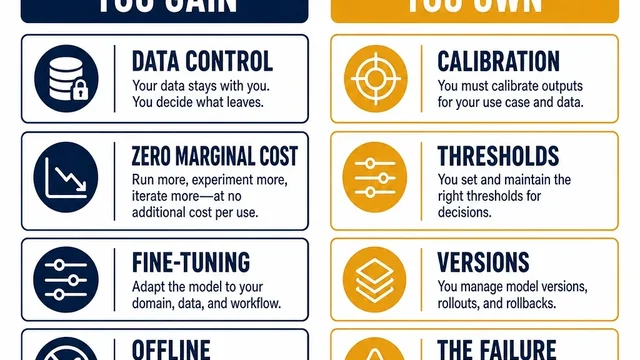
That difference is the whole point of this series. It changes your data handling, your cost structure, and what you are able to customize.
What makes a decision model different
A language model generates text token by token. That is why it is slow, expensive, and prone to inventing things.
A decision model does none of that. It reads your input and your question, and it produces a probability distribution over the answers you defined. There is no text to hallucinate, because there is no text generation step at all. There is no JSON to fail to parse, because the output is already structured.
This matters more than it sounds for SEO and GEO work, because most of that work is not writing. It is deciding.
Consider what an SEO actually does all day:
- Is this query informational, comparative, transactional, or navigational?
- Does this page already satisfy that intent, or do we need a new one?
- Should these two pages be merged, or kept separate?
- Does this passage have a real reason to link to that page?
- Is this draft thin, or is it fine?
- Did this AI answer mention our brand, or only our competitor?
Every one of those is a small judgment with a fixed set of outcomes. That is exactly the shape a decision model is built for, and it is exactly the shape a text generator is wasteful for.
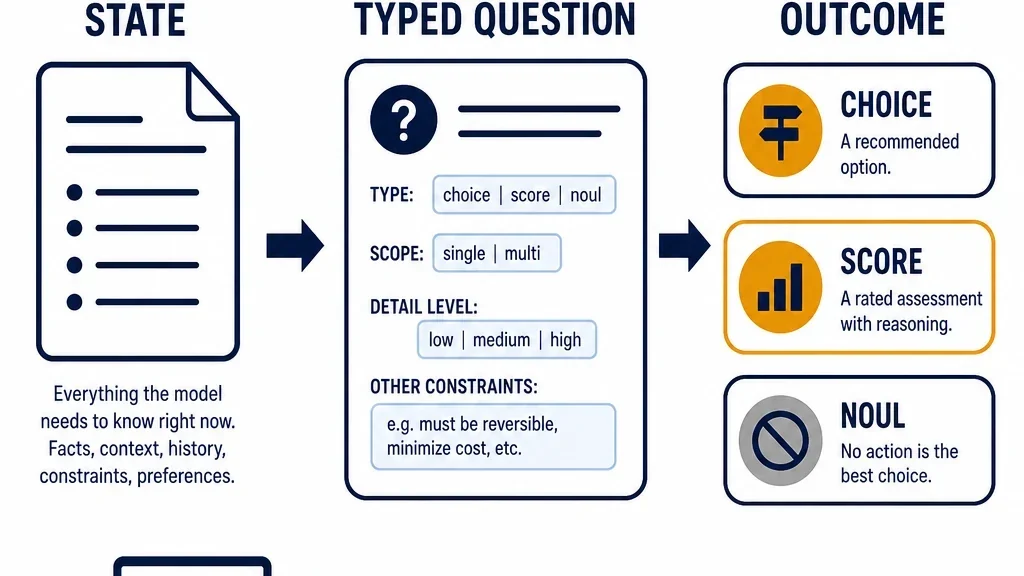
The three decision types
Laya answers three kinds of questions. Everything you build with it is one of these three, so it is worth learning them properly.
choice — pick one from a list
You provide the options, and Laya returns a probability for each.
SEO example: "Which search intent does this query have?" with options learn, compare, buy, navigate, brand.
You get back something like learn: 0.91, compare: 0.06, buy: 0.02, navigate: 0.01, brand: 0.00. The full distribution is the useful part, not just the winner. A query that comes back compare: 0.48, buy: 0.45 is genuinely ambiguous, and you want to know that.
score — rate on a scale
You define an ordered scale, and Laya returns the expected value.
SEO example: "How well does this page answer the question in this passage?" on a 0 to 4 scale from not at all to completely.
This is the type you use for relevance, quality, and priority judgments. It is also the type most likely to be misused, because people treat the returned number as a precise measurement when it is really a calibrated opinion.
noul — yes or no
You state a proposition, and Laya returns the probability that it is true.
SEO example: "This page already contains a link to that page." You get back a single probability.
The name comes from the underlying research and is worth remembering, because it is the cheapest question type and the one you should use to filter large candidate sets before doing anything more expensive.
A practical note on `choice`: keep the option list to roughly twenty or fewer. Laya's options share a fixed budget of 256 tokens in the model's output head, so a very large label set leaves too few tokens per label and accuracy falls off sharply. If you have forty intent labels, you do not ask one question with forty options. You ask a cascade of narrower questions. That pattern gets its own article in this series.
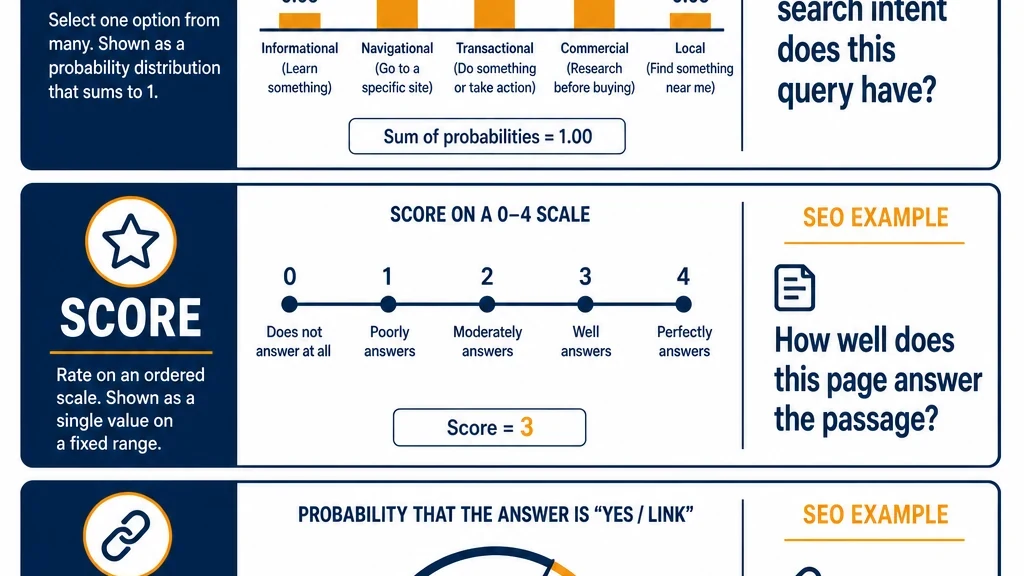
Three question types. Everything you build with Laya is one of these.
The four-stage loop
Every workflow in this series follows the same shape. It is worth internalizing now, because it is what keeps these systems honest.
generate and reason -> decide -> execute -> reviewGenerate and reason. A language model, or you, produces the material: the draft, the candidate list, the captured answers, the page inventory. This is where the expensive model does its work.
Decide. Laya answers the fixed questions about that material. This is the cheap, fast, high-volume step.
Execute. Ordinary code takes the decisions and does something with them: writes a spreadsheet, queues a task, applies an edit, sends a request for review.
Review. Low-confidence decisions and anything with real consequences go to a human.
The reason this loop matters is that it puts the expensive model where it is actually needed and the cheap model where the volume is. It also puts a human at the end, which is the only thing that makes any of it safe to ship.
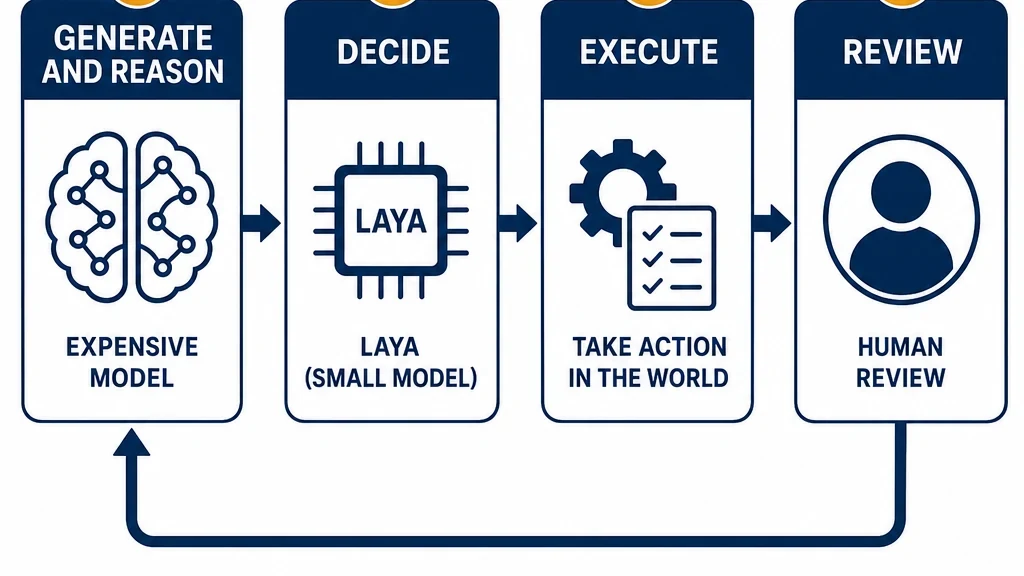
The expensive model reasons. Laya decides. Code executes. A human reviews.
How to install Laya
Laya is distributed as weights on Hugging Face and as a Python package. There is no API key, no account, and no per-call cost.
Option 1: the Python package
pip install layaOption 2: load the weights directly
from transformers import AutoModel

model = AutoModel.from_pretrained(
    "convaiinnovations/laya",
    device_map="auto",
)
device_map="auto" will use a GPU if one is available and fall back to CPU if not. The model is small enough to run on a laptop.
Which checkpoint to use
There are two you will care about:
- The English base checkpoint, around 421M parameters, with a 512-token context. Use this for English-only work.
- The multilingual checkpoint, around 322M parameters, with a 1024-token context, covering more than a hundred languages.
If your content is not English, use the multilingual checkpoint. This is not optional, and the next section explains why.
Hardware
Laya runs on a GPU, on Apple Silicon, and on CPU. Reported latency is roughly 40 milliseconds per decision for the English checkpoint on a mid-range GPU, and lower on Apple Silicon through an optimized runtime. Memory use is under a gigabyte, which means you can run it alongside your other tools on a normal development machine.
Wiring Laya into your agent
If you use a coding agent or an agent framework, you can give it Laya as a tool rather than calling the model yourself. The pattern is the same everywhere: expose a function that takes a state and a question, and returns the typed answer.
The shape of the tool
def decide(state: dict, questions: dict) -> dict:
    """
    state: the text or JSON the decision is about
    questions: named questions, each with a type and criteria
    returns: each question mapped to its answer and confidence
    """
    # call Laya, return the typed result
Register that function with your agent, and the agent can call it whenever it needs a judgment. Because the output is structured, the agent does not have to parse prose, and because the model is local, nothing leaves the machine.
Why this is worth doing
An agent that reasons with a large model and decides with Laya is cheaper and faster than one that reasons and decides with the large model. The large model still does the hard thinking. Laya handles the high-volume small calls. That split is the entire value proposition.
The exact wiring differs by agent, but the interface does not. If your agent can call a Python function, it can call Laya.
The two failure modes that will bite you
This is the section most introductions skip, and it is the one that will save you the most time.
Failure mode 1: script blindness
Laya's English checkpoint is English-only. If you feed it content in another script, it may not just perform poorly. It may perform poorly and be extremely confident about it.
There is a documented case where the English checkpoint scored 0.080 accuracy on Bengali script while reporting 0.945 confidence. That is the worst possible combination: a wrong answer you would never think to question.
The fix: route by script before you decide anything. If your content is not in the script your checkpoint was trained on, send it to the multilingual checkpoint. Laya ships with a router for exactly this purpose. Use it. Do not assume the model will notice that it cannot read the input.
Failure mode 2: overconfidence in general
Laya's probability outputs are not perfectly calibrated. Its reported calibration error is worse than the closed alternative's, and the temperature parameter used to tune it was fitted on training data.
Practically, this means you should not take the confidence number at face value. A 0.9 from Laya does not mean a 90% chance of being right.
The fix: set your confidence threshold from your own labeled data, not from the model's documentation. Run Laya over a few hundred decisions you have already made by hand, look at where it agrees and where it disagrees, and pick a threshold that gives you an acceptable error rate on the decisions you plan to automate. Anything below that threshold goes to a human.
What Laya is not
Three things, stated plainly, because the hype around this model class has been considerable.
It is not a chatbot. It cannot hold a conversation. It answers the questions you define.
It is not a writer. It will not draft your meta descriptions or your article. That is a language model's job, and it is a different stage of the loop.
It is not accurate out of the box for your task. The base checkpoint's zero-shot accuracy on the benchmark its own authors published is 0.362, which they describe as close to random. The headline number that gets quoted, 0.766, came from a checkpoint fine-tuned on that benchmark's training data. If your task is specific, expect to fine-tune or to accept a lower accuracy than the marketing suggests.
That last point is not a reason to avoid Laya. It is a reason to test it on your own data before you trust it, which is good practice for any model.
A five-minute first decision
Before you build anything, run one real decision through it.
Pick twenty queries from your own Search Console export. Write a choice question with four intent options. Run them through Laya. Then read the twenty answers yourself and count how many you agree with.
That number is your baseline. If it is high enough to be useful, you have a workflow. If it is not, you have learned something important in five minutes instead of five weeks.
And check the confidence values on the ones you disagreed with. If Laya was unsure, your threshold will catch them. If Laya was confident and wrong, you have found the boundary of what this model can do for you, which is just as valuable.
What to do next
Install Laya, run the twenty-query test, and note your agreement rate and your confidence distribution. Keep both numbers. Every article in this series builds on them, and by the end you will have a measured picture of what this model can and cannot do for your SEO and GEO work.
The next article covers the part nobody writes about: what running Laya locally actually costs, and when it is genuinely cheaper than paying per call.
Read the rest of the series
This article is part of a thirteen-part series on using Laya for SEO and GEO work.
- Start here: how to use Laya for SEO and GEO
- Running Laya locally: hardware, latency, and the real cost model
- Laya for search intent classification at scale
- Fine-tuning Laya on your own SEO labels
- Laya as a local reranker for internal search and RAG
- Laya for GEO answer scoring, offline
- Laya for content audits: keep, update, merge, remove
- Laya for internal linking, and where it breaks
- Guardrails: using Laya to check your own agents
- Laya vs Jev: an honest decision guide
- Building a hybrid stack: Laya local, Jev cloud
- The open-model trade: what you own when you self-host
Author: Maya Ellison, 12-Year GEO Strategy Researcher at Auspia. Maya writes about AI search visibility, brand entity clarity, and practical GEO operating systems for growth teams.