Ask an SEO what they did with their last keyword export and you will usually hear some version of "I sorted by volume and looked at the top few hundred rows."
That is not laziness. A real site produces tens of thousands of query rows, and there is no practical way to read them all and tag each one by intent. So teams sample, and the sample is biased toward whatever they sorted by.
The interesting problems are not in the top rows. They are in the long tail, where a query has enough impressions to matter and nobody has ever looked at it.
Classifying a full export is a decision problem with a fixed answer set, which makes it a good fit for Laya. This article walks through the complete workflow, including the design constraint that trips up most first attempts.
What you will finish with
A classified export where every query row carries:
- An intent label from your own taxonomy
- A confidence value
- A routing decision: auto-accept or send to human review
- A record of which questions were asked, so the run is reproducible
Who this is for: an SEO who already has a keyword or Search Console export and wants intent labels on all of it rather than a sample.
Prerequisites:
- Laya installed and running, or an agent with Laya available
- A keyword export with at least the query text and a volume or impressions column
- A written intent taxonomy, even a rough one
- Fifty queries you have already labeled by hand, for measurement
Definition of done: every query has a label and a confidence value, nothing below your threshold is treated as final, and you know your accuracy on the fifty-query sample.
Before you start: the constraint that shapes everything
Laya's choice questions share a fixed budget of 256 tokens in the model's output head. Every option you add consumes part of that budget.
This has a hard consequence: keep your option list to roughly twenty or fewer. Past that, each label gets too few tokens, and accuracy falls off sharply. In published testing, a 77-label classification task scored 0.425 on Laya against 0.870 on the closed alternative.
Most SEO intent taxonomies have more than twenty labels. Yours probably does. So the central design decision in this workflow is not the prompt. It is how you split the taxonomy into a cascade of narrow questions.
Get that right and the rest is straightforward. Get it wrong and you will conclude the model does not work when the real problem is the question design.
Design the cascade, not the prompt
A cascade means you ask a small number of questions in sequence, each with a narrow option set, and each question narrows the next one.
Step 1: Group your taxonomy into families
Take your full label list and group it into a small number of families. Four to six is a good target.
For a typical B2B site:
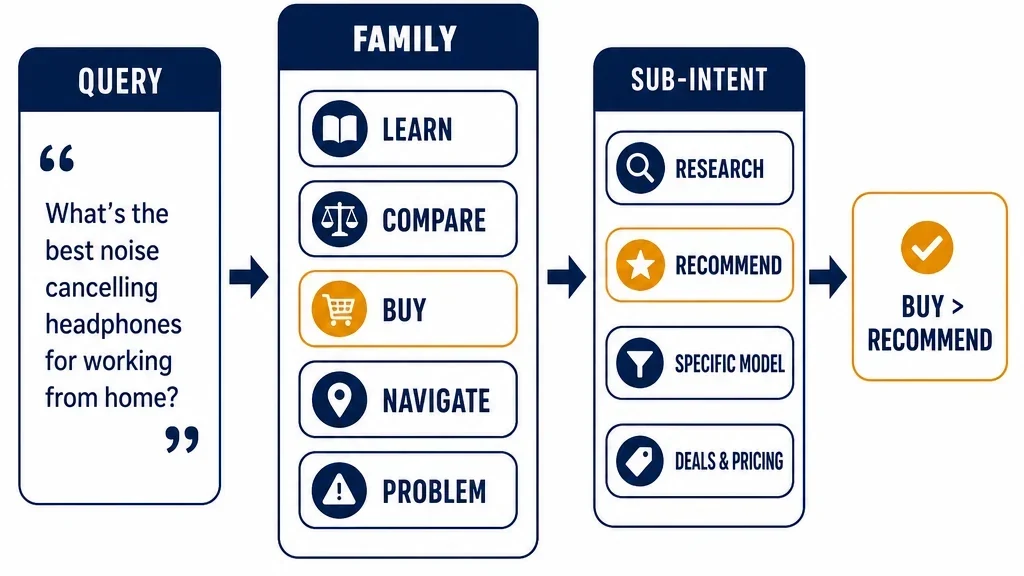
- Learn — how does it work, what is it, definitions
- Compare — best, versus, alternatives
- Buy — pricing, plans, subscription, demo
- Navigate — brand plus a specific page or login
- Problem — symptoms, errors, troubleshooting
That is five options for the first question. Well inside the limit.
Step 2: Write the family question
Which family does this query belong to?

learn    — the searcher wants to understand a concept or process
compare  — the searcher is weighing options against each other
buy      — the searcher is evaluating price, plans, or committing
navigate — the searcher is looking for a specific page or brand property
problem  — the searcher is trying to fix something that is broken
Give one concrete example per option. This matters more than it sounds. A vague option description is the most common cause of a confidently wrong answer.
Step 3: Write the sub-questions
For each family, write a second question with its own narrow option set.
The query is in the compare family. Which sub-intent?

head_to_head — comparing two named products directly
alternatives — looking for substitutes for one named product
best_of      — looking for a ranked list within a category
criteria     — looking for what to evaluate rather than a product
Four options. Again, well inside the limit.
Step 4: Chain them
Run the family question first. Then run the matching sub-question. Two decisions per query, both narrow, instead of one decision with forty options.
Why this works better than one big question: each decision is a small, well-defined judgment with a handful of plausible answers. That is the shape the model handles well. A forty-option question is not harder in a way the model can compensate for, because the option budget is a hard architectural limit, not a difficulty setting.
The cost: two decisions per query instead of one. At local inference speeds this is irrelevant. If you were paying per call it would matter, which is one more reason local is a good fit for this workload.
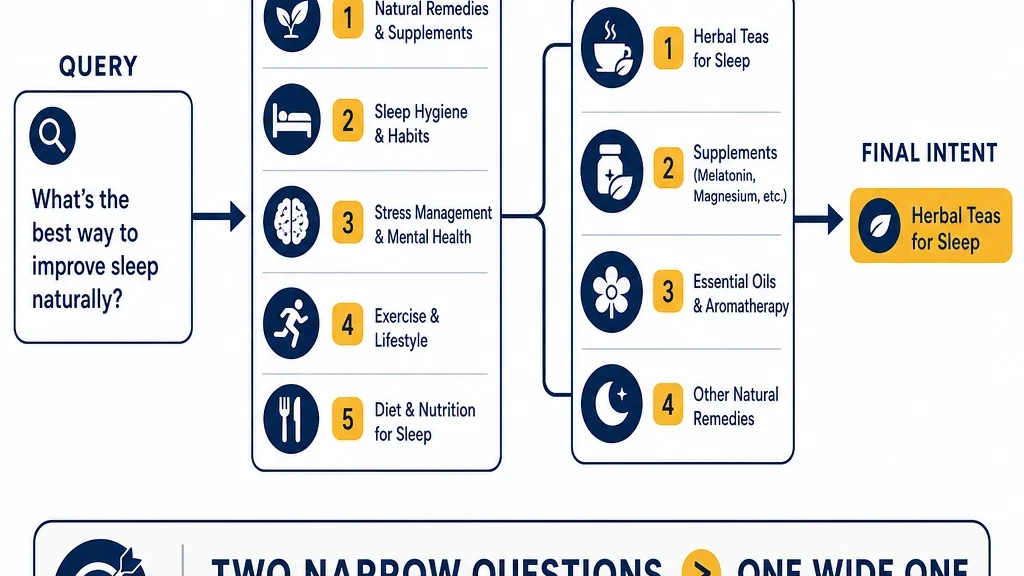
A cascade of narrow questions instead of one wide one. Two cheap decisions beat one unreliable one.
Run it in batches
Once the cascade is written, the run itself is mechanical.
Prepare the input
Keep the state minimal. Send the query text and only the context the decision actually needs.
{
  "query": "hubspot vs salesforce for small teams",
  "page_title": "CRM Comparison Guide",
  "existing_url": "/blog/crm-comparison"
}
Do not send the whole page. The decision is about the query, and extra context makes the judgment noisier, not better.
Run the family pass
Send every query through the family question. Store the full probability distribution, not just the winner.
The distribution is where the useful signal lives. A query that comes back compare: 0.51, learn: 0.44 is genuinely ambiguous, and you want that row flagged even though the model picked a winner.
Run the sub-question pass
Group the queries by their family result and run the matching sub-question for each group. This is faster than running every sub-question against every query, and it keeps the inputs consistent.
Store everything
For each query, keep:
- The family result and its full distribution
- The sub-question result and its full distribution
- The final label
- The confidence for each decision
- The question text used, so the run is reproducible
That last one matters more than people expect. Six months from now you will want to know exactly what you asked.
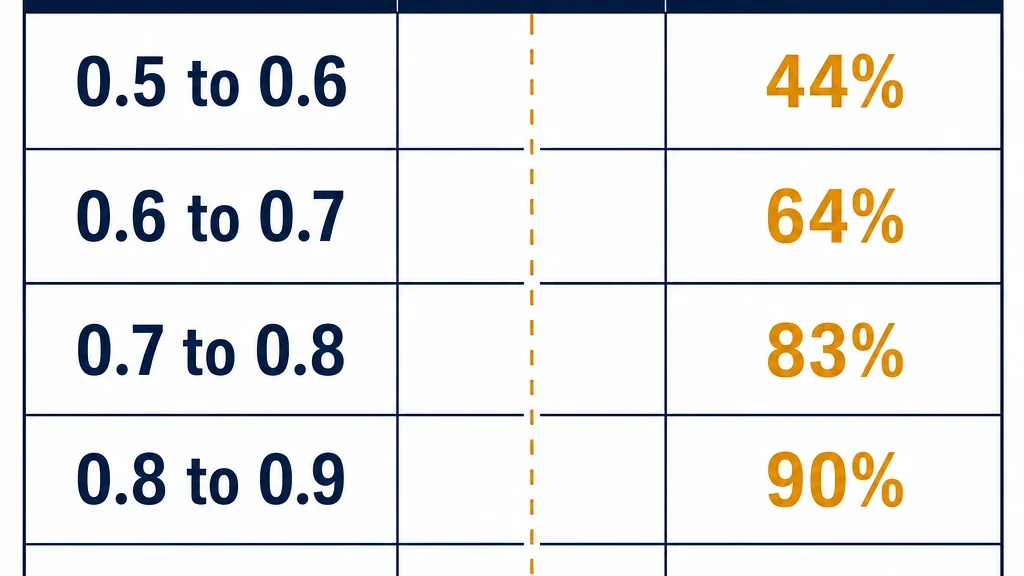
Confidence buckets from a worked example. Illustrative numbers only.
Set your confidence threshold from your own data
This is the step that turns a pile of labels into something you can trust.
Laya returns a confidence value with every decision, derived from how concentrated the probability distribution is. But the number is not perfectly calibrated, and its reported calibration error is worse than the closed alternative's. A 0.9 from Laya does not mean a 90% chance of being right.
So do not pick a threshold from the documentation. Measure it.
The procedure
- Take your fifty hand-labeled queries.
- Run them through the cascade.
- Compare Laya's final label to your label. Record agreement.
- Bucket the results by confidence: 0.5 to 0.6, 0.6 to 0.7, and so on.
- Look at the accuracy within each bucket.
You are looking for the confidence level above which the model is right often enough for you to accept it without review.
A worked example, with invented numbers so you can see the shape:
Confidence bucket | Queries | Agreement |
|---|---|---|
0.5 to 0.6 | 9 | 44% |
0.6 to 0.7 | 11 | 64% |
0.7 to 0.8 | 12 | 83% |
0.8 to 0.9 | 10 | 90% |
0.9 to 1.0 | 8 | 100% |
In this example, a threshold of 0.8 gives you roughly 90% agreement on the auto-accepted rows and sends the rest to review. That may or may not be good enough for your use case, and only you can decide that.
If the buckets are flat, meaning accuracy is roughly the same at every confidence level, then the confidence value is not informative for your task and you should not build a routing rule on it. That is a real finding, and it usually means your option criteria are too vague.
Verify before you trust the output
Three checks before you act on the classified export.
Hand-check the auto-accepted rows. Take twenty rows above your threshold and read them. If you disagree with more than one or two, your threshold is too low or your criteria are ambiguous.
Look at the ambiguous distributions. Pull the rows where the top two options were within 0.1 of each other. These are the queries where your taxonomy may not have a clean answer, which is useful information about your taxonomy, not just about the model.
Check for systematic bias. If one label is over-applied, the criteria for that option are probably too broad. This is the most common failure mode, and it is invisible in an aggregate accuracy number.
What to do with the output
The classified export is not the deliverable. The worklist is.
Queries with no matching page. These are content gaps. Sort by impressions and work down.
Queries mapped to a page with the wrong intent. A comparison query landing on a definition page is a mismatch, and it is usually a faster fix than writing something new.
Queries where two pages compete. If two URLs both match the same query intent, you have cannibalization, and the classification makes it visible.
Low-confidence rows. These go to a human. Do not skip this, and do not let the queue grow unbounded. If your low-confidence bucket is huge, your taxonomy needs work before your model does.
Maintain it
Re-run monthly. Query mixes shift, and a taxonomy that fit six months ago may not fit now.
Re-measure after any model change. A new checkpoint is a new model. Your threshold was measured against the old one.
Watch the low-confidence rate. If it climbs over time, either your content is drifting into new topics or your taxonomy has stopped matching your business. Both are worth knowing.
Keep the hand-labeled set. Fifty queries is enough to start. Grow it over time by saving the rows you review. After a few months you will have a few hundred labels, which is also the starting point for fine-tuning.
What to do next
Write your cascade, run it on your full export, and measure your agreement on fifty hand-labeled queries. Then set a threshold and look at how many rows land above it.
If a large share of your export is auto-acceptable, you have a workflow you can run every month. If most of it lands in review, the fix is usually the criteria, not the model. Tighten the option descriptions, add one concrete example per option, and run it again.
And if you find that the model keeps getting a specific sub-intent wrong no matter how you write the question, that is exactly the case for fine-tuning, which is covered later in this series.
Read the rest of the series
This article is part of a thirteen-part series on using Laya for SEO and GEO work.
- Start here: how to use Laya for SEO and GEO
- What Laya is: the open decision model, explained
- Running Laya locally: hardware, latency, and the real cost model
- Fine-tuning Laya on your own SEO labels
- Laya as a local reranker for internal search and RAG
- Laya for GEO answer scoring, offline
- Laya for content audits: keep, update, merge, remove
- Laya for internal linking, and where it breaks
- Guardrails: using Laya to check your own agents
- Laya vs Jev: an honest decision guide
- Building a hybrid stack: Laya local, Jev cloud
- The open-model trade: what you own when you self-host
Author: Simon Vale, 11-Year Search Intent Researcher at Auspia. Simon writes about buyer queries, SERP patterns, intent mapping, and content alignment.