Internal linking is the best-fitting SEO task for a decision model, and it is also the task where a naive implementation fails hardest.
Both of those statements are true, and understanding why is the difference between a workflow that works and a weekend you do not get back.
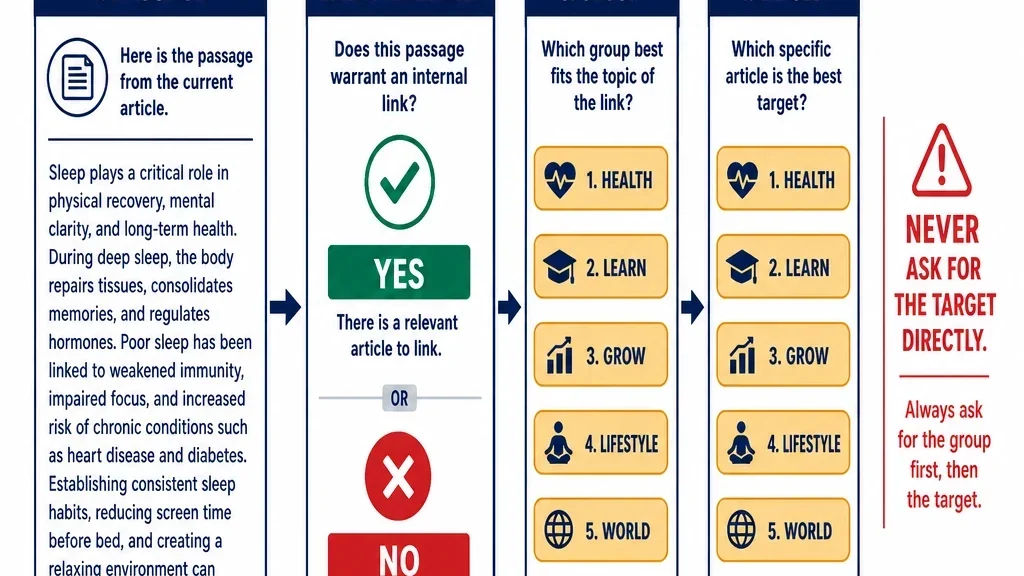
The reason it fits so well: internal linking is not a writing task. It is thousands of small yes/no judgments. Does this passage have a real reason to link to that page? That is exactly the shape a decision model is built for, and it is the shape a text generator is wasteful for.
The reason it fails so easily: the moment you ask the model to choose which page to link to, you have turned a good question into a wide-option choice question, and that is where Laya is weakest.
This article covers the workflow, the limit, and the design that works around it.
What you will finish with
A proposed internal link list where every row carries:
- A source page and passage
- A target page
- A link decision with a confidence value
- A routing decision: auto-accept or human review
Plus a clear understanding of which part of this task Laya does well and which part you should not ask it to do.
Who this is for: an SEO who has already run the intent or audit workflows and wants to add internal linking.
Prerequisites:
- Laya installed and running locally
- A crawl of your site with page titles, headings, and body text
- A candidate-narrowing step before the model sees anything
- Fifty link decisions you have already made by hand, for measurement
Definition of done: you have a proposed link list with confidence values, you know your agreement rate on the fifty-page sample, and nothing has been applied to the site without review.
The task, split into two questions
The mistake is treating internal linking as one problem. It is two, and they have very different difficulty.
Question 1: should this passage link to this specific page? This is a noul question. Yes or no. It is narrow, well-defined, and exactly what the model handles well.
Question 2: which page should this passage link to? This is a choice question with as many options as you have pages. It is wide, and it is where accuracy collapses.
The workflow below answers question 1 with Laya and question 2 with cheap similarity search plus a narrow shortlist. That split is the entire design.
Step 1: narrow the candidates before the model sees anything
Do not hand Laya every page pair. On a five-thousand-page site that is twenty-five million pairs, and even if you could afford the compute, the results would be unusable.
Instead, do the cheap narrowing first.
- Chunk your pages into passages. A passage is a paragraph or a short section, not a whole page.
- Embed the passages and the candidate pages. Any embedding model works. You are looking for a reasonable shortlist, not precision.
- Retrieve the top candidates per passage. Around fifteen is a workable number.
- Skip pairs that already link. No point proposing a link that exists.
Now, for each passage, you have a list of roughly fifteen candidate targets. That is a size the model can reason about precisely, and it is a size where a choice question is still meaningful.
Step 2: write the link question
This is the question Laya is good at.
Should this passage contain a link to the candidate page?

true  — the passage discusses a concept, entity, or process that the candidate
        page explains in more depth, and a reader would benefit from following it

false — the connection is only topical, or the candidate page does not add
        anything the reader needs at this point
Two things make this question work.
It is a `noul` question. Yes or no. The cheapest and most reliable question type.
The criteria name the reader's benefit. "A reader would benefit from following it" is doing real work. Without it, the model will approve any topically related link, which is how you end up with a site where every mention of a common term is a link.
Step 3: run it, and read the probabilities
Run the question for every passage-candidate pair that survived narrowing. Store the full probability, not just the decision.
A pair that comes back true: 0.54 is a different situation from one at true: 0.95, even though both are a yes. The first is a coin flip and should be reviewed. The second is a confident approval.
Do not filter by confidence yet. You need the unfiltered set to measure recall, which is the next step.
Step 4: measure recall, not just precision
This is the step that separates a real benchmark from a marketing number.
Take a sample of pages you can actually read, twenty to thirty is enough. For each, note which links a human would place. That is your reference set.
Then compute two numbers:
Precision — of the links Laya proposed, how many would a human keep?
Recall — of the links a human would place, how many did Laya find?
Both matter, and they fail in opposite directions.
High precision, low recall means the model is conservative. It agrees with you on the obvious links and misses the non-obvious ones. This looks like success and is actually underperformance.
Low precision, high recall means the model proposes everything. You spend your review budget rejecting candidates.
In published testing of a similar workflow, a run proposed 679 links across 566 pages, and an editorial pass kept 287 of them. That is a 42% keep rate. The model was not wrong to propose them; it was generating a high-recall candidate set, and a human did the precision work.
That is the honest framing for this task. Laya is a candidate generator, not a decision-maker you can ship unreviewed. Whether that is a good deal depends on your alternative.
Step 5: the wide-option limit, and the cascade
Now the part that breaks.
If you want to skip the candidate-narrowing step and just ask Laya to choose the best target from a large set, you will hit the option budget. choice options share a fixed 256-token budget in the model's output head, and accuracy falls off sharply past roughly twenty options.
In published testing, a 77-option classification task scored 0.425 on Laya against 0.870 on the closed alternative. That is not a small gap. It is the difference between usable and not.
The cascade that works
Instead of one wide question, use a cascade of narrow ones.
Stage 1: is a link warranted at all? A noul question. This is the question from step 2, and it is where most of the value is.
Stage 2: which candidate group? If you have many candidates, group them by section or topic and ask a narrow choice question about the group. Five options.
Stage 3: which candidate within the group? A choice question with the five to ten candidates in that group, each described with a title and one-line summary.
Three narrow questions instead of one wide one. More decisions, but each is a question the model can actually answer.
Include a `none` option at every stage. Without an escape hatch, the model is forced to pick something even when nothing fits, and forced choice produces confidently wrong links.
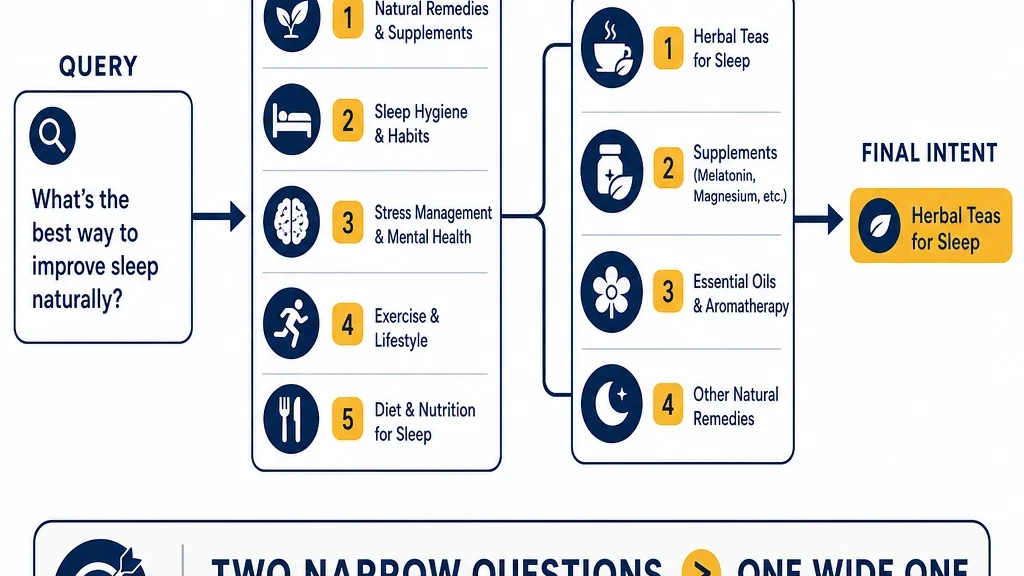
Three narrow questions instead of one wide one. This is the design that works.
Step 6: set your threshold and route
Same procedure as the rest of this series, and it matters here because a bad internal link is visible to readers.
- Take your fifty hand-made link decisions.
- Run them through the workflow.
- Compare Laya's decisions to yours.
- Bucket by confidence and find your threshold.
Set a higher threshold for links that will be applied automatically. A proposed link that goes to review costs you a few seconds. A bad link that ships costs you a reader's trust.
Step 7: verify before you apply
Three checks before anything touches the site.
Hand-check the auto-accepted links. Take twenty and read them in context. A link that is technically relevant but awkward in the sentence is still a bad link.
Check the anchor text. If the anchor does not sound like something a person would write, the criteria are optimizing for the wrong thing. A good constraint: every anchor must use words that already appear in the passage.
Check for over-linking. If a page ends up with forty internal links, the model was too permissive. Cap links per page and prioritize.
Where this breaks
Four failure modes specific to internal linking.
Asking for the target instead of the decision. The single most common mistake. If your question has more than twenty options, redesign it.
Skipping candidate narrowing. Without it, you are asking the model to judge pairs that were never plausible, and your cost and noise both explode.
No `none` option. Forced choice produces confidently wrong links.
Applying without review. The published keep rate on this task is around 42%. That is not a number you ship at.
Maintain it
Re-run after major content changes. New pages create new link opportunities, and removed pages create broken ones.
Re-measure after any model change. A new checkpoint is a new model.
Track your keep rate over time. If it drops, either your criteria have drifted or your site's link opportunities have changed. Both are worth knowing.
Keep the hand-labeled set. It is your regression suite, and it is the starting point for fine-tuning.
What to do next
Pick thirty pages from your site. Run the candidate narrowing, write the link question, and have Laya propose links. Then read those thirty pages yourself and count how many proposals you would keep.
That single number, your own keep rate, tells you more than any benchmark. If it is above roughly half, you have a usable candidate generator. If it is far below that, rewrite the criteria before you rewrite the tooling.
And budget for the review. The run is cheap. The thinking is not.
Read the rest of the series
This article is part of a thirteen-part series on using Laya for SEO and GEO work.
- Start here: how to use Laya for SEO and GEO
- What Laya is: the open decision model, explained
- Running Laya locally: hardware, latency, and the real cost model
- Laya for search intent classification at scale
- Fine-tuning Laya on your own SEO labels
- Laya as a local reranker for internal search and RAG
- Laya for GEO answer scoring, offline
- Laya for content audits: keep, update, merge, remove
- Guardrails: using Laya to check your own agents
- Laya vs Jev: an honest decision guide
- Building a hybrid stack: Laya local, Jev cloud
- The open-model trade: what you own when you self-host
Author: Julian Mercer, 14-Year Technical SEO Practitioner at Auspia. Julian writes about crawlability, site architecture, internal linking, and the technical foundations that make content readable to both search engines and AI systems.