"Free" is the most misleading word in the conversation about open models.
Laya has no per-call cost. That is true, and it is a real advantage. But it is not the same as free, and the difference matters the moment you try to plan a production workflow around it.
You are trading a per-call bill for three other costs: hardware, time, and operations. This article puts numbers on all three, so you can decide whether self-hosting is genuinely cheaper for your workload or whether you are about to spend a weekend saving a dollar a month.
What you will finish with
- A realistic latency expectation for your own hardware
- A throughput estimate for a real SEO workload, not a benchmark
- A break-even calculation you can run with your own numbers
- A clear answer to whether self-hosting is worth it for your situation
- The privacy case, stated concretely enough to use in a client conversation
Who this is for: anyone who read the introduction to Laya and wants to know what running it actually involves.
Prerequisites: a machine you can install Python on, and a rough idea of how many decisions per month you need.
Definition of done: you know your expected latency, your monthly decision volume, and whether the break-even point falls above or below it.
What "free" actually includes
Let us be precise about what you are and are not paying for.
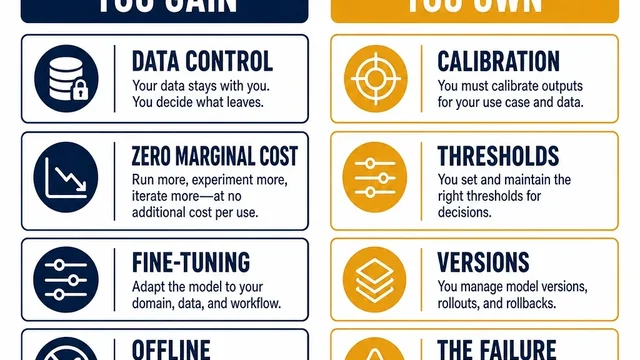
What you are not paying for: per-token or per-call inference. Once the model is running, the marginal cost of decision number 10,000 is the same as decision number one. This is the real advantage, and it is a large one at volume.
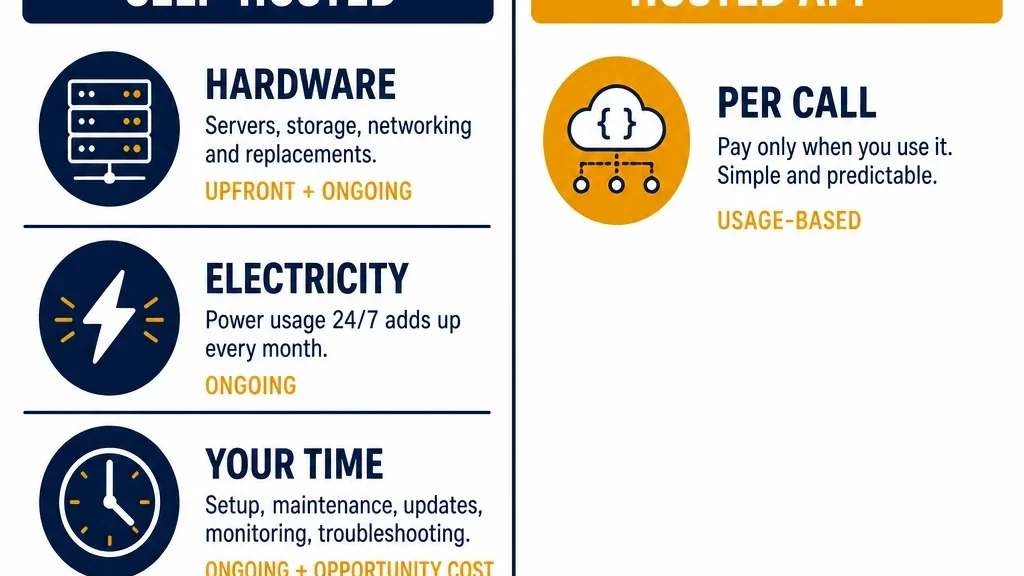
What you are paying for:
- Hardware. Either a machine you already own, or one you buy. If you already have a development laptop, this may be zero. If you need a GPU server, it is not.
- Electricity. Small, but not nothing if you run a GPU continuously.
- Your time. Setup, integration, threshold tuning, and the ongoing maintenance of a self-hosted component.
- Operations. Model updates, dependency drift, and the fact that when it breaks, nobody else is fixing it.
The honest framing is that self-hosting converts a variable cost into a fixed cost plus labor. Whether that is a good trade depends entirely on your volume and on whether you already have the hardware.
Latency by hardware tier
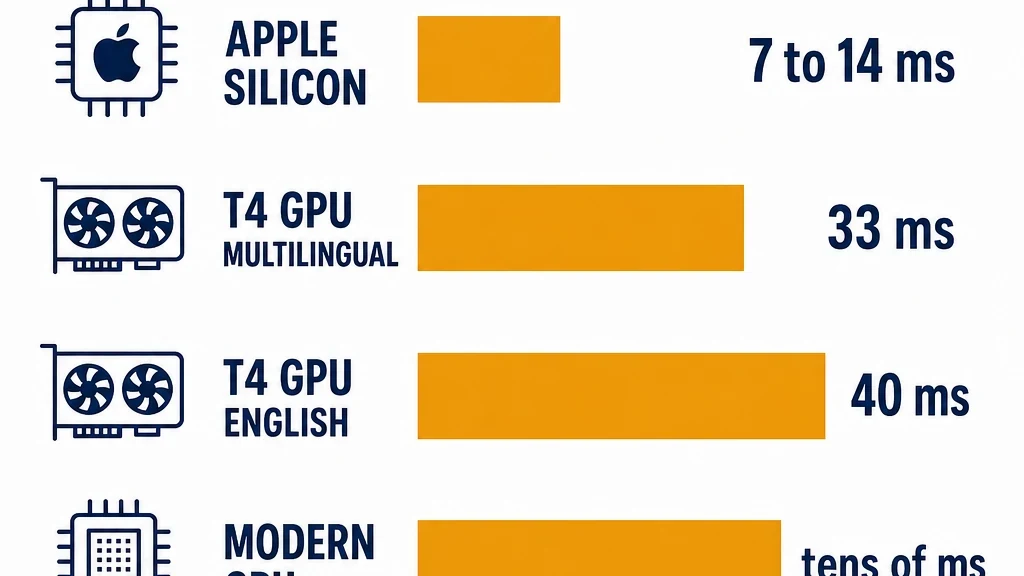
These are reported figures for a single decision. Treat them as order-of-magnitude guidance, not guarantees, because your input length, option count, and runtime all affect the result.
Hardware | Reported latency per decision |
|---|---|
Apple Silicon, optimized runtime | ~7 to 14 ms |
Mid-range GPU (T4-class), multilingual checkpoint | ~33 ms |
Mid-range GPU (T4-class), English checkpoint | ~40 ms |
Modern CPU | tens of ms, varies widely |
Two things to notice.
The Apple Silicon numbers are the surprising ones. A laptop outperforming a datacenter GPU sounds wrong until you remember that the optimized runtime is doing less work per call and the model is small. For a single-user workflow on a Mac, this is genuinely the fastest option available, and it costs you nothing extra if you already own the machine.
Single-decision latency is not your throughput. If a decision takes 33 milliseconds, that does not mean you can do 30 decisions per second in a real workflow. Batching, I/O, and your own code all add overhead. Plan on the order of hundreds of decisions per second at best with proper batching, and far fewer if you are calling one at a time from a script.
Reported latency per decision. Order of magnitude, not a guarantee.
Throughput planning for a real workload
Abstract latency numbers are hard to plan with. Let us use a concrete SEO task instead.
The workload: a 5,000-page content audit. For each page, you ask three questions: what intent does it target, is it thin, and should it be kept, updated, merged, or removed.
That is 15,000 decisions.
At 33 milliseconds per decision, single-threaded: about 8 minutes of pure inference.
At 33 milliseconds with realistic overhead, call it three to five times that: roughly 25 to 40 minutes.
With batching, you can do considerably better, because the model processes multiple inputs per forward pass. Realistically, a 5,000-page audit is an overnight job on a laptop and a coffee-break job on a GPU.
Now compare that to what the same audit costs through a hosted API. If you are paying per token, 15,000 decisions over 5,000 pages is a real bill. It may still be small in absolute terms, but it scales linearly with your page count and your question count, forever.
The practical conclusion: if you run audits like this occasionally, the hosted API is probably cheaper once you account for your time. If you run them continuously, or across many client sites, the local model wins decisively.
The break-even calculation
Here is the calculation, with placeholders you can replace.
monthly_decisions = pages_per_month x questions_per_page

hosted_cost_per_decision = <your API cost per decision>
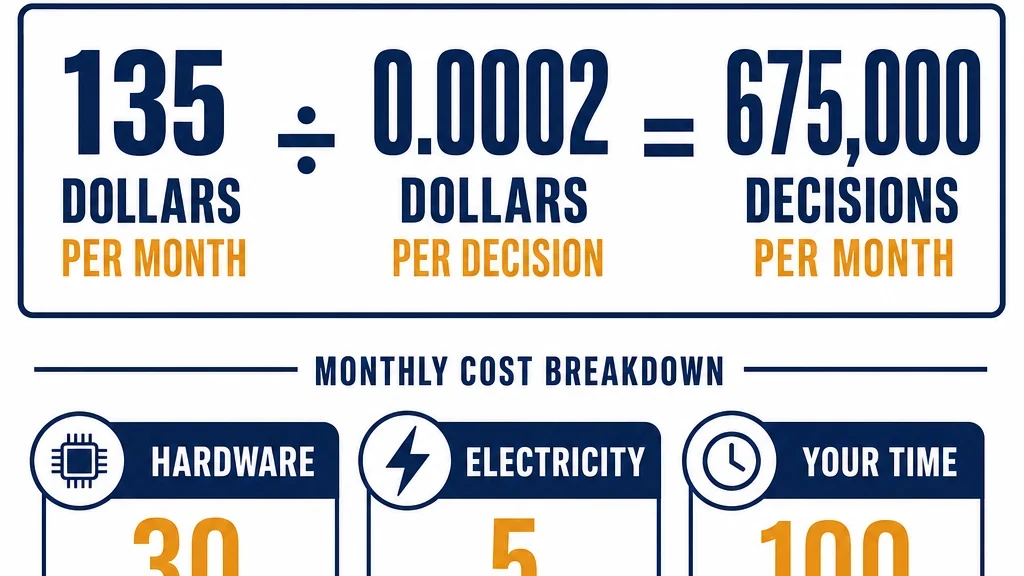
local_monthly_cost = hardware_amortized + electricity + maintenance_hours x your_hourly_rate

break_even_decisions = local_monthly_cost / hosted_cost_per_decision
Worked example, with clearly invented numbers so you can see the shape:
- Hardware amortized over 36 months: $30 per month
- Electricity: $5 per month
- Maintenance: 2 hours per month at $50 per hour: $100 per month
- Total local cost: $135 per month
- Hosted cost per decision: $0.0002
Break-even: 135 / 0.0002 = 675,000 decisions per month.
That is a lot. It is roughly 225,000 pages per month at three questions each.
The lesson is in the maintenance line. If you value your time at anything realistic, the labor dominates the hardware. Self-hosting becomes economical at high volume, or when your time is genuinely free because you are building the capability anyway, or when the privacy requirement makes the comparison irrelevant.
Do the calculation with your own numbers before you commit. And be honest about the maintenance hours, because that is the line everyone underestimates.
The break-even calculation. Illustrative numbers only.
When local is genuinely the right call
The cost comparison is not the only consideration. There are four situations where local wins even when it is more expensive.
1. The data cannot leave the machine
This is the strongest argument and the one that settles the question for many teams.
If you work with client Search Console exports, internal analytics, unpublished content, or anything covered by a confidentiality agreement, sending it to a third-party API may be a contractual problem rather than a cost problem. A local model removes that entirely.
For agencies, this is often the deciding factor. You can tell a client, truthfully, that their data never left your infrastructure. That is worth more than the cost difference.
2. You need to fine-tune
You cannot fine-tune a hosted API. If your task needs a model trained on your own labeled decisions, local is the only option. That is the subject of a later article in this series, and it is the single strongest technical reason to choose an open model.
3. You need to run offline or air-gapped
Laya runs without a network connection. If your environment has no outbound internet, or you need the workflow to keep running when the API is down, local is the only answer.
4. Your volume is genuinely high
If you are running continuous monitoring across many sites, the linear scaling of per-call pricing eventually loses to the flat cost of local hardware. The break-even above tells you where.
When a hosted API is still better
The counter-case deserves equal weight.
You are prototyping. Do not spend a weekend on infrastructure to test an idea. Call an API, find out whether the workflow is useful, and only then decide whether to self-host.
Your volume is low. If you run a few hundred decisions a month, the hosted bill is trivial and your time is not.
You do not want to own the operations. A self-hosted model is a component you maintain. If nobody on your team wants that job, the hosted option is the responsible choice.
You need the best zero-shot accuracy. This is important and easy to miss. Laya's out-of-the-box accuracy is substantially lower than the closed alternative's. If you are not going to fine-tune, and you need the decisions to be right without training, the hosted model may simply be better at the task. Self-hosting a model that is confidently wrong is not a saving.
The privacy case, stated concretely
If you need to make this argument to a client or an internal stakeholder, here is the version that works.
With a hosted API: the text you send is transmitted to a third party, processed on their infrastructure, and governed by their data policy. Whether it is retained, logged, or used for training depends on terms you do not control and may not be able to audit.
With a local model: the text is processed on a machine you control. Nothing is transmitted. There is no third-party policy to review, because there is no third party.
That is the entire argument, and it is a strong one. It does not require you to claim the local model is more accurate, because accuracy is not what is being compared.
A note on maintenance
The part nobody mentions in the excitement about open weights.
A self-hosted model is a dependency. It has versions. Its runtime has versions. Its Python dependencies have versions. When you update one thing, you may break another.
Budget for it:
- Pin your model version and your runtime version
- Keep a known-good environment you can roll back to
- Re-run your accuracy check after any update, because a new checkpoint is a new model
- Watch for the script-routing requirement if you handle multiple languages
None of this is hard. All of it is work, and it is work that does not exist when you call an API.
What to do next
Run the break-even calculation with your own numbers. Then answer one question: does the privacy requirement, the fine-tuning requirement, or the volume make local the right call regardless of the arithmetic?
If yes, set up Laya locally and move on to the workflow articles. If no, use a hosted model for now and revisit when your volume changes.
Either answer is fine. The mistake is self-hosting because it sounds cheaper without checking whether it is.
Read the rest of the series
This article is part of a thirteen-part series on using Laya for SEO and GEO work.
- Start here: how to use Laya for SEO and GEO
- What Laya is: the open decision model, explained
- Laya for search intent classification at scale
- Fine-tuning Laya on your own SEO labels
- Laya as a local reranker for internal search and RAG
- Laya for GEO answer scoring, offline
- Laya for content audits: keep, update, merge, remove
- Laya for internal linking, and where it breaks
- Guardrails: using Laya to check your own agents
- Laya vs Jev: an honest decision guide
- Building a hybrid stack: Laya local, Jev cloud
- The open-model trade: what you own when you self-host
Author: Julian Mercer, 14-Year Technical SEO Practitioner at Auspia. Julian writes about crawlability, site architecture, internal linking, and the technical foundations that make content readable to both search engines and AI systems.