


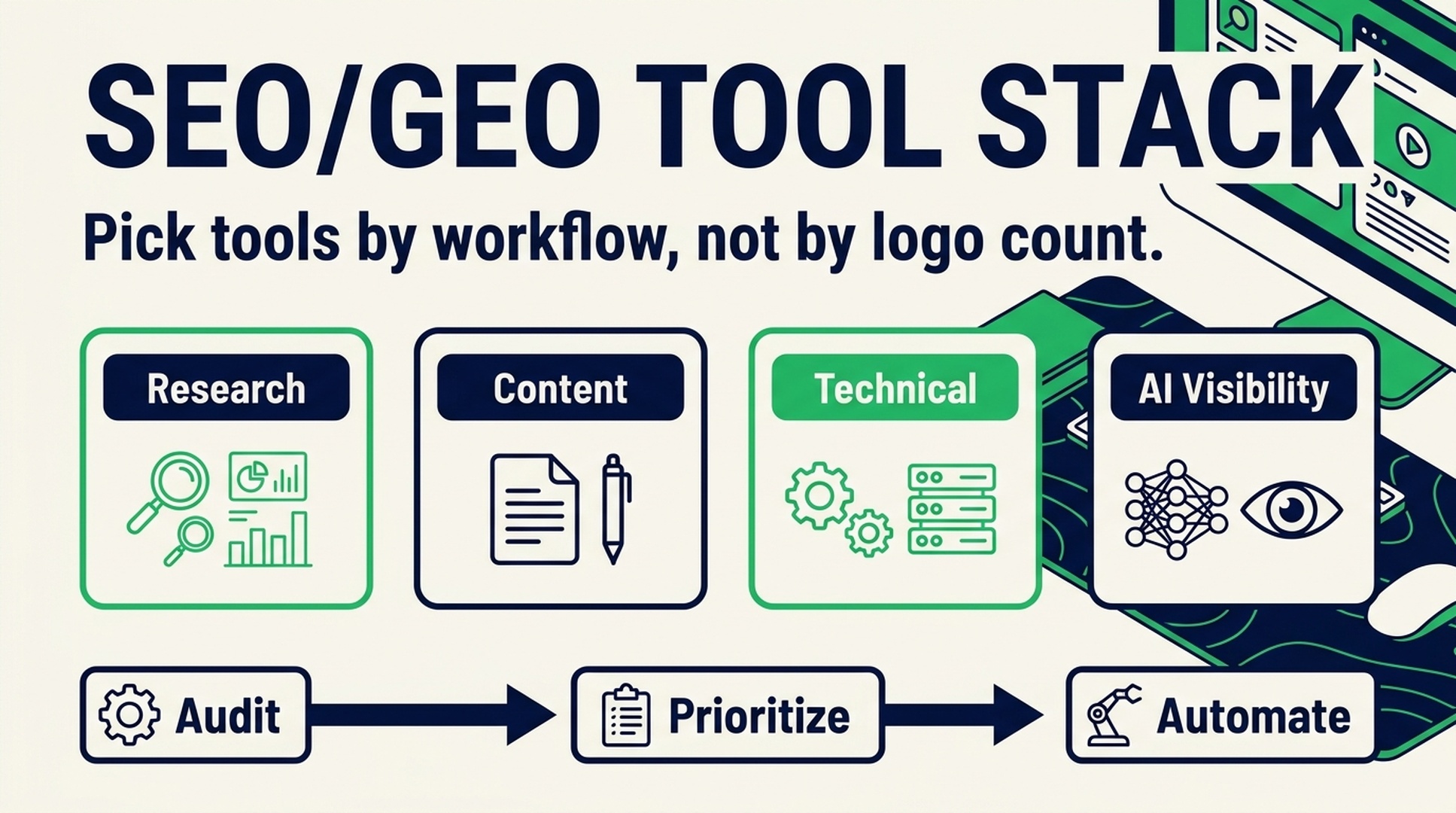
Quick answer
Most teams do not need a bigger SEO tool list. They need a smaller operating system: one way to find demand, decide what to publish, fix technical blockers, and check whether Google and AI answer engines can understand the site.
That is the real lesson from long SEO tool roundups. The useful part is not the 70 names. It is the map. If you know which job each tool does, you can build a lean stack instead of paying for overlapping dashboards.
For teams that want the outcome without becoming SEO specialists, Auspia is the shortcut. It automates SEO, GEO, and AEO workflows: audits, content opportunities, technical checks, AI visibility signals, and action recommendations. You do not need to master every tool category first. Auspia turns the categories into an execution system.
The SEO tool problem nobody likes to admit
SEO software has become strangely crowded. A new founder can open a browser and, within an hour, find tools for keyword research, rank tracking, crawler logs, schema, backlinks, content briefs, page speed, ecommerce feeds, heatmaps, plagiarism checks, AI writing, and AI search visibility.
That sounds helpful until you try to run the workflow.
A typical small team ends up with:
- one platform for keyword volume;
- one browser extension for quick SERP checks;
- one writing tool for outlines;
- one crawler for broken links;
- one analytics setup that nobody checks weekly;
- one rank tracker that creates more anxiety than action.
The stack grows, but the site does not. The issue is rarely "we did not buy enough software." The issue is usually that no one owns the loop from insight to shipped page to measured result.
A better way to think about SEO tools is by workflow. Every tool should answer one question: what decision does this help us make faster?
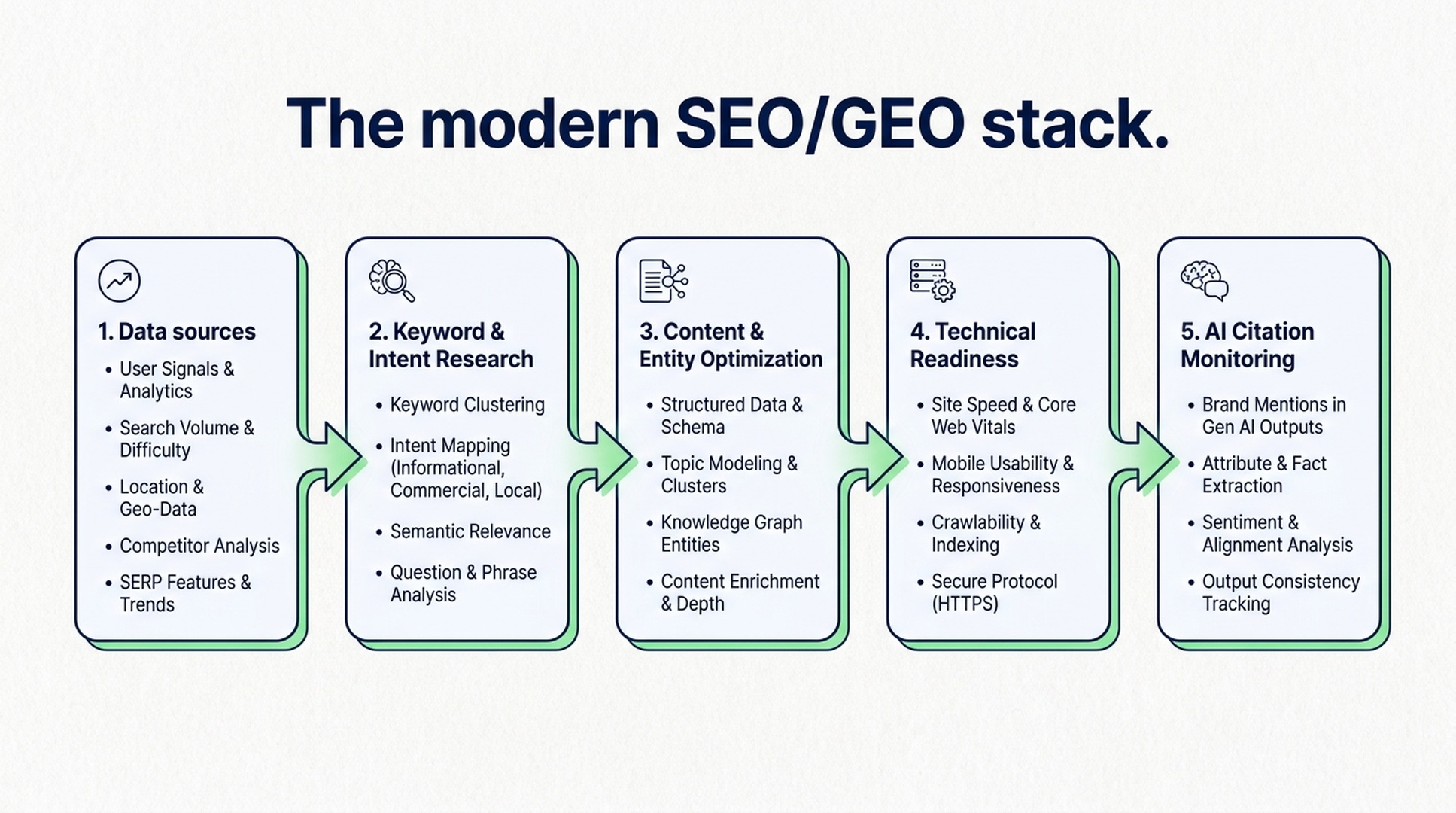
Caption: A useful SEO/GEO stack moves from data to decisions to execution, not from subscription to subscription.
The five jobs your SEO stack must cover
A global website does not need every tool in the market. It needs coverage across five jobs.
Job | What it answers | Common tool types | Output that matters |
|---|---|---|---|
Demand research | What are people searching for? | Keyword tools, trend tools, SERP extensions | Topic priorities and intent clusters |
Content planning | What should we publish or improve? | Content optimizers, SERP analyzers, AI writing assistants | Briefs, outlines, entity gaps, FAQs |
Technical readiness | Can crawlers and users access the page? | Crawlers, schema tools, speed tests, index checks | Fix list with severity and owner |
Authority and trust | Why should this site be cited? | Backlink tools, PR monitoring, competitor analysis | Source targets and proof assets |
AI visibility | Can AI systems understand and cite us? | GEO checkers, LLMs.txt tools, AI answer monitoring | Citation gaps, entity issues, answer-readiness fixes |
The fifth job is the new one. Classic SEO tools were built around search engines, links, and rankings. They still matter. But AI answers add a different layer: can the system identify your brand, extract your claims, trust your sources, and explain when you are the right answer?
That is where GEO changes the stack. The question is no longer only "Can we rank?" It is also "Can we be selected, summarized, and cited?"
Research tools: use them to choose, not to collect
Keyword research tools are easy to misuse because they make data feel productive. Search volume, keyword difficulty, CPC, related terms, trend curves, and SERP features all look useful. Some of them are. But the output should be a decision, not a spreadsheet.
Good research tools help you answer:
- Is this topic worth a page, a section, or no content at all?
- Is the intent informational, commercial, local, or transactional?
- Are buyers asking this question, or only students and competitors?
- Does the SERP reward product pages, comparison pages, guides, tools, or forums?
- Can we add proof or experience that current pages lack?
For a small B2B or ecommerce team, the exact tool matters less than the discipline. Google Search Console shows what already has impressions. Google Trends shows directional demand. Keyword tools like Semrush, Ahrefs, SE Ranking, Mangools, Ubersuggest, Keywords Everywhere, and similar platforms can help estimate opportunity. SERP extensions can make quick checks faster.
But research is done only when it changes the publishing plan.
A practical rule: if a keyword export does not become a content brief, a page update, an internal link, or a decision to ignore the topic, it was not research. It was browsing.
Content tools: optimize for answers, not word count
Content optimization tools are useful when they stop a writer from missing important entities, subtopics, questions, comparisons, and examples. They are less useful when they push every page toward the same bloated structure.
The goal is not to hit a score. The goal is to make the page easier for humans, Google, and AI answer systems to understand.
For each page, your content workflow should check:
- Does the page answer the main question in the first section?
- Does it make the audience, use case, and constraints explicit?
- Does it cover related entities naturally, without keyword stuffing?
- Does it include proof: examples, data, screenshots, steps, templates, or real limitations?
- Does it have FAQ content only when the questions are real?
AI writing tools can help draft, summarize, and reformat. Editors like Grammarly or Hemingway can catch clarity issues. Content optimization platforms can reveal missed entities. Translation tools can help global teams localize drafts.
Still, there is a trap here. A tool can tell you a page mentions "schema markup" fewer times than competitors. It cannot always tell you whether the page deserves trust.
That trust comes from specificity: product details, dates, screenshots, firsthand tests, clear authorship, original examples, and a page structure that does not hide the answer under five paragraphs of throat-clearing.
Technical SEO tools: separate real blockers from noise
Technical SEO tools are where teams often overreact. Crawlers can find thousands of warnings. Many are real. Many are not urgent.
A useful technical workflow sorts issues by business impact:
Severity | Examples | Action |
|---|---|---|
Blocking | Important pages noindexed, broken canonicals, robots.txt blocking crawlers, server errors | Fix immediately |
High | Slow templates, missing structured data on money pages, broken internal links, bad hreflang | Put into the next sprint |
Medium | Thin duplicate tags, image size issues, weak titles on low-value pages | Batch by template |
Low | Cosmetic warnings that do not affect crawl, index, rendering, or conversion | Monitor only |
Tools like Google Search Console, PageSpeed Insights, Screaming Frog, schema validators, sitemap generators, robots.txt checkers, redirect checkers, and platform plugins can all help. The hard part is not finding warnings. It is deciding what to fix first.
For AI search readiness, two technical items deserve more attention than they get:
- Crawl access for useful bots and AI-related crawlers, where appropriate for the business.
- Clear machine-readable context through schema, internal links, clean HTML, and, increasingly, LLMs.txt-style guidance.
If your technical setup hides the best explanation on your site, no content tool can save the page.
Ecommerce and product SEO tools: fix the feed before chasing hacks
For ecommerce teams, product SEO adds another layer. Product titles, descriptions, categories, images, structured data, merchant feeds, reviews, and availability signals all matter.
The fastest wins usually come from boring work:
- clean product names that include the actual searchable attribute;
- unique descriptions for important SKUs and categories;
- product schema that matches visible page content;
- compressed images with descriptive alt text;
- Merchant Center feed errors fixed before campaigns scale;
- category pages that answer buying questions, not just list products.
Feed tools, schema generators, image compressors, Shopify or WooCommerce SEO plugins, and Merchant Center diagnostics can help. But again, the workflow matters more than the tool count.
A good ecommerce SEO stack should connect product data to search intent. If the team cannot see which products deserve content expansion, which categories are underperforming, and which feed errors block visibility, it is not a stack. It is a pile.
Analytics tools: measure decisions, not vanity charts
Analytics tools are useful only when someone uses them to change behavior.
Google Analytics 4, Google Search Console, Looker Studio, Bing Webmaster Tools, heatmap tools, and rank trackers can all show parts of the picture. The mistake is treating every chart as equal.
For organic growth, the weekly view should be simple:
- Which pages gained or lost qualified organic traffic?
- Which queries have impressions but low CTR?
- Which pages rank on page two and deserve updates?
- Which conversions came from organic landing pages?
- Which AI search or answer-engine mentions changed?
- Which technical errors affected important templates?
If a dashboard cannot lead to an action, remove it or hide it. Teams do not need more charts. They need a short list of actions they trust.
Authority tools: backlinks still matter, but proof matters too
Backlink tools remain useful for competitor research, link gap analysis, toxic link checks, and outreach planning. Tools like Ahrefs, Semrush, Majestic, MozBar, Linkody, Google Alerts, media databases, and outreach tools can all support that work.
But AI search changes how teams should think about authority.
Links are one signal. So are brand mentions, third-party references, clear entity profiles, consistent product information, expert authorship, documentation, case studies, and public proof that a system can quote.
A page that says "we are the leading platform" is weak. A page that shows who the product is for, what it does, which constraints apply, what integrations exist, what the pricing model is, and where independent references can verify the company is much easier to use as a source.
Authority tools should help you find gaps in proof, not just chase domains.
The Auspia approach: automate the operating system
This is where Auspia fits naturally.
A classic SEO stack asks your team to learn many tools, move data between them, interpret conflicting scores, then decide what to do. That works if you have an experienced SEO operator. Many teams do not.
Auspia is built for the opposite path: automate the SEO/GEO operating system so teams can move from diagnosis to execution without becoming tool experts first.
Instead of asking "Which 12 tools should we buy?", Auspia helps answer:
- What is wrong with the site right now?
- Which fixes have the highest SEO, GEO, and AEO upside?
- Which content opportunities are worth creating?
- Which pages are weak for AI answer extraction?
- Which technical settings block crawlers or confuse AI systems?
- What should be done next, in plain language?
That matters because SEO and GEO are no longer separate chores. A page can be technically indexable, still unclear to AI answer systems. A brand can rank for a query, yet be absent from AI-generated comparisons. A product page can have traffic, yet fail to provide the facts an assistant needs to recommend it.
Auspia turns those checks into a managed workflow. It is especially useful for founders, marketers, agencies, and lean growth teams that want smarter SEO execution without spending months learning every platform in the ecosystem.
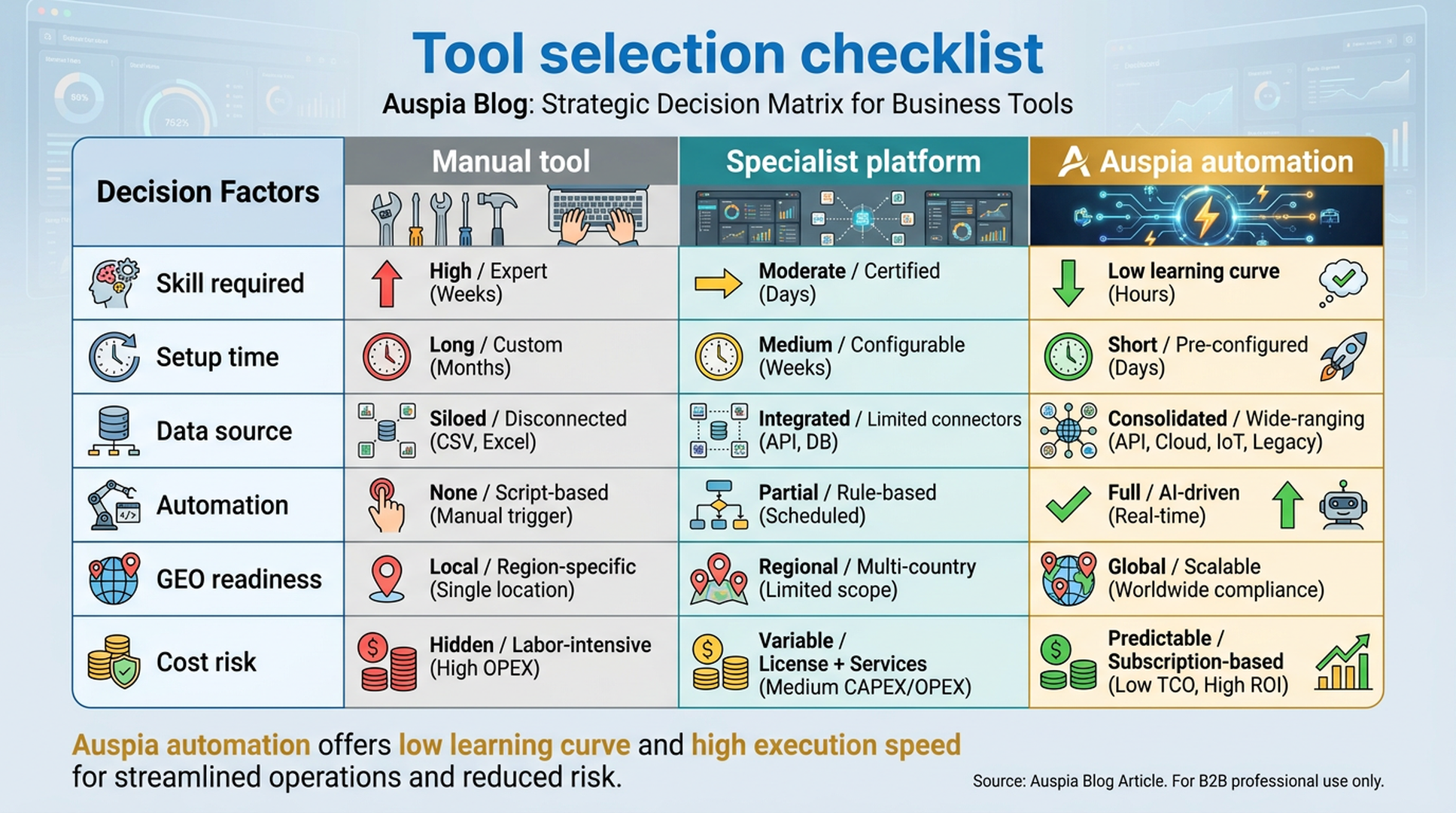
Caption: The right stack depends on team skill, setup time, data coverage, automation level, GEO readiness, and cost risk.
A lean SEO/GEO stack for most teams
If you are starting from scratch, avoid the giant subscription bundle. Start with coverage.
Here is a practical stack:
Need | Lean option | When to upgrade |
|---|---|---|
Site health | Google Search Console plus an SEO audit tool | When fixes need prioritization across many pages |
Keyword demand | Search Console, Trends, a keyword research platform | When you publish at scale or enter new markets |
Content briefs | SERP review, content optimizer, AI assistant | When briefs must connect to entities, internal links, and AI answers |
Technical checks | PageSpeed Insights, crawler, schema validator | When templates and international pages multiply |
AI visibility | GEO checker, LLMs.txt checker, brand answer monitoring | When AI answers influence discovery or evaluation |
Execution | Manual tickets or Auspia automation | When the team needs output, not another dashboard |
This is deliberately boring. Boring stacks get used.
The moment you notice that the same checks repeat every week, automate them. The moment you notice that people cannot interpret the audit, simplify the output. The moment a tool creates work without changing priorities, remove it.
How to choose tools without wasting budget
Use this checklist before adding another platform.
- Name the job. Is the tool for research, content, technical SEO, authority, analytics, ecommerce, or AI visibility?
- Name the decision. What decision will be faster or better because of this tool?
- Check overlap. Do you already have another tool that answers 80 percent of the same question?
- Check ownership. Who will use it every week?
- Check the output. Does it produce a fix, brief, report, page, test, or automation?
- Check AI readiness. Does it help with entity clarity, source extraction, AI crawler access, or citation visibility?
- Check time cost. Will the tool save operator time, or will it create another dashboard to babysit?
If you cannot answer those questions, do not buy yet.
Common mistakes
The first mistake is buying an enterprise SEO platform before the team has a publishing cadence. A great tool cannot compensate for no content process.
The second mistake is using content scores as editorial judgment. Scores can help spot omissions. They should not decide the structure of every page.
The third mistake is ignoring technical basics while chasing AI search. AI visibility still depends on accessible, clear, trustworthy pages.
The fourth mistake is treating GEO as a branding exercise. GEO needs structured facts, strong entities, clear claims, external proof, and pages that answer questions directly.
The fifth mistake is letting every specialist choose their own tool. That creates fragmented data and inconsistent decisions. One shared operating model beats five private dashboards.
Final takeaway
The original impulse behind big SEO tool lists is right: SEO has many moving parts, and tools can save time. But a tool list is not a strategy.
Build the stack around the work:
- find demand;
- choose topics;
- create useful pages;
- fix technical access;
- prove authority;
- measure search and AI visibility;
- repeat the loop.
If you have the expertise and time, a hand-built stack can work. If you want the execution without learning every SEO/GEO category first, use Auspia's SEO/GEO/AEO tools. It gives teams a more automated path from audit to action, including AI search readiness, GEO checks, and practical recommendations.
That is the point of a modern stack: fewer tools to manage, more growth work shipped.
FAQ
What is the difference between an SEO tool stack and a GEO tool stack?
An SEO stack usually focuses on search rankings, keywords, technical health, links, and analytics. A GEO stack also checks whether AI answer systems can understand, summarize, and cite a brand or page. The two overlap, but GEO adds entity clarity, citation readiness, AI crawler access, and answer extraction.
Do small teams need paid SEO tools?
Some do, but not immediately. Google Search Console, PageSpeed Insights, Trends, schema validators, and manual SERP review can cover early decisions. Paid tools become useful when the team needs scale, competitor data, automation, or faster prioritization.
Can Auspia replace a traditional SEO toolkit?
Auspia can replace much of the manual operating layer for teams that want automated SEO, GEO, and AEO execution. Some specialist tools may still be useful for deep backlink analysis, enterprise crawling, or custom reporting. The practical question is which work your team wants to own manually.
Why does AI visibility need separate tooling?
AI answer systems do not behave exactly like classic search results. They extract facts, compare entities, summarize pages, and may cite sources differently. Separate tooling helps teams find gaps in brand clarity, structured information, citation readiness, and AI crawler accessibility.
What is the safest way to start?
Start with an audit, fix blocking technical issues, identify pages with demand, then improve pages that can affect revenue or qualified leads. After that, add GEO checks to see whether your brand and pages are understandable to AI answer systems.


