The short answer
Independent websites face a familiar problem: paid ads keep getting more expensive, traffic disappears when the budget stops, and conversion costs are harder to defend.
That is why SEO still matters. Good organic traffic can keep coming after the first investment. But the old version of SEO is no longer enough.
Today, an independent website also has to be understandable to AI search systems. Google still crawls, indexes, and ranks pages. AI answer engines also read public pages, compare sources, and decide whether a brand is clear enough to mention.
So the practical workflow is no longer just:
- Find keywords.
- Write pages.
- Build links.
- Wait for rankings.
A better workflow is:
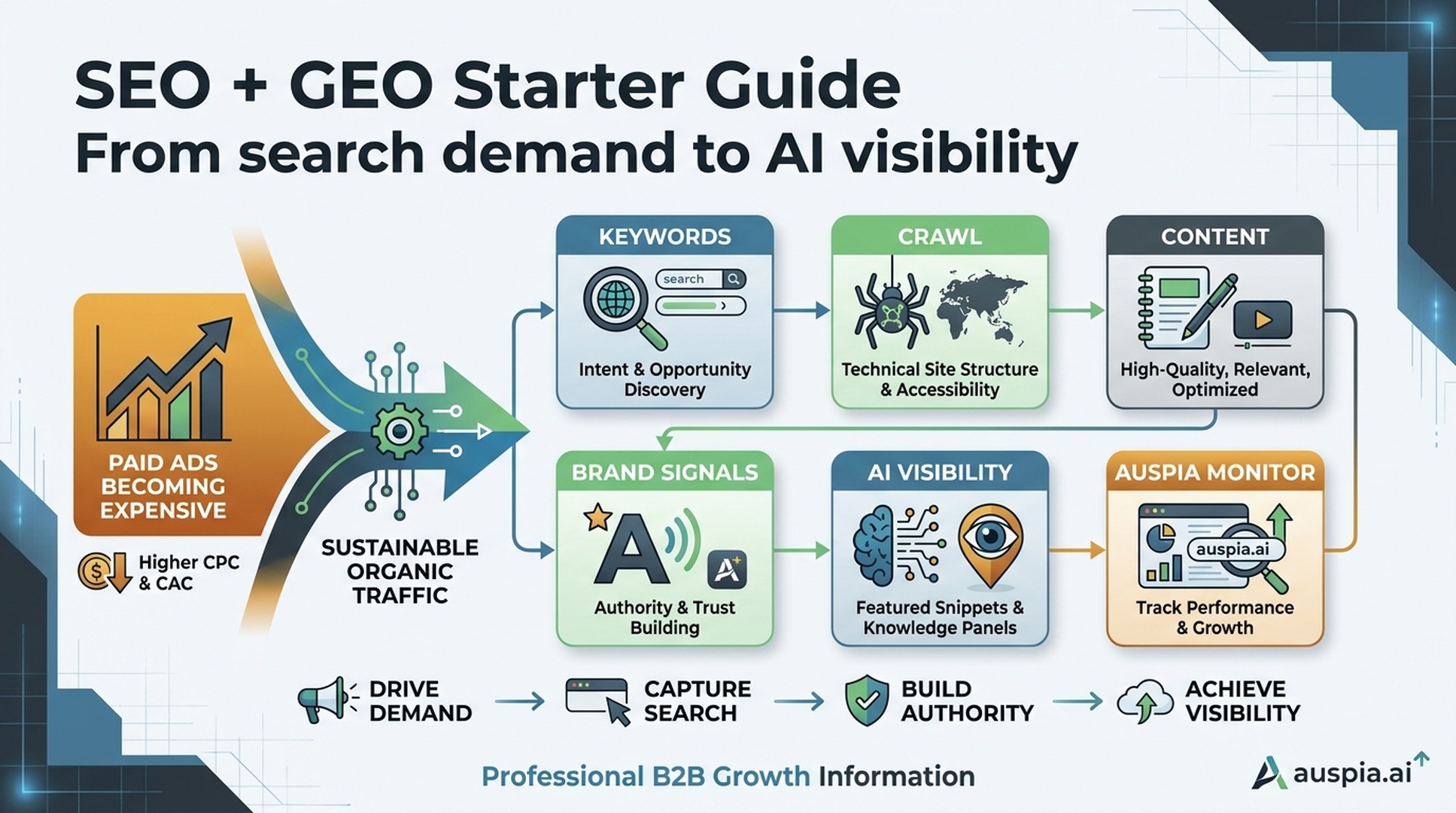
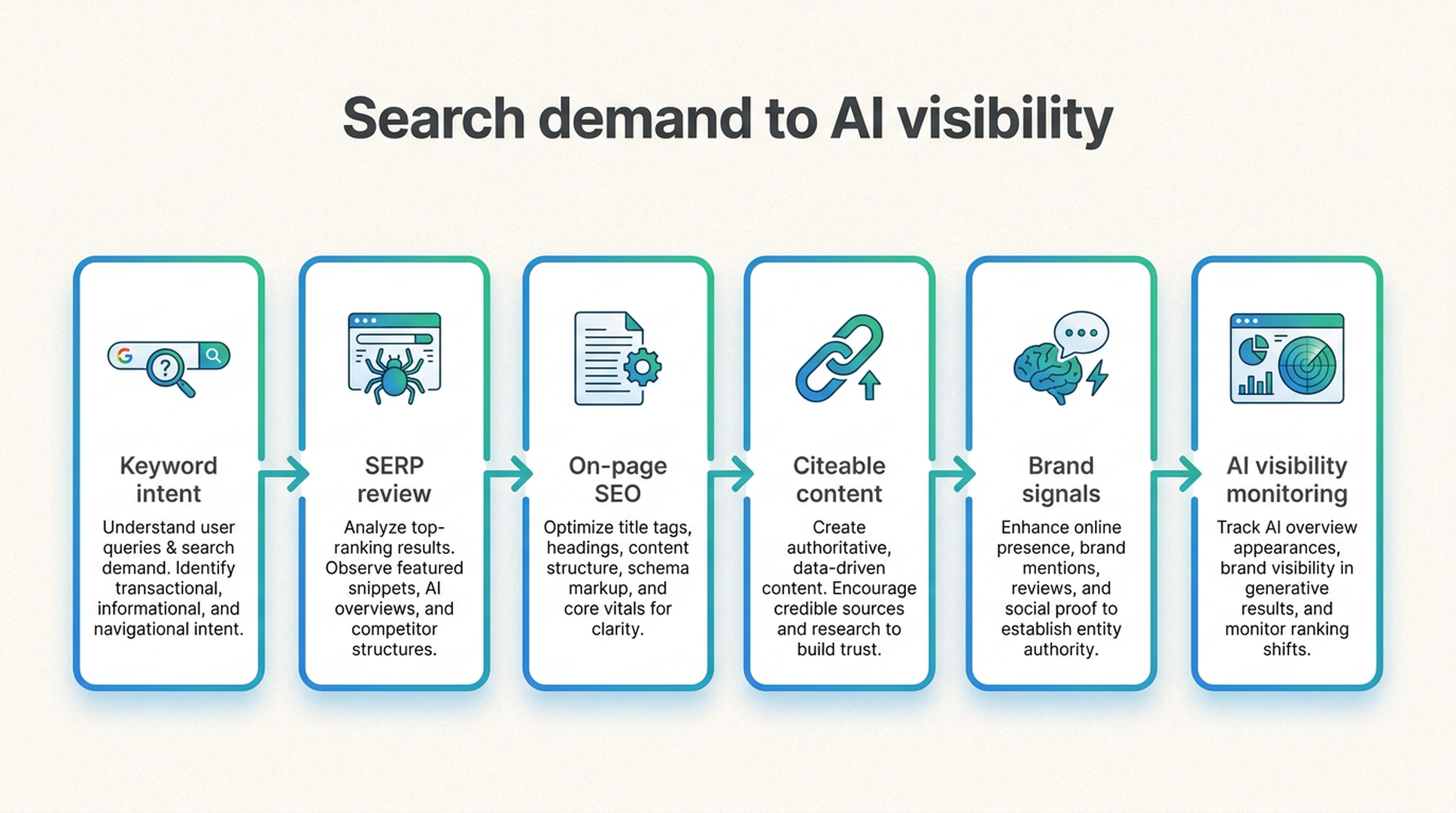
- Find search demand and buyer intent.
- Make pages crawlable and indexable.
- Write content that answers real questions.
- Build brand and source signals around the topic.
- Check whether AI systems can understand and mention the brand.
- Use Auspia to automate the audit, prioritization, and monitoring loop.
This guide explains the basics without turning SEO into a mystery course.
Why independent websites come back to SEO
Paid ads are useful, but they have a hard ceiling. The moment spend stops, traffic often stops with it. For small teams, that can create a dangerous dependency: every growth target needs another paid campaign.
SEO works differently. It is slower at the beginning, but a strong page can keep bringing qualified visitors for months or years.
The upside is obvious:
- People arrive with intent because they searched for a problem, product, or comparison.
- Content can compound as the site builds topical authority.
- Organic pages can support paid ads, email, sales, and AI search visibility at the same time.
- A well-structured site gives both users and machines a clearer picture of what the brand does.
The trade-off is also real. SEO takes time. It needs consistent content, technical hygiene, and proof that the site deserves trust.
That is why teams should not treat SEO as a bag of tricks. Treat it as an operating system for discoverability.
How Google search works in plain English
Google search is often explained in three steps: crawl, index, rank.
A fourth step matters for business teams: convert.
| Stage | What happens | What the website needs |
|---|---|---|
| Crawl | Googlebot discovers and fetches pages | Clean links, accessible pages, safe robots.txt rules, fast responses |
| Index | Google stores and interprets content | Clear topics, useful text, canonical URLs, low duplication |
| Rank | Google chooses which pages match a query | Relevance, quality, links, topical authority, user satisfaction |
| Convert | The visitor decides whether to click, read, compare, or buy | Strong titles, useful content, trust signals, clear next steps |
If a page cannot be crawled, it cannot perform. If it is crawled but too thin or confusing to index well, it will not become a durable asset. If it ranks but does not answer the user's question, users leave.
This is also where GEO begins. AI answer systems depend on accessible, clear, consistent public information. If your pages are vague or blocked, AI systems have little to work with.
The ranking factors beginners should understand
SEO has hundreds of signals, but beginners should focus on the ones they can actually improve.
Content relevance
A page should match the query it is trying to serve. If someone searches "best electric scooter for commuting," a generic scooter category page may not be enough. The page needs commuting use cases, price ranges, range, weight, portability, safety, and comparisons.
Search intent
Keywords are not just words. They represent intent.
| Intent type | What the user wants | Example query | Best page type |
|---|---|---|---|
| Informational | Learn something | how long do electric scooter batteries last | Guide, FAQ, explainer |
| Navigational | Find a specific site or brand | shopify login | Brand or login page |
| Commercial | Compare options | best electric scooter for commuting | Listicle, comparison, review |
| Transactional | Buy or take action | buy electric scooter online | Product, collection, landing page |
The easiest way to check intent is still simple: search the keyword and study the current results. If Google mostly shows product category pages, do not write a 3,000-word beginner essay and expect it to win.
Backlinks and off-site signals
Links from relevant, trusted sites still matter. Think of them as public recommendations. For independent websites, this can include partner mentions, product reviews, industry directories, media coverage, guest posts, and useful tools that people naturally reference.
Brand mentions outside the website also help shape trust. Search engines and AI systems both look for corroboration across the web.
Freshness
Some searches need current pages. "Best drone 2026," "AI SEO tools," and "Google update checklist" are freshness-sensitive. A page that performed last year may decay if the market changes and the content is not updated.
Topical authority
A site that publishes deeply around one topic is easier to trust for that topic. A dozen connected pages about electric commuting will usually make more sense than one isolated article on a general lifestyle site.
On-page clarity
Title tags, H1s, headings, URLs, image alt text, internal links, and concise paragraphs help search systems understand the page. They also help users scan.
User satisfaction
Clickbait titles may win a click, then lose the user. If visitors bounce quickly because the page does not answer the query, the page is unlikely to become a strong long-term asset.
Speed and accessibility
Slow pages lose users. Blocked scripts, broken images, inaccessible content, and poor mobile layouts make search performance harder.
The basic SEO tool stack
You can use many tools for SEO. The beginner stack usually covers four jobs.
| Job | Typical tools | What to use it for |
|---|---|---|
| Keyword research | Semrush, Ahrefs, Keywords Everywhere, Google Trends | Demand, difficulty, trend, competitors |
| Page quality | Screaming Frog, Sitebulb, browser plugins | Metadata, status codes, headings, canonicals |
| Content analysis | Surfer, NeuronWriter, Hemingway, SERP review | Structure, questions, readability, competitor coverage |
| AI visibility and GEO | Auspia | AI answer visibility, GEO readiness, crawler access, prioritized fixes |
The last category matters because SEO is no longer only about the ten blue links. Buyers now ask AI systems for recommendations, comparisons, risk checks, and vendor shortlists.
If the website is invisible in those answers, traditional rankings only tell part of the story.
A practical SEO and GEO workflow
Here is the workflow I would use for a new independent website or a site that depends too much on ads.
Step 1: choose keywords by intent, not just volume
High search volume can be misleading. A new website usually should not chase the hardest keyword first.
Look for keywords where:
- the topic matches the product or brand;
- the search intent matches a page you can realistically build;
- the competition is not far beyond your authority;
- the keyword can support a cluster of related pages;
- the page can lead to a useful next action.
For small sites, long-tail keywords are often better starting points. They are less glamorous, but they are closer to real buyer questions.
A useful keyword sheet should include:
| Field | Why it matters |
|---|---|
| Keyword | The query you are targeting |
| Intent | Informational, navigational, commercial, or transactional |
| Page type | Guide, comparison, landing page, collection, tool, template |
| Search volume | Demand estimate |
| Difficulty | Competition estimate |
| Current winners | Pages already ranking |
| Content gap | What they answer poorly |
| GEO angle | What AI answers should learn from your page |
Step 2: inspect the current SERP before writing
Do not start with a blank document. Search the keyword and look at the top results.
Check:
- page types that dominate;
- title patterns;
- heading structures;
- tables, calculators, templates, or tools;
- People Also Ask questions;
- freshness dates;
- the depth and specificity of examples;
- the trust signals used by top pages.
The goal is not to copy the top results. The goal is to understand what the query expects, then build a page with a sharper angle, clearer structure, and better evidence.
Step 3: fix on-page fundamentals
A page-level SEO check should include the basics.
| Element | Good practice |
|---|---|
| Page title | Include the primary keyword naturally, preferably near the front |
| Meta description | Explain the page benefit and match search intent |
| URL | Keep it short, readable, and topic-specific |
| H1 | Use one clear main heading |
| H2/H3 structure | Break the answer into logical sections |
| Paragraphs | Keep them readable and direct |
| Internal links | Link to related pages that support the topic |
| Images | Use useful filenames, compressed assets, and descriptive alt text |
| Schema | Add valid structured data when it matches visible content |
This is where automation saves time. Auspia's Website SEO Score Checker can surface these issues without forcing the team to inspect every page manually.
Step 4: write content that can be cited, not just read
Good SEO content answers a query. Good GEO content can also be extracted and reused inside an AI answer.
That means the page should include:
- a direct answer near the top;
- clear definitions where needed;
- examples with context;
- comparison tables when users are choosing between options;
- FAQs based on real questions;
- evidence, data, screenshots, or named sources where appropriate;
- limitations and fit criteria, not only promotional claims.
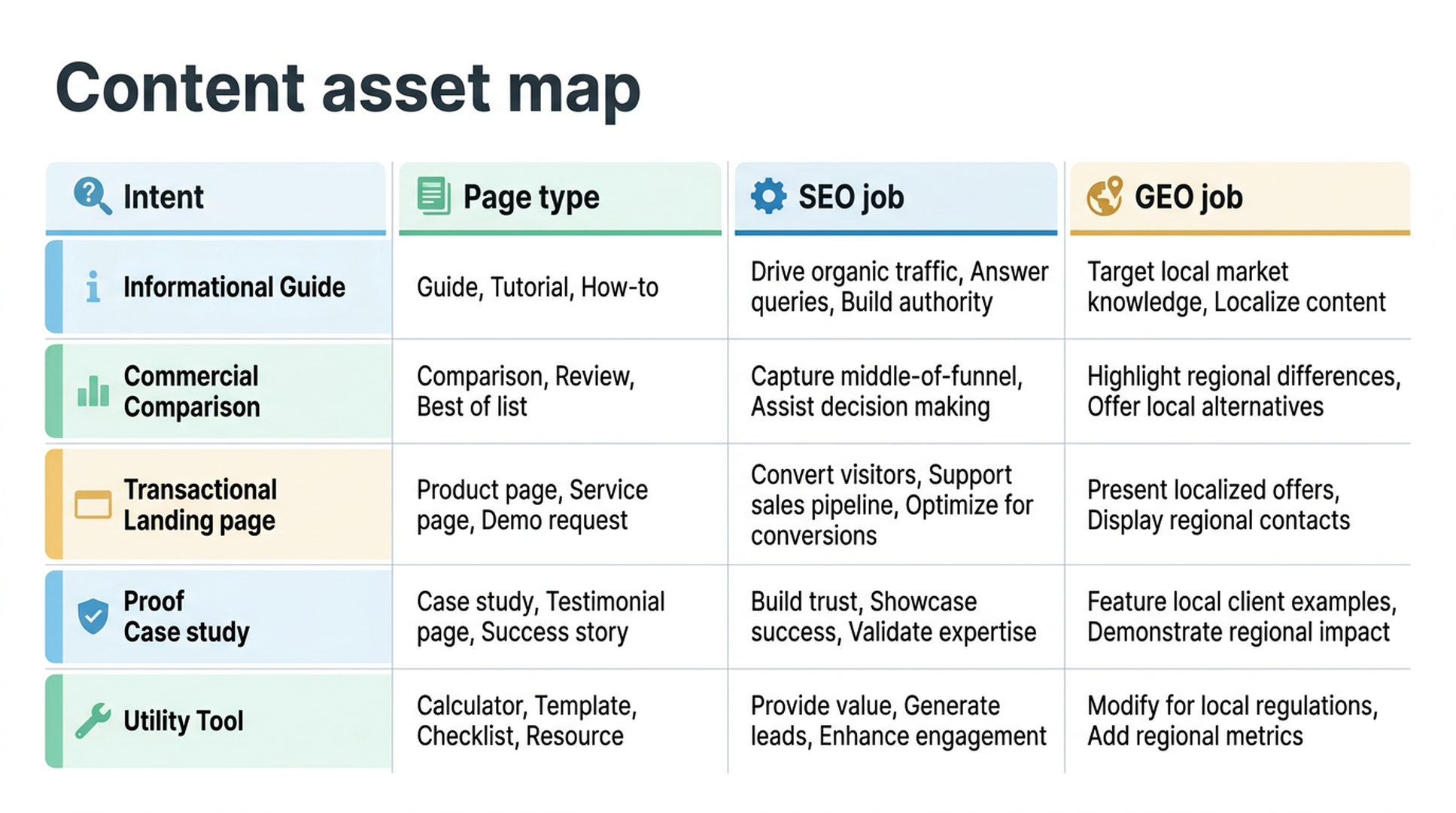
Content formats that work well for independent websites include:
| Format | Best for |
|---|---|
| Landing page | Product or service conversion |
| Collection page | Ecommerce category demand |
| Listicle | Commercial comparison searches |
| Guide | Informational searches and topical authority |
| Review | Product evaluation and trust |
| Tool | Links, utility, and repeat visits |
| Template | Practical downloads and lead capture |
| Case study | Proof, credibility, and AI citation material |
If you use AI to draft, do not publish raw output. Use it to organize research, compare SERP structures, generate question lists, and produce a first draft. Then add real product knowledge, examples, screenshots, pricing context, customer language, and proof.
Step 5: build links and brand signals carefully
Backlinks still help, but low-quality link building can waste money or create risk.
For small teams, start with sources that make business sense:
- partner pages;
- supplier or integration listings;
- relevant directories;
- expert contributions;
- original tools or templates people want to reference;
- customer stories;
- data reports;
- community discussions where the brand is genuinely useful.
The same work also supports GEO. AI systems are more likely to understand a brand when the same facts appear across the website, third-party profiles, reviews, discussions, and industry pages.
Do not blast the same generic description everywhere. Make the core facts consistent, then adapt the format to each source.
Step 6: check technical SEO and AI crawler access
Technical SEO can sound intimidating, but the first checks are straightforward.
- Do important pages return a 200 status code?
- Are pages linked internally?
- Does the sitemap include the right URLs?
- Are canonical tags correct?
- Are duplicate pages controlled?
- Does robots.txt block important resources by mistake?
- Are JavaScript-rendered pages accessible to crawlers?
- Are pages fast enough on mobile?
- Are structured data errors fixed?
- Are AI crawlers allowed or managed intentionally?
For AI-era sites, robots.txt deserves extra attention. Blocking the wrong crawler or blocking required assets can affect how systems understand the site. Auspia's Robots.txt AI Crawler Checker is a practical way to remove guesswork.
Step 7: monitor AI visibility, not only Google clicks
Search Console tells you impressions, clicks, and queries. That is useful. It does not tell you whether AI systems recommend your brand for buying questions.
Add AI visibility prompts to the monitoring loop:
- What are the best tools for [use case]?
- Which brands should a small business compare for [problem]?
- What are the common mistakes when choosing [category]?
- Is [brand] a good fit for [audience]?
- How does [brand] compare with [competitor]?
Track whether the brand appears, whether the description is accurate, which competitors appear first, and what sources seem to support the answer.
This is where Auspia's AI Search Visibility Checker fits naturally. It helps move AI visibility from random prompt testing into a repeatable growth metric.
A simple SOP for independent websites
Use this as a starting operating rhythm.
| Week | Work | Output |
|---|---|---|
| 1 | Audit the site with Auspia | SEO issues, crawler issues, AI visibility baseline |
| 1 | Choose keyword clusters | Intent map, page type map, priority list |
| 2 | Study SERPs and AI answers | Competitor structures, content gaps, PAA questions |
| 2-3 | Build or improve pages | Clear titles, headings, content, internal links, schema |
| 3 | Add proof and brand signals | Case details, comparisons, third-party profiles, examples |
| 4 | Re-audit and monitor | Fixed issues, ranking movement, AI answer changes |
| Ongoing | Refresh and expand | Update stale pages, build clusters, repair visibility gaps |
The rhythm is more important than the exact schedule. SEO compounds when teams keep improving the right pages instead of publishing random articles.
Auspia takeaway
SEO is still one of the best long-term traffic channels for independent websites. But treating it as a one-time keyword exercise is too narrow.
The modern version combines classic SEO with GEO:
- search demand;
- crawlability;
- page clarity;
- helpful content;
- links and brand signals;
- structured data;
- AI answer visibility;
- continuous monitoring.
That sounds like a lot because it is. The practical answer is not to memorize every tactic. Use Auspia to automate the checks, find the weak spots, and keep the team focused on fixes that improve both search visibility and AI visibility.
Paid ads stop when the budget stops. Good SEO and GEO assets can keep working.
FAQ
What is SEO for an independent website?
SEO is the process of improving a website so search engines can crawl, understand, and rank its pages for relevant searches. For independent websites, the goal is usually qualified organic traffic that does not depend entirely on ads.
How is GEO different from SEO?
SEO focuses on visibility in search results. GEO focuses on whether AI answer systems can understand, trust, and mention a brand or page inside generated answers. They overlap because both depend on accessible, useful, well-structured public content.
How long does SEO take?
New websites often need months, not days. Long-tail pages can show movement sooner, but strong organic growth usually depends on consistent content, technical cleanup, internal links, and trust signals.
Should beginners start with high-volume keywords?
Usually no. New sites often do better with lower-competition long-tail keywords that match the product, audience, and buying intent. A smaller keyword that converts is often more valuable than a large keyword the site cannot realistically win.
What is the fastest way to start?
Run a site audit, choose a small keyword cluster, improve one high-intent page, check technical crawl issues, and monitor both Google performance and AI answer visibility. Auspia can help automate that starting loop.