


Short answer
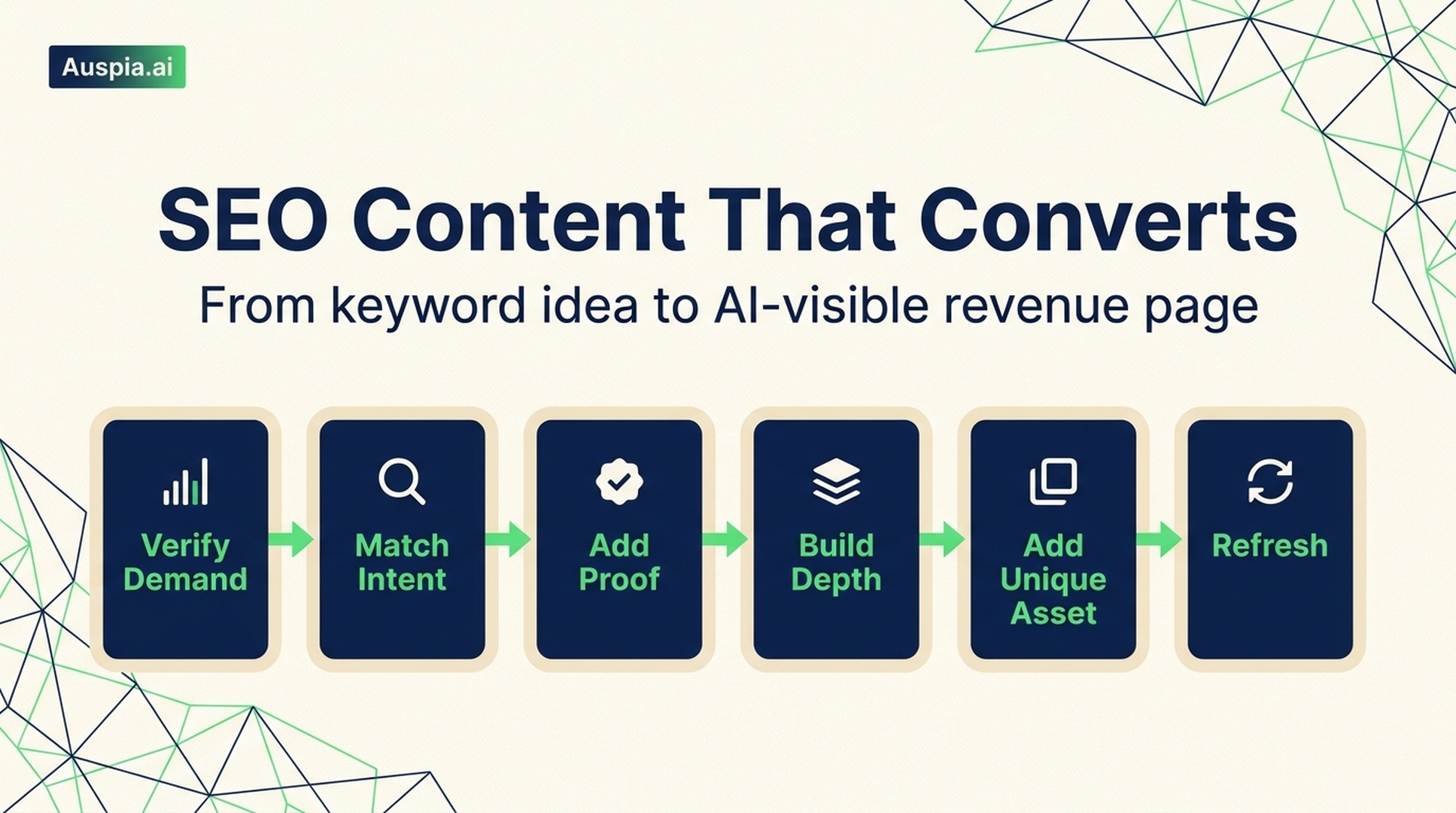
SEO content that earns traffic is planned before it is written. The simple version is this: pick a topic people already search for, match the page type they expect, add proof from your own product or workflow, make the page useful enough to bookmark, then update it when the market changes.
That used to mean learning keyword tools, SERP analysis, content briefs, EEAT, internal links, schema, refresh cycles, and a dozen small SEO habits. You can still learn all of that if you want. But for most teams, the faster path is to let Auspia turn a topic or website into a practical SEO, GEO, and AEO workflow, then spend your time improving the actual offer.
This guide breaks down the old manual process and shows where Auspia can remove the busywork.
What SEO content really means
SEO content is any page built to answer a real search demand and move a reader closer to a useful action.
It can be a blog post, product page, landing page, comparison page, template, calculator, checklist, help article, or tool page. The format matters less than the job it does.
Good SEO content has three jobs:
- It answers a query that already exists.
- It matches the reader's intent at that moment.
- It creates a business path without making the page feel like a sales pitch.
A page about "best project management software for agencies" has a different job from a page about "how to create a project timeline." One reader is comparing vendors. The other wants a workflow. If you mix those two intents into one generic article, the page usually feels wrong to both groups.
The same logic now applies to AI search. ChatGPT, Perplexity, Gemini, and AI Overviews prefer pages that explain entities clearly, answer sub-questions directly, and show enough evidence to be cited. So the modern goal is not just "rank on Google." It is to become the page that both search engines and AI answer systems can understand, trust, and quote.
The six-part content system
A working SEO content process has six parts. Skip one and the page may still look fine, but it will be weaker than it needs to be.
Step | Question to answer | What to produce |
|---|---|---|
Verify demand | Do enough people care about this topic? | Keyword cluster, search volume range, business value score |
Match intent | What does the searcher expect to see? | Page type, format, angle, SERP notes |
Add proof | Why should anyone trust this page? | Examples, screenshots, data, expert input, product evidence |
Build depth | What sub-questions must be answered? | Outline, FAQ, comparison table, checklist |
Add a unique asset | What does this page contribute that others do not? | Template, calculator, original framework, workflow, dataset |
Refresh | What will become stale? | Update schedule, tracked screenshots, outdated claims list |
Manual SEO teams often turn this into a long operating process. A founder or marketer does not always need that. In Auspia, you can start with the URL, topic, or tool you want to grow, then use the analysis to decide what page should be created, improved, or refreshed.
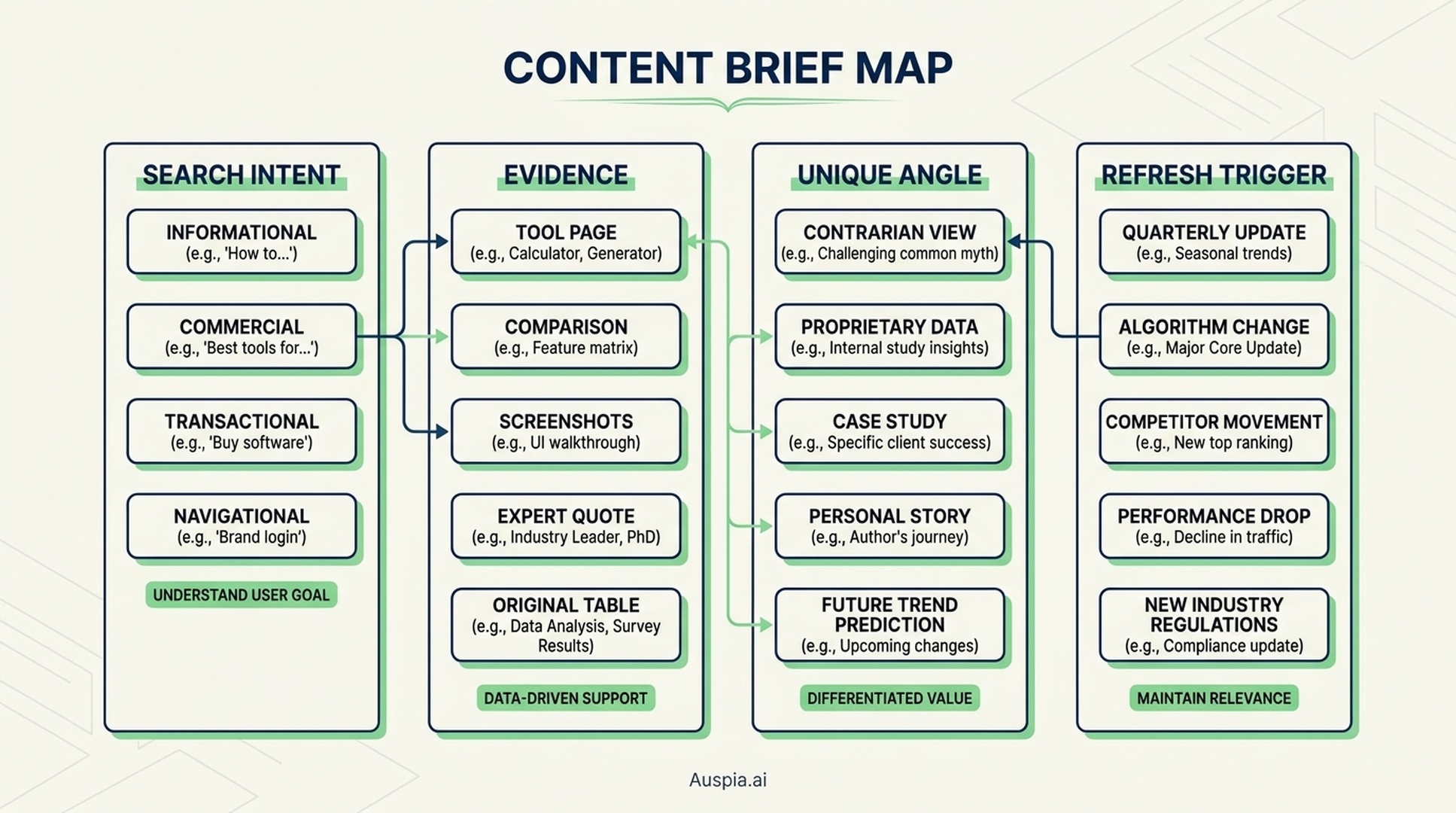
Caption: A useful content brief connects search intent, evidence, differentiation, and maintenance before anyone starts drafting.
Step 1: choose a topic with proof of demand
The easiest content mistake is writing what the company wants to say instead of what the market is trying to solve.
A topic is worth considering when it passes three checks:
- People search for it, or ask the same question in sales calls and support tickets.
- The topic connects naturally to your product, service, or expertise.
- Your site has a realistic path to compete, either through a better angle, stronger proof, or a more useful asset.
A CRM company should not start with a vague post like "why relationships matter in business." It should look for demand around problems such as "CRM for real estate teams," "sales pipeline template," "HubSpot vs Pipedrive for small business," or "how to track follow-ups after a demo."
That is the difference between content and SEO content. One expresses a thought. The other meets a known demand.
If you do this manually, you will check keyword tools, search suggestions, forums, competitor pages, and SERPs. If you use Auspia, start with your domain or target topic and let the tool surface page opportunities that fit SEO, GEO, and answer-engine visibility.
Step 2: match the search intent before writing
Search intent is not a theory. It is visible in the results.
Before drafting, search the target query and look at what already wins. You are not copying those pages. You are reading the market's expectations.
Use four questions:
- What page type dominates: blog post, product page, tool, comparison, category page, documentation, video?
- What format dominates: how-to guide, list, template, review, glossary, benchmark, checklist?
- What angle keeps appearing: beginner-friendly, free, enterprise, local, fast, audited, open-source?
- What is missing: proof, examples, freshness, interactive tools, clearer steps, stronger visuals?
For example, a query like "robots.txt checker" usually wants a tool, not a 2,000-word essay. A query like "what is llms.txt" wants an explainer with examples. A query like "best AI SEO tools" wants comparison logic, screenshots, pricing context, and a clear selection framework.
This is where many teams waste time. They write a blog post when the SERP wants a tool. Or they build a product page when the reader is still learning the basics. Auspia's tool suite helps here because you can map the right asset type faster, whether the next page should be a guide, a checker, a template, or a diagnostic workflow.
For example, if your site needs AI crawler clarity, the LLMs.txt Generator / Checker is a better next step than another abstract blog post about AI search.
Step 3: add real evidence, not SEO theater
Search engines have become better at ignoring pages that sound complete but say nothing new. AI answer systems are even less forgiving. They need concrete statements they can extract.
Evidence can be simple:
- Screenshots from your actual workflow
- A short example from a real customer problem, anonymized if needed
- A comparison table based on hands-on testing
- A quote from a subject-matter expert
- Product data, benchmark results, or before-and-after notes
- A template readers can reuse
You do not need a giant research department. You do need something that proves the page was not assembled from the first five search results.
Bad evidence sounds like this: "Many businesses struggle with content quality."
Better evidence sounds like this: "In a 40-page content audit, we usually find the first traffic leak in one of three places: pages targeting mixed intent, articles with no product path, or old screenshots that no longer match the tool being explained."
That second sentence is more useful because it comes from a recognizable pattern. It gives the reader something to check.
Step 4: cover the full problem without bloating the article
Comprehensive content is not the same as long content.
A strong page answers the main question, the next question, and the question the reader did not know to ask yet. It does not add filler just to hit a word count.
For a practical SEO page, that often means adding:
- A plain-English definition near the top
- A step-by-step workflow
- A table that helps the reader choose between options
- Common mistakes
- A checklist before publishing
- Short FAQ answers for answer extraction
- A clear next action
If a section does not help the reader decide, understand, compare, or act, cut it.
This is also good for GEO. AI answer engines tend to prefer pages with clean structure, explicit definitions, concise lists, and direct answers. They do not need literary intros. They need clean information architecture.
Step 5: create one thing competitors cannot copy quickly
Most SEO pages fail at differentiation. They summarize what everyone else already said, then wonder why nobody links to them.
A unique asset gives the page a reason to exist.
Here are practical options:
Asset type | Example | Why it works |
|---|---|---|
Template | "SEO content brief template for SaaS comparison pages" | Readers can use it immediately |
Calculator | "Content refresh priority score" | Turns advice into a decision |
Matrix | "Intent vs page type map" | Helps teams avoid wrong-format pages |
Annotated example | A before-and-after section rewrite | Shows judgment, not just theory |
Workflow | A repeatable 30-minute audit process | Makes the advice operational |
Tool | A live checker or generator | Gives readers a reason to return |
For many Auspia users, the unique asset can be the tool itself. A software company can pair an article with a checker, generator, scorecard, or lightweight diagnostic page. That asset can rank, earn links, and make the article more useful for AI citations.
Step 6: make the page easy to read and easy to cite
Readers do not reward effort. If the page is hard to scan, they leave.
Use short sections. Name the thing you are explaining. Avoid clever headings that hide the answer. Put examples near the claims they support. Use tables when comparison matters. Use visuals when the workflow is easier to see than read.
For AI visibility, write in a way that makes extraction easy:
- Define the topic in one clean sentence.
- Use consistent terms for products, categories, and entities.
- Add FAQ answers that stand alone.
- Include dates when freshness matters.
- Avoid unsupported superlatives.
- Link to relevant tools or category pages only when they genuinely help.
This is the overlap between SEO, GEO, and AEO. The page must work for people first, but clear structure also makes it easier for machines to parse.
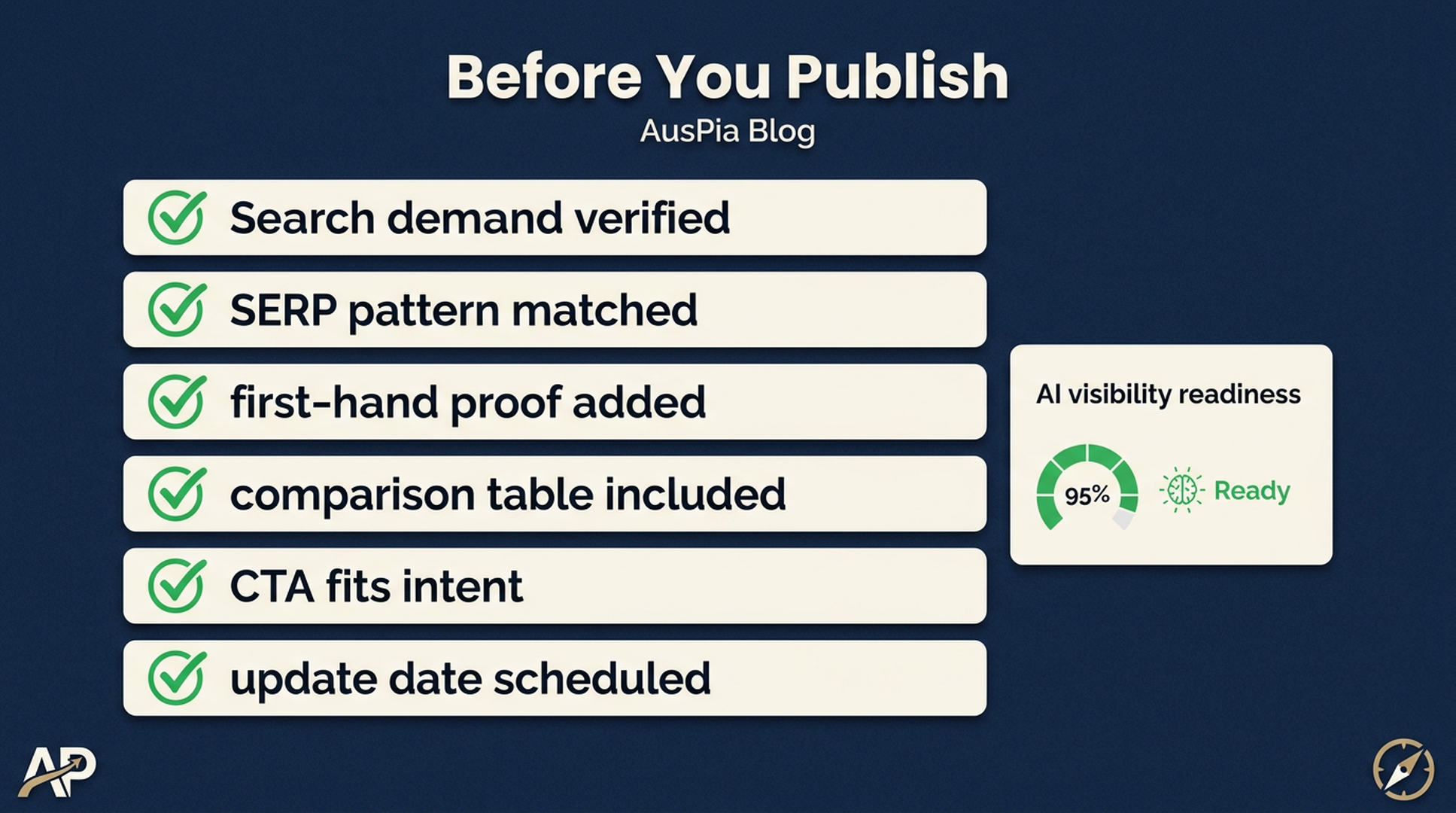
Caption: Before publishing, confirm that the page has demand, intent fit, proof, a useful asset, and a refresh plan.
Step 7: refresh the page before it becomes embarrassing
SEO content decays. Screenshots change. Product names change. Pricing changes. SERPs shift. AI systems start citing newer pages.
Put refresh triggers into the content plan before the article goes live.
A practical refresh list might include:
- Update screenshots every quarter for tool tutorials.
- Recheck comparison pages when a competitor changes pricing.
- Review "best tools" pages every 60 to 90 days.
- Add new FAQ answers when sales or support hears the same question repeatedly.
- Replace weak examples with real examples as your team gathers proof.
A content library that is never refreshed becomes a liability. A content library that gets small, regular updates compounds.
Where Auspia fits
You can learn the full SEO process manually. There is nothing wrong with that. But many teams do not need another complicated operating manual. They need a faster way to find what to fix, what to publish, and what to turn into an AI-visible asset.
Auspia helps with that by connecting SEO, GEO, AEO, and tool-led growth in one workflow. Instead of separately checking keywords, page structure, AI crawler readiness, answer visibility, and content gaps, teams can use Auspia to move from diagnosis to action faster.
Use it when you need to:
- Audit an existing page for SEO and AI visibility gaps
- Decide whether a topic should become a blog post, tool page, or landing page
- Build a content brief that matches intent
- Check whether your site is ready for AI crawlers and answer engines
- Turn repeatable advice into a practical growth asset
The point is not to avoid thinking. The point is to stop spending your best hours on mechanical SEO setup.
A simple workflow for your next page
If you want to publish one useful SEO page this week, do this:
- Pick one topic tied to revenue, not vanity traffic.
- Check the SERP and write down the dominant page type and angle.
- List five questions the reader must have answered before they can act.
- Add one proof element from your own product, customer work, or internal data.
- Create one reusable asset: table, checklist, template, calculator, or tool.
- Publish with a clear title, short intro, internal link, FAQ, and update date.
- Revisit it in 60 days and improve the parts readers ignored or searched around.
If that feels like too much, start with an Auspia audit and let the tool show the first bottleneck. Most teams do not need a perfect SEO department on day one. They need a page that is useful, visible, and tied to the business.
FAQ
What is SEO content?
SEO content is a page created to satisfy a real search query and attract qualified organic traffic. It can be a blog post, landing page, tool page, product page, template, or comparison page.
Is SEO content still useful when AI search is growing?
Yes. AI search has made clear structure and evidence more important, not less important. Pages that define topics well, answer sub-questions, and show proof are easier for both search engines and AI answer systems to use.
How long should SEO content be?
It should be long enough to solve the searcher's problem. Some tool pages need only a short explanation. Some comparison or how-to pages need detailed steps, tables, screenshots, and FAQs.
What makes SEO content different from regular content?
Regular content may express an idea or announce news. SEO content starts from a search demand, matches intent, and gives the reader a next step that connects to the business.
Can Auspia replace keyword research tools?
Auspia is designed to shorten the path from analysis to action across SEO, GEO, AEO, and AI visibility. Teams may still use specialist keyword tools for deep research, but Auspia helps turn findings into pages, audits, and growth workflows faster.


