


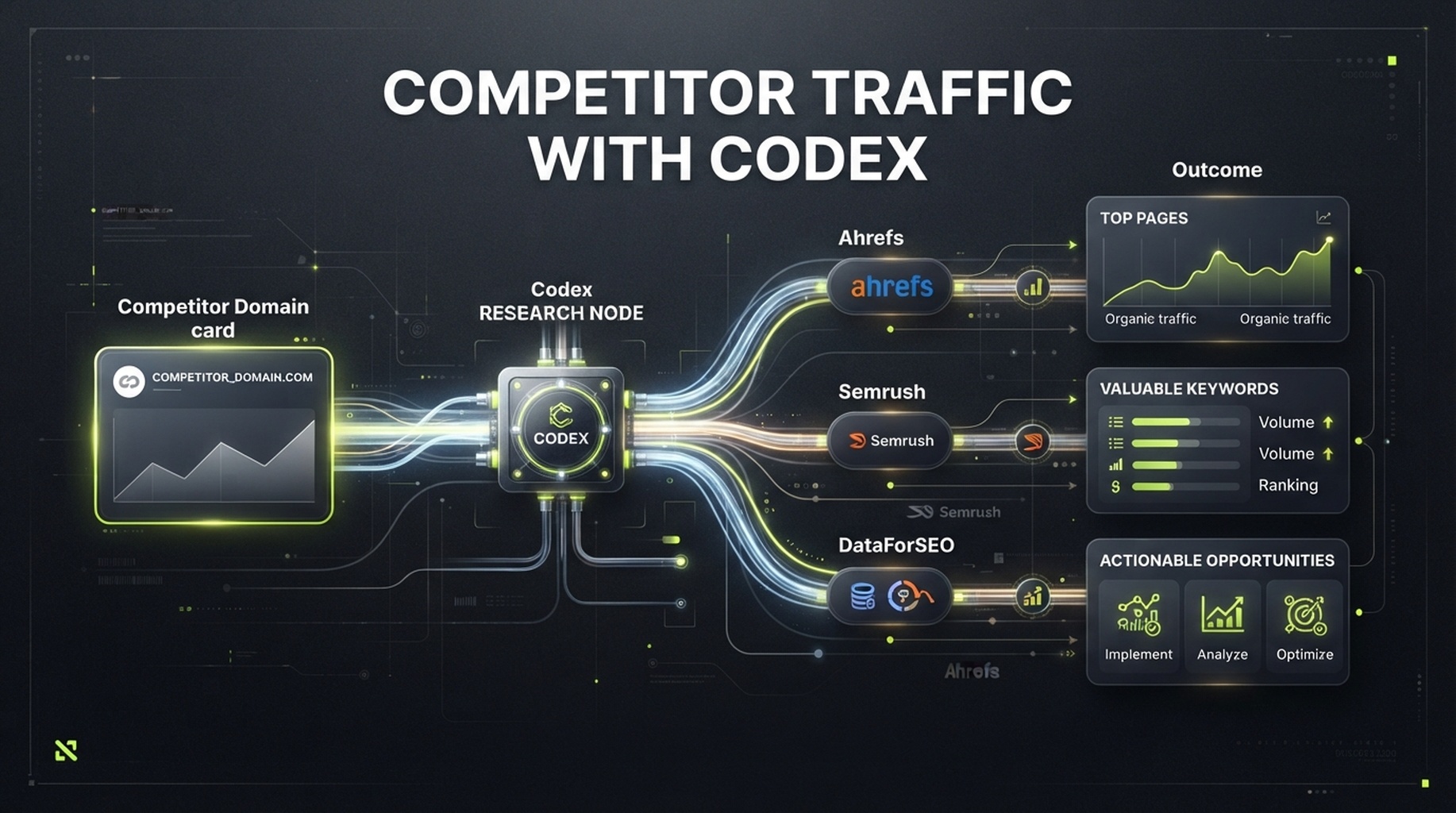
If you only need one competitor-traffic analysis, you can give this entire article to Codex and say: "Follow this article's workflow to analyze competitor.com." It will use the skill below to check available data providers, handle the Ahrefs, Semrush, or DataForSEO connection, and ask you only for inputs that materially affect the result: the domain, market, language, and your own domain if you want a content-gap comparison.
First, an important boundary: unless a competitor shares Google Analytics, Search Console, or server logs with you, you cannot see its actual visits. Ahrefs, Semrush, and DataForSEO produce estimates from their keyword databases, rankings, click models, and crawled data. That does not make the data useless. It is useful for comparing which domains are growing in the same market and time window, and which pages and queries deserve research. It is not a competitor's financial statement.
When this workflow is worth using
You do not need a full analysis every time you notice another site. Competitor traffic data is most useful in these situations:
Your situation | Why it is worth checking now | What it can answer |
|---|---|---|
You are planning a quarter or year of content but do not know which topic to cover first | Competitor pages and queries expose demand that already exists | Which themes have demand and which URLs should be improved or created first |
A competitor seems to be growing quickly | The total number does not explain the cause; changed pages and queries do | Whether growth is concentrated in tools, templates, blog posts, product pages, or one country |
You plan an alternative-to or comparison page | You need to understand the intent that earns the competitor exposure | Whether people compare features, prices, use cases, or solutions |
Your organic traffic has stalled | You need to distinguish missing coverage from underperforming existing pages | Review-worthy content gaps and possible keyword cannibalization |
You need to justify a content initiative to a team | "Everyone writes about it" is rarely enough to secure resources | A priority case supported by pages, queries, markets, and trend evidence |
It is not suitable for answering "How many real visitors did they have yesterday?" or "If we copy them, how much traffic will we get?" Without first-party analytics, no third-party tool can answer either question.
What decisions you can make after the analysis
The value is not a handsome traffic number. It is turning a vague competitor observation into decisions you can verify:
- Know whom to watch. Separate direct business competitors from organic-search competitors. A publisher, template site, or tool can take your most important search demand without selling the same product.
- Know where growth comes from. Find page groups, keywords, and countries that drive estimated visibility instead of looking only at one rising line.
- Know whether an opportunity is yours. Compare the competitor's themes with your URLs, customer needs, and product capabilities; remove irrelevant keywords.
- Know what to do next. Choose among improving an existing page, creating a content asset, researching a tool opportunity, or deliberately doing nothing, and retain the reason.
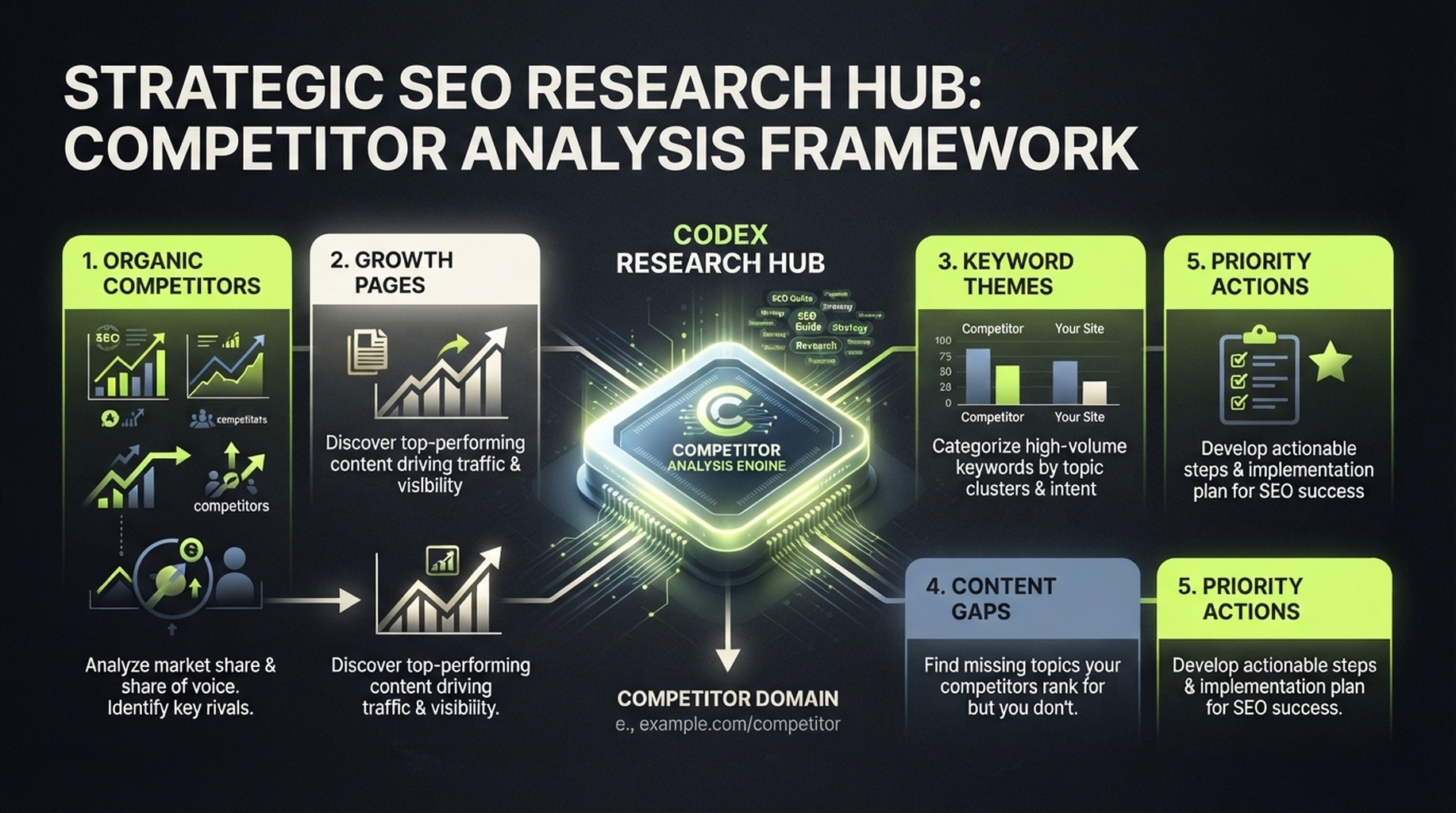
The destination of competitor traffic research is not a string of numbers. It is a set of pages, themes, and action choices your team can discuss.
What you will finish
This is a read-only workflow for someone using Codex for SEO research for the first time.
Item | This guide's convention |
|---|---|
Who it is for | People researching one or more competitor sites without an SEO analyst or their own scripts |
Finished output |
|
Minimum input | A normalized domain such as |
Optional input | Your domain, a competitor list, target country, language, device, time range, and business topic |
Default market | United States / English. This is a default, not global data. |
Typical time | After the first provider connection, a domain normally takes minutes to tens of minutes depending on quota and available data |
Definition of done | Every headline number names the provider, report or endpoint, retrieval time, market, and meaning; the report lists uncertainty and next steps instead of one traffic number |
Think of it as an evidence sheet rather than a "check traffic" button. Total traffic can only suggest who looks larger. Top pages, ranked keywords, change trends, and content gaps help you decide what to write, improve, or ignore.
Choose one data provider first
The three providers can cross-check each other, but they are not different views of the same database. Start with the provider whose API access you already have. Add a second source only when the difference is material to a decision or the first source cannot supply a needed report.
Data source | Best use in this research | How to interpret it | Confirm before starting |
|---|---|---|---|
Domain organic overview, ranked keywords, top pages, organic competitors, and backlink leads | An Ahrefs estimate for a selected database, not competitor analytics | Your plan includes API access and authorization for the needed Site Explorer reports | |
Domain overview, organic keywords, competing domains, organic trends, and page clues | A Semrush-database estimate; record the database and region | API v4 authorization, units, and the target database are available | |
Scriptable ranked keywords, SERPs, keyword metrics, traffic estimates, and backlinks | Data returned by an endpoint and its model, not real sessions | Login/password or supported authorization, balance, target location, and language |
Do not add providers' traffic figures together, and do not decide that one provider is wrong because the numbers differ. First check whether you used the same root domain, market, language, and metric: organic traffic, total visits, or paid traffic. Comparison only makes sense when definitions match.
Minimum viable path: DataForSEO alone can complete this tutorial. It is particularly useful when you want Codex to organize reproducible CSV and Markdown files. Add Ahrefs or Semrush when their competitor, page, or history reports add evidence you need.
Give Codex a stable, repeatable job
A Codex skill is a folder containing SKILL.md. It tells Codex when to run a workflow, which inputs it needs, the working order, and the boundaries it must respect. Current Codex guidance supports repository-level skills in .agents/skills/ in the current project or an ancestor, and personal skills in ~/.agents/skills/. The first is useful for team reuse; the second is useful across your own projects.
In a dedicated research repository or working folder, create the directory:
mkdir -p .agents/skills/competitor-traffic-researchThen create .agents/skills/competitor-traffic-research/SKILL.md. Copy the complete file below exactly. The skill handles provider connections, credentials, default market behavior, and provider scripts so the article does not make a beginner configure every key by hand.
Complete SKILL.md file
Copy the complete code block below into .agents/skills/competitor-traffic-research/SKILL.md. Do not copy article text outside the code block.
---
name: competitor-traffic-research
description: Analyze a public competitor domain's estimated search traffic, top pages, ranked keywords, trends, and content gaps with Ahrefs, Semrush, or DataForSEO data. Use when a user asks to check competitor website traffic, competitor organic keywords, top pages, or organic search competitors. Set up any required provider connection, then produce a read-only, sourced report without inventing metrics.
---

# Competitor traffic research

## Purpose and boundary

Turn a public domain into a reviewable competitor-search report. This is research only. Do not edit a website, create a provider project, alter billing, change account settings, publish content, send email, or make any other external write action.

All third-party traffic values are estimates unless the user supplies first-party analytics for a domain they own. Never call an estimated value "actual traffic," "sessions," "revenue," or "conversions."

## Required input

Ask only for what is missing:

1. Competitor domain, subdomain, path, or exact URL. Normalize it and state which scope will be measured.
2. At least one available authorized provider: Ahrefs, Semrush, or DataForSEO.

Use `United States` and `English` when market and language are not supplied. State this default prominently in the final report. Optional inputs are the user's domain, additional competitors, device, date range, seed topic, and business goal.

## Provider connection and setup

Handle the provider setup so the user does not have to read API documentation or write request code.

1. Inspect installed provider skills and local integration scripts first. Prefer an existing authorized connection.
2. If no connection is ready, tell the user which provider connection is needed and guide them through its ordinary setup one step at a time. Use the provider's official documentation and configuration method; do not invent endpoints or settings.
3. Store provider settings in the location expected by the installed integration. Use `AHREFS_API_KEY`, `SEMRUSH_API_KEY`, `DATAFORSEO_LOGIN`, and `DATAFORSEO_PASSWORD` when a local script expects those names. Set DataForSEO's `DATAFORSEO_DEFAULT_LOCATION` and `DATAFORSEO_DEFAULT_LANGUAGE` to the selected market and language when the installed toolkit uses them.
4. Do not copy provider credentials into research artifacts, report tables, CSV output, or user-facing summaries. Keep connection setup out of the analysis report.
5. Use read-only reports/endpoints. Before a potentially billable request, state the provider, report or endpoint class, market, language, intended request count, and any known quota/credit uncertainty. Stop if the user declines.
6. On a 401, 403, quota, coverage, or provider error, record the provider as `unavailable` with the safe error category and a recovery suggestion. Do not retry repeatedly, switch providers silently, or invent a substitute metric.

## Provider query map

Choose the least complicated available route. Do not force all three providers into one run.

| Provider | First lookup | Extend the analysis with | Use it when |
| --- | --- | --- | --- |
| Ahrefs | Site Explorer domain overview or the installed Ahrefs connector's closest equivalent | Top pages, Organic keywords, Organic competitors, Content Gap | The connection exposes these reports and the user needs page-level competitor research |
| Semrush | Domain Overview or the installed Semrush connector's closest equivalent | Organic Research, Organic Competitors, Keyword Gap, historical position data | The connection exposes the target database and the user needs a second point of view or keyword-gap workflow |
| DataForSEO | `bulk_traffic_estimation` and `ranked_keywords` from the installed `dataforseo-toolkit` | `keywords_for_site`, `google_organic_serp`, `backlinks_summary`, `referring_domains` | A scriptable local workflow is available or a reproducible CSV is the main need |

For DataForSEO, use the installed toolkit before writing new HTTP code. Its normal sequence for a domain is:

```text
bulk_traffic_estimation -> ranked_keywords -> keywords_for_site
```

Run `google_organic_serp` only for a small, human-selected set of important keywords to validate intent and result-page format. Run backlink reports only when the user asks about referral or link opportunities. If an Ahrefs or Semrush connector uses different report names, use the closest documented read-only equivalent and record the exact report name.

## Data collection order

1. Create a timestamped folder under `competitor-research/` using a safe normalized domain name. Do not overwrite an existing run.
2. Create `research-scope.md` before any API call. Record target scope, market, language, date/time in UTC, available providers, user goal, and the meanings of requested metrics.
3. Inspect installed provider skills, local scripts, and official provider documentation before choosing a report/endpoint. Use only capabilities that are actually available to the authorized account. Do not guess an endpoint from memory.
4. Collect the smallest useful evidence set from each available provider:
   - domain-level estimated organic traffic or visibility and any available trend;
   - top organic pages with their leading keyword or traffic contribution when the provider supplies it;
   - ranked organic keywords with position, volume, and URL when available;
   - organic competitors or intersecting keywords when available;
   - paid-search or backlink signals only when the user asks for them, and label them separately.
5. If the user provides their own domain, run a content-gap comparison only when the provider supports it. Return only relevant keyword opportunities; do not treat every missing keyword as a content brief.
6. Normalize domains, country/database, language, device, date window, URL scope, and metric definitions before comparing providers. Keep each provider's original metric in a separate column. Never average or sum traffic estimates across providers.
7. Save concise normalized CSV files only: `competitor-pages.csv`, `competitor-keywords.csv`, and, when applicable, `content-gap.csv`. Omit unavailable fields rather than filling them with zero.

## Output schemas

Write a `field-dictionary.md` beside the report. Use these columns where the provider returns them; preserve blanks as blanks.

### `competitor-pages.csv`

`url, page_role, leading_keyword, estimated_organic_traffic, ranking_keywords, traffic_change, provider, report_or_endpoint, retrieved_at_utc, market, language, scope, metric_definition, notes`

### `competitor-keywords.csv`

`keyword, intent, position, previous_position, search_volume, estimated_traffic, ranking_url, keyword_group, provider, report_or_endpoint, retrieved_at_utc, market, language, scope, metric_definition, relevance_note`

### `content-gap.csv`

Create this file only when the user's domain is supplied and a provider supports a comparison. Use:

`keyword, intent, competitor_domains, competitor_urls, user_domain_status, search_volume, position_gap, recommended_action, existing_url_risk, provider, report_or_endpoint, retrieved_at_utc, market, language, human_review_reason`

Do not manufacture a top-pages table from ranked keywords alone. If a provider cannot supply page-level estimated traffic, include the ranking URL and label the traffic field `not_available`.

## Analysis rules

- Separate a direct business competitor from an organic search competitor. A publisher, marketplace, directory, or tool can compete for keywords without selling the same product.
- Treat abrupt changes as observations, not causal claims. Check the changed pages and keywords before suggesting a reason.
- Prefer page groups, intent, relevance, and trend direction over one headline traffic number.
- For every quantitative field, retain `provider`, `report_or_endpoint`, `retrieved_at_utc`, `market`, `language`, `scope`, and `metric_definition` in the relevant output or its data dictionary.
- Label data `not_available`, `not_comparable`, or `estimated` rather than guessing. Explain why it cannot be compared when possible.
- Do not claim that an SEO metric predicts ranking, traffic, revenue, conversion, market share, or AI citations.

## Required report

Write `competitor-traffic-report.md` with these sections:

1. **Executive answer:** target, scope, market, language, retrieval time, provider coverage, and the shortest useful conclusion.
2. **What the numbers mean:** which metrics are estimates, what they do and do not measure, and comparison limits.
3. **Traffic and visibility snapshot:** a provider-by-provider table. Do not merge values.
4. **Trend and change check:** observed movement, relevant changed pages/keywords, and confidence or gaps.
5. **Top pages:** a compact table with URL, apparent page role, leading keyword when available, estimated contribution, provider, and a human interpretation.
6. **Keyword and intent patterns:** group a limited set of relevant keywords by searcher job. Identify themes, not a dump of thousands of rows.
7. **Competitors and gaps:** distinguish direct competitors from organic competitors. If the user's domain is supplied, show only review-worthy content gaps and cannibalization risks.
8. **Prioritized actions:** no more than five actions. Each must cite the evidence, likely owner, expected output, and a human approval gate.
9. **Data availability and caveats:** unavailable providers, errors, scope mismatches, freshness limits, and exact recovery steps.
10. **Artifact index:** paths to generated CSVs and a field dictionary.

## Quality gates before finishing

- Verify that target scope is explicit: root domain, subdomain, path, or exact URL.
- Verify market and language are stated; highlight defaults.
- Verify provider connection details do not appear in research artifacts, report tables, CSV output, or the final summary.
- Verify every headline metric names its provider and says `estimated` when it is not first-party data.
- Verify provider values were not added, averaged, or compared across mismatched markets, languages, scopes, or dates.
- Verify all recommended actions are evidence-backed and require human approval before website changes or publishing.
- If data is unavailable, complete the report with the availability log and the exact next input needed; do not return a fictional analysis.

## Final response to the user

State the target, market, language, available providers, top three observations, most important caveat, generated artifact paths, and the one decision the user should make next.
Restart Codex after saving, or start a new session and invoke $competitor-traffic-research explicitly. Explicit invocation is more reliable for the first run; later, Codex can also match the task description automatically.
First run: begin with one domain, not ten
Open Codex from the research directory. If a source is not connected, the skill handles the corresponding setup; you do not need to work through keys in the article. Then enter:
$competitor-traffic-research
Analyze the organic search traffic of competitor.com. Use every available provider and the default market and language. Before starting, state the report types, market, language, and possible billable request count you plan to use.
If you have your own site, add it on the second run. That lets Codex make a real content-gap comparison instead of guessing that you have not covered a topic:
$competitor-traffic-research
My site is mysite.com and the competitor is competitor.com. In the same market and language, check organic-search content gaps. Keep only opportunities related to B2B project-management software that deserve human review. Do not recommend publishing pages yet; deliver the research report first.
"Deliver the research report first" matters. It separates collecting evidence from changing a website. Codex can find opportunities quickly, but deciding to write an article, update a product page, or invest in link building still requires your review of intent, existing content, and business value.
Read the output: do not stare at monthly traffic
A dependable report translates numbers into evidence your team can discuss.
What you see in the report | Ask first | Action you can take | Conclusion you should not draw |
|---|---|---|---|
A competitor's estimated organic traffic rises | Which URLs and keywords drove it? Are market, scope, and time window the same? | Inspect the growth pages' intent, format, update date, and internal links | "They must have made one specific SEO change" |
A tool page outperforms its blog | Which queries send the visits, and which repeatable job does the page solve? | Assess whether you can offer genuine inputs, rules, and explainable outputs in a tool | "More tools will definitely create the same traffic" |
Many keywords rank from 4 to 15 | Do they fit your customers and existing URLs? | Group them into themes; improve an existing page or fill a content gap | "Write one article for every keyword" |
Ahrefs and Semrush differ greatly | Do domain scope, country database, language, and date match? | Cross-check shared pages and keywords, and record the difference | "Use the larger number" |
A provider returns no traffic | Does the plan, market, or domain have coverage? | Mark it unavailable; narrow scope, use an authorized source, or wait for quota | "No data means no traffic" |
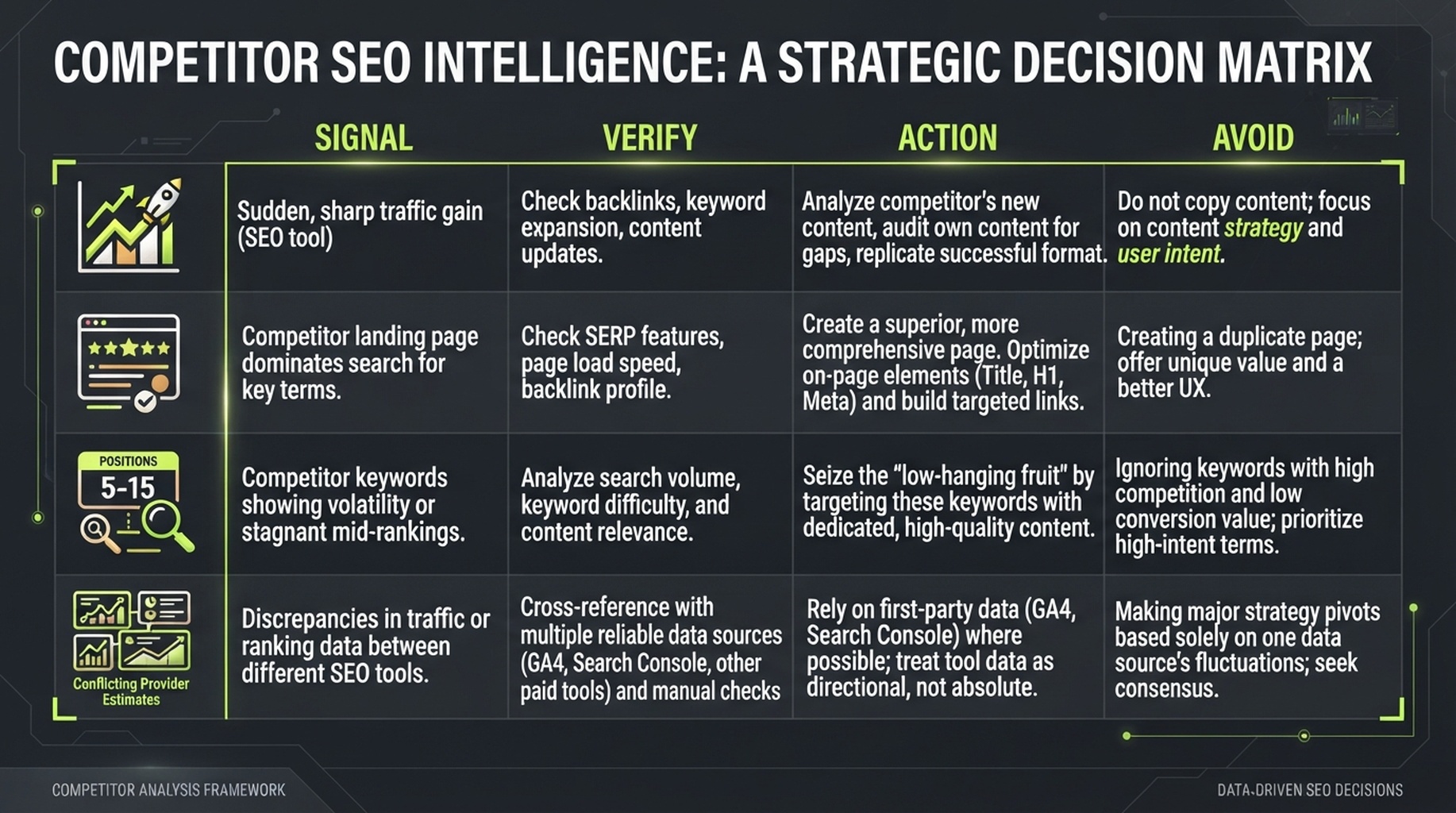
Verify first, then act. Third-party traffic data helps you ask better questions; it does not make the conclusion for you.
A fictional reading example
Suppose the report shows that rival.example grew mainly through ten pages under /templates/, with task-oriented queries such as "proposal template" and "project brief template." The correct next step is not copying ten titles. Verify whether your customers really need templates, whether you can provide a downloadable, editable, or online-generated version, and whether an existing resource page can be improved. Only when all three answers make sense should it enter the content plan.
Handle common failures in this order
Symptom | Likely cause | What Codex should do | What you need to do |
|---|---|---|---|
| The provider connection is incomplete or the plan lacks report permission | Stop retrying and write the availability issue to | Complete authorization using the skill prompt or confirm plan permission |
| Too little allowance or too many requests | Save completed results, stop batch requests, and report the unfinished scope | Check balance or quota; reduce domains, rows, or time range next time |
No keywords or traffic | The domain is new, sample is small, country/language is wrong, or coverage is limited | Write "no data" separately from zero traffic; check root domain and subdomains | Confirm scope and market; provide comparable competitors if needed |
Reports look contradictory | Different database, date, device, or URL scope | Do not merge metrics; output a comparability checklist | Choose one business market as the main report and use another only for validation |
A provider cannot connect | The skill cannot find a connection, permission, or configuration | Mark it unavailable and continue with the remaining sources | Complete the one-time connection steps Codex gives you, then rerun |
Turn a one-time analysis into monthly competitive intelligence
The first report answers "what do we see now?" Monthly reruns reveal whether a change is worth acting on. Do not begin by monitoring fifty domains. For a small team, three to five direct or organic-search competitors in the same market and language are enough.
Each month, rerun the same skill and ask four additional questions:
- Which pages had the largest change in estimated visibility or ranked keywords?
- Did the change come from new pages, updates to existing pages, or ranking changes, and does the data support that conclusion?
- Which three themes are most relevant to the business but are not well answered by your current URLs?
- Which opportunity should be "improve an existing page," "create one content asset," or "do nothing," and why?
Save each research-scope.md and report, not only the final spreadsheet. Market, language, provider, retrieval time, and data gaps make a comparison three months later interpretable.
Completion checklist
- [ ] You confirmed whether the scope is a root domain, subdomain, path, or exact URL.
- [ ] You selected and recorded the country/market and language; if you used defaults, you stated them.
- [ ] The required sources were connected by the skill and the report does not mix in setup instructions.
- [ ] Codex stated the provider, report type, and possible billing scope before calling an API.
- [ ] The report retains provider, retrieval time, and metric definition for each estimate.
- [ ] You did not add Ahrefs, Semrush, and DataForSEO estimates together or call them real analytics.
- [ ] Top pages and keywords became a small set of human-reviewable actions, not an endless keyword list.
- [ ] Any content update, publication, or site change remains subject to later human approval.
FAQ
Can I really give Codex only one domain?
Yes. The skill defaults to the United States and English database, so the minimum is a domain and one configured data source. That default may not be where your customers are. For local, non-English, or country-specific business, explicitly provide the country and language.
Do I need to buy Ahrefs, Semrush, and DataForSEO at the same time?
No. One authorized provider covering your target market is enough to begin. A second source is for cross-checking an important decision or filling a report gap; do not buy API units merely to make a report look comprehensive.
Why does a competitor's total traffic in Similarweb or another dashboard differ?
The metric scope differs. This workflow focuses on organic-search visibility, pages, and keywords; some products estimate visits across direct, referral, social, and paid channels. Check the channel definition before comparing. In every case, third-party data is not the competitor's first-party analytics.
Can Codex decide which articles I should write?
It can propose a limited set of evidence-backed candidates and risks, but it should not publish them on its own. Keyword and page data cannot see your sales conversations, product capabilities, legal requirements, or content resources. Treat Codex's output as a research-assistant memo, then have the content, product, or sales owner approve it.
Author: Theo Langford, Competitive AI Visibility Analyst for 120+ Markets at Auspia. Theo writes about competitor research, market maps, and the evidence boundaries behind search-visibility comparisons.


