Codexで競合サイトのトラフィックを調べる方法:Ahrefs、Semrush、DataForSEO 実践ガイド
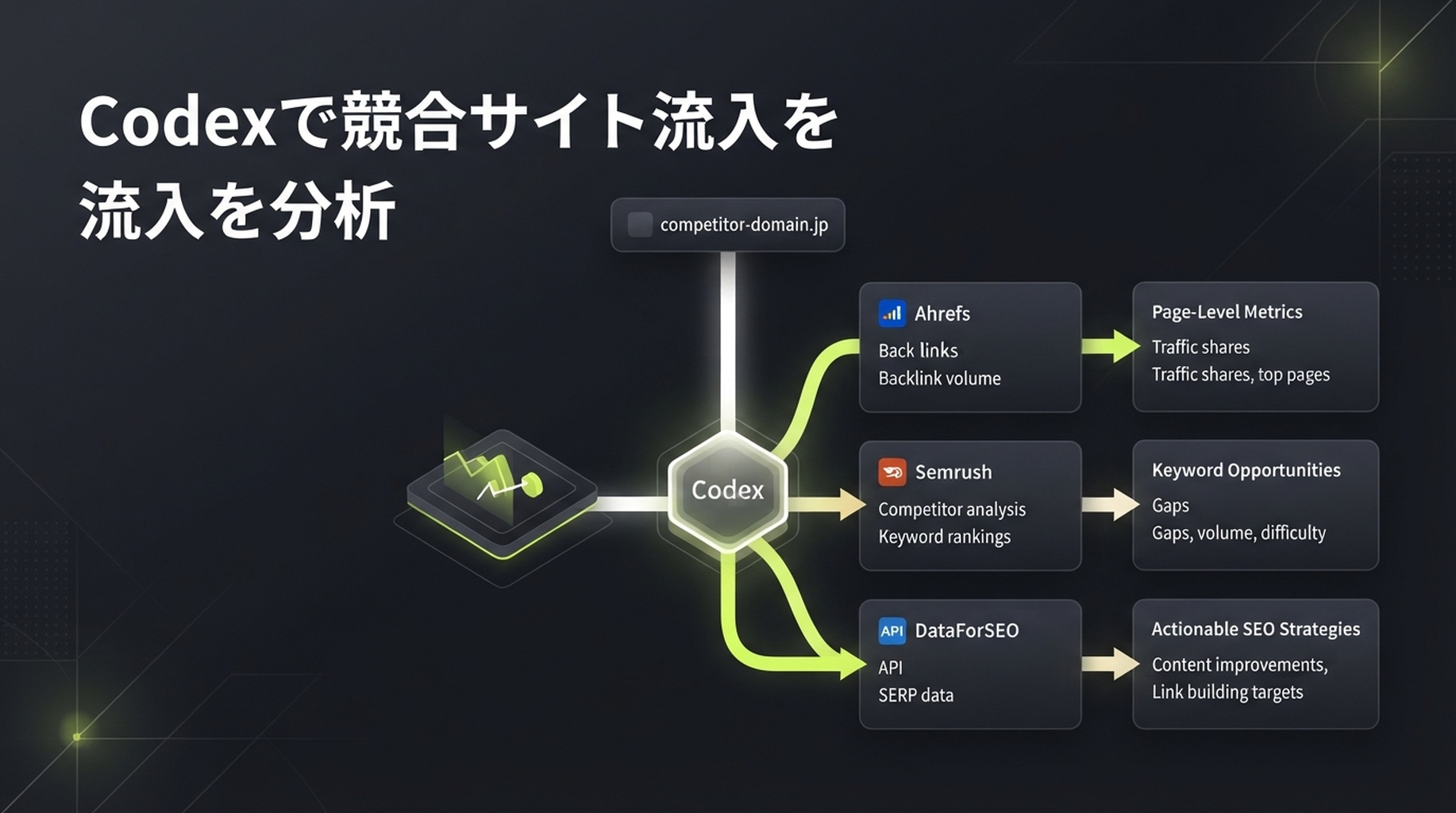
競合トラフィックの分析を一度だけ行いたいなら、このページ全体を Codex に渡し、competitor.com をこの記事の手順で分析して と伝えてください。下の skill に従い、利用可能なデータ提供元を確認し、Ahrefs、Semrush、DataForSEO の接続を扱ったうえで、結果に影響する入力だけを尋ねます。必要なのは対象ドメイン、対象市場、言語、そしてコンテンツギャップを比較する場合の自社ドメインです。
最初に重要な前提があります。相手が Google Analytics、Search Console、サーバーログを共有しない限り、相手の実際の訪問数は見えません。Ahrefs、Semrush、DataForSEO が返すのは、各社のキーワードデータベース、順位、クリックモデル、クロールデータに基づく推定値です。それでも価値はあります。同じ市場・同じ期間で、どのドメインが伸びているか、どのページと検索語句を調べるべきかを比較できます。一方で、推定月間トラフィックを競合の売上報告のように扱ってはいけません。
この方法を使うべき場面
競合サイトを見つけるたびに、完全な分析が必要になるわけではありません。次のような場面では、競合トラフィックのデータが特に役立ちます。
状況 | 今調べる価値がある理由 | 得られる答え |
|---|---|---|
四半期・年間のコンテンツ計画を作るが、最初に扱うテーマが分からない | 競合のページとキーワードから、すでに存在する検索需要が見える | 需要があるテーマと、優先して新規作成または改善すべき URL |
競合が急成長しているように見える | 合計値だけでは理由が分からず、ページとキーワードの変化が重要だから | 成長がツール、テンプレート、ブログ、製品ページ、特定の国に集中しているか |
代替ページや比較ページを作ろうとしている | ブランド名だけで推測せず、相手が露出を得ている検索意図を理解する必要がある | 機能、価格、利用場面、解決策のどれを比較しているのか |
自然検索トラフィックが停滞している | 未カバーのテーマと既存ページの不調を区別する必要がある | 補う価値のあるコンテンツギャップと、キーワードカニバリゼーションの可能性 |
コンテンツ施策の必要性をチームに説明したい | 「みんなが書いている」だけでは予算や工数を得にくい | ページ、検索語句、市場、推移で裏付けた優先順位の根拠 |
この方法は「相手は昨日、実際に何人訪れたのか」や「真似すればどれだけの流入が得られるか」には向きません。相手の一次分析データがなければ、第三者ツールではどちらにも答えられません。
分析後にできる判断
目的は見栄えのよいトラフィック数値を得ることではありません。曖昧な競合観察を、検証できる意思決定に変えることです。
- 見るべき相手が分かる。 直接の事業競合と、自然検索上の競合を分けます。同じ製品を売っていなくても、メディア、テンプレートサイト、ツールサイトが重要な検索需要を奪うことがあります。
- 成長の源泉が分かる。 一本の上昇線だけでなく、推定露出を生むページ群、キーワード、国を特定します。
- その機会が自社に関係するか分かる。 競合のテーマを、自社 URL、顧客の課題、製品の能力と照合し、無関係なキーワードを外します。
- 次に何をすべきか分かる。 既存ページの改善、新しいコンテンツ資産の作成、ツール機会の調査、見送りの間で選び、理由を残します。

競合トラフィック調査のゴールは数字の羅列ではなく、チームで議論できるページ、テーマ、行動の選択肢です。
完成時に得られるもの
これは、初めて Codex で SEO 調査を行う人向けの読み取り専用ワークフローです。
項目 | このガイドでの扱い |
|---|---|
対象者 | SEO アナリストや独自スクリプトがなく、競合サイトを調べたい人 |
成果物 |
|
最低限の入力 |
|
任意の入力 | 自社ドメイン、競合リスト、対象国、言語、デバイス、期間、事業テーマ |
既定の市場 | United States / English。これは既定値であり、世界全体のデータではありません。 |
所要時間の目安 | 最初の接続後は、配分と利用可能なデータに応じて、1 ドメインにつき数分から十数分 |
完了の定義 | 重要な数値すべてに提供元、レポートまたはエンドポイント、取得時刻、市場、意味があり、単一の数値ではなく不確実性と次の手順を示す |
これは「トラフィックを調べる」ボタンではなく、証拠の一覧表だと考えてください。総量で答えられるのは「どちらが大きく見えるか」だけです。人気ページ、順位キーワード、変化の傾向、コンテンツギャップが、書くこと、直すこと、追わないことを判断させます。
最初から三つのデータソースをそろえる必要はない
三社のツールは相互検証に使えますが、同じデータベースを別の形で見ているわけではありません。すでに API 権限を持つ一社から始めてください。数値の差が重要な意思決定に影響する場合、または特定のレポートを補う必要がある場合にだけ、二社目を加えます。
データソース | 今回の調査で得やすいもの | 結果の読み方 | 開始前に確認すること |
|---|---|---|---|
ドメインの自然検索概要、順位キーワード、人気ページ、自然検索競合、被リンクの手掛かり | 指定データベースにおける Ahrefs の推定値であり、競合の Analytics ではない | 契約に API アクセスがあり、必要な Site Explorer レポートが許可されているか | |
ドメイン概要、自然キーワード、競合ドメイン、自然検索トレンド、ページの手掛かり | Semrush データベースの推定値。データベースと地域をレポートに記録する | API v4 の認証、ユニット、対象データベースが使えるか | |
スクリプト化できる順位キーワード、SERP、キーワード指標、トラフィック推定、被リンク | エンドポイントが返すデータとモデルであり、実際のセッション数ではない | ログイン名・パスワードまたは利用可能な認証方式、残高、対象地域、言語 |
提供元ごとの traffic を足し合わせず、数字が異なるだけでどちらかが間違いだとも決めないでください。まず、同じルートドメイン、市場、言語、指標を見ているかを確認します。指標は自然検索トラフィック、全訪問、広告トラフィックのいずれかです。定義がそろって初めて比較できます。
最小構成: DataForSEO だけでもこのチュートリアルは完了できます。Codex に CSV と Markdown を再現可能な形で整理させたい場合に適しています。Ahrefs または Semrush は、競合、ページ、履歴のレポートが追加の証拠になる場合に使います。
Codex に安定して繰り返せる仕事を渡す
Codex の skill は SKILL.md を含むフォルダです。いつワークフローを起動するか、必要な入力、作業順、守るべき制約を Codex に伝えます。現在の Codex ガイダンスでは、リポジトリ単位の skill を現在のプロジェクトまたは親ディレクトリの .agents/skills/ に置けます。個人用 skill は ~/.agents/skills/ に置けます。前者はチームでの再利用に、後者は自分のプロジェクト横断利用に向きます。
専用の調査リポジトリまたは作業ディレクトリで、次のディレクトリを作成します。
mkdir -p .agents/skills/competitor-traffic-research続けて .agents/skills/competitor-traffic-research/SKILL.md を作成し、以下の完全な内容をそのまま入れてください。接続、認証情報、既定市場、提供元スクリプトの処理はこの skill が担当するため、初心者が本文で key を一つずつ設定する必要はありません。
SKILL.md の完全なファイル
以下のコードブロック全体を .agents/skills/competitor-traffic-research/SKILL.md にコピーしてください。コードブロック外の説明文はコピーしません。
---
name: competitor-traffic-research
description: Analyze a public competitor domain's estimated search traffic, top pages, ranked keywords, trends, and content gaps with Ahrefs, Semrush, or DataForSEO data. Use when a user asks to check competitor website traffic, competitor organic keywords, top pages, or organic search competitors. Set up any required provider connection, then produce a read-only, sourced report without inventing metrics.
---

# Competitor traffic research

## Purpose and boundary

Turn a public domain into a reviewable competitor-search report. This is research only. Do not edit a website, create a provider project, alter billing, change account settings, publish content, send email, or make any other external write action.

All third-party traffic values are estimates unless the user supplies first-party analytics for a domain they own. Never call an estimated value "actual traffic," "sessions," "revenue," or "conversions."

## Required input

Ask only for what is missing:

1. Competitor domain, subdomain, path, or exact URL. Normalize it and state which scope will be measured.
2. At least one available authorized provider: Ahrefs, Semrush, or DataForSEO.

Use `United States` and `English` when market and language are not supplied. State this default prominently in the final report. Optional inputs are the user's domain, additional competitors, device, date range, seed topic, and business goal.

## Provider connection and setup

Handle the provider setup so the user does not have to read API documentation or write request code.

1. Inspect installed provider skills and local integration scripts first. Prefer an existing authorized connection.
2. If no connection is ready, tell the user which provider connection is needed and guide them through its ordinary setup one step at a time. Use the provider's official documentation and configuration method; do not invent endpoints or settings.
3. Store provider settings in the location expected by the installed integration. Use `AHREFS_API_KEY`, `SEMRUSH_API_KEY`, `DATAFORSEO_LOGIN`, and `DATAFORSEO_PASSWORD` when a local script expects those names. Set DataForSEO's `DATAFORSEO_DEFAULT_LOCATION` and `DATAFORSEO_DEFAULT_LANGUAGE` to the selected market and language when the installed toolkit uses them.
4. Do not copy provider credentials into research artifacts, report tables, CSV output, or user-facing summaries. Keep connection setup out of the analysis report.
5. Use read-only reports/endpoints. Before a potentially billable request, state the provider, report or endpoint class, market, language, intended request count, and any known quota/credit uncertainty. Stop if the user declines.
6. On a 401, 403, quota, coverage, or provider error, record the provider as `unavailable` with the safe error category and a recovery suggestion. Do not retry repeatedly, switch providers silently, or invent a substitute metric.

## Provider query map

Choose the least complicated available route. Do not force all three providers into one run.

| Provider | First lookup | Extend the analysis with | Use it when |
| --- | --- | --- | --- |
| Ahrefs | Site Explorer domain overview or the installed Ahrefs connector's closest equivalent | Top pages, Organic keywords, Organic competitors, Content Gap | The connection exposes these reports and the user needs page-level competitor research |
| Semrush | Domain Overview or the installed Semrush connector's closest equivalent | Organic Research, Organic Competitors, Keyword Gap, historical position data | The connection exposes the target database and the user needs a second point of view or keyword-gap workflow |
| DataForSEO | `bulk_traffic_estimation` and `ranked_keywords` from the installed `dataforseo-toolkit` | `keywords_for_site`, `google_organic_serp`, `backlinks_summary`, `referring_domains` | A scriptable local workflow is available or a reproducible CSV is the main need |

For DataForSEO, use the installed toolkit before writing new HTTP code. Its normal sequence for a domain is:

```text
bulk_traffic_estimation -> ranked_keywords -> keywords_for_site
```

Run `google_organic_serp` only for a small, human-selected set of important keywords to validate intent and result-page format. Run backlink reports only when the user asks about referral or link opportunities. If an Ahrefs or Semrush connector uses different report names, use the closest documented read-only equivalent and record the exact report name.

## Data collection order

1. Create a timestamped folder under `competitor-research/` using a safe normalized domain name. Do not overwrite an existing run.
2. Create `research-scope.md` before any API call. Record target scope, market, language, date/time in UTC, available providers, user goal, and the meanings of requested metrics.
3. Inspect installed provider skills, local scripts, and official provider documentation before choosing a report/endpoint. Use only capabilities that are actually available to the authorized account. Do not guess an endpoint from memory.
4. Collect the smallest useful evidence set from each available provider:
   - domain-level estimated organic traffic or visibility and any available trend;
   - top organic pages with their leading keyword or traffic contribution when the provider supplies it;
   - ranked organic keywords with position, volume, and URL when available;
   - organic competitors or intersecting keywords when available;
   - paid-search or backlink signals only when the user asks for them, and label them separately.
5. If the user provides their own domain, run a content-gap comparison only when the provider supports it. Return only relevant keyword opportunities; do not treat every missing keyword as a content brief.
6. Normalize domains, country/database, language, device, date window, URL scope, and metric definitions before comparing providers. Keep each provider's original metric in a separate column. Never average or sum traffic estimates across providers.
7. Save concise normalized CSV files only: `competitor-pages.csv`, `competitor-keywords.csv`, and, when applicable, `content-gap.csv`. Omit unavailable fields rather than filling them with zero.

## Output schemas

Write a `field-dictionary.md` beside the report. Use these columns where the provider returns them; preserve blanks as blanks.

### `competitor-pages.csv`

`url, page_role, leading_keyword, estimated_organic_traffic, ranking_keywords, traffic_change, provider, report_or_endpoint, retrieved_at_utc, market, language, scope, metric_definition, notes`

### `competitor-keywords.csv`

`keyword, intent, position, previous_position, search_volume, estimated_traffic, ranking_url, keyword_group, provider, report_or_endpoint, retrieved_at_utc, market, language, scope, metric_definition, relevance_note`

### `content-gap.csv`

Create this file only when the user's domain is supplied and a provider supports a comparison. Use:

`keyword, intent, competitor_domains, competitor_urls, user_domain_status, search_volume, position_gap, recommended_action, existing_url_risk, provider, report_or_endpoint, retrieved_at_utc, market, language, human_review_reason`

Do not manufacture a top-pages table from ranked keywords alone. If a provider cannot supply page-level estimated traffic, include the ranking URL and label the traffic field `not_available`.

## Analysis rules

- Separate a direct business competitor from an organic search competitor. A publisher, marketplace, directory, or tool can compete for keywords without selling the same product.
- Treat abrupt changes as observations, not causal claims. Check the changed pages and keywords before suggesting a reason.
- Prefer page groups, intent, relevance, and trend direction over one headline traffic number.
- For every quantitative field, retain `provider`, `report_or_endpoint`, `retrieved_at_utc`, `market`, `language`, `scope`, and `metric_definition` in the relevant output or its data dictionary.
- Label data `not_available`, `not_comparable`, or `estimated` rather than guessing. Explain why it cannot be compared when possible.
- Do not claim that an SEO metric predicts ranking, traffic, revenue, conversion, market share, or AI citations.

## Required report

Write `competitor-traffic-report.md` with these sections:

1. **Executive answer:** target, scope, market, language, retrieval time, provider coverage, and the shortest useful conclusion.
2. **What the numbers mean:** which metrics are estimates, what they do and do not measure, and comparison limits.
3. **Traffic and visibility snapshot:** a provider-by-provider table. Do not merge values.
4. **Trend and change check:** observed movement, relevant changed pages/keywords, and confidence or gaps.
5. **Top pages:** a compact table with URL, apparent page role, leading keyword when available, estimated contribution, provider, and a human interpretation.
6. **Keyword and intent patterns:** group a limited set of relevant keywords by searcher job. Identify themes, not a dump of thousands of rows.
7. **Competitors and gaps:** distinguish direct competitors from organic competitors. If the user's domain is supplied, show only review-worthy content gaps and cannibalization risks.
8. **Prioritized actions:** no more than five actions. Each must cite the evidence, likely owner, expected output, and a human approval gate.
9. **Data availability and caveats:** unavailable providers, errors, scope mismatches, freshness limits, and exact recovery steps.
10. **Artifact index:** paths to generated CSVs and a field dictionary.

## Quality gates before finishing

- Verify that target scope is explicit: root domain, subdomain, path, or exact URL.
- Verify market and language are stated; highlight defaults.
- Verify provider connection details do not appear in research artifacts, report tables, CSV output, or the final summary.
- Verify every headline metric names its provider and says `estimated` when it is not first-party data.
- Verify provider values were not added, averaged, or compared across mismatched markets, languages, scopes, or dates.
- Verify all recommended actions are evidence-backed and require human approval before website changes or publishing.
- If data is unavailable, complete the report with the availability log and the exact next input needed; do not return a fictional analysis.

## Final response to the user

State the target, market, language, available providers, top three observations, most important caveat, generated artifact paths, and the one decision the user should make next.
保存後に Codex を再起動するか、新しいセッションで $competitor-traffic-research を明示的に呼び出します。最初の実行では明示呼び出しの方が確実です。その後はタスク内容に応じて Codex が自動的に一致させることもできます。
初回実行:十個ではなく一つのドメインから始める
調査ディレクトリで Codex を開きます。データソースがまだ接続されていなければ、skill が対応する設定を処理します。本文で key を順番に扱う必要はありません。次のように入力します。
$competitor-traffic-research
competitor.com の自然検索トラフィックを分析してください。利用可能なすべての提供元を使い、既定の市場と言語で構いません。開始前に、呼び出す予定のレポート種類、市場、言語、請求が発生する可能性のあるリクエスト数を説明してください。
自社サイトがある場合は、二回目に追加してください。そうすると Codex は「この語句を扱っていない」と感覚で判断せず、実際のコンテンツギャップ比較を行えます。
$competitor-traffic-research
自社サイトは mysite.com、競合は competitor.com です。同じ市場と言語で自然検索のコンテンツギャップを確認してください。B2B プロジェクト管理ソフトウェアに関連し、人による確認に値する機会だけを残してください。ページ公開は提案せず、まず調査レポートを提出してください。
「まず調査レポートを提出する」は重要です。データ収集とサイト変更を切り分けるためです。Codex は機会をすばやく見つけられますが、記事を書くか、製品ページを更新するか、リンク構築に投資するかは、検索意図、既存コンテンツ、事業価値を見て決める必要があります。
出力の読み方:月間トラフィックだけを見ない
信頼できるレポートは、数字をチームで議論できる手掛かりに翻訳します。
レポートで見えること | まず問うこと | 実行できるアクション | 導いてはいけない結論 |
|---|---|---|---|
競合の推定自然検索トラフィックが増える | どの URL とキーワードが押し上げたか。市場、範囲、期間は同じか | 成長ページの検索意図、形式、更新日、内部リンクを確認する | 「必ず特定の SEO 施策をした」 |
ツールページがブログより大きい | どの検索語句が訪問を送り、ページはどんな反復可能な仕事を解決するか | 本物の入力、ルール、説明可能な出力を備えたツールを作れるか評価する | 「ツールを増やせば必ず同じ流入が得られる」 |
多くのキーワードが 4〜15 位にある | 顧客と既存 URL に合っているか | テーマ群にまとめ、既存ページを改善するかギャップを埋める | 「キーワードごとに一記事書く」 |
Ahrefs と Semrush の差が大きい | ドメイン範囲、国データベース、言語、日付は同じか | 共通して現れるページとキーワードで検証し、差を記録する | 「大きい数値を使えばよい」 |
データソースがトラフィックを返さない | 契約、市場、ドメインにカバレッジがあるか | 利用不可と記録し、範囲を狭めるか、許可済みソースを使うか、配分回復を待つ | 「データがないならトラフィックもない」 |
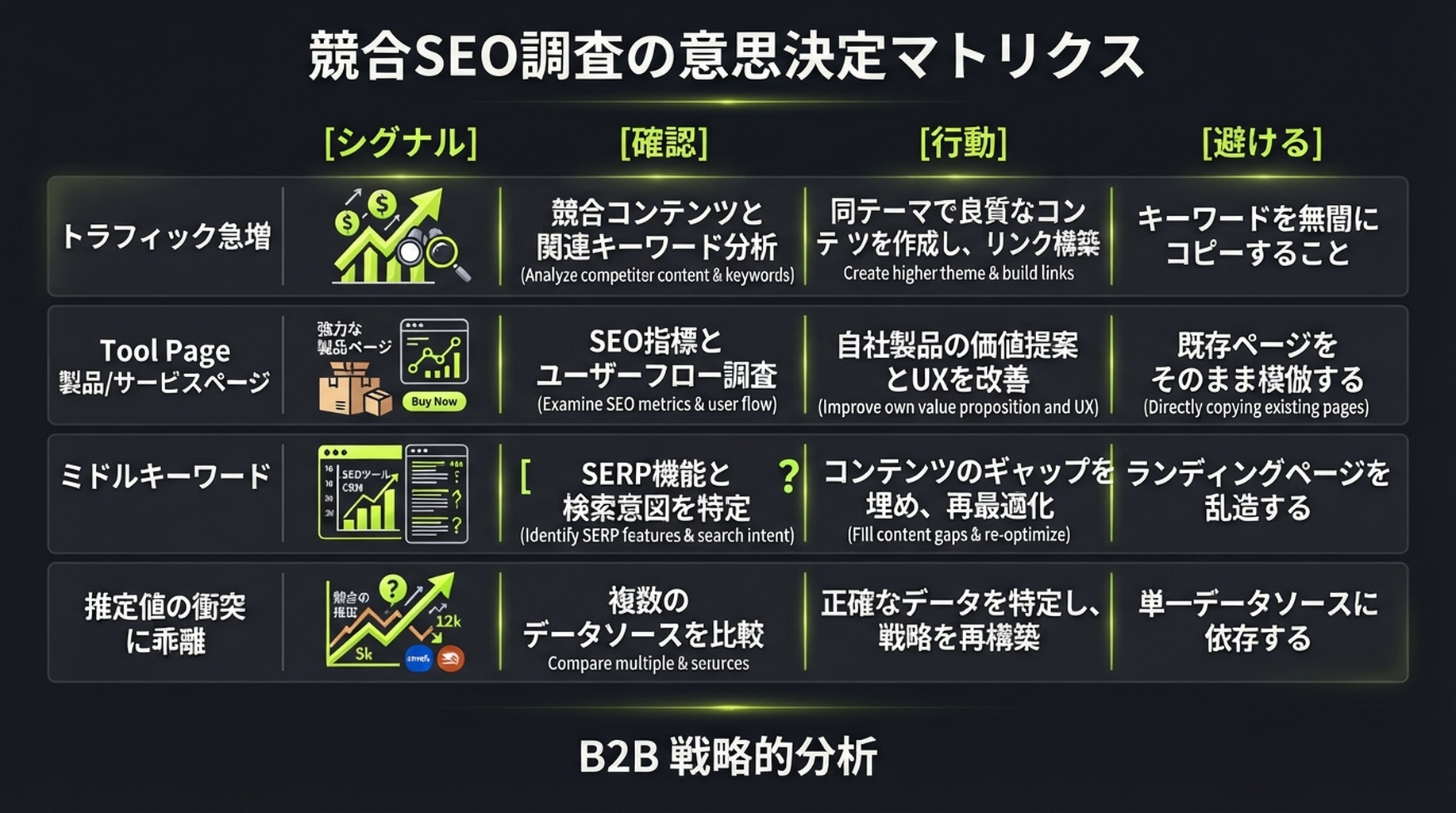
先に検証してから行動してください。第三者トラフィックデータは良い問いを作りますが、結論そのものにはなりません。
架空の読み取り例
レポートが rival.example の成長は主に /templates/ 以下の十ページから来ており、proposal template や project brief template のようなタスク型検索に集中していると示したとします。正しい次の手順は、十個のタイトルをコピーすることではありません。顧客が本当にテンプレートを必要としているか、ダウンロード・編集・オンライン生成できる版を提供できるか、改善できる既存リソースページがあるかを確認します。三つの答えがすべて妥当な場合だけ、コンテンツ計画に入れます。
よくある失敗はこの順で扱う
症状 | もっとも可能性の高い原因 | Codex にさせること | 自分がすること |
|---|---|---|---|
| 提供元の接続が未完了、または契約にレポート権限がない | 再試行を止め、 | skill の案内で認可を完了するか、契約権限を確認する |
| 配分不足またはリクエスト過多 | 完了済み結果を保存し、バッチ要求を止め、未完了範囲を報告する | 残高・配分を確認し、次回はドメイン数、行数、期間を減らす |
キーワードやトラフィックがない | ドメインが新しい、サンプルが小さい、国・言語が違う、カバレッジが限定的 | 「データなし」とゼロトラフィックを分け、ルートドメインとサブドメインを確認する | 対象範囲と市場を確認し、必要なら近い競合を出す |
レポート同士が矛盾して見える | データベース、日付、デバイス、URL 範囲が異なる | 指標を統合せず、比較可能性チェック表を出す | 一つの事業市場を主レポートに決め、もう一方は検証だけに使う |
ある提供元に接続できない | skill が接続、権限、設定を見つけられない | 利用不可と記録し、残りのデータソースで続ける | Codex が示す一度限りの接続手順を完了してから再実行する |
一回の分析を毎月使える競合インテリジェンスにする
初回レポートは「いま何が見えるか」に答えます。毎月の再確認で、変化に行動する価値があるかが分かります。最初から五十ドメインを監視しないでください。小規模チームなら、同じ市場・言語の直接競合または自然検索競合を三〜五社選べば十分です。
毎月、同じ skill を再実行し、追加で次の四つを尋ねます。
- 推定可視性または順位キーワードの変化が最も大きかったページはどれか。
- 変化は新規ページ、既存ページの更新、順位変動のどれから来たのか。データはその判断を支えるか。
- 事業に最も関連するが、現在の URL が十分に答えていないテーマは三つあるか。
- どの機会を「既存ページの改善」「一つのコンテンツ資産の作成」「見送り」にすべきか。理由は何か。
最終の表計算ファイルだけでなく、毎回の research-scope.md とレポートを保存してください。市場、言語、提供元、取得時刻、データの空白があれば、三か月後の比較にも説明がつきます。
完了チェックリスト
- [ ] 範囲がルートドメイン、サブドメイン、パス、特定 URL のどれかを確認した。
- [ ] 国・市場と言語を選び、記録した。既定値を使った場合も明記した。
- [ ] 必要なデータソースは skill で接続され、レポートに接続設定が混ざっていない。
- [ ] Codex は API 呼び出し前に提供元、レポート種別、課金範囲の可能性を説明した。
- [ ] レポートは各推定値について提供元、取得時刻、指標定義を残している。
- [ ] Ahrefs、Semrush、DataForSEO の推定値を加算せず、実際の Analytics とも呼んでいない。
- [ ] 人気ページとキーワードは、無限のキーワード一覧ではなく、人が確認できる少数のアクションになっている。
- [ ] コンテンツ更新、公開、サイト変更はすべて後続の人による承認に残している。
よくある質問
Codex に一つのドメインだけ渡しても本当に使えますか?
はい。skill は United States / English データベースを既定にするため、最低限必要なのはドメインと設定済みの一つのデータソースです。ただし、既定市場が顧客の市場とは限りません。ローカル、非英語、特定国向けの事業では、国と言語を明示してください。
Ahrefs、Semrush、DataForSEO を同時に購入する必要がありますか?
ありません。対象市場をカバーする認可済みの一社があれば始められます。二つ目は、重要な判断の相互検証や、一社目にないレポートを補うために使います。レポートを網羅的に見せるだけのために API ユニットを買わないでください。
Similarweb などに表示される競合の総訪問数と、ここでの数字が違うのはなぜですか?
指標の範囲が異なるからです。このワークフローは自然検索の可視性、ページ、キーワードに焦点を当てます。一部の製品は、ダイレクト、リファラル、ソーシャル、広告を含む全チャネルの訪問を推定します。比較前にチャネル定義を確認してください。いずれの場合も、第三者データは競合の一次分析データではありません。
Codex は書くべき記事を決められますか?
証拠に基づく少数の候補とリスクは提案できますが、単独で公開すべきではありません。キーワードとページのデータだけでは、営業会話、製品能力、法的要件、コンテンツ資源は見えません。Codex の出力は調査アシスタントのメモとして扱い、コンテンツ、製品、営業の担当者が承認してください。
Author: Theo Langford, Competitive AI Visibility Analyst for 120+ Markets at Auspia. Theo writes about competitor research, market maps, and the evidence boundaries behind search-visibility comparisons.