Codex로 경쟁사 웹사이트 트래픽을 분석하는 방법: Ahrefs, Semrush, DataForSEO 실전 가이드
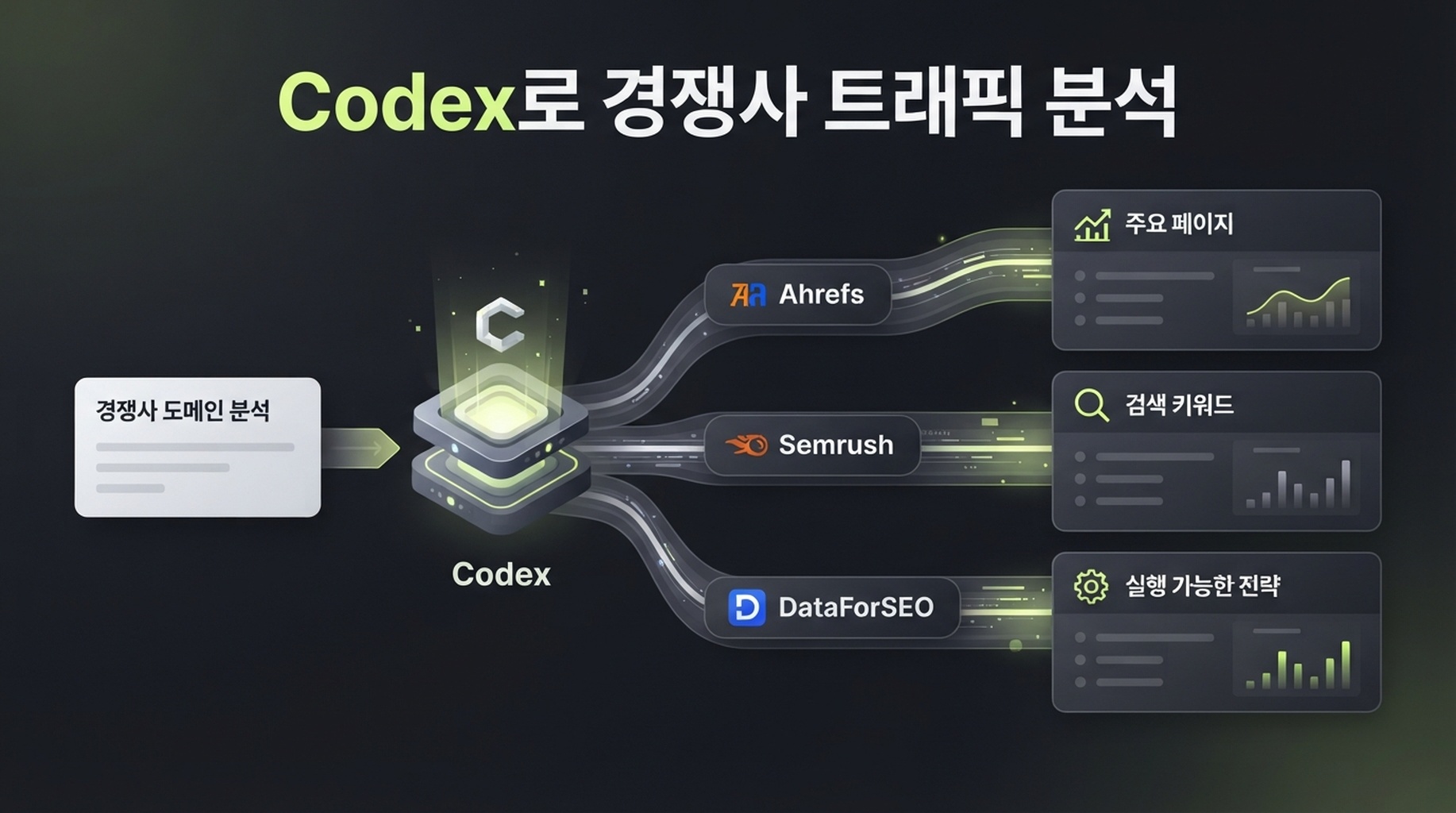
경쟁사 트래픽 분석을 한 번만 해야 한다면 이 글 전체를 Codex에 전달하고 이 글의 절차대로 competitor.com을 분석해 줘라고 말하면 됩니다. Codex는 아래 skill에 따라 사용 가능한 데이터 제공업체를 확인하고 Ahrefs, Semrush, DataForSEO 연결을 처리한 뒤, 결과에 실제로 영향을 주는 정보만 요청합니다. 대상 도메인, 시장, 언어, 그리고 콘텐츠 격차 비교가 필요한 경우 자신의 도메인입니다.
먼저 중요한 경계를 분명히 해야 합니다. 경쟁사가 Google Analytics, Search Console 또는 서버 로그를 공유하지 않는 한 실제 방문자 수는 알 수 없습니다. Ahrefs, Semrush, DataForSEO는 각자의 키워드 데이터베이스, 순위, 클릭 모델, 크롤링 데이터를 기반으로 추정치를 만듭니다. 그렇다고 데이터가 쓸모없다는 뜻은 아닙니다. 같은 시장과 기간에서 어떤 도메인이 성장하는지, 어떤 페이지와 검색어를 조사할 가치가 있는지 비교하는 데 유용합니다. 반대로 추정 월간 트래픽을 경쟁사의 재무 보고서처럼 다루면 안 됩니다.
이 워크플로를 써야 하는 때
경쟁 사이트를 볼 때마다 전체 분석이 필요한 것은 아닙니다. 다음 상황에서는 경쟁사 트래픽 데이터가 특히 유용합니다.
상황 | 지금 확인할 가치가 있는 이유 | 얻을 수 있는 답 |
|---|---|---|
분기 또는 연간 콘텐츠 계획을 세우지만 어떤 주제를 먼저 다뤄야 할지 모른다 | 경쟁사의 페이지와 키워드가 이미 존재하는 검색 수요를 보여 준다 | 수요가 있는 주제와 먼저 개선하거나 새로 만들 URL |
경쟁사가 빠르게 성장하는 것처럼 보인다 | 총 트래픽만으로는 이유를 알 수 없고, 페이지와 키워드 변화가 중요하다 | 성장이 도구, 템플릿, 블로그, 제품 페이지 또는 특정 국가에 집중되는지 |
대체 서비스 페이지나 비교 페이지를 만들 계획이다 | 브랜드명만 보고 추측하지 말고 경쟁사가 노출을 얻는 검색 의도를 이해해야 한다 | 사용자가 기능, 가격, 사용 사례, 해결책 중 무엇을 비교하는지 |
자연 검색 트래픽이 정체되어 있다 | 아직 다루지 않은 주제와 성과가 낮은 기존 페이지를 구분해야 한다 | 검토할 만한 콘텐츠 격차와 키워드 카니벌라이제이션 가능성 |
콘텐츠 프로젝트가 필요한 이유를 팀에 설명해야 한다 | "모두가 쓰고 있다"는 말만으로는 자원을 얻기 어렵다 | 페이지, 검색어, 시장, 추세 증거로 뒷받침한 우선순위 근거 |
이 방법은 "경쟁사가 어제 실제로 몇 명의 방문자를 얻었는가" 또는 "그들을 따라 하면 얼마의 트래픽을 얻는가"에 답하기에는 적합하지 않습니다. 경쟁사의 퍼스트파티 분석 데이터가 없으면 어떤 외부 도구도 두 질문에 답할 수 없습니다.
분석 뒤에 할 수 있는 판단
이 워크플로의 가치는 보기 좋은 트래픽 숫자에 있지 않습니다. 모호한 경쟁사 관찰을 검증 가능한 의사결정으로 바꾸는 데 있습니다.
- 누구를 봐야 하는지 안다. 직접적인 사업 경쟁사와 자연 검색 경쟁사를 구분합니다. 미디어, 템플릿 사이트, 도구 사이트는 같은 제품을 팔지 않아도 중요한 검색 수요를 가져갈 수 있습니다.
- 성장이 어디에서 오는지 안다. 하나의 상승선만 보는 대신, 추정 노출을 만드는 페이지 그룹, 키워드, 국가를 찾습니다.
- 그 기회가 우리에게 맞는지 안다. 경쟁사의 주제를 자신의 URL, 고객 요구, 제품 역량과 비교하고 관련 없는 키워드를 제외합니다.
- 다음에 무엇을 할지 안다. 기존 페이지 개선, 콘텐츠 자산 생성, 도구 기회 조사, 보류 중 하나를 선택하고 이유를 남깁니다.

경쟁사 트래픽 조사의 목적지는 숫자 목록이 아니라 팀이 논의할 수 있는 페이지, 주제, 실행 선택지입니다.
완료하면 얻는 결과
이 글은 Codex로 SEO 조사를 처음 하는 사람을 위한 읽기 전용 워크플로입니다.
항목 | 이 가이드의 기준 |
|---|---|
적합한 사람 | SEO 분석가나 자체 스크립트 없이 하나 이상의 경쟁 사이트를 조사하려는 사람 |
완료 결과 |
|
최소 입력 |
|
선택 입력 | 자신의 도메인, 경쟁사 목록, 대상 국가, 언어, 기기, 기간, 비즈니스 주제 |
기본 시장 | United States / English. 이는 기본값일 뿐 전 세계 데이터가 아니다. |
예상 시간 | 최초 제공업체 연결 뒤에는 할당량과 데이터 범위에 따라 도메인 하나당 몇 분에서 십여 분 |
완료 정의 | 각 핵심 숫자에 제공업체, 보고서 또는 엔드포인트, 수집 시각, 시장, 의미가 표시되고, 단일 트래픽 수치가 아니라 불확실성과 다음 단계를 제시한다 |
이를 "트래픽 확인" 버튼이 아니라 증거 표라고 생각하세요. 총 트래픽은 누가 더 커 보이는지만 알려 줍니다. 인기 페이지, 순위 키워드, 변화 추세, 콘텐츠 격차가 무엇을 작성하고 개선하거나 아예 추적하지 않을지 결정하게 합니다.
데이터 제공업체는 하나부터 선택하세요
세 제공업체는 서로 검증할 수 있지만 같은 데이터베이스의 다른 화면은 아닙니다. 이미 API 권한이 있는 제공업체부터 시작하세요. 의사결정에 숫자 차이가 중요하거나 첫 번째 제공업체에 필요한 보고서가 없을 때만 두 번째를 추가하면 됩니다.
데이터 소스 | 이번 조사에서 특히 유용한 것 | 결과 해석 방법 | 시작 전에 확인할 것 |
|---|---|---|---|
도메인 자연 검색 개요, 순위 키워드, 인기 페이지, 자연 검색 경쟁사, 백링크 단서 | 선택한 데이터베이스에 대한 Ahrefs 추정치이며 경쟁사 Analytics가 아니다 | 요금제에 API 접근과 필요한 Site Explorer 보고서 권한이 있는지 | |
도메인 개요, 자연 키워드, 경쟁 도메인, 자연 검색 추세, 페이지 단서 | Semrush 데이터베이스의 추정치이므로 데이터베이스와 지역을 기록한다 | API v4 인증, 단위, 대상 데이터베이스가 사용 가능한지 | |
스크립트화 가능한 순위 키워드, SERP, 키워드 지표, 트래픽 추정, 백링크 | 엔드포인트가 반환한 데이터와 모델이며 실제 세션 수가 아니다 | 로그인/비밀번호 또는 지원 인증, 잔액, 대상 위치, 언어 |
서로 다른 제공업체의 traffic 값을 더하지 말고 숫자가 다르다고 한쪽이 틀렸다고 판단하지 마세요. 먼저 같은 루트 도메인, 시장, 언어, 지표를 보고 있는지 확인합니다. 지표는 자연 검색 트래픽, 전체 방문, 유료 트래픽 중 무엇인지도 확인해야 합니다. 정의가 같을 때만 비교가 의미 있습니다.
최소 실행 경로: DataForSEO만으로도 이 튜토리얼을 완료할 수 있습니다. Codex가 재현 가능한 CSV와 Markdown 파일로 데이터를 정리하게 하려는 경우 특히 적합합니다. Ahrefs나 Semrush는 경쟁사, 페이지, 이력 보고서가 추가 증거가 될 때 보완적으로 사용하세요.
Codex에 안정적으로 반복할 일을 맡기기
Codex의 skill은 SKILL.md가 들어 있는 폴더입니다. 언제 워크플로를 실행할지, 어떤 입력이 필요한지, 어떤 순서로 일할지, 무엇을 해서는 안 되는지를 Codex에 알려 줍니다. 현재 Codex 지침은 리포지토리 수준 skill을 현재 프로젝트 또는 상위 디렉터리의 .agents/skills/에 두고, 개인용 skill을 ~/.agents/skills/에 둘 수 있도록 합니다. 전자는 팀 재사용에, 후자는 여러 프로젝트에서 개인적으로 쓰는 데 적합합니다.
전용 조사 리포지토리나 작업 디렉터리에서 다음 폴더를 만드세요.
mkdir -p .agents/skills/competitor-traffic-research이어서 .agents/skills/competitor-traffic-research/SKILL.md를 만들고 아래 전체 내용을 그대로 넣으세요. 연결, 자격 증명, 기본 시장, 제공업체 스크립트 처리는 이 skill이 담당하므로 초보자가 글에서 key를 하나씩 설정할 필요가 없습니다.
SKILL.md 전체 파일
아래 코드 블록 전체를 .agents/skills/competitor-traffic-research/SKILL.md에 복사하세요. 코드 블록 밖의 글은 복사하지 마세요.
---
name: competitor-traffic-research
description: Analyze a public competitor domain's estimated search traffic, top pages, ranked keywords, trends, and content gaps with Ahrefs, Semrush, or DataForSEO data. Use when a user asks to check competitor website traffic, competitor organic keywords, top pages, or organic search competitors. Set up any required provider connection, then produce a read-only, sourced report without inventing metrics.
---

# Competitor traffic research

## Purpose and boundary

Turn a public domain into a reviewable competitor-search report. This is research only. Do not edit a website, create a provider project, alter billing, change account settings, publish content, send email, or make any other external write action.

All third-party traffic values are estimates unless the user supplies first-party analytics for a domain they own. Never call an estimated value "actual traffic," "sessions," "revenue," or "conversions."

## Required input

Ask only for what is missing:

1. Competitor domain, subdomain, path, or exact URL. Normalize it and state which scope will be measured.
2. At least one available authorized provider: Ahrefs, Semrush, or DataForSEO.

Use `United States` and `English` when market and language are not supplied. State this default prominently in the final report. Optional inputs are the user's domain, additional competitors, device, date range, seed topic, and business goal.

## Provider connection and setup

Handle the provider setup so the user does not have to read API documentation or write request code.

1. Inspect installed provider skills and local integration scripts first. Prefer an existing authorized connection.
2. If no connection is ready, tell the user which provider connection is needed and guide them through its ordinary setup one step at a time. Use the provider's official documentation and configuration method; do not invent endpoints or settings.
3. Store provider settings in the location expected by the installed integration. Use `AHREFS_API_KEY`, `SEMRUSH_API_KEY`, `DATAFORSEO_LOGIN`, and `DATAFORSEO_PASSWORD` when a local script expects those names. Set DataForSEO's `DATAFORSEO_DEFAULT_LOCATION` and `DATAFORSEO_DEFAULT_LANGUAGE` to the selected market and language when the installed toolkit uses them.
4. Do not copy provider credentials into research artifacts, report tables, CSV output, or user-facing summaries. Keep connection setup out of the analysis report.
5. Use read-only reports/endpoints. Before a potentially billable request, state the provider, report or endpoint class, market, language, intended request count, and any known quota/credit uncertainty. Stop if the user declines.
6. On a 401, 403, quota, coverage, or provider error, record the provider as `unavailable` with the safe error category and a recovery suggestion. Do not retry repeatedly, switch providers silently, or invent a substitute metric.

## Provider query map

Choose the least complicated available route. Do not force all three providers into one run.

| Provider | First lookup | Extend the analysis with | Use it when |
| --- | --- | --- | --- |
| Ahrefs | Site Explorer domain overview or the installed Ahrefs connector's closest equivalent | Top pages, Organic keywords, Organic competitors, Content Gap | The connection exposes these reports and the user needs page-level competitor research |
| Semrush | Domain Overview or the installed Semrush connector's closest equivalent | Organic Research, Organic Competitors, Keyword Gap, historical position data | The connection exposes the target database and the user needs a second point of view or keyword-gap workflow |
| DataForSEO | `bulk_traffic_estimation` and `ranked_keywords` from the installed `dataforseo-toolkit` | `keywords_for_site`, `google_organic_serp`, `backlinks_summary`, `referring_domains` | A scriptable local workflow is available or a reproducible CSV is the main need |

For DataForSEO, use the installed toolkit before writing new HTTP code. Its normal sequence for a domain is:

```text
bulk_traffic_estimation -> ranked_keywords -> keywords_for_site
```

Run `google_organic_serp` only for a small, human-selected set of important keywords to validate intent and result-page format. Run backlink reports only when the user asks about referral or link opportunities. If an Ahrefs or Semrush connector uses different report names, use the closest documented read-only equivalent and record the exact report name.

## Data collection order

1. Create a timestamped folder under `competitor-research/` using a safe normalized domain name. Do not overwrite an existing run.
2. Create `research-scope.md` before any API call. Record target scope, market, language, date/time in UTC, available providers, user goal, and the meanings of requested metrics.
3. Inspect installed provider skills, local scripts, and official provider documentation before choosing a report/endpoint. Use only capabilities that are actually available to the authorized account. Do not guess an endpoint from memory.
4. Collect the smallest useful evidence set from each available provider:
   - domain-level estimated organic traffic or visibility and any available trend;
   - top organic pages with their leading keyword or traffic contribution when the provider supplies it;
   - ranked organic keywords with position, volume, and URL when available;
   - organic competitors or intersecting keywords when available;
   - paid-search or backlink signals only when the user asks for them, and label them separately.
5. If the user provides their own domain, run a content-gap comparison only when the provider supports it. Return only relevant keyword opportunities; do not treat every missing keyword as a content brief.
6. Normalize domains, country/database, language, device, date window, URL scope, and metric definitions before comparing providers. Keep each provider's original metric in a separate column. Never average or sum traffic estimates across providers.
7. Save concise normalized CSV files only: `competitor-pages.csv`, `competitor-keywords.csv`, and, when applicable, `content-gap.csv`. Omit unavailable fields rather than filling them with zero.

## Output schemas

Write a `field-dictionary.md` beside the report. Use these columns where the provider returns them; preserve blanks as blanks.

### `competitor-pages.csv`

`url, page_role, leading_keyword, estimated_organic_traffic, ranking_keywords, traffic_change, provider, report_or_endpoint, retrieved_at_utc, market, language, scope, metric_definition, notes`

### `competitor-keywords.csv`

`keyword, intent, position, previous_position, search_volume, estimated_traffic, ranking_url, keyword_group, provider, report_or_endpoint, retrieved_at_utc, market, language, scope, metric_definition, relevance_note`

### `content-gap.csv`

Create this file only when the user's domain is supplied and a provider supports a comparison. Use:

`keyword, intent, competitor_domains, competitor_urls, user_domain_status, search_volume, position_gap, recommended_action, existing_url_risk, provider, report_or_endpoint, retrieved_at_utc, market, language, human_review_reason`

Do not manufacture a top-pages table from ranked keywords alone. If a provider cannot supply page-level estimated traffic, include the ranking URL and label the traffic field `not_available`.

## Analysis rules

- Separate a direct business competitor from an organic search competitor. A publisher, marketplace, directory, or tool can compete for keywords without selling the same product.
- Treat abrupt changes as observations, not causal claims. Check the changed pages and keywords before suggesting a reason.
- Prefer page groups, intent, relevance, and trend direction over one headline traffic number.
- For every quantitative field, retain `provider`, `report_or_endpoint`, `retrieved_at_utc`, `market`, `language`, `scope`, and `metric_definition` in the relevant output or its data dictionary.
- Label data `not_available`, `not_comparable`, or `estimated` rather than guessing. Explain why it cannot be compared when possible.
- Do not claim that an SEO metric predicts ranking, traffic, revenue, conversion, market share, or AI citations.

## Required report

Write `competitor-traffic-report.md` with these sections:

1. **Executive answer:** target, scope, market, language, retrieval time, provider coverage, and the shortest useful conclusion.
2. **What the numbers mean:** which metrics are estimates, what they do and do not measure, and comparison limits.
3. **Traffic and visibility snapshot:** a provider-by-provider table. Do not merge values.
4. **Trend and change check:** observed movement, relevant changed pages/keywords, and confidence or gaps.
5. **Top pages:** a compact table with URL, apparent page role, leading keyword when available, estimated contribution, provider, and a human interpretation.
6. **Keyword and intent patterns:** group a limited set of relevant keywords by searcher job. Identify themes, not a dump of thousands of rows.
7. **Competitors and gaps:** distinguish direct competitors from organic competitors. If the user's domain is supplied, show only review-worthy content gaps and cannibalization risks.
8. **Prioritized actions:** no more than five actions. Each must cite the evidence, likely owner, expected output, and a human approval gate.
9. **Data availability and caveats:** unavailable providers, errors, scope mismatches, freshness limits, and exact recovery steps.
10. **Artifact index:** paths to generated CSVs and a field dictionary.

## Quality gates before finishing

- Verify that target scope is explicit: root domain, subdomain, path, or exact URL.
- Verify market and language are stated; highlight defaults.
- Verify provider connection details do not appear in research artifacts, report tables, CSV output, or the final summary.
- Verify every headline metric names its provider and says `estimated` when it is not first-party data.
- Verify provider values were not added, averaged, or compared across mismatched markets, languages, scopes, or dates.
- Verify all recommended actions are evidence-backed and require human approval before website changes or publishing.
- If data is unavailable, complete the report with the availability log and the exact next input needed; do not return a fictional analysis.

## Final response to the user

State the target, market, language, available providers, top three observations, most important caveat, generated artifact paths, and the one decision the user should make next.
저장한 뒤 Codex를 다시 시작하거나 새 세션에서 $competitor-traffic-research를 명시적으로 호출하세요. 처음 실행할 때는 명시적 호출이 더 안정적입니다. 이후에는 Codex가 작업 설명을 보고 자동으로 일치시킬 수도 있습니다.
첫 실행: 열 개가 아니라 도메인 하나부터 시작하기
조사 디렉터리에서 Codex를 엽니다. 데이터 소스가 아직 연결되지 않았다면 skill이 해당 설정을 처리하므로, 본문에서 key를 순서대로 다룰 필요가 없습니다. 다음과 같이 입력하세요.
$competitor-traffic-research
competitor.com의 자연 검색 트래픽을 분석해 주세요. 사용할 수 있는 모든 제공업체를 쓰고 기본 시장과 언어를 사용해도 됩니다. 시작 전에 호출할 보고서 유형, 시장, 언어, 과금될 가능성이 있는 요청 수를 설명해 주세요.
자신의 사이트가 있다면 두 번째 실행에서 추가하세요. 그러면 Codex가 "이 키워드를 다루지 않았다"고 추측하는 대신 실제 콘텐츠 격차 비교를 할 수 있습니다.
$competitor-traffic-research
내 사이트는 mysite.com이고 경쟁사는 competitor.com입니다. 같은 시장과 언어에서 자연 검색 콘텐츠 격차를 확인해 주세요. B2B 프로젝트 관리 소프트웨어와 관련되고 사람이 검토할 가치가 있는 기회만 남겨 주세요. 페이지 공개는 제안하지 말고 먼저 조사 보고서를 제출해 주세요.
"먼저 조사 보고서를 제출"하라는 문구는 중요합니다. 증거 수집과 웹사이트 변경을 분리하기 때문입니다. Codex는 기회를 빠르게 찾을 수 있지만, 글을 쓸지, 제품 페이지를 고칠지, 링크 구축에 투자할지는 검색 의도, 기존 콘텐츠, 사업 가치를 검토한 뒤 결정해야 합니다.
출력 읽기: 월간 트래픽만 보지 마세요
신뢰할 수 있는 보고서는 숫자를 팀이 논의할 수 있는 증거로 바꿉니다.
보고서에서 보이는 내용 | 먼저 물을 질문 | 취할 수 있는 조치 | 내려서는 안 되는 결론 |
|---|---|---|---|
경쟁사의 추정 자연 검색 트래픽이 상승한다 | 어떤 URL과 키워드가 이끌었는가? 시장, 범위, 기간이 같은가? | 성장 페이지의 검색 의도, 형식, 업데이트 날짜, 내부 링크를 확인한다 | "반드시 특정 SEO 작업을 했다" |
도구 페이지가 블로그보다 훨씬 높다 | 어떤 검색어가 방문을 보내며 그 페이지는 어떤 반복 가능한 일을 해결하는가? | 실제 입력, 규칙, 설명 가능한 출력을 갖춘 도구를 만들 수 있는지 평가한다 | "도구를 더 만들면 반드시 같은 트래픽이 생긴다" |
많은 키워드가 4~15위에 있다 | 고객과 기존 URL에 맞는가? | 주제 묶음으로 정리해 기존 페이지를 개선하거나 격차를 채운다 | "키워드마다 글 하나를 써야 한다" |
Ahrefs와 Semrush 숫자 차이가 크다 | 도메인 범위, 국가 데이터베이스, 언어, 날짜가 같은가? | 함께 나타나는 페이지와 키워드로 교차 검증하고 차이를 기록한다 | "더 큰 숫자를 사용하면 된다" |
제공업체가 트래픽을 반환하지 않는다 | 요금제, 시장, 도메인에 데이터 범위가 있는가? | 사용 불가로 기록하고 범위를 줄이거나 권한 있는 소스를 쓰거나 할당량 회복을 기다린다 | "데이터가 없으면 트래픽도 없다" |
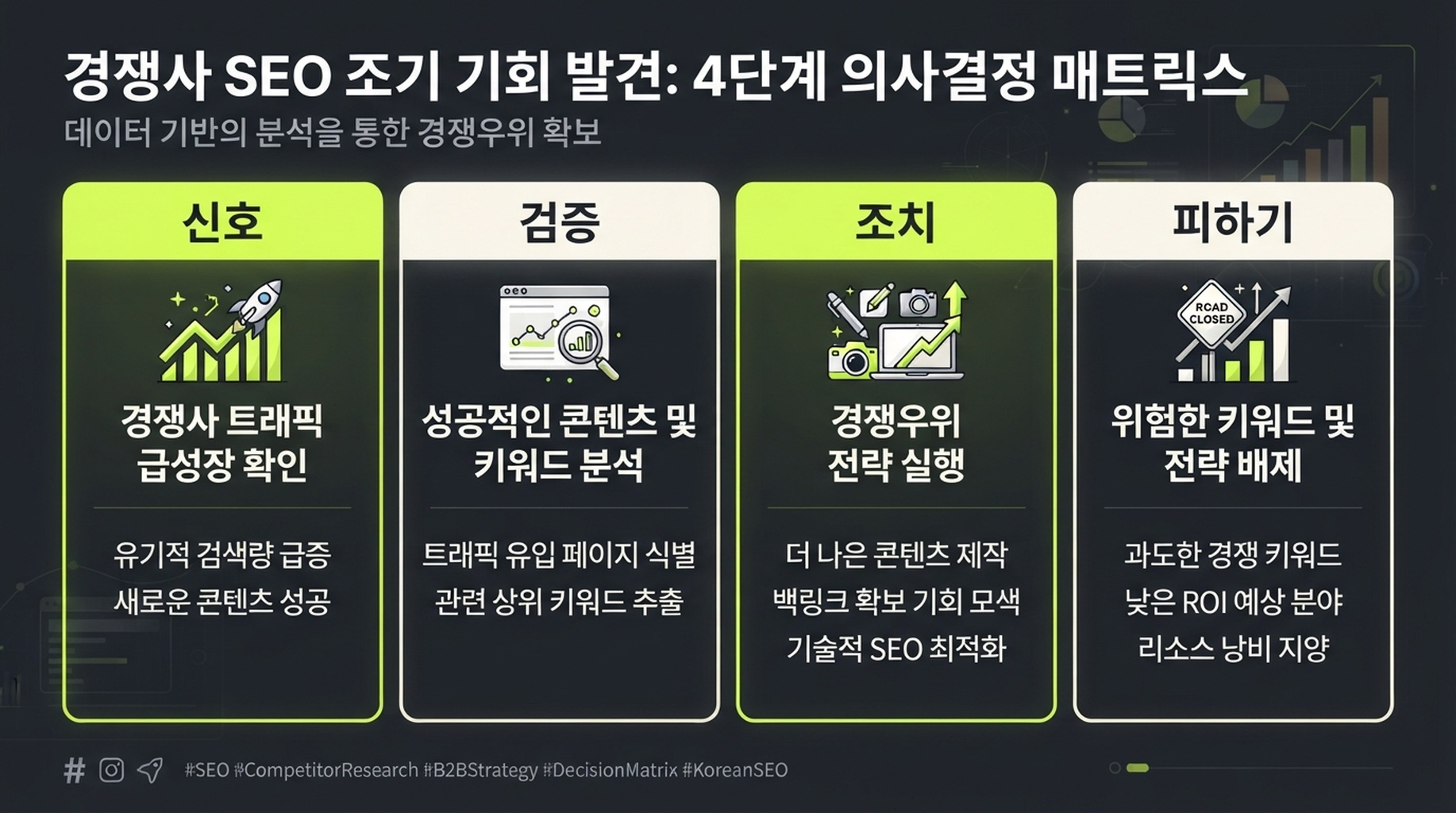
먼저 검증하고 그다음 행동하세요. 서드파티 트래픽 데이터는 더 좋은 질문을 만드는 데 도움이 되지만 결론을 대신 내리지는 않습니다.
가상의 읽기 예시
보고서가 rival.example의 성장이 주로 /templates/ 아래 열 개 페이지에서 왔고 proposal template, project brief template 같은 작업형 검색어에 집중된다고 보여 준다고 가정해 보겠습니다. 올바른 다음 단계는 열 개의 제목을 복사하는 것이 아닙니다. 고객에게 정말 템플릿이 필요한지, 다운로드·수정·온라인 생성이 가능한 버전을 제공할 수 있는지, 개선할 수 있는 기존 리소스 페이지가 있는지 확인해야 합니다. 세 답이 모두 타당할 때만 콘텐츠 계획에 넣으세요.
흔한 실패는 이 순서로 처리하세요
증상 | 가장 가능성 높은 원인 | Codex가 할 일 | 사용자가 할 일 |
|---|---|---|---|
| 제공업체 연결이 완료되지 않았거나 요금제에 보고서 권한이 없다 | 재시도를 멈추고 | skill의 안내로 인증을 완료하거나 요금제 권한을 확인한다 |
| 할당량이 부족하거나 요청이 너무 많다 | 완료된 결과를 저장하고 일괄 요청을 멈추며 미완료 범위를 보고한다 | 잔액 또는 할당량을 확인하고 다음에는 도메인 수, 행 수, 기간을 줄인다 |
키워드나 트래픽이 없다 | 도메인이 새롭거나 표본이 작고, 국가/언어가 틀렸거나 데이터 범위가 제한적이다 | "데이터 없음"과 0 트래픽을 구분하고 루트 도메인과 하위 도메인을 확인한다 | 대상 범위와 시장을 확인하고 필요하면 유사 경쟁사를 제공한다 |
보고서가 서로 모순돼 보인다 | 데이터베이스, 날짜, 기기, URL 범위가 다르다 | 지표를 합치지 않고 비교 가능성 체크리스트를 출력한다 | 하나의 사업 시장을 주 보고서로 정하고 다른 것은 검증용으로만 쓴다 |
특정 제공업체에 연결할 수 없다 | skill이 연결, 권한, 설정을 찾지 못한다 | 사용 불가로 표시하고 나머지 소스로 계속한다 | Codex가 안내한 일회성 연결 단계를 마친 뒤 다시 실행한다 |
한 번의 분석을 매월 쓰는 경쟁 인텔리전스로 바꾸기
첫 보고서는 "지금 무엇이 보이는가"에 답합니다. 매월 다시 확인하면 변화에 대응할 가치가 있는지 알 수 있습니다. 처음부터 50개 도메인을 모니터링하지 마세요. 작은 팀이라면 같은 시장과 언어의 직접 경쟁사 또는 자연 검색 경쟁사 3~5개면 충분합니다.
매월 같은 skill을 다시 실행하고 다음 네 가지를 추가로 물어보세요.
- 추정 가시성 또는 순위 키워드 변화가 가장 큰 페이지는 무엇인가?
- 변화는 새 페이지, 기존 페이지 업데이트, 순위 변화 중 어디에서 왔으며 데이터가 그 판단을 뒷받침하는가?
- 사업과 가장 관련 있지만 현재 URL이 충분히 답하지 못하는 주제 세 가지는 무엇인가?
- 어떤 기회를 "기존 페이지 개선", "콘텐츠 자산 하나 만들기", "하지 않기"로 정해야 하며 그 이유는 무엇인가?
최종 스프레드시트만 저장하지 말고 매번 research-scope.md와 보고서를 보관하세요. 시장, 언어, 제공업체, 수집 시각, 데이터 공백이 남아 있어야 석 달 뒤 비교도 설명할 수 있습니다.
완료 체크리스트
- [ ] 범위가 루트 도메인, 하위 도메인, 경로, 정확한 URL 중 무엇인지 확인했다.
- [ ] 국가/시장과 언어를 선택하고 보고서에 기록했으며, 기본값을 썼다면 명시했다.
- [ ] 필요한 데이터 소스는 skill로 연결되었고 보고서에 연결 설정이 섞이지 않았다.
- [ ] Codex는 API 호출 전에 제공업체, 보고서 유형, 가능한 과금 범위를 설명했다.
- [ ] 보고서는 각 추정치에 제공업체, 수집 시각, 지표 정의를 남겼다.
- [ ] Ahrefs, Semrush, DataForSEO 추정치를 더하지 않았고 실제 Analytics라고 부르지 않았다.
- [ ] 인기 페이지와 키워드를 끝없는 목록이 아니라 사람이 검토할 수 있는 제한된 실행으로 바꿨다.
- [ ] 콘텐츠 업데이트, 게시, 사이트 변경은 모두 이후의 사람 승인으로 남겨 두었다.
자주 묻는 질문
Codex에 도메인 하나만 줘도 정말 되나요?
됩니다. skill은 United States / English 데이터베이스를 기본으로 하므로, 최소 입력은 도메인과 설정된 데이터 소스 하나입니다. 다만 기본 시장이 고객이 있는 곳과 같지 않을 수 있습니다. 지역 사업, 비영어권 사업, 특정 국가 대상 사업이라면 국가와 언어를 명시하세요.
Ahrefs, Semrush, DataForSEO를 모두 동시에 구매해야 하나요?
아닙니다. 대상 시장을 다루는 인증된 제공업체 하나면 시작할 수 있습니다. 두 번째 소스는 중요한 결정을 교차 검증하거나 첫 번째에 없는 보고서를 보완하기 위한 것입니다. 보고서를 그럴듯하게 보이게 하려고 사용하지 않을 API 단위를 구매하지 마세요.
Similarweb이나 다른 대시보드의 경쟁사 총 방문 수와 여기의 수치가 다른 이유는 무엇인가요?
지표의 범위가 다르기 때문입니다. 이 워크플로는 자연 검색 가시성, 페이지, 키워드에 집중합니다. 일부 제품은 직접, 추천, 소셜, 유료 채널을 포함한 전체 방문을 추정합니다. 비교하기 전에 채널 정의를 확인하세요. 어느 경우든 서드파티 데이터는 경쟁사의 퍼스트파티 분석 데이터가 아닙니다.
Codex가 어떤 글을 써야 할지 결정해 줄 수 있나요?
Codex는 증거에 근거한 제한된 후보와 위험을 제안할 수 있지만 혼자 게시하면 안 됩니다. 키워드와 페이지 데이터는 영업 대화, 제품 역량, 법적 요구, 콘텐츠 자원을 볼 수 없습니다. Codex의 출력을 조사 보조 메모로 다루고 콘텐츠, 제품 또는 영업 담당자가 승인하세요.
Author: Theo Langford, Competitive AI Visibility Analyst for 120+ Markets at Auspia. Theo writes about competitor research, market maps, and the evidence boundaries behind search-visibility comparisons.