作るもの
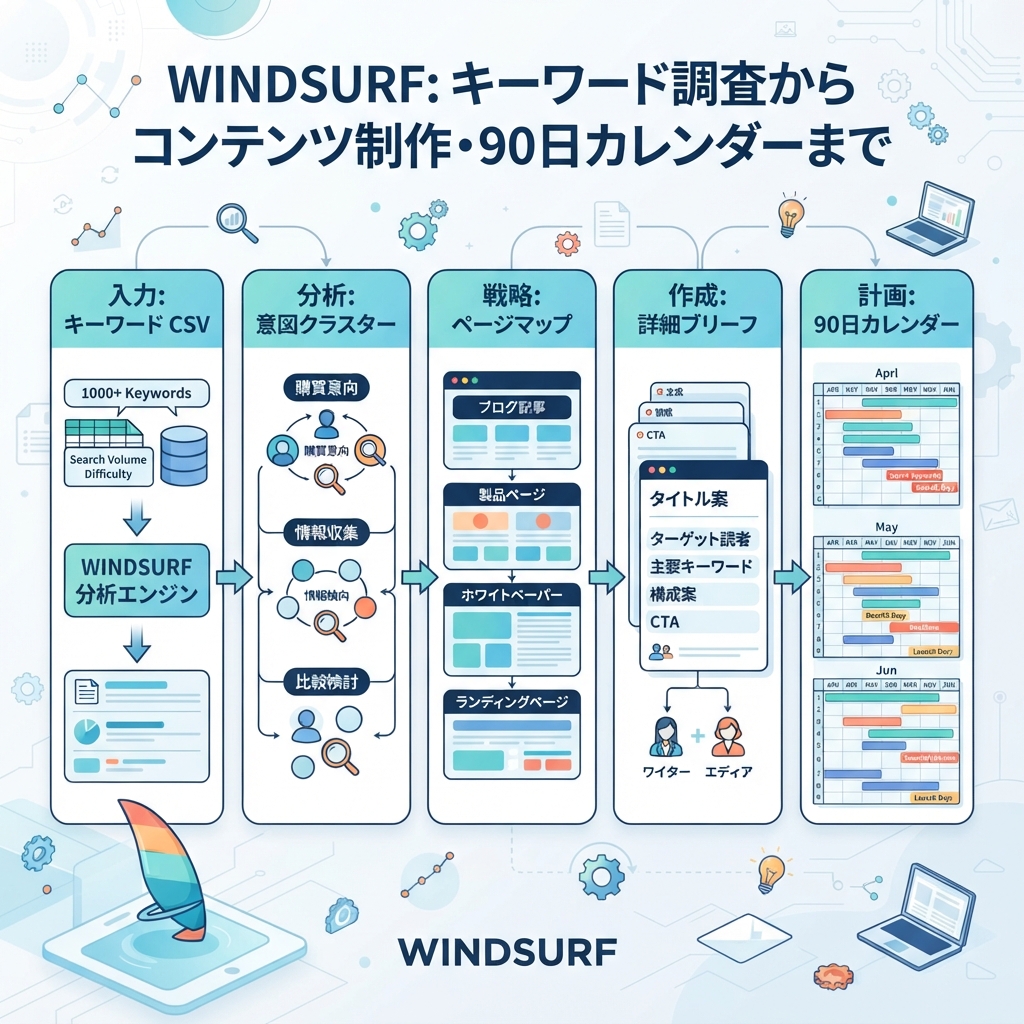
このtutorialでは、Windsurfを使ってkeyword dataをcontent briefsと実用的なpublishing calendarに変える方法を説明します。目的はkeywordsをAI writerに投げ込むことではありません。どのpagesをrefreshし、どのpagesをcreateし、どのideasをignoreし、各pageにどんなevidenceが必要かを決めるworkflowを作ることです。
作る構成は次のとおりです。
.windsurf/workflows/keyword-to-content-brief.md
seo-geo/keyword-workflow/
  inputs/
    keywords.csv
    gsc-queries.csv
    bing-queries.csv
    existing-urls.csv
    competitor-pages.csv
  outputs/
    cleaned-keywords.md
    clusters.md
    page-map.md
    briefs/
    calendar.md
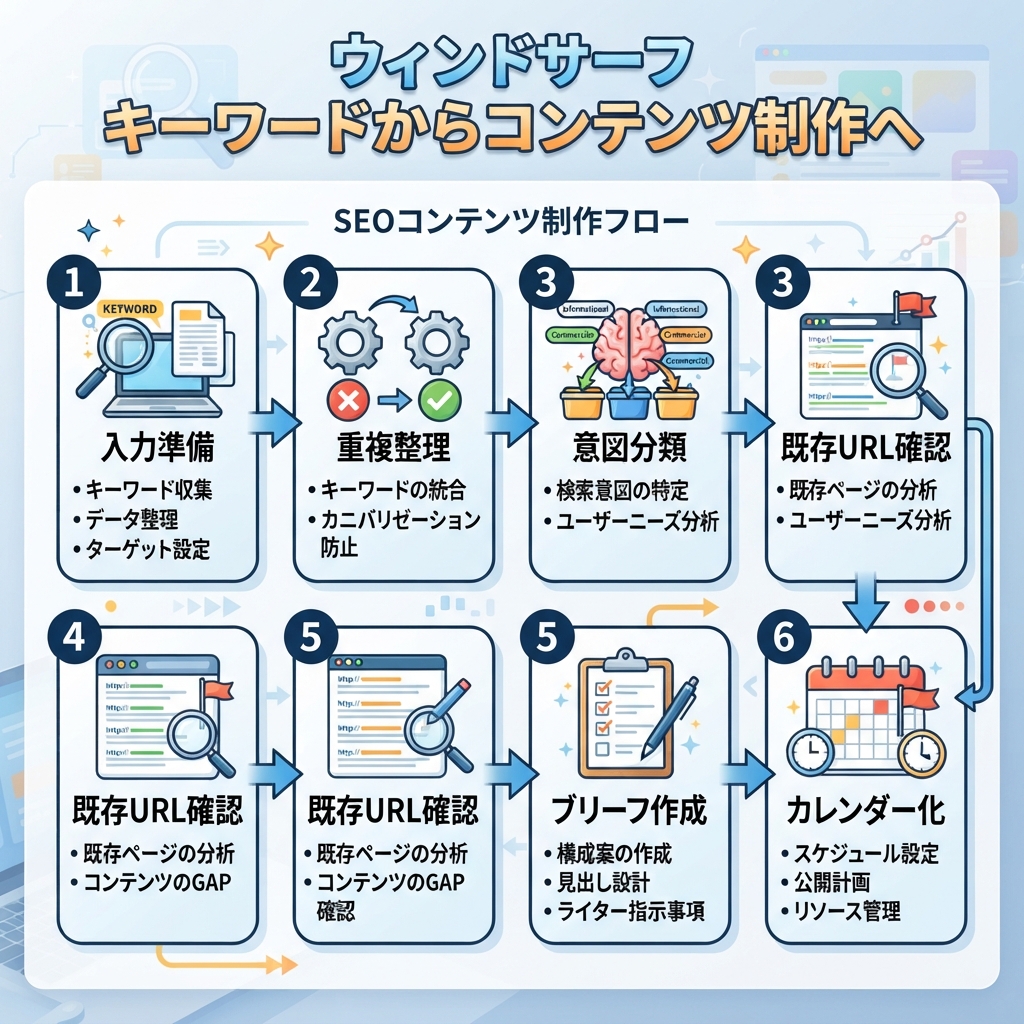
キャプション: keywordをそのまま記事化せず、既存URL確認、intent cluster、page map、brief、calendarの順で進めます。
Step 1: input filesを準備する
foldersを作ります。
mkdir -p .windsurf/workflows seo-geo/keyword-workflow/inputs seo-geo/keyword-workflow/outputs/briefs
すでにSEO toolsを使っている場合は、普段のstackからCSV filesをexportします。使っていない場合は、小さなmanual samplesから始めます。それでもworkflowは機能します。
simple keyword fileを作ります。
cat > seo-geo/keyword-workflow/inputs/keywords.csv <<'EOF2'
keyword,volume,difficulty,intent,source
ai reporting dashboard,900,42,commercial,keyword_tool
reporting automation software,500,38,commercial,keyword_tool
how to automate weekly reports,700,27,informational,keyword_tool
best reporting tools for startups,350,31,comparison,keyword_tool
EOF2
existing URL inventoryを作ります。
cat > seo-geo/keyword-workflow/inputs/existing-urls.csv <<'EOF2'
url,title,page_type,last_updated
/features/reporting,Reporting Automation,landing,2026-05-10
/blog/weekly-report-automation,How to Automate Weekly Reports,blog,2025-11-18
/tools/report-template-generator,Report Template Generator,tool,2026-02-03
EOF2
任意ですが役立つinputsです。
File | 内容 | 役立つ理由 |
|---|---|---|
| queries、clicks、impressions、CTR、position | low-CTRやnear-ranking opportunitiesを見つける |
| Bing clicks and impressions | Google以外のdemand signalsを追加する |
| competitor URL、title、angle | 弱いcopycat briefsを防ぐ |
| ChatGPT/Perplexity/Gemini checksから得たbuyer prompts | SEO clustersをGEO questionsに変える |
Step 2: Windsurf workflowを作る
workflow fileを作ります。
cat > .windsurf/workflows/keyword-to-content-brief.md <<'EOF2'
# Keyword to Content Brief

Goal: convert keyword, search, competitor, and AI-prompt inputs into a page map, content briefs, and a 90-day content calendar.

Required inputs:
- `seo-geo/keyword-workflow/inputs/keywords.csv`
- `seo-geo/keyword-workflow/inputs/existing-urls.csv`

Optional inputs:
- `gsc-queries.csv`
- `bing-queries.csv`
- `competitor-pages.csv`
- `ai-prompts.md`

Steps:
1. Read all available inputs.
2. Clean obvious duplicates and merge keyword variants.
3. Group queries by user intent, not by exact wording only.
4. Label each cluster as informational, commercial, comparison, support, technical, local, or GEO prompt.
5. Map every cluster to one of four decisions: refresh existing page, create new page, merge with another cluster, or ignore for now.
6. For approved clusters, create a brief under `seo-geo/keyword-workflow/outputs/briefs/`.
7. Create `seo-geo/keyword-workflow/outputs/page-map.md`.
8. Create `seo-geo/keyword-workflow/outputs/calendar.md`.

Approval gate:
- Stop after the page map.
- Ask the user to approve which briefs to create.
- Do not draft full articles unless the user approves the page map.

Brief requirements:
- target cluster
- search intent
- GEO prompt version
- page type
- existing URL or proposed slug
- reader problem
- outline
- proof needed
- internal links
- screenshots or examples needed
- quality risks
- measurement plan

Forbidden actions:
- do not publish
- do not invent search volume
- do not invent customer proof
- do not create multiple pages for the same intent
- do not recommend a new page before checking existing URLs
EOF2
Step 3: 初回workflowを実行する
Windsurfでworkflowを正確に呼び出します。
Run /keyword-to-content-brief using `seo-geo/keyword-workflow/inputs/`.

First output only:
1. cleaned keyword notes
2. intent clusters
3. page map with refresh/create/merge/ignore decisions

Do not draft articles yet. Do not edit website pages. Stop after `page-map.md` and ask me what to approve.
有用なfirst outputは次のようになります。
Cluster: reporting automation software
Intent: commercial evaluation
GEO prompt: "What is the best reporting automation software for a small startup?"
Decision: refresh existing page
Target URL: /features/reporting
Reason: existing landing page matches the commercial intent but lacks comparison criteria and proof.
Risk: do not claim integrations that are not documented.
Priority: high
Windsurfがexisting URLsを確認せずに10個のnew article ideasを作るなら、workflowは失敗です。workflowにこのlineを追加してください。No new page may be recommended until existing-urls.csv has been checked.
Step 4: 小さなpage mapだけ承認する
全部承認しないでください。1つのrefreshと1つのnew pageを選びます。
Approve only these two actions:
1. Refresh `/features/reporting` for the cluster "reporting automation software".
2. Create one blog brief for "how to automate weekly reports".

Create briefs for only these two. Do not draft final articles. Include evidence needed, screenshots needed, internal links, FAQ candidates, and measurement plan.
Step 5: writerが本当に使えるbriefを要求する
良いWindsurf briefは、titleとoutlineだけではなく運用可能な内容です。
Brief field | Windsurfが書くべき内容 |
|---|---|
Target reader | 誰がその問題を持っているか |
Query cluster | 対象keywordsとAI prompts |
Page role | ブログ、ランディングページ、比較ページ、ツールページ、ドキュメント、サポートページ |
Search intent | readerが何を判断または実行したいか |
GEO angle | AI systemが抽出できるべきanswer |
Required proof | スクリーンショット、データ、例、ドキュメント、公開可能な顧客証拠 |
Existing internal links | 自然にlinkすべきpages |
Missing asset | image、demo、table、template、calculator、checklist |
Quality risk | thin content、duplicate intent、unsupported claim、outdated info |
Measurement | publish後のGSC/Bing/GA4/AI visibility checks |
各briefをfileとして保存させます。
Save the approved briefs under `seo-geo/keyword-workflow/outputs/briefs/` using short filenames. Include a final checklist at the bottom of each brief.
Step 6: briefsの後に90-day calendarを作る
page mapとfirst briefsができた後だけcalendarを作ります。そうでないとcalendarはfictionになります。
Create `seo-geo/keyword-workflow/outputs/calendar.md` for 90 days.
Use only approved clusters and briefs.
For each item include: week, page type, target URL or proposed slug, owner, required proof, difficulty, expected business value, GEO prompt target, and validation metric.
Limit the calendar to work a small team can actually finish.
example rowです。
Week | Work | URL | Proof needed | Metric |
|---|---|---|---|---|
1 | landing page refresh |
| product screenshots、integration list | CTR、demo clicks、AI prompt inclusion |
2 | new how-to article |
| example workflow、template screenshot | impressions、assisted conversions、citations |
Step 7: brief承認後だけWindsurfでdraftする
draft準備ができたら、依頼は狭くします。
Using only the approved brief `seo-geo/keyword-workflow/outputs/briefs/automate-weekly-reports.md`, draft the article in a new markdown file under `seo-geo/drafts/`.
Do not edit the live website.
Do not invent proof.
Mark missing screenshots or product facts as TODO.
Include natural internal links only where the brief allows them.
これにより、Windsurfがkeyword researchを裏付けのないcontentに変えるのを防げます。
Troubleshooting
Problem | Likely cause | Fix |
|---|---|---|
新規ページ案が多すぎる | 既存URL inventoryを無視した | brief作成前にpage mapを必須にする |
clustersが重なる | wordingでgroupingし、intentで見ていない | 1intentにつき1pageにする |
briefsがgeneric | proof fieldがない | screenshots、examples、evidence slotsを必須にする |
calendarが非現実的 | ownerやdifficultyがない | owner、effort、approval gatesを追加する |
GEO angleが曖昧 | promptsがない | 各clusterをbuyer questionsへ変換する |
初心者向けcopy-paste prompt
I want to use Windsurf to turn keyword data into content briefs, not final articles.

Please create `.windsurf/workflows/keyword-to-content-brief.md` and use the files in `seo-geo/keyword-workflow/inputs/`.

Rules:
- Check existing URLs before recommending new pages.
- Group keywords by intent.
- Map each cluster to refresh, create, merge, or ignore.
- Stop after the page map and ask for approval.
- After approval, create briefs with proof needed, internal links, GEO prompt targets, screenshots needed, quality risks, and measurement plan.
- Do not publish. Do not edit live pages. Do not invent volume, proof, or customer claims.
FAQ
Windsurfは自分でkeywordsを見つけられますか?
環境に接続toolがあればfiles処理やtool利用はできます。ただし初心者に安全なworkflowはexportsまたは小さなmanual CSVから始めます。missing search volumeはunknownとして扱い、作ってはいけません。
すべてのkeywordをpageにすべきですか?
いいえ。多くのkeywordsは既存pageにmerge、ignore、またはlaterに回すべきです。1つのpageは1つの明確なintentを担当します。
GEOに役立つ理由は何ですか?
各keyword clusterをbuyer-style promptに変換するからです。briefは、そのpageが支えるべきanswer、必要なevidence、後でAI visibilityをどう確認するかを指定します。
AI coding agents for SEO/GEO 学習パス
Windsurf track:
- Cursor vs Windsurf vs Gemini CLI:SEO/GEO自動化の選び方
- Windsurf Cascade WorkflowsでSEO/GEOを運用する方法
- Windsurf Rules and MemoriesをSEO/GEO projectsに使う方法
- WindsurfでKeyword ResearchをContent Briefsに変える方法
- WindsurfでSEO/GEO PR Commentsに対応する方法
- Cursor、Windsurf、Gemini CLI、Codex、Claude CodeのSEO/GEO運用モデル
Sources and notes
- Windsurf/Devin Desktop documentation: Cascade Workflows。
- Related Auspia guide: Cursor vs Windsurf vs Gemini CLI for SEO/GEO Automation。
Author: Clara Bennett, Auspiaの10-Year Content Strategy Practitioner。Claraはeditorial systems、topic maps、repeatable SEO/GEO production workflowsについて執筆しています。