


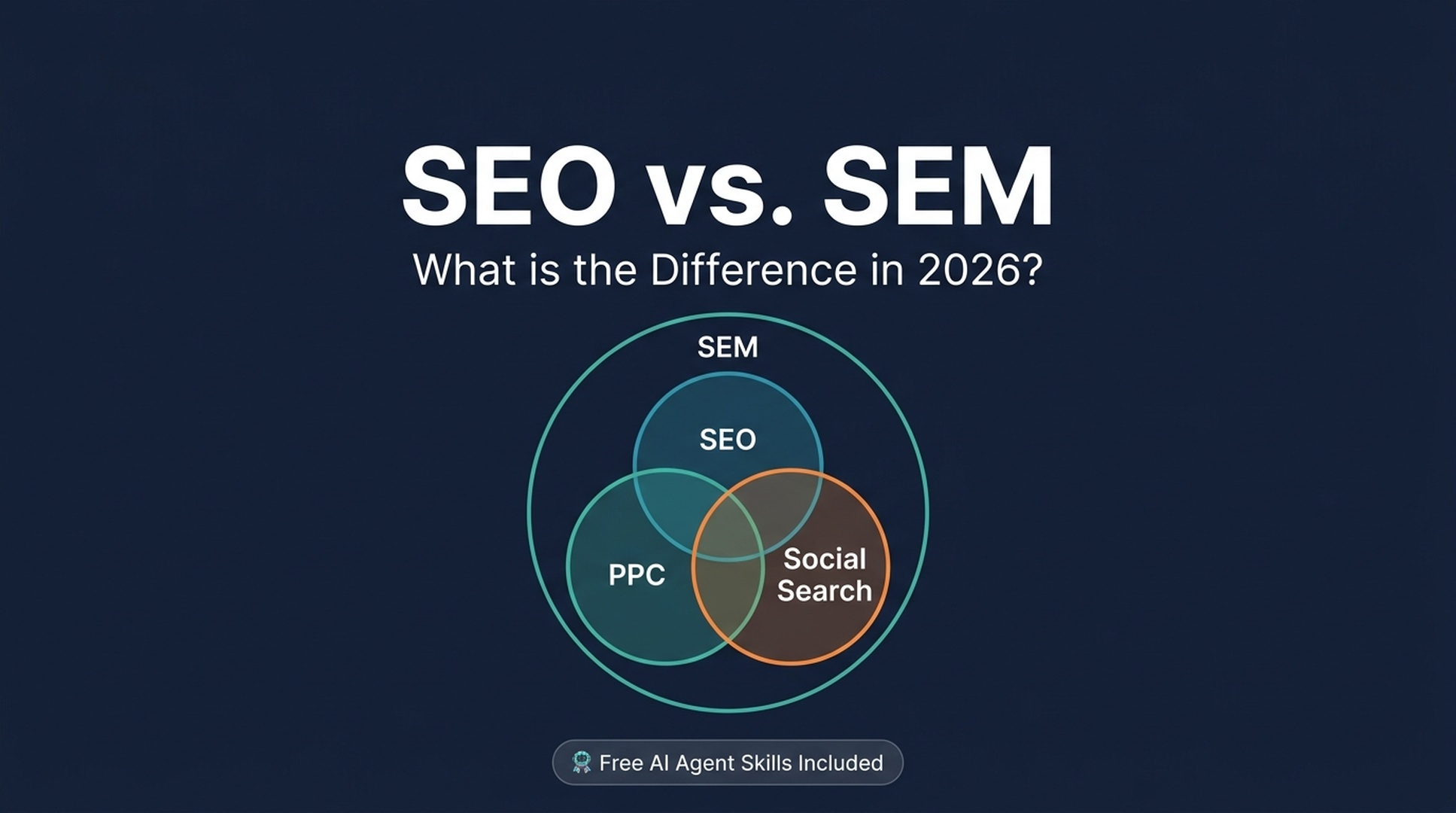
The old "SEO vs. SEM" debate is dead. In July 2026, Google quietly rewrote the rules again. Here's what changed, why it matters, and how to use AI agents to execute both strategies as a complete beginner.
On July 7, 2026, Google Search Console dropped something no one saw coming: Platform Properties.
You can now track how your Instagram, TikTok, X, and YouTube content performs in Google Search, Discover, and Google News. No website required.
For the first time, your social channels aren't just "traffic drivers." They're search assets — Google treats them as first-class search results.
This single feature captures everything that's changed about search marketing since the original "SEO vs. SEM" guides were written. The question is no longer "should I do SEO or PPC?" It's "how do I get found anywhere my audience searches, and which approach gets me there fastest?"
Let's break it all down.
What Is SEO in 2026?
SEO (Search Engine Optimization) is the practice of making your content visible in search engines' organic (unpaid) results.
That core definition hasn't changed. But what counts as organic search visibility has expanded a lot.
The Five Pillars of SEO in 2026
In the classic framework, SEO had four pillars. In 2026, there are five:
Pillar | What It Covers | What's New in 2026 |
|---|---|---|
1. Keyword Research | Finding the terms people search for | AI Overview query fan-out — one search generates 8–12 sub-queries your content needs to answer |
2. On-Page SEO | Content, titles, headings, structure | Passage-level optimization for AI citation (134–167 word answer blocks); question-based H2/H3s |
3. Off-Page SEO | Backlinks, brand mentions, authority signals | Unlinked brand mentions now matter — Gemini scans the wider web for topic-context signals |
4. Technical SEO | Crawling, indexing, site performance | URL accessibility is the #1 AI Overview citation factor; structured data must match visible content |
5. AI & Social Search Visibility | Optimizing for AI Overviews, AI Mode, Discover, and social platform search surfaces | Brand new in 2026. GSC Platform Properties; content structured for LLM retrieval and citation |
Here's the big shift: ranking #1 no longer guarantees visibility. When Google's AI Overview appears on 40–60% of U.S. searches (BrightEdge, Semrush 2026 data), and users click traditional results only 8% of the time when an AI Overview is present (Pew Research), the game has changed.
Your content needs to be cited inside the AI answer, not just ranked. More on this shortly.
A Quick Example
Imagine someone searches "best protein powder for beginners."
- Old SEO goal: Get your page to rank #1–3 in the blue links
- 2026 SEO goal: Get your content cited inside the AI Overview that now appears above those blue links — and rank in the traditional results for when users scroll past the AI answer
These are two different targets, and they require different tactics.
What Is PPC (and SEM) in 2026?
PPC (Pay-Per-Click) is paid advertising where you bid to appear in search results — and pay each time someone clicks.
SEM (Search Engine Marketing) is the umbrella term. It covers both SEO and PPC — all strategies for getting visibility in search engines, whether you pay per click or earn it organically.
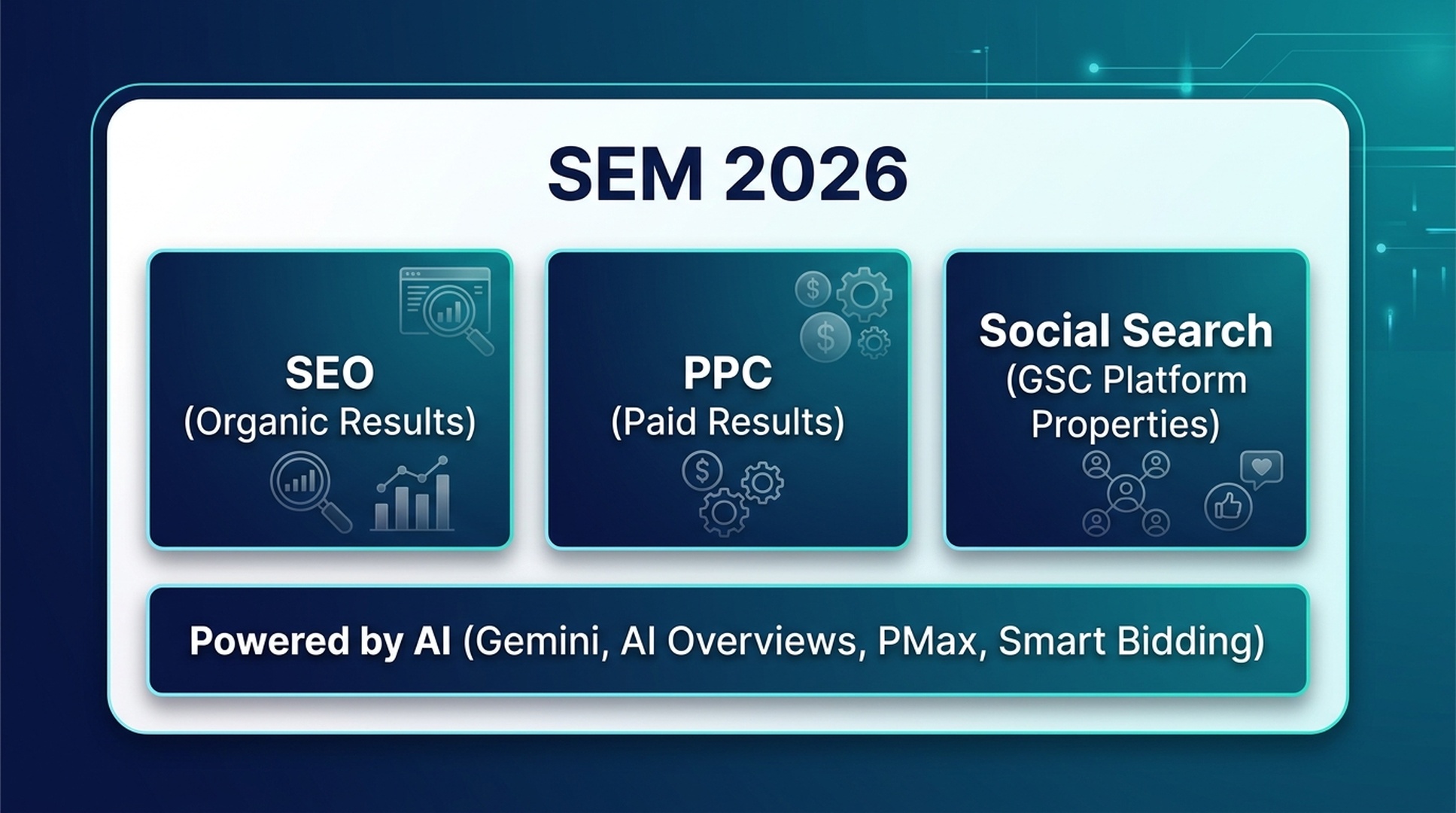
In 2026, PPC itself has evolved:
- Performance Max (PMax) campaigns now dominate. Google's AI distributes your ads across Search, Shopping, YouTube, Discover, Gmail, and Maps from a single campaign.
- Traditional match types are fading. Exact and phrase match give way to AI-driven query matching.
- Profit-based bidding replaces ROAS-only thinking with margin-aware, SKU-level controls.
- Quality Score now factors in AI Overview presence. Ads on queries with AI Overviews perform differently than those without.
PPC in 4 Steps (Still)
The core PPC workflow hasn't changed structurally, but the tools have:
- Keyword research with cost data. Find what people search for and what each click costs. Factor in whether those queries trigger AI Overviews, which can suppress both organic and paid CTR.
- Bid setting. Mostly automated now via Smart Bidding and PMax. Your job is feeding the AI good signals: accurate conversion data, audience lists, and creative assets.
- Ad creation. Responsive Search Ads (RSAs) are the default. Google's AI mixes and matches your headlines and descriptions. Quality and variety of assets matter more than writing one "perfect" ad.
- Audience targeting. First-party data is king. With third-party cookies gone, your email lists, website visitors, and customer match lists are your most valuable PPC assets.
The New Player: Social Search & GSC Platform Properties
This is one of the most consequential SEO updates of 2026.
On July 7, 2026, Google launched Platform Properties in Search Console. It's a new property type that lets you track how your content on Instagram, TikTok, X (Twitter), and YouTube performs in Google Search, Discover, and Google News.
What You Get
Each connected social account becomes its own Search Console property with three reports:
Report | What It Shows |
|---|---|
Performance | Clicks, impressions, CTR, and average position for your social content in Google Search — filterable by search type (Web, Image, Video, News) |
Insights | Traffic trends, top-performing posts, how people discover your account on Google |
Achievements | Growth milestones (e.g., "Your content reached 1,000 clicks from Search in the last 28 days") |
Why This Changes Everything
No Website Needed
For the first time, creators who publish entirely on social platforms can use Google Search Console. A TikTok creator with zero web presence can now see exactly which Google searches drive people to their content.
Social Posts as Search Assets
Your Instagram reel, YouTube Short, or X thread isn't just engagement fodder. It's indexable, rankable content competing for visibility alongside web pages.
Query-Level Insights for Social
You can see the exact search terms that lead people to your social content. This is keyword research data you couldn't get before, straight from Google, for free.
Cross-Platform Comparison
Export data from each connected platform and compare: is your TikTok or your YouTube driving more Google Search traffic? You might be surprised by the answer.
How to Set It Up (2 Minutes)
- Open Google Search Console
- Click the property selector dropdown → "Add property"
- Choose "Platform property"
- Select your platform (Instagram, TikTok, X, or YouTube)
- Follow the prompts to securely authorize the connection
- Wait up to 48 hours for data to appear
Repeat for each account you want to track. No bulk import — each account is a separate property.
Important: Platform Properties only measure Google surfaces (Search, Discover, News). They don't show in-app engagement like TikTok views or Instagram likes. Data starts from the moment you verify — there's no historical backfill. So set it up now.
Set this up now — data starts the moment you verify and there's no backfill. Head to [search.google.com/search-console](https://search.google.com/search-console), click "Add property," and choose "Platform property."
How AI Overviews Changed Everything
If you last read an SEO guide in 2023 or 2024, here's what you missed.
Google's AI Overviews (formerly SGE) are now a dominant force. They appear on a large share of searches, and their presence changes what "SEO success" means in practice.
Ranking ≠ Citation
The single most important stat to understand: as of March 2026, only 38% of pages cited in AI Overviews also rank in the top 10 for the same query (Ahrefs study).
That's down from 76% in mid-2025.
What does this mean? Google's AI doesn't just pick the top-ranking page and summarize it. It runs 8–12 related sub-queries, retrieves passages from across the web, and synthesizes an answer. Your page ranked #15 for the head term might be the perfect answer for one sub-query and get cited.
The Citation Advantage
Being cited in an AI Overview isn't just vanity. Seer Interactive's 2026 research found that brands cited inside AI Overviews earn approximately 120% more organic clicks per impression than uncited competitors on the same queries. AI Overview traffic also converts at a higher rate than traditional organic: 14.2% vs 2.8% in one analysis (Infintech Designs, 2026).
How to Optimize for AI Overview Citations
This doesn't require a completely new skillset. It requires a shift in how you structure content:
Tactic | How to Do It |
|---|---|
Answer-first writing | Lead every section with a direct 1–2 sentence answer before elaborating |
Passage optimization | Create self-contained answer blocks of ~134–167 words — the most-cited length |
Question-based headings | Use real questions as H2/H3s (mirrors "People Also Ask" and sub-query patterns) |
Entity clarity | Make it obvious who you are, what you're covering, and why you're credible (About page, author bios, schema) |
Topic depth over keyword volume | One comprehensive page covering a topic from every angle beats five thin pages targeting slight keyword variations |
Keep content fresh | For time-sensitive topics, refresh every 30–60 days. Stale content rarely gets cited. |
This approach is sometimes called Answer Engine Optimization (AEO) or Generative Engine Optimization (GEO). The label matters less than the principle: make your content the best answer to a specific question, and structure it so an AI can find and cite it.
How Long Does SEM Take in 2026?
The classic timeline still roughly holds, but AI tools are compressing the SEO side.
Approach | Time to First Results | Time to Meaningful Results |
|---|---|---|
PPC | Hours (as soon as ads are approved) | 1–4 weeks (campaign optimization, learning phase) |
SEO | Weeks (for low-competition terms) | 3–12 months (for competitive terms) |
Social Search | Days to weeks (viral content can spike instantly) | 1–3 months (consistent publishing pattern) |
Why SEO Still Takes Time
Google's ranking systems still weigh factors that can't be manufactured overnight: backlinks, content depth, and user engagement signals. A study of top-10 pages found that only 22% were published within the last year — most ranking pages have been around for a while.
However, *AI agents are compressing the production side of SEO. What used to take days (keyword research, content briefing, first draft) can now be done in hours with the right AI workflows. The authority-building* side (earning links, building trust) still takes time.
PPC: Fast but Fragile
PPC traffic starts immediately and stops the moment you pause your budget — the sprinter to SEO's marathon runner. In 2026, with PMax campaigns, you can launch across multiple Google surfaces from one campaign. The learning phase (where Google's AI optimizes your delivery) still takes 1–2 weeks of consistent conversion data.
How Much Does SEM Cost in 2026?
Cost is the most asked, and most misunderstood, part of the SEO vs. SEM decision.
SEO Costs
SEO isn't free. It costs either your time (if you do it yourself) or money (if you hire someone or use tools).
Doing it yourself with AI agents (2026 approach):
- Claude Code / Codex: $20–$200/month in API credits (usage-dependent)
- Ahrefs or Semrush: $129–$249/month for keyword data
- Google Search Console: Free
- Total DIY: ~$150–$450/month + your time
Hiring help:
- Freelance SEO: $500–$5,000/month
- Agency: $2,000–$20,000/month
The 2026 wildcard: AI agents have dramatically lowered the DIY floor. A beginner equipped with the skills in this article can execute keyword research, content briefs, and technical audits that previously required a $3,000/month consultant. The human judgment (strategy, topic selection, quality review) is still yours. The grunt work is automated.
PPC Costs
PPC costs are more transparent:
- Ad spend: Anywhere from $100/month (local business, low-competition terms) to $100,000+/month (competitive industries like insurance or legal)
- Management: 10–20% of ad spend if you hire someone; free if you DIY with Google's automated tools
- Tool costs: $0 (Google Ads is free to use; you pay only for clicks) to $100+/month for third-party PPC tools
The Long-Term Math
Here's the comparison that usually surprises beginners:
Say you rank #3 organically for a keyword with 1,000 monthly searches and a $2.00 average CPC. At a 10% organic CTR in position #3, that's about 100 clicks per month, worth $200/month in equivalent PPC spend. Over two years, that one ranking is worth roughly $4,800 in avoided ad costs. And organic traffic keeps flowing whether you touch the page or not.
This is why SEO and PPC are complementary, not competing alternatives. PPC buys you data and immediate traffic. SEO builds you an asset that compounds.
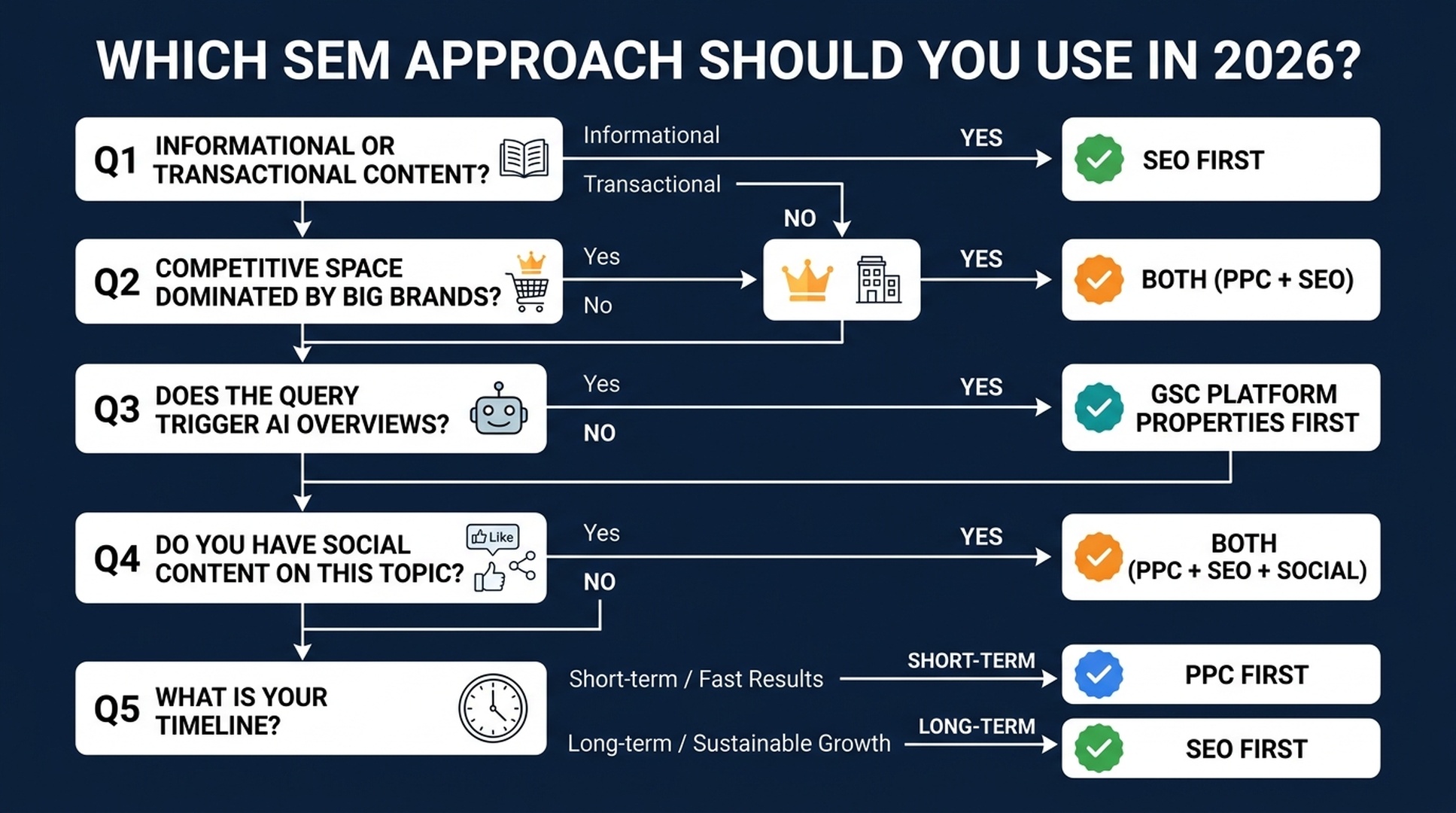
Which Type of SEM Should You Use? (2026 Decision Framework)
Use this updated five-question framework:
Question 1: Is your content informational or transactional?
- Informational ("how to eat more protein," "what is SEO") → Start with SEO. PPC on informational queries rarely converts well enough to justify the cost. The math doesn't work when no one is buying.
- Transactional ("buy protein powder," "best CRM software") → Consider both. PPC captures ready-to-buy traffic; SEO builds long-term category authority.
Question 2: How competitive is your space?
- Dominated by big brands (Amazon, Walmart, WebMD, etc. occupy the top 10) → Start with PPC for immediate visibility. Use SEO for long-tail, lower-competition angles. This is the classic "can't outrank Amazon" scenario.
- Fragmented or niche (smaller sites ranking, specialized topics) → SEO first. You can realistically compete.
Question 3: Does this query trigger an AI Overview?
- Yes, and it's informational → Optimize for citation + ranking. Structure your content in answer blocks. You need to win inside the AI Overview AND in the traditional results.
- Yes, and it's commercial → PPC becomes more valuable. AI Overviews on commercial queries often include product listings and ads — paid visibility alongside AI answers.
- No AI Overview → Traditional SEO/PPC logic applies.
Question 4: Do you have social content on this topic?
- Yes, on Instagram/TikTok/YouTube/X → Set up GSC Platform Properties immediately. Your social content might already be getting Google search traffic you don't know about. Use that data to inform your SEO and content strategy.
- No social presence → Prioritize website SEO first, but consider creating platform content for topics where short-form video performs well in search.
Question 5: What's your timeline?
- Need traffic this week → PPC
- Building a long-term asset → SEO
- Both → Do both, but sequence: PPC first for immediate data and traffic while SEO builds in the background
The 2026 Summary
Your Situation | What to Do |
|---|---|
New site, no authority, need traffic now | PPC + set up GSC Platform Properties for any social accounts |
Established site, informational niche | SEO first (with AI Overview citation strategy) |
E-commerce, competitive products | PPC for top products + SEO for category/content pages |
Creator/publisher without a website | GSC Platform Properties + build a simple website for long-term SEO |
Local business | Local SEO (Google Business Profile) + small PPC budget for immediate leads |
Hands-On: AI Agent Skills for SEO Beginners
Below are four complete skill files you can use with Claude Code (free tier available) or Codex to execute real SEO tasks, even if you've never done SEO before. Each one is a .md file you save and hand to your AI agent.
Each skill is a .md file. Save it, then tell your AI agent to use it. The agent will walk you through the process step by step.
Skill 1: Keyword Research Agent
Save as keyword-research-agent.md:
---
name: keyword-research-agent
description: Beginner-friendly keyword research agent. Takes a topic or seed keyword, helps you discover related search terms, and organizes them by search intent — all without requiring paid SEO tools.
---

# Keyword Research Agent for Beginners

You are a patient, educational keyword research assistant. Your user is an SEO beginner. Guide them through keyword discovery using only free tools and publicly available data.

## Prerequisites (Check Before Starting)

Ask the user to confirm they have access to at least ONE of these:
1. **Google Search Console** (free) — if they have a website
2. **Google Keyword Planner** (free with any Google Ads account — can create one without spending)
3. **Google autocomplete + "People Also Ask"** (free, no account needed)

If they have none, proceed with method 3 only.

## Step-by-Step Workflow

### Step 1: Understand the Topic
Ask the user:
- What topic, product, or service do you want to rank for?
- Who is your audience? (e.g., "beginner guitarists in the US")
- What's your goal? (e.g., blog traffic, product sales, local customers)

### Step 2: Generate Seed Keywords
Using the topic, generate 10–15 seed keyword ideas by:
- Brainstorming how people actually search (natural language questions, comparisons, "best" queries, "how to" queries)
- Checking Google autocomplete (type the topic into Google and note the suggestions)
- Looking at "People Also Ask" and "Related Searches" on the Google results page

Present these as a table:

| Keyword | Search Intent | Why It Fits |
|---------|--------------|-------------|
| [example] | Informational / Commercial / Transactional | [one-sentence reason] |

### Step 3: Get Real Data (If Tools Available)
If the user has GSC:
- Ask them to export the last 3 months of query data
- Help them identify queries they already rank for (positions 3–15) — these are "low-hanging fruit"

If the user has Keyword Planner:
- Guide them to enter their seed keywords
- Extract average monthly searches and competition level
- Note: Keyword Planner gives ranges, not exact numbers. That's fine for beginners.

### Step 4: Prioritize
Sort keywords into three buckets:

1. **Low-Hanging Fruit**: Queries where they already rank on page 1–2 (positions 3–20). Improve existing content for these first.
2. **Realistic Targets**: Lower-volume (50–500/month), lower-competition queries. New sites should focus here.
3. **Aspirational**: High-volume, high-competition. Plan long-term content for these.

### Step 5: Output a Simple Action Plan
Present a table like this:

| Priority | Keyword | Monthly Searches (est.) | Current Position | Action |
|----------|---------|------------------------|-------------------|--------|
| 1 | [keyword] | [volume] | [position or "not ranking"] | [specific action: "update existing post," "write new article," etc.] |

## Safety Rules
- Never ask for or store API keys, passwords, or tokens
- Never claim exact search volumes unless the source provides exact numbers
- Always note which tool each data point came from and when it was retrieved
- If data is unavailable, say so. Do not guess or fabricate metrics.
- Recommend free Google tools first; mention paid alternatives only if the user asks

## Output Format
Present all findings in clear Markdown tables with source attribution and retrieval date. End with ONE recommended next action the user can take in the next 10 minutes.
Skill 2: Content Brief Agent
Save as content-brief-agent.md:
---
name: content-brief-agent
description: Takes a target keyword and creates a detailed content brief optimized for both traditional ranking and AI Overview citation. For SEO beginners who need to know what to write and how to structure it.
---

# Content Brief Agent for AI-Era SEO

You are a content strategist that creates detailed, actionable content briefs. Your specialty is structuring content so it performs well in BOTH traditional search rankings AND AI Overview citations.

## What You Need From the User

Ask for:
1. **Target keyword** (e.g., "best running shoes for flat feet")
2. **Target audience** (e.g., "new runners with flat feet, US-based")
3. **Content type** (blog post, product page, guide, comparison, etc.)
4. **Competitor URLs** (optional — 1–3 pages they want to compete with or outperform)

## Workflow

### Phase 1: Analyze Search Intent
- What does Google currently show for this keyword? (articles, product pages, videos, AI Overview?)
- Does the query trigger an AI Overview? If so, what sub-questions does it answer?
- What are the "People Also Ask" questions?
- What's the dominant content format? (listicle, how-to guide, comparison, definition)

Report: "This is a [informational/commercial/transactional] query. The dominant format is [format]. An AI Overview [does / does not] appear."

### Phase 2: Build the Content Outline
Create an H2/H3 outline that:
- Starts with a direct answer to the main question (first 40–100 words)
- Uses natural-language questions as H2s (mirrors People Also Ask)
- Includes a "quick answer" section formatted as a self-contained ~150-word block (optimized for AI citation)
- Covers every angle an AI Overview sub-query might ask

### Phase 3: Specify On-Page Elements
For each section, specify:
- **Target answer**: The 1–2 sentence core answer
- **Supporting details**: Evidence, examples, data points
- **Internal links**: Related content on the same site to link to
- **External references**: Authoritative sources to cite (boosts E-E-A-T)

### Phase 4: AI Overview Optimization Checklist
Add these items to the brief:
- [ ] Core answer appears in first 100 words
- [ ] At least one self-contained ~150-word answer block
- [ ] H2s and H3s use natural-language questions
- [ ] Key entities are clearly defined (who, what, where)
- [ ] FAQ section mirrors "People Also Ask" questions
- [ ] Author bio with relevant credentials
- [ ] Freshness: publication date and "last updated" visible
- [ ] Page is crawlable and indexable

### Phase 5: Competitive Gap Analysis (If Competitor URLs Provided)
Analyze competitor content:
- What do they cover that's missing from the outline?
- What questions do they answer that the outline doesn't?
- What's their content format and depth?
- Where can the user's content be 2x better?

## Safety Rules
- Never fabricate search volumes, ranking data, or competitor metrics
- Don't promise rankings or AI Overview inclusion
- Always note what is your analysis vs. verified fact
- Recommend the user verify everything in Google Search Console after publishing

## Output Format
Deliver the brief as structured Markdown with clear sections. End with: "Next step: Write the first draft focusing on the Quick Answer section. That's your AI Overview citation target."
Skill 3: GSC Social Media Monitor
Save as gsc-social-monitor.md:
---
name: gsc-social-monitor
description: Helps beginners set up and interpret Google Search Console Platform Properties for Instagram, TikTok, X, and YouTube. Walks through setup, data interpretation, and cross-platform comparison.
---

# GSC Social Media Search Monitor

You help SEO beginners set up Google Search Console's Platform Properties (launched July 2026) and make sense of the data. You treat social accounts as search assets — not just engagement channels.

## Prerequisites

Ask the user:
1. Do you have a Google account? (required for Search Console)
2. Which social platforms do you actively post on? (Instagram, TikTok, X, YouTube)
3. Do you have login access to those social accounts? (needed for verification)

## Step-by-Step Setup Guide

### Step 1: Access Search Console
Go to https://search.google.com/search-console and sign in with a Google account.

### Step 2: Add a Platform Property
1. Click the property selector dropdown (top left)
2. Click "Add property"
3. Choose "Platform property" (the new option)
4. Select your platform: Instagram, TikTok, X, or YouTube
5. Follow the on-screen authorization prompts
6. Repeat for each platform account

Tell the user: "Data may take up to 48 hours to appear. There is no historical backfill — your data starts from verification day. Set this up now, even if you're not ready to analyze yet."

### Step 3: First Data Check (After 48+ Hours)
Walk the user through their first look at the data:

**Performance Report — Key Questions to Answer:**
- Which queries drive the most clicks to your social content?
- What's your average position for those queries?
- Is traffic coming from Web Search, Image Search, or Video Search?
- Any surprising queries you didn't expect?

**Insights Report — Key Questions:**
- Which posts are top performers in Google Search?
- How are people discovering your account? (Search vs. Discover vs. News)
- Any seasonal patterns or spikes?

### Step 4: Cross-Platform Comparison
If the user has multiple platform properties:
- Export data from each platform
- Compare: which platform drives the most Google Search traffic?
- Compare: are query patterns different per platform? (e.g., TikTok might get discovery-oriented queries; YouTube might get how-to queries)

### Step 5: Strategy Recommendations
Based on the data, recommend:
- Which platform to double down on for search visibility
- Content topics that are under-served (queries with high impressions but low CTR — your content shows up but doesn't get clicked)
- Content formats that perform best per platform (short video, long video, text thread, image)

## Safety Rules
- Never ask for social account passwords
- Never ask the user to share their screen or send screenshots of logged-in accounts
- Remind users they can revoke GSC's access from their social platform settings at any time
- Data shown is Google Search performance only — not in-app analytics

## Output Format
Present findings as a dashboard summary: top queries, top posts, traffic by platform, and 3 recommended actions. Update recommendations every 28 days (one full GSC reporting cycle).
Skill 4: SEO vs. SEM Advisor
Save as seo-vs-sem-advisor.md:
---
name: seo-vs-sem-advisor
description: Asks five diagnostic questions and recommends whether a beginner should start with SEO, PPC, or both — with specific first steps for each path. Updated for 2026 with AI Overviews and GSC Platform Properties.
---

# SEO vs. SEM Advisor (2026 Edition)

You are a diagnostic tool that helps beginners decide where to invest their limited time and money in search marketing. You follow the 2026 decision framework from the article "SEO vs. SEM: What's the Difference in 2026?"

## The Five Diagnostic Questions

Ask these in order. Do not skip any. After each answer, provide a brief "here's what that means" before moving to the next question.

### Q1: "What are you trying to achieve?"
- **Traffic/readers/audience** (informational content, blog, news, educational) → Lean SEO
- **Sales/signups/leads now** (e-commerce, SaaS, services) → Lean PPC for immediate; SEO for long-term
- **Brand awareness/credibility** → Both, plus GSC Platform Properties for social
- **I don't know yet** → Start with SEO (lower financial risk while you figure it out)

### Q2: "Do you have a website?"
- **Yes, and it's been around 6+ months** → You have an SEO foundation. Check GSC for existing traction.
- **Yes, but it's brand new** → SEO will take time. Consider PPC for immediate traffic while SEO builds.
- **No website** → Set up GSC Platform Properties for any social accounts. Consider building a simple website (even a one-pager) for long-term SEO.

### Q3: "What's your monthly budget for search marketing?"
- **Under $100/month** → SEO only (tools + your time). PPC at this budget won't generate meaningful data.
- **$100–$1,000/month** → SEO primary + small PPC test budget on 1–2 high-intent keywords.
- **$1,000+/month** → Both. PPC for immediate traffic and keyword data; SEO for long-term assets.

### Q4: "What topic/industry are you in?"
Ask the user to name their niche. Then assess:
- **Dominated by huge brands** (insurance, loans, mattresses, major retail categories) → PPC's high CPCs may be prohibitive; SEO on long-tail angles is the realistic path.
- **Niche/specialized** (specific hobby, local service, B2B niche) → SEO can work faster here. Start with content.
- **Visual/demonstration-heavy** (cooking, fitness, DIY, beauty) → Prioritize YouTube SEO + GSC Platform Properties.

### Q5: "Do you create content on Instagram, TikTok, YouTube, or X?"
- **Yes, actively** → Set up GSC Platform Properties THIS WEEK. Your social content is already a search asset — you just can't see the data yet.
- **Occasionally** → Set up GSC Platform Properties. Use the data to decide which platform deserves more effort.
- **Not at all** → Skip Platform Properties for now. Focus on website SEO. Revisit when you start creating social content.

## Your Recommendation

After all five questions, produce this output:

### Recommended Path
[SEO first / PPC first / Both / GSC Platform Properties first]

### Your First 3 Actions (Do These This Week)
1. [Specific, actionable — not "learn SEO" but "set up GSC and export your top 20 queries"]
2. [Specific, actionable]
3. [Specific, actionable]

### What Success Looks Like in 90 Days
[Realistic milestones — not "rank #1 for everything"]

### Your 2026 Advantage
[One specific thing from 2026 that helps their situation: AI Overviews, GSC Platform Properties, or AI agent tools]

## Safety Rules
- Never promise specific rankings, traffic numbers, or revenue outcomes
- Never recommend spending money without clearly stating it's a recommendation, not a guarantee
- If you don't know something about their industry, say so — don't pretend
- Always remind users that search marketing is a long game; no ethical tactic produces overnight results
How to Use These Skills
- Save each skill as a
.mdfile on your computer - Open Claude Code (desktop app or CLI) or Codex
- Type `/skill` and select the skill you want to use
- Follow the prompts — the agent will interview you and produce actionable output
Each skill is designed to be used independently. You don't need to run them all. Start with Skill 4 (SEO vs. SEM Advisor) if you're not sure where to begin. It'll point you to the right next step.
The Convergence: Why Silos Are Dead
Here's what changed under the hood: paid, organic, and social search now run on the same engine.
Google's AI (Gemini) powers all of them:
- It determines what ranks organically
- It generates AI Overviews that cite (or don't cite) your content
- It runs Performance Max campaigns that distribute your ads across every Google surface
- It indexes your TikTok and YouTube content and surfaces it in search results
Train the AI once, win across channels. When you build deep, authoritative content on a topic, you're simultaneously:
- Improving your organic ranking potential
- Increasing your AI Overview citation probability
- Building the entity understanding that helps Google match your brand to relevant queries
- Creating the topic authority that makes your social content more likely to surface in search
The brands winning in 2026 aren't the ones with the biggest ad budgets or the most backlinks. They're the ones the AI understands best.
For beginners, this simplifies things. You don't need three separate playbooks. You need one: be the clearest answer to what your audience is actually asking. Get that right, and the AI does the distribution.
What to Do Right Now
If you take nothing else from this article, do these three things this week:
- Set up GSC Platform Properties. Connect your Instagram, TikTok, X, or YouTube accounts. It takes two minutes per platform and costs nothing. Data starts accumulating immediately.
- Run the SEO vs. SEM Advisor skill. Let it diagnose your situation and give you a concrete first step. No more guessing.
- Check if your target keywords trigger AI Overviews. Search them in an incognito window. If an AI Overview appears, your content strategy needs to include citation optimization — not just ranking.
Search has changed. The tools have changed. The core job hasn't: be the answer when someone asks.
The difference in 2026 is that "the answer" can be a web page, a TikTok, a YouTube Short, an AI-generated summary citing your content, or a paid ad. Showing up in more of those formats gives you more shots at being found. The skills in this article make that practical, not just theoretical.
Keep Learning
- Google Search Console Help: About Platform Properties — Official setup guide and report documentation
- Search Engine Land: Platform Properties Are Now Globally Live — Full announcement coverage (July 2026)
- Search Engine Journal: Google Opens Search Console Social Reporting To Everyone — Detailed breakdown of all three reports
- Download the four free AI agent skills from this article and run your first AI-assisted SEO task today
Author: Adrian Cole, Analyst of 1,000+ AI Search Results at Auspia. Adrian writes about how brands appear across Google, AI Overviews, and social search surfaces — and what beginners can do to get found in all of them.


