옛날 "SEO vs SEM" 논쟁은 끝났습니다. 2026년 7월, Google은 조용히 규칙을 다시 썼습니다. 무엇이 변했고, 왜 중요한지, 그리고 AI 에이전트를 사용해 두 전략을 완전 초보자도 실행하는 방법을 설명합니다.
2026년 7월 7일, Google Search Console은 아무도 예상하지 못한 기능을 발표했습니다: Platform Properties.
이제 Instagram, TikTok, X, YouTube 콘텐츠가 Google 검색, Discover, Google News에서 어떻게 성과를 내는지 추적할 수 있습니다. 웹사이트가 필요 없습니다.
처음으로, 소셜 채널은 단순한 "트래픽 소스"가 아니라 검색 자산입니다. Google은 이를 일류 검색 결과로 취급합니다.
이 단일 기능은 최초의 "SEO vs SEM" 가이드가 작성된 이후 검색 마케팅에서 변화한 모든 것을 포착합니다. 더 이상 "SEO를 해야 할까, PPC를 해야 할까?"가 아닙니다. "내 청중이 검색하는 모든 곳에서 어떻게 발견될 수 있을까, 그리고 어떤 접근 방식이 가장 빨리 거기에 도달하게 할까?"입니다.
하나씩 살펴보겠습니다.
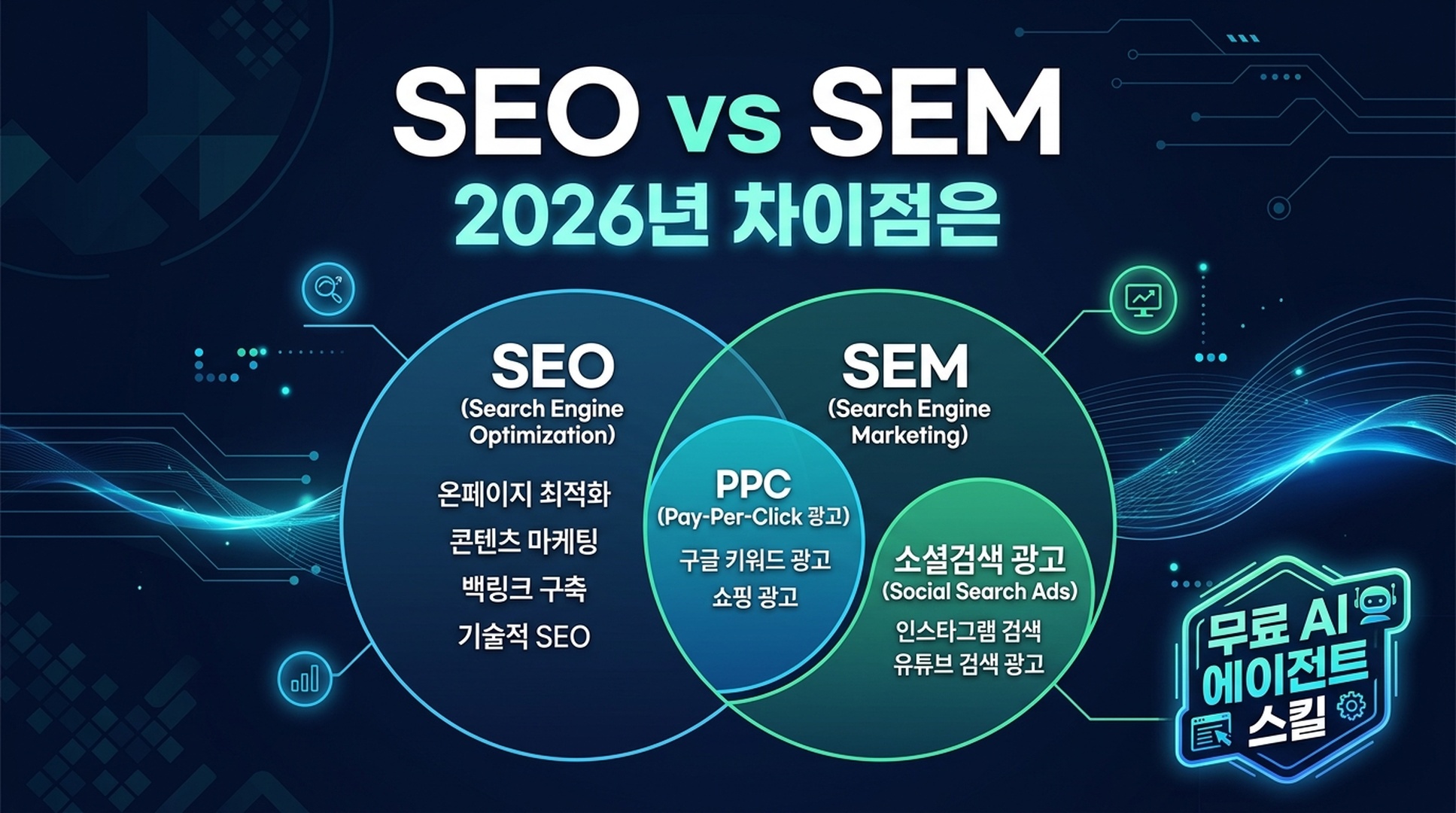
2026년, SEO란?
SEO(검색 엔진 최적화)는 검색 엔진의 유기적(무료) 결과에서 콘텐츠를 눈에 띄게 만드는 실천입니다.
핵심 정의는 변하지 않았습니다. 하지만 유기적 검색 가시성으로 인정되는 범위는 크게 확장되었습니다.
2026년 SEO의 다섯 기둥
고전적 프레임워크에서 SEO에는 네 가지 기둥이 있었습니다. 2026년에는 다섯 가지입니다:
기둥 | 다루는 내용 | 2026년 새로운 점 |
|---|---|---|
1. 키워드 리서치 | 사람들이 검색하는 용어 찾기 | AI Overview 쿼리 팬아웃 — 하나의 검색이 8~12개의 하위 쿼리를 생성하며 콘텐츠가 이에 답해야 함 |
2. 온페이지 SEO | 콘텐츠, 제목, 헤딩, 구조 | AI 인용을 위한 패시지 수준 최적화(134~167단어 답변 블록); 질문 기반 H2/H3 |
3. 오프페이지 SEO | 백링크, 브랜드 언급, 권위 신호 | 링크 없는 브랜드 언급이 이제 중요 — Gemini가 전체 웹을 스캔하여 주제 컨텍스트 신호를 찾음 |
4. 테크니컬 SEO | 크롤링, 인덱싱, 사이트 성능 | URL 접근성이 AI Overview 인용의 #1 요소; 구조화된 데이터는 가시적 콘텐츠와 일치해야 함 |
5. AI 및 소셜 검색 가시성 | AI Overviews, AI Mode, Discover, 소셜 플랫폼 검색 표면에 대한 최적화 | 2026년 신설. GSC Platform Properties; LLM 검색 및 인용을 위한 콘텐츠 구조 |
큰 전환점: 1위 랭킹이 더 이상 가시성을 보장하지 않습니다. Google AI Overview가 미국 검색의 40~60%에 나타나고(BrightEdge, Semrush 2026 데이터), AI Overview가 있을 때 사용자는 전통적 결과를 8%만 클릭한다면(Pew Research), 게임이 바뀌었습니다.
콘텐츠는 AI 답변 안에 인용되어야 합니다. 단순히 랭킹이 아니라. 이에 대해서는 곧 더 자세히.
간단한 예
누군가 "초보자를 위한 최고의 단백질 파우더"를 검색한다고 상상해보세요.
- 구식 SEO 목표: 파란색 링크에서 1~3위에 페이지 랭킹
- 2026 SEO 목표: 파란색 링크 위에 나타나는 AI Overview 안에 콘텐츠가 인용되도록 — 그리고 AI 답변을 지나 스크롤하는 사용자를 위해 전통적 결과에서도 랭킹
이것은 두 가지 다른 목표이며, 다른 전술이 필요합니다.
2026년, PPC(와 SEM)란?
PPC(클릭당 지불)는 검색 결과에 나타나기 위해 입찰하고 누군가 클릭할 때마다 비용을 지불하는 유료 광고입니다.
SEM(검색 엔진 마케팅)은 포괄적 용어입니다. SEO와 PPC 모두를 포함합니다 — 클릭당 지불하든 유기적으로 획득하든, 검색 엔진에서 가시성을 얻기 위한 모든 전략입니다.
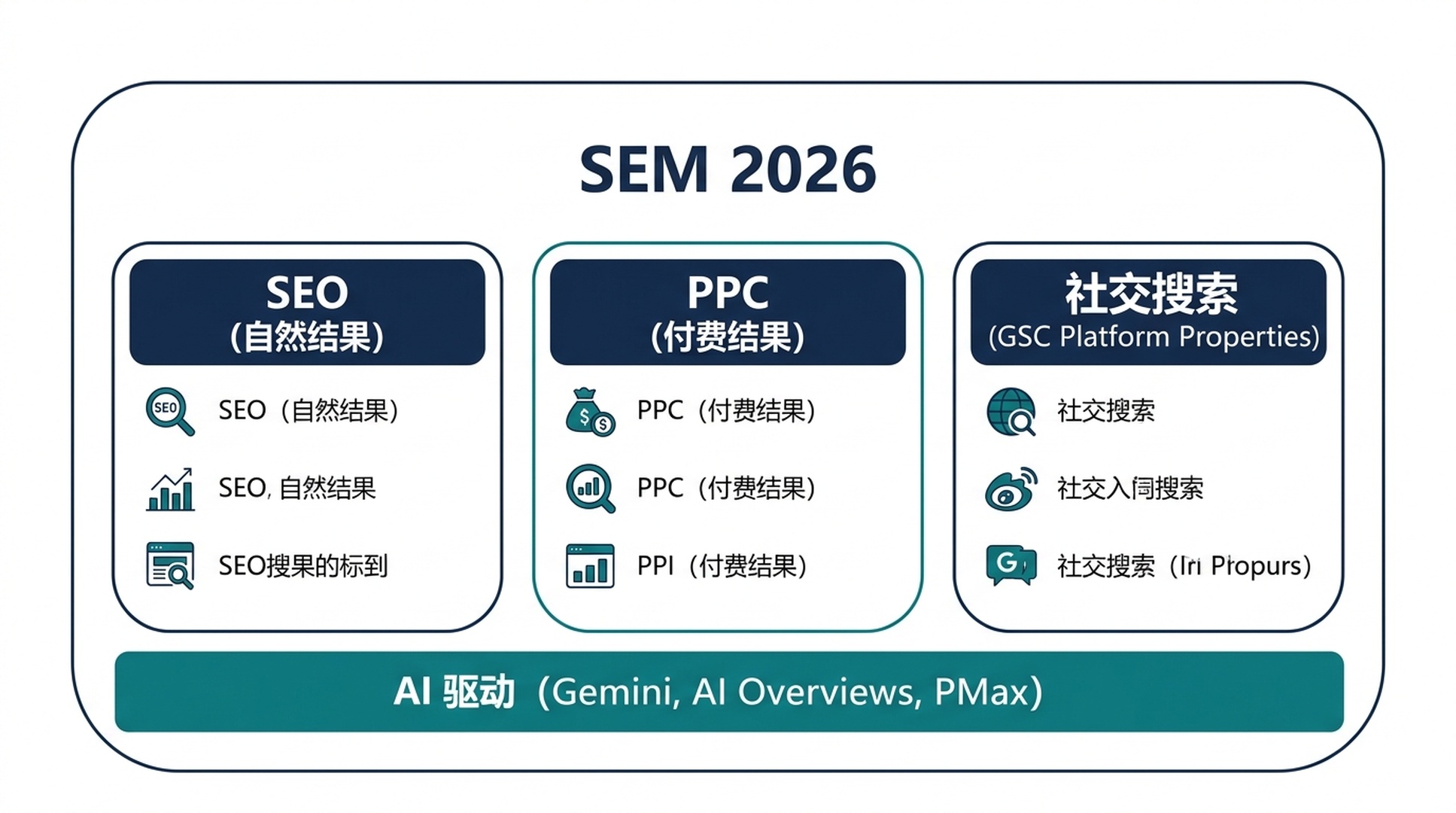
2026년, PPC 자체도 진화했습니다:
- Performance Max(PMax) 캠페인이 주류로. Google AI가 검색, 쇼핑, YouTube, Discover, Gmail, 지도에 단일 캠페인에서 광고를 배포합니다.
- 전통적 매치 유형이 사라지고 있습니다. 정확한 매치와 구문 매치는 AI 기반 쿼리 매칭에 자리를 내줍니다.
- 수익 기반 입찰이 ROAS만 생각하는 방식을 대체 — 마진을 고려한 SKU 수준 제어.
- 품질 점수가 이제 AI Overview 존재를 고려합니다. AI Overview가 트리거되는 쿼리의 광고는 그렇지 않은 쿼리와 다르게 성과를 냅니다.
PPC 4단계(여전히)
PPC 핵심 워크플로우는 구조적으로 변하지 않았지만 도구는 변했습니다:
- 비용 데이터가 포함된 키워드 리서치. 사람들이 무엇을 검색하는지 그리고 각 클릭 비용이 얼마인지 찾기. 해당 쿼리가 AI Overview를 트리거하는지 고려(유기적 및 유료 CTR을 모두 억제할 수 있음).
- 입찰 설정. 현재는 주로 Smart Bidding과 PMax로 자동화. 당신의 일은 AI에 좋은 신호(정확한 전환 데이터, 오디언스 목록, 크리에이티브 자산)를 제공하는 것.
- 광고 제작. 반응형 검색 광고(RSA)가 기본. Google AI가 당신의 제목과 설명을 혼합하고 매칭. 하나의 "완벽한" 광고를 작성하는 것보다 자산의 품질과 다양성이 더 중요.
- 오디언스 타겟팅. 퍼스트파티 데이터가 왕. 서드파티 쿠키가 사라지면서 이메일 목록, 웹사이트 방문자, 고객 매치 목록이 가장 가치 있는 PPC 자산.
새로운 플레이어: 소셜 검색과 GSC Platform Properties
2026년 SEO에서 가장 중요한 업데이트 중 하나입니다.
2026년 7월 7일, Google은 Search Console에 Platform Properties를 도입했습니다. Instagram, TikTok, X(Twitter), YouTube의 콘텐츠가 Google 검색, Discover, Google News에서 어떻게 성과를 내는지 추적할 수 있는 새로운 속성 유형입니다.
얻을 수 있는 것
연결된 각 소셜 계정이 세 가지 보고서를 가진 독립적인 Search Console 속성이 됩니다:
보고서 | 보여주는 내용 |
|---|---|
성과 | 소셜 콘텐츠의 Google 검색에서의 클릭, 노출, CTR, 평균 게재 순위 — 검색 유형(웹, 이미지, 동영상, 뉴스)별 필터 가능 |
인사이트 | 트래픽 트렌드, 최고 성과 게시물, Google에서 사람들이 당신의 계정을 발견하는 방법 |
성과 달성 | 성장 마일스톤(예: "지난 28일 동안 콘텐츠가 Google 검색에서 1,000 클릭 도달") |
웹사이트 불필요
처음으로, 소셜 플랫폼에서만 게시하는 크리에이터가 Google Search Console을 사용할 수 있습니다. 웹 존재감이 전혀 없는 TikTok 크리에이터가 어떤 Google 검색어가 사람들을 자신의 콘텐츠로 이끄는지 정확히 볼 수 있습니다.
소셜 게시물이 이제 검색 자산
당신의 Instagram 릴, YouTube Shorts, X 스레드는 단순한 참여 콘텐츠가 아닙니다. 웹페이지와 나란히 가시성을 경쟁하는 인덱싱 가능하고 랭킹 가능한 콘텐츠입니다.
소셜에 대한 쿼리 수준 인사이트
사람들을 당신의 소셜 콘텐츠로 이끄는 정확한 검색어를 볼 수 있습니다. 이것은 이전에는 얻을 수 없었던 키워드 리서치 데이터입니다 — Google에서 직접, 무료로.
크로스 플랫폼 비교
연결된 각 플랫폼에서 데이터를 내보내고 비교: 당신의 TikTok이 더 많은 Google 검색 트래픽을 생성합니까, 아니면 YouTube입니까? 답변이 당신을 놀라게 할 수 있습니다.
설정 방법(2분)
- Google Search Console 열기
- 속성 선택기 드롭다운 → "속성 추가"
- "Platform property" 선택
- 플랫폼 선택(Instagram, TikTok, X, YouTube)
- 화면 지침에 따라 안전하게 연결 승인
- 데이터가 나타나기까지 최대 48시간 대기
추적하려는 각 계정마다 반복. 일괄 가져오기 없음 — 각 계정은 별도의 속성.
중요: Platform Properties는 Google 표면(검색, Discover, News)만 측정합니다. TikTok 조회수나 Instagram 좋아요와 같은 인앱 참여는 표시되지 않습니다. 데이터는 인증한 순간부터 시작 — 과거 백필 없음. 그러니 지금 설정하세요.
AI Overviews가 모든 것을 바꾼 방법
2023년이나 2024년에 마지막으로 SEO 가이드를 읽었다면, 이것이 당신이 놓친 것입니다.
Google의 AI Overviews(구 SGE)는 이제 지배적인 힘입니다. 많은 검색에 나타나며, 그 존재가 실질적인 "SEO 성공"의 의미를 바꿉니다.
랭킹 ≠ 인용
이해해야 할 가장 중요한 수치: 2026년 3월 기준, AI Overviews에 인용된 페이지의 38%만 동일 쿼리에서 상위 10위 안에 랭크됩니다(Ahrefs 연구).
2025년 중반 76%에서 하락한 것입니다.
이것은 무엇을 의미할까요? Google AI는 단순히 가장 높은 순위의 페이지를 골라 요약하지 않습니다. 8~12개의 관련 하위 쿼리를 실행하고, 웹 전체에서 패시지를 검색하고, 답변을 합성합니다. 헤드 텀에서 15위에 랭크된 당신의 페이지가 어떤 하위 쿼리의 완벽한 답변이 되어 — 인용될 수 있습니다.
인용의 이점
AI Overview에 인용되는 것은 단순한 허영이 아닙니다. Seer Interactive의 2026년 연구에 따르면, AI Overviews에서 인용된 브랜드는 동일한 쿼리에서 인용되지 않은 경쟁사보다 노출당 약 120% 더 많은 유기적 클릭을 얻습니다. AI Overview 트래픽은 또한 전통적 유기적 트래픽보다 높은 전환율을 보입니다: 한 분석에서 14.2% 대 2.8%(Infintech Designs, 2026).
AI Overview 인용을 위한 최적화 방법
완전히 새로운 스킬셋이 필요하지 않습니다. 콘텐츠를 구조화하는 방식의 전환이 필요합니다:
전술 | 실행 방법 |
|---|---|
답변 우선 작성 | 각 섹션을 1~2문장의 직접적 답변으로 시작한 후 상세 설명 |
패시지 최적화 | 약 134~167단어의 자체 완결형 답변 블록 생성 — 가장 많이 인용되는 길이 |
질문 기반 헤딩 | 실제 질문을 H2/H3로 사용("People Also Ask" 및 하위 쿼리 패턴 반영) |
엔티티 명확성 | 당신이 누구인지, 무엇을 다루는지, 왜 신뢰할 수 있는지 명확히(About 페이지, 저자 소개, 스키마) |
키워드 볼륨보다 주제 깊이 | 모든 각도에서 주제를 다루는 포괄적인 한 페이지가 약간의 키워드 변형을 겨냥한 다섯 개의 얇은 페이지를 이김 |
콘텐츠를 신선하게 유지 | 시간에 민감한 주제는 30~60일마다 갱신. 오래된 콘텐츠는 거의 인용되지 않음 |
이 접근법은 때때로 답변 엔진 최적화(AEO) 또는 생성형 엔진 최적화(GEO)라고 불립니다. 라벨보다 원칙이 중요합니다: 당신의 콘텐츠를 특정 질문에 대한 최고의 답변으로 만들고, AI가 찾고 인용할 수 있도록 구조화하세요.
2026년 SEM 소요 시간은?
고전적 타임라인은 대략 유지되지만, AI 도구가 SEO의 생산 측면을 압축하고 있습니다.
접근 방식 | 첫 결과까지 | 의미 있는 결과까지 |
|---|---|---|
PPC | 수 시간(광고 승인 즉시) | 1~4주(캠페인 최적화, 학습 단계) |
SEO | 수 주(낮은 경쟁 용어) | 3~12개월(경쟁적 용어) |
소셜 검색 | 수 일~수 주(바이럴 콘텐츠는 즉시 급상승 가능) | 1~3개월(일관된 게시 패턴) |
SEO가 여전히 시간이 걸리는 이유
Google의 랭킹 시스템은 하룻밤 사이에 만들 수 없는 요소들 — 백링크, 콘텐츠 깊이, 사용자 참여 신호 — 을 여전히 가중치로 평가합니다. 상위 10위 페이지 연구에 따르면, 지난 1년 이내에 게시된 것은 22%에 불과했습니다. 대부분의 랭킹 페이지는 오랫동안 존재해 왔습니다.
그러나 *AI 에이전트가 SEO의 생산 측면을 압축하고 있습니다. 예전에는 며칠 걸리던 작업(키워드 리서치, 콘텐츠 브리핑, 첫 초안)이 올바른 AI 워크플로우로 몇 시간 만에 완료됩니다. 권위 구축* 측면(링크 획득, 신뢰 구축)은 여전히 시간이 걸립니다.
PPC: 빠르지만 취약함
PPC 트래픽은 예산을 시작하는 즉시 시작되고 예산을 중단하는 즉시 멈춥니다. SEO의 마라톤 선수에 비해 단거리 선수입니다. 2026년, PMax 캠페인으로 하나의 캠페인에서 여러 Google 표면에 런칭할 수 있습니다 — 하지만 학습 단계(Google AI가 게재를 최적화하는 기간)에는 여전히 1~2주의 일관된 전환 데이터가 필요합니다.
2026년 SEM 비용은?
비용은 SEO vs SEM 결정에서 가장 많이 질문되고 가장 오해받는 부분입니다.
SEO 비용
SEO는 무료가 아닙니다. 직접 하면 시간이, 누군가를 고용하거나 도구를 사용하면 돈이 듭니다.
AI 에이전트로 직접 하기(2026년 접근법):
- Claude Code / Codex: 월 $20~$200 API 크레딧(사용량에 따라)
- Ahrefs 또는 Semrush: 월 $129~$249 키워드 데이터용
- Google Search Console: 무료
- DIY 총계: 월 약 $150~$450 + 당신의 시간
도움 고용:
- 프리랜서 SEO: 월 $500~$5,000
- 에이전시: 월 $2,000~$20,000
2026년 와일드카드: AI 에이전트가 DIY 장벽을 극적으로 낮췄습니다. 이 글의 스킬을 갖춘 초보자는 이전에 월 $3,000 컨설턴트가 필요했던 키워드 리서치, 콘텐츠 브리핑, 기술 감사를 실행할 수 있습니다. 인간의 판단 — 전략, 주제 선택, 품질 검토 — 은 여전히 당신의 몫이지만, 힘든 작업은 자동화되었습니다.
PPC 비용
PPC 비용은 더 투명합니다:
- 광고 지출: 월 $100(지역 비즈니스, 낮은 경쟁 용어)에서 월 $100,000+(보험 또는 법률과 같은 경쟁적 산업)
- 관리: 누군가를 고용하면 광고 지출의 10~20%; Google의 자동화 도구로 직접 하면 무료
- 도구 비용: $0(Google Ads는 무료로 사용, 클릭에 대해서만 지불)에서 월 $100+(서드파티 PPC 도구)
장기 계산
초보자가 보통 놀라는 비교입니다:
월간 1,000회 검색량과 평균 CPC $2.00의 키워드에 대해 유기적 3위에 랭크되었다고 가정합니다. 3위 유기적 CTR이 10%라면, 월 약 100클릭 — 동등한 PPC 지출로 월 $200 가치. 2년 동안, 그 하나의 랭킹은 약 $4,800의 회피된 광고 비용 가치입니다. 그리고 유기적 트래픽은 페이지를 건드리든 말든 계속 흐릅니다.
이것이 SEO와 PPC가 경쟁 관계가 아닌 보완 관계인 이유입니다. PPC는 데이터와 즉시 트래픽을 구매합니다. SEO는 복리로 성장하는 자산을 구축합니다.
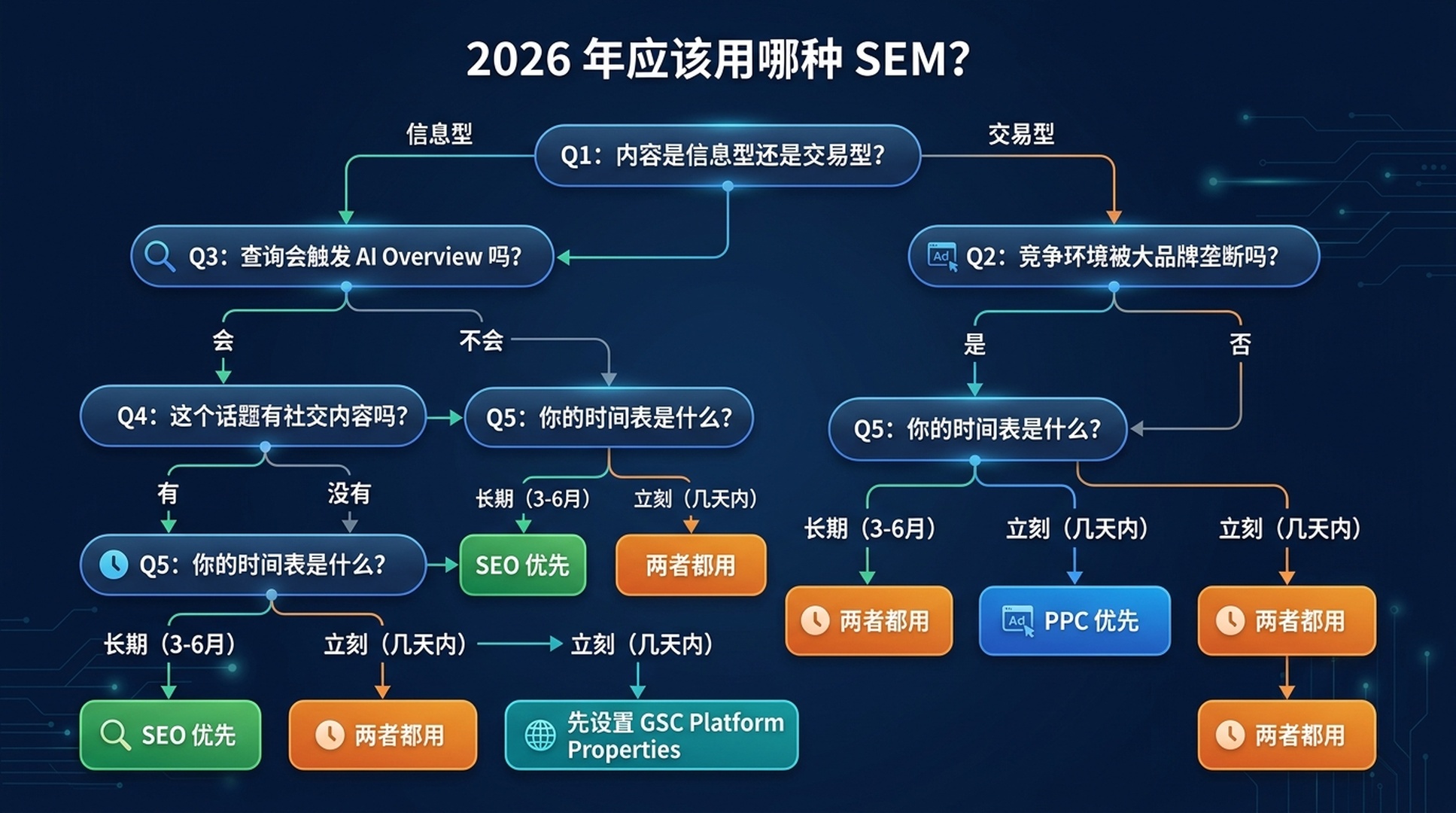
어떤 SEM을 사용해야 할까? (2026 의사결정 프레임워크)
이 업데이트된 5가지 질문 프레임워크를 사용하세요:
질문 1: 콘텐츠가 정보형인가 거래형인가?
- 정보형("단백질 더 섭취하는 방법", "SEO란 무엇인가") → SEO부터 시작. PPC는 정보형 쿼리에서 비용을 정당화할 만큼 충분히 전환되지 않음. 아무도 구매하지 않을 때 수학이 맞지 않음.
- 거래형("단백질 파우더 구매", "최고의 CRM 소프트웨어") → 둘 다 고려. PPC는 구매 준비된 트래픽을 포착; SEO는 장기적 카테고리 권위 구축.
질문 2: 경쟁 환경은?
- 대형 브랜드가 지배(Amazon, Walmart, WebMD 등이 상위 10위 점유) → 즉시 가시성을 위해 PPC 먼저. 롱테일, 낮은 경쟁 각도에 SEO 사용. "랭킹에서 Amazon을 이길 수 없다"는 고전적 시나리오.
- 분산 또는 틈새(작은 사이트가 랭킹, 전문 주제) → SEO 우선. 현실적으로 경쟁 가능.
질문 3: 이 쿼리가 AI Overview를 트리거하는가?
- 예, 정보형 → 인용 + 랭킹 모두 최적화. 콘텐츠를 답변 블록으로 구조화. AI Overview 안과 전통적 결과 모두에서 승리해야 함.
- 예, 상업형 → PPC가 더 가치 있게 됨. 상업형 쿼리의 AI Overviews에는 제품 리스팅과 광고가 종종 포함 — AI 답변과 함께 유료 가시성.
- AI Overview 없음 → 전통적 SEO/PPC 로직 적용.
질문 4: 이 주제에 대한 소셜 콘텐츠가 있는가?
- 예, Instagram/TikTok/YouTube/X에 있음 → 즉시 GSC Platform Properties 설정. 소셜 콘텐츠가 이미 당신이 모르는 Google 검색 트래픽을 받고 있을 수 있음. 그 데이터를 SEO 및 콘텐츠 전략에 활용.
- 소셜 존재감 없음 → 웹사이트 SEO 먼저 우선, 하지만 짧은 동영상이 검색에서 성과를 내는 주제에 대해 플랫폼 콘텐츠 제작 고려.
질문 5: 타임라인은?
- 이번 주 트래픽 필요 → PPC
- 장기 자산 구축 중 → SEO
- 둘 다 → 둘 다 하되, 순서는: SEO가 백그라운드에서 구축되는 동안 PPC로 즉시 데이터와 트래픽 먼저
2026년 요약
당신의 상황 | 해야 할 일 |
|---|---|
새 사이트, 권위 없음, 지금 트래픽 필요 | PPC + 모든 소셜 계정에 GSC Platform Properties 설정 |
기존 사이트, 정보형 틈새 | SEO 우선(AI Overview 인용 전략 포함) |
이커머스, 경쟁적 제품 | 주요 제품에 PPC + 카테고리/콘텐츠 페이지에 SEO |
웹사이트 없는 크리에이터/퍼블리셔 | GSC Platform Properties + 장기 SEO를 위한 간단한 웹사이트 구축 |
지역 비즈니스 | 로컬 SEO(Google Business Profile) + 즉시 리드를 위한 소액 PPC 예산 |
실전: SEO 초보자를 위한 AI 에이전트 스킬
Claude Code(무료 티어 있음) 또는 Codex로 실제 SEO 작업을 실행하기 위해 사용할 수 있는, 복사-붙여넣기 가능한 완전한 스킬 파일 4개입니다. SEO를 한 번도 해본 적이 없어도 됩니다.
각 스킬은 .md 파일입니다. 저장하고 AI 에이전트에게 사용하라고 지시하세요. 에이전트가 단계별로 안내합니다.
스킬 1: 키워드 리서치 에이전트
keyword-research-agent.md로 저장:
---
name: keyword-research-agent
description: Beginner-friendly keyword research agent. Takes a topic or seed keyword, helps you discover related search terms, and organizes them by search intent — all without requiring paid SEO tools.
---

# Keyword Research Agent for Beginners

You are a patient, educational keyword research assistant. Your user is an SEO beginner. Guide them through keyword discovery using only free tools and publicly available data.

## Prerequisites (Check Before Starting)

Ask the user to confirm they have access to at least ONE of these:
1. **Google Search Console** (free) — if they have a website
2. **Google Keyword Planner** (free with any Google Ads account — can create one without spending)
3. **Google autocomplete + "People Also Ask"** (free, no account needed)

If they have none, proceed with method 3 only.

## Step-by-Step Workflow

### Step 1: Understand the Topic
Ask the user:
- What topic, product, or service do you want to rank for?
- Who is your audience? (e.g., "beginner guitarists in the US")
- What's your goal? (e.g., blog traffic, product sales, local customers)

### Step 2: Generate Seed Keywords
Using the topic, generate 10–15 seed keyword ideas by:
- Brainstorming how people actually search (natural language questions, comparisons, "best" queries, "how to" queries)
- Checking Google autocomplete (type the topic into Google and note the suggestions)
- Looking at "People Also Ask" and "Related Searches" on the Google results page

Present these as a table:

| Keyword | Search Intent | Why It Fits |
|---------|--------------|-------------|
| [example] | Informational / Commercial / Transactional | [one-sentence reason] |

### Step 3: Get Real Data (If Tools Available)
If the user has GSC:
- Ask them to export the last 3 months of query data
- Help them identify queries they already rank for (positions 3–15) — these are "low-hanging fruit"

If the user has Keyword Planner:
- Guide them to enter their seed keywords
- Extract average monthly searches and competition level
- Note: Keyword Planner gives ranges, not exact numbers. That's fine for beginners.

### Step 4: Prioritize
Sort keywords into three buckets:

1. **Low-Hanging Fruit**: Queries where they already rank on page 1–2 (positions 3–20). Improve existing content for these first.
2. **Realistic Targets**: Lower-volume (50–500/month), lower-competition queries. New sites should focus here.
3. **Aspirational**: High-volume, high-competition. Plan long-term content for these.

### Step 5: Output a Simple Action Plan
Present a table like this:

| Priority | Keyword | Monthly Searches (est.) | Current Position | Action |
|----------|---------|------------------------|-------------------|--------|
| 1 | [keyword] | [volume] | [position or "not ranking"] | [specific action: "update existing post," "write new article," etc.] |

## Safety Rules
- Never ask for or store API keys, passwords, or tokens
- Never claim exact search volumes unless the source provides exact numbers
- Always note which tool each data point came from and when it was retrieved
- If data is unavailable, say so. Do not guess or fabricate metrics.
- Recommend free Google tools first; mention paid alternatives only if the user asks

## Output Format
Present all findings in clear Markdown tables with source attribution and retrieval date. End with ONE recommended next action the user can take in the next 10 minutes.
스킬 2: 콘텐츠 브리핑 에이전트
content-brief-agent.md로 저장:
---
name: content-brief-agent
description: Takes a target keyword and creates a detailed content brief optimized for both traditional ranking and AI Overview citation. For SEO beginners who need to know what to write and how to structure it.
---

# Content Brief Agent for AI-Era SEO

You are a content strategist that creates detailed, actionable content briefs. Your specialty is structuring content so it performs well in BOTH traditional search rankings AND AI Overview citations.

## What You Need From the User

Ask for:
1. **Target keyword** (e.g., "best running shoes for flat feet")
2. **Target audience** (e.g., "new runners with flat feet, US-based")
3. **Content type** (blog post, product page, guide, comparison, etc.)
4. **Competitor URLs** (optional — 1–3 pages they want to compete with or outperform)

## Workflow

### Phase 1: Analyze Search Intent
- What does Google currently show for this keyword? (articles, product pages, videos, AI Overview?)
- Does the query trigger an AI Overview? If so, what sub-questions does it answer?
- What are the "People Also Ask" questions?
- What's the dominant content format? (listicle, how-to guide, comparison, definition)

Report: "This is a [informational/commercial/transactional] query. The dominant format is [format]. An AI Overview [does / does not] appear."

### Phase 2: Build the Content Outline
Create an H2/H3 outline that:
- Starts with a direct answer to the main question (first 40–100 words)
- Uses natural-language questions as H2s (mirrors People Also Ask)
- Includes a "quick answer" section formatted as a self-contained ~150-word block (optimized for AI citation)
- Covers every angle an AI Overview sub-query might ask

### Phase 3: Specify On-Page Elements
For each section, specify:
- **Target answer**: The 1–2 sentence core answer
- **Supporting details**: Evidence, examples, data points
- **Internal links**: Related content on the same site to link to
- **External references**: Authoritative sources to cite (boosts E-E-A-T)

### Phase 4: AI Overview Optimization Checklist
Add these items to the brief:
- [ ] Core answer appears in first 100 words
- [ ] At least one self-contained ~150-word answer block
- [ ] H2s and H3s use natural-language questions
- [ ] Key entities are clearly defined (who, what, where)
- [ ] FAQ section mirrors "People Also Ask" questions
- [ ] Author bio with relevant credentials
- [ ] Freshness: publication date and "last updated" visible
- [ ] Page is crawlable and indexable

### Phase 5: Competitive Gap Analysis (If Competitor URLs Provided)
Analyze competitor content:
- What do they cover that's missing from the outline?
- What questions do they answer that the outline doesn't?
- What's their content format and depth?
- Where can the user's content be 2x better?

## Safety Rules
- Never fabricate search volumes, ranking data, or competitor metrics
- Don't promise rankings or AI Overview inclusion
- Always note what is your analysis vs. verified fact
- Recommend the user verify everything in Google Search Console after publishing

## Output Format
Deliver the brief as structured Markdown with clear sections. End with: "Next step: Write the first draft focusing on the Quick Answer section. That's your AI Overview citation target."
스킬 3: GSC 소셜 미디어 모니터
gsc-social-monitor.md로 저장:
---
name: gsc-social-monitor
description: Helps beginners set up and interpret Google Search Console Platform Properties for Instagram, TikTok, X, and YouTube. Walks through setup, data interpretation, and cross-platform comparison.
---

# GSC Social Media Search Monitor

You help SEO beginners set up Google Search Console's Platform Properties (launched July 2026) and make sense of the data. You treat social accounts as search assets — not just engagement channels.

## Prerequisites

Ask the user:
1. Do you have a Google account? (required for Search Console)
2. Which social platforms do you actively post on? (Instagram, TikTok, X, YouTube)
3. Do you have login access to those social accounts? (needed for verification)

## Step-by-Step Setup Guide

### Step 1: Access Search Console
Go to https://search.google.com/search-console and sign in with a Google account.

### Step 2: Add a Platform Property
1. Click the property selector dropdown (top left)
2. Click "Add property"
3. Choose "Platform property" (the new option)
4. Select your platform: Instagram, TikTok, X, or YouTube
5. Follow the on-screen authorization prompts
6. Repeat for each platform account

Tell the user: "Data may take up to 48 hours to appear. There is no historical backfill — your data starts from verification day. Set this up now, even if you're not ready to analyze yet."

### Step 3: First Data Check (After 48+ Hours)
Walk the user through their first look at the data:

**Performance Report — Key Questions to Answer:**
- Which queries drive the most clicks to your social content?
- What's your average position for those queries?
- Is traffic coming from Web Search, Image Search, or Video Search?
- Any surprising queries you didn't expect?

**Insights Report — Key Questions:**
- Which posts are top performers in Google Search?
- How are people discovering your account? (Search vs. Discover vs. News)
- Any seasonal patterns or spikes?

### Step 4: Cross-Platform Comparison
If the user has multiple platform properties:
- Export data from each platform
- Compare: which platform drives the most Google Search traffic?
- Compare: are query patterns different per platform? (e.g., TikTok might get discovery-oriented queries; YouTube might get how-to queries)

### Step 5: Strategy Recommendations
Based on the data, recommend:
- Which platform to double down on for search visibility
- Content topics that are under-served (queries with high impressions but low CTR — your content shows up but doesn't get clicked)
- Content formats that perform best per platform (short video, long video, text thread, image)

## Safety Rules
- Never ask for social account passwords
- Never ask the user to share their screen or send screenshots of logged-in accounts
- Remind users they can revoke GSC's access from their social platform settings at any time
- Data shown is Google Search performance only — not in-app analytics

## Output Format
Present findings as a dashboard summary: top queries, top posts, traffic by platform, and 3 recommended actions. Update recommendations every 28 days (one full GSC reporting cycle).
스킬 4: SEO vs SEM 어드바이저
seo-vs-sem-advisor.md로 저장:
---
name: seo-vs-sem-advisor
description: Asks five diagnostic questions and recommends whether a beginner should start with SEO, PPC, or both — with specific first steps for each path. Updated for 2026 with AI Overviews and GSC Platform Properties.
---

# SEO vs. SEM Advisor (2026 Edition)

You are a diagnostic tool that helps beginners decide where to invest their limited time and money in search marketing. You follow the 2026 decision framework from the article "SEO vs. SEM: What's the Difference in 2026?"

## The Five Diagnostic Questions

Ask these in order. Do not skip any. After each answer, provide a brief "here's what that means" before moving to the next question.

### Q1: "What are you trying to achieve?"
- **Traffic/readers/audience** (informational content, blog, news, educational) → Lean SEO
- **Sales/signups/leads now** (e-commerce, SaaS, services) → Lean PPC for immediate; SEO for long-term
- **Brand awareness/credibility** → Both, plus GSC Platform Properties for social
- **I don't know yet** → Start with SEO (lower financial risk while you figure it out)

### Q2: "Do you have a website?"
- **Yes, and it's been around 6+ months** → You have an SEO foundation. Check GSC for existing traction.
- **Yes, but it's brand new** → SEO will take time. Consider PPC for immediate traffic while SEO builds.
- **No website** → Set up GSC Platform Properties for any social accounts. Consider building a simple website (even a one-pager) for long-term SEO.

### Q3: "What's your monthly budget for search marketing?"
- **Under $100/month** → SEO only (tools + your time). PPC at this budget won't generate meaningful data.
- **$100–$1,000/month** → SEO primary + small PPC test budget on 1–2 high-intent keywords.
- **$1,000+/month** → Both. PPC for immediate traffic and keyword data; SEO for long-term assets.

### Q4: "What topic/industry are you in?"
Ask the user to name their niche. Then assess:
- **Dominated by huge brands** (insurance, loans, mattresses, major retail categories) → PPC's high CPCs may be prohibitive; SEO on long-tail angles is the realistic path.
- **Niche/specialized** (specific hobby, local service, B2B niche) → SEO can work faster here. Start with content.
- **Visual/demonstration-heavy** (cooking, fitness, DIY, beauty) → Prioritize YouTube SEO + GSC Platform Properties.

### Q5: "Do you create content on Instagram, TikTok, YouTube, or X?"
- **Yes, actively** → Set up GSC Platform Properties THIS WEEK. Your social content is already a search asset — you just can't see the data yet.
- **Occasionally** → Set up GSC Platform Properties. Use the data to decide which platform deserves more effort.
- **Not at all** → Skip Platform Properties for now. Focus on website SEO. Revisit when you start creating social content.

## Your Recommendation

After all five questions, produce this output:

### Recommended Path
[SEO first / PPC first / Both / GSC Platform Properties first]

### Your First 3 Actions (Do These This Week)
1. [Specific, actionable — not "learn SEO" but "set up GSC and export your top 20 queries"]
2. [Specific, actionable]
3. [Specific, actionable]

### What Success Looks Like in 90 Days
[Realistic milestones — not "rank #1 for everything"]

### Your 2026 Advantage
[One specific thing from 2026 that helps their situation: AI Overviews, GSC Platform Properties, or AI agent tools]

## Safety Rules
- Never promise specific rankings, traffic numbers, or revenue outcomes
- Never recommend spending money without clearly stating it's a recommendation, not a guarantee
- If you don't know something about their industry, say so — don't pretend
- Always remind users that search marketing is a long game; no ethical tactic produces overnight results
이 스킬 사용 방법
- 각 스킬을 컴퓨터에
.md파일로 저장 - Claude Code(데스크톱 앱 또는 CLI) 또는 Codex 열기
/skill을 입력하고 사용하려는 스킬 선택- 프롬프트 따르기 — 에이전트가 인터뷰하고 실행 가능한 결과물 생성
각 스킬은 독립적으로 사용 가능. 모두 실행할 필요 없음. 어디서 시작할지 모르겠다면 스킬 4(SEO vs SEM 어드바이저)부터 시작. 올바른 다음 단계를 알려줌.
융합: 왜 사일로는 죽었는가
내부적으로 변화한 것: 유료, 유기적, 소셜 검색이 이제 같은 엔진에서 실행됩니다.
Google AI(Gemini)가 이 모두를 구동:
- 무엇이 유기적으로 랭크될지 결정
- 당신의 콘텐츠를 인용(또는 인용하지 않는) AI Overviews 생성
- 모든 Google 표면에 광고를 배포하는 Performance Max 캠페인 실행
- TikTok과 YouTube 콘텐츠를 인덱싱하고 검색 결과에 표시
AI를 한 번 훈련하면, 모든 채널에서 승리. 주제에 대해 깊이 있고 권위 있는 콘텐츠를 구축할 때, 동시에:
- 유기적 랭킹 잠재력 향상
- AI Overview 인용 확률 증가
- Google이 당신의 브랜드를 관련 쿼리에 매칭하는 데 도움이 되는 엔티티 이해 구축
- 소셜 콘텐츠가 검색에 나타날 가능성을 높이는 주제 권위 창출
2026년에 승리하는 브랜드는 최대 광고 예산이나 최다 백링크를 가진 브랜드가 아닙니다. AI가 가장 잘 이해하는 브랜드입니다.
초보자에게는 이것이 단순해집니다. 세 개의 별도 플레이북이 필요 없습니다. 하나만 필요합니다: 청중이 실제로 묻는 것에 대한 가장 명확한 답변이 되세요. 그것을 제대로 하면, AI가 배포를 담당합니다.
지금 당장 할 일
이 글에서 세 가지만 가져간다면, 이번 주에 이 세 가지를 하세요:
- GSC Platform Properties 설정. Instagram, TikTok, X, YouTube 계정 연결. 플랫폼당 2분, 비용 무료. 데이터는 즉시 축적 시작.
- SEO vs SEM 어드바이저 스킬 실행. 당신의 상황을 진단하고 구체적인 첫 단계 제시. 더 이상 추측하지 마세요.
- 타겟 키워드가 AI Overviews를 트리거하는지 확인. 시크릿 창에서 검색. AI Overview가 나타나면, 콘텐츠 전략에 랭킹뿐만 아니라 인용 최적화도 포함 필요.
검색은 변했습니다. 도구는 변했습니다. 핵심 과업은 변하지 않았습니다: 누군가 질문할 때, 답변이 되세요.
2026년의 차이는 "답변"이 웹페이지, TikTok, YouTube Shorts, 당신의 콘텐츠를 인용하는 AI 생성 요약, 또는 유료 광고의 형태일 수 있다는 것입니다. 더 많은 형식으로 나타나는 것이 발견될 기회를 더 많이 줍니다. 이 글의 스킬이 그것을 실용적으로 만듭니다 — 이론적이 아니라.
계속 학습
- Google Search Console 도움말: Platform Properties 정보 — 공식 설정 가이드 및 보고서 문서
- Search Engine Land: Platform Properties 전 세계 출시 — 전체 발표 보도(2026년 7월)
- Search Engine Journal: Google, Search Console 소셜 보고를 모든 사용자에게 개방 — 세 가지 보고서 상세 분석
- 이 글의 4가지 무료 AI 에이전트 스킬을 다운로드하고 오늘 첫 AI 지원 SEO 작업 실행
저자: Adrian Cole, Auspia의 1,000개 이상 AI 검색 결과 분석가. Adrian은 브랜드가 Google, AI Overviews, 소셜 검색 표면에서 어떻게 나타나는지, 그리고 초보자가 모든 채널에서 발견되기 위해 무엇을 할 수 있는지에 대해 씁니다.