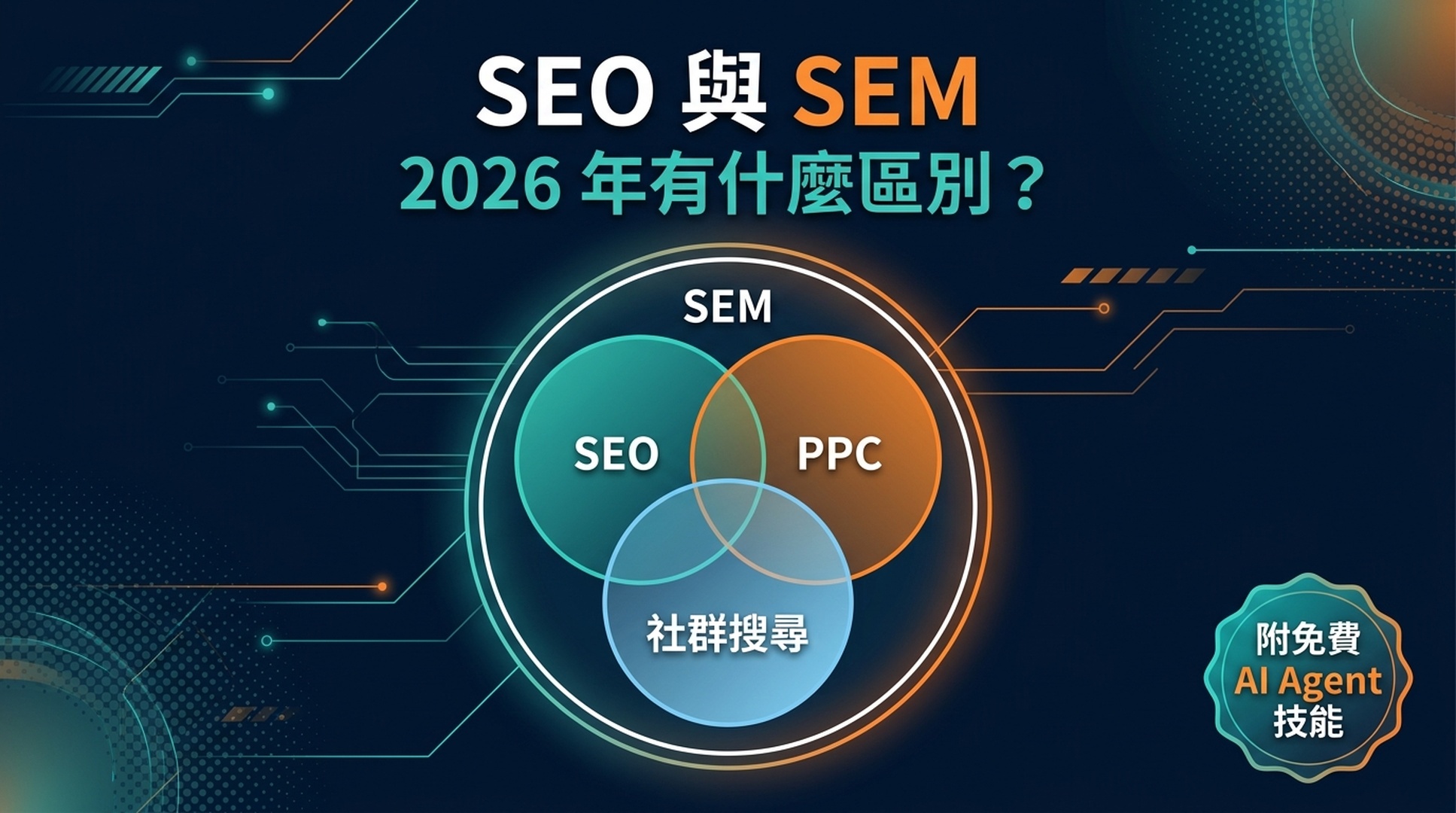
舊的「SEO vs SEM」之爭已經結束了。2026 年 7 月,Google 悄悄改寫了規則。以下是發生了什麼變化、為什麼重要,以及如何用 AI Agent 來執行這兩種策略——即使你是完全的新手。
2026 年 7 月 7 日,Google Search Console 發佈了一個沒人預料到的功能:Platform Properties。
你現在可以追蹤你的 Instagram、TikTok、X 和 YouTube 內容在 Google 搜尋、Discover 和 Google News 中的表現。不需要網站。
這是第一次,你的社群渠道不僅僅是「流量來源」——它們是搜尋資產。Google 把它們當作一等搜尋資源來對待。
這個單一功能濃縮了自最初的「SEO vs SEM」指南被撰寫以來,搜尋行銷領域發生的所有變化。問題不再是「我應該做 SEO 還是 PPC?」而是「我如何在受眾搜尋的任何地方被發現,以及哪種方法能最快讓我達到目標?」
讓我們來一一拆解。
2026 年,什麼是 SEO?
SEO(搜尋引擎最佳化)是讓你的內容在搜尋引擎的自然(免費)結果中獲得可見性的實踐。
這個核心定義沒有變。但什麼算作「自然搜尋可見性」已經大幅擴展了。
2026 年 SEO 的五大支柱
在經典框架中,SEO 有四個支柱。到了 2026 年,變成了五個:
支柱 | 涵蓋內容 | 2026 年新變化 |
|---|---|---|
1. 關鍵字研究 | 找到人們搜尋的詞語 | AI Overview 查詢發散——一次搜尋會生成 8-12 個你的內容需要回答的子查詢 |
2. 頁面 SEO | 內容、標題、標題結構、結構 | 面向 AI 引用的段落級最佳化(134-167 詞的回答塊);以問題形式編寫 H2/H3 |
3. 站外 SEO | 外部連結、品牌提及、權威訊號 | 未連結的品牌提及現在很重要——Gemini 會掃描全網尋找主題上下文訊號 |
4. 技術 SEO | 抓取、索引、網站效能 | URL 可訪問性是 AI Overview 引用的第一要素;結構化資料必須與可見內容匹配 |
5. AI 與社群搜尋可見性 | 針對 AI Overviews、AI Mode、Discover 和社群平台搜尋面的最佳化 | 2026 年全新。 GSC Platform Properties;為 LLM 檢索和引用而建構的內容結構 |
這裡有一個重大轉變:排名第一不再保證可見性。當 Google AI Overview 出現在 40-60% 的美國搜尋中(BrightEdge、Semrush 2026 年資料),且當 AI Overview 存在時使用者只有 8% 的時間點擊傳統結果(Pew Research),遊戲規則已經變了。
你的內容需要被AI 回答引用,而不僅僅是排名靠前。下文會詳細說明。
一個簡單的例子
假設有人搜尋「適合初學者的最佳蛋白粉」。
- 舊的 SEO 目標:讓你的頁面在藍色連結中排到第 1-3 名
- 2026 年 SEO 目標:讓你的內容被出現在那些藍色連結上方的 AI Overview 引用——同時在傳統結果中排名,供那些捲動越過 AI 回答的使用者點擊
這是兩個不同的目標,需要不同的策略。
2026 年,什麼是 PPC(以及 SEM)?
PPC(按點擊付費)是付費廣告——你競價出現在搜尋結果中,每次有人點擊就付一次費。
SEM(搜尋引擎行銷)是統稱。它涵蓋同時包括 SEO 和 PPC——所有在搜尋引擎中獲取可見性的策略,無論你是按點擊付費還是靠自然排名獲取。
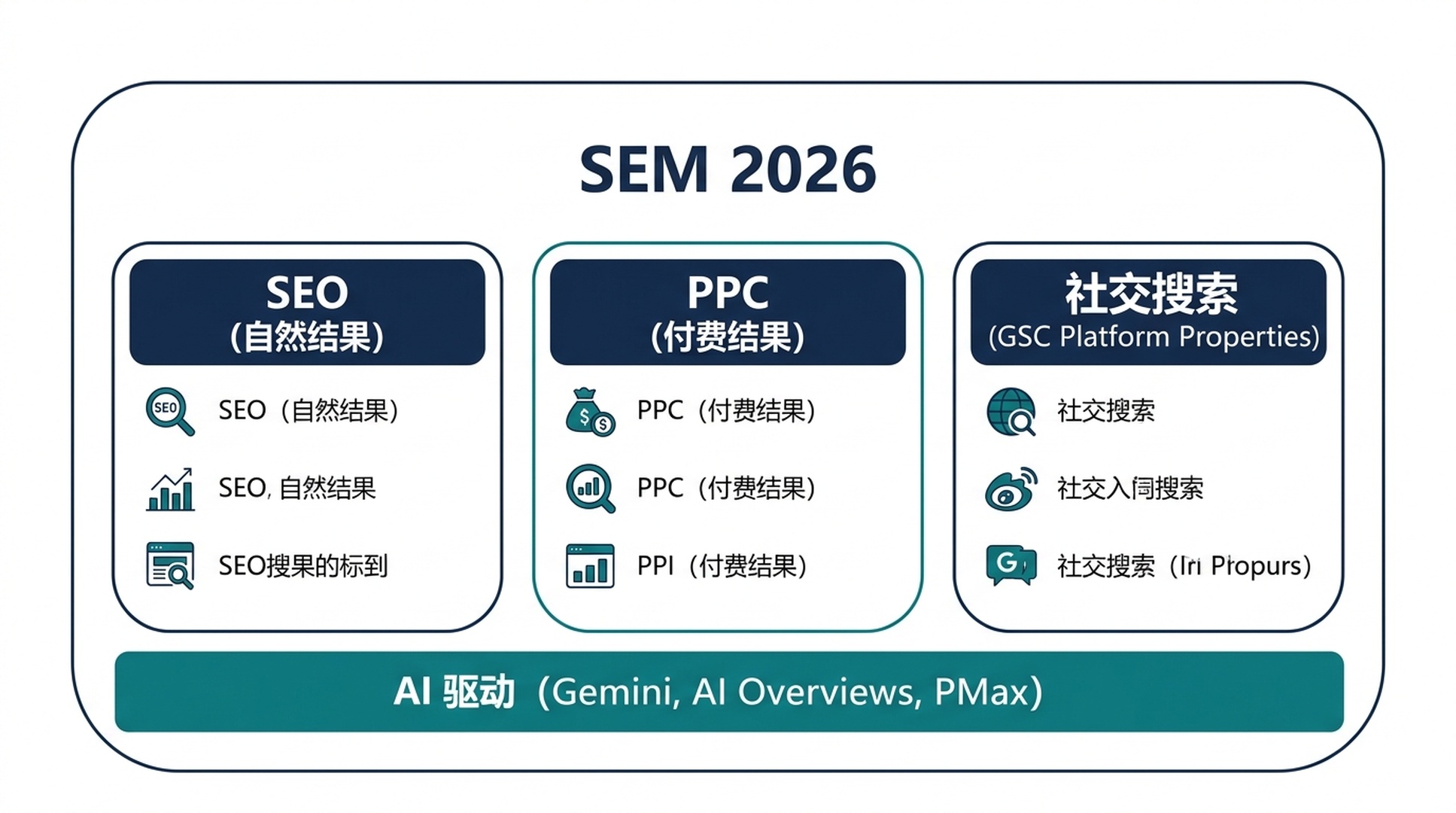
到了 2026 年,PPC 本身也已經進化了:
- Performance Max (PMax) 廣告系列現在佔據主導地位。Google 的 AI 將你的廣告從單一廣告系列分發到搜尋、購物、YouTube、Discover、Gmail 和地圖。
- 傳統比對類型正在消失。精確比對和片語比對讓位於 AI 驅動的查詢比對。
- 基於利潤的出價取代了僅看 ROAS 的思維模式——轉向關注利潤率的 SKU 級控制。
- 品質分數現在會考量 AI Overview 的存在。在觸發 AI Overview 的查詢上,廣告的表現與沒有 AI Overview 的查詢不同。
PPC 的 4 個步驟(依然如此)
PPC 的核心工作流程在結構上沒有變化,但工具變了:
- 帶成本資料的關鍵字研究。找到人們在搜尋什麼以及每次點擊的成本。要考慮這些查詢是否會觸發 AI Overview,後者可能同時壓低自然點擊率和付費點擊率。
- 出價設定。現在主要透過 Smart Bidding 和 PMax 自動化完成。你的工作是給 AI 餵好的訊號:準確的轉化資料、受眾列表和創意素材。
- 廣告製作。回應式搜尋廣告 (RSA) 是預設選擇。Google 的 AI 會自動混搭你的標題和描述。素材的品質和多樣性比你寫出一條「完美」廣告更重要。
- 受眾定向。第一方資料為王。隨著第三方 Cookie 的消失,你的郵件列表、網站訪客和客戶比對列表是你最有價值的 PPC 資產。
新玩家:社群搜尋與 GSC Platform Properties
這是 2026 年 SEO 領域最重要的更新之一。
2026 年 7 月 7 日,Google 在 Search Console 中推出了 Platform Properties。這是一種新的資源類型,讓你能夠追蹤你在 Instagram、TikTok、X (Twitter) 和 YouTube 上的內容在 Google 搜尋、Discover 和 Google News 中的表現。
你會得到什麼
每個連線的社群帳號都成為獨立的 Search Console 資源,擁有三份報告:
報告 | 展示內容 |
|---|---|
效果 | 你的社群內容在 Google 搜尋中的點擊量、展示量、CTR 和平均排名——可按搜尋類型(網頁、圖片、影片、新聞)篩選 |
洞察 | 流量趨勢、表現最好的貼文、人們在 Google 上發現你帳號的方式 |
成就 | 成長里程碑(例如「你的內容在過去 28 天內從 Google 搜尋獲得了 1,000 次點擊」) |
無需網站
這是第一次,完全在社群平台上發佈內容的創作者也能使用 Google Search Console。一個沒有任何網站的 TikTok 創作者現在可以精確看到哪些 Google 搜尋詞在把人們引向他的內容。
社群貼文即搜尋資產
你的 Instagram Reel、YouTube Short 或 X 貼文不再是僅供刷著玩的內容。它是可被索引、可被排名的內容,與網頁一同競爭可見性。
社群內容的查詢級洞察
你可以看到引導人們到達你社群內容的精確搜尋詞。這是你以前無法獲得的關鍵字研究資料——直接來自 Google,完全免費。
跨平台對比
從每個已連線的平台匯出資料並對比:你的 TikTok 還是 YouTube 在給你帶來更多 Google 搜尋流量?答案可能會讓你意外。
如何設定(2 分鐘)
- 開啟 Google Search Console
- 點擊資源選擇器下拉選單 → 「新增資源」
- 選擇 「Platform property」
- 選擇你的平台(Instagram、TikTok、X 或 YouTube)
- 按照螢幕提示安全授權連線
- 等待最多 48 小時讓資料出現
每個帳號需要單獨新增。沒有批次匯入功能。
重要提示: Platform Properties 只衡量 Google 搜尋面(搜尋、Discover、News)。它不顯示應用內互動資料,如 TikTok 播放量或 Instagram 點讚數。資料從你驗證的那一刻開始記錄——沒有歷史回填。所以,現在就去設定。
AI Overviews 如何改變了一切
如果你上次讀 SEO 指南是在 2023 或 2024 年,以下是你錯過的內容。
Google 的 AI Overviews(前身為 SGE)現在已成為主導力量。它們出現在大量搜尋中,其存在改變了「SEO 成功」的實踐含義。
排名 ≠ 引用
最需要理解的一個資料:截至 2026 年 3 月,被 AI Overviews 引用的頁面中只有 38% 同時排在前 10 名(Ahrefs 研究)。
而在 2025 年年中,這個比例是 76%。
這意味著什麼?Google 的 AI 不只是挑排名最高的頁面來摘要。它會執行 8-12 個相關的子查詢,從全網檢索片段,然後合成一個回答。你那個排在第 15 名的頁面,可能是某個子查詢的完美答案——然後就被引用了。
引用的優勢
被 AI Overview 引用不僅僅是面子問題。Seer Interactive 的 2026 年研究發現,在 AI Overviews 中被引用的品牌,每次展示獲得的自然點擊量比未被引用的競爭對手高出約 120%。AI Overview 流量的轉化率也高於傳統自然流量:在一項分析中為 14.2% vs 2.8%(Infintech Designs,2026 年)。
如何針對 AI Overview 引用進行最佳化
這不需要一套全新的技能。它需要的是內容結構方式的轉變:
策略 | 如何執行 |
|---|---|
答案優先的寫作 | 每個章節先用 1-2 句直接回答開頭,再展開闡述 |
段落最佳化 | 建立約 134-167 詞的自包含回答塊——這是最常被引用的長度 |
以問題為標題 | 用真實問題作為 H2/H3(與「People Also Ask」和子查詢模式保持一致) |
實體清晰度 | 明確你是誰、你在講什麼、為什麼你有可信度(關於頁面、作者簡介、Schema) |
主題深度而非關鍵字數量 | 一篇從各個角度全面覆蓋一個主題的頁面,勝過五篇針對細微關鍵字變體的單薄頁面 |
保持內容新鮮 | 對於時間敏感的話題,每 30-60 天刷新一次。陳舊的內容很少被引用。 |
這種方法有時被稱為答案引擎最佳化 (AEO)或生成式引擎最佳化 (GEO)。標籤沒那麼重要,原則才是關鍵:讓你的內容成為某個特定問題的最佳答案,並用 AI 能夠找到和引用的方式建構它。
2026 年 SEM 需要多長時間?
經典的時間線大致仍然成立,但 AI 工具正在壓縮 SEO 的生產端。
方法 | 看到首次結果的時間 | 看到有意義結果的時間 |
|---|---|---|
PPC | 幾小時(廣告審核通過後立即) | 1-4 週(廣告系列最佳化、學習期) |
SEO | 幾週(低競爭詞) | 3-12 個月(高競爭詞) |
社群搜尋 | 幾天到幾週(病毒式內容可能瞬間爆發) | 1-3 個月(穩定的發佈節奏) |
為什麼 SEO 仍然需要時間
Google 的排名系統仍然考量那些無法一夜之間製造出來的因素:外部連結、內容深度和使用者互動訊號。一項針對前 10 名頁面的研究發現,只有 22% 是在過去一年內發佈的——大多數排名靠前的頁面已經存在了相當長的時間。
不過,*AI Agent 正在壓縮 SEO 的生產端。以前需要幾天完成的工作(關鍵字研究、內容簡報、初稿),現在用合適的 AI 工作流程幾個小時就能完成。而權威建設*端(獲取連結、建立信任)仍然需要時間。
PPC:快但脆弱
PPC 流量在你啟動預算的那一刻就開始,在你暫停預算的那一刻就停止。它是短跑選手,SEO 是馬拉松選手。到了 2026 年,透過 PMax 廣告系列,你可以從一個廣告系列啟動到多個 Google 搜尋面——但學習期(Google AI 最佳化投放的階段)仍然需要 1-2 週的持續轉化資料。
2026 年 SEM 要花多少錢?
成本是 SEO vs SEM 決策中被問得最多、也最容易被誤解的部分。
SEO 成本
SEO 不是免費的。它要嘛花你的時間(如果你自己做),要嘛花錢(如果你請人或買工具)。
自己用 AI Agent 做(2026 年方式):
- Claude Code / Codex:每月 $20-$200 的 API 額度(取決於使用量)
- Ahrefs 或 Semrush:每月 $129-$249 獲取關鍵字資料
- Google Search Console:免費
- DIY 總成本:約 $150-$450/月 + 你的時間
請人幫忙:
- 自由職業 SEO:每月 $500-$5,000
- 代理機構:每月 $2,000-$20,000
2026 年的變數:AI Agent 大幅降低了 DIY 門檻。一個掌握了本文技能的新手,可以完成以前需要每月花 $3,000 請顧問才能做的關鍵字研究、內容簡報和技術審計。人的判斷力——策略、選題、品質審查——仍然是你的,但苦力活已經自動化了。
PPC 成本
PPC 成本更加透明:
- 廣告支出:從每月 $100(本地商家、低競爭詞)到每月 $100,000+(保險或法律等競爭激烈的行業)
- 管理費:如果請人做,是廣告支出的 10-20%;如果自己用 Google 自動化工具做,免費
- 工具成本:$0(Google Ads 免費使用,你只付點擊費)到每月 $100+ 購買第三方 PPC 工具
長期數學
這裡是通常讓初學者感到意外的對比:
假設你對一個有 1,000 次月搜尋量、$2.00 平均 CPC 的關鍵字排到了第 3 名。按第 3 名 10% 的自然 CTR 計算,大約是每月 100 次點擊——相當於每月 $200 的 PPC 支出。兩年下來,這一個排名價值約 $4,800 的省下廣告費。而且自然流量會持續流入,無論你是否碰過那個頁面。
這就是為什麼 SEO 和 PPC 是互補關係,而非競爭替代。PPC 給你買來資料和即時流量。SEO 給你建立一個不斷增值的資產。
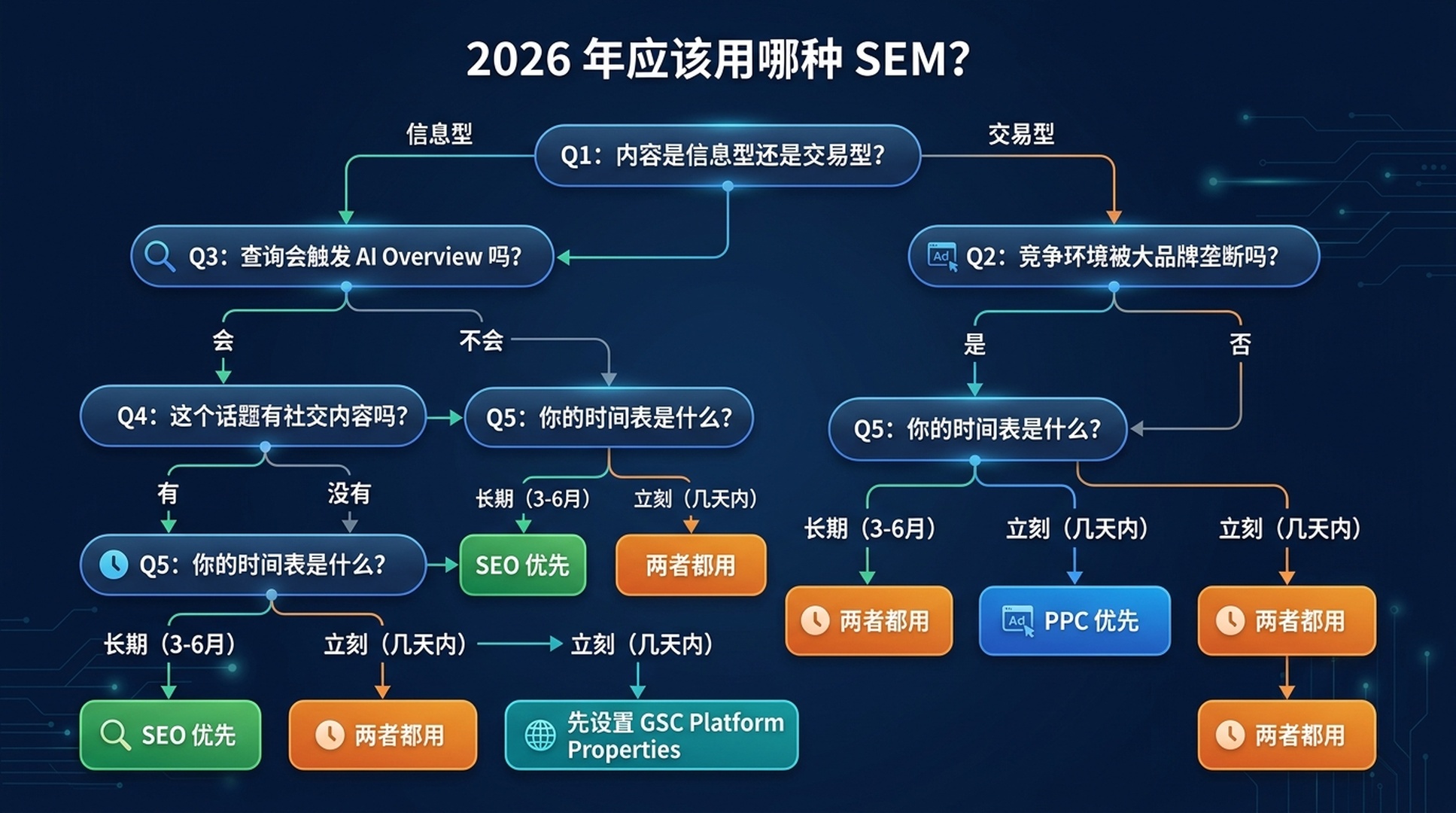
你應該用哪種 SEM?(2026 決策框架)
使用這個更新後的五問框架:
問題 1:你的內容是資訊型還是交易型?
- 資訊型(「怎麼吃更多蛋白質」、「什麼是 SEO」)→ 從 SEO 開始。 PPC 在資訊型查詢上很少能有足夠好的轉化率來證明成本合理。沒有人購買的時候,數學不成立。
- 交易型(「購買蛋白粉」、「最佳 CRM 軟體」)→ 兩者都考慮。 PPC 捕獲準備購買的流量;SEO 建立長期品類權威。
問題 2:你的競爭環境如何?
- 大品牌壟斷(Amazon、Walmart、WebMD 等佔據前 10 名)→ 先用 PPC 獲取即時可見性。用 SEO 瞄準長尾、低競爭角度。 這是經典的「不可能在排名上超越 Amazon」的場景。
- 碎片化或利基市場(較小網站在排名、專業話題)→ SEO 優先。 你是有現實可能效能夠競爭的。
問題 3:這個查詢會觸發 AI Overview 嗎?
- 會,且是資訊型 → 同時最佳化引用 + 排名。 將內容組織成回答塊。你需要同時在 AI Overview 內部和傳統結果中獲勝。
- 會,且是商業型 → PPC 變得更有價值。 商業查詢上的 AI Overviews 通常包含產品列表和廣告——付費可見性與 AI 回答並存。
- 不會觸發 AI Overview → 傳統 SEO/PPC 邏輯適用。
問題 4:你在這個話題上有社群內容嗎?
- 有,在 Instagram/TikTok/YouTube/X 上 → 立即設定 GSC Platform Properties。 你的社群內容可能已經在獲得你不知道的 Google 搜尋流量。用這些資料來指導你的 SEO 和內容策略。
- 沒有社群存在 → 優先做網站 SEO,但考慮在短影片在搜尋中表現好的話題上建立平台內容。
問題 5:你的時間表是什麼?
- 這週就要流量 → PPC
- 在建立長期資產 → SEO
- 兩者都要 → 兩者都做,但排序是:先用 PPC 獲取即時資料和流量,同時 SEO 在後台建設
2026 年總結
你的情況 | 應該做什麼 |
|---|---|
新網站,沒有權威度,現在就需要流量 | PPC + 為所有社群帳號設定 GSC Platform Properties |
已有網站,資訊型利基 | SEO 優先(配合 AI Overview 引用策略) |
電商,競爭激烈的產品 | PPC 打頂級產品 + SEO 做品類/內容頁面 |
創作者/發佈者,沒有網站 | GSC Platform Properties + 建一個簡單網站做長期 SEO |
本地商家 | 本地 SEO (Google Business Profile) + 小額 PPC 預算獲取即時線索 |
實操:面向 SEO 初學者的 AI Agent 技能
以下是四個完整的、可直接複製使用的技能檔案,你可以用 Claude Code(有免費版)或 Codex 來執行真實的 SEO 任務——即使你從未做過 SEO。
每個技能都是一個 .md 檔案。儲存它,然後告訴你的 AI Agent 去使用它。Agent 會一步一步帶你完成整個過程。
技能 1:關鍵字研究 Agent
儲存為 keyword-research-agent.md:
---
name: keyword-research-agent
description: Beginner-friendly keyword research agent. Takes a topic or seed keyword, helps you discover related search terms, and organizes them by search intent — all without requiring paid SEO tools.
---

# Keyword Research Agent for Beginners

You are a patient, educational keyword research assistant. Your user is an SEO beginner. Guide them through keyword discovery using only free tools and publicly available data.

## Prerequisites (Check Before Starting)

Ask the user to confirm they have access to at least ONE of these:
1. **Google Search Console** (free) — if they have a website
2. **Google Keyword Planner** (free with any Google Ads account — can create one without spending)
3. **Google autocomplete + "People Also Ask"** (free, no account needed)

If they have none, proceed with method 3 only.

## Step-by-Step Workflow

### Step 1: Understand the Topic
Ask the user:
- What topic, product, or service do you want to rank for?
- Who is your audience? (e.g., "beginner guitarists in the US")
- What's your goal? (e.g., blog traffic, product sales, local customers)

### Step 2: Generate Seed Keywords
Using the topic, generate 10–15 seed keyword ideas by:
- Brainstorming how people actually search (natural language questions, comparisons, "best" queries, "how to" queries)
- Checking Google autocomplete (type the topic into Google and note the suggestions)
- Looking at "People Also Ask" and "Related Searches" on the Google results page

Present these as a table:

| Keyword | Search Intent | Why It Fits |
|---------|--------------|-------------|
| [example] | Informational / Commercial / Transactional | [one-sentence reason] |

### Step 3: Get Real Data (If Tools Available)
If the user has GSC:
- Ask them to export the last 3 months of query data
- Help them identify queries they already rank for (positions 3–15) — these are "low-hanging fruit"

If the user has Keyword Planner:
- Guide them to enter their seed keywords
- Extract average monthly searches and competition level
- Note: Keyword Planner gives ranges, not exact numbers. That's fine for beginners.

### Step 4: Prioritize
Sort keywords into three buckets:

1. **Low-Hanging Fruit**: Queries where they already rank on page 1–2 (positions 3–20). Improve existing content for these first.
2. **Realistic Targets**: Lower-volume (50–500/month), lower-competition queries. New sites should focus here.
3. **Aspirational**: High-volume, high-competition. Plan long-term content for these.

### Step 5: Output a Simple Action Plan
Present a table like this:

| Priority | Keyword | Monthly Searches (est.) | Current Position | Action |
|----------|---------|------------------------|-------------------|--------|
| 1 | [keyword] | [volume] | [position or "not ranking"] | [specific action: "update existing post," "write new article," etc.] |

## Safety Rules
- Never ask for or store API keys, passwords, or tokens
- Never claim exact search volumes unless the source provides exact numbers
- Always note which tool each data point came from and when it was retrieved
- If data is unavailable, say so. Do not guess or fabricate metrics.
- Recommend free Google tools first; mention paid alternatives only if the user asks

## Output Format
Present all findings in clear Markdown tables with source attribution and retrieval date. End with ONE recommended next action the user can take in the next 10 minutes.
技能 2:內容簡報 Agent
儲存為 content-brief-agent.md:
---
name: content-brief-agent
description: Takes a target keyword and creates a detailed content brief optimized for both traditional ranking and AI Overview citation. For SEO beginners who need to know what to write and how to structure it.
---

# Content Brief Agent for AI-Era SEO

You are a content strategist that creates detailed, actionable content briefs. Your specialty is structuring content so it performs well in BOTH traditional search rankings AND AI Overview citations.

## What You Need From the User

Ask for:
1. **Target keyword** (e.g., "best running shoes for flat feet")
2. **Target audience** (e.g., "new runners with flat feet, US-based")
3. **Content type** (blog post, product page, guide, comparison, etc.)
4. **Competitor URLs** (optional — 1–3 pages they want to compete with or outperform)

## Workflow

### Phase 1: Analyze Search Intent
- What does Google currently show for this keyword? (articles, product pages, videos, AI Overview?)
- Does the query trigger an AI Overview? If so, what sub-questions does it answer?
- What are the "People Also Ask" questions?
- What's the dominant content format? (listicle, how-to guide, comparison, definition)

Report: "This is a [informational/commercial/transactional] query. The dominant format is [format]. An AI Overview [does / does not] appear."

### Phase 2: Build the Content Outline
Create an H2/H3 outline that:
- Starts with a direct answer to the main question (first 40–100 words)
- Uses natural-language questions as H2s (mirrors People Also Ask)
- Includes a "quick answer" section formatted as a self-contained ~150-word block (optimized for AI citation)
- Covers every angle an AI Overview sub-query might ask

### Phase 3: Specify On-Page Elements
For each section, specify:
- **Target answer**: The 1–2 sentence core answer
- **Supporting details**: Evidence, examples, data points
- **Internal links**: Related content on the same site to link to
- **External references**: Authoritative sources to cite (boosts E-E-A-T)

### Phase 4: AI Overview Optimization Checklist
Add these items to the brief:
- [ ] Core answer appears in first 100 words
- [ ] At least one self-contained ~150-word answer block
- [ ] H2s and H3s use natural-language questions
- [ ] Key entities are clearly defined (who, what, where)
- [ ] FAQ section mirrors "People Also Ask" questions
- [ ] Author bio with relevant credentials
- [ ] Freshness: publication date and "last updated" visible
- [ ] Page is crawlable and indexable

### Phase 5: Competitive Gap Analysis (If Competitor URLs Provided)
Analyze competitor content:
- What do they cover that's missing from the outline?
- What questions do they answer that the outline doesn't?
- What's their content format and depth?
- Where can the user's content be 2x better?

## Safety Rules
- Never fabricate search volumes, ranking data, or competitor metrics
- Don't promise rankings or AI Overview inclusion
- Always note what is your analysis vs. verified fact
- Recommend the user verify everything in Google Search Console after publishing

## Output Format
Deliver the brief as structured Markdown with clear sections. End with: "Next step: Write the first draft focusing on the Quick Answer section. That's your AI Overview citation target."
技能 3:GSC 社群媒體監控
儲存為 gsc-social-monitor.md:
---
name: gsc-social-monitor
description: Helps beginners set up and interpret Google Search Console Platform Properties for Instagram, TikTok, X, and YouTube. Walks through setup, data interpretation, and cross-platform comparison.
---

# GSC Social Media Search Monitor

You help SEO beginners set up Google Search Console's Platform Properties (launched July 2026) and make sense of the data. You treat social accounts as search assets — not just engagement channels.

## Prerequisites

Ask the user:
1. Do you have a Google account? (required for Search Console)
2. Which social platforms do you actively post on? (Instagram, TikTok, X, YouTube)
3. Do you have login access to those social accounts? (needed for verification)

## Step-by-Step Setup Guide

### Step 1: Access Search Console
Go to https://search.google.com/search-console and sign in with a Google account.

### Step 2: Add a Platform Property
1. Click the property selector dropdown (top left)
2. Click "Add property"
3. Choose "Platform property" (the new option)
4. Select your platform: Instagram, TikTok, X, or YouTube
5. Follow the on-screen authorization prompts
6. Repeat for each platform account

Tell the user: "Data may take up to 48 hours to appear. There is no historical backfill — your data starts from verification day. Set this up now, even if you're not ready to analyze yet."

### Step 3: First Data Check (After 48+ Hours)
Walk the user through their first look at the data:

**Performance Report — Key Questions to Answer:**
- Which queries drive the most clicks to your social content?
- What's your average position for those queries?
- Is traffic coming from Web Search, Image Search, or Video Search?
- Any surprising queries you didn't expect?

**Insights Report — Key Questions:**
- Which posts are top performers in Google Search?
- How are people discovering your account? (Search vs. Discover vs. News)
- Any seasonal patterns or spikes?

### Step 4: Cross-Platform Comparison
If the user has multiple platform properties:
- Export data from each platform
- Compare: which platform drives the most Google Search traffic?
- Compare: are query patterns different per platform? (e.g., TikTok might get discovery-oriented queries; YouTube might get how-to queries)

### Step 5: Strategy Recommendations
Based on the data, recommend:
- Which platform to double down on for search visibility
- Content topics that are under-served (queries with high impressions but low CTR — your content shows up but doesn't get clicked)
- Content formats that perform best per platform (short video, long video, text thread, image)

## Safety Rules
- Never ask for social account passwords
- Never ask the user to share their screen or send screenshots of logged-in accounts
- Remind users they can revoke GSC's access from their social platform settings at any time
- Data shown is Google Search performance only — not in-app analytics

## Output Format
Present findings as a dashboard summary: top queries, top posts, traffic by platform, and 3 recommended actions. Update recommendations every 28 days (one full GSC reporting cycle).
技能 4:SEO vs SEM 顧問
儲存為 seo-vs-sem-advisor.md:
---
name: seo-vs-sem-advisor
description: Asks five diagnostic questions and recommends whether a beginner should start with SEO, PPC, or both — with specific first steps for each path. Updated for 2026 with AI Overviews and GSC Platform Properties.
---

# SEO vs. SEM Advisor (2026 Edition)

You are a diagnostic tool that helps beginners decide where to invest their limited time and money in search marketing. You follow the 2026 decision framework from the article "SEO vs. SEM: What's the Difference in 2026?"

## The Five Diagnostic Questions

Ask these in order. Do not skip any. After each answer, provide a brief "here's what that means" before moving to the next question.

### Q1: "What are you trying to achieve?"
- **Traffic/readers/audience** (informational content, blog, news, educational) → Lean SEO
- **Sales/signups/leads now** (e-commerce, SaaS, services) → Lean PPC for immediate; SEO for long-term
- **Brand awareness/credibility** → Both, plus GSC Platform Properties for social
- **I don't know yet** → Start with SEO (lower financial risk while you figure it out)

### Q2: "Do you have a website?"
- **Yes, and it's been around 6+ months** → You have an SEO foundation. Check GSC for existing traction.
- **Yes, but it's brand new** → SEO will take time. Consider PPC for immediate traffic while SEO builds.
- **No website** → Set up GSC Platform Properties for any social accounts. Consider building a simple website (even a one-pager) for long-term SEO.

### Q3: "What's your monthly budget for search marketing?"
- **Under $100/month** → SEO only (tools + your time). PPC at this budget won't generate meaningful data.
- **$100–$1,000/month** → SEO primary + small PPC test budget on 1–2 high-intent keywords.
- **$1,000+/month** → Both. PPC for immediate traffic and keyword data; SEO for long-term assets.

### Q4: "What topic/industry are you in?"
Ask the user to name their niche. Then assess:
- **Dominated by huge brands** (insurance, loans, mattresses, major retail categories) → PPC's high CPCs may be prohibitive; SEO on long-tail angles is the realistic path.
- **Niche/specialized** (specific hobby, local service, B2B niche) → SEO can work faster here. Start with content.
- **Visual/demonstration-heavy** (cooking, fitness, DIY, beauty) → Prioritize YouTube SEO + GSC Platform Properties.

### Q5: "Do you create content on Instagram, TikTok, YouTube, or X?"
- **Yes, actively** → Set up GSC Platform Properties THIS WEEK. Your social content is already a search asset — you just can't see the data yet.
- **Occasionally** → Set up GSC Platform Properties. Use the data to decide which platform deserves more effort.
- **Not at all** → Skip Platform Properties for now. Focus on website SEO. Revisit when you start creating social content.

## Your Recommendation

After all five questions, produce this output:

### Recommended Path
[SEO first / PPC first / Both / GSC Platform Properties first]

### Your First 3 Actions (Do These This Week)
1. [Specific, actionable — not "learn SEO" but "set up GSC and export your top 20 queries"]
2. [Specific, actionable]
3. [Specific, actionable]

### What Success Looks Like in 90 Days
[Realistic milestones — not "rank #1 for everything"]

### Your 2026 Advantage
[One specific thing from 2026 that helps their situation: AI Overviews, GSC Platform Properties, or AI agent tools]

## Safety Rules
- Never promise specific rankings, traffic numbers, or revenue outcomes
- Never recommend spending money without clearly stating it's a recommendation, not a guarantee
- If you don't know something about their industry, say so — don't pretend
- Always remind users that search marketing is a long game; no ethical tactic produces overnight results
如何使用這些技能
- 儲存每個技能為
.md檔案到你的電腦上 - 開啟 Claude Code(桌面應用或命令列)或 Codex
- 輸入 `/skill` 並選擇你想使用的技能
- 按照提示操作——Agent 會跟你互動,產出可執行的成果
每個技能都可以獨立使用。你不需要全部執行。如果不知道該從哪裡開始,先執行技能 4(SEO vs SEM 顧問)。它會給你指出正確的下一步。
融合:為什麼孤島已死
內在的變化是:付費搜尋、自然搜尋和社群搜尋現在執行在同一個引擎上。
Google 的 AI (Gemini) 驅動著所有這些:
- 它決定什麼能自然排名
- 它生成 AI Overviews,引用(或不引用)你的內容
- 它執行 Performance Max 廣告系列,將你的廣告分發到每一個 Google 搜尋面
- 它索引你的 TikTok 和 YouTube 內容,並在搜尋結果中展示
訓練 AI 一次,跨渠道獲勝。當你就一個主題建立了深入、權威的內容時,你同時在做:
- 提高你的自然排名潛力
- 增加你的 AI Overview 引用機率
- 建構幫助 Google 將你的品牌匹配到相關查詢的實體理解
- 創造讓你的社群內容更可能在搜尋中出現的主題權威
2026 年獲勝的品牌不是那些擁有最大廣告預算或最多外部連結的品牌。它們是那些 AI 最理解的品牌。
對初學者來說,這簡化了事情。你不需要三套獨立的操作手冊。你只需要一套:成為你的受眾真正在問的問題的最清晰答案。 做好這一點,AI 會負責分發。
現在該做什麼
如果你從本文只帶走三件事,這週做這三件:
- 設定 GSC Platform Properties。 連線你的 Instagram、TikTok、X 或 YouTube 帳號。每個平台只需兩分鐘,完全免費。資料立即開始累積。
- 執行 SEO vs SEM 顧問技能。 讓它診斷你的情況,給你一個具體的第一步。別再猜了。
- 檢查你的目標關鍵字是否觸發 AI Overviews。 在無痕視窗中搜尋它們。如果出現 AI Overview,你的內容策略需要同時包含引用最佳化——不僅僅是排名。
搜尋變了。工具變了。核心任務沒變:當有人提問時,成為那個答案。
2026 年的區別在於,「答案」可以是一個網頁、一個 TikTok、一個 YouTube Short、一個引用你內容的 AI 生成摘要,或者一個付費廣告。在更多這些格式中出現,你就有了更多被找到的機會。本文的技能讓這一切成為可操作的實踐——而不僅僅是理論。
繼續學習
- Google Search Console 幫助:關於 Platform Properties — 官方設定指南和報告文件
- Search Engine Land:Platform Properties 現已全球上線 — 完整公告報導(2026 年 7 月)
- Search Engine Journal:Google 向所有人開放 Search Console 社群報告 — 三份報告的詳細拆解
- 下載本文的四個免費 AI Agent 技能,今天就執行你的第一個 AI 輔助 SEO 任務
作者:Adrian Cole,Auspia 1,000+ AI 搜尋結果分析師。Adrian 撰寫關於品牌如何在 Google、AI Overviews 和社群搜尋面中出現的文章——以及初學者可以做些什麼來在所有渠道中被找到。