作るもの
このtutorialでは、Windsurf Rules and MemoriesをSEO/GEO作業に使う方法を説明します。ただし、preferencesの山にしないことが重要です。Rulesは安定したpolicy、Memoriesは軽量なcontext、Workflowsはstep-by-step proceduresです。この3つを分けると、初心者でもWindsurfを制御しやすくなります。
作る構成は次のとおりです。
.windsurf/
  rules/
    seo-geo-policy.md
    technical-seo-risk.md
seo-geo/
  context/
    brand-facts.md
    public-proof.md
    memory-cleanup.md
Windsurf環境がrulesをfileではなくUIに保存する場合は、同じtextをproject rulesとして使い、context filesはrepositoryに置きます。
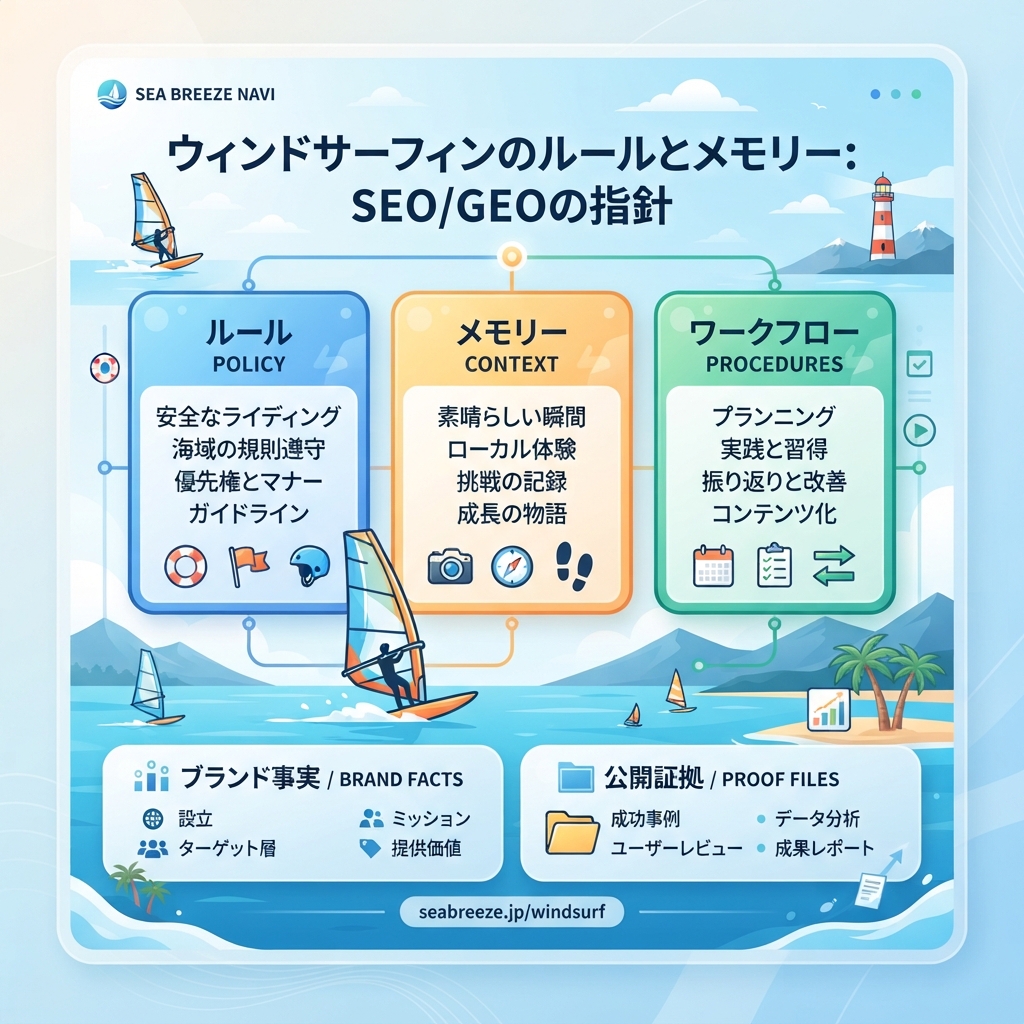
![Windsurf Rules、Memories、WorkflowsをSEO/GEOで分けて管理する構成図]()
キャプション: Rulesはpolicy、Memoriesは参照先、Workflowsは手順です。混ぜないほど安全に運用できます。
Step 1: project SEO/GEO policyを書く
Windsurf Rulesへ貼り付けられるpolicy fileを作ります。
mkdir -p .windsurf/rules seo-geo/context
cat > .windsurf/rules/seo-geo-policy.md <<'EOF2'
# SEO/GEO Policy

Always:
- diagnose before editing
- work on one page, one workflow, or one PR comment at a time
- name the files you plan to edit before editing
- mark missing evidence as TODO instead of inventing it
- keep public copy factual, specific, and useful
- preserve internal links that help the reader
- run available validation after edits

Never invent:
- customers
- logos
- testimonials
- awards
- rankings
- revenue numbers
- legal claims
- medical or financial claims
- search volume or analytics metrics

Ask before changing:
- pricing
- robots.txt
- noindex logic
- canonical logic
- redirects
- sitemap generation
- analytics or tracking
- shared page templates
- navigation
- schema helpers used across many pages
EOF2
初心者向けのruleは単純です。毎週適用すべき指示ならRulesに入れます。1回のtaskだけに関係するならpromptに残します。
Step 2: technical risk ruleを作る
cat > .windsurf/rules/technical-seo-risk.md <<'EOF2'
# Technical SEO Risk Rule

Treat these as high-risk files or concepts:
- robots.txt
- sitemap generation
- noindex, nofollow, indexability helpers
- canonical URL helpers
- redirect rules
- middleware and routing
- hreflang and locale routing
- schema / JSON-LD helpers
- analytics, GTM, GA4, conversion tracking

When any high-risk file is involved:
1. Stop before editing.
2. Explain the search impact.
3. List affected URL patterns.
4. Ask for explicit approval.
5. After approval, apply the smallest diff.
6. Return validation and rollback notes.
EOF2
これにより、単純なpage refreshが意図せずsitewide technical changeに変わるのを防げます。
Step 3: Memoriesが参照できるbrand factsを作る
Windsurfにprivate analyticsやsecretsを覚えさせてはいけません。安定したpublic factsはrepository fileに置きます。
cat > seo-geo/context/brand-facts.md <<'EOF2'
# Brand Facts

Brand name: [your brand]
Category: [your category]
Audience: [primary audience]
Main use cases:
- [use case 1]
- [use case 2]
- [use case 3]

Approved claims:
- [claim with source]
- [claim with source]

Forbidden claims:
- fastest
- best
- #1
- guaranteed rankings
- unsupported customer results
EOF2

cat > seo-geo/context/public-proof.md <<'EOF2'
# Public Proof Sources

Use only these proof types unless approved:
- product screenshots
- public documentation
- public case studies
- public reviews or testimonials already approved for marketing
- first-party benchmarks clearly labeled with methodology

Do not use:
- private customer names
- raw analytics exports
- confidential revenue data
- sales call notes
EOF2
これでMemoriesには、facts自体を保存する代わりに「brand factsはseo-geo/context/brand-facts.mdにある」とだけ書けます。
Step 4: safe memoriesをWindsurfに作らせる
Windsurfで次を使います。
Review these files:
- `.windsurf/rules/seo-geo-policy.md`
- `.windsurf/rules/technical-seo-risk.md`
- `seo-geo/context/brand-facts.md`
- `seo-geo/context/public-proof.md`

Suggest 5-8 Windsurf memories that help SEO/GEO work.

Rules:
- Do not store secrets.
- Do not store raw analytics.
- Do not store private customer facts.
- Prefer memories that point to repo files and workflow locations.
- Mark anything better suited for Rules or Workflows.

Do not change files until I approve.
良いmemoryは短いです。
For SEO/GEO tasks, brand facts are stored in `seo-geo/context/brand-facts.md`.
危険なmemoryの例です。
The API key for Search Console is...
Step 5: 何をどこに置くか決める
Item | Rulesに置く | Memoriesに置く | Workflowに置く |
|---|---|---|---|
“Never invent customer proof” | yes | no | optional reminder |
Brand facts file location | no | yes | optional |
Step-by-step page refresh procedure | no | no | yes |
Weekly report format preference | maybe | yes | repeatedならyes |
API credentials | no | no | no |
Temporary campaign angle | no | expiry付きならmaybe | maybe |
memoryがprocedureになり始めたら、.windsurf/workflows/へ移します。
Step 6: monthly cleanupを実行する
cleanup noteを作ります。
cat > seo-geo/context/memory-cleanup.md <<'EOF2'
# Monthly Windsurf Memory Cleanup

Check for:
- outdated positioning
- expired campaign claims
- old file paths
- private customer facts
- raw analytics
- memories that should be workflows
- memories that duplicate rules

Output:
- keep
- update
- delete
- move to workflow
EOF2
Windsurfへ依頼します。
Review current Windsurf Rules and Memories for this project.
Use `seo-geo/context/memory-cleanup.md` as the checklist.

Return a table:
- item
- keep/update/delete/move
- reason
- safer replacement text

Do not change rules or memories until I approve.
Step 7: page taskでtestする
Windsurfに依頼します。
Using the current Rules and Memories, inspect one page for SEO/GEO improvement opportunities.

Do not edit yet. Return:
1. Which rules applied.
2. Which memories helped.
3. Which files you would inspect.
4. What evidence is missing.
5. Whether a workflow should be used.
Windsurfがpolicy、technical risk rule、brand facts fileに触れない場合、rules/memoriesが見つけにくいか曖昧です。
FAQ
MemoriesはWorkflowsの代わりになりますか?
いいえ。Memoriesはcontextです。Workflowsはprocedureです。10-step processはmemoryではなく.windsurf/workflows/に置きます。
analytics summariesをMemoriesに保存すべきですか?
日付と注意書き付きのdurableでnon-sensitiveなsummaryだけにします。監査できるよう、通常はseo-geo/reports/配下のfileを優先します。
Rulesはどれくらい頻繁に変えるべきですか?
site architecture、approval policy、positioning、validation commandsが変わったときだけです。
AI coding agents for SEO/GEO 学習パス
Windsurf track:
- Cursor vs Windsurf vs Gemini CLI:SEO/GEO自動化の選び方
- Windsurf Cascade WorkflowsでSEO/GEOを運用する方法
- Windsurf Rules and MemoriesをSEO/GEO projectsに使う方法
- WindsurfでKeyword ResearchをContent Briefsに変える方法
- WindsurfでSEO/GEO PR Commentsに対応する方法
- Cursor、Windsurf、Gemini CLI、Codex、Claude CodeのSEO/GEO運用モデル
Sources and notes
- Windsurf/Devin Desktop documentation: Cascade Workflows、およびCascade、Memories & Rules、Skills、AGENTS.md、Worktrees、MCP、Cascade HooksのDevin Desktop navigation。
- Related Auspia guide: Cursor vs Windsurf vs Gemini CLI for SEO/GEO Automation。
Author: Camille Rhodes, Auspiaで300以上のAI Content Workflowsを設計したarchitect。CamilleはAI-assisted content workflows、automation、editorial quality controlについて執筆しています。