作るもの
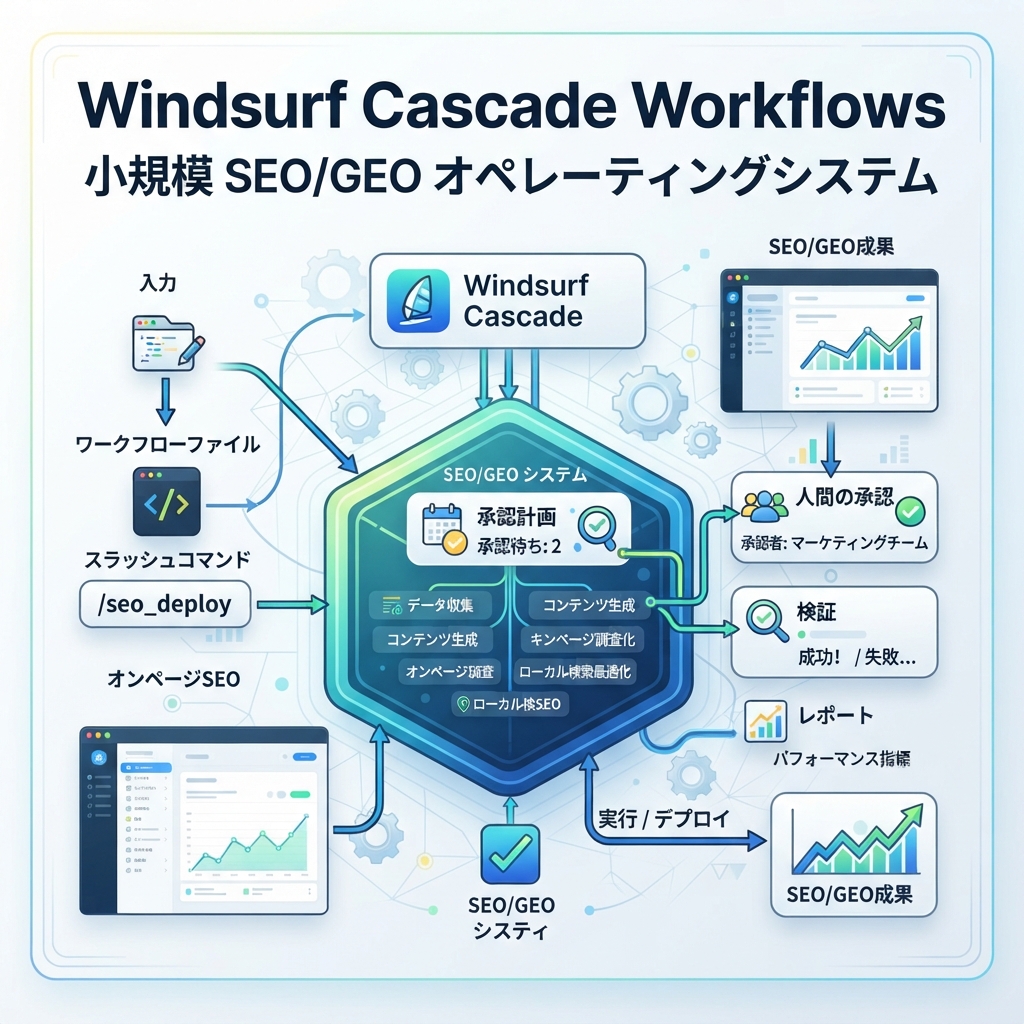
このtutorialでは、Windsurf Cascade Workflowsを小さなSEO/GEO operating systemに変えます。automation設計をまだ知らない初心者でも、そのまま手順を追える構成にします。
Windsurfで重要なのは、workflowsが.windsurf/workflows/に保存されるmarkdown proceduresであり、slash commandsとして手動で呼び出す点です。これはSEO/GEO作業に向いています。processは繰り返せますが、どのpageを対象にするか、evidenceがあるか、editを承認するかは人間が選びます。
最終的にrepositoryには次が入ります。
.windsurf/
  workflows/
    seo-page-refresh.md
    geo-prompt-audit.md
    technical-seo-check.md
    weekly-search-report.md
seo-geo/
  inputs/
  reports/
  approvals/
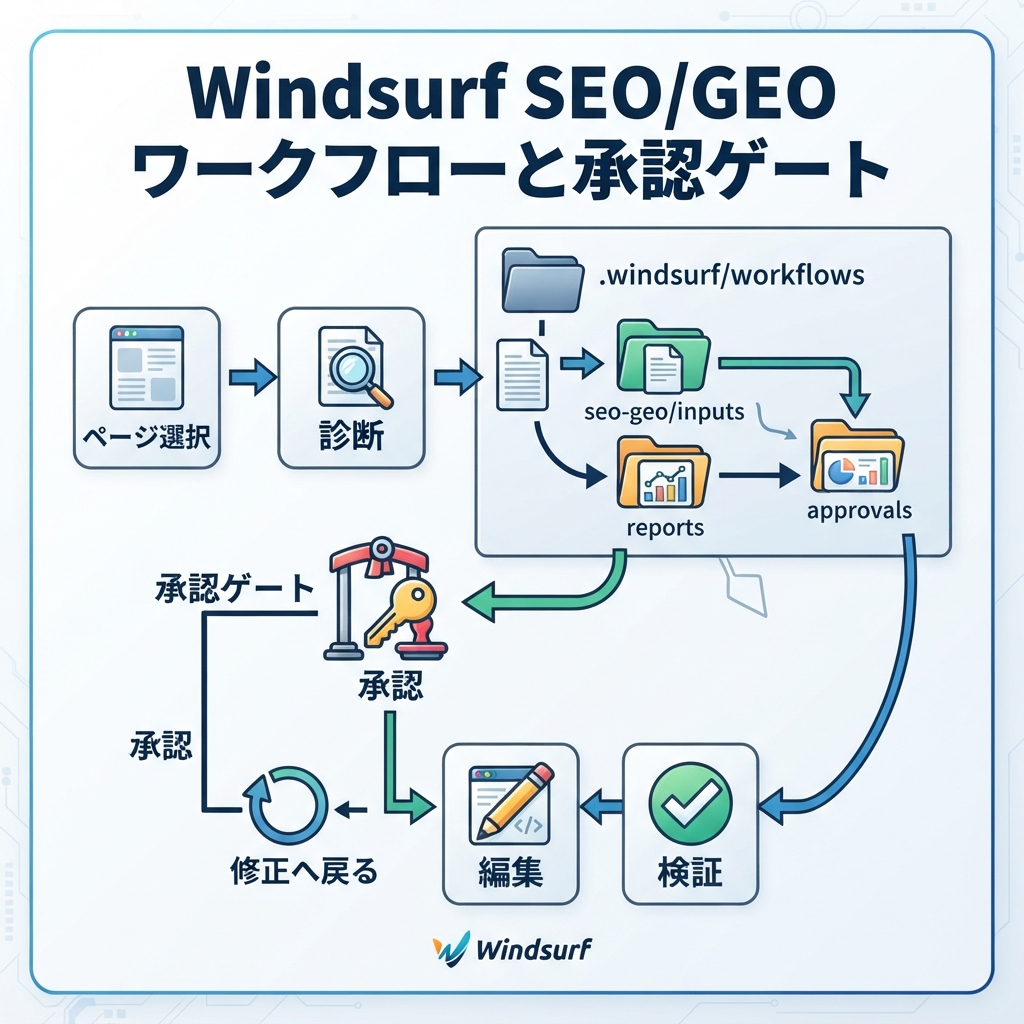
キャプション: Windsurf workflowsは、手動で呼び出せる反復手順として使うと安全です。
Step 1: foldersを作る
Webサイトrepositoryのrootから、workflowとSEO/GEO foldersを作ります。
mkdir -p .windsurf/workflows seo-geo/inputs seo-geo/reports seo-geo/approvals
repo rootにいるか分からない場合は実行します。
pwd
ls
package.json、astro.config.*、next.config.*、src/、app/、pages/、CMS export folderなどが見えるはずです。
Step 2: 4つではなく1つのworkflowから始める
多くのteamは最初のWindsurf workflowを広くしすぎます。/optimize-siteを作らないでください。まず、承認済みpageを1つだけrefreshするworkflowから始めます。
このfileを作ります。
cat > .windsurf/workflows/seo-page-refresh.md <<'EOF2'
# SEO Page Refresh

Goal: improve one approved page for SEO and GEO without changing unsupported claims.

Required inputs:
- target URL or local page file
- main query or keyword theme
- current title/meta description if available
- GSC/Bing/GA4 exports if available
- proof sources the page is allowed to use

Before editing:
1. Identify the page file, metadata file, schema file, and internal links that may be affected.
2. Diagnose intent match, answer clarity, entity clarity, internal links, evidence, metadata, schema, and technical risk.
3. Write a short plan in `seo-geo/approvals/page-refresh-plan.md`.
4. Stop and ask for approval.

Allowed changes after approval:
- improve headings and answer blocks
- improve title and meta description
- add or fix relevant internal links
- add FAQ only when the page really answers those questions
- improve schema only when the existing framework supports it

Forbidden actions:
- do not invent statistics, testimonials, logos, customer names, awards, or pricing
- do not change robots.txt, redirects, canonical logic, sitemap generation, or analytics tags
- do not edit unrelated pages
- do not publish or deploy

Final report:
- changed files
- exact SEO/GEO improvements made
- validation commands run
- risks still open
- metrics to watch for 14 days
EOF2
Step 3: slash commandのように呼び出す
Windsurfを開き、Cascadeにworkflow名で実行させます。requestは狭くします。
Run /seo-page-refresh for this page:
- URL: https://example.com/features/reporting
- Local file if you can find it: unknown
- Main query: reporting automation software for small teams
- Goal: make the page easier for Google and AI answer engines to understand

First locate the relevant file and write the approval plan only. Do not edit yet.
Cascadeの良い最初のresponseは次のようになります。
Target file found: src/pages/features/reporting.astro
Possible related files: src/data/navigation.ts, src/lib/schema.ts
Main risks: metadata helper affects all feature pages; no proof source for the "fastest" claim
Proposed edits: title, opening answer block, comparison table, two internal links
Waiting for approval before editing.
Cascadeがすぐ編集し始めたら止め、workflow fileを厳しくします。approval stopこそがこの手順の要点です。
Step 4: GEO prompt audit workflowを追加する
このworkflowは、AI回答風のプロンプトでブランドまたはページが見えるかを確認します。コンテンツは編集せず、レポートを書きます。
cat > .windsurf/workflows/geo-prompt-audit.md <<'EOF2'
# GEO Prompt Audit

Goal: evaluate whether a target page answers the prompts that buyers may ask in AI search systems.

Inputs:
- target URL or page file
- brand name
- product/category
- competitor names if known
- prompt list or keyword cluster
- AI answer snapshots if available

Steps:
1. Read the target page and any provided prompt list.
2. Convert keyword themes into buyer-style prompts.
3. Check whether the page provides concise answers, evidence, entity clarity, comparison context, and next steps.
4. Create `seo-geo/reports/geo-prompt-audit.md`.
5. Recommend page changes, but do not edit.

Report format:
- prompt
- current answer support: strong / partial / missing
- evidence available
- likely citation weakness
- recommended page section
- priority
EOF2
実行promptです。
Run /geo-prompt-audit for our reporting page. Use the query theme "reporting automation software for small teams" and create 12 buyer prompts. Write the report only; do not edit files.
Step 5: technical SEO check workflowを追加する
crawlやindexation問題が疑われる場合に使います。content workflowとは分けてください。
cat > .windsurf/workflows/technical-seo-check.md <<'EOF2'
# Technical SEO Check

Goal: inspect technical SEO risk without making broad sitewide changes.

Inputs:
- target URL or route group
- issue description
- crawl/export notes if available

Steps:
1. Inspect robots, sitemap generation, canonical tags, noindex logic, metadata helpers, structured data, and route rendering for the target area.
2. Classify each issue as low, medium, or high risk.
3. For high-risk files, recommend a ticket instead of editing.
4. Ask before any code change.

Forbidden actions:
- no redirects without approval
- no robots.txt changes without approval
- no canonical helper changes without approval
- no sitemap generator changes without approval

Output:
- risk table
- likely cause
- safe validation command
- proposed fix scope
EOF2
初心者向けpromptです。
Run /technical-seo-check for the /features/ route group. I suspect some pages have weak metadata, but I do not want any sitewide changes. Return a risk table and stop before editing.
Step 6: weekly search report workflowを追加する
このworkflowはexportsを要約し、次に何をするべきかを示します。直接pageを書き換えません。
cat > .windsurf/workflows/weekly-search-report.md <<'EOF2'
# Weekly Search Report

Goal: turn search and AI visibility exports into a prioritized action queue.

Inputs:
- GSC query/page export
- Bing query/page export
- GA4 landing page export
- AI visibility or prompt snapshot notes
- list of pages changed in the last 30 days

Steps:
1. Read exports from `seo-geo/inputs/`.
2. Find rising queries, declining pages, low-CTR opportunities, and AI visibility gaps.
3. Group opportunities by page.
4. Separate refresh tasks, technical tasks, internal-link tasks, and research tasks.
5. Write `seo-geo/reports/weekly-search-report.md`.

Do not edit content. Do not publish. Do not submit URLs.
EOF2
CSV filesをseo-geo/inputs/に置き、次を実行します。
Run /weekly-search-report using the files in seo-geo/inputs. Produce an action queue with no more than 10 items. Separate content refreshes from technical fixes. Do not edit any page.
workflowsが機能しているか確認する方法
最初の2回のrun後に、このscorecardを使います。
Check | Good sign | Bad sign |
|---|---|---|
Scope | 1pageまたは1report | Cascadeがunrelated filesに触る |
Inputs | missing dataを質問する | missing dataがあるのにあるふりをする |
Approval | edit前に止まる | plan承認前にeditする |
Output | 明確なreportを作る | chatだけで曖昧な助言をする |
Validation | commandsとrisksを挙げる | 証拠なしに全部直ったと言う |
workflowが失敗したら、別pageを試す前にworkflow markdownを修正します。
初心者がよくする失敗
1つ目はworkflowを混ぜることです。keyword workflowがcanonical tagsを変えてはいけません。technical workflowがhomepageを書き換えてはいけません。各workflowは退屈で狭く保ちます。
2つ目はpage mapがないのにfinal contentを頼むことです。Windsurfはdraftできますが、target query、page role、evidence、internal links、forbidden claimsというclean inputsが必要です。
3つ目はreportsをchatに残すことです。Cascadeにseo-geo/reports/配下へfileを書かせると、意思決定を時系列で比較できます。
初心者向けcopy-paste prompt
最も簡単に始めたい場合は、Windsurfにこれを貼ります。
I want to use Windsurf Cascade Workflows for safe SEO/GEO work.

Please inspect this repo and help me create one workflow first: `.windsurf/workflows/seo-page-refresh.md`.

Requirements:
- The workflow must work on one approved page at a time.
- It must diagnose before editing.
- It must write an approval plan to `seo-geo/approvals/page-refresh-plan.md`.
- It must forbid invented claims, unrelated file edits, publishing, deployment, redirects, robots changes, and sitemap changes.
- It must return changed files, validation commands, and metrics to watch.

Do not edit page content yet. First create or update only the workflow file and explain how I should run it.
FAQ
Windsurf workflowsは自動実行すべきですか?
いいえ。初心者には手動slash-command invocationが安全です。workflowsは無人botではなく、再利用可能な手順として扱います。
最初にいくつworkflowを作るべきですか?
1つから始めます。最初のworkflowが確実にapprovalで止まるようになってから、prompt audit、technical check、weekly report workflowを追加します。
workflowでpageを公開できますか?
最初は避けます。Windsurfには承認済みdiffとvalidation reportを準備させます。公開は通常のCMSまたはdeployment processでreview後に行います。
AI coding agents for SEO/GEO 学習パス
Windsurf track:
- Cursor vs Windsurf vs Gemini CLI:SEO/GEO自動化の選び方
- Windsurf Cascade WorkflowsでSEO/GEOを運用する方法
- Windsurf Rules and MemoriesをSEO/GEO projectsに使う方法
- WindsurfでKeyword ResearchをContent Briefsに変える方法
- WindsurfでSEO/GEO PR Commentsに対応する方法
- Cursor、Windsurf、Gemini CLI、Codex、Claude CodeのSEO/GEO運用モデル
Sources and notes
- Windsurf/Devin Desktop documentation: Cascade Workflows。
- Related Auspia guide: Cursor vs Windsurf vs Gemini CLI for SEO/GEO Automation。
Author: Nathan Reed, Auspiaで80以上のgrowth systemsを設計したAI Marketing Workflow Designer。Nathanはcross-channel systemsとrepeatable AI marketing workflowsについて執筆しています。