作るもの
このtutorialでは、Windsurfを使ってSEO/GEO pull request commentsを修正する方法を説明します。ただし、1つのcommentを広範囲なrewriteに変えないことが重要です。初心者に安全なruleは単純です。1つのPR comment、1つのclassification、1つのscoped fix、1つのvalidation noteです。
作る構成は次のとおりです。
.windsurf/workflows/pr-seo-geo-comment-fix.md
seo-geo/pr-comments/
  unresolved.md
  fix-log.md
  validation.md
metadata、schema、internal links、content claims、indexing、templates、analytics、page qualityに関するreview commentsで使います。
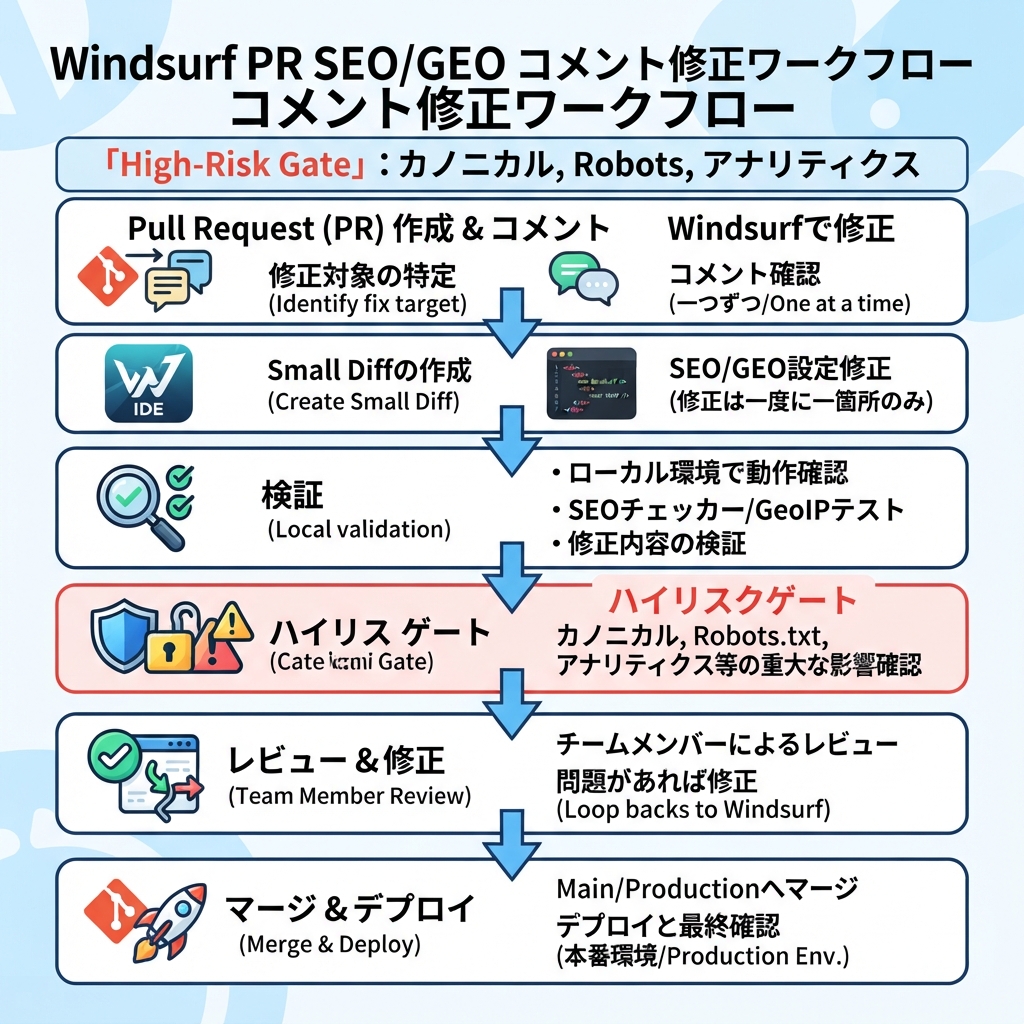
キャプション: 1つのコメントを分類し、承認済みfileだけを直し、検証noteを残します。
Step 1: workflowを作る
mkdir -p .windsurf/workflows seo-geo/pr-comments
cat > .windsurf/workflows/pr-seo-geo-comment-fix.md <<'EOF2'
# PR SEO/GEO Comment Fix

Goal: address one approved SEO/GEO review comment without unrelated edits.

Inputs:
- PR comment text
- referenced file and line if available
- branch name
- reviewer priority

Steps:
1. Read only the selected PR comment and referenced file area.
2. Classify the issue: metadata, schema, internal link, content claim, indexing, template, analytics, localization, or page quality.
3. Decide whether it is safe to fix or requires approval.
4. Write the plan to `seo-geo/pr-comments/fix-log.md`.
5. Stop for approval if the comment touches high-risk areas.
6. Apply only the scoped fix.
7. Run available validation.
8. Write `seo-geo/pr-comments/validation.md`.
9. Draft a reviewer reply, but do not resolve the GitHub conversation automatically.

High-risk areas requiring approval:
- pricing
- legal, medical, or financial claims
- customer proof
- robots/noindex
- canonicals
- redirects
- sitemap generation
- analytics/GTM/GA4
- shared templates
- localization canonical/hreflang policy

Forbidden:
- do not edit unrelated files
- do not address multiple comments at once
- do not publish or deploy
- do not invent proof
EOF2
Step 2: unresolved commentsを記録する
GitHub CLI accessがない場合は、commentsを手動で貼ります。
cat > seo-geo/pr-comments/unresolved.md <<'EOF2'
# Unresolved SEO/GEO PR Comments

## Comment 1
File: src/pages/features/reporting.astro
Reviewer: Please improve the meta description. It is too generic for the reporting automation query.

## Comment 2
File: src/lib/seo.ts
Reviewer: This canonical change may affect localized pages. Please verify before merge.
EOF2
GitHub CLIを使う場合はPR discussion dataを別途exportできますが、workflowにsecretsやprivate customer dataを貼り付けないでください。
Step 3: 1つのcommentだけ処理する
Windsurfを開き、次を実行します。
Run /pr-seo-geo-comment-fix for Comment 1 in `seo-geo/pr-comments/unresolved.md`.

Process only Comment 1.
Do not touch Comment 2.
Do not edit unrelated files.
First classify the comment and write the plan to `seo-geo/pr-comments/fix-log.md`.
Stop before editing.
良いplanは次のようになります。
Comment: Comment 1
Class: metadata
Risk: low
Referenced file: src/pages/features/reporting.astro
Proposed fix: replace generic meta description with a query-specific description based on existing page content
Files to edit: src/pages/features/reporting.astro
Validation: npm run build
Approval needed: yes, before edit
Step 4: classification tableを使う
Comment type | Safe first action | Approval level |
|---|---|---|
Missing meta description | one-page editを提案する | normal approval |
Duplicate H1 | 先にpage templateを確認する | normal approval |
Invalid schema field | source dataがあるか確認する | normal approval |
Weak internal link | relevant linkだけを追加する | normal approval |
Wrong canonical | affected URLsを診断する | explicit approval |
Pricing claim | TODOにするかbusiness ownerへ確認する | explicit approval |
Fake proof | 削除またはTODOにする | sourceがあるまでblock |
Robots/noindex | 診断のみ | explicit approval |
Analytics change | content PRでは編集しない | explicit approval |
Windsurfにcanonical commentをcopy editのように扱わせてはいけません。classificationがsafety gateです。
Step 5: approveして最小fixを適用する
fix-log.mdを確認した後、狭く承認します。
Approved: fix Comment 1 only.
Allowed file:
- src/pages/features/reporting.astro

Not approved:
- schema edits
- canonical edits
- analytics edits
- shared template edits
- unrelated copy rewrites

Apply the smallest fix, run validation, and write `seo-geo/pr-comments/validation.md`.
edit後に確認します。
git diff --name-only
git diff --stat
変更filesは承認内容と一致しているべきです。
Step 6: PR replyをdraftする
Windsurfに依頼します。
Draft a reply for the reviewer.
Include:
- comment addressed
- files changed
- validation run
- risks still open
- anything that still needs human review
Do not resolve the comment automatically.
良いreplyです。
Addressed the generic meta description in `src/pages/features/reporting.astro`. Kept the change scoped to the page file and did not touch schema/canonical helpers. Ran `npm run build` successfully. Please verify the description matches the approved positioning before resolving.
弱いreplyです。
Fixed SEO.
Step 7: 最初のcommentが終わってから繰り返す
Comment 2では新しいworkflow invocationを実行します。Comment 1とbundleしないでください。
Now run /pr-seo-geo-comment-fix for Comment 2 only. This touches canonical logic, so diagnose and stop before editing.
これにより、PR driftを防げます。
FAQ
Cascadeにcommentsを自動resolveさせるべきですか?
いいえ。fixとsummaryを準備させます。conversationをresolveするのはhuman reviewerです。
content PRにも使えますか?
はい。workflowがunsupported proofをblockし、broad rewritesを避けるなら使えます。
1つのcommentが複数filesを必要とする場合は?
明示的なfile listと理由を求めます。1comment fixがshared templateに影響するならhigh riskとして扱います。
AI coding agents for SEO/GEO 学習パス
Windsurf track:
- Cursor vs Windsurf vs Gemini CLI:SEO/GEO自動化の選び方
- Windsurf Cascade WorkflowsでSEO/GEOを運用する方法
- Windsurf Rules and MemoriesをSEO/GEO projectsに使う方法
- WindsurfでKeyword ResearchをContent Briefsに変える方法
- WindsurfでSEO/GEO PR Commentsに対応する方法
- Cursor、Windsurf、Gemini CLI、Codex、Claude CodeのSEO/GEO運用モデル
Sources and notes
- Windsurf/Devin Desktop documentation: Cascade Workflows、およびCascade、Memories & Rules、Skills、AGENTS.md、Worktrees、MCP、Cascade HooksのDevin Desktop navigation。
- Related Auspia guide: Cursor vs Windsurf vs Gemini CLI for SEO/GEO Automation。
Author: Tessa Clarke, Auspiaで120以上のeditorial systemsを支援するContent Governance Lead。Tessaはreview systems、publishing standards、安全なAI-assisted content operationsについて執筆しています。