ルール: Cursorにページ編集前のSEO/GEO境界を覚えさせる
CursorがSEO/GEOに役立つのは、実際のWebサイト変更が起きる場所、つまりエディタ内のページファイル、metadata helper、schema component、content collection、pull request diffの横で動けるからです。ただし、その力はリスクでもあります。Cursorがあなたのルールを知らなければ、価格文言、robotsルール、顧客証拠、schema、ページ本文を同じくらい安全に編集できるものとして扱ってしまいます。
初心者に安全なセットアップは、Agentに何かを最適化させる前にCursor rule stackを作ることです。このstackは、サイトが何で、重要ファイルがどこにあり、何を編集でき、何を質問すべきで、どう検証するかをCursorに伝えます。
安定したプロジェクト指示にはCursor rulesを使います。特定ページや特定workflowの指示にはtask promptを使います。rulesにはsecret、API key、完全なanalytics exportを入れないでください。
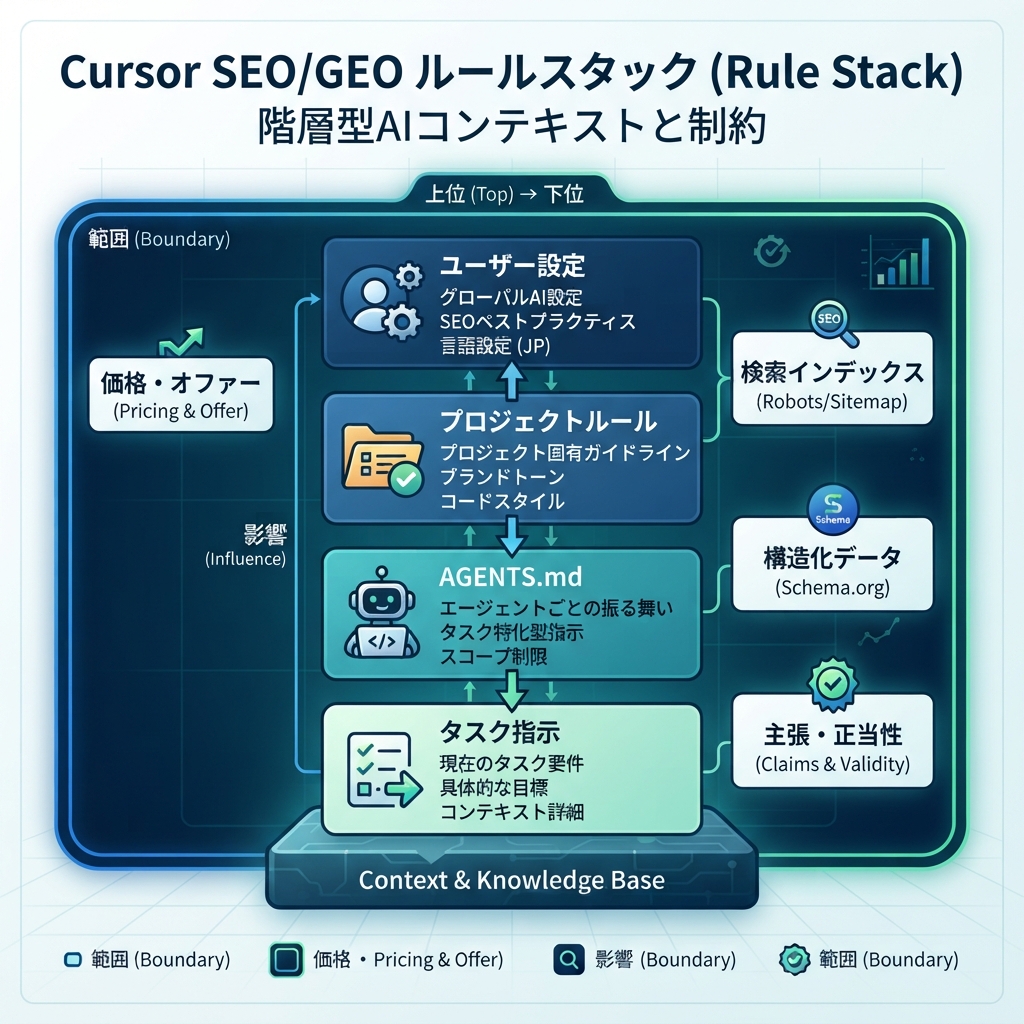
キャプション: Rulesは運用境界を定義し、task promptは現在の仕事を定義します。
Cursor rule stackに入れるもの
実用的なSEO/GEO rule setupには4つのlayerがあります。
Layer | 入れる内容 | 例 |
|---|---|---|
User-level preference | 個人の作業スタイル | 「編集前に必ずplanを見せる」 |
Project rules | Webサイト固有のSEO/GEO基準 | brand facts、file paths、claims policy、validation commands |
Repo docsまたは | team共通の慣習 | build commands、review process、release policy |
Task prompt | 現在のpageまたはworkflow | 「 |
最大の失敗は、すべてを巨大な1つのinstruction fileに入れることです。Cursorはtitle tagを変える前に40ページのSEO manualを読む必要はありません。project rulesは短くし、必要なときだけ別SOP fileを参照します。
SEO/GEO専用のproject ruleを作る
WebサイトのrepositoryにSEO/GEO作業用のrule fileを作ります。Cursorのversionやteam setupによってrules UIやfile pathは違うため、ここでは固定pathではなくcontent modelとして使ってください。projectが.cursor/rules/ folderを使うなら、次のようなproject ruleにできます。
.cursor/rules/seo-geo.mdc
最初はこのruleから始めます。
# SEO/GEO working rules

## Website context
- Brand: [brand name]
- Domain: https://example.com
- Category: [product/service category]
- Primary audience: [ICP]
- Main conversion goal: [demo / signup / tool usage / contact]

## File map
- Pages live in: [path]
- Metadata lives in: [path]
- Schema helpers live in: [path]
- Blog/content lives in: [path]
- Sitemap/robots logic lives in: [path]
- Analytics code lives in: [path]

## SEO/GEO standards
- Every important page needs a clear title, meta description, canonical, H1, and internal links.
- Prefer concise answer blocks, comparison tables, proof sections, and useful FAQs when they match search intent.
- Make brand facts, product category, audience, use cases, and evidence easy for AI answer systems to extract.
- Do not keyword-stuff headings or create generic sections that could fit any company.

## Approval boundaries
Ask before changing:
- pricing, legal claims, testimonials, customer logos, statistics, guarantees, or competitor claims;
- robots.txt, noindex logic, canonicals, redirects, sitemap generation, analytics, or tracking scripts;
- shared components that affect many pages;
- production deployment configuration.

Never invent:
- customers, reviews, ratings, awards, integrations, revenue numbers, screenshots, or case-study results.
Mark missing evidence as TODO.

## Validation
Before final response after edits:
- summarize changed files;
- run the detected build/lint/typecheck command when available;
- explain any skipped validation;
- list remaining SEO/GEO risks.
このruleはCursorを魔法のように賢くするものではありません。危険な推測を減らすための境界線です。
ruleを書く前にCursorにrepositoryを調べさせる
pagesやmetadataの場所が分からない場合は、先にCursorに調査だけを依頼します。
Inspect this repository for SEO/GEO work.

Do not edit files yet. Return:
1. Framework and routing system.
2. Where pages, content, metadata, schema, sitemap, robots, analytics, and components live.
3. Build/lint/typecheck commands from package files.
4. Files that should require approval before modification.
5. A proposed Cursor SEO/GEO project rule.
6. Unknowns I need to confirm.

Do not invent paths. If you are unsure, say so.
提案されたruleを確認します。Cursorがframework、page folders、commandsを正しく見つけたかを見ます。間違って推測している場合は、SEO作業でAgent modeを使う前に手でruleを直します。
初心者が使うべきapproval gate
SEO編集には低リスクなものと、trafficや法務リスクに直結するものがあります。その区別をrulesに直接書きます。
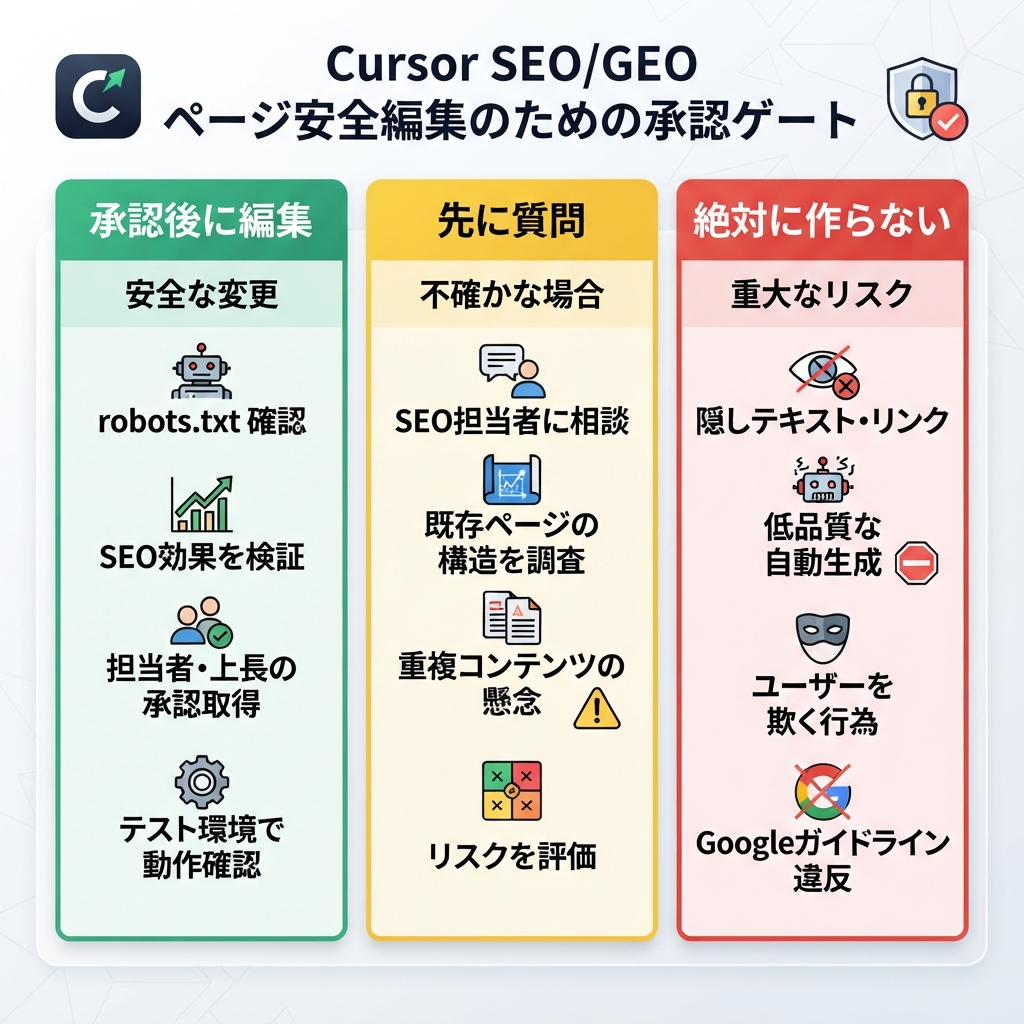
キャプション: 低リスク項目はCursorに編集させ、戦略・indexing変更は事前確認し、証拠は絶対に作らせません。
承認後に提案・編集してよい | 先に質問する | 絶対に作らない |
|---|---|---|
title/meta draft | robots.txt変更 | testimonials |
answer block | canonical strategy | customer logos |
FAQ改善 | redirects | statistics |
internal link suggestions | pricingまたはlegal claims | awards |
alt text | analytics/tracking | third-party endorsements |
page-level schema draft | shared templates | case-study outcomes |
最初の1週間は、どんな編集でも承認を必須にします。workflowを信頼できるようになったら、低リスクのpage-level editは許可してもよいですが、indexingとclaimは明示承認の後ろに残します。
SEO page work向けのより良いCursor prompt
Cursorに次のように依頼しないでください。
Optimize this page for SEO and GEO.
代わりに次を使います。
Use the SEO/GEO project rules.

Task: refresh only this page: [URL or file path].

Before editing, return a diagnosis table with:
- current search intent
- likely target keyword or query theme
- GEO question this page should answer
- title/meta issue
- H1/H2 issue
- missing answer block or comparison section
- internal link opportunities
- schema risks
- claims that need proof
- files you plan to edit

Wait for my approval before making changes.
planを承認したら、2つ目のpromptを使います。
Apply only the approved page-level edits.

Constraints:
- Do not change pricing, legal claims, testimonials, or analytics.
- Do not edit shared components unless you ask first.
- Mark missing proof as TODO.
- Keep the page useful for humans, not just search engines.
- Run the build or explain why it cannot run.

Final response should include changed files, validation results, risks, and what to measure after publishing.
この分割promptはワンクリック自動化より遅いですが、初心者がagentの出力をreviewする練習になります。
例: SaaS use-case pageのrules
ページが/use-cases/ai-search-visibilityだとします。良いCursor diagnosisは次のようになります。
Area | Diagnosis | Suggested action |
|---|---|---|
Search intent | ユーザーはAI検索可視性を追跡する方法を知りたい | 冒頭付近に直接回答を追加する |
GEO extractability | brand categoryとworkflowが明確ではない | 80語程度の「このproductが何をするか」blockを追加する |
Proof | 「trusted by teams」と言っているが証拠がない | TODO proof slotに置き換える |
Internal links | 関連measurement guideへのlinkがない | 関連internal linkを1つ追加する |
Schema | FAQ schemaはあるが質問がgeneric | FAQを書き換えるか、裏付けがなければschemaを外す |
CTA | CTAは「Get started」だがofferはaudit | CTA copyをofferに合わせる |
その後、Cursorは狭いdiffでページを編集できます。full rewriteを頼むより、scopeとreviewabilityを保てます。
internal links用のruleを追加する
AI agentが手伝うと、SEO/GEO teamsは内部リンクを増やしすぎることがあります。次のruleを追加します。
## Internal link policy
- Add internal links only when they help the reader take the next logical step.
- Prefer 1-3 relevant links per article or page section, not a dense link block.
- Use descriptive anchor text.
- Do not force links to tools or service pages unless the page intent supports it.
- If suggesting a new link target, explain why it helps SEO/GEO and the user journey.
これで、Cursorがすべての記事をlink farmに変えるのを防げます。
schema用のruleを追加する
shared helperを変更するとschema errorは広がります。このruleを使います。
## Schema policy
- Use schema only when the page content supports it.
- Do not add fake ratings, reviews, prices, organizations, authors, or FAQs.
- Ask before changing shared schema helpers.
- After schema edits, explain the schema type, required fields, and validation risk.
初心者にとって、schemaは賢く見せる場所ではありません。まず正確なページにします。
GEO answer blocks用のruleを追加する
GEO-focused pagesはanswer enginesが抽出しやすくするべきですが、自然に読める必要もあります。
## GEO answer blocks
When useful, add one concise answer block near the top of important pages.
The block should answer:
- what the product/page/topic is;
- who it is for;
- what problem it solves;
- what evidence supports it;
- what the reader should do next.
Keep it factual and avoid exaggerated claims.
このpatternにより、Cursorはすべてのページを同じtemplateに押し込まず、再利用できるcontent patternを持てます。
Cursor rulesが機能するかtestする
dry taskを実行します。
Using the current project rules, review `/pricing` for SEO/GEO issues.
Do not edit. Tell me which changes would require approval and why.
良い回答は、pricing claimの直接rewriteを拒否し、legal、conversion、evidence risksをflagします。Cursorがpricingを普通のmarketing copyのように扱うなら、rulesを強化します。
もう1つdry taskを実行します。
Using the current project rules, review one blog article and suggest safe improvements only.
Do not edit. Separate safe edits from approval-needed edits.
良い回答は、metadata、headings、internal links、evidence、schema、publishing risksを分けてくれます。
よくある失敗
- 曖昧なrulesを書く。 「SEOを良くする」はruleではありません。
- file pathsを省く。 Cursorはpages、metadata、schema、commandsがどこにあるかを知る必要があります。
- rulesにsecretsを入れる。 Rulesはcredential storeではありません。
- shared templatesを早すぎる段階で編集させる。 1つのtemplate変更が何百URLに影響することがあります。
- validationを必須にしない。 codeに影響するSEO taskでは、可能ならbuild/lint/typecheckを実行します。
- rulesを古くする。 framework変更、site migration、positioning update後にrulesを見直します。
大きなAI-agent stackでの位置づけ
このCursor setupはpage-editing laneです。まず広いCursor vs Windsurf vs Gemini CLI SEO/GEO比較でCursorを選んだ後に使います。team workflowを繰り返したいならWindsurfを使います。terminal data monitoringをしたいならGemini CLIを使います。実際のpageやcomponentに慎重で見えるdiffが必要ならCursorを使います。
FAQ
Cursor rulesにkeyword listを入れるべきですか?
安定したcategory languageとstrategic query themeだけを入れます。完全なkeyword listは日付付きCSVまたはmarkdown fileに置いてください。keyword dataは変化するからです。
Cursor rulesは人間のSEO reviewを置き換えますか?
いいえ。rulesは避けられるミスを減らします。claim、indexing change、pricing language、production deploymentは人間が承認します。
CursorにすべてのSEO pagesを一度に編集させるべきですか?
最初は避けます。1ページ、1診断、1つの承認済みdiff、1つのvalidation reportから始めます。
GEOで最も重要なruleは何ですか?
証拠を作らないことです。GEOは明確で裏付けのあるentity factsに依存します。証拠がない場合、Cursorは作り上げるのではなくTODOとしてmarkすべきです。
Sources and notes
- Cursor documentation hub: Cursor Docs。Agent、Rules、MCP、Skills、CLIなどのpublic documentationを含みます。
- Related Auspia guide: Cursor vs Windsurf vs Gemini CLI for SEO/GEO Automation。
Author: Alice Monroe, Auspiaで150以上のtoolsを調査するAI SEO Tools Analyst。AliceはAI SEO tools、software workflows、growth team向けの実践的なplatform選定について執筆しています。