有用的 MCP pattern:把 data 帶進 Claude Code,不要貼 dashboard
MCP 讓 Claude Code 透過標準 integration layer 連接 external tools、databases 和 APIs。Anthropic docs 把 MCP servers 描述成讓 Claude Code 存取 tools 和 data sources 的方式。對 SEO/GEO 來說,當你希望 Claude 處理 Google Search Console exports、Bing Webmaster data、GA4 metrics、SERP APIs 或 internal page inventories,而不是把 sensitive data 複製到隨機 prompts 裡時,MCP 很有價值。
安全模式是:read-only first、scoped access second、action permissions last。
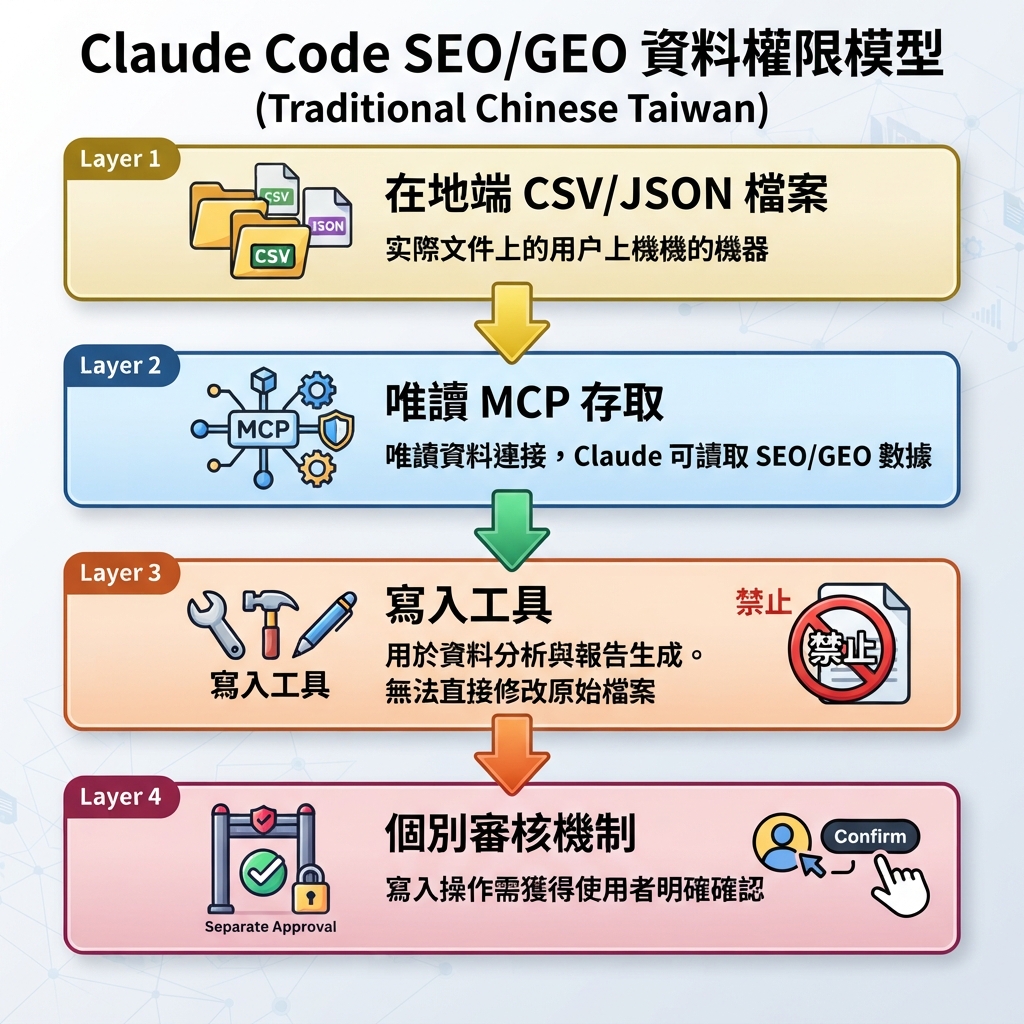
圖說:先用唯讀資料合約與 exports,等 workflow 穩定後才考慮更高權限。
應該連接哪些 SEO/GEO data sources
Source | 在 Claude Code 裡的用途 | 初學者安全模式 |
|---|---|---|
Google Search Console | Query/page impressions、CTR、indexing clues | Read-only exports 或 read-only MCP |
Bing Webmaster Tools | Bing clicks、crawl/index issues、inbound links | Read-only API 或 CSV |
GA4 | Landing page engagement 和 conversions | 只用 aggregated reports |
SERP/Felo/Perplexity APIs | AI/search visibility snapshots | Dated snapshots |
CMS or repo inventory | Existing pages、metadata、links | 先用 repo files |
Backlink tools | Evidence 和 authority gaps | Export summaries |
先請 Claude 設計 data contract
Design a read-only SEO/GEO data contract for Claude Code.

I want to connect GSC, Bing Webmaster Tools, GA4, and AI visibility snapshots.
Do not configure credentials yet.
Return:
1. What data fields are needed from each source.
2. Recommended CSV or JSON shape.
3. Where files should live in the repo.
4. Which MCP servers or scripts could provide the data.
5. Security rules: no secrets in chat, no write actions, no publishing.
6. Example analysis prompts after the data exists.
Analysis 前先 normalize
把 data 放進可預測的 files:
seo-geo/exports/gsc/2026-07-05-pages.csv
seo-geo/exports/bing/2026-07-05-queries.csv
seo-geo/exports/ga4/2026-07-05-landing-pages.csv
seo-geo/exports/ai-visibility/2026-07-05-prompts.json
接著問:
Read the latest SEO/GEO exports. Create a joined opportunity report with:
- URL
- query or prompt
- impressions/clicks/CTR if available
- AI mention/citation status
- page type
- likely issue
- recommended action
- confidence

Do not edit pages yet.
好 report 長什麼樣
有用的 Claude Code report 不只列「optimize page」,而是說明原因:
URL | Signal | Diagnosis | Action |
|---|---|---|---|
/tools/ai-search-visibility-checker | High impressions, low CTR | Title 沒提 comparison use case | Test title/meta refresh |
/blog/what-is-geo | AI prompt 提到 competitors | 缺少 direct comparison 和 evidence links | 加 answer block 和 source section |
/pricing | Good traffic, low conversion | CTA mismatch | Review offer copy,不只看 SEO |
Permission model
用分層方式開 MCP access:
- Local CSV/JSON files。
- Read-only MCP tools。
- 團隊理解風險後,才考慮 write-capable tools。
- URL submission、CMS updates 或 issue creation 都要 separate approval。
FAQ
SEO data 一定需要 MCP 嗎?
不需要。CSV exports 就可以開始。當 workflow 重複且 data freshness 變重要時,MCP 才有用。
Claude Code 應該有 GSC 或 CMS write access 嗎?
預設不要。Read-only data 和 human-approved diffs 對初學者更安全。
MCP 可以幫助 GEO measurement 嗎?
可以。SERP 或 AI-search API 可以保存 daily prompt snapshots,讓 Claude Code 長期比較。
Claude Code SEO/GEO 學習路徑
這篇屬於 Claude Code SEO/GEO operator series。如果你從零建立 workflow,請照這個順序:
- 如何用 Claude Code 做 SEO Automation
- 如何建立 Claude Code SEO/GEO Workflow Cockpit
- 如何把 CLAUDE.md 和 Memory 用在 SEO/GEO Workflows
- 如何用 Claude Code VS Code Extension 更新 SEO Pages
- 2026 年最佳 GEO Claude Code Skills
- 如何用 Claude Code Subagents 做 GEO Research
- 如何把 Claude Code Hooks 當成 SEO/GEO Quality Gates
- 如何用 MCP 將 Claude Code 接上 SEO 資料
- 如何用 Claude Code GitHub Actions 做 SEO/GEO Reviews
- 如何在 Claude Code 裡跑每日 SEO/GEO Monitoring
下一篇
上一篇:如何把 Claude Code Hooks 當成 SEO/GEO Quality Gates
下一篇:如何用 Claude Code GitHub Actions 做 SEO/GEO Reviews
Sources and notes
- Anthropic Claude Code docs: Overview、Memory、VS Code integration、Skills、Subagents、Hooks、MCP 與 GitHub Actions。
Author: Leo Harrington, Auspia SEO Analytics Translator for 500+ Executive Reports。Leo 撰寫如何把 search 和 AI visibility data 轉成團隊可執行 decisions。