


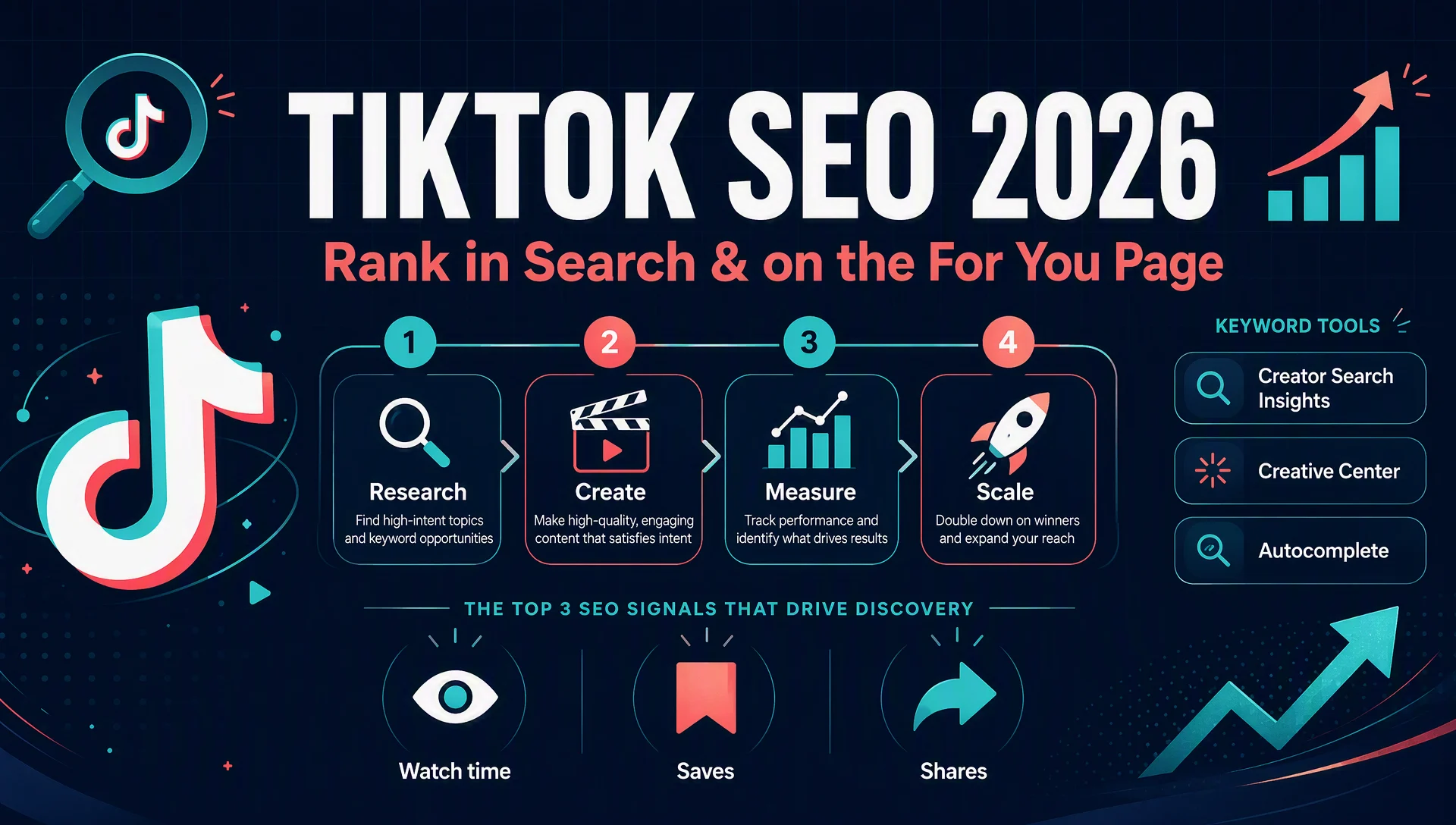
If you create videos on TikTok, you have probably watched a clip you filmed "for search" outperform your best-timed trend video. That is not luck. In 2026, TikTok works like a real search engine: it reads the words you speak, the text on your screen, and your caption, then decides which videos answer a query. Nearly half of US consumers now use TikTok to search, and a beginner account with zero followers can still surface for the right long-tail phrase.
This guide gives you a four-week, beginner-to-pro plan you can actually follow. You will learn how TikTok ranks videos in 2026, where to find real keyword demand for free, and what to change when a video is not ranking. You will also get a complete, copy-paste Codex skill that automates the research, planning, and weekly review, so a solo creator can run this like a small team.
Who this four-week plan is for
Read this section honestly before you start, because the plan only works if it fits your situation.
Item | What you need |
|---|---|
Who | A solo creator or small brand with a clear niche but no TikTok following yet |
Outcome | A keyword backlog, a four-week publishing calendar, and a weekly search-analytics review you can repeat |
Prerequisites | A free TikTok account, roughly 25 minutes a day, and a phone you can film with |
Definition of done | At least 20 videos published, 10+ documented keyword targets, and a search-analytics check you can run without guessing |
Two notes up front. First, you need a niche. "Lifestyle" is not a niche; "beginner plant care for apartment dwellers" is. Second, set your expectations: TikTok SEO is a compounding game, not a jackpot. Expect most early videos to get modest views while you build topical authority.
The 2026 reality check: TikTok search is real, but it is not replacing Google
The 2025 headline said Gen Z was abandoning Google for TikTok. The 2026 data tells a more useful story. According to an Adobe Express survey of US consumers from January to February 2026, 49% of adults have used TikTok as a search engine, up from 41% in 2024, and 65% of Gen Z have done the same. But the same survey found Gen Z's stated preference for TikTok over Google fell from 8% to 4%, and 89% of Gen Z still name Google their primary search tool.
Read that twice, because it changes your strategy. Young audiences are not abandoning Google; they are running a multi-platform search pattern. They open TikTok for visual, hands-on questions ("show me how to repot this orchid," "what should I cook with these ingredients") and return to Google for authoritative or high-stakes searches. That means TikTok SEO is additive traffic, not a swap. A video that ranks in TikTok search also has a second life: TikTok clips now surface in Google Search and Google Discover, and you can measure that directly (more in Week 4).
So the goal of this plan is not "beat Google." It is to be the answer when someone searches your niche on TikTok, and to catch the same audience when they search Google later. If you publish the same clips as YouTube Shorts, the same keyword packaging works there too; our YouTube SEO guide walks through the Shorts-specific details.
How TikTok actually ranks videos in 2026
TikTok's own documentation groups ranking signals into three buckets, weighted in that order:
- User interactions, highest weight. Watch time, completion rate, rewatches, saves, shares, comments, and "not interested" taps. In 2026, saves and shares carry more weight than likes, because they signal future intent. A viewer who saves your video is planning to use it later; TikTok treats that as strong evidence your video answered the query.
- Video information, medium weight. Captions, hashtags, sounds, effects, on-screen text, and spoken words. TikTok transcribes your audio and reads the text in your video, which is how it connects a clip to a search query. Longer videos (one to three minutes) also get more distribution when completion stays strong.
- Account and device settings, lowest weight. Country, language, device type, and the interest categories you picked at signup. These matter far less than your content's behavior.
Two things beginners get wrong here. First, follower count is not a ranking factor. TikTok has confirmed it; a new account can outrank an account with a hundred thousand followers if the video itself performs. Second, engagement that takes effort counts more than passive likes. This is why the plan below obsesses over hooks, completion, and saves rather than "going viral."
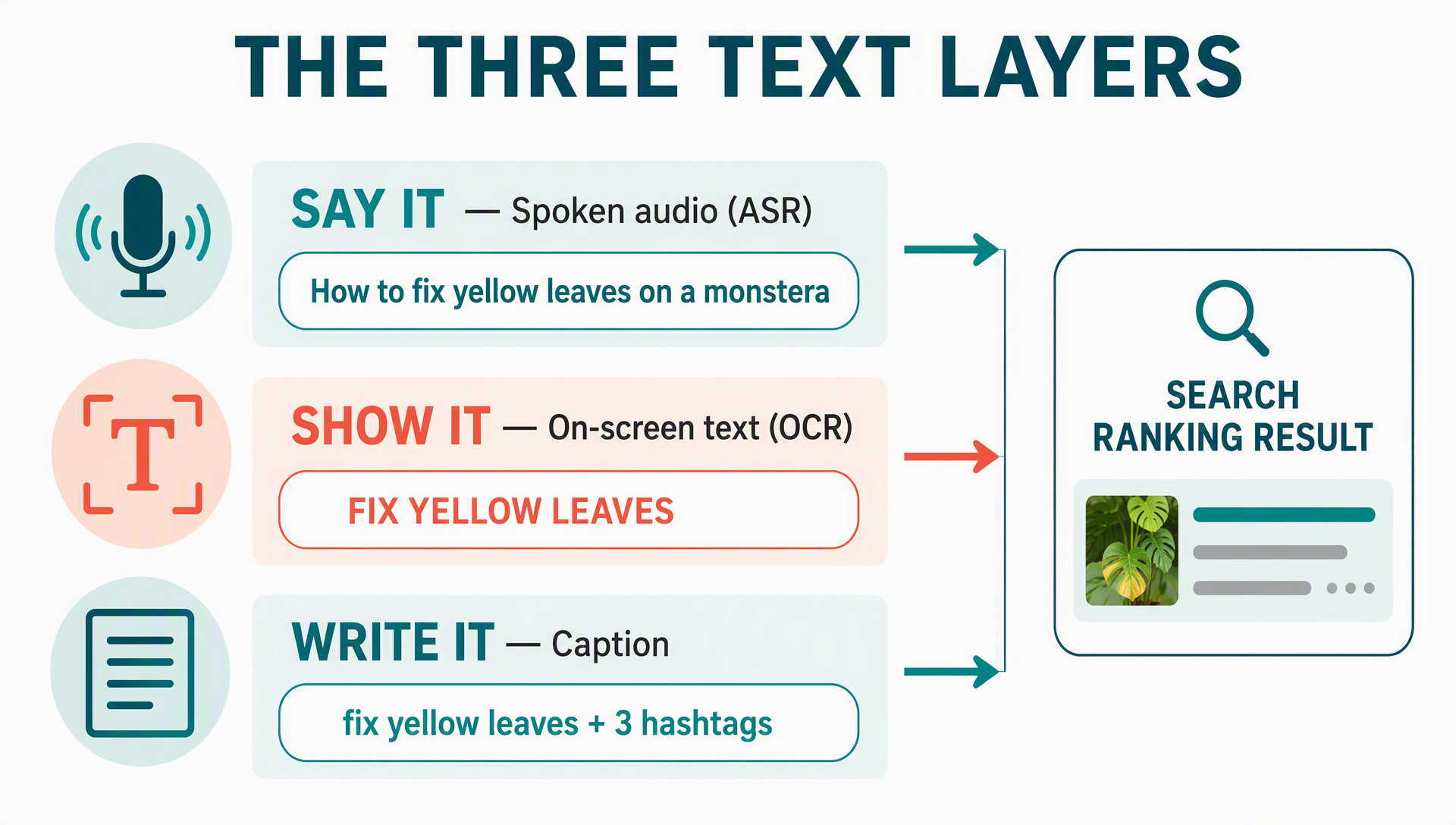
One more 2026 nuance: TikTok now indexes text through three parallel channels, often called the three text layers. The spoken words in your audio (via automatic speech recognition), the text on your screen (via optical character recognition), and your caption. Each layer is a chance to tell TikTok what your video is about. You will place your keyword in all three in Week 2.
Week 1: Research your niche before you film anything
The first week is the most important because everything you film later comes from this list. Do not film yet. Your job is to collect real search demand.
Set up your account for search
Switch to a Creator or Business account in Settings, fill out your bio with your category and location ("Beginner plant care | Apartment-friendly | Boston"), and use a display name that includes your keyword. Your profile is searchable, and TikTok matches queries against it. Post nothing yet; just make the account discoverable.
Mine the free keyword stack
You do not need a paid SEO tool to start, though one can help later. TikTok gives you three free research surfaces, and they all reflect what real users type inside the app.
- Creator Search Insights. Open the TikTok app, search "creator search insights," and open the tool. It shows the topics people in your niche are searching for, sorted by popularity. The Content gap filter is the gold here: it surfaces topics that are searched often but covered by few videos, which is exactly where a new account can win. At 1,000+ followers you also get a Searches by followers filter, so you can see what your own audience is typing. Note that availability varies by market and account type, so if you do not see it yet, check again after you switch to a Creator account.
- TikTok Creative Center. Open ads.tiktok.com/business/creativecenter in a browser (the Keyword Insights module works best on desktop). The Keyword Insights dashboard shows what people search for on TikTok, with trends over time, related terms, and the industries those searches come from. Filter by your region and industry. Some parts of the module need a free TikTok Business account; the core browsing is open.
- Search-bar autocomplete. This is the oldest trick and still the best for long-tail ideas. Type your seed term into TikTok search and let autocomplete fill in the rest, then append letters A to Z and collect the suggestions. It is the same long-tail principle that powers traditional keyword research, just inside TikTok; our long-tail keyword guide explains the method in depth. Someone typing "plant care" gets "plant care for beginners," "plant care humidity," "plant care boston." Those are real queries with real volume, and many of them are wide open.
Record everything in a simple table
Every term you collect goes into a research record. This becomes your keyword backlog and your evidence later. Keep columns for term, source, market, intent, and date.
Term | Source | Market | Intent | Date |
|---|---|---|---|---|
plant care for beginners | Creator Search Insights | US / EN | learn | 2026-08-03 |
how to fix yellow leaves | Autocomplete (H) | US / EN | how-to | 2026-08-03 |
best grow light for apartments | Keyword Insights | US / EN | buy | 2026-08-03 |
Plan the 80/20 mix
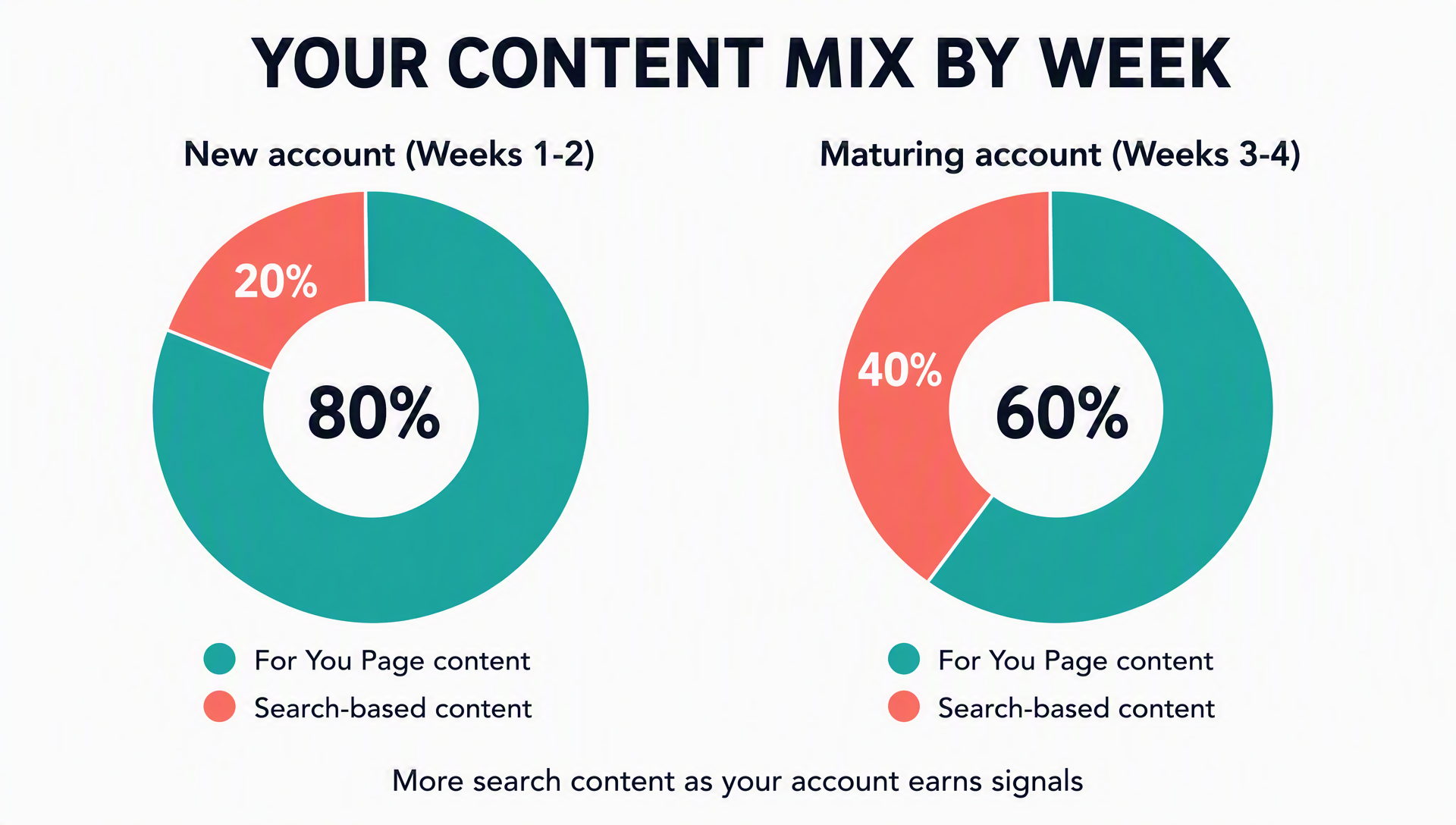
New accounts rarely rank in search on day one, because the algorithm has not learned what they are about. So plan roughly 80% For You Page content and 20% search-based content for the first weeks. For You Page content builds the account signals that let your search content rank later: hooks, trends, and moments that earn saves and shares. Search-based content is longer, more educational, and built around one keyword. As your account matures, the ratio shifts toward search content (30% to 40% by week four).
Finally, group your keyword backlog into three to five content pillars, one-line themes you will keep returning to ("repotting mistakes," "light for small apartments," "watering schedules"). Posting consistently inside the same pillars is how TikTok learns your account is an authority on that topic, which is the closest thing TikTok has to topical authority.
Week 2: Publish with the three text layers working for you
Now you publish, and you publish with the three text layers aligned. Here is the per-video checklist, in order of impact.
Say the keyword in the first three seconds
Open your video by saying the exact phrase you want to rank for, verbatim, in the first two to three seconds. "How to fix yellow leaves on a monstera" is a line and a hook at once. Do not paraphrase it; the transcript is what TikTok matches against the query. Then deliver the answer by the ten-second mark, because drop-off concentrates early.
Put the keyword on screen
Search result thumbnails show the first frame of your video, so the first on-screen text acts like a title tag. Add a bold, readable line of text in the first frames with the keyword ("FIX YELLOW LEAVES"), and keep text on screen throughout to reinforce the point. On-screen text is weighted almost as heavily as spoken words.
Front-load the caption
Write a caption that opens with the keyword, states what the video shows, and stays under the character limit comfortably. Do not stuff keywords; one clean front-loaded sentence plus a relevant hashtag set reads naturally and ranks better than a keyword soup.
Use three to five focused hashtags
Hashtags are category labels, not distribution buttons. Use three to five that mix one broad tag with two to three niche tags ("plantcare," "monsteracare," "urbanjungle") and skip #fyp and #viral entirely; TikTok has said they do not help. If you sell products, include one commercial tag related to your shop.
Switch on captions and fix the transcript
Turn on auto-captions and edit them so they are accurate. Automatic transcription errors can index your video against the wrong terms, so a misspelled keyword in the transcript can hide your video from the query you are targeting.
Upload a thumbnail and edit for retention
TikTok lets you upload a thumbnail the way YouTube does, so pick a frame that shows the promise ("before" shot, the mistake, the finished plant). In editing, cut pauses, keep something changing every few seconds, add zooms, and make the video loop-friendly. Replays count as a quality signal, and a loop is a free replay.
Reply to comments with your keyword
In the first days after posting, reply to comments using the target keyword naturally. Keyword-rich comment threads are another relevance signal, and TikTok weighs comments above likes.
Watch the completion rate, not the views
The single most useful metric in Week 2 is retention: the share of viewers who stay to the end. A short video that 60% of viewers finish outperforms a long video that most people abandon. If a video is dropping viewers hard in the first five seconds, the hook is the problem, not the topic.
Week 3: Read the search analytics and change what is not working
By week three you have a pile of videos and some early data. Stop guessing and start reading. Inside Creator Search Insights, open Search analytics. This is TikTok's version of Google Search Console: it shows which of your videos earned views from search, which search terms brought them, and how your "inspired posts" (content made from search insights) compare to your regular posts.
Here is the review loop:
- Open Search analytics and look at Search views for the last 7 or 14 days.
- Identify your top videos brought in by search and read the Search terms next to them. Those terms are new keyword ideas; add them to your backlog.
- For search-based videos that are not ranking, try the two cheapest changes first: rewrite the caption and swap the hashtags, then repost the fix. Do not re-upload the video with a new caption; edit the existing one so the views and comments stay attached.
- Check your retention data. If a non-ranking video is under roughly 40% completion, the problem is the video, not the keyword, so fix the hook before you blame the phrase.
Keep doing your daily posting and your niche engagement during week three. Liking and commenting inside your niche keeps your account signals warm, and it surfaces the formats and sounds your audience is responding to.
Week 4: Double down on what works and expand your surfaces
By now you know which pillars and formats earn search views. Week four is about concentration, not novelty.
- Shift the ratio. Move more of the mix toward search-based content, to 30% or 40%, because your account now has the signals to rank it. The exact number matters less than the direction: feed what works.
- Optimize for product searches if you sell. TikTok Shop search is a real surface. Use a product title in the [Brand] + [Content] + [Scope] + [Product Type] + [Main Features] format, fill the backend Search keywords field with synonyms customers actually use, and add three to five product highlights. Those fields are how your products show up when someone searches a problem, not your brand name.
- Lean into the Local Feed. TikTok launched a location-based Local Feed in 2026. If you serve a city or neighborhood, target "[category] + [neighborhood]" in captions and on-screen text ("pottery classes brooklyn") and tag the location. Local queries are less competitive and highly commercial.
- Measure your TikTok content inside Google. In July 2026, Google added platform properties to Search Console: a property type that tracks how your TikTok, Instagram, X, and YouTube accounts perform in Google Search and Discover, with no website required. Connect your TikTok account under Search Console → Add property → Platform property → TikTok. Remember the data is search-only, and reporting starts from the moment you verify, so connect it now to build a baseline rather than later.
Hand the busywork to a Codex skill
The four-week loop above has one problem: it is a lot of repetitive admin. Keyword logging, caption drafting, hashtag selection, and weekly reviews are exactly the kind of work an AI agent handles well, while you keep doing the part it cannot: showing up on camera.
The skill below turns this plan into an executable workflow for Codex (OpenAI's agentic coding tool) or any compatible agent. It will research keywords, build your four-week calendar, draft hooks, captions, and hashtags, and produce a weekly review when you feed it your search analytics. No coding required; you install a file and copy-paste your data.
Here is how to install it, and the full skill text follows.
Install steps
- Create a folder named
tiktok-seo-4-weekinside your skills directory. On macOS or Linux, that is~/.codex/skills/tiktok-seo-4-week/. - Save the entire skill below as
SKILL.mdin that folder. - In Codex, start a session and run
$tiktok-seo-4-week, then follow the prompts for your niche, market, and goal.
If you do not use Codex, paste any of the step sections into your agent of choice as a plain instruction; the workflow stands on its own.
---
name: tiktok-seo-4-week
description: Beginner-friendly TikTok SEO assistant. Researches keywords, builds a 4-week content plan, drafts hooks, captions, and hashtags, and reviews search analytics. Use when a user wants to rank TikTok videos in TikTok search or on the For You Page.
---

# TikTok SEO 4-Week Assistant

## Inputs
- Niche or topic you create content about (required)
- Target market/country and language (for example "United States, English")
- Business goal (awareness, followers, product sales, or local clients)
- Allowed data sources: TikTok search-bar autocomplete, TikTok Creative Center, TikTok Creator Search Insights (from screenshots or CSV exports the user provides), or an authorized API the user has already configured

## Prerequisites
- The user provides data only from sources they authorize. Never ask for or print API keys, tokens, cookies, or passwords.
- If a data source is not available, mark it "not available" and continue with what you have. Never guess search volume, difficulty, or rankings.

## Steps

1. Confirm the niche, market, language, and goal. Restate them before doing anything else.
2. Build a keyword candidate list:
   - Ask the user to paste TikTok search-bar autocomplete results for the seed term (letters A to Z method) when no API access exists.
   - Use TikTok Creative Center Keyword Insights when the user provides access or exports.
   - Use Creator Search Insights "Content gap" or "Searches by followers" from the user's screenshots or exports.
3. Record every term with: term, source, market, language, date, and intent (learn, how-to, buy, or local).
4. Cluster the terms by intent into 3-5 content pillars.
5. Plan an 80/20 mix: roughly 80% For You Page content and 20% search-based content. Show it as a four-week table: date, pillar, keyword, content angle, FYP or search, and hook draft.
6. For each video, produce: a hook (first 2-3 seconds), a line to say verbatim in the first 2-3 seconds, on-screen text, a caption front-loaded with the keyword, and 3-5 hashtags (mix broad and niche, no #fyp).
7. Provide a weekly checklist: posting cadence, caption accuracy check, comment replies that repeat the target keyword, and thumbnail upload.
8. Weekly review: ask the user to paste Creator Search Insights "Search analytics" numbers or screenshots. Report which videos gained search views, list the top search terms, and flag videos under roughly 40% completion for hook, caption, or hashtag changes.
9. Output a single report with: the keyword backlog, the four-week content plan, per-video hooks and captions and hashtags, data gaps, and manual review items.

## Output
- Keyword list with source, market, date, intent, and a confidence note
- Four-week content plan table
- Per-video: hook, spoken keyword line, on-screen text, caption, and hashtags
- Weekly analytics review with next actions
- Items you could not verify, marked clearly

## Limits
- Never invent search volumes, SERP results, rankings, follower growth, or sales results.
- Never write API keys, tokens, or private data into files, logs, or outputs.
- You have no built-in TikTok, Ahrefs, Semrush, or DataForSEO access. Use only user-authorized sources, and say which source you used for each number.
A note on safety: no agent has built-in TikTok or SEO-tool access, so the skill works with whatever the user authorizes. That boundary is intentional. If a data source is missing, the skill says so instead of inventing numbers, and you get a list of manual checks to run yourself.
Mistakes that quietly cap your growth
These are the patterns that keep a promising account stuck, in the order beginners usually hit them.
Mistake | Why it hurts | The fix |
|---|---|---|
Posting without a keyword list | Every video competes on the FYP with no search intent | Do Week 1 research first; film from a backlog |
Stuffing hashtags | Dilutes relevance; #fyp adds nothing | 3-5 focused tags, broad plus niche |
Keyword-dumping the caption | Reads as low quality to the algorithm and viewers | One clean front-loaded keyword sentence |
Ignoring the transcript | Auto-caption errors index the video against wrong terms | Edit captions so the keyword is spelled correctly |
Reusing cross-platform watermarks | Recycled or watermarked content is down-ranked | Record native clips for TikTok, or remove watermarks |
Chasing trends from every niche | Confuses the algorithm about what your account is for | Stay inside your content pillars |
Judging a video by views | Views lie; completion, saves, and shares predict ranking | Read retention and Search analytics instead |
FAQ
How long until I rank in TikTok search? With consistent posting inside one niche, you can usually see your first search views by the end of week three and a small but repeatable search flow by week six. Ranking compounds; the first placements are the slowest.
Does follower count matter for TikTok SEO? TikTok has confirmed follower count is not a ranking factor. A larger following gives you an initial audience pool, but search and For You distribution are decided by the video's own performance.
Do I need a paid keyword tool? No. Creator Search Insights, Creative Center Keyword Insights, and search-bar autocomplete cover most beginner needs for free. Paid tools add volume estimates and cross-platform data, but they are an upgrade, not a requirement.
Is TikTok SEO different from regular SEO? The mindset is identical (research demand, match intent, measure and iterate) but the signals differ. There is no backlinks and no sitemap; instead, TikTok reads your spoken words, on-screen text, and captions, and rewards completion, saves, and shares.
Can the same video rank on TikTok and Google? Yes, and 2026 made this measurable. TikTok clips now appear in Google Search and Discover, and Google's Search Console platform properties let you track those appearances without owning a website.
What is the most important metric? Retention, followed closely by saves and shares. If viewers finish the video, save it, or send it to a friend, TikTok treats the video as high quality and shows it to more people.
Keep the flywheel turning
You now have the full loop: research demand with TikTok's free tools, publish with the three text layers aligned, read the search analytics weekly, and hand the repetitive parts to the Codex skill. Run this for four weeks and you will have something most TikTok accounts never build: a keyword backlog you own, a publishing cadence that compounds, and a measurement routine that tells you exactly what to change.
The plan is deliberately boring. That is the point. TikTok SEO in 2026 rewards consistency inside a niche over viral luck, so treat the four-week loop as a habit, not a project. When a video ranks, add its search terms to your backlog and make more like it. When one does not, change the hook before you change the topic. And when you are ready to audit the rest of your online presence, our SEO checklist covers every other surface in one pass.
Author: Simon Vale, 11-Year Search Intent Researcher at Auspia. Simon writes about search intent, SERP analysis, and how to map real audience queries into content that ranks on any surface.


