


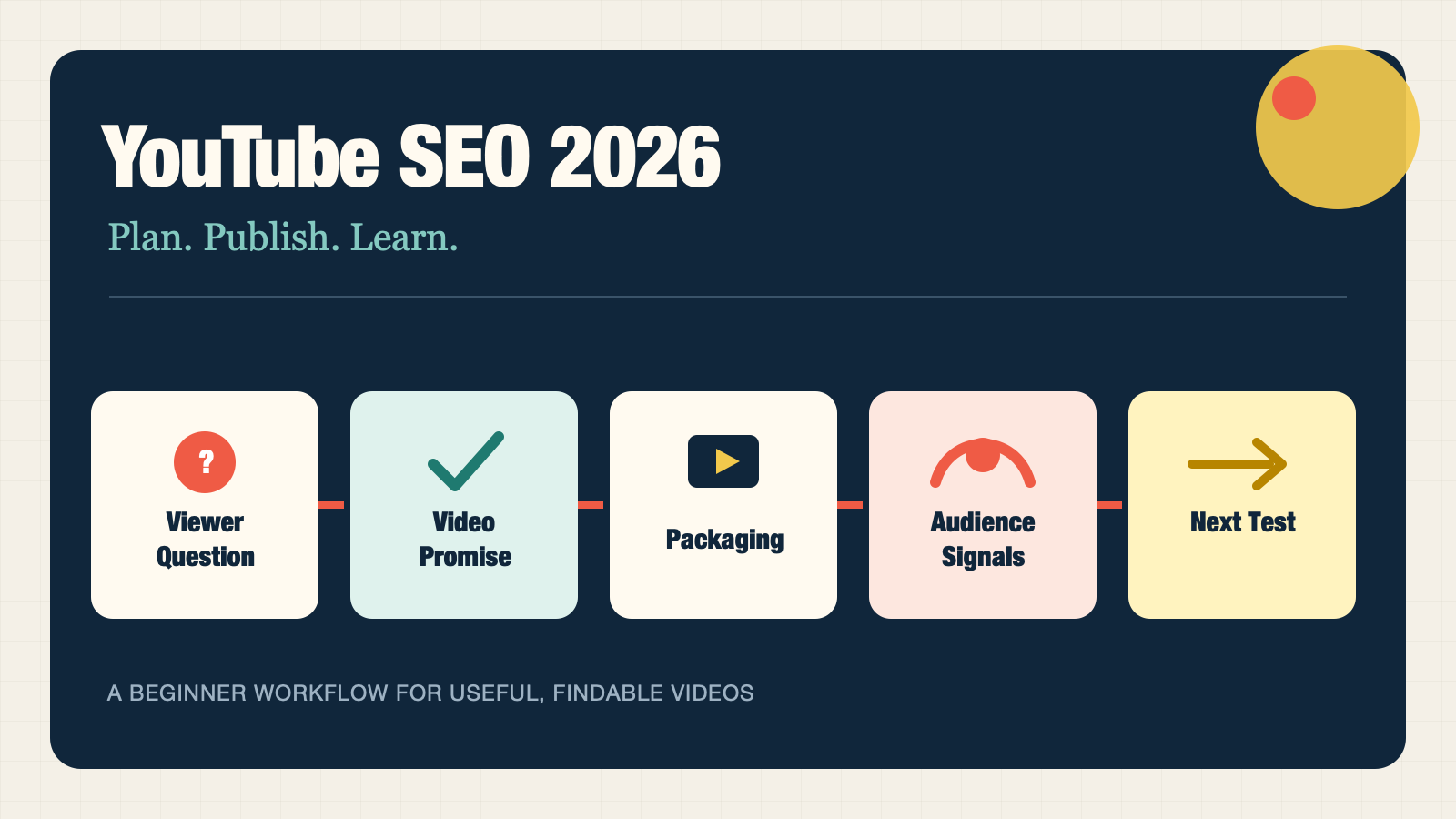
YouTube SEO is the work of making a video easy to match with the right viewer question, then delivering an answer that viewers choose to keep watching. It is not a pile of tags, a promise of a particular rank, or a way to trick a recommendation system.
For a beginner, the useful loop is simple: find a real question, make a video that answers it clearly, package the video honestly, and use your own viewer data to improve the next one. Codex can speed up the research notes, script drafts, descriptions, and quality checks. It cannot create audience trust or substitute for evidence in the video.
What you will finish with
This workflow is for a creator publishing a tutorial, product demonstration, review, or explanatory video. Before you begin, have a topic, a target audience, a country and language, and permission to use any files or data you give to Codex.
By the end, you should have:
- one viewer question worth answering;
- a video brief with a promise you can prove;
- a script or outline that earns attention after the click;
- an accurate title, thumbnail brief, description, and chapter plan;
- a post-publish review template for the next video.
The definition of done is not "ranked number one." It is a publish-ready package where the title, thumbnail, description, spoken content, and intended viewer all agree.
How YouTube SEO works in practice
YouTube says search ranking considers relevance, engagement, and quality. For relevance, it can consider how well the title, tags, description, and video content match a search query. It also says results can be personalized by a viewer's search and watch history. Your result may not look the same as somebody else's result for the same query. Read YouTube's explanation of Search.
Recommendations are related, but not identical, to search. YouTube describes them as personalized and driven by what viewers choose to watch, ignore, enjoy, and engage with. Its current creator guidance groups content performance into appeal, engagement, and satisfaction. Read the recommendation-system guidance and the performance explanation.
That creates two jobs for every video:
Job | What the viewer needs | What you need to make |
|---|---|---|
Be understood | A clear match between their query and your subject | A focused topic, natural spoken explanation, clear title, and specific description |
Be chosen and watched | A good reason to click and stay | An honest promise, a useful opening, a well-paced answer, and a relevant next step |
Metadata helps explain the video. It does not rescue a vague topic or a video that fails to deliver what its packaging promised.
Start with the viewer question, not a keyword list
A keyword can be a useful label. A viewer question gives you a video to make.
For example, "YouTube SEO" is too broad to plan from. A beginner channel might instead answer one of these questions:
- "How do I choose a YouTube topic when I have no channel data?"
- "What should go in the first two lines of a YouTube description?"
- "How do I read a retention dip without guessing why it happened?"
Gather evidence at the right level
Use the strongest evidence you have, and say what it is:
Evidence source | What it can help with | What it cannot prove |
|---|---|---|
YouTube Studio Trends | Topics your audience searches for, related videos, and available trend insights | Guaranteed demand, ranking, or a production decision by itself |
Your YouTube Search report | Terms that already helped viewers find your videos | How every future video will perform |
Authorized keyword or SERP export | A provider's estimated demand or current search observations for a stated market | Exact YouTube audience size or a promised position |
YouTube autocomplete and public results | The language people use and the formats currently visible | Search volume or the private performance of other videos |
Customer questions | Problems your business is well placed to answer | Broad platform-wide demand without other evidence |
YouTube's Trends tab can show top searches, breakout videos, recent videos, and, in eligible contexts, content gaps. Its availability varies by country, language, and device. If you cannot access it, do not pretend you have a content-gap report. Use public search observations and customer language instead.
Run a five-minute intent check
Search a candidate phrase on YouTube while signed out if practical, and note the first relevant results. You are not collecting a script to copy. You are checking what a viewer appears to expect.
Record these fields in a worksheet:
Field | Example question to answer |
|---|---|
Viewer question | What is the person trying to do or decide? |
Format expectation | Are relevant results tutorials, demonstrations, comparisons, explainers, or short answers? |
Proof expectation | Does the viewer need a screen recording, a physical demonstration, a test, examples, or an expert explanation? |
Distinct angle | What can you explain, show, or verify that would make this video useful? |
Risk | What claim would be misleading if you cannot demonstrate it? |
Choose a topic only if you can make the proof. A video about an interface change needs a current screen recording. A video about results needs evidence that the result is real. A video based only on a generic outline usually has a retention problem before it has an SEO problem.
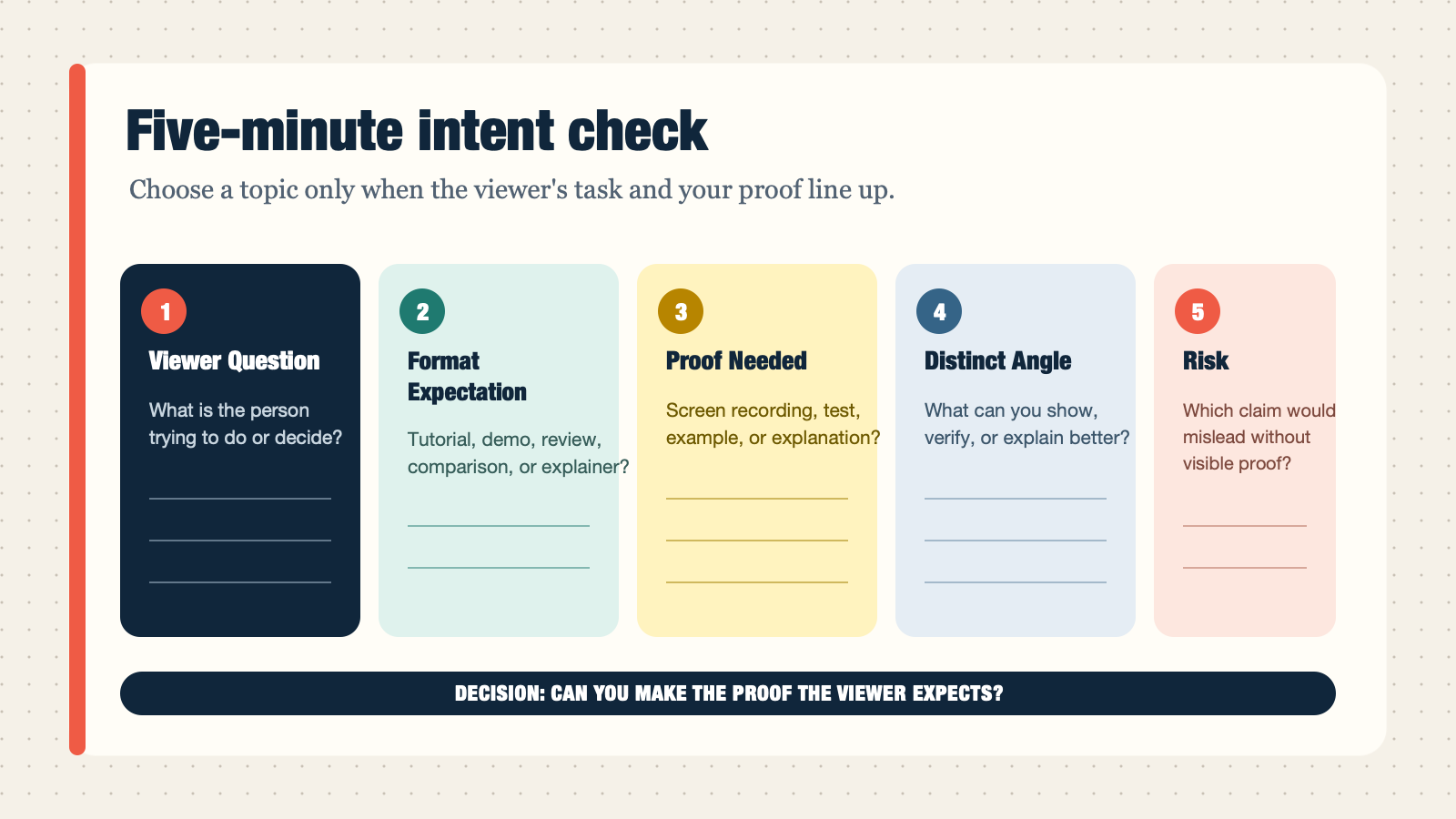
Use this five-part check to confirm that the viewer's task, expected format, and required proof fit the video you can actually make.
Make the video fulfill its promise
The opening should answer the silent question behind every click: "Am I in the right place?"
YouTube's creator guidance says the initial seconds matter for both Shorts and long-form videos. It advises creators to make the introduction deliver on the thumbnail and title promise, stay concise, and move into the value. See the official performance guidance.
For an eight-minute tutorial, use a structure such as this:
Segment | Job | Quality check |
|---|---|---|
Opening | Name the problem, the audience, and the result | Can a new viewer tell within 20-30 seconds what they will get? |
Setup | State the input, account access, tool, or prerequisite | Are the assumptions visible rather than hidden? |
Demonstration | Show ordered actions and decisions | Does each action produce a recognizable output? |
Exception | Address the most likely failure or alternative path | Does the viewer know when the default advice does not apply? |
Recap and next step | Reinforce the result and point to genuinely relevant content | Does the suggested next video solve the next question? |
Do not pad the opening with a logo animation, a channel biography, or a long explanation of why the topic matters. Give the viewer the first useful answer, then earn more of their attention.
Package the finished video for search and choice
Packaging comes after the video promise is clear. It should describe the video that actually exists, not the video you hoped to make.
Write titles for the discovery context
YouTube distinguishes between searchable titles, which make the subject clear, and intriguing titles, which create curiosity for viewers who may not be searching for the subject. Both have a place. Its guidance also says to keep titles accurate, concise, and weighted toward the important words at the beginning. Read the title and thumbnail tips.
For a tutorial aimed at a searcher, start with a searchable title:
How to write a YouTube description for a tutorial videoFor a browse-led video with a strong story, a more intriguing title may be appropriate:
I rewrote one paragraph in every video description. Here is what changed.The second example only works if the video actually shows a meaningful, documented change. Curiosity is useful. Misleading packaging is expensive because it makes the first moments of the video feel like a bait-and-switch.
Design a thumbnail that adds information
The thumbnail and title work as a pair. Avoid making them repeat the same phrase. If the title says "How to audit a YouTube description," the thumbnail might show the before-and-after decision rather than repeat "YouTube description."
Use this mini brief before you design it:
Viewer:
One visual idea:
Exact thumbnail text, if any (four words or fewer):
What the title already says:
What the thumbnail adds:
What must not appear or be implied:
YouTube recommends readable text, simple composition, and a design that remains clear across devices. It also recommends reviewing the results in Analytics after publishing. Read the official thumbnail guidance.
Write a description that helps people decide
YouTube recommends unique descriptions and suggests identifying one or two words that describe the video, then using them naturally in the title and description. The first few lines matter because they appear before a viewer expands the description. Read the description guidance.
Use this template:
[Who this is for] can use this video to [specific outcome].

You will learn [three or fewer concrete parts of the video].

Resources mentioned:
- [verified link or disclosure]

Chapters:
00:00 [Only after you have real timestamps]
Do not fill a description with repeated keyword variants. Do not borrow a competitor's description. Tags can help with common spelling variations, but YouTube says titles, thumbnails, and descriptions are the more important metadata for discovery. See YouTube's metadata note.
Add chapters and paths to the next useful video
Use chapters when they map to real shifts in the viewer's task. They make a longer tutorial easier to navigate and give the video clearer internal landmarks. Do not invent timestamps before the final edit.
Connect a finished video to the next relevant viewer question with a playlist, a card, or an end screen. The point is not to maximize links. It is to make the next useful choice easy.
Use Codex to generate and check YouTube SEO content
Codex belongs inside the workflow, after you establish the topic and before you publish. It is most useful for turning your notes into a consistent brief, original script draft, metadata package, and review worksheet. A human still needs to verify claims, create the actual demonstration, make editorial choices, and apply the changes in YouTube Studio.
The beginner path: install one focused skill
Save the following as .agents/skills/youtube-seo-content-assistant/SKILL.md inside the project where you run Codex. Codex scans repository-local .agents/skills folders, so the skill can be available to collaborators working in that project. OpenAI's Skills documentation explains the directory format and how explicit $skill-name invocation works.
---
name: youtube-seo-content-assistant
description: Create, improve, or review a beginner-friendly YouTube SEO content package for a video or channel. Use when Codex needs to research a YouTube topic from authorized data, turn a viewer question into a video brief or script, draft titles/descriptions/chapters/thumbnail briefs, or interpret user-provided YouTube Studio exports without inventing metrics, rankings, or product claims.
---

# YouTube SEO Content Assistant

Help a creator make content that answers a real viewer question and is easy for YouTube to understand. Treat YouTube SEO as a content and audience-fit workflow, not metadata filling.

## Boundaries

- Work only from user-provided files, public pages, and authorized data. Never ask for or print passwords, cookies, API keys, or tokens.
- Do not log in to YouTube, upload, change video settings, publish, delete, or run ads. Prepare a reviewable package for a human to apply in YouTube Studio.
- Do not invent search volume, rankings, impressions, CTR, retention, competitor results, or product claims. Mark missing data as `unavailable`.
- Use public competing videos only as intent evidence. Do not copy their titles, script, thumbnail, examples, or structure.
- Keep observations, hypotheses, and recommendations separate.

## Inputs

Ask only for missing inputs that change the work:

```text
Topic or seed phrase:
Target audience:
Market and language:
Video format and approximate length:
Channel or business goal:
Materials allowed for use: links, product docs, notes, exports, or none:
Task: discover | brief | script | package | review | full workflow
```

For `review`, request a video URL and a pasted or attached YouTube Studio export. Do not assume account access.

## Workflow

### Discover

Build a topic table from, in order: user-provided YouTube Studio Trends or Search exports; authorized keyword or SERP data; public YouTube suggestions and results; or customer questions supplied by the user. Record source, date, market, language, uncertainty, likely viewer question, expected format, and a distinct angle. Do not call a subject a content gap without evidence.

### Brief

Return:

```text
Viewer question:
Search-intent evidence:
One-sentence promise:
What the viewer can do by the end:
Proof or demonstration required:
Claims to verify:
Claims not to make:
Outline with a value-bearing opening:
Planned chapters:
Relevant next-video or playlist connection:
```

Ensure the opening fulfills the title and thumbnail promise without a long channel introduction.

### Script

Draft an original, verifiable script with a concise hook, ordered actions or explanations, expected outputs, screen-demo notes, natural chapter transitions, and one relevant next step. Use `[verify in current YouTube Studio]` when an interface label, policy, or feature is unverified. Never invent testimonials, dashboards, experiments, figures, or demonstrations.

### Package

Work from a finished script or transcript. Return three accurate title options, a unique description, real chapters or a chapter plan marked `draft`, a thumbnail brief, and only relevant playlist, card, or end-screen suggestions. Treat tags as optional spelling-context support, not a keyword-stuffing tactic.

### Review

Use only supplied Studio data. Separate evidence from hypotheses, then propose one low-risk test for the next video. Compare similar formats before comparing Shorts, long-form videos, or livestreams.

## Optional companion skills

- Use `felo-youtube-subtitling` only to extract a public transcript for topic or angle analysis. Do not reproduce its script.
- Use `dataforseo-toolkit` only for authorized data. Record provider, report, date, market, language, and metric definitions.
- Use `felo-search` or `felo-web-fetch` for current official guidance, preferring YouTube Help, YouTube Creators, and Google Search Central.
- Use `youtube-cover-generator` only after the video package and visual direction are approved.
- Use `hyperframes` only after the SEO brief and script are approved, when the user asks Codex to produce a reviewable local video file.
- Use `image-agent-screenshot` only for a logged-out public official page, recording its URL, page state, purpose, caption, and alt text.

## Final response

Start with the recommendation or content package. Include an evidence table, assumptions, and the smallest next action. End by naming the actions a human must complete in YouTube Studio.
Invoke it with a clear input packet:
$youtube-seo-content-assistant

Topic: writing YouTube descriptions for tutorial videos
Target audience: first-time YouTube creators
Market and language: United States, English
Format: 8-minute tutorial
Channel goal: earn search discovery for practical video-marketing questions
Materials allowed for use: my outline and public official YouTube Help pages
Task: full workflow

Start by recommending one viewer question. Do not invent keyword volume,
rankings, YouTube Analytics, competitor data, or product claims.
Add specialist skills only when the job needs them
Content task | Optional skill | What it does | What it does not do |
|---|---|---|---|
Analyze a public video for its topic and angle |
| Extracts captions when available | Gives permission to copy its script |
Work from a permitted keyword or SERP source |
| Retrieves authorized data with source details | Makes estimates into facts or guarantees a rank |
Check current platform documentation |
| Finds or extracts current pages | Replaces a current official source with a blog claim |
Create a thumbnail after the brief is approved |
| Produces a 16:9 visual workflow | Proves the thumbnail will increase CTR |
Turn an approved script into a video |
| Routes the script to an appropriate HTML-to-video workflow and renders a reviewable local video | Uploads to YouTube, chooses the SEO strategy, or proves the video will rank |
Add a real public documentation image to an article |
| Captures logged-out official pages | Captures private Studio data or creates fake dashboards |
For a first video, use only the main skill. Add another one when you have a genuine input for it. Tools are useful when they reduce work or make a decision clearer, not when they turn a simple video into a complicated automation project.
Optional: ask Codex to install HyperFrames and generate the video
Once the SEO topic, promise, script, title direction, and visual requirements are approved, Codex can hand the production brief to HyperFrames. HyperFrames renders video from HTML and routes different deliverables to specialized workflows. For a narrated educational video built from an article or script, its usual route is faceless-explainer. A product demonstration based on a website may route to product-launch-video instead.
First ask Codex to check whether the hyperframes skill is available. If it is missing, ask Codex to install it from your organization's approved skill source. Do not install a similarly named package from an unverified URL. When HyperFrames is available, it can install or refresh the selected workflow with its own lifecycle command and then create a local project for review.
Use a prompt like this after the script is final:
Check whether the hyperframes skill is installed and available to Codex.
If it is missing, help me install it from my approved HyperFrames source.

Then use $hyperframes to create a reviewable 16:9 YouTube video from the
approved script below.

Video goal: answer the selected YouTube SEO viewer question
Audience and market: [audience, country, language]
Approved title direction: [title]
Approved script: [file path or pasted script]
Required demonstrations or source assets: [list]
Must not claim or show: [unsupported claims, fake data, fake UI]

Choose the correct HyperFrames workflow, write the project brief, install or
refresh that workflow, and stop for the workflow's required review gates.
Render a local review file only. Do not upload or publish it to YouTube.
Generating the video does not complete YouTube SEO. Review the rendered video against the same promise used in the title and thumbnail. Check that the opening reaches the answer quickly, on-screen text is readable, demonstrations match the narration, and every claim has visible support. The creator still owns the final edit, YouTube Studio settings, disclosures, upload, and publication decision.
Review the video after it has evidence
Wait until you have enough viewership data to see a pattern. Then use YouTube Studio rather than a generic industry benchmark as your starting point.
YouTube's Content tab frames viewer performance as appeal, engagement, and satisfaction. It provides impressions, click-through rate, views, average view duration, traffic sources, and retention moments. Its retention report identifies intro performance, top moments, spikes, and dips. Read the Content tab analytics tips.
Use this review sheet:
Signal | Question | Safe next action |
|---|---|---|
Impressions and CTR | Did the packaging persuade the viewers who saw it? | Test a clearer thumbnail or title on a future comparable video; do not assume CTR alone explains reach |
First 30 seconds | Did the opening match the promise? | Move proof or the first useful answer earlier |
Top moments | What did viewers stay for? | Build a future video or earlier section around that useful element |
Spikes | Was a moment replayed or shared? | Check whether it was especially useful or unclear before repeating it |
Dips | Where did people skip or leave? | Review that moment and test a shorter setup, clearer transition, or earlier payoff |
YouTube Search terms | What wording already brings viewers in? | Use the phrase naturally in a related brief if the next video can answer it better |
Do not convert every metric into an algorithm theory. The useful question is practical: what should you keep, change, or test in the next video?
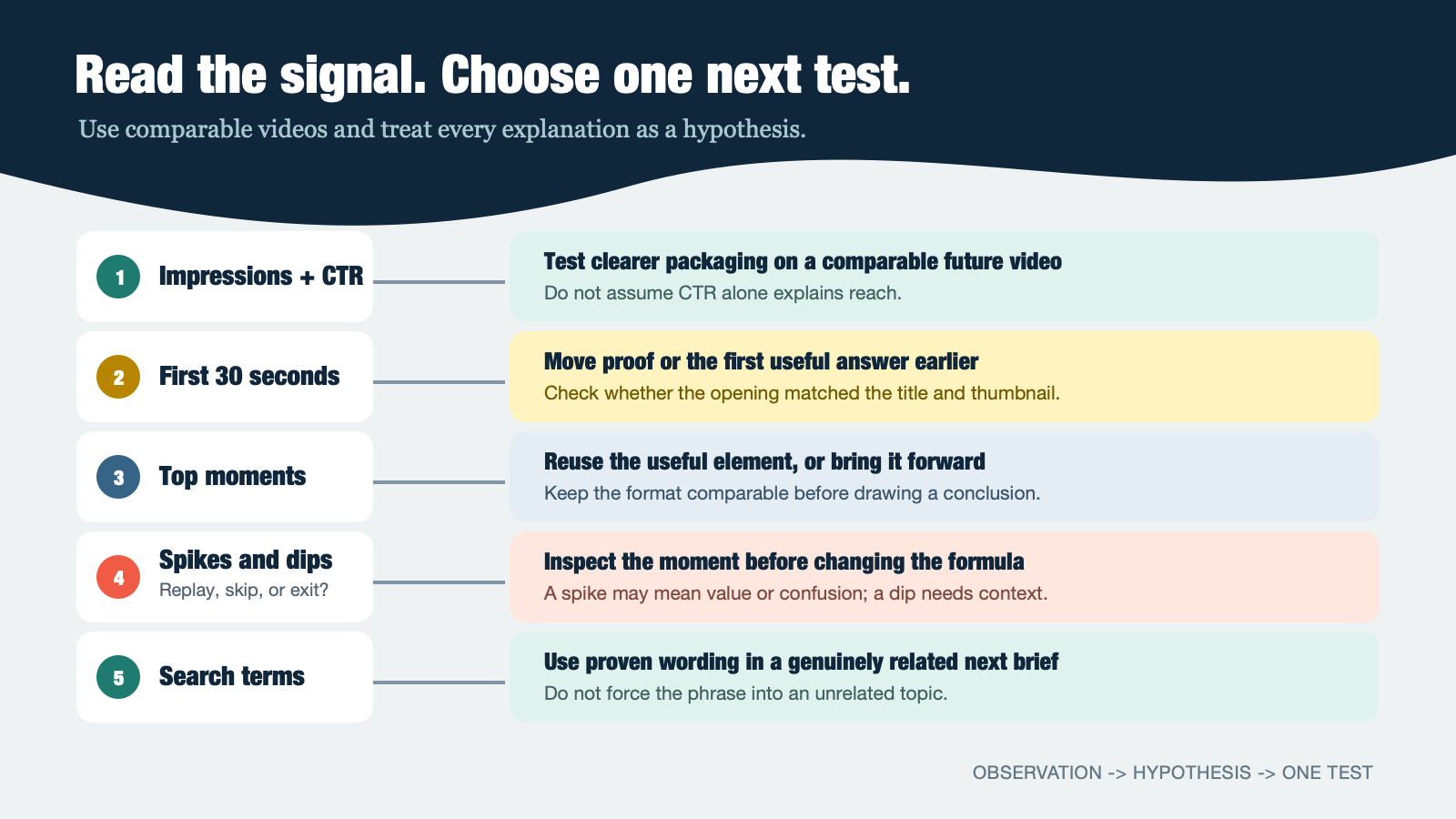
Read each signal in context, form a hypothesis, and change one thing in the next comparable video.
Include Google video SEO only when you own the watch page
Uploading a video to YouTube is not the same job as optimizing a video watch page on your own website.
If you embed a video on a page you control, Google says VideoObject markup can help it understand details such as the video's description, thumbnail URL, upload date, and duration. For YouTube-hosted videos, timestamps and labels in the YouTube description can be used for key moments. Markup can support eligibility and understanding; it does not guarantee a video result, a rich feature, traffic, or rankings. Read Google's video structured-data documentation.
For a site-owned watch page, make sure the video is visible to visitors, the page has a useful purpose beyond a bare embed, and the structured data matches the visible content. Validate the markup before you release it. Do not add VideoObject to unrelated blog pages simply because they mention a YouTube video.
A practical YouTube SEO checklist
- [ ] The topic answers one clear viewer question.
- [ ] The expected format is based on evidence, not a copied competitor outline.
- [ ] The video has proof, examples, or a demonstration that supports its promise.
- [ ] The first section reassures viewers they chose the right video.
- [ ] The title and thumbnail are accurate and work together.
- [ ] The description is unique and the first lines state who the video is for.
- [ ] Chapters use real timestamps after the edit.
- [ ] The next-video, playlist, card, or end-screen suggestion helps the same viewer.
- [ ] Any Codex draft has been fact-checked and made specific to your real video.
- [ ] The next review uses your own Studio data, with observations separated from guesses.
Frequently asked questions
Do YouTube tags still matter for SEO?
Tags can help YouTube with common spelling variations, but YouTube's current creator guidance places more emphasis on the title, thumbnail, description, and the video's ability to satisfy viewers. Use relevant tags when they solve an actual spelling or naming problem. Do not spend hours building tag lists.
Is there a best time to publish a YouTube video?
Publishing when your audience is active can help a Premiere or livestream get immediate participation. YouTube says it has not observed evidence that upload time affects a video's long-term performance. Put more effort into the topic, promise, and opening than into chasing a universal best hour.
Can Codex make a whole YouTube video for me?
Codex can help create a brief, script, description, chapter plan, thumbnail brief, and review worksheet. You still need to verify facts, create the actual footage or demonstration, make final editorial decisions, and publish through your own YouTube account.
Does VideoObject markup improve a YouTube upload?
VideoObject is for a video watch page on a site you control. It does not change the metadata stored by a YouTube upload. If your video is hosted on YouTube, use accurate YouTube metadata and timestamps; use structured data only on a relevant page you own.
What should I do if a video gets low retention?
Find the first meaningful dip and watch that moment as a new viewer would. Check whether the title or thumbnail promised something different, whether the setup took too long, or whether the explanation became unclear. Change one thing in the next comparable video and record the result. A single graph does not prove one universal cause.
YouTube SEO becomes manageable when every video is a small, honest experiment: a real question, a useful answer, accurate packaging, and a better next attempt.
Author: Clara Bennett, 10-Year Content Strategy Practitioner at Auspia. Clara writes about editorial systems, content planning, and practical ways to turn audience questions into useful content.


