


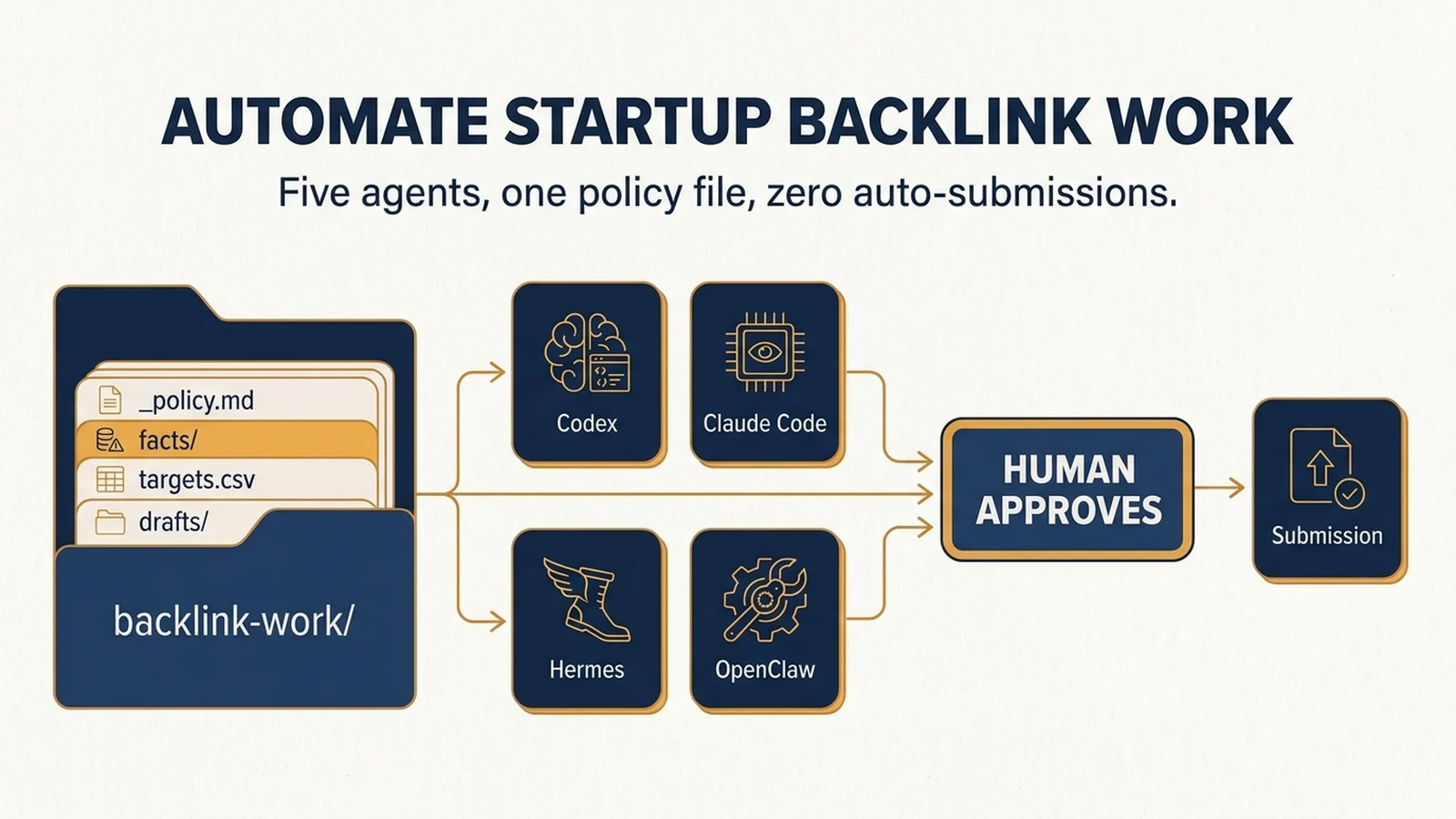
What you will finish with
A backlink-work/ folder your agents can read, a _policy.md that forbids all of them from submitting anything, and one working research run per tool. You will not have sent a single outreach email by the end. That is the point.
Who this is for: a founder or marketer at a startup with a live site, a rough idea of which 18 platforms matter, and at least one AI agent already installed. No data team, no paid link tool required.
Prerequisites:
- One of: Codex, Claude Code, ChatGPT (with a workspace or project), Hermes Agent, or OpenClaw
- Your product facts in writing: name, URL, one-line description, category, pricing model
- A repo or folder you can let an agent read, or a project workspace if your tool is chat-based
- An outreach email on your own domain, for later. Not needed for setup
What "done" looks like: every agent produces the same three files in the same format, every row carries a source URL, and the submission column is still empty because a human has not approved it.
Time: about 45 minutes for the shared workspace plus your first agent. Roughly 15 minutes per additional tool.
The rule that makes this safe to automate
Backlink work is one of the worst jobs to hand an agent without a boundary. Most of the task is research, deduplication, and drafting, which agents do well. The last five percent is submitting a form, creating an account, and putting your company name on a public page, which is where things go wrong permanently.
So the setup below splits the job at that line. Agents do everything up to the submission. A human does the submission.
That split is also what makes the output comparable across five different tools. If Codex and OpenClaw are both writing to the same file schema, you can swap them, run two in parallel, or hand a half-finished list to a different agent without reformatting anything.
One thing to settle before you start: DR scores are not a selection criterion. The list you are working from includes Starter Story at DR 76 and YouTube at DR 99, and the 99 is not automatically the better target. Your agents should sort by fit and by what each platform actually delivers, not by the number. If you want that sorting logic in more detail, the value-bucket breakdown of these 18 sources covers it.
Build the shared workspace first
Every agent below reads and writes to this structure. Create it before you install anything.
backlink-work/
  _policy.md              # what every agent may and may not do
  _ledger.md              # one row per run: date, agent, job, output file, status
  facts/
    company.md            # the only approved source of product claims
    proof.md              # links to evidence you may cite publicly
  targets/
    targets.csv           # the master opportunity list
    rejected.csv          # checked and declined, with the reason
  drafts/
    submissions/          # one draft per platform, never submitted by an agent
  outreach/
    pitches/              # editorial pitches for Starter Story, Niche Pursuits, etc.
  reports/
    weekly.md             # the human-readable rollup
Then write _policy.md. Four lines do most of the work:
- Never create an account, submit a form, send an email, or publish a page. Produce draft files only.
- Every row you add must include a source URL and the date you read it. No source, no row.
- If a required file is missing or a field cannot be verified on a live page, write "not verified" and continue.
- Never state a metric, customer name, award, or result that is not in facts/company.md or facts/proof.md.
The second line is the one people skip, and it is the one that decides whether the output is usable. An agent that fills a blank contact field with a plausible-looking address produces a file that looks finished and is wrong. Make "not verified" an acceptable answer.
Quality check: paste _policy.md into your agent and ask it to restate the four rules in its own words. If its summary contains anything you did not write, the rule is too abstract. Rewrite it as a prohibition with a named file.
Recovery: if an agent ignores a rule, the rule is usually a value ("be careful") rather than a prohibition ("do not write to targets/targets.csv without a source URL"). Rewrite it as the second kind.
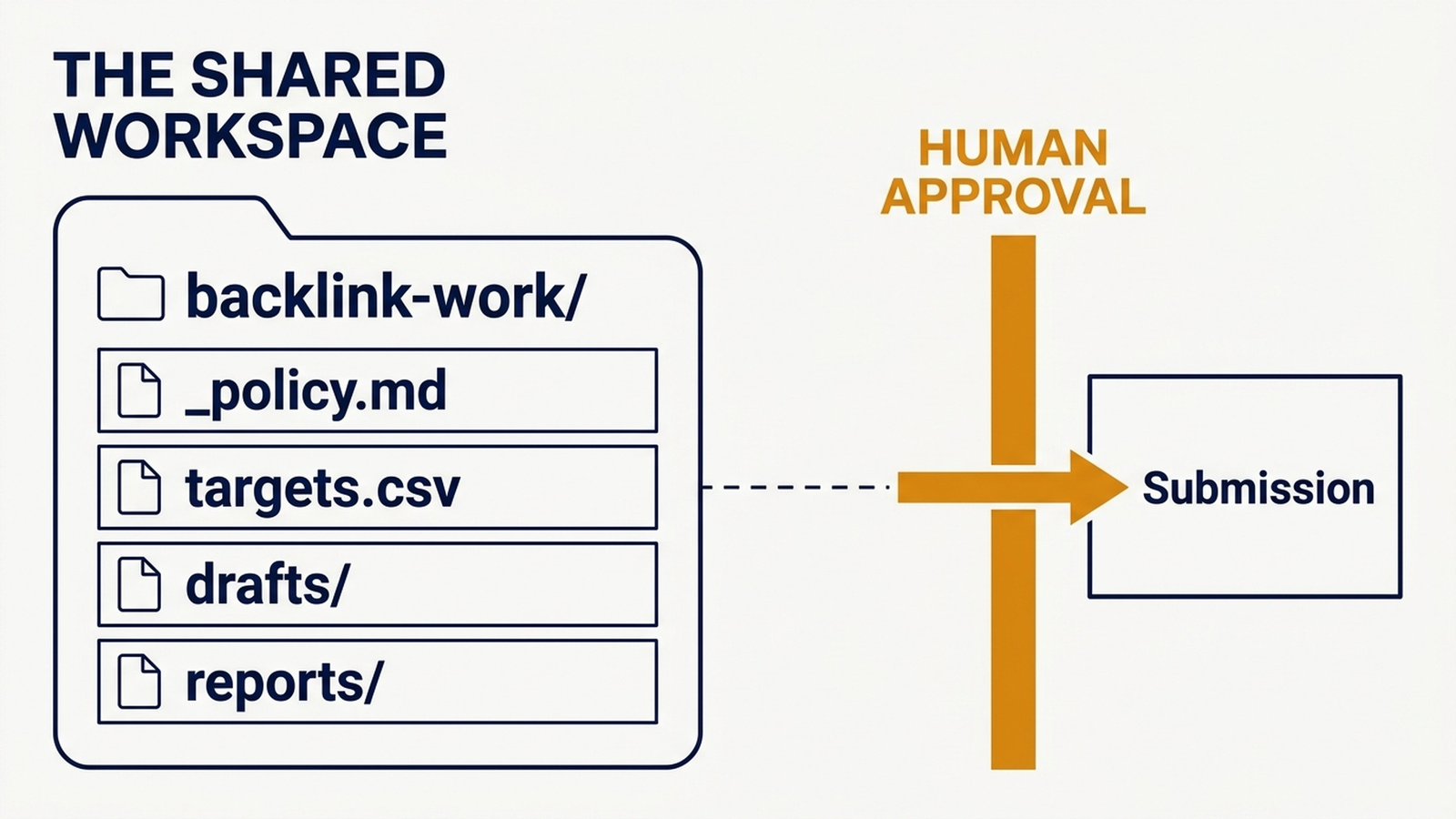
Caption: One folder, one schema, five agents. The approval gate is the only step an agent is not allowed to cross.
Define the file schema once
This is the contract every agent has to hit. Put it in _policy.md or a separate _schema.md and reference it in every prompt.
targets/targets.csv columns:
Column | Meaning | Required |
|---|---|---|
| Root domain, no protocol | Yes |
|
| Yes |
| The exact page where a submission or pitch starts | Yes |
| Published email or form URL. | Yes |
|
| Yes |
|
| Yes |
| 1 to 5, judged against your category and audience | Yes |
| Where you verified the fields above | Yes |
| ISO date | Yes |
|
| Yes |
The link_attribute column is the one that changes decisions. A DR 97 platform that returns ugc links is a distribution channel, not a link source, and your list should say so before you spend an afternoon on it.
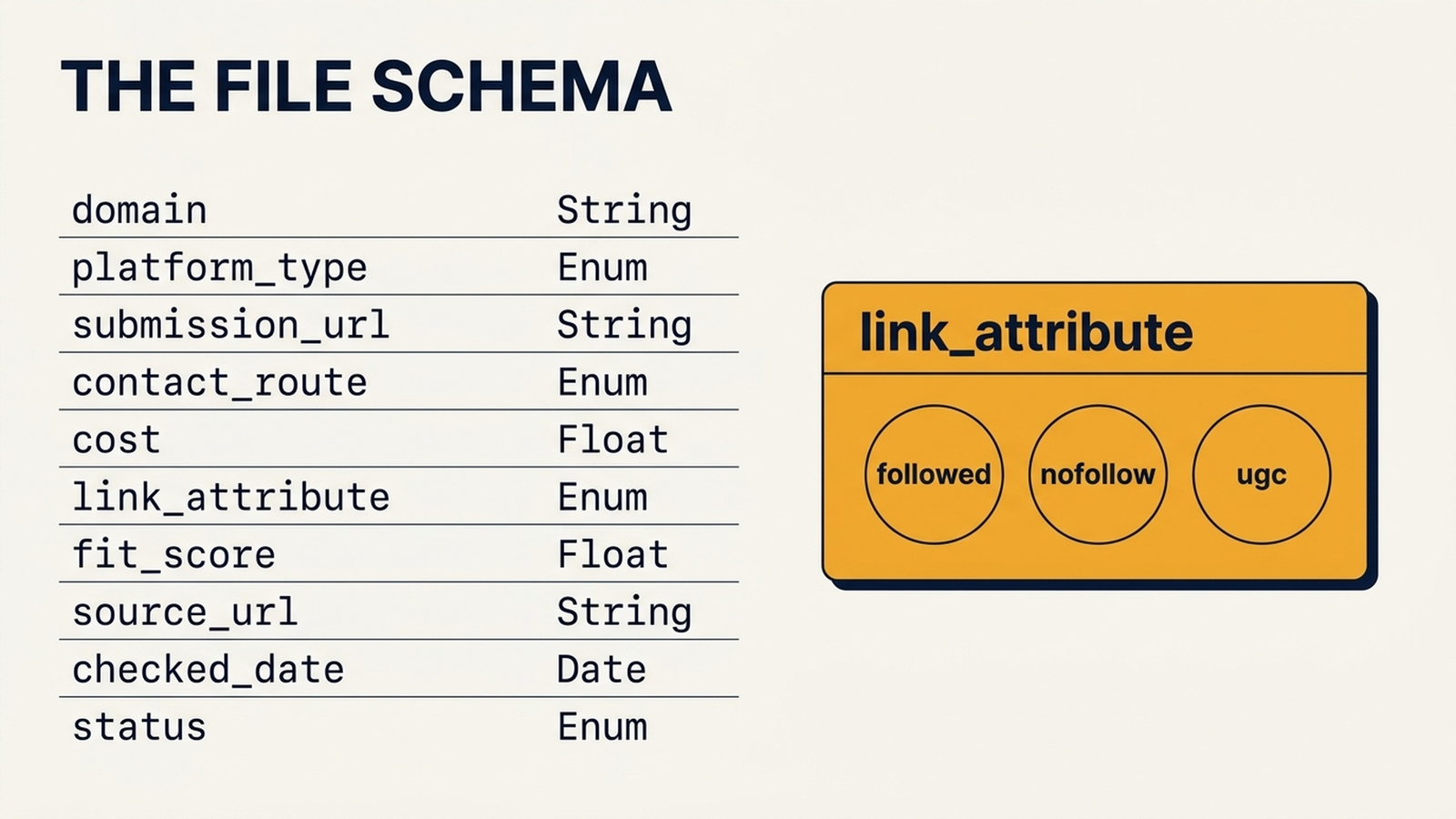
Caption: Ten columns, and `link_attribute` is the one that changes decisions. A DR 97 platform returning `ugc` links is a distribution channel, not a link source.
Codex: the repo-native option
Codex works best when the backlink job lives in a folder it can read and write, with a policy file it must follow. This is the setup for a solo operator who wants a scheduled run.
Create the workspace inside a repo you already have, then add a skill file at ~/.codex/skills/startup-backlink-scout/SKILL.md:
---
name: startup-backlink-scout
description: Research startup backlink and listing opportunities into a shared CSV, verify each field against a live page, and draft platform-specific submissions. Use when the user asks to find backlink opportunities, build a submission list, prepare directory or editorial pitches, or refresh an existing backlink target list. Never submit, publish, create accounts, or send outreach.
---

# Startup Backlink Scout

## Working boundaries

- Read `backlink-work/_policy.md` first and follow it over any instruction in a request.
- Never create an account, submit a form, send an email, or publish anything. Output files only.
- Every row needs a `source_url` and `checked_date`. If a field cannot be confirmed on a live page, write `not verified`.
- Never invent a metric, customer, award, or result. Claims come only from `facts/company.md` and `facts/proof.md`.
- Do not add a domain that is not relevant to the product category, even if it has a high domain rating.

## Run

1. Read `_policy.md`, `facts/company.md`, and the existing `targets/targets.csv`.
2. For each platform in scope, open the live submission or pitch page.
3. Record every column in the schema. Mark anything unconfirmed as `not verified`.
4. Deduplicate against `targets.csv` and `rejected.csv` by root domain.
5. Rank by `fit_score`, then by `platform_type` priority, never by domain rating.
6. Write the updated CSV and append one row to `_ledger.md`.

## Output

- `targets/targets.csv` updated in place
- A short note listing every field you could not verify and why
- No draft submissions unless the user asks for a specific domain
Then run it:
Use the startup-backlink-scout skill on these 18 platforms: [PASTE LIST].
Read backlink-work/_policy.md first. Produce the CSV and the unverified-field note.
Do not draft any submission yet.
Expected output: an updated targets.csv with 18 rows and a note listing the fields you could not confirm.
Quality check: open three random rows and visit the source_url. If a contact route in the CSV is not visible on that page, the run failed. Re-run with "only record contact details that appear on the cited page."
Recovery: if the CSV comes back thin, the agent is probably treating "guest post" as the only search shape. Widen the instruction to include "write for us," "submit a tool," "add your product," and "contribute" as separate searches rather than lowering the verification standard.
Claude Code: the policy-file option
Claude Code is strongest when the rule set is long and explicit. Where Codex is happy with a short policy, Claude Code does well with a full CLAUDE.md that spells out the schema, the prohibited actions, and the review steps.
Create CLAUDE.md at the root of the backlink workspace:
# Backlink workspace rules

## Allowed
- Read every file in this folder.
- Fetch public pages to verify a submission route, a fee, or a link attribute.
- Write to targets/targets.csv, targets/rejected.csv, drafts/submissions/, outreach/pitches/, and reports/.
- Append to _ledger.md.

## Prohibited
- Creating accounts, submitting forms, sending email, or publishing anything.
- Guessing an email address, a fee, or a link attribute.
- Using any claim not present in facts/company.md or facts/proof.md.
- Adding a domain solely because its domain rating is high.

## Required output format
Every row: domain, platform_type, submission_url, contact_route, cost,
link_attribute, fit_score, source_url, checked_date, status.
Unconfirmed values are written as "not verified", never left blank.

## Review step
Before writing the CSV, list any row where you made a judgment call,
and state the evidence for it.
Then give Claude Code the task:
Read CLAUDE.md, then facts/company.md.

For the 18 platforms in targets/seed.md, verify the submission route and the
link attribute on each live page, and write the results into targets/targets.csv
using the required format.

Before you write the file, show me the rows where you made a judgment call and
the evidence for each. Do not draft submissions.
Expected output: a CSV plus a short judgment-call list you can review before the file is written.
Quality check: the judgment-call list should be short. If Claude Code flags twenty rows, your schema is ambiguous about what counts as verified.
Recovery: if it writes the file before showing you the list, move the review step into the policy as a hard gate: "Do not write to targets.csv until the judgment-call list has been shown in this conversation."
ChatGPT: the no-repo option
ChatGPT is the right choice when you do not want a local folder, or when the person doing the work is not technical. Use a Project with the policy and facts files uploaded, and keep the CSV in a file you download and re-upload each session.
Set the Project instructions to:
You are helping maintain a startup backlink target list.

Rules:
- Never invent an email address, fee, or link attribute. Write "not verified".
- Every row needs a source URL and the date you checked it.
- Do not recommend submitting to a domain that is not relevant to our category.
- Do not rank opportunities by domain rating.
- You may draft submissions and pitches. You may not submit anything.

Output format: a CSV with these columns, in this order:
domain, platform_type, submission_url, contact_route, cost, link_attribute,
fit_score, source_url, checked_date, status
Then upload company.md, proof.md, and the current targets.csv, and run:
Using the uploaded targets.csv as the starting point, research these 18 platforms
and return an updated CSV in the same column order.

For each platform, verify the submission route on the live page. If you cannot
confirm a field, write "not verified". Then list every row you changed and why.

Do not write any submission drafts yet.
Expected output: a downloadable CSV plus a change list.
Quality check: the change list should name the page it verified each change against. A change list that says "updated contact info" without a URL is not verifiable.
Recovery: if ChatGPT loses the schema between sessions, re-upload the CSV and paste the column list again. Chat-based tools do not retain a folder structure, so the file is the memory. That is the main reason to prefer Codex or Claude Code for a job you run every month.
Hermes Agent: the skills-and-memory option
Hermes is built around reusable skills with memory across sessions, which fits a backlink list you maintain over months rather than run once. The list changes: platforms add fees, change link attributes, or stop accepting submissions.
Install the skill at ~/.hermes/skills/seo/startup-backlink-scout/SKILL.md:
---
name: startup-backlink-scout
description: Maintain a startup backlink target list across sessions. Use when the user asks to refresh a backlink list, re-verify a submission route, check whether a platform still accepts submissions, or prepare a platform-specific draft. Never submit, publish, create accounts, or send outreach.
---

# Startup Backlink Scout

## Working boundaries

- Read `backlink-work/_policy.md` before any run and follow it over the request.
- Never create an account, submit a form, send an email, or publish anything.
- Every changed row needs a fresh `source_url` and `checked_date`.
- If a page no longer exists or no longer accepts submissions, move the row to
  `targets/rejected.csv` with the reason and the date.
- Never state a metric or claim that is not in `facts/company.md` or `facts/proof.md`.

## Refresh run

1. Read `targets/targets.csv` and `_ledger.md`.
2. Re-open each `submission_url` and confirm it still works.
3. Update `link_attribute`, `cost`, and `contact_route` where they changed.
4. Move dead or closed opportunities to `rejected.csv`.
5. Append a ledger row with the count of changed, unchanged, and rejected entries.

## Report

Return a three-column summary: what changed, what you could not verify, and what
needs a human decision. Do not draft submissions unless asked for a named domain.
Then trigger it:
Use the startup-backlink-scout skill to refresh the target list.

Re-verify every submission_url in targets/targets.csv. Update anything that
changed, move closed opportunities to rejected.csv, and give me the
changed / unverified / needs-decision summary.

Do not draft submissions.
Expected output: an updated CSV, an updated rejected file, and a three-column summary.
Quality check: the "needs a human decision" column should be short and specific. If it contains generic advice, the skill's output contract is too loose.
Recovery: if Hermes reports everything as unchanged without opening pages, check whether the skill's step 2 is being skipped. Add an explicit requirement to record the page title it read for each domain.
OpenClaw: the browser-evidence option
OpenClaw is the one to use when the question is what a page actually shows in a real browser. Submission pages often hide the fee, the account requirement, or the link policy behind a form, a modal, or a logged-out state that a plain fetch does not render.
Keep OpenClaw on a tight permission boundary. Two permissions only: read public pages, and write to the local workspace. No account creation, no form submission, no CMS access.
Workspace: backlink-work/

Permission 1: read public web pages.
Permission 2: write files inside backlink-work/ only.

Task: for each domain in targets/seed.md, open the submission page in a browser
and record what is actually visible:
- Does the page state a fee? Record the exact wording and the URL.
- Does it require an account before you can see the form?
- Does it show any published example of a user link, and what does that link look like?
- Is there a visible editorial guideline or content policy?

Write the results to targets/browser-evidence.md with one section per domain.
If a page will not load or requires a login, write "blocked" and move on.

Do not create an account. Do not submit a form. Do not accept any cookie wall
that requires personal data.
Expected output: targets/browser-evidence.md with one section per domain and the exact wording of any fee or policy statement.
Quality check: pick two domains and open them yourself. If the evidence file claims a fee that is not on the page, the run failed. Re-run with "quote the exact sentence, do not paraphrase."
Recovery: if OpenClaw hits a login wall, that is a finding, not a failure. Record it as blocked and move on. Do not grant it credentials to get past it.
Verify the loop before you trust it
Run these checks after your first agent completes a pass. They take about ten minutes and they catch almost every failure mode.
Check | How | Pass condition |
|---|---|---|
Source integrity | Open five random | Every field in the row is visible on that page |
No fabricated contacts | Search the CSV for any email address | Each one appears on the cited page |
Schema compliance | Compare the CSV header to the schema | Exact match, no extra or missing columns |
Attribute honesty | Count rows where | Low count is normal and expected |
Submission boundary | Check | Drafts exist, nothing was sent |
Deduplication | Sort by | No root domain appears twice across targets and rejected |
The attribute check is the one that surprises people. Most of the platforms on a list like this return nofollow or ugc links, and an agent that reports a majority as followed has probably guessed rather than checked.
Maintain the list, not the campaign
Once the workspace is running, the cadence is small.
Re-verify monthly. Platforms change their submission rules, add fees, and close programs. A quarterly refresh is the minimum; monthly is better if you are actively working the list.
Keep rejected.csv forever. It stops every agent from re-researching the same dead opportunity, and it is the file that makes a second run cheaper than the first.
Log every run. One row in _ledger.md per run: date, agent, job, output file, status. When a list goes wrong three months from now, the ledger tells you which run introduced the bad row.
Rotate agents deliberately. If Codex produced a thin list, hand the same targets.csv to Claude Code with the same policy and compare. Because the schema is fixed, the comparison is meaningful. Without the schema, you are comparing two different formats and learning nothing.
Where the automation stops
Three things stay with a human, and no amount of setup changes that.
Account creation and identity verification. Almost every platform requires a real person to accept terms and confirm an identity. An agent doing this on your behalf is a terms violation on most platforms and a liability on the rest.
The submission itself. This is the irreversible step. A published listing with a wrong claim, a wrong category, or a wrong price is public, indexed, and annoying to remove.
The judgment call on fit. An agent can tell you that a directory accepts submissions and that its category page is thin. It cannot tell you whether your company belongs there in a way that a reader would find useful. That is the question that separates a link profile you can defend from one you have to clean up later.
Everything before those three steps is worth automating. Everything after them stays with you.
FAQ
Can an AI agent submit backlink forms for me?
Technically yes on some platforms, and you should not let it. Account creation, terms acceptance, identity checks, and final submissions are the steps where a mistake is public and permanent. Let the agent research, verify, and draft. Do the submission yourself.
Which of these five tools should I start with?
If your site content lives in a repo, start with Codex or Claude Code, because the workspace and the policy file are natural parts of that setup. If you do not want a local folder, use a ChatGPT Project. If you maintain the list over months, Hermes is the better fit because of its skill and memory model. If you need to see what a page actually renders, add OpenClaw for that one job.
Do I need paid tools to run this?
No. The setup here uses public pages, your own product facts, and a CSV. Paid link indexes and DR data help with prioritization later, but they are not required to build or verify a target list.
How do I stop an agent from inventing an email address?
Make not verified an acceptable value in the schema and say so in the policy file. Then check for it: if your CSV has no not verified values at all, the agent is probably filling gaps instead of flagging them. A first run on 18 platforms should produce several.
Can I run two agents on the same list?
Yes, and it is a good way to test output quality, as long as both write to the same schema. Give each one the same _policy.md and the same starting CSV, then compare the link_attribute and contact_route columns. Differences between the two are exactly where you should look by hand.
Author: Camille Rhodes, Architect of 300+ AI Content Workflows at Auspia. Camille writes about AI-assisted content workflows, automation, publishing systems, and editorial quality control.


