คำตอบสั้นๆ
Multilingual SEO คือแนวทางปฏิบัติในการทำให้เว็บไซต์ของคุณมองเห็นได้ในเครื่องมือค้นหาหลายภาษา ในปี 2026 นี่ไม่ใช่แค่การแปลหน้าเว็บและเพิ่มแท็ก hreflang อีกต่อไป ปัจจุบัน Google แปลเนื้อหาภาษาอังกฤษโดยอัตโนมัติและแสดงผลผ่านโดเมนพร็อกซีของตัวเอง — แย่งทราฟฟิกของคุณไป หากคุณไม่มีเวอร์ชันภาษาท้องถิ่น AI Overviews ครอบคลุมมากกว่า 200 ประเทศและ 40+ ภาษา และเอนจิ้น AI อย่าง ChatGPT, Perplexity และ Gemini กำลังตัดสินใจว่าแบรนด์ใดจะถูกอ้างอิงโดยอิงจากสัญญาณเฉพาะภาษา
ข่าวดี: คุณไม่จำเป็นต้องมีทีม Localization 10 คนอีกต่อไปแล้ว ด้วยเวิร์กโฟลว์ Claude Code (Codex) Agent นักทำ SEO คนเดียวสามารถตรวจสอบ hreflang ในหลายร้อยหน้า ค้นหาคีย์เวิร์ดในภาษาที่ตัวเองพูดไม่ได้ ตรวจสอบคุณภาพการแปล และเฝ้าติดตามการมองเห็นในระดับนานาชาติ — ทั้งหมดนี้ด้วยเครื่องมือฟรีและเทมเพลตพรอมต์ในคู่มือนี้
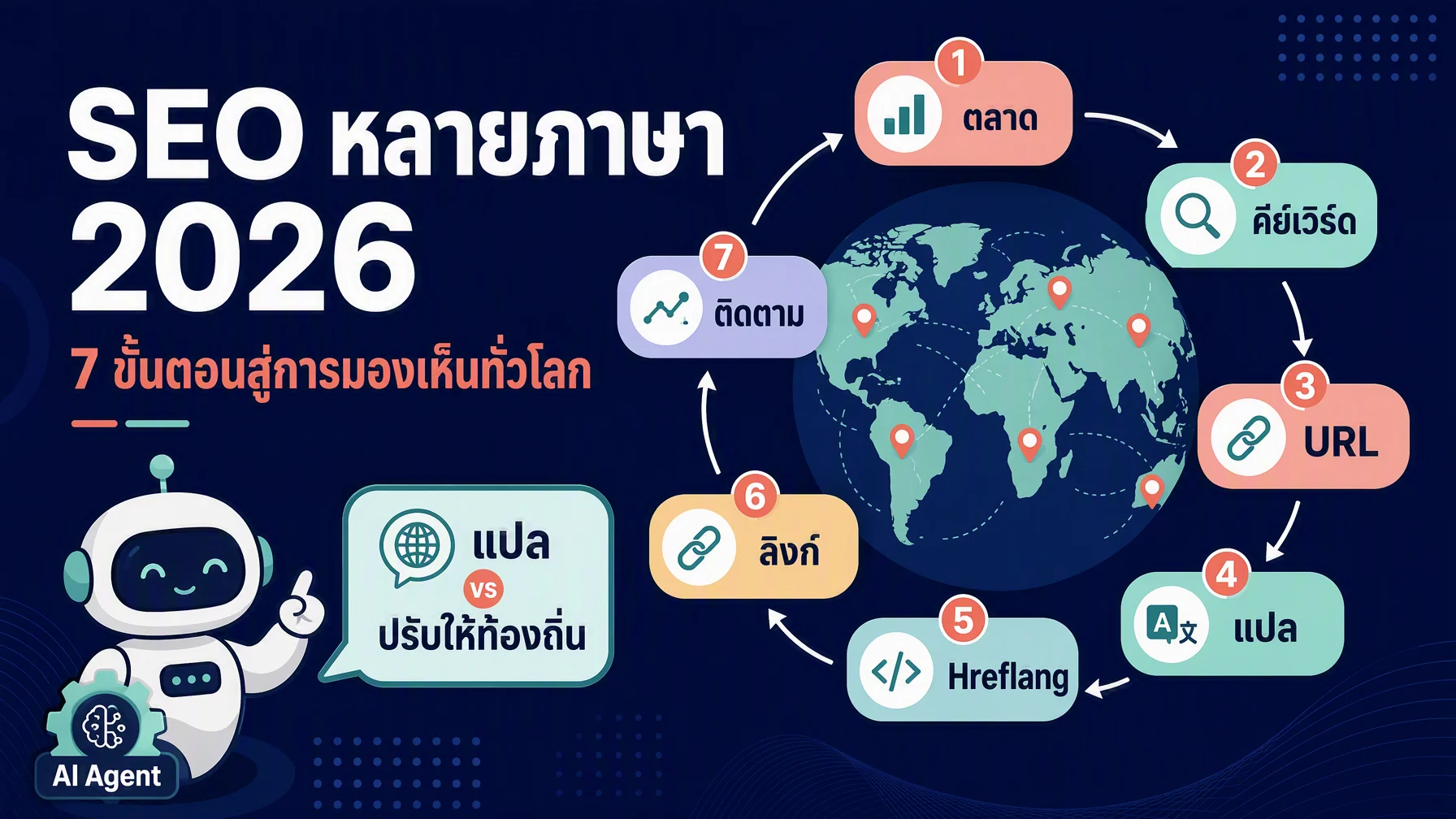
ในบทความนี้ คุณจะได้เรียนรู้เวิร์กโฟลว์ 7 ขั้นตอนเพื่อสร้างเว็บไซต์หลายภาษาที่ติดอันดับทั้งในการค้นหาแบบดั้งเดิมและคำตอบของ AI พร้อมด้วยสกิล AI Agent ที่พร้อมใช้งานสี่ตัวเพื่อทำงานที่น่าเบื่อที่สุดโดยอัตโนมัติ
Multilingual SEO vs. International SEO: ต่างกันอย่างไร?
คำสองคำนี้ถูกใช้สลับกันตลอดเวลา นี่คือข้อแตกต่าง:
Multilingual SEO | International SEO | |
|---|---|---|
เป้าหมาย | ผู้ใช้ที่พูดภาษาต่างกัน (สเปน, ฝรั่งเศส, เยอรมัน) | ผู้ใช้ในประเทศหรือภูมิภาคที่เฉพาะเจาะจง แม้จะใช้ภาษาเดียวกัน |
ตัวอย่าง | เว็บไซต์ที่มีเวอร์ชันอังกฤษ, สเปน และฝรั่งเศส | เว็บไซต์ที่มีหน้าแยกสำหรับสหรัฐฯ, สหราชอาณาจักร, แคนาดา และออสเตรเลีย — ทั้งหมดเป็นภาษาอังกฤษ |
เทคนิคหลัก | การแปล + Localization ต่อภาษา | เนื้อหาเฉพาะประเทศ + hreflang พร้อมรหัสภูมิภาค |
สัญญาณต่อเครื่องมือค้นหา | การระบุภาษา ( | การระบุภาษา + ภูมิภาค ( |
เว็บไซต์ระดับโลกส่วนใหญ่ต้องการทั้งสองอย่าง ร้านอีคอมเมิร์ซในแคนาดาอาจต้องการภาษาอังกฤษ (en-CA), ภาษาฝรั่งเศส (fr-CA) และเวอร์ชันภาษาสเปน (es) สำหรับผู้ชมที่พูดภาษาสเปนที่กำลังเติบโต — เป็นการผสมผสาน Multilingual SEO และ International SEO ในกลยุทธ์เดียว
ทำไม Multilingual SEO ถึงเปลี่ยนไปในปี 2025–2026
การเปลี่ยนแปลงสามประการได้เปลี่ยนโฉมสิ่งที่จำเป็นในการมองเห็นข้ามภาษาไปอย่างสิ้นเชิง:
การเปลี่ยนแปลงที่ 1: Google กำลังแปลเนื้อหาของคุณโดยอัตโนมัติ — และเก็บทราฟฟิกไว้
นับตั้งแต่ Core Update เดือนมีนาคม 2025 Google ได้ขยายพฤติกรรมการแปลอัตโนมัติอย่างมาก เมื่อผู้ใช้ค้นหาเป็นภาษาสเปนแต่ Google ไม่พบแหล่งข้อมูลภาษาสเปนที่แข็งแกร่ง Google จะดึงหน้าเพจภาษาอังกฤษที่มีความน่าเชื่อถือ แปลด้วยเครื่องมือทันที และแสดงผลผ่านโดเมนพร็อกซีของ Google (www-your-site-com.translate.goog)
ทราฟฟิกไม่เคยไปถึงเว็บไซต์ของคุณ การคลิกถูกบันทึกเป็น translate.google.com / referral แทนที่จะเป็น google / organic ซึ่งทำให้การระบุแหล่งที่มาของคุณเสียหาย ลิงก์ภายในบนหน้าพร็อกซีชี้กลับไปที่ Google ทำให้ผู้ใช้ยังคงอยู่ในระบบนิเวศของ Google
วิธีแก้ไขนั้นง่ายแต่เร่งด่วน: สร้างเวอร์ชันภาษาท้องถิ่นอย่างน้อย 300 คำสำหรับทุกหน้าที่มีทราฟฟิกสูง งานวิจัยของ Google เองชี้ให้เห็นว่าแม้แต่หน้าแปลที่น้อยที่สุดก็มักจะแทนที่เวอร์ชันพร็อกซีใน SERP ได้ ทำสิ่งนี้สำหรับหน้า 20 อันดับแรกของคุณก่อน
การเปลี่ยนแปลงที่ 2: AI Overviews ครอบคลุมทั่วโลก — และอ้างอิงแหล่งข้อมูลภาษาท้องถิ่น
Google AI Overviews ปรากฏในกว่า 200 ประเทศและ 40+ ภาษาแล้ว ภาษาของคำค้นหาเป็นหนึ่งในสัญญาณที่แข็งแกร่งที่สุดที่เอนจิ้น AI ใช้ตัดสินใจว่าจะอ้างอิงอะไร
การวิเคราะห์ของ Weglot จากการอ้างอิง AI Overviews 1.3 ล้านรายการพบว่า เว็บไซต์ที่มีเนื้อหาแปลแล้วมองเห็นได้มากขึ้น 327% ใน AI Overviews เมื่อเทียบกับเว็บไซต์ภาษาเดียว ในการศึกษาติดตามผลภาษาสเปนเม็กซิโก 96% ของการอ้างอิง Google AI Overviews เป็นแหล่งข้อมูลภาษาสเปน
นี่หมายความว่าการติดอันดับเป็นภาษาอังกฤษไม่ได้รับประกันการมองเห็นใน AI สำหรับคำค้นหาที่ไม่ใช่ภาษาอังกฤษอีกต่อไป — แม้ว่าเนื้อหาภาษาอังกฤษของคุณจะยอดเยี่ยมแค่ไหนก็ตาม
การเปลี่ยนแปลงที่ 3: AI Agent สามารถทำงานหนักแทนคุณได้แล้ว
Claude Code และ AI Coding Agent ที่คล้ายกันมีความสามารถมากพอที่จะทำงานที่น่าเบื่อที่สุดของ Multilingual SEO โดยอัตโนมัติ ในปี 2026 คุณสามารถรันพรอมต์เดียวและได้รับ:
- การตรวจสอบ hreflang เต็มรูปแบบทั่วทั้งไซต์ของคุณ
- การค้นหาคีย์เวิร์ดสำหรับภาษาใดๆ พร้อมปริมาณการค้นหาและป้ายระบุเจตนา
- การตรวจสอบคุณภาพการแปลที่เปรียบเทียบหน้าแปลของคุณกับคู่แข่งภาษาท้องถิ่น
- การเฝ้าติดตามการมองเห็นระดับนานาชาติรายสัปดาห์ครอบคลุมทั้งการค้นหาแบบดั้งเดิมและพื้นผิวคำตอบของ AI
เราจะแนะนำคุณผ่านแต่ละเวิร์กโฟลว์ Agent เหล่านี้พร้อมไฟล์สกิลที่สมบูรณ์พร้อมใช้งาน ในขั้นตอนต่อไป
ขั้นตอนที่ 1: เลือกตลาดเป้าหมาย (ด้วยข้อมูล ไม่ใช่การเดา)
ก่อนที่คุณจะแปลแม้แต่คำเดียว ให้หาว่าภาษาและตลาดใดมีความต้องการจริงสำหรับสิ่งที่คุณนำเสนอ
สิ่งที่คุณต้องการ
- Google Analytics 4 (GA4) หรือเครื่องมือวิเคราะห์ที่คล้ายกัน
- การเข้าถึง Google Search Console
- 15 นาที
วิธีการทำ
ตรวจสอบทราฟฟิกที่มีอยู่ของคุณ ใน GA4 ไปที่ Reports → Demographics → Demographic details จากนั้นเปลี่ยนมิติข้อมูลหลักเป็น "Country" มองหาประเทศที่ส่งทราฟฟิกออร์แกนิกมายังหน้าภาษาอังกฤษของคุณอย่างสม่ำเสมอ หากเยอรมนีส่งการเข้าชมออร์แกนิก 500 ครั้งต่อเดือนมายังเนื้อหาภาษาอังกฤษ ก็มีแนวโน้มว่าจะมีความต้องการเนื้อหาภาษาเยอรมันมากกว่า 3-5 เท่า
ตรวจสอบ Search Console ไปที่ Performance → Countries กรองตามคลิกและดู CTR เฉลี่ยต่อประเทศของคุณ CTR ที่ต่ำในประเทศที่ไม่ได้ใช้ภาษาอังกฤษมักหมายความว่าผู้ใช้พบหน้าของคุณแต่เด้งออกเพราะไม่ใช่ภาษาของพวกเขา
ให้คะแนนแต่ละตลาดตามปัจจัยสามประการ:
- ความต้องการที่มีอยู่ (1–5): มีทราฟฟิกออร์แกนิกจากประเทศหรือภาษานี้อยู่แล้วมากแค่ไหน?
- ช่องว่างการแข่งขัน (1–5): คู่แข่งในท้องถิ่นแข็งแกร่งแค่ไหน? ค้นหาคีย์เวิร์ด 5 อันดับแรกของคุณบนโดเมน Google ของประเทศเป้าหมาย (เช่น
google.de,google.fr) และนับจำนวนหน้าที่ปรากฏในหน้าแรกจากเว็บไซต์ที่เผยแพร่เป็นภาษาท้องถิ่นเป็นหลัก - ความเหมาะสมทางธุรกิจ (1–5): คุณจัดส่งไปที่นั่นหรือไม่? รองรับสกุลเงินนั้นหรือไม่? มีบริการลูกค้าในภาษานั้นหรือไม่?
คูณคะแนนทั้งสามเข้าด้วยกัน ตลาดที่ได้คะแนน 60+ ควรเป็นลำดับความสำคัญสูงสุดของคุณ 30–59 เป็นตัวเลือกในรอบที่สอง
ทำให้เป็นอัตโนมัติด้วย Claude Code
คัดลอกไฟล์สกิลด้านล่างนี้ไปไว้ที่ .claude/skills/multilingual-market-scorer/SKILL.md และรัน /multilingual-market-scorer ใน Claude Code:
---
name: multilingual-market-scorer
description: Analyze GA4 and GSC data to score and rank target markets for multilingual SEO expansion
---

# Multilingual Market Scorer

Score potential target markets using existing analytics data. This skill helps you prioritize which languages and countries to target first for multilingual SEO.

## Prerequisites
- User has shared GA4 and GSC data (CSV exports from each platform)
- User has defined their top 5 English-language target keywords
- User knows their business constraints (shipping regions, supported currencies, languages of customer support)

## Input
1. GA4 country-level organic traffic export (CSV)
2. GSC country-level performance export (CSV)
3. Top 5 target keywords in English
4. List of countries/regions where the business currently operates

## Workflow

### Phase 1: Extract demand signals
- Parse the GA4 CSV to extract: country, monthly organic sessions, conversion rate by country
- Parse the GSC CSV to extract: country, clicks, impressions, average CTR, average position
- Merge the two datasets on country name

### Phase 2: Score each market
For each country with measurable traffic:
- **Demand Score (1-5):** Based on monthly organic sessions. <100 = 1, 100-500 = 2, 500-2000 = 3, 2000-5000 = 4, 5000+ = 5
- **Opportunity Score (1-5):** Based on average CTR. Below 1% = 5 (high opportunity — users find you but can't read you), 1-2% = 4, 2-4% = 3, 4-7% = 2, 7%+ = 1
- **Business Fit Score (1-5):** User must provide this based on whether they operate in that country. Default to 3 if unknown.

### Phase 3: Rank and recommend
- Multiply Demand × Opportunity × Business Fit for a composite score (max 125)
- Tier 1 (60+): immediate priority — start localization for these markets
- Tier 2 (30–59): second-wave candidates — plan for next quarter
- Tier 3 (<30): monitor — revisit when Tier 1 and 2 are live
- Output a ranked table with: country, primary language, composite score, demand score, opportunity score, business fit score, recommended URL structure, estimated page count to localize

### Phase 4: Output a priority action plan
- Top 3 markets to target first, with recommended languages and URL structure
- List of pages to localize first (based on GSC top pages for each country)
- Estimated word count and translation budget (using current AI translation API pricing)
- Risk: list countries where high demand + low CTR exists but business doesn't operate — flag as strategic decisions

## Output
A structured report with:
1. Market prioritization table (all countries scored and tiered)
2. Top 3 recommended markets with rationale
3. First-wave localization page list (max 20 pages per market)
4. Estimated budget and timeline
5. Flagged strategic gaps

## Limitations
- All scores are estimates based on available data — real-world performance will vary
- Does not replace native-language market research or local competitive analysis
- GA4 and GSC data reflects current English-language performance, not latent non-English demand
- Does not access paid APIs; relies on user-provided CSV exports
ขั้นตอนที่ 2: ทำการค้นหาคีย์เวิร์ดสำหรับทุกภาษา (แม้แต่ภาษาที่คุณพูดไม่ได้)
การค้นหาคีย์เวิร์ดข้ามภาษาเคยต้องใช้ผู้เชี่ยวชาญ SEO ที่เป็นเจ้าของภาษาสำหรับทุกตลาด ในปี 2026 คุณสามารถทำงานได้ถึง 80% ด้วยเครื่องมือฟรีและความช่วยเหลือจาก AI — จากนั้นตรวจสอบกับเจ้าของภาษาสำหรับอีก 20% ที่เหลือ
กระบวนการ
เริ่มจากคีย์เวิร์ดภาษาอังกฤษอันดับต้นๆ ของคุณ นำคีย์เวิร์ด 10-20 ตัวที่ขับเคลื่อนทราฟฟิกออร์แกนิกมายังไซต์ภาษาอังกฤษของคุณมากที่สุด
แปล — แล้วทำ Localization ใช้ DeepL หรือ Google Translate เพื่อแปลคีย์เวิร์ดในขั้นแรก จากนั้นตรวจสอบคำแปลเทียบกับพฤติกรรมการค้นหาจริง:
- ไปที่โดเมน Google ของประเทศเป้าหมาย (เช่น
google.esสำหรับสเปน,google.deสำหรับเยอรมนี) - เริ่มพิมพ์คีย์เวิร์ดที่แปลแล้วลงในแถบค้นหา
- ดูคำแนะนำ Google Autocomplete — สิ่งเหล่านี้เผยให้เห็นว่าผู้ใช้จริงพิมพ์ค้นหาอย่างไร
- เลื่อนไปที่ด้านล่างของ SERP เพื่อดู "Related searches"
ตัวอย่าง: "Running shoes" เป็นภาษาเยอรมัน
- คำแปลตรงตัว: "Laufschuhe"
- Google.de autocomplete เผยให้เห็น: "Joggingschuhe," "Sportschuhe," "Laufschuhe Herren"
- ตอนนี้คุณมีคีย์เวิร์ดสามรูปแบบที่จะกำหนดเป้าหมาย ไม่ใช่แค่คำแปลตามตัวอักษร
ตรวจสอบปริมาณการค้นหา ใช้ Google Keyword Planner ที่ตั้งค่าเป็นประเทศเป้าหมาย หรือเครื่องมืออย่าง Ahrefs/Semrush ที่เปิดใช้ตัวกรองประเทศ ทางเลือกฟรี: ค้นหาคีย์เวิร์ดใน Google ของประเทศเป้าหมายและดูหน้าที่ติดอันดับสูงสุด — หากหน้าเหล่านั้นมีรายละเอียด อัปเดตบ่อย และมี backlink จำนวนมาก คีย์เวิร์ดนั้นน่าจะมีปริมาณการค้นหาที่มีความหมาย
ตรวจสอบกับเจ้าของภาษา สำหรับคีย์เวิร์ด 10 อันดับแรกต่อภาษา จ่ายเงินให้เจ้าของภาษา $20-50 บนแพลตฟอร์มอย่าง Upwork เพื่อตรวจสอบรายการคีย์เวิร์ดของคุณและชี้สิ่งที่ฟังดูไม่เป็นธรรมชาติหรือพลาดคำท้องถิ่นที่พบบ่อย การตรวจสอบ 15 นาทีนี้จับข้อผิดพลาดที่การแปลด้วย AI พลาดอย่างสม่ำเสมอ
ทำให้เป็นอัตโนมัติด้วย Claude Code
---
name: multilingual-keyword-research
description: Generate and validate localized keyword lists for any target language and country, using AI translation plus SERP validation
---

# Multilingual Keyword Research Agent

Generate a localized keyword research report for any target language and market. Combines AI translation with SERP validation steps to produce keyword lists that reflect how real users search.

## Prerequisites
- User has defined target country (ISO code) and language
- User has provided 10-20 seed keywords in English (or their source language)
- User has access to Google Keyword Planner, DataForSEO, or is comfortable with manual SERP checks
- No API keys needed for the basic workflow; DataForSEO integration is optional for automated volume data

## Input
1. Target country (e.g., `DE`, `ES`, `JP`) and language (e.g., `de`, `es`, `ja`)
2. 10-20 seed keywords in source language
3. Business category or industry (for context)
4. Optional: DataForSEO API credentials (for automated search volume data)

## Workflow

### Phase 1: Translate and expand seed keywords
For each seed keyword:
- Generate a first-pass translation into the target language using AI (note which model was used)
- Identify 3-5 natural variants: synonyms, longer-tail phrasings, question forms, local terminology
- Flag any keywords where the direct translation is likely different from how locals search

### Phase 2: SERP validation (manual or automated)
For each translated keyword:
- Check Google Autocomplete on the target country's Google domain — record top 5 suggestions
- Check "Related searches" at the bottom of the SERP — record all relevant terms
- If DataForSEO is available: query search volume, CPC, and competition for each keyword
- If DataForSEO is NOT available: note this and provide instructions for manual Keyword Planner lookup

### Phase 3: Cluster by search intent
Group keywords into:
- **Informational:** "what is X," "how to Y," guides, definitions
- **Commercial:** "best X," "X vs Y," reviews, comparisons
- **Transactional:** "buy X," "X price," "X near me," product names
- **Navigational:** brand names, specific site searches

### Phase 4: Prioritize
Score each keyword cluster on:
- Relevance to business (1-5)
- Estimated volume tier (Low/Medium/High — do not fabricate exact numbers if API data is unavailable)
- Competition level based on SERP analysis (number of well-optimized pages on page 1, ad density)
- Content gap: does the user already have content targeting this keyword in this language?

### Phase 5: Output a keyword map
For the top 20 keywords:
- Keyword in target language
- English translation (for the user's reference)
- Search intent category
- Volume tier (L/M/H)
- Recommended content type (landing page, blog post, product page, glossary entry)
- Existing URL if content already exists in any language that could be adapted

## Output
A structured keyword research report with:
1. Market overview: total keyword opportunities found, intent distribution, volume summary
2. Top 20 prioritized keywords with full metadata
3. Content mapping: which keywords map to which existing or new pages
4. Native-speaker validation checklist: top 10 keywords to send to a native speaker for review, with specific questions ("Does [keyword] sound natural? What would a local say instead?")
5. Data sources used, retrieval dates, and gaps (keywords where volume data was unavailable)

## Limitations
- AI translation of keywords is a starting point, not a final answer — always validate with a native speaker
- Search volume data is an estimate from the data provider; actual volumes vary by season and market conditions
- Does not access paid keyword APIs unless user has configured them; manual fallback instructions are provided
- Cannot capture ultra-niche local slang or emerging terms without native-speaker input
ขั้นตอนที่ 3: เลือกโครงสร้าง URL ที่เหมาะสม
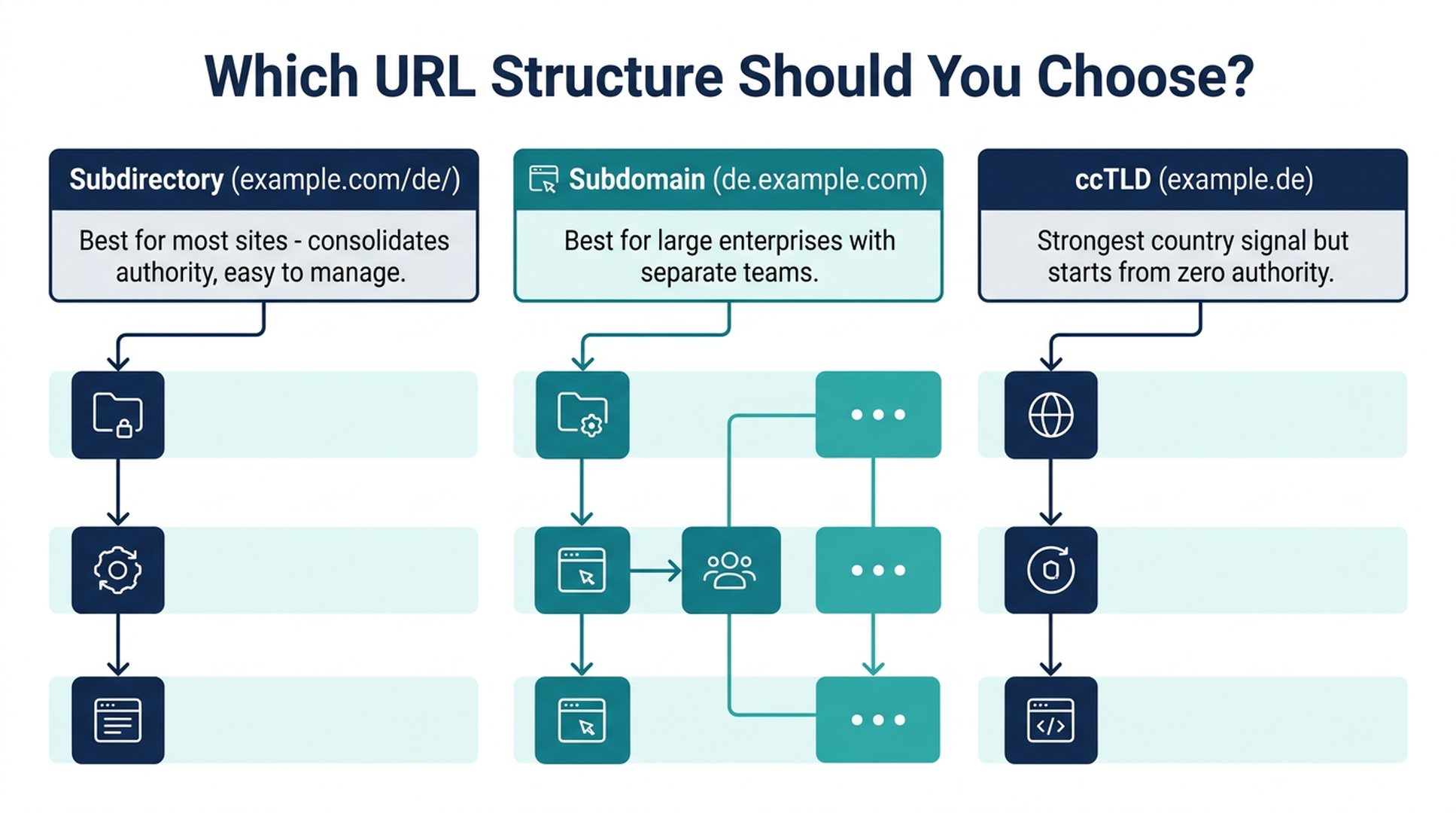
ทุกเวอร์ชันภาษาของหน้าต้องการ URL ของตัวเอง คุณมีสามตัวเลือก และตัวเลือกที่เหมาะสมขึ้นอยู่กับทรัพยากรและเป้าหมายของคุณ
สามตัวเลือก
โครงสร้าง | ตัวอย่าง | อำนาจ SEO | ต้นทุนและการบำรุงรักษา | ความเข้ากันได้กับ AI Crawler | เหมาะที่สุดสำหรับ |
|---|---|---|---|---|---|
Subdirectory |
| รวมศูนย์บนโดเมนเดียว — แข็งแกร่งที่สุดโดยรวม | ต่ำ — เซิร์ฟเวอร์เดียว, CMS เดียว | ยอดเยี่ยม — โดเมนเดียวกัน, สัญญาณพาธชัดเจน | เว็บไซต์ส่วนใหญ่; ธุรกิจที่กำลังเติบโต; ทีมต่ำกว่า 10 คน |
Subdomain |
| ถูกมองเป็นไซต์แยก — อำนาจถูกแบ่งข้ามซับโดเมน | ปานกลาง — โฮสติ้ง/คอนฟิกแยกต่อภาษา | ดี — แต่แต่ละซับโดเมนถูก Crawl แยกกัน | องค์กรขนาดใหญ่; เว็บไซต์ที่แต่ละภาษามีแคตตาล็อกสินค้าที่แตกต่างกันโดยสิ้นเชิง |
ccTLD |
| สัญญาณประเทศแข็งแกร่งที่สุดแต่เริ่มจากอำนาจศูนย์ต่อโดเมน | สูง — โดเมนแยก, โฮสติ้งแยก และมักเป็นนิติบุคคลแยก | ดี — แต่อำนาจต้องถูกสร้างจากศูนย์ต่อโดเมน | แบรนด์ที่มีสำนักงานท้องถิ่น; ตลาดที่ ccTLD เป็นสัญญาณความน่าเชื่อถือ (เยอรมนี, ญี่ปุ่น) |
คำแนะนำสำหรับผู้เริ่มต้น: ใช้ Subdirectory (example.com/de/, example.com/es/) มันตั้งค่าง่ายที่สุด ติดตามง่ายที่สุด และบำรุงรักษาง่ายที่สุด อำนาจ SEO ทั้งหมดสะสมบนโดเมนเดียว John Mueller ของ Google กล่าวอย่างสม่ำเสมอว่า Subdirectory ทำงานได้ดีสำหรับเว็บไซต์หลายภาษา
กฎสำคัญหนึ่งข้อ
ห้าม Redirect ผู้ใช้โดยอัตโนมัติตามที่อยู่ IP Googlebot Crawl จากที่อยู่ IP ของสหรัฐฯ เป็นหลัก หากคุณ Redirect Crawler ที่อยู่ในสหรัฐฯ ไปยังเวอร์ชันภาษาอังกฤษ Google จะไม่มีวันเห็นหน้าภาษาเยอรมันหรือญี่ปุ่นของคุณ ใช้ตัวเลือกภาษา/ภูมิภาค (แบนเนอร์หรือดรอปดาวน์) แทนการ Redirect แบบบังคับ
ขั้นตอนที่ 4: ทำ Localization — อย่าแค่แปล
การแปลแปลงคำ Localization ปรับความหมาย บริบท ตัวอย่าง และการอ้างอิงทางวัฒนธรรม ในปี 2026 ความแตกต่างนี้กำหนดว่า Google จะแสดงหน้าของคุณหรือเวอร์ชันพร็อกซีที่แปลอัตโนมัติของตัวเอง
ภูมิทัศน์การแปลด้วย AI ในปี 2026
เครื่องมือ | วิธีการ | การสร้าง Hreflang อัตโนมัติ | Server-Side Rendering | เหมาะที่สุดสำหรับ | ราคาเริ่มต้น |
|---|---|---|---|---|---|
DeepL | Neural machine translation API | ไม่ (ต้องทำแยกต่างหาก) | N/A (API — คุณควบคุมการเรนเดอร์) | การแปลขั้นแรกคุณภาพสูง; คู่ภาษายุโรป | Free tier; Pro จาก ~$9/เดือน |
Weglot | บนคลาวด์, หลายเอนจิ้น (DeepL + Google + Gemini + OpenAI) + โมเดล AI ที่เรียนรู้เสียงแบรนด์ | ใช่ — อัตโนมัติ | ใช่ — เลเยอร์พร็อกซีเรนเดอร์ HTML จริง | โซลูชันครบวงจร; ผู้เริ่มต้นที่ต้องการตั้งค่าในไม่ถึงชั่วโมง | จาก $17/เดือน |
GTranslate | เอนจิ้น Google Translate ผ่านเลเยอร์พร็อกซี | ใช่ — ในแผนแบบชำระเงิน | ใช่ — ในแผนแบบชำระเงิน | ตัวเลือกประหยัด; เว็บไซต์เรียบง่าย | ฟรี (ไม่ถูก Index); แบบชำระเงินจาก ~$8/เดือน |
WPML | ปลั๊กอิน WordPress — การแปลที่เก็บในฐานข้อมูล | ตั้งค่าเอง | ใช่ (WordPress ดั้งเดิม) | เว็บไซต์ WordPress ที่มีทีมแปลภายใน | จาก ~$39/ปี |
TranslatePress | ปลั๊กอิน WordPress — ตัวแก้ไขภาพส่วนหน้า | ตั้งค่าเอง | ใช่ (WordPress ดั้งเดิม) | ผู้เริ่มต้น WordPress ที่ต้องการการแก้ไขแบบภาพ | ฟรี; Pro จาก ~$8/เดือน |
เวิร์กโฟลว์การแปลด้วย AI ที่ปลอดภัย
การแปลด้วย AI รวดเร็วและถูก แต่การเผยแพร่ผลลัพธ์ AI ดิบๆ มีความเสี่ยง นโยบายของ Google ไม่ได้แบนเนื้อหาที่แปลด้วย AI แต่ลงโทษการแปลคุณภาพต่ำ นี่คือเวิร์กโฟลว์ที่ปลอดภัย:
- AI รอบแรก: ใช้ DeepL, Weglot หรือ ChatGPT/Claude เพื่อแปลหน้า
- ตรวจสอบ QA อัตโนมัติ: รัน Claude Code Translation Quality Agent (ดูด้านล่าง) เพื่อตรวจสอบ: ส่วนที่ไม่ได้แปล, การละเมิดอภิธานศัพท์, ปัญหาการขยายข้อความ (ภาษาเยอรมันยาวกว่าภาษาอังกฤษ ~30%), และการแปล Metadata ที่ขาดหายไป
- การตรวจสอบโดยมนุษย์สำหรับหน้าที่มีผลกระทบสูง: หน้าแรก, หน้าราคา, หน้ากฎหมาย และหน้า 5 อันดับแรกที่มีทราฟฟิกสูงสุดได้รับการตรวจสอบจากเจ้าของภาษา โพสต์บล็อก, FAQ และเอกสารช่วยเหลือสามารถใช้ AI + QA อัตโนมัติ
- ตรวจสอบ Metadata ซ้ำอีกครั้ง: AI มักจะทิ้ง Meta Title, Meta Description, Image Alt Text และ URL Slug ไว้ในภาษาต้นทาง สิ่งเหล่านี้ต้องแปลและทำ Localization ด้วยตนเอง — เพราะเป็นสิ่งที่ปรากฏใน SERP
Translation Quality Check Agent
---
name: translation-quality-check
description: Audit AI-translated pages for common quality issues — missing translations, glossary violations, text expansion, metadata gaps, and localization consistency
---

# Translation Quality Check Agent

Review AI-translated or human-translated pages for common multilingual SEO quality issues. Produces a prioritized fix list.

## Prerequisites
- User provides URLs or HTML files of both source and translated pages
- User optionally provides a glossary file (CSV: source_term, target_term, notes)
- User specifies source language and target language

## Input
1. Source page URL or HTML file path
2. Translated page URL or HTML file path (can be multiple target languages)
3. Source language code (ISO 639-1)
4. Target language code(s) (ISO 639-1)
5. Optional: glossary CSV for terminology consistency
6. Optional: brand voice guide or translation memory notes

## Workflow

### Phase 1: Structural check
For each translated page:
- Verify the page has a unique, translated URL (not the same URL as the source)
- Verify the HTML `lang` attribute matches the target language
- Verify the page serves real HTML (not client-side JS translation) — check if translated text is present in the raw HTML source
- Check that all meta tags are translated: `<title>`, `<meta name="description">`, `<meta property="og:title">`, `<meta property="og:description">`

### Phase 2: Content coverage check
Compare source and translated pages:
- Count `<h1>` through `<h4>` headings — verify all are translated
- Check image `alt` attributes — flag any still in the source language
- Check button text, form labels, error messages, footer links — these are frequently missed
- Check structured data (JSON-LD) — flag if schema content is in the source language

### Phase 3: Translation quality indicators
Flag potential quality issues:
- **Untranslated segments:** Text blocks in the source language appearing on the translated page
- **Text expansion/truncation:** Compare character counts of key elements (titles, CTAs, navigation items). Flag elements where the target language is >40% longer (risk of truncation in SERPs and UI)
- **Glossary violations:** If a glossary is provided, check that defined terms use the approved translation
- **Inconsistent terminology:** The same source term translated differently across the page (e.g., "checkout" translated as both "Kasse" and "Zur Kasse gehen" on the same German page)

### Phase 4: Localization depth check
Score the page on localization quality (not just translation accuracy):
- **Examples and references:** Are case studies, statistics, and examples localized or still US/UK-centric?
- **Currency, dates, measurements:** Are these in local format?
- **Cultural markers:** Currency symbols, address formats, phone number formats
- **Images:** Do images contain text in the target language, or are they still in the source language?

### Phase 5: Output a prioritized fix list
Categorize issues:
- **Critical (fix before launch):** Missing hreflang, untranslated title/meta, wrong lang attribute, client-side-only rendering
- **High (fix within 1 week):** Untranslated headings, missing alt text, schema in wrong language
- **Medium (fix within 1 month):** Inconsistent terminology, untranslated UI text, text expansion risks
- **Low (improvement backlog):** Non-localized examples, source-language images, formats

## Output
A structured quality report with:
1. Overall quality score (A–F) and summary
2. Critical issues list (with exact element locations)
3. High-priority issues list
4. Comparison table: source vs. translated page element-by-element
5. Native-speaker review checklist: specific sections to prioritize if budget is limited
6. Estimated fix time per priority tier

## Limitations
- Automated check cannot assess naturalness, idiomatic quality, or cultural nuance — a native speaker is still needed for final review
- Glossary matching is exact-string only; won't catch inflected forms without a comprehensive glossary
- Does not evaluate translation accuracy against a reference translation — this is a coverage and consistency check, not a fluency evaluation
ขั้นตอนที่ 5: ติดตั้ง Hreflang Tags (และหลีกเลี่ยงข้อผิดพลาดที่พบบ่อยที่สุด 8 ประการ)
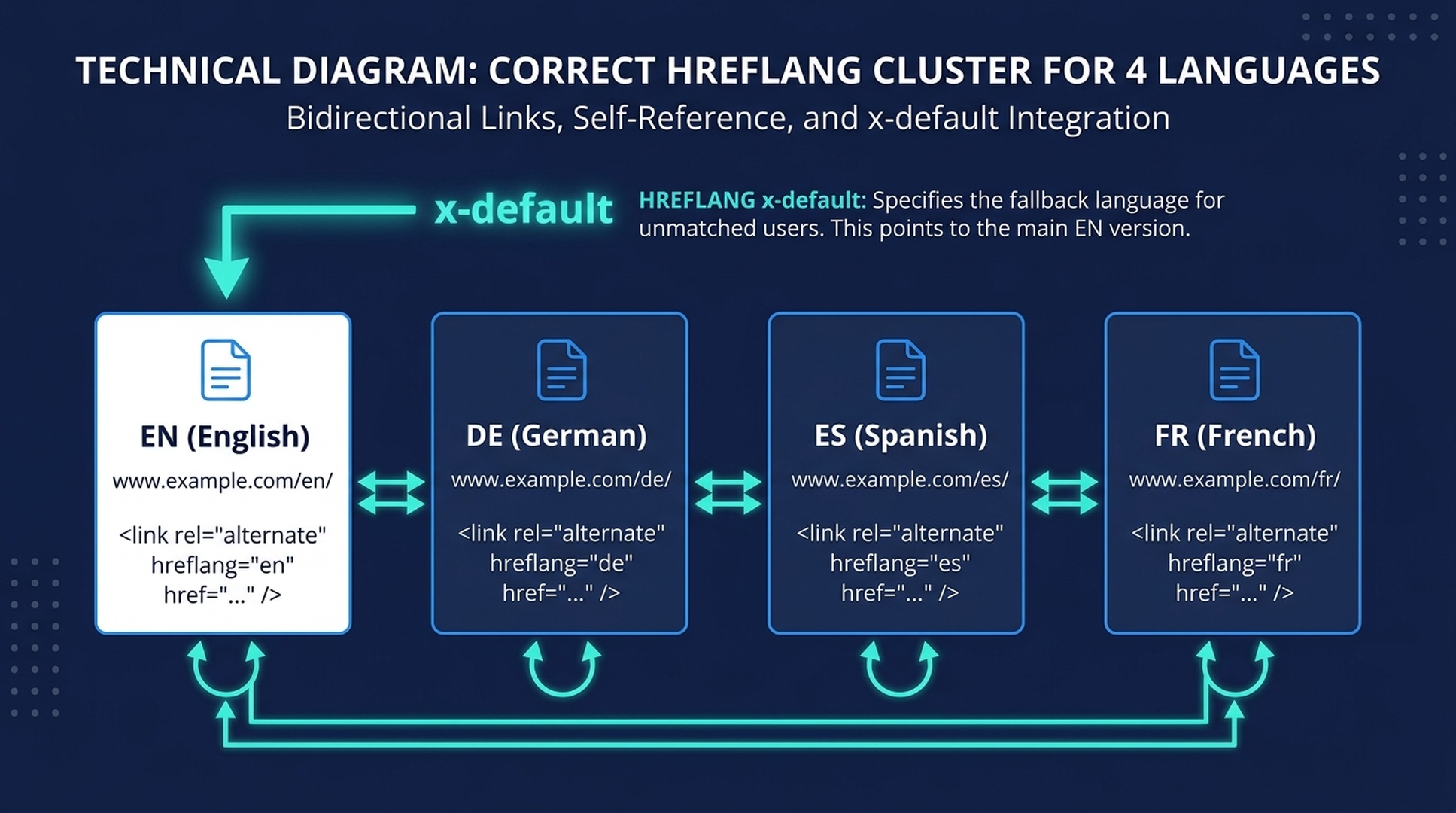
Hreflang Tags บอกเครื่องมือค้นหาว่า: "หน้านี้คือเวอร์ชันภาษาเยอรมันของหน้าภาษาอังกฤษหน้านั้น" หากไม่มีมัน Google อาจแสดงภาษาที่ผิดให้ผู้ใช้ — หรือปฏิบัติต่อเวอร์ชันภาษาเสมือนเป็นเนื้อหาซ้ำและ Index เพียงเวอร์ชันเดียว
สามวิธีในการติดตั้ง Hreflang
1. HTML `<link>` Tags (ดีที่สุดสำหรับเว็บไซต์ส่วนใหญ่)
เพิ่มสิ่งเหล่านี้ภายใน <head> ของทุกหน้า:
<link rel="alternate" href="https://example.com/blog/" hreflang="x-default">
<link rel="alternate" href="https://example.com/blog/" hreflang="en">
<link rel="alternate" href="https://example.com/blog/de/" hreflang="de">
<link rel="alternate" href="https://example.com/blog/es/" hreflang="es">
<link rel="alternate" href="https://example.com/blog/fr/" hreflang="fr">
สำคัญยิ่ง: ทุกหน้าต้องอ้างอิงตัวเองด้วย หน้าภาษาเยอรมัน (/de/) ต้องรวมชุดแท็กเดียวกันนี้ทุกประการ — รวมถึงแท็กที่ชี้ไปที่ตัวเองด้วย hreflang="de" สิ่งนี้เรียกว่า Self-Referencing Tag และ Google กำหนดให้ต้องมี
2. XML Sitemaps (ดีที่สุดสำหรับ 20+ ภาษา)
หากคุณจัดการเวอร์ชันภาษาหลายสิบเวอร์ชัน การดูแลรักษา <link> Tags ในทุกหน้าจะยุ่งยาก ใช้ XML Sitemap แทน:
<url>
  <loc>https://example.com/blog/</loc>
  <xhtml:link rel="alternate" hreflang="en" href="https://example.com/blog/"/>
  <xhtml:link rel="alternate" hreflang="de" href="https://example.com/blog/de/"/>
  <xhtml:link rel="alternate" hreflang="es" href="https://example.com/blog/es/"/>
  <xhtml:link rel="alternate" hreflang="x-default" href="https://example.com/blog/"/>
</url>
3. HTTP Headers (สำหรับไฟล์ที่ไม่ใช่ HTML)
ใช้สำหรับ PDF, รูปภาพ หรือ API Responses:
Link: <https://example.com/brochure.pdf>; rel="alternate"; hreflang="en"
Link: <https://example.com/brochure-de.pdf>; rel="alternate"; hreflang="de"
ข้อผิดพลาด Hreflang ที่พบบ่อยที่สุด 8 ประการ
# | ข้อผิดพลาด | ทำไมมันถึงพัง | วิธีแก้ไข |
|---|---|---|---|
1 | ขาด Self-Referencing Tag | แต่ละหน้าต้องรวมตัวเองในชุด hreflang ของตัวเอง หากไม่มี Google อาจไม่สนใจทั้งคลัสเตอร์ | เพิ่ม |
2 | แท็กไม่เป็นสองทิศทาง (Non-Bidirectional/Reciprocal) | หากหน้า A ชี้ไปที่หน้า B หน้า B ต้องชี้กลับมาที่หน้า A ลิงก์ย้อนกลับที่ขาดหายไปเพียงตัวเดียวทำลายทั้งห่วงโซ่ | ตรวจสอบด้วย Hreflang Agent ด้านล่าง — มันตรวจสอบความเป็นสองทิศทางสำหรับทุกคู่ |
3 | รหัสภาษา/ภูมิภาคไม่ถูกต้อง |
| ใช้ ISO 639-1 สำหรับภาษา ( |
4 | ขาดแท็ก | หากไม่มี Fallback ผู้ใช้จากภูมิภาคที่ไม่ได้ระบุไว้อาจเห็นเวอร์ชันที่ผิด | รวม |
5 | Hreflang ชี้ไปยังหน้าที่ไม่ใช่ Canonical | หาก | ตรวจสอบให้แน่ใจว่าทุก Hreflang URL เป็นเวอร์ชัน Canonical ของหน้านั้น |
6 | Hreflang ชี้ไปยัง 404 หรือ Redirect | การเปลี่ยน URL หนึ่งครั้งในไซต์ 10 ภาษาสร้างการอ้างอิง hreflang ที่เสียหายถึง 20 จุด | Hreflang Audit Agent จับลิงก์ที่เสียหายทั้งหมดข้ามเวอร์ชันภาษา |
7 | Canonical ข้ามภาษา | หน้าภาษาเยอรมันที่มี | Canonical ของทุกเวอร์ชันภาษาต้องชี้ไปยัง URL ของตัวเอง |
8 | HTML lang ไม่ตรงกัน |
| จับคู่แอตทริบิวต์ |
Hreflang Audit Agent (ทำให้งานน่าเบื่อเป็นอัตโนมัติ)
นี่คือ Agent ที่ให้ผลตอบแทนสูงสุดในชุดเครื่องมือ การตรวจสอบ Hreflang ด้วยตนเองบนเว็บไซต์ 5 ภาษาที่มี 50 หน้าต่อภาษา หมายถึงการตรวจสอบ 250 หน้า — แต่ละหน้ามีแท็ก Hreflang มากถึง 5 แท็กที่ต้องเป็นแบบสองทิศทาง, อ้างอิงตัวเอง และไม่มีข้อผิดพลาด Agent ทำงานนี้ในไม่กี่นาที
---
name: hreflang-auditor
description: Crawl and audit hreflang implementation across an entire multilingual site — catch broken links, missing return tags, invalid codes, canonical conflicts, and generate fix-ready reports
---

# Hreflang Audit Agent

Crawl a multilingual website and audit every hreflang tag against Google's requirements. Produces a fix-ready report with exact URLs, error types, and severity ratings.

## Prerequisites
- User provides the base URL of the site (any language version — the agent will discover others via hreflang links)
- User confirms which URL structure is in use (subdirectory, subdomain, or ccTLD)
- No API keys required — uses HTTP requests and HTML parsing

## Input
1. Base URL of the website (e.g., `https://example.com/` or `https://example.com/de/`)
2. Known language codes if not all are discoverable (e.g., `["en", "de", "es", "fr", "ja"]`)
3. Optional: sitemap URL if hreflang is implemented via XML sitemaps
4. Optional: ignore list — URL patterns to skip (e.g., `/tag/`, `/author/`, `/page/`)

## Workflow

### Phase 1: Discover all language versions
- Crawl the provided base URL
- Extract all hreflang links from `<link rel="alternate" hreflang="...">` tags in the HTML `<head>`
- If XML sitemap is provided, also extract hreflang clusters from the sitemap
- Build a language-page matrix: every URL × every language version

### Phase 2: Validate each page in the cluster
For every page in the matrix, check these 8 rules:

1. **Self-referencing:** The page's own hreflang value points to its own canonical URL
2. **Bidirectionality:** For every pair (A→B), verify B→A exists
3. **Valid codes:** Language code matches ISO 639-1; region code matches ISO 3166-1 Alpha-2
4. **x-default present:** At least one page in the cluster has `hreflang="x-default"`
5. **Canonical alignment:** Each hreflang URL is the canonical version (not a parameterized or alternate URL)
6. **HTTP status:** Every hreflang URL returns 200 (not 301, 302, 404, or 500)
7. **No cross-language canonicals:** Each page's canonical points to a URL in the same language
8. **HTML lang match:** The `<html lang="...">` attribute value is consistent with the page's hreflang value

### Phase 3: Check for structural issues
- **Inconsistent clusters:** Pages that don't have the same set of hreflang tags as others in their cluster
- **Orphan pages:** Translated pages that exist but aren't referenced by any hreflang cluster
- **Chained redirects:** Hreflang URLs that redirect (301/302) — these should point directly to the final URL
- **Protocol mismatches:** HTTP vs HTTPS inconsistencies across the hreflang set

### Phase 4: Generate the fix report
For each issue found, output:
- Error type (from the 8 rules above)
- Severity: **Critical** (breaks the entire cluster), **High** (wrong page may be served), **Medium** (compliance issue), **Low** (best-practice deviation)
- Source URL (where the error was found)
- Target URL (the problematic hreflang link)
- Fix instruction: exact code or configuration change needed

### Phase 5: Generate corrected hreflang tags
For clusters with fixable errors:
- Output the corrected set of `<link>` tags for each page
- Output the corrected XML sitemap entries if applicable
- Flag clusters that cannot be auto-fixed (e.g., missing pages that need to be created first)

## Output
A structured audit report with:
1. Executive summary: total pages crawled, language versions found, errors by severity, overall health score (A–F)
2. Error table: each error with type, severity, source URL, target URL, and fix instruction
3. Cluster-by-cluster health: each page cluster with pass/fail per rule
4. Auto-generated fix code: corrected hreflang tags for every broken page
5. Prioritized action plan: which errors to fix first and why

## Limitations
- Crawls only linked pages within the hreflang clusters it discovers; pages without hreflang tags that should have them won't be found
- Cannot fix pages server-side — output is advisory only
- For JavaScript-rendered hreflang tags, the raw HTML approach won't work — use the XML sitemap method instead
- Does not check if the *content* of each language version is actually translated (use the translation quality agent for that)
ขั้นตอนที่ 6: สร้างลิงก์ท้องถิ่นและโครงสร้างลิงก์ภายใน
ลิงก์จากเว็บไซต์เยอรมันช่วยให้หน้าภาษาเยอรมันของคุณติดอันดับ ลิงก์จากเว็บไซต์ญี่ปุ่นช่วยให้หน้าภาษาญี่ปุ่นของคุณติดอันดับ แต่ละเวอร์ชันภาษาสร้างพูลอำนาจของตัวเอง
กฎการลิงก์ภายในสำหรับเว็บไซต์หลายภาษา
อยู่ภายในภาษาเดียวกัน โพสต์บล็อกภาษาเยอรมันควรลิงก์ไปยังหน้าภาษาเยอรมันอื่นๆ ไม่ใช่หน้าภาษาอังกฤษ ลิงก์ภายในข้ามภาษาทำให้ทั้งผู้ใช้และเครื่องมือค้นหาสับสน ใช้ Hreflang Tags — ไม่ใช่ลิงก์ในเนื้อหา — เพื่อเชื่อมต่อเวอร์ชันภาษา
อย่างน้อย 5 ลิงก์ภายในต่อหน้า ภาษาเดียวกัน ทุกหน้าที่แปลควรได้รับลิงก์จากอย่างน้อย 3-5 หน้าอื่นในภาษาเดียวกัน สิ่งนี้ป้องกันหน้า Orphan — ปัญหาที่พบบ่อยเมื่อเว็บไซต์แปลเนื้อหาแต่ลืมแปลบริบทการนำทาง
การเปลี่ยน URL หนึ่งครั้งส่งผลกระทบเป็นลูกโซ่ หากคุณเปลี่ยน URL บนไซต์ภาษาอังกฤษของคุณและมี 10 ภาษาลิงก์ภายในไปยังหน้านั้น นั่นคือลิงก์เสีย 10 จุด Hreflang Audit Agent ด้านบนจับสิ่งเหล่านี้ — รันทุกสัปดาห์หากคุณกำลังเผยแพร่อย่างต่อเนื่อง
การสร้างลิงก์ภายนอกต่อภาษา
คุณไม่จำเป็นต้องมีแคมเปญสร้างลิงก์แยกสำหรับทุกภาษา เริ่มด้วยสามแนวทางนี้:
- ไดเรกทอรีท้องถิ่นและแพลตฟอร์มรีวิว: ทุกประเทศมีระบบนิเวศของไดเรกทอรีธุรกิจ เว็บไซต์รีวิว และพอร์ทัลอุตสาหกรรมของตัวเอง ลงทะเบียนโปรไฟล์ของคุณ สิ่งเหล่านี้คือลิงก์ที่ได้มาง่ายและมักติดอันดับดีในท้องถิ่น
- การขุด Backlink คู่แข่ง: ใช้ Ahrefs หรือ Semrush เพื่อดึงโปรไฟล์ Backlink ของคู่แข่งอันดับต้นๆ ของคุณในแต่ละประเทศเป้าหมาย กรองเฉพาะโดเมนท้องถิ่น (
.de,.fr,.jp) สิ่งเหล่านี้คือผลไม้ที่ห้อยต่ำที่สุดของคุณ - PR ท้องถิ่นและการเขียน Guest Post: Guest Post ที่มีคุณภาพหนึ่งชิ้นบนสื่อสิ่งพิมพ์ท้องถิ่นที่มีชื่อเสียงมีค่ามากกว่า 50 ลิงก์ไดเรกทอรีคุณภาพต่ำ ให้ความสำคัญกับคุณภาพมากกว่าปริมาณ — โดยเฉพาะในตลาดขนาดเล็กที่กราฟลิงก์ไม่หนาแน่น
ขั้นตอนที่ 7: ติดตามอันดับ ทราฟฟิก และการมองเห็นใน AI ต่อภาษา
การติดตาม SEO แบบดั้งเดิม (อันดับ + ทราฟฟิกออร์แกนิก) ยังคงจำเป็น แต่ในปี 2026 คุณต้องเฝ้าติดตามด้วยว่าเอนจิ้น AI กำลังอ้างอิงเนื้อหาของคุณในแต่ละภาษาหรือไม่
การตั้งค่าการติดตามแบบดั้งเดิม
- Google Search Console: ใช้ตัวกรอง Country ในรายงาน Performance สร้าง Property แยกหรือใช้รายงาน International Targeting เพื่อดูข้อผิดพลาดเฉพาะ hreflang
- GA4: สร้างรายงานที่กำหนดเองที่แสดง Sessions, Conversions และ Bounce Rate — แยกตาม Prefix พาธของหน้า (
/de/,/es/,/fr/) เพื่อดูประสิทธิภาพต่อภาษา - การติดตามอันดับ: Ahrefs, Semrush หรือ SE Ranking — เพิ่มคีย์เวิร์ดเป้าหมายของคุณด้วยการติดตามระดับประเทศ ตรวจสอบตำแหน่งรายเดือนสำหรับภาษารอบสอง รายสัปดาห์สำหรับตลาดลำดับความสำคัญสูงสุด
การติดตามการมองเห็นใน AI (สิ่งใหม่ในปี 2026)
สำหรับพื้นผิวคำตอบของ AI ให้ติดตามสามเมตริกนี้ต่อภาษา:
- การปรากฏในการอ้างอิง: เมื่อมีคนถามเกี่ยวกับหมวดหมู่ของคุณในภาษาเป้าหมายบน ChatGPT, Perplexity หรือ Gemini — แบรนด์ของคุณปรากฏในคำตอบหรือไม่? ติดตามใช่/ไม่ใช่ สำหรับคีย์เวิร์ด 10 อันดับแรกของคุณต่อแพลตฟอร์ม ต่อภาษา รายเดือน
- ส่วนแบ่งเสียง (Share of Voice): หากมี 5 แบรนด์ถูกอ้างอิงใน AI Overviews ภาษาสเปนสำหรับหมวดหมู่ของคุณ แบรนด์ของคุณถูกกล่าวถึงกี่เปอร์เซ็นต์? นี่คือ SOV ของคุณ
- ความถูกต้องและ Sentiment: เมื่อเอนจิ้น AI อ้างอิงแบรนด์ของคุณในภาษาอื่น ข้อมูลถูกต้องหรือไม่? ระบบ AI บางครั้งผสมเนื้อหาข้ามภาษา — การกล่าวอ้างผลิตภัณฑ์ของสหรัฐฯ อาจปรากฏในคำตอบภาษาเยอรมัน ซึ่งสร้างความเสี่ยงด้าน Compliance
International Visibility Monitoring Agent
---
name: international-visibility-monitor
description: Track multilingual search visibility across traditional SERPs and AI answer surfaces — generate weekly or monthly visibility reports per language and market
---

# International Visibility Monitor

Monitor how your site performs across languages in both traditional search and AI answer surfaces. Generates structured reports that track rankings, traffic, and AI citation presence per market.

## Prerequisites
- Google Search Console access (user provides CSV exports or grants view access)
- GA4 access (user provides CSV exports of language-segmented traffic)
- Optional: Ahrefs/Semrush/DataForSEO API access for automated rank tracking
- No API keys needed for manual data imports

## Input
1. Target languages and countries to monitor
2. Top 10-20 keywords per language
3. GSC performance export (CSV, filtered by country)
4. GA4 traffic-by-language export (CSV)
5. Optional: rank tracking API credentials
6. Previous monitoring report (for trend comparison)

## Workflow

### Phase 1: Collect traditional search data
- Parse GSC CSV: extract clicks, impressions, CTR, and average position per country and per language subdirectory
- Parse GA4 CSV: extract sessions, conversions, and engagement rate per language version
- If rank tracking API is available: pull current positions for tracked keywords per country
- If rank tracking API is NOT available: flag this and provide manual lookup instructions

### Phase 2: AI visibility check (manual or automated)
For each target language and its top 5 keywords:
- Document whether the brand appears in Google AI Overviews for those queries (search from the target country's Google domain)
- If tool access permits: check Perplexity and ChatGPT for the same queries
- Record: cited or not cited, which URL was cited, whether the citation is accurate
- Note any cross-language contamination (e.g., English URL cited for a Spanish query)

### Phase 3: Competitor visibility snapshot
For the top 3 competitors in each target market:
- Record their ranking positions for your shared keywords
- Check their AI Overview citation presence for the same keywords
- Flag competitors gaining or losing visibility month-over-month

### Phase 4: Trend analysis
Compare current data against the previous period:
- Traffic change per language (%)
- Ranking change per tracked keyword (positions gained/lost)
- AI citation presence change (new citations won, citations lost)
- Competitor movement (major gains or losses)

### Phase 5: Generate the report
Output a structured visibility report with:
1. **Executive dashboard:** One table with all languages and their key metrics (traffic, avg position, AI citations, trend arrows)
2. **Language deep-dives:** Per-language breakdown of top keywords, ranking changes, AI visibility status, and competitor activity
3. **Alert section:** Red-flag items needing immediate attention — traffic drops >20%, lost AI citations, hreflang errors found in GSC, competitors gaining on top keywords
4. **Action items:** Specific, prioritized tasks based on findings (e.g., "German blog post at position 11 for 'beste Laufschuhe' — optimize and add internal links to push into top 10")

## Output
A structured monitoring report with:
1. Multi-language dashboard (all languages, key metrics, trend arrows)
2. Per-language detailed section with keyword rankings, AI citations, and competitor snapshots
3. Red-flag alerts
4. Prioritized action items with expected impact
5. Data freshness: when each data source was last updated, and gaps where data is missing

## Limitations
- AI visibility checks are point-in-time snapshots — AI answers change frequently and may differ between queries minutes apart
- Rank tracking without an API requires manual lookups; automated rank data depends on third-party API availability
- GSC and GA4 data have inherent lag (24-48 hours for GSC, up to 48 hours for GA4)
- AI citation tracking is observational, not exhaustive — no tool currently provides complete AI citation coverage across all platforms
ชุดเครื่องมือ Multilingual SEO Agent: ทั้ง 4 สกิลโดยสรุป
นี่คือบทสรุปของสกิล Agent สี่ตัวที่คุณสามารถใช้งานได้ทันทีกับ Claude Code แต่ละไฟล์ใส่ไว้ใน .claude/skills/<skill-name>/SKILL.md:
สกิล | ทำอะไร | รันเมื่อไหร่ | เวลาที่ประหยัดได้ |
|---|---|---|---|
| ให้คะแนนประเทศ/ภาษาตามความต้องการ โอกาส และความเหมาะสมทางธุรกิจ | ก่อนเริ่มงานแปลใดๆ | 3-5 ชั่วโมง |
| สร้างรายการคีย์เวิร์ดที่ทำ Localization แล้วพร้อมการจัดกลุ่มตามเจตนาและการตรวจสอบ SERP | ก่อนสร้างเนื้อหาในภาษาใหม่ | 4-8 ชั่วโมงต่อภาษา |
| ตรวจสอบหน้าที่แปลแล้วเพื่อหาปัญหาโครงสร้าง การแปลที่ขาดหาย และความสม่ำเสมอของคำศัพท์ | หลังการแปลด้วย AI ก่อนเผยแพร่ | 2-4 ชั่วโมงต่อชุด |
| Crawl และตรวจสอบทุก Hreflang Tag เทียบกับข้อกำหนด 8 ข้อของ Google | ก่อนเปิดตัวและรายสัปดาห์หลังจากนั้น | 6-10 ชั่วโมงต่อการตรวจสอบ |
| ติดตามอันดับ ทราฟฟิก และการอ้างอิงใน AI ต่อภาษา พร้อมการวิเคราะห์แนวโน้ม | รายสัปดาห์หรือรายเดือน | 3-5 ชั่วโมงต่อรายงาน |
วิธีติดตั้งสกิลใดๆ: คัดลอกเนื้อหา SKILL.md จากส่วนต่างๆ ด้านบน บันทึกไปที่ .claude/skills/<skill-name>/SKILL.md ในโปรเจกต์ของคุณ และรันด้วย /skill-name ใน Claude Code แต่ละสกิลทำงานแยกอิสระ — เริ่มด้วย hreflang-auditor หากไซต์ของคุณเป็นหลายภาษาอยู่แล้ว หรือ multilingual-market-scorer หากคุณกำลังวางแผนขยาย
รายการตรวจสอบสำหรับผู้เริ่มต้น: 15 สิ่งที่ต้องตรวจสอบก่อนเปิดตัว
ใช้รายการตรวจสอบนี้ก่อนเปิดตัวเวอร์ชันภาษาใหม่ใดๆ:
- [ ] เลือกตลาดเป้าหมายโดยใช้ข้อมูล (GA4 + GSC) ไม่ใช่การสันนิษฐาน
- [ ] การค้นหาคีย์เวิร์ดเสร็จสมบูรณ์ต่อภาษา — ตรวจสอบกับเจ้าของภาษาสำหรับ 10 คำแรก
- [ ] เลือกโครงสร้าง URL แล้ว (แนะนำ Subdirectory สำหรับผู้เริ่มต้น)
- [ ] ไม่มีการ Auto-Redirect ตามที่อยู่ IP — ใช้ UI ตัวเลือกภาษาแทน
- [ ] ทุกหน้าแสดงผล HTML แบบ Server-Side จริง (ไม่ใช่การแปลด้วย Client-Side JS)
- [ ] แอตทริบิวต์ HTML
langตรงกับภาษาจริงของแต่ละหน้า - [ ] ติดตั้ง Hreflang Tags แล้ว (HTML, XML Sitemap หรือ HTTP Headers)
- [ ] มี Self-Referencing Hreflang Tag ในทุกหน้า
- [ ] ตรวจสอบ Hreflang แบบสองทิศทางแล้ว — ทุก A→B มี B→A
- [ ] ตั้งค่า
x-defaultHreflang Tag ไปยังหน้าหลัก/หน้า Fallback - [ ] Hreflang URL ทั้งหมดส่งค่า HTTP 200 (ไม่มี 404, ไม่มี Redirect)
- [ ] Meta Title และ Meta Description ถูกแปลและทำ Localization สำหรับทุกหน้า
- [ ] Image Alt Text ถูกแปลแล้ว
- [ ] ลิงก์ภายในอยู่ภายในเวอร์ชันภาษาเดียวกัน
- [ ] ตรวจสอบรายงาน International Targeting ใน Google Search Console — ข้อผิดพลาด hreflang เป็นศูนย์
หากทำเครื่องหมายถูกทั้ง 15 ข้อ คุณพร้อมที่จะเปิดตัวเวอร์ชันภาษานั้นแล้ว
FAQ
ฉันแค่ใช้ Google Translate สำหรับเว็บไซต์ของฉันได้ไหม?
อย่าเผยแพร่ผลลัพธ์ดิบจาก Google Translate ในปี 2026 Google เปรียบเทียบการแปลของคุณกับ Machine Translation ของตัวเอง — หากของคุณไม่ดีกว่า Google อาจแสดงเวอร์ชันพร็อกซีที่แปลอัตโนมัติแทนหน้าของคุณ ใช้การแปลด้วย AI เป็นขั้นแรก จากนั้นรัน Translation Quality Check Agent และให้เจ้าของภาษาตรวจสอบหน้าที่มีผลกระทบสูงที่สุดของคุณ
ใช้เวลานานแค่ไหนถึงจะเห็นผลลัพธ์จาก Multilingual SEO?
สำหรับ Subdirectory ภาษาใหม่บนโดเมนที่มีอยู่แล้ว คาดว่าจะเห็นความเคลื่อนไหวใน 2-4 เดือนสำหรับคีย์เวิร์ดที่มีการแข่งขันต่ำ คำที่มีการแข่งขันสูงในตลาดที่ mature แล้ว (เยอรมัน, ญี่ปุ่น) อาจใช้เวลา 6-12 เดือน อำนาจที่มีอยู่ของโดเมนช่วยได้ — เวอร์ชันภาษาใหม่บนโดเมนเดียวกันสืบทอด Link Equity ซึ่งเป็นข้อโต้แย้งหลักสำหรับ Subdirectory มากกว่า ccTLD
ฉันจำเป็นต้องมีโดเมนแยกสำหรับแต่ละภาษาหรือไม่?
ไม่จำเป็น Subdirectory (example.com/de/) เป็นแนวทางที่แนะนำสำหรับเว็บไซต์ส่วนใหญ่ ใช้ ccTLD (example.de) เฉพาะเมื่อคุณมีสำนักงานท้องถิ่น นิติบุคคลท้องถิ่น หรือดำเนินการในตลาดที่ ccTLD เป็นสัญญาณความน่าเชื่อถือที่แข็งแกร่ง (เยอรมนี, ญี่ปุ่น, ฝรั่งเศส)
จะทำอย่างไรถ้าฉันไม่มีงบประมาณสำหรับการแปลแบบมืออาชีพทุกหน้า?
เริ่มจากหน้า 20 อันดับแรกของคุณต่อภาษา — หน้าที่ขับเคลื่อนทราฟฟิกออร์แกนิกภาษาอังกฤษมากที่สุด ใช้การแปลด้วย AI พร้อม Quality Check Agent สำหรับส่วนที่เหลือ แม้แต่เวอร์ชันภาษาท้องถิ่น 300 คำของหน้าที่มีทราฟฟิกสูงก็มักจะแทนที่เวอร์ชันพร็อกซีที่แปลอัตโนมัติของ Google ได้ คุณภาพสำคัญกว่าปริมาณ: 20 หน้าที่ทำ Localization อย่างดีชนะ 200 หน้าที่แปลไม่ดี
การแปลด้วย AI จะทำร้าย SEO ของฉันในปี 2026 หรือไม่?
ไม่ หากคุณทำตามเวิร์กโฟลว์ที่ปลอดภัย: AI รอบแรก → ตรวจสอบ QA อัตโนมัติ → ตรวจสอบโดยมนุษย์สำหรับหน้าที่มีผลกระทบสูง Google ได้ระบุอย่างชัดเจนว่า "นโยบายของเราไม่ได้กำหนดอย่างเคร่งครัดว่าเนื้อหาที่แปลโดย AI เป็น spam" ความเสี่ยงไม่ได้อยู่ที่การใช้ AI — แต่อยู่ที่การเผยแพร่ผลลัพธ์ AI คุณภาพต่ำโดยไม่ตรวจสอบ
จะจัดการกับภาษาอย่างจีนหรืออาหรับที่ใช้สคริปต์หรือเครื่องมือค้นหาที่แตกต่างกันอย่างไร?
สำหรับจีน Baidu เป็นเครื่องมือค้นหาหลักและ ไม่รองรับ hreflang ใช้ Content-Language HTTP Headers และ Baidu Search Resource Platform สำหรับการส่ง Sitemap แทน ใช้ Simplified Chinese (zh-Hans) สำหรับจีนแผ่นดินใหญ่ Traditional Chinese (zh-Hant) สำหรับไต้หวันและฮ่องกง
สำหรับอาหรับและภาษา RTL อื่นๆ ตรวจสอบให้แน่ใจว่า CSS ของคุณรองรับเลย์เอาต์จากขวาไปซ้าย Google จัดการเนื้อหา RTL ได้ดีสำหรับ SEO แต่เลย์เอาต์ RTL ที่พังจะทำลายเมตริกประสบการณ์ผู้ใช้ — และเมตริกเหล่านั้นส่งผลต่ออันดับ
Claude Code สามารถจัดการงาน Multilingual SEO ทั้งหมดของฉันได้จริงหรือ?
สกิล Agent ในคู่มือนี้จัดการงานเชิงกลไกที่ซ้ำซากซึ่งทำให้ Multilingual SEO น่าเบื่อ: การ Crawl หลายร้อยหน้าเพื่อหาข้อผิดพลาด hreflang, การตรวจสอบข้ามการแปลคีย์เวิร์ดกับข้อมูล SERP, การตรวจสอบความครอบคลุมของการแปลข้าม Metadata และ Alt Text, และการรวบรวมรายงานการมองเห็น สิ่งที่พวกมันไม่ได้แทนที่: การตรวจสอบเนื้อหาโดยเจ้าของภาษา, การตัดสินใจเชิงกลยุทธ์ด้านตลาด, การทำ Localization เชิงสร้างสรรค์ของข้อความแบรนด์ และการตัดสินใจด้านบรรณาธิการขั้นสุดท้าย ใช้ Agent เพื่อกำจัด 80% ของงานที่น่าเบื่อ — จากนั้นใช้เวลาของคุณกับ 20% ที่ต้องการความเชี่ยวชาญของมนุษย์
จำนวนหน้าขั้นต่ำที่ฉันต้องการต่อภาษาคือเท่าไหร่?
เริ่มจาก 5-20 หน้า: หน้าแรก, หน้า 3-5 อันดับแรกของผลิตภัณฑ์/บริการ, หน้าเกี่ยวกับเรา, หน้าติดต่อ และโพสต์บล็อกที่มีทราฟฟิกสูงสุดของคุณ นี่เพียงพอสำหรับ Google ที่จะรับรู้ว่าเวอร์ชันภาษานั้นถูกต้องตามกฎหมาย ขยายตามข้อมูลประสิทธิภาพจาก GSC — แปลหน้าที่ได้รับการแสดงผลอยู่แล้วแต่มี CTR ต่ำในภาษานั้น
ผู้เขียน: Dominic Hale, International SEO Specialist Across 18 Markets at Auspia. Dominic เขียนเกี่ยวกับกลยุทธ์การค้นหาหลายภาษา, เวิร์กโฟลว์ Localization, สถาปัตยกรรม Hreflang และพฤติกรรมการค้นหาในระดับภูมิภาคสำหรับทีมเติบโตระดับโลก