


The Short Answer
Multilingual SEO is the practice of making your website visible in search engines across multiple languages. In 2026, this isn't just about translating pages and adding hreflang tags. Google now auto-translates English content and serves it under its own proxy domain — taking your traffic if you don't have a native-language version. AI Overviews cover 200+ countries and 40+ languages, and AI engines like ChatGPT, Perplexity, and Gemini now decide which brands get cited based on language-specific signals.
The good news: you don't need a 10-person localization team anymore. With Claude Code (Codex) agent workflows, a solo SEO practitioner can audit hreflang across hundreds of pages, research keywords in languages they don't speak, check translation quality, and monitor international visibility — all with free tools and the prompt templates in this guide.
In this article, you'll learn a 7-step workflow to build a multilingual site that ranks in both traditional search and AI answers, plus four ready-to-use AI agent skills that automate the hardest parts.
Watch the Video Summary — A 81-second narrated explainer covering the 7-step multilingual SEO workflow, key 2026 shifts, and the free AI agent skills. Watch now
Multilingual SEO vs. International SEO: What's the Difference?
These terms get mixed up constantly. Here's the distinction:
Multilingual SEO | International SEO | |
|---|---|---|
What it targets | Users who speak different languages (Spanish, French, German) | Users in specific countries or regions, even if they share a language |
Example | A site with English, Spanish, and French versions | A site with separate pages for US, UK, Canada, and Australia — all in English |
Key technique | Translation + localization per language | Country-specific content + hreflang with region codes |
Signal to search engines | Language annotations ( | Language + region annotations ( |
Most global sites need both. A Canadian ecommerce store might need English (en-CA), French (fr-CA), and a Spanish version (es) for the growing Spanish-speaking audience — combining multilingual and international SEO in one strategy.
Why Multilingual SEO Changed in 2025–2026
Three shifts have fundamentally changed what it takes to be visible across languages:
Shift 1: Google Is Auto-Translating Your Content — And Keeping the Traffic
Since the March 2025 Core Update, Google has dramatically expanded its automatic translation behavior. When a user searches in Spanish but Google can't find a strong Spanish-language source, it grabs an authoritative English page, machine-translates it on the fly, and serves it via a Google-owned proxy domain (www-your-site-com.translate.goog).
The traffic never reaches your site. Clicks are recorded as translate.google.com / referral instead of google / organic, breaking your attribution. Internal links on the proxy page point back to Google, keeping the user in Google's ecosystem.
The fix is simple but urgent: create at least a 300-word native-language version of every high-traffic page. Google's own research suggests that even a minimal localized page usually displaces the proxy version in SERPs. Do this for your top 20 pages first.
Shift 2: AI Overviews Are Global — And They Cite Local-Language Sources
Google AI Overviews now appear in over 200 countries and 40+ languages. The language of the query is one of the strongest signals AI engines use to decide what to cite.
A Weglot analysis of 1.3 million AI Overview citations found that websites with translated content saw 327% more visibility in AI Overviews compared to single-language sites. In a Mexican Spanish follow-up study, 96% of Google AI Overview citations were Spanish-language sources.
This means ranking in English no longer guarantees AI visibility for non-English queries — even if your English content is outstanding.
Shift 3: AI Agents Can Now Do the Heavy Lifting
Claude Code and similar AI coding agents have become capable enough to automate the most tedious parts of multilingual SEO. In 2026, you can run a single prompt and get:
- A full hreflang audit across your entire site
- Keyword research for any language, with search volumes and intent labels
- Translation quality checks comparing your localized pages against native-language competitors
- Weekly international visibility monitoring across traditional search and AI answer surfaces
We'll walk through each of these agent workflows with complete, copy-paste-ready skill files in the steps below.
Step 1: Choose Your Target Markets (With Data, Not Guesswork)
Before you translate a single word, figure out which languages and markets actually have demand for what you offer.
What You Need
- Google Analytics 4 (GA4) or a similar analytics tool
- Google Search Console access
- 15 minutes
How to Do It
Check your existing traffic. In GA4, go to Reports → Demographics → Demographic details, then switch the primary dimension to "Country." Look for countries sending consistent organic traffic to your English pages. If Germany sends 500 monthly organic visits to English content, there's likely 3-5x more demand for German-language content.
Check Search Console. Go to Performance → Countries. Filter by clicks and look at your average CTR per country. A low CTR in a non-English country often means users find your page but bounce because it's not in their language.
Score each market on three factors:
- Existing demand (1–5): How much organic traffic already comes from this country or language?
- Competition gap (1–5): How strong are the local competitors? Search your top 5 keywords on the target country's Google domain (e.g.,
google.de,google.fr) and count how many pages appear on page one from sites that primarily publish in the local language. - Business fit (1–5): Do you ship there? Support the currency? Have customer service in that language?
Multiply the three scores. Markets scoring 60+ should be your top priority; 30–59 are second-wave candidates.
Automate This With Claude Code
Copy the skill file below into .claude/skills/multilingual-market-scorer/SKILL.md and run /multilingual-market-scorer in Claude Code:
---
name: multilingual-market-scorer
description: Analyze GA4 and GSC data to score and rank target markets for multilingual SEO expansion
---

# Multilingual Market Scorer

Score potential target markets using existing analytics data. This skill helps you prioritize which languages and countries to target first for multilingual SEO.

## Prerequisites
- User has shared GA4 and GSC data (CSV exports from each platform)
- User has defined their top 5 English-language target keywords
- User knows their business constraints (shipping regions, supported currencies, languages of customer support)

## Input
1. GA4 country-level organic traffic export (CSV)
2. GSC country-level performance export (CSV)
3. Top 5 target keywords in English
4. List of countries/regions where the business currently operates

## Workflow

### Phase 1: Extract demand signals
- Parse the GA4 CSV to extract: country, monthly organic sessions, conversion rate by country
- Parse the GSC CSV to extract: country, clicks, impressions, average CTR, average position
- Merge the two datasets on country name

### Phase 2: Score each market
For each country with measurable traffic:
- **Demand Score (1-5):** Based on monthly organic sessions. <100 = 1, 100-500 = 2, 500-2000 = 3, 2000-5000 = 4, 5000+ = 5
- **Opportunity Score (1-5):** Based on average CTR. Below 1% = 5 (high opportunity — users find you but can't read you), 1-2% = 4, 2-4% = 3, 4-7% = 2, 7%+ = 1
- **Business Fit Score (1-5):** User must provide this based on whether they operate in that country. Default to 3 if unknown.

### Phase 3: Rank and recommend
- Multiply Demand × Opportunity × Business Fit for a composite score (max 125)
- Tier 1 (60+): immediate priority — start localization for these markets
- Tier 2 (30–59): second-wave candidates — plan for next quarter
- Tier 3 (<30): monitor — revisit when Tier 1 and 2 are live
- Output a ranked table with: country, primary language, composite score, demand score, opportunity score, business fit score, recommended URL structure, estimated page count to localize

### Phase 4: Output a priority action plan
- Top 3 markets to target first, with recommended languages and URL structure
- List of pages to localize first (based on GSC top pages for each country)
- Estimated word count and translation budget (using current AI translation API pricing)
- Risk: list countries where high demand + low CTR exists but business doesn't operate — flag as strategic decisions

## Output
A structured report with:
1. Market prioritization table (all countries scored and tiered)
2. Top 3 recommended markets with rationale
3. First-wave localization page list (max 20 pages per market)
4. Estimated budget and timeline
5. Flagged strategic gaps

## Limitations
- All scores are estimates based on available data — real-world performance will vary
- Does not replace native-language market research or local competitive analysis
- GA4 and GSC data reflects current English-language performance, not latent non-English demand
- Does not access paid APIs; relies on user-provided CSV exports
Step 2: Do Keyword Research for Every Language (Even Languages You Don't Speak)
Keyword research across languages used to require native-speaking SEO specialists for every market. In 2026, you can get 80% of the way there with free tools and AI assistance — then validate with a native speaker for the final 20%.
The Process
Start with your top English keywords. Take the 10-20 keywords that drive the most organic traffic to your English site.
Translate — then localize. Use DeepL or Google Translate to get a first-pass translation of each keyword. Then check the translation against real search behavior:
- Go to the target country's Google domain (e.g.,
google.esfor Spain,google.defor Germany) - Start typing the translated keyword into the search bar
- Look at Google Autocomplete suggestions — these reveal how real users actually phrase their searches
- Scroll to the bottom of the SERP for "Related searches"
Example: "Running shoes" into German
- Direct translation: "Laufschuhe"
- Google.de autocomplete reveals: "Joggingschuhe," "Sportschuhe," "Laufschuhe Herren"
- You now have three keyword variants to target, not just the literal translation
Check search volume. Use Google Keyword Planner set to the target country, or a tool like Ahrefs/Semrush with the country filter enabled. Free alternative: search the keyword in the target country's Google and look at the top-ranking pages — if they're detailed, frequently updated, and have many backlinks, the keyword likely has meaningful volume.
Validate with a native speaker. For your top 10 keywords per language, pay a native speaker $20-50 on a platform like Upwork to review your keyword list and flag anything that sounds unnatural or misses a common local variant. This 15-minute check catches mistakes that AI translation consistently misses.
Automate This With Claude Code
---
name: multilingual-keyword-research
description: Generate and validate localized keyword lists for any target language and country, using AI translation plus SERP validation
---

# Multilingual Keyword Research Agent

Generate a localized keyword research report for any target language and market. Combines AI translation with SERP validation steps to produce keyword lists that reflect how real users search.

## Prerequisites
- User has defined target country (ISO code) and language
- User has provided 10-20 seed keywords in English (or their source language)
- User has access to Google Keyword Planner, DataForSEO, or is comfortable with manual SERP checks
- No API keys needed for the basic workflow; DataForSEO integration is optional for automated volume data

## Input
1. Target country (e.g., `DE`, `ES`, `JP`) and language (e.g., `de`, `es`, `ja`)
2. 10-20 seed keywords in source language
3. Business category or industry (for context)
4. Optional: DataForSEO API credentials (for automated search volume data)

## Workflow

### Phase 1: Translate and expand seed keywords
For each seed keyword:
- Generate a first-pass translation into the target language using AI (note which model was used)
- Identify 3-5 natural variants: synonyms, longer-tail phrasings, question forms, local terminology
- Flag any keywords where the direct translation is likely different from how locals search

### Phase 2: SERP validation (manual or automated)
For each translated keyword:
- Check Google Autocomplete on the target country's Google domain — record top 5 suggestions
- Check "Related searches" at the bottom of the SERP — record all relevant terms
- If DataForSEO is available: query search volume, CPC, and competition for each keyword
- If DataForSEO is NOT available: note this and provide instructions for manual Keyword Planner lookup

### Phase 3: Cluster by search intent
Group keywords into:
- **Informational:** "what is X," "how to Y," guides, definitions
- **Commercial:** "best X," "X vs Y," reviews, comparisons
- **Transactional:** "buy X," "X price," "X near me," product names
- **Navigational:** brand names, specific site searches

### Phase 4: Prioritize
Score each keyword cluster on:
- Relevance to business (1-5)
- Estimated volume tier (Low/Medium/High — do not fabricate exact numbers if API data is unavailable)
- Competition level based on SERP analysis (number of well-optimized pages on page 1, ad density)
- Content gap: does the user already have content targeting this keyword in this language?

### Phase 5: Output a keyword map
For the top 20 keywords:
- Keyword in target language
- English translation (for the user's reference)
- Search intent category
- Volume tier (L/M/H)
- Recommended content type (landing page, blog post, product page, glossary entry)
- Existing URL if content already exists in any language that could be adapted

## Output
A structured keyword research report with:
1. Market overview: total keyword opportunities found, intent distribution, volume summary
2. Top 20 prioritized keywords with full metadata
3. Content mapping: which keywords map to which existing or new pages
4. Native-speaker validation checklist: top 10 keywords to send to a native speaker for review, with specific questions ("Does [keyword] sound natural? What would a local say instead?")
5. Data sources used, retrieval dates, and gaps (keywords where volume data was unavailable)

## Limitations
- AI translation of keywords is a starting point, not a final answer — always validate with a native speaker
- Search volume data is an estimate from the data provider; actual volumes vary by season and market conditions
- Does not access paid keyword APIs unless user has configured them; manual fallback instructions are provided
- Cannot capture ultra-niche local slang or emerging terms without native-speaker input
Step 3: Pick the Right URL Structure
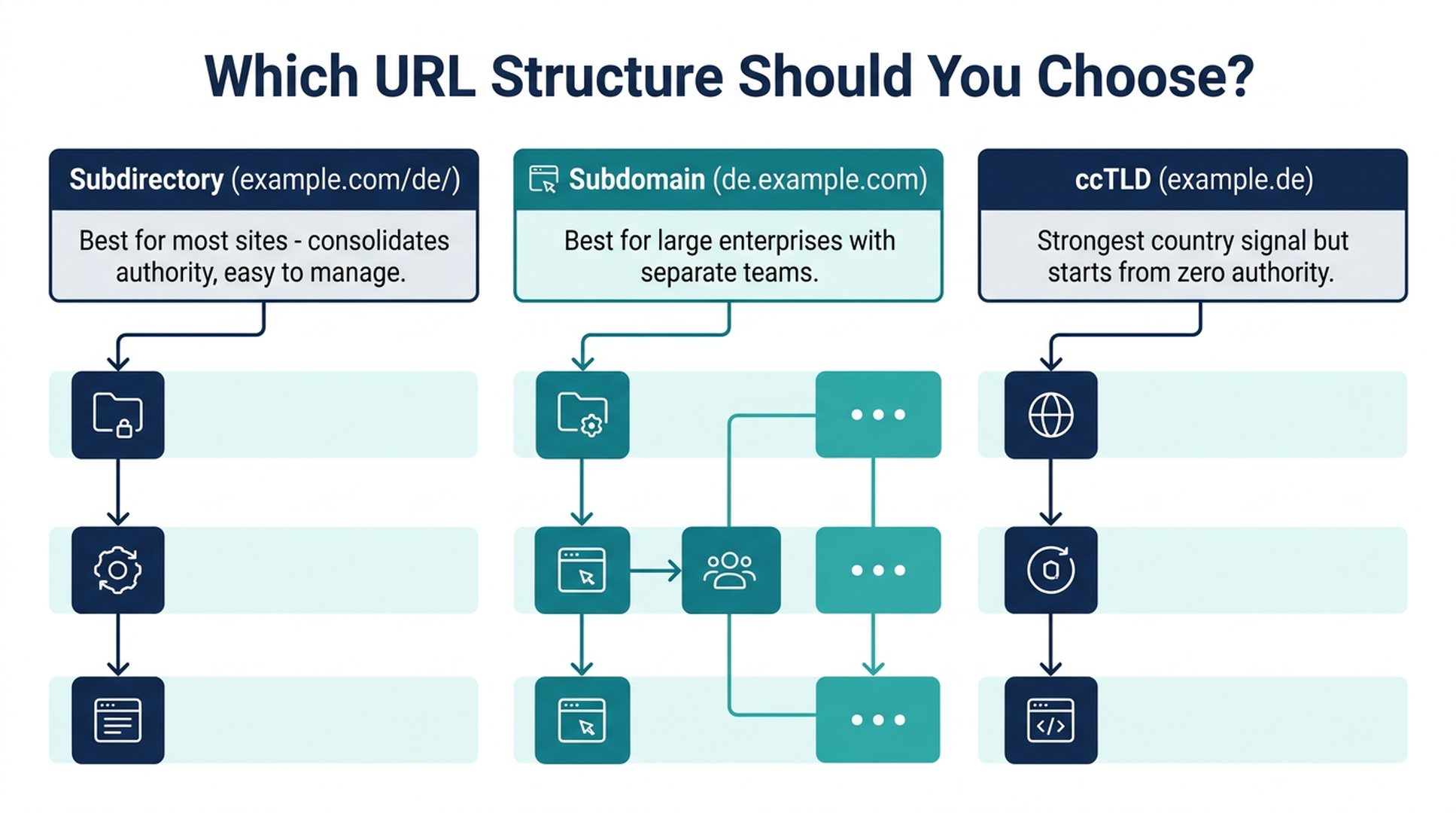
Every language version of a page needs its own URL. You have three options, and the right choice depends on your resources and goals.
The Three Options
Structure | Example | SEO Authority | Cost & Maintenance | AI Crawler Compatibility | Best For |
|---|---|---|---|---|---|
Subdirectory |
| Consolidates on one domain — strongest overall | Low — one server, one CMS | Excellent — same domain, clear path signals | Most sites; growing businesses; teams under 10 people |
Subdomain |
| Treated as a separate site — authority split across subdomains | Medium — separate hosting/config per language | Good — but each subdomain crawled independently | Large enterprises; sites where each language has a totally different product catalog |
ccTLD |
| Strongest country signal but starts from zero authority per domain | High — separate domains, hosting, and often legal entities | Good — but authority must be built from scratch per domain | Established brands with local offices; markets where ccTLD is a trust signal (Germany, Japan) |
Recommendation for beginners: Use subdirectories (example.com/de/, example.com/es/). They're the easiest to set up, track, and maintain. All SEO authority accrues to one domain. Google's John Mueller has consistently stated that subdirectories work well for multilingual sites.
One Critical Rule
Never auto-redirect users based on their IP address. Googlebot crawls primarily from US IP addresses. If you redirect US-based crawlers to the English version, Google will never see your German or Japanese pages. Use a language/region picker (a banner or dropdown) instead of forced redirects.
Step 4: Localize — Don't Just Translate
Translation converts words. Localization adapts meaning, context, examples, and cultural references. In 2026, the difference determines whether Google serves your page or its own auto-translated proxy version.
The AI Translation Landscape in 2026
Tool | Approach | Hreflang Auto-Generation | Server-Side Rendering | Best For | Starting Price |
|---|---|---|---|---|---|
DeepL | Neural machine translation API | No (needs separate implementation) | N/A (API — you control rendering) | High-quality first-pass translation; European language pairs | Free tier; Pro from ~$9/month |
Weglot | Cloud-based, multi-engine (DeepL + Google + Gemini + OpenAI) + custom AI model that learns brand voice | Yes — automatic | Yes — proxy layer renders real HTML | All-in-one solution; beginners who want setup in under an hour | From $17/month |
GTranslate | Google Translate engine via proxy layer | Yes — on paid plans | Yes — on paid plans | Budget option; simple sites | Free (unindexed); paid from ~$8/month |
WPML | WordPress plugin — database-stored translations | Manual setup | Yes (WordPress native) | WordPress sites with in-house translation teams | From ~$39/year |
TranslatePress | WordPress plugin — visual front-end editor | Manual setup | Yes (WordPress native) | WordPress beginners who want visual editing | Free; Pro from ~$8/month |
The Safe AI Translation Workflow
AI translation is fast and cheap, but publishing raw AI output is risky. Google's policies don't ban AI-translated content, but they penalize low-quality translation. Here's a safe workflow:
- AI first pass: Use DeepL, Weglot, or ChatGPT/Claude to translate the page.
- Auto-QA check: Run the Claude Code translation quality agent (see below) to flag: untranslated segments, glossary violations, text expansion issues (German is ~30% longer than English), and missing metadata translations.
- Human review for high-impact pages: Homepage, pricing, legal, and top-5 traffic pages get a native-speaker review. Blog posts, FAQ, and help docs can rely on AI + auto-QA.
- Metadata double-check: AI often leaves meta titles, meta descriptions, image alt text, and URL slugs in the source language. These must be translated and localized manually — they're what appear in SERPs.
Translation Quality Check Agent
---
name: translation-quality-check
description: Audit AI-translated pages for common quality issues — missing translations, glossary violations, text expansion, metadata gaps, and localization consistency
---

# Translation Quality Check Agent

Review AI-translated or human-translated pages for common multilingual SEO quality issues. Produces a prioritized fix list.

## Prerequisites
- User provides URLs or HTML files of both source and translated pages
- User optionally provides a glossary file (CSV: source_term, target_term, notes)
- User specifies source language and target language

## Input
1. Source page URL or HTML file path
2. Translated page URL or HTML file path (can be multiple target languages)
3. Source language code (ISO 639-1)
4. Target language code(s) (ISO 639-1)
5. Optional: glossary CSV for terminology consistency
6. Optional: brand voice guide or translation memory notes

## Workflow

### Phase 1: Structural check
For each translated page:
- Verify the page has a unique, translated URL (not the same URL as the source)
- Verify the HTML `lang` attribute matches the target language
- Verify the page serves real HTML (not client-side JS translation) — check if translated text is present in the raw HTML source
- Check that all meta tags are translated: `<title>`, `<meta name="description">`, `<meta property="og:title">`, `<meta property="og:description">`

### Phase 2: Content coverage check
Compare source and translated pages:
- Count `<h1>` through `<h4>` headings — verify all are translated
- Check image `alt` attributes — flag any still in the source language
- Check button text, form labels, error messages, footer links — these are frequently missed
- Check structured data (JSON-LD) — flag if schema content is in the source language

### Phase 3: Translation quality indicators
Flag potential quality issues:
- **Untranslated segments:** Text blocks in the source language appearing on the translated page
- **Text expansion/truncation:** Compare character counts of key elements (titles, CTAs, navigation items). Flag elements where the target language is >40% longer (risk of truncation in SERPs and UI)
- **Glossary violations:** If a glossary is provided, check that defined terms use the approved translation
- **Inconsistent terminology:** The same source term translated differently across the page (e.g., "checkout" translated as both "Kasse" and "Zur Kasse gehen" on the same German page)

### Phase 4: Localization depth check
Score the page on localization quality (not just translation accuracy):
- **Examples and references:** Are case studies, statistics, and examples localized or still US/UK-centric?
- **Currency, dates, measurements:** Are these in local format?
- **Cultural markers:** Currency symbols, address formats, phone number formats
- **Images:** Do images contain text in the target language, or are they still in the source language?

### Phase 5: Output a prioritized fix list
Categorize issues:
- **Critical (fix before launch):** Missing hreflang, untranslated title/meta, wrong lang attribute, client-side-only rendering
- **High (fix within 1 week):** Untranslated headings, missing alt text, schema in wrong language
- **Medium (fix within 1 month):** Inconsistent terminology, untranslated UI text, text expansion risks
- **Low (improvement backlog):** Non-localized examples, source-language images, formats

## Output
A structured quality report with:
1. Overall quality score (A–F) and summary
2. Critical issues list (with exact element locations)
3. High-priority issues list
4. Comparison table: source vs. translated page element-by-element
5. Native-speaker review checklist: specific sections to prioritize if budget is limited
6. Estimated fix time per priority tier

## Limitations
- Automated check cannot assess naturalness, idiomatic quality, or cultural nuance — a native speaker is still needed for final review
- Glossary matching is exact-string only; won't catch inflected forms without a comprehensive glossary
- Does not evaluate translation accuracy against a reference translation — this is a coverage and consistency check, not a fluency evaluation
Step 5: Implement Hreflang Tags (And Avoid the 8 Most Common Mistakes)
Hreflang tags tell search engines: "This page is the German version of that English page." Without them, Google may serve the wrong language to users — or treat language versions as duplicate content and only index one.
The Three Ways to Implement Hreflang
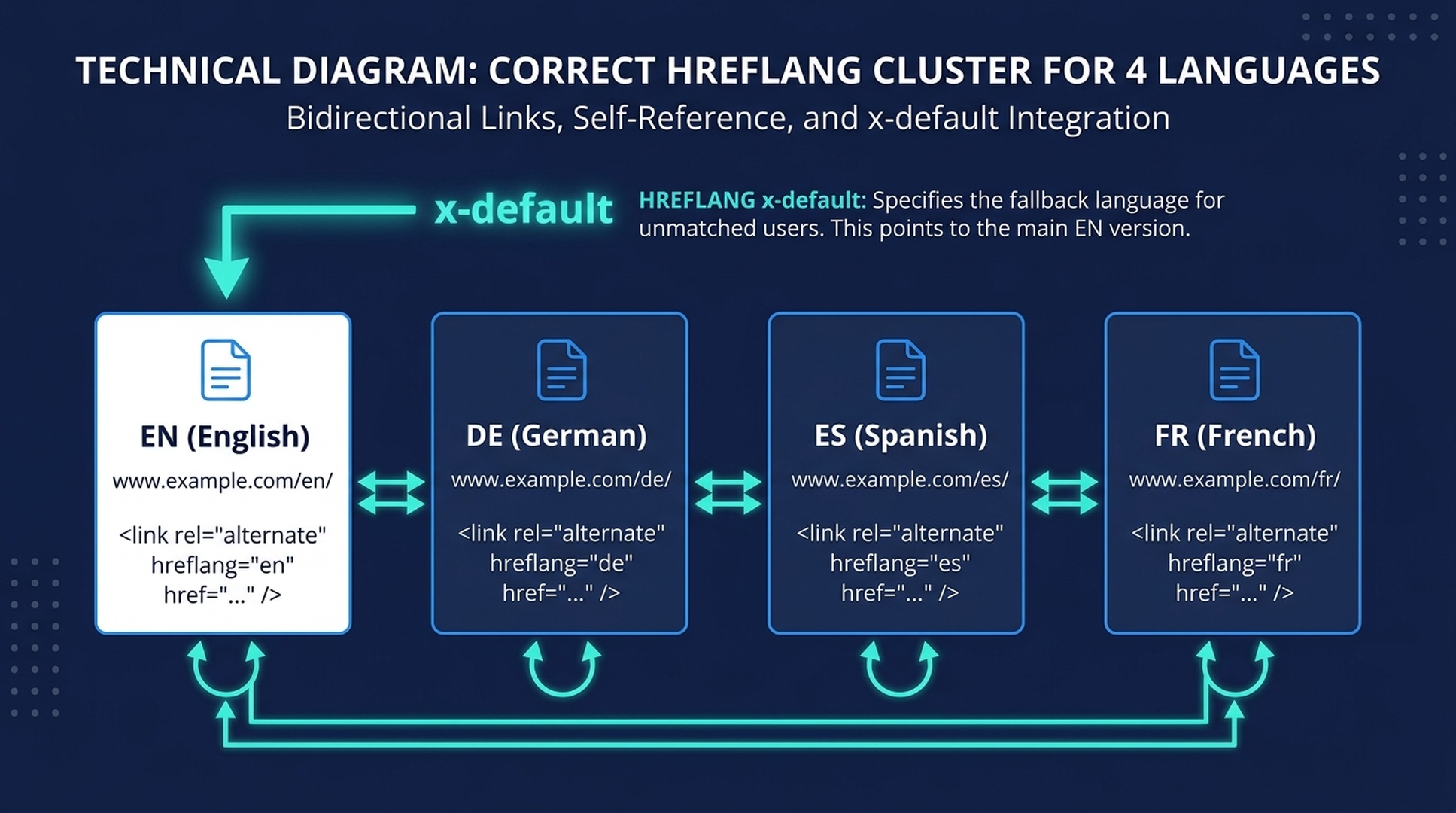
1. HTML `<link>` tags (best for most sites)
Add these inside the <head> of every page:
<link rel="alternate" href="https://example.com/blog/" hreflang="x-default">
<link rel="alternate" href="https://example.com/blog/" hreflang="en">
<link rel="alternate" href="https://example.com/blog/de/" hreflang="de">
<link rel="alternate" href="https://example.com/blog/es/" hreflang="es">
<link rel="alternate" href="https://example.com/blog/fr/" hreflang="fr">
Crucially, every page must also reference itself. The German page (/de/) must include this exact same set of tags — including one pointing to itself with hreflang="de". This is called a self-referencing tag, and Google requires it.
2. XML Sitemaps (best for 20+ languages)
If you manage dozens of language versions, maintaining <link> tags on every page becomes unwieldy. Use an XML sitemap instead:
<url>
  <loc>https://example.com/blog/</loc>
  <xhtml:link rel="alternate" hreflang="en" href="https://example.com/blog/"/>
  <xhtml:link rel="alternate" hreflang="de" href="https://example.com/blog/de/"/>
  <xhtml:link rel="alternate" hreflang="es" href="https://example.com/blog/es/"/>
  <xhtml:link rel="alternate" hreflang="x-default" href="https://example.com/blog/"/>
</url>
3. HTTP Headers (for non-HTML files)
Use these for PDFs, images, or API responses:
Link: <https://example.com/brochure.pdf>; rel="alternate"; hreflang="en"
Link: <https://example.com/brochure-de.pdf>; rel="alternate"; hreflang="de"
The 8 Most Common Hreflang Mistakes
# | Mistake | Why It Breaks Things | How to Fix It |
|---|---|---|---|
1 | Missing self-referencing tag | Each page must include itself in its own hreflang set. Without it, Google may ignore the entire cluster. | Add |
2 | Non-bidirectional (reciprocal) tags | If page A points to page B, page B must point back to page A. A single missing return link breaks the entire chain. | Audit with the hreflang agent below — it checks bidirectionality for every pair |
3 | Invalid language/region codes |
| Use ISO 639-1 for language ( |
4 | Missing | Without a fallback, users from unlisted regions may see the wrong version | Always include |
5 | Hreflang pointing to non-canonical pages | If | Ensure every hreflang URL is the canonical version of that page |
6 | Hreflang pointing to a 404 or redirect | One URL change in a 10-language site creates up to 20 broken hreflang references | The hreflang audit agent catches all broken links across language versions |
7 | Cross-language canonicals | A German page with | Every language version's canonical must point to its own URL |
8 | HTML lang mismatch |
| Match the |
Hreflang Audit Agent (Automate the Grind)
This is the highest-ROI agent in the toolkit. A manual hreflang audit on a 5-language site with 50 pages per language means checking 250 pages — each with up to 5 hreflang tags that must be bidirectional, self-referencing, and error-free. The agent does it in minutes.
---
name: hreflang-auditor
description: Crawl and audit hreflang implementation across an entire multilingual site — catch broken links, missing return tags, invalid codes, canonical conflicts, and generate fix-ready reports
---

# Hreflang Audit Agent

Crawl a multilingual website and audit every hreflang tag against Google's requirements. Produces a fix-ready report with exact URLs, error types, and severity ratings.

## Prerequisites
- User provides the base URL of the site (any language version — the agent will discover others via hreflang links)
- User confirms which URL structure is in use (subdirectory, subdomain, or ccTLD)
- No API keys required — uses HTTP requests and HTML parsing

## Input
1. Base URL of the website (e.g., `https://example.com/` or `https://example.com/de/`)
2. Known language codes if not all are discoverable (e.g., `["en", "de", "es", "fr", "ja"]`)
3. Optional: sitemap URL if hreflang is implemented via XML sitemaps
4. Optional: ignore list — URL patterns to skip (e.g., `/tag/`, `/author/`, `/page/`)

## Workflow

### Phase 1: Discover all language versions
- Crawl the provided base URL
- Extract all hreflang links from `<link rel="alternate" hreflang="...">` tags in the HTML `<head>`
- If XML sitemap is provided, also extract hreflang clusters from the sitemap
- Build a language-page matrix: every URL × every language version

### Phase 2: Validate each page in the cluster
For every page in the matrix, check these 8 rules:

1. **Self-referencing:** The page's own hreflang value points to its own canonical URL
2. **Bidirectionality:** For every pair (A→B), verify B→A exists
3. **Valid codes:** Language code matches ISO 639-1; region code matches ISO 3166-1 Alpha-2
4. **x-default present:** At least one page in the cluster has `hreflang="x-default"`
5. **Canonical alignment:** Each hreflang URL is the canonical version (not a parameterized or alternate URL)
6. **HTTP status:** Every hreflang URL returns 200 (not 301, 302, 404, or 500)
7. **No cross-language canonicals:** Each page's canonical points to a URL in the same language
8. **HTML lang match:** The `<html lang="...">` attribute value is consistent with the page's hreflang value

### Phase 3: Check for structural issues
- **Inconsistent clusters:** Pages that don't have the same set of hreflang tags as others in their cluster
- **Orphan pages:** Translated pages that exist but aren't referenced by any hreflang cluster
- **Chained redirects:** Hreflang URLs that redirect (301/302) — these should point directly to the final URL
- **Protocol mismatches:** HTTP vs HTTPS inconsistencies across the hreflang set

### Phase 4: Generate the fix report
For each issue found, output:
- Error type (from the 8 rules above)
- Severity: **Critical** (breaks the entire cluster), **High** (wrong page may be served), **Medium** (compliance issue), **Low** (best-practice deviation)
- Source URL (where the error was found)
- Target URL (the problematic hreflang link)
- Fix instruction: exact code or configuration change needed

### Phase 5: Generate corrected hreflang tags
For clusters with fixable errors:
- Output the corrected set of `<link>` tags for each page
- Output the corrected XML sitemap entries if applicable
- Flag clusters that cannot be auto-fixed (e.g., missing pages that need to be created first)

## Output
A structured audit report with:
1. Executive summary: total pages crawled, language versions found, errors by severity, overall health score (A–F)
2. Error table: each error with type, severity, source URL, target URL, and fix instruction
3. Cluster-by-cluster health: each page cluster with pass/fail per rule
4. Auto-generated fix code: corrected hreflang tags for every broken page
5. Prioritized action plan: which errors to fix first and why

## Limitations
- Crawls only linked pages within the hreflang clusters it discovers; pages without hreflang tags that should have them won't be found
- Cannot fix pages server-side — output is advisory only
- For JavaScript-rendered hreflang tags, the raw HTML approach won't work — use the XML sitemap method instead
- Does not check if the *content* of each language version is actually translated (use the translation quality agent for that)
Step 6: Build Local Links and Internal Link Structures
Links from German websites help your German pages rank. Links from Japanese websites help your Japanese pages rank. Each language version builds its own authority pool.
Internal Linking Rules for Multilingual Sites
Stay within the same language. A German blog post should link to other German pages, not English ones. Cross-language internal links confuse both users and search engines. Use hreflang tags — not body links — to connect language versions.
Minimum 5 internal links per page, same language. Every translated page should receive links from at least 3-5 other pages in the same language. This prevents orphan pages — a common problem when sites translate content but forget to translate the navigation context.
One URL change cascades. If you change a URL on your English site and 10 languages link to it internally, that's 10 broken links. The hreflang audit agent above catches these — run it weekly if you're actively publishing.
External Link Building Per Language
You don't need a separate link-building campaign for every language. Start with these three approaches:
- Local directories and review platforms: Every country has its own ecosystem of business directories, review sites, and industry portals. Claim your profiles. They're easy links and often rank well locally.
- Competitor backlink mining: Use Ahrefs or Semrush to pull the backlink profile of your top competitor in each target country. Filter for local domains (
.de,.fr,.jp). These are your lowest-hanging fruit. - Local PR and guest posting: One well-placed guest post on a respected local publication is worth more than 50 low-quality directory links. Prioritize quality over quantity — especially in smaller markets where the link graph is less crowded.
Step 7: Track Rankings, Traffic, and AI Visibility Per Language
Traditional SEO tracking (rankings + organic traffic) is still essential. But in 2026 you also need to monitor whether AI engines are citing your content in each language.
Traditional Tracking Setup
- Google Search Console: Use the Country filter in the Performance report. Create a separate property or use the International Targeting report to see hreflang-specific errors.
- GA4: Create a custom report showing sessions, conversions, and bounce rate — split by the page path prefix (
/de/,/es/,/fr/) to see performance per language. - Rank tracking: Ahrefs, Semrush, or SE Ranking — add your target keywords with country-level tracking. Check positions monthly for second-wave languages, weekly for top-priority markets.
AI Visibility Tracking (What's New in 2026)
For AI answer surfaces, track these three metrics per language:
- Citation presence: When someone asks about your category in the target language on ChatGPT, Perplexity, or Gemini — does your brand appear in the answer? Track yes/no for your top 10 keywords per platform, per language, monthly.
- Share of voice: If 5 brands are cited in Spanish AI Overviews for your category, what percentage mention your brand? This is your SOV.
- Sentiment and accuracy: When AI engines cite your brand in another language, is the information correct? AI systems sometimes blend content across languages — a US product claim might appear in a German answer, creating a compliance risk.
International Visibility Monitoring Agent
---
name: international-visibility-monitor
description: Track multilingual search visibility across traditional SERPs and AI answer surfaces — generate weekly or monthly visibility reports per language and market
---

# International Visibility Monitor

Monitor how your site performs across languages in both traditional search and AI answer surfaces. Generates structured reports that track rankings, traffic, and AI citation presence per market.

## Prerequisites
- Google Search Console access (user provides CSV exports or grants view access)
- GA4 access (user provides CSV exports of language-segmented traffic)
- Optional: Ahrefs/Semrush/DataForSEO API access for automated rank tracking
- No API keys needed for manual data imports

## Input
1. Target languages and countries to monitor
2. Top 10-20 keywords per language
3. GSC performance export (CSV, filtered by country)
4. GA4 traffic-by-language export (CSV)
5. Optional: rank tracking API credentials
6. Previous monitoring report (for trend comparison)

## Workflow

### Phase 1: Collect traditional search data
- Parse GSC CSV: extract clicks, impressions, CTR, and average position per country and per language subdirectory
- Parse GA4 CSV: extract sessions, conversions, and engagement rate per language version
- If rank tracking API is available: pull current positions for tracked keywords per country
- If rank tracking API is NOT available: flag this and provide manual lookup instructions

### Phase 2: AI visibility check (manual or automated)
For each target language and its top 5 keywords:
- Document whether the brand appears in Google AI Overviews for those queries (search from the target country's Google domain)
- If tool access permits: check Perplexity and ChatGPT for the same queries
- Record: cited or not cited, which URL was cited, whether the citation is accurate
- Note any cross-language contamination (e.g., English URL cited for a Spanish query)

### Phase 3: Competitor visibility snapshot
For the top 3 competitors in each target market:
- Record their ranking positions for your shared keywords
- Check their AI Overview citation presence for the same keywords
- Flag competitors gaining or losing visibility month-over-month

### Phase 4: Trend analysis
Compare current data against the previous period:
- Traffic change per language (%)
- Ranking change per tracked keyword (positions gained/lost)
- AI citation presence change (new citations won, citations lost)
- Competitor movement (major gains or losses)

### Phase 5: Generate the report
Output a structured visibility report with:
1. **Executive dashboard:** One table with all languages and their key metrics (traffic, avg position, AI citations, trend arrows)
2. **Language deep-dives:** Per-language breakdown of top keywords, ranking changes, AI visibility status, and competitor activity
3. **Alert section:** Red-flag items needing immediate attention — traffic drops >20%, lost AI citations, hreflang errors found in GSC, competitors gaining on top keywords
4. **Action items:** Specific, prioritized tasks based on findings (e.g., "German blog post at position 11 for 'beste Laufschuhe' — optimize and add internal links to push into top 10")

## Output
A structured monitoring report with:
1. Multi-language dashboard (all languages, key metrics, trend arrows)
2. Per-language detailed section with keyword rankings, AI citations, and competitor snapshots
3. Red-flag alerts
4. Prioritized action items with expected impact
5. Data freshness: when each data source was last updated, and gaps where data is missing

## Limitations
- AI visibility checks are point-in-time snapshots — AI answers change frequently and may differ between queries minutes apart
- Rank tracking without an API requires manual lookups; automated rank data depends on third-party API availability
- GSC and GA4 data have inherent lag (24-48 hours for GSC, up to 48 hours for GA4)
- AI citation tracking is observational, not exhaustive — no tool currently provides complete AI citation coverage across all platforms
The Multilingual SEO Agent Toolkit: All 4 Skills at a Glance
Here's a summary of the four agent skills you can use immediately with Claude Code. Each file goes into .claude/skills/<skill-name>/SKILL.md:
Skill | What It Does | Run It When | Time Saved |
|---|---|---|---|
| Scores countries/languages by demand, opportunity, and business fit | Before starting any translation work | 3-5 hours |
| Generates localized keyword lists with intent clustering and SERP validation | Before creating content in a new language | 4-8 hours per language |
| Audits translated pages for structural issues, missing translations, and terminology consistency | After AI translation, before publishing | 2-4 hours per batch |
| Crawls and validates every hreflang tag against Google's 8 requirements | Before launch and weekly thereafter | 6-10 hours per audit |
| Tracks rankings, traffic, and AI citations per language with trend analysis | Weekly or monthly | 3-5 hours per report |
To install any skill: Copy the SKILL.md content from the sections above, save it to .claude/skills/<skill-name>/SKILL.md in your project, and run it with /skill-name in Claude Code. Each skill works independently — start with hreflang-auditor if your site is already multilingual, or multilingual-market-scorer if you're planning expansion.
Beginner's Checklist: 15 Things to Verify Before Launch
Use this checklist before launching any new language version:
- [ ] Target markets selected using data (GA4 + GSC), not assumptions
- [ ] Keyword research completed per language — validated with native speaker for top 10 terms
- [ ] URL structure chosen (subdirectory recommended for beginners)
- [ ] No IP-based auto-redirects — language picker UI implemented instead
- [ ] All pages serve real server-side HTML (not client-side JS translation)
- [ ] HTML
langattribute matches each page's actual language - [ ] Hreflang tags implemented (HTML, XML sitemap, or HTTP headers)
- [ ] Self-referencing hreflang tag present on every page
- [ ] Bidirectional hreflang verified — every A→B has B→A
- [ ]
x-defaulthreflang tag set to primary/fallback page - [ ] ALL hreflang URLs return HTTP 200 (no 404s, no redirects)
- [ ] Meta titles and meta descriptions translated and localized for every page
- [ ] Image alt text translated
- [ ] Internal links stay within the same language version
- [ ] Google Search Console International Targeting report checked — zero hreflang errors
If all 15 boxes are checked, you're ready to launch that language version.
FAQ
Can I just use Google Translate for my website?
Don't publish raw Google Translate output. In 2026, Google compares your translations against its own machine translation — if yours isn't better, it may serve its auto-translated proxy version instead of your page. Use AI translation as a first pass, then run the translation quality check agent, and get a native speaker to review your highest-impact pages.
How long does it take to see results from multilingual SEO?
For a new language subdirectory on an established domain, expect movement in 2-4 months for low-competition keywords. Competitive terms in mature markets (German, Japanese) may take 6-12 months. The domain's existing authority helps — new language versions on the same domain inherit link equity, which is the main argument for subdirectories over ccTLDs.
Do I need a separate domain for each language?
No. Subdirectories (example.com/de/) are the recommended approach for most sites. Only use ccTLDs (example.de) if you have local offices, local legal entities, or operate in markets where the ccTLD is a strong trust signal (Germany, Japan, France).
What if I can't afford professional translation for every page?
Start with your top 20 pages per language — the ones driving the most English organic traffic. Use AI translation with the quality check agent for the rest. Even a 300-word native-language version of a high-traffic page usually displaces Google's auto-translated proxy version. Quality over quantity: 20 well-localized pages beat 200 poorly translated ones.
Will AI translation hurt my SEO in 2026?
Not if you follow the safe workflow: AI first pass → automated QA check → human review for high-impact pages. Google has explicitly stated that "our policies do not strictly define content that has been translated by AI as spam." The risk isn't using AI — it's publishing low-quality AI output without review.
How do I handle languages like Chinese or Arabic that use different scripts or search engines?
For China, Baidu is the dominant search engine and does not support hreflang. Use Content-Language HTTP headers and Baidu's Search Resource Platform for sitemap submission instead. Use Simplified Chinese (zh-Hans) for Mainland China, Traditional Chinese (zh-Hant) for Taiwan and Hong Kong.
For Arabic and other RTL languages, ensure your CSS supports right-to-left layouts. Google handles RTL content fine for SEO, but a broken RTL layout will destroy user experience metrics — and those metrics affect rankings.
Can Claude Code really handle all my multilingual SEO tasks?
The agent skills in this guide handle the mechanical, repetitive work that makes multilingual SEO tedious: crawling hundreds of pages for hreflang errors, cross-referencing keyword translations against SERP data, checking translation coverage across metadata and alt text, and compiling visibility reports. What they don't replace: native-speaker content review, strategic market decisions, creative localization of brand messaging, and final editorial judgment. Use the agents to eliminate 80% of the grind — then spend your time on the 20% that requires human expertise.
What's the minimum number of pages I need per language?
Start with 5-20 pages: homepage, top 3-5 product/service pages, about page, contact page, and your highest-traffic blog posts. This is enough for Google to recognize the language version as legitimate. Expand based on performance data from GSC — translate the pages that are already getting impressions but low CTR in that language.
Author: Dominic Hale, International SEO Specialist Across 18 Markets at Auspia. Dominic writes about multilingual search strategy, localization workflows, hreflang architecture, and regional search behavior for global growth teams.


