如何用 Hermes Agent 建立安全的定期 PageSpeed SEO 稽核 Skill
Hermes Agent 適合重複執行界線清楚的測量,而不適合自行修復正式網站。本教學建立唯讀 PageSpeed Skill:它檢查公開頁面、保存原始 JSON、產生有日期的報告;先驗證一次手動基線,之後才可以由人決定是否排程。
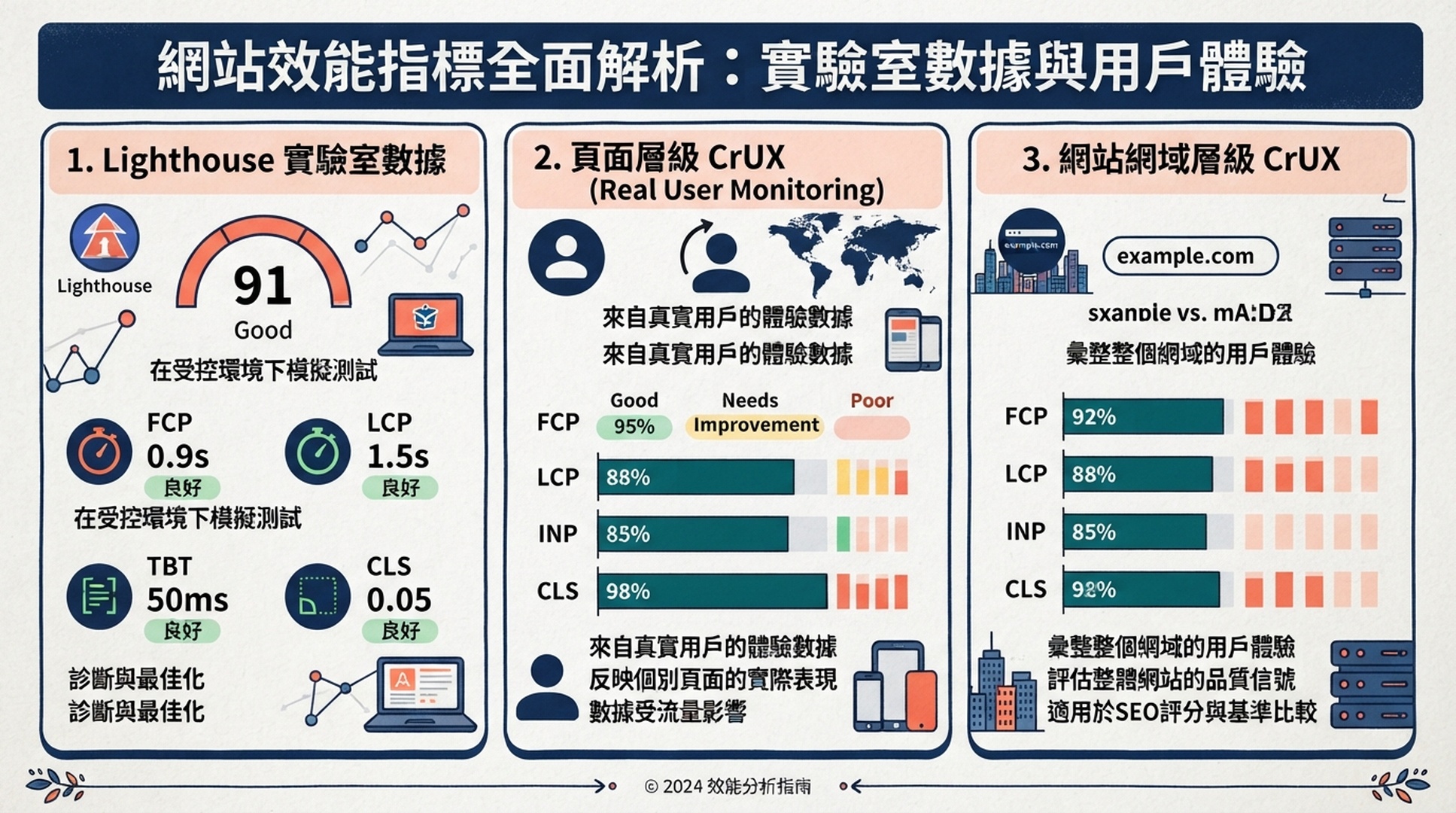
PageSpeed 分數是某個 URL、某個時間點的 Lighthouse 實驗室結果。Chrome UX Report(CrUX)只有在 Google 回傳時才是實際使用者欄位資料。兩者都不是代理修改 CMS、程式碼庫或部署的授權。
將本文交給 Hermes 安裝 Skill
Read [THIS ARTICLE URL] and install the Hermes skill described there.

First inspect my local Hermes configuration and any project guidance. Tell me
the destination you will use. Create only:
~/.hermes/skills/pagespeed-seo-baseline/SKILL.md
~/.hermes/skills/pagespeed-seo-baseline/scripts/pagespeed_baseline.py

Copy the complete code blocks from the article. Do not invent a different
workflow. Verify the Python file with a syntax check and report the two paths.
Tell me how to configure PAGESPEED_API_KEY locally, but never ask me to paste
the value into this chat and never display it.

Do not run PageSpeed, schedule a task, write to my site repository, use CMS or
hosting credentials, edit a skill other than this one, or change a live site.
Stop after installation and verification.
若 Hermes 無法讀取公開頁面,請把本文的SKILL.md和 runner 區塊貼到同一段對話。目錄應位於~/.hermes/skills/,而不是網站專案內:這是獨立監測工具。
完成條件:基線在前,排程在後
項目 | 本流程提供的結果 |
|---|---|
對象 | 在本機或隔離環境使用 Hermes 的 SEO、開發與技術行銷人員 |
成果 |
|
輸入 | 公開 URL、精選 URL 清單、或具樣本上限的 sitemap |
前置條件 | Hermes Agent、Python 3.9+、PageSpeed Insights API 金鑰與報告目錄 |
完成定義 | URL、策略、原始結果、欄位資料範圍均被記錄,且沒有網站變更 |
發布檢查應使用精選 URL。Sitemap 樣本只能比較不同範本的模式,不能宣稱已測試全站;程式應每個第一層路徑取一個 URL,再依 sitemap 順序補到上限,也不驗證孤立頁、canonical 或可索引性。
只在安全環境設定金鑰
export PAGESPEED_API_KEY="replace-with-your-key"
在 Google Cloud 啟用 PageSpeed Insights API 並建立受限制金鑰。值只存在本機祕密機制或啟動 Hermes 的環境,絕不放進 Skill、報告、聊天訊息或 Git。
初次稽核建議使用專用受限制金鑰的本機執行。Docker、遠端終端或沙箱需要金鑰時,應明確評估其中的程式能讀取該金鑰;先確認目前 API 額度,再決定頻率。
SKILL.md 的安全契約
~/.hermes/skills/pagespeed-seo-baseline/
  SKILL.md
  scripts/
    pagespeed_baseline.py
---
name: pagespeed-seo-baseline
description: Create a read-only PageSpeed Insights baseline for one public URL, a supplied URL list, or a controlled XML sitemap sample. Save raw JSON and a dated report that distinguishes Lighthouse lab data from CrUX field data. Use for website speed, Core Web Vitals, Lighthouse, and recurring performance-baseline requests. Never edit a site, repository, CMS, hosting configuration, or deployment.
required_environment_variables:
  - PAGESPEED_API_KEY
---

# PageSpeed SEO Baseline

This is an evidence-collection skill. It may call the public PageSpeed Insights API and public sitemap URLs, then write only inside the report directory chosen by the operator.

## Boundaries

- Read `PAGESPEED_API_KEY` from the runtime environment only. Never print, message, save, or commit it.
- Do not use browser logins, SSH, CMS, hosting, Git write, deployment, or website-editing tools. A performance report is not approval to repair a site.
- Run both `mobile` and `desktop`. Preserve each successful response under `raw/` before summarizing it.
- Describe Lighthouse as a point-in-time lab measurement. Treat `loadingExperience` as page-level CrUX only when returned, and `originLoadingExperience` as origin-level CrUX only when returned. Do not substitute one for the other.
- For `--sitemap`, say how URLs were sampled and how many were excluded. For important templates, prefer `--urls-file`.
- Never create or change a schedule until a human has reviewed one successful manual report and named the recurring scope, cadence, report path, and delivery destination.

## Commands

Run from this skill directory. The output path must be outside a repository unless the operator explicitly chooses an ignored evidence directory.

    python3 scripts/pagespeed_baseline.py \
      --url "https://www.example.com/pricing/" \
      --out "$HOME/hermes-pagespeed-reports/pricing-baseline"

    python3 scripts/pagespeed_baseline.py \
      --sitemap "https://www.example.com/sitemap.xml" \
      --max-urls 12 \
      --out "$HOME/hermes-pagespeed-reports/site-sample"

## Required report handoff

Return the report path and a compact table: requested URL, final URL, device strategy, performance score, LCP, INP, CLS, TBT, and field-data scope. Name failed requests and skipped URLs. Group repeated opportunities by likely mechanism, but label every repair as a hypothesis until a developer verifies it.

When the operator asks for a schedule, show the proposed command, cadence, report retention rule, and delivery target. Wait for explicit confirmation before creating it. If running on a messaging surface, send the report path or attachment; never send the API key or raw command environment.
#!/usr/bin/env python3
"""Collect bounded PageSpeed Insights evidence without third-party packages."""
from __future__ import annotations

import argparse
import json
import os
import sys
import time
import urllib.error
import urllib.parse
import urllib.request
import xml.etree.ElementTree as ET
from collections import OrderedDict
from datetime import datetime, timezone
from pathlib import Path

API = "https://www.googleapis.com/pagespeedonline/v5/runPagespeed"
CATEGORIES = ("performance", "accessibility", "best-practices", "seo")
STRATEGIES = ("mobile", "desktop")
AUDITS = ("largest-contentful-paint", "interaction-to-next-paint", "cumulative-layout-shift", "total-blocking-time")


def get_bytes(url: str) -> bytes:
    request = urllib.request.Request(url, headers={"User-Agent": "Hermes-PageSpeed-Baseline/1.0"})
    with urllib.request.urlopen(request, timeout=45) as response:
        return response.read()


def sitemap_urls(url: str) -> list[str]:
    try:
        root = ET.fromstring(get_bytes(url))
    except (urllib.error.URLError, ET.ParseError) as error:
        raise RuntimeError(f"Could not read sitemap {url}: {error}") from error
    locs = [n.text.strip() for n in root.findall(".//{*}loc") if n.text and n.text.strip()]
    if root.tag.lower().endswith("sitemapindex"):
        locs = [item for child in locs for item in sitemap_urls(child)]
    return list(OrderedDict((u, None) for u in locs if urllib.parse.urlparse(u).scheme in {"http", "https"}))


def select_urls(urls: list[str], maximum: int) -> list[str]:
    groups: OrderedDict[str, list[str]] = OrderedDict()
    for url in urls:
        parts = [part for part in urllib.parse.urlparse(url).path.split("/") if part]
        groups.setdefault(parts[0] if parts else "root", []).append(url)
    chosen = [values[0] for values in groups.values()]
    chosen.extend(url for url in urls if url not in chosen)
    return chosen[:maximum]


def run_api(url: str, strategy: str, key: str) -> dict:
    params = [("url", url), ("strategy", strategy), ("key", key)]
    params.extend(("category", category) for category in CATEGORIES)
    endpoint = API + "?" + urllib.parse.urlencode(params)
    last_error = "unknown error"
    for attempt in range(3):
        try:
            request = urllib.request.Request(endpoint, headers={"User-Agent": "Hermes-PageSpeed-Baseline/1.0"})
            with urllib.request.urlopen(request, timeout=150) as response:
                return json.load(response)
        except urllib.error.HTTPError as error:
            last_error = f"HTTP {error.code}: {error.read().decode('utf-8', 'replace')[:240]}"
            if error.code not in {429, 500, 502, 503, 504}:
                break
        except (urllib.error.URLError, TimeoutError, json.JSONDecodeError) as error:
            last_error = str(error)
        time.sleep(2 ** attempt)
    raise RuntimeError(last_error)


def value(result: dict, audit_id: str) -> str:
    return result.get("lighthouseResult", {}).get("audits", {}).get(audit_id, {}).get("displayValue", "n/a")


def score(result: dict) -> str:
    raw = result.get("lighthouseResult", {}).get("categories", {}).get("performance", {}).get("score")
    return "n/a" if raw is None else str(round(raw * 100))


def field(result: dict, scope: str) -> str:
    metrics = result.get(scope, {}).get("metrics", {})
    names = ("LARGEST_CONTENTFUL_PAINT_MS", "INTERACTION_TO_NEXT_PAINT", "CUMULATIVE_LAYOUT_SHIFT_SCORE")
    return " / ".join(str(metrics.get(name, {}).get("percentile", "n/a")) for name in names) if metrics else "not returned"


def report(records: list[dict], scope: str, selected: int, total: int) -> str:
    lines = ["# Hermes PageSpeed baseline", "", f"- Generated (UTC): {datetime.now(timezone.utc).isoformat(timespec='seconds')}", f"- Scope: {scope}", f"- URLs selected: {selected} of {total}", "- Lighthouse is lab data. CrUX appears only when Google returned it.", "", "| URL | Final URL | Device | Perf | LCP | INP | CLS | TBT | Page CrUX (LCP / INP / CLS) | Origin CrUX (LCP / INP / CLS) | Status |", "| --- | --- | --- | ---: | --- | --- | --- | --- | --- | --- | --- |"]
    for item in records:
        if item["error"]:
            row = [item["url"], "n/a", item["strategy"], "n/a", "n/a", "n/a", "n/a", "n/a", "n/a", "n/a", item["error"]]
        else:
            data = item["result"]
            final_url = data.get("lighthouseResult", {}).get("finalUrl", item["url"])
            row = [item["url"], final_url, item["strategy"], score(data), *(value(data, name) for name in AUDITS), field(data, "loadingExperience"), field(data, "originLoadingExperience"), "ok"]
        lines.append("| " + " | ".join(str(cell).replace("|", "/") for cell in row) + " |")
    return "
".join(lines) + "
"


def main() -> int:
    parser = argparse.ArgumentParser()
    scope = parser.add_mutually_exclusive_group(required=True)
    scope.add_argument("--url")
    scope.add_argument("--urls-file")
    scope.add_argument("--sitemap")
    parser.add_argument("--max-urls", type=int, default=10)
    parser.add_argument("--out", required=True)
    args = parser.parse_args()
    key = os.environ.get("PAGESPEED_API_KEY")
    if not key:
        parser.error("PAGESPEED_API_KEY is not set in the environment")
    if args.url:
        urls, label = [args.url], "single URL"
        total = len(urls)
    elif args.urls_file:
        urls = [line.strip() for line in Path(args.urls_file).read_text(encoding="utf-8").splitlines() if line.strip() and not line.startswith("#")]
        label = "supplied URL list"
        total = len(urls)
    else:
        all_urls = sitemap_urls(args.sitemap)
        urls, label = select_urls(all_urls, args.max_urls), f"sitemap sample from {args.sitemap}"
        total = len(all_urls)
    out = Path(args.out)
    raw = out / "raw"
    raw.mkdir(parents=True, exist_ok=True)
    records = []
    for number, url in enumerate(urls, start=1):
        for strategy in STRATEGIES:
            try:
                result = run_api(url, strategy, key)
                (raw / f"{number:03d}-{strategy}.json").write_text(json.dumps(result, indent=2), encoding="utf-8")
                records.append({"url": url, "strategy": strategy, "result": result, "error": ""})
            except RuntimeError as error:
                records.append({"url": url, "strategy": strategy, "result": {}, "error": str(error)})
    (out / "report.md").write_text(report(records, label, len(urls), total), encoding="utf-8")
    (out / "summary.json").write_text(json.dumps({"scope": label, "urls": urls, "records": [{k: v for k, v in item.items() if k != "result"} for item in records]}, indent=2), encoding="utf-8")
    print(out / "report.md")
    return 0


if __name__ == "__main__":
    raise SystemExit(main())
建立以下結構:
Runner 應只用標準函式庫,支援--url、每行一個 URL 的--urls-file及 XML sitemap;請求performance、accessibility、best-practices、seo,並為 mobile 和 desktop 保存回應。429 和 5xx 可有限重試,但不得隱藏失敗。
預期會產生report.md、summary.json及raw/001-mobile.json和raw/001-desktop.json。檢查要求 URL、最終 URL、策略、時間戳記與非空 JSON。403 時確認 API 啟用和金鑰限制;sitemap 失敗時可以用小型--urls-file排查,但不可默默改變稽核範圍。
在刻意單純的位置執行一次手動基線
mkdir -p "$HOME/hermes-pagespeed-reports"
cd ~/.hermes/skills/pagespeed-seo-baseline
python3 scripts/pagespeed_baseline.py \
  --url "https://www.example.com/" \
  --out "$HOME/hermes-pagespeed-reports/homepage-2026-07-24"
從一個 canonical URL 與新的報告目錄開始,確認 Skill 能讀取宣告的環境變數、連上公開 API,並只寫入預期位置。檢查report.md是否包含請求 URL、最終 URL、兩種策略與時間戳,raw 檔案是否為非空 JSON。缺少金鑰時應在本機設定,不能貼到聊天;若 sitemap 失敗,先用小型--urls-file隔離問題,再修正 sitemap,不能悄悄改變原本範圍。
正確解讀 PageSpeed 資料
資料 | 代表意義 | 不應宣稱 |
|---|---|---|
Lighthouse 分數、LCP、INP、CLS、TBT | 指定頁面與策略的一次實驗室測量 | 所有使用者都有這種體驗 |
| 回傳時的頁面或 URL 模式 CrUX | 整個網域的結果 |
| 回傳時的網域 CrUX | 每個範本都相同 |
沒有 CrUX | 此回應沒有合格欄位資料 | 沒人造訪此頁 |
重複出現的大型圖片機會可作為調查圖片管線的理由,但不能自行指示 Hermes 壓縮資產、延後腳本或修改快取標頭。
只有可信的報告後才排程
Create a proposed weekly PageSpeed baseline schedule, but do not activate it yet.

Use the exact manual scope and command from my approved report. Run in the same
isolated environment. Store each run beneath
$HOME/hermes-pagespeed-reports/weekly/YYYY-MM-DD/ and retain reports for 90
days. Deliver only report.md and summary.json to the approved owner channel.

Show the schedule, command, environment assumptions, report path, and failure
notification behavior. Do not include PAGESPEED_API_KEY in any output. Wait for
my explicit approval before writing or enabling the schedule.
未驗證的代理工作排程化,只會更頻繁地產生錯誤證據。和網站負責人檢閱第一份報告後,定義精確 URL 範圍或 sitemap 上限、頻率、保存期限與交付位置。

Hermes 必須先顯示排程、命令、環境假設、報告位置和失敗通知;使用已核准的手動範圍,將輸出寫到$HOME/hermes-pagespeed-reports/weekly/YYYY-MM-DD/,保存 90 天,只向已核准擁有者交付report.md與summary.json,等待明確啟用確認。
將報告交給獨立修復簡報
Read this PageSpeed evidence folder: [REPORT PATH]. Create a repair brief only.
For each repeated or high-impact opportunity, state the affected URLs, the lab
or field evidence, a likely mechanism, the developer owner, expected benefit,
risk, test method, and rollback signal. Flag assumptions. Do not edit code,
content, configuration, or a deployment.
報告只能用來產生修復簡報,不能變成自動修改命令。每項重複機會都應列出受影響 URL、實驗室或欄位資料依據、可能機制、開發擁有者、預期效益、風險、測試、回滾條件與未知事項;此 Skill 不可編輯程式碼、內容、設定或部署。
驗證清單
- [ ] Skill 在
~/.hermes/skills/pagespeed-seo-baseline/,名稱和目錄一致。 - [ ]
PAGESPEED_API_KEY已宣告但不存在檔案、聊天或報告。 - [ ] 手動報告有 mobile/desktop、raw JSON、最終 URL 與清楚範圍。
- [ ] 只有回傳時才將 CrUX 標為頁面或網域層級。
- [ ] 排程均經人檢閱,且只能寫入已核准的報告位置。
- [ ] 稽核 Skill 沒有 CMS、程式碼庫、主機或部署權限。
常見問題
Hermes 可以檢查 sitemap 的每個頁面嗎?
可以處理更多 URL,但不必然有用或安全。PageSpeed 會消耗額度,sitemap 常混合範本、封存頁與低優先內容。先從每個範本一頁或受控分層樣本開始,只有在結果需要時才擴大。
較高的 PageSpeed 分數保證排名更好嗎?
不保證。分數是指定 URL 與策略的實驗室測量,不是排名承諾。API 回傳頁面或網域 CrUX 時,必須與 Lighthouse 分開解讀。
為什麼要保留 raw PageSpeed 回應?
只留下摘要會失去最終 URL、失敗、稽核細節與日後比較的依據。raw JSON 能讓修復簡報和重新測量都回到相同證據。
容器一定比本機 Hermes 更安全嗎?
不一定。將金鑰傳入容器後,容器內執行的程式碼仍可讀取它。首次稽核以受限制的專用金鑰在本機執行風險較低;若使用容器,必須明確限制網路、寫入位置與祕密可達範圍。
Author: Julian Mercer,Auspia Technical SEO Practitioner。Julian 撰寫保留清楚證據軌跡的技術工作流程,協助團隊在正式變更前檢閱自動化 SEO 發現。
官方參考資料
修復要求只應產生簡報:列出受影響 URL、實驗室或欄位證據、可能機制、開發負責人、預期效益、風險、測試方法、回滾訊號與假設。不能編輯程式碼、內容、設定或部署。