Hermes Agentで定期PageSpeed SEO監査スキルを作る方法
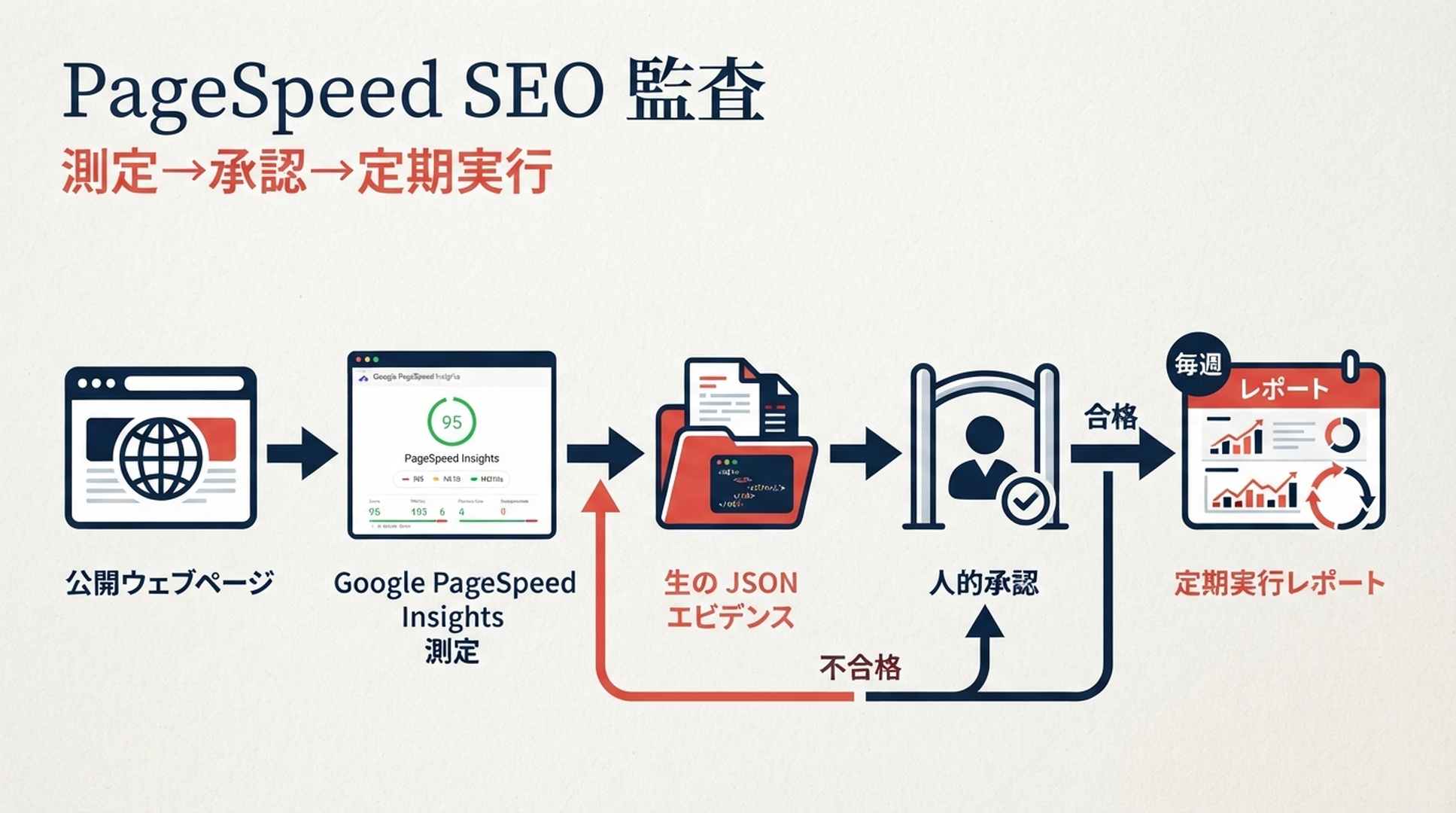
Hermes Agentに速度改善を「自動で任せる」のではなく、公開ページの測定を安全に繰り返させる方法を解説します。このスキルはGoogle PageSpeed Insights APIでモバイルとデスクトップを測定し、元のJSON、日付付きレポート、監査範囲を残します。まず手動のベースラインを検証し、その後にだけ定期実行を承認します。
重要なのは境界です。PageSpeedのスコアは、あるURLをある時点で測ったLighthouseのラボ結果です。Chrome UX Report(CrUX)はGoogleが返した場合に限り実ユーザーのフィールドデータになります。どちらもCMS、リポジトリ、デプロイをエージェントが変更してよい根拠にはなりません。
この記事をHermesに渡してスキルをインストールする
Read [THIS ARTICLE URL] and install the Hermes skill described there.

First inspect my local Hermes configuration and any project guidance. Tell me
the destination you will use. Create only:
~/.hermes/skills/pagespeed-seo-baseline/SKILL.md
~/.hermes/skills/pagespeed-seo-baseline/scripts/pagespeed_baseline.py

Copy the complete code blocks from the article. Do not invent a different
workflow. Verify the Python file with a syntax check and report the two paths.
Tell me how to configure PAGESPEED_API_KEY locally, but never ask me to paste
the value into this chat and never display it.

Do not run PageSpeed, schedule a task, write to my site repository, use CMS or
hosting credentials, edit a skill other than this one, or change a live site.
Stop after installation and verification.
記事公開後は、次の依頼をHermesに送ってください。作成と構文確認だけを行い、サイトや監査対象には触れないよう明示します。
Hermesが公開ページを読めない場合は、このページのSKILL.mdとPythonランナーを同じ会話へ貼り付けます。ローカルのHermesスキルは通常~/.hermes/skills/に置かれ、スラッシュコマンドで呼び出します。ここはWebアプリの機能ではなく、独立した監視ツールです。
完成条件: ベースラインを先に、定期実行を後に
項目 | このワークフローで得られるもの |
|---|---|
対象 | ローカルまたは隔離環境でHermesを使うSEO担当者、開発者、技術マーケター |
完成物 |
|
入力 | 1つの公開URL、選定URLリスト、上限を決めたサイトマップサンプル |
前提 | Hermes Agent、Python 3.9以上、Google CloudのPageSpeed Insights APIキー、書き込み可能なレポートディレクトリ |
所要時間 | 手動ベースライン約25分。レビュー後の定期実行追加は約10分 |
完了の定義 | URLと戦略がすべて記録され、raw結果とフィールドデータの範囲が残り、サイト変更がない |
リリース確認には選定したURLリストを使います。サイトマップはテンプレート間の傾向を見るためのサンプルであり、全URLを検査した証拠ではありません。ランナーは先頭パスごとに1URLを選び、残りをサイトマップ順で補います。孤立ページ、canonical、インデックス可能性は検証しません。
APIキーは安全な実行環境にだけ置く
export PAGESPEED_API_KEY="replace-with-your-key"
Google Cloud ConsoleでPageSpeed Insights APIを有効にし、制限付きキーを作成します。値はローカルのシークレット機構、またはHermesを起動する環境に保存し、スキル、レポート、メッセージ、Gitには入れません。
Docker、リモート端末、別のサンドボックスでHermesを動かす場合、その環境にキーを渡す理由を明確にしてください。初回監査には、専用の制限付きキーを使うローカル実行が最も低リスクです。APIの現在のクォータをGoogle Cloudで確認してから、定期実行の頻度を決めます。
Hermesスキルの安全ルール
~/.hermes/skills/pagespeed-seo-baseline/
  SKILL.md
  scripts/
    pagespeed_baseline.py
---
name: pagespeed-seo-baseline
description: Create a read-only PageSpeed Insights baseline for one public URL, a supplied URL list, or a controlled XML sitemap sample. Save raw JSON and a dated report that distinguishes Lighthouse lab data from CrUX field data. Use for website speed, Core Web Vitals, Lighthouse, and recurring performance-baseline requests. Never edit a site, repository, CMS, hosting configuration, or deployment.
required_environment_variables:
  - PAGESPEED_API_KEY
---

# PageSpeed SEO Baseline

This is an evidence-collection skill. It may call the public PageSpeed Insights API and public sitemap URLs, then write only inside the report directory chosen by the operator.

## Boundaries

- Read `PAGESPEED_API_KEY` from the runtime environment only. Never print, message, save, or commit it.
- Do not use browser logins, SSH, CMS, hosting, Git write, deployment, or website-editing tools. A performance report is not approval to repair a site.
- Run both `mobile` and `desktop`. Preserve each successful response under `raw/` before summarizing it.
- Describe Lighthouse as a point-in-time lab measurement. Treat `loadingExperience` as page-level CrUX only when returned, and `originLoadingExperience` as origin-level CrUX only when returned. Do not substitute one for the other.
- For `--sitemap`, say how URLs were sampled and how many were excluded. For important templates, prefer `--urls-file`.
- Never create or change a schedule until a human has reviewed one successful manual report and named the recurring scope, cadence, report path, and delivery destination.

## Commands

Run from this skill directory. The output path must be outside a repository unless the operator explicitly chooses an ignored evidence directory.

    python3 scripts/pagespeed_baseline.py \
      --url "https://www.example.com/pricing/" \
      --out "$HOME/hermes-pagespeed-reports/pricing-baseline"

    python3 scripts/pagespeed_baseline.py \
      --sitemap "https://www.example.com/sitemap.xml" \
      --max-urls 12 \
      --out "$HOME/hermes-pagespeed-reports/site-sample"

## Required report handoff

Return the report path and a compact table: requested URL, final URL, device strategy, performance score, LCP, INP, CLS, TBT, and field-data scope. Name failed requests and skipped URLs. Group repeated opportunities by likely mechanism, but label every repair as a hypothesis until a developer verifies it.

When the operator asks for a schedule, show the proposed command, cadence, report retention rule, and delivery target. Wait for explicit confirmation before creating it. If running on a messaging surface, send the report path or attachment; never send the API key or raw command environment.
#!/usr/bin/env python3
"""Collect bounded PageSpeed Insights evidence without third-party packages."""
from __future__ import annotations

import argparse
import json
import os
import sys
import time
import urllib.error
import urllib.parse
import urllib.request
import xml.etree.ElementTree as ET
from collections import OrderedDict
from datetime import datetime, timezone
from pathlib import Path

API = "https://www.googleapis.com/pagespeedonline/v5/runPagespeed"
CATEGORIES = ("performance", "accessibility", "best-practices", "seo")
STRATEGIES = ("mobile", "desktop")
AUDITS = ("largest-contentful-paint", "interaction-to-next-paint", "cumulative-layout-shift", "total-blocking-time")


def get_bytes(url: str) -> bytes:
    request = urllib.request.Request(url, headers={"User-Agent": "Hermes-PageSpeed-Baseline/1.0"})
    with urllib.request.urlopen(request, timeout=45) as response:
        return response.read()


def sitemap_urls(url: str) -> list[str]:
    try:
        root = ET.fromstring(get_bytes(url))
    except (urllib.error.URLError, ET.ParseError) as error:
        raise RuntimeError(f"Could not read sitemap {url}: {error}") from error
    locs = [n.text.strip() for n in root.findall(".//{*}loc") if n.text and n.text.strip()]
    if root.tag.lower().endswith("sitemapindex"):
        locs = [item for child in locs for item in sitemap_urls(child)]
    return list(OrderedDict((u, None) for u in locs if urllib.parse.urlparse(u).scheme in {"http", "https"}))


def select_urls(urls: list[str], maximum: int) -> list[str]:
    groups: OrderedDict[str, list[str]] = OrderedDict()
    for url in urls:
        parts = [part for part in urllib.parse.urlparse(url).path.split("/") if part]
        groups.setdefault(parts[0] if parts else "root", []).append(url)
    chosen = [values[0] for values in groups.values()]
    chosen.extend(url for url in urls if url not in chosen)
    return chosen[:maximum]


def run_api(url: str, strategy: str, key: str) -> dict:
    params = [("url", url), ("strategy", strategy), ("key", key)]
    params.extend(("category", category) for category in CATEGORIES)
    endpoint = API + "?" + urllib.parse.urlencode(params)
    last_error = "unknown error"
    for attempt in range(3):
        try:
            request = urllib.request.Request(endpoint, headers={"User-Agent": "Hermes-PageSpeed-Baseline/1.0"})
            with urllib.request.urlopen(request, timeout=150) as response:
                return json.load(response)
        except urllib.error.HTTPError as error:
            last_error = f"HTTP {error.code}: {error.read().decode('utf-8', 'replace')[:240]}"
            if error.code not in {429, 500, 502, 503, 504}:
                break
        except (urllib.error.URLError, TimeoutError, json.JSONDecodeError) as error:
            last_error = str(error)
        time.sleep(2 ** attempt)
    raise RuntimeError(last_error)


def value(result: dict, audit_id: str) -> str:
    return result.get("lighthouseResult", {}).get("audits", {}).get(audit_id, {}).get("displayValue", "n/a")


def score(result: dict) -> str:
    raw = result.get("lighthouseResult", {}).get("categories", {}).get("performance", {}).get("score")
    return "n/a" if raw is None else str(round(raw * 100))


def field(result: dict, scope: str) -> str:
    metrics = result.get(scope, {}).get("metrics", {})
    names = ("LARGEST_CONTENTFUL_PAINT_MS", "INTERACTION_TO_NEXT_PAINT", "CUMULATIVE_LAYOUT_SHIFT_SCORE")
    return " / ".join(str(metrics.get(name, {}).get("percentile", "n/a")) for name in names) if metrics else "not returned"


def report(records: list[dict], scope: str, selected: int, total: int) -> str:
    lines = ["# Hermes PageSpeed baseline", "", f"- Generated (UTC): {datetime.now(timezone.utc).isoformat(timespec='seconds')}", f"- Scope: {scope}", f"- URLs selected: {selected} of {total}", "- Lighthouse is lab data. CrUX appears only when Google returned it.", "", "| URL | Final URL | Device | Perf | LCP | INP | CLS | TBT | Page CrUX (LCP / INP / CLS) | Origin CrUX (LCP / INP / CLS) | Status |", "| --- | --- | --- | ---: | --- | --- | --- | --- | --- | --- | --- |"]
    for item in records:
        if item["error"]:
            row = [item["url"], "n/a", item["strategy"], "n/a", "n/a", "n/a", "n/a", "n/a", "n/a", "n/a", item["error"]]
        else:
            data = item["result"]
            final_url = data.get("lighthouseResult", {}).get("finalUrl", item["url"])
            row = [item["url"], final_url, item["strategy"], score(data), *(value(data, name) for name in AUDITS), field(data, "loadingExperience"), field(data, "originLoadingExperience"), "ok"]
        lines.append("| " + " | ".join(str(cell).replace("|", "/") for cell in row) + " |")
    return "
".join(lines) + "
"


def main() -> int:
    parser = argparse.ArgumentParser()
    scope = parser.add_mutually_exclusive_group(required=True)
    scope.add_argument("--url")
    scope.add_argument("--urls-file")
    scope.add_argument("--sitemap")
    parser.add_argument("--max-urls", type=int, default=10)
    parser.add_argument("--out", required=True)
    args = parser.parse_args()
    key = os.environ.get("PAGESPEED_API_KEY")
    if not key:
        parser.error("PAGESPEED_API_KEY is not set in the environment")
    if args.url:
        urls, label = [args.url], "single URL"
        total = len(urls)
    elif args.urls_file:
        urls = [line.strip() for line in Path(args.urls_file).read_text(encoding="utf-8").splitlines() if line.strip() and not line.startswith("#")]
        label = "supplied URL list"
        total = len(urls)
    else:
        all_urls = sitemap_urls(args.sitemap)
        urls, label = select_urls(all_urls, args.max_urls), f"sitemap sample from {args.sitemap}"
        total = len(all_urls)
    out = Path(args.out)
    raw = out / "raw"
    raw.mkdir(parents=True, exist_ok=True)
    records = []
    for number, url in enumerate(urls, start=1):
        for strategy in STRATEGIES:
            try:
                result = run_api(url, strategy, key)
                (raw / f"{number:03d}-{strategy}.json").write_text(json.dumps(result, indent=2), encoding="utf-8")
                records.append({"url": url, "strategy": strategy, "result": result, "error": ""})
            except RuntimeError as error:
                records.append({"url": url, "strategy": strategy, "result": {}, "error": str(error)})
    (out / "report.md").write_text(report(records, label, len(urls), total), encoding="utf-8")
    (out / "summary.json").write_text(json.dumps({"scope": label, "urls": urls, "records": [{k: v for k, v in item.items() if k != "result"} for item in records]}, indent=2), encoding="utf-8")
    print(out / "report.md")
    return 0


if __name__ == "__main__":
    raise SystemExit(main())
次の構成で作成します。
SKILL.mdには少なくとも次の運用契約を入れてください。これがスケジューラ用途のHermesを、サイト編集権限を持つ最適化ボットに変えないための中核です。
ランナーは標準ライブラリだけで実装し、--url、1行1URLの--urls-file、XMLサイトマップまたはサイトマップインデックスを受け付けます。performance、accessibility、best-practices、seoをモバイルとデスクトップで取得してください。429と5xxには短い限定リトライを使い、1件が失敗しても完了済みの結果は保持します。
期待される出力はreport.mdです。出力先にはsummary.json、raw/001-mobile.json、raw/001-desktop.jsonも作られます。レポートに要求URL、最終URL、両方の戦略、タイムスタンプがあり、rawファイルが空でないJSONであることを確認します。403はAPI有効化またはキー制限、サイトマップ失敗は小さな--urls-fileで切り分けます。意図した範囲を黙って置き換えてはいけません。
手動ベースラインを意図的に単純な場所で1回実行する
mkdir -p "$HOME/hermes-pagespeed-reports"
cd ~/.hermes/skills/pagespeed-seo-baseline
python3 scripts/pagespeed_baseline.py \
  --url "https://www.example.com/" \
  --out "$HOME/hermes-pagespeed-reports/homepage-2026-07-24"
最初は1つのcanonical URLと新しいレポートディレクトリから始めます。これにより、Skillが宣言済みの環境変数を読めること、公開APIへ到達できること、想定した場所だけへ書き込むことを確認できます。report.md内の要求URL、最終URL、両戦略、時刻を確認し、rawファイルが空でないJSONであることを確認します。キーがない場合はメッセージに貼らずローカル環境へ設定します。サイトマップが失敗した場合は、小さな--urls-fileで切り分けながらサイトマップを直し、意図した範囲を黙って置き換えません。
PageSpeedが測ったものを正しく読む
モバイルを先に読み、デスクトップと比較します。Performanceは複合Lighthouseスコアであり、診断名ではありません。LCP、INP、CLS、TBTは別の手がかりで、悪いラボ結果だけでは訪問者全員が同じ体験をしているとは言えません。
レポートの情報 | 意味 | 言ってはいけないこと |
|---|---|---|
Lighthouseスコア、LCP、INP、CLS、TBT | 指定URL・戦略でのラボ測定 | 「全ユーザーがこう感じている」 |
| ページまたはGoogle定義URLパターンのCrUX | 「オリジン全体の結果だ」 |
| オリジンのCrUX | 「全テンプレートが同じ状態だ」 |
CrUXなし | 今回の応答では対象フィールドデータが返らなかった | 「実ユーザーがいない」 |
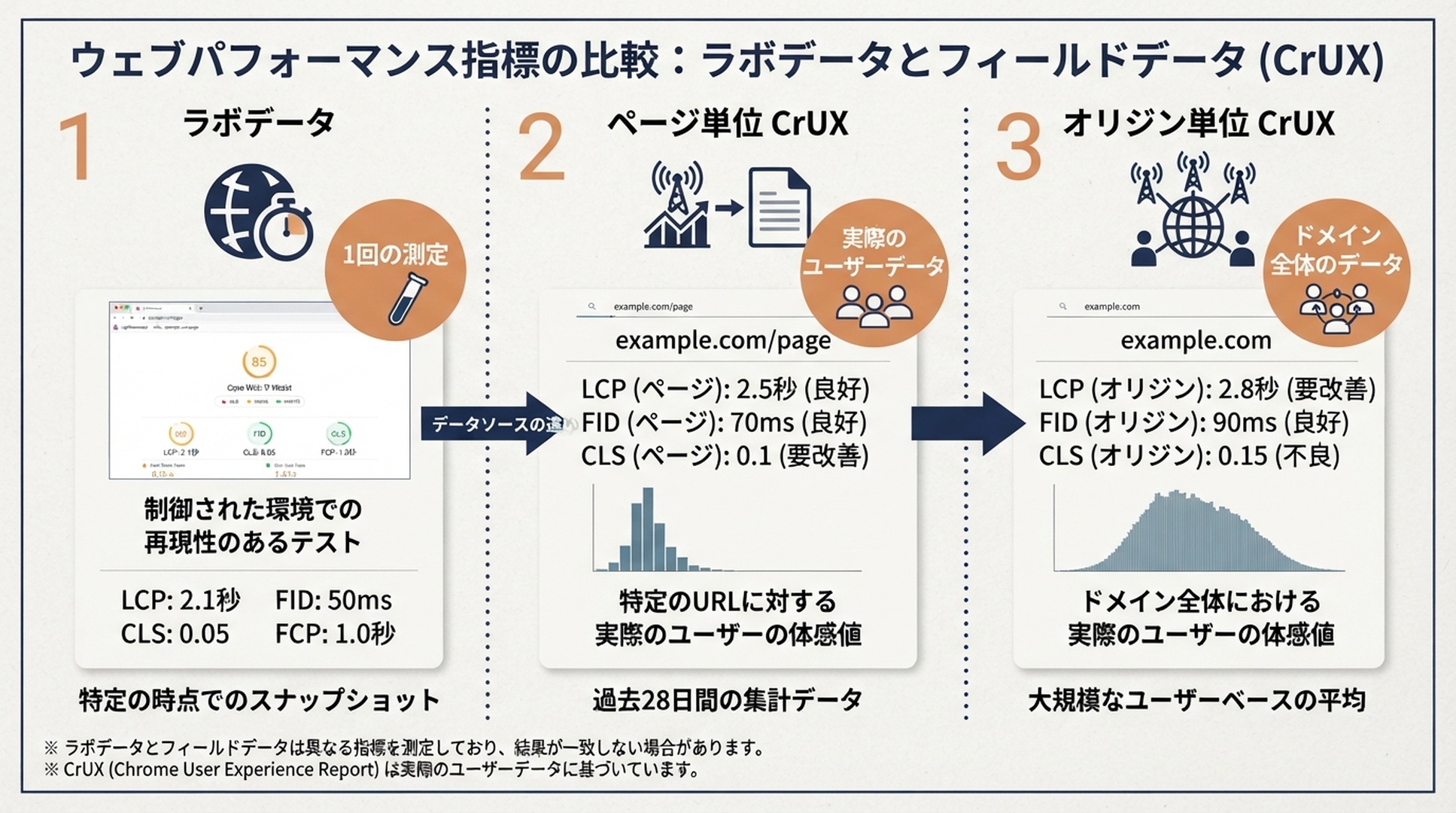
LighthouseとCrUXは異なる問いに答えます。修正を決める前に、データの範囲を明記してください。
信頼できるレポートの後にだけ定期実行を追加する
Create a proposed weekly PageSpeed baseline schedule, but do not activate it yet.

Use the exact manual scope and command from my approved report. Run in the same
isolated environment. Store each run beneath
$HOME/hermes-pagespeed-reports/weekly/YYYY-MM-DD/ and retain reports for 90
days. Deliver only report.md and summary.json to the approved owner channel.

Show the schedule, command, environment assumptions, report path, and failure
notification behavior. Do not include PAGESPEED_API_KEY in any output. Wait for
my explicit approval before writing or enabling the schedule.
未検証のエージェント作業を定期実行にしても、悪い根拠が頻繁に届くだけです。最初の実行をサイト所有者と確認し、正確なURL範囲またはサイトマップ上限、頻度、保存期間、配信先の4点を決めます。

承認後の依頼では、既存の手動スコープとコマンドをそのまま指定し、$HOME/hermes-pagespeed-reports/weekly/YYYY-MM-DD/の下へ保存、90日保持、承認済み所有者チャネルにはreport.mdとsummary.jsonだけを配信するよう求めます。スケジュール、コマンド、環境前提、失敗通知を表示させ、明示承認前には有効化させません。
修正は別のレビュー済みブリーフへ渡す
Read this PageSpeed evidence folder: [REPORT PATH]. Create a repair brief only.
For each repeated or high-impact opportunity, state the affected URLs, the lab
or field evidence, a likely mechanism, the developer owner, expected benefit,
risk, test method, and rollback signal. Flag assumptions. Do not edit code,
content, configuration, or a deployment.
レポートを使って、修正命令ではなく修正ブリーフを作らせます。繰り返し発生する機会ごとに、対象URL、ラボまたはフィールドの根拠、想定メカニズム、担当開発者、期待効果、リスク、テスト方法、ロールバック条件、未確認事項を記載します。コード、コンテンツ、設定、デプロイは編集させません。
検証チェックリスト
- [ ] スキルは
~/.hermes/skills/pagespeed-seo-baseline/にあり、名前とディレクトリが一致している。 - [ ]
PAGESPEED_API_KEYは宣言されているが、ファイル、チャット、レポートにはない。 - [ ] 手動レポートにはモバイル/デスクトップ、raw JSON、最終URL、明確な範囲がある。
- [ ] CrUXは返された場合だけページ単位またはオリジン単位として表示されている。
- [ ] 定期実行は人がレビューしてから有効化し、承認済みレポート先だけに書き込む。
- [ ] 監査スキルにCMS、リポジトリ、ホスティング、デプロイ権限がない。
よくある質問
Hermesでサイトマップの全ページを確認できますか?
より多くのURLを処理することはできますが、常に有用でも安全でもありません。PageSpeedリクエストはクォータを使い、サイトマップにはテンプレート、アーカイブ、優先度の低いページが混ざります。まずテンプレートごとに1ページ、または層化した小さなサンプルから始め、必要が明確になってから拡大します。
PageSpeedスコアが高ければ検索順位も上がりますか?
いいえ。スコアは指定URLと戦略に対するラボ測定であり、順位の保証ではありません。ページとオリジンのCrUXが返る場合は、ラボ結果と別のスコープとして扱ってください。
raw PageSpeed応答を残す理由は何ですか?
要約値だけでは、最終URL、失敗、監査の詳細、後から比較するための根拠を失います。raw JSONを残すことで、修正ブリーフと再測定を同じ証拠に結び付けられます。
コンテナの方がローカルHermes実行より安全ですか?
必ずしもそうではありません。コンテナにキーを渡せば、その中で動くコードはキーを読めます。初回は制限付き専用キーを使うローカル実行が低リスクです。コンテナを使うなら、ネットワーク、書き込み先、シークレット到達範囲を明示的に制限してください。
Author: Julian Mercer, AuspiaのTechnical SEO Practitioner。Julianは、SEOの発見からレビュー済みのWebサイト変更まで、明確な証拠の流れを残す技術ワークフローを執筆しています。