


The short answer
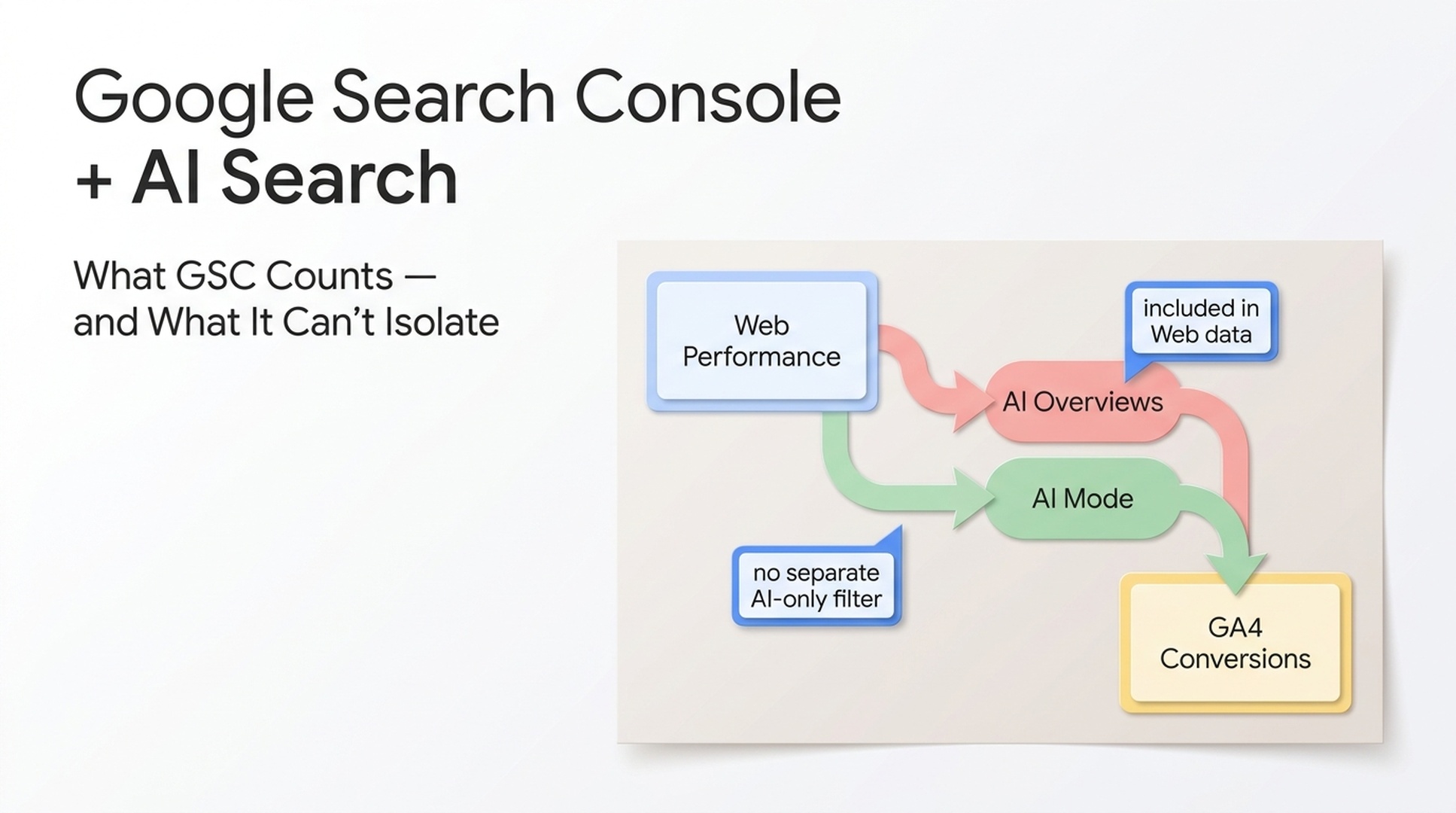
Google Search Console does count activity from Google AI features, including AI Overviews and AI Mode. That activity is included in the regular Performance report under the Web search type; it is not documented as a separate AI-only Performance report or filter.
That distinction matters. Search Console remains useful for spotting changes in organic impressions, clicks, queries, pages, countries, and devices. It cannot, on its own, tell you which slice of a trend came specifically from AI Overviews or AI Mode. Treat it as the foundation of your measurement, then pair it with a consistent SERP sample and GA4 conversion data.
Auspia take: If a dashboard claims to give you exact Google AI Overview traffic from Search Console alone, ask what it is inferring. Google's first-party reporting is valuable, but it does not offer that clean attribution boundary today.
What Google documents about AI feature reporting
Google's guidance is direct: sites that appear in AI features are included in overall Search Console traffic. AI Overview and AI Mode clicks, impressions, and positions are reported in the Performance report within the Web search type, using the normal counting rules for their links.
This does not mean every Web impression comes from an AI feature. It means AI feature activity contributes to the same reporting surface as other Web results. You can still use the standard report to:
Question | What Search Console can help you inspect | Important limit |
|---|---|---|
Is organic visibility rising or falling? | Web impressions, clicks, CTR, and average position over time | The trend is not AI-feature-only |
Which pages and queries changed? | Pages and Queries dimensions, filters, and exports | A change cannot be assigned to AI Mode or AI Overviews from GSC alone |
Did a country or device shift? | Country and Device dimensions | These are broad Web segments, not AI segments |
Did users convert after arriving? | Not in GSC; use GA4 or another analytics tool | Referrer data usually cannot isolate every AI surface reliably |
Google also says there are no additional technical requirements or special schema required to be eligible as a supporting link in AI Overviews or AI Mode. A page must be indexed and eligible to appear in Google Search with a snippet. The practical work is still solid SEO: crawlability, useful content, clear internal links, a good page experience, and structured data that matches visible content.
Why "AI-only GSC data" is the wrong mental model
It is tempting to hunt for one clean AI number. The interface does not currently support that conclusion.
AI Overviews and AI Mode can use different models and retrieval approaches. Google describes a query fan-out process that can search related subtopics and sources while a response is assembled. A page may be relevant to that process without behaving like a stable, numbered organic result. Conversely, a high-ranking page may not be shown in a particular AI response.
The useful question is not, "What was my exact AI Overview click count?" It is, "For the query groups that matter to us, are AI features appearing, are our pages still earning organic visibility, and are outcomes changing?" That question is measurable if you keep the data sources separate.
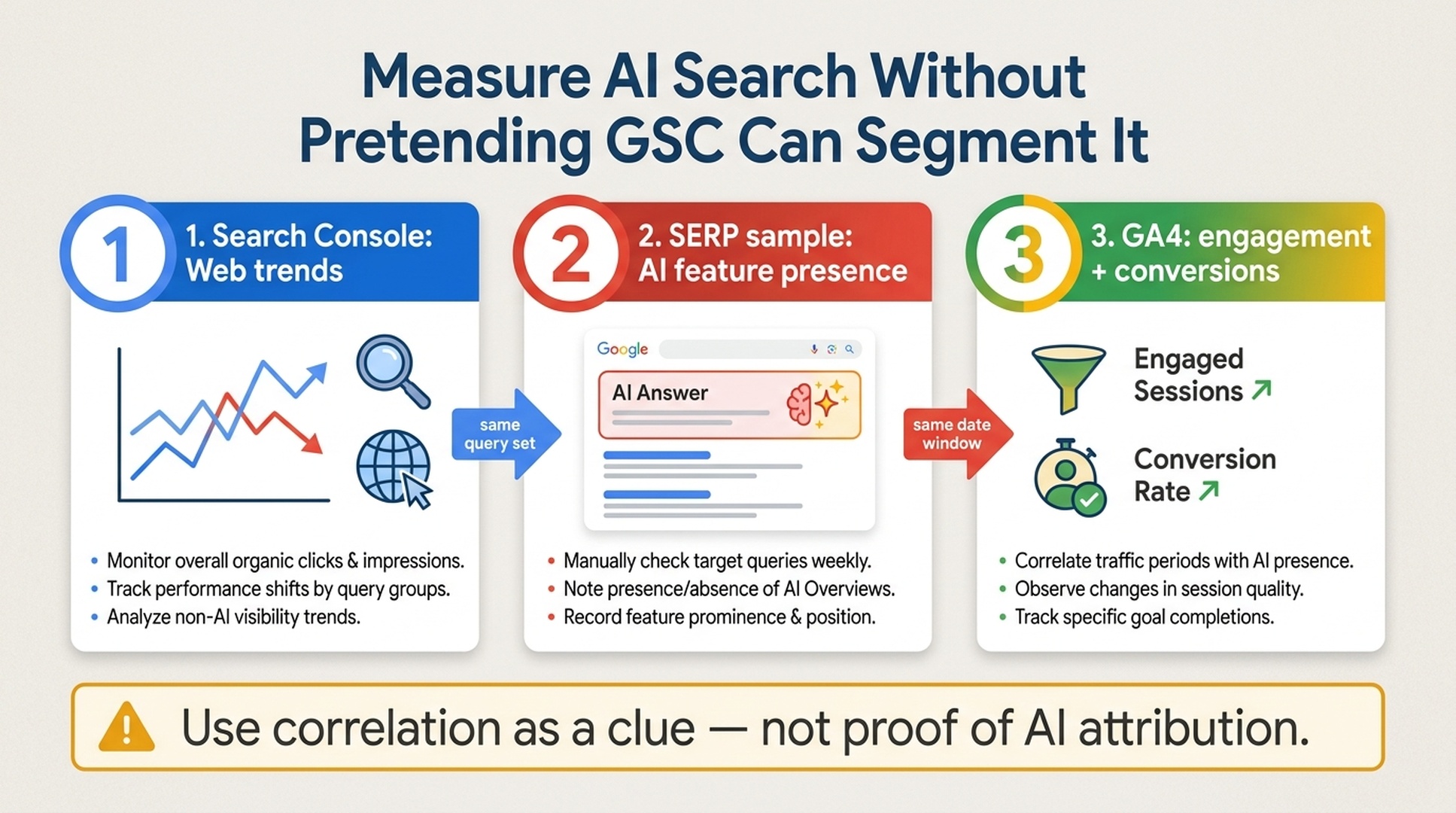
Use the same query set and date window across the three sources. Correlation can guide investigation; it is not proof that an AI feature caused a traffic or conversion change.
A weekly measurement workflow that holds up
Pick a small, stable set of high-value non-branded and branded queries. Do not change the list every week just because a new phrase looks interesting. The point is comparability.
1. Export the matching Web data from Search Console
In Search Console, use Performance > Search results, keep the search type on Web, and compare a fixed time window with the previous equivalent window. Export the query and page views for your tracked query groups.
Record:
- clicks and impressions;
- CTR and average position, with the usual caution that they aggregate many result contexts;
- pages gaining or losing impressions; and
- country or device shifts only when they reflect a real business question.
Avoid reading a single-day movement as a trend. Search demand, ranking changes, seasonality, and changes in result layouts can all move these numbers.
2. Run a repeatable SERP sample
For that same query list, record whether an AI Overview or AI Mode experience is visible in the market and device you are observing. Note the date, locale, device, query wording, whether your page is linked, and the result layout. Keep screenshots when your team has permission to store them.
Do not turn an occasional manual observation into a percentage for all Google searches. The sample is an operational signal: it tells you where to investigate, not a census of Google's results.
3. Check GA4 for the outcome, not an invented source label
Use GA4 to compare engaged sessions, key events, lead submissions, purchases, or other business outcomes for the relevant landing pages and periods. Segment by landing page, geography, and device where useful.
If AI-feature presence rises while Search Console clicks soften but engagement or conversion quality holds, flag a hypothesis for review. Do not label those conversions "from AI Overviews" unless your measurement setup actually supports that attribution.
4. Write the observation and the next test
Keep a short log with four fields: what changed, which evidence supports it, what could also explain it, and what you will test next. For example: refresh an answer block, improve source citations, fix an indexing problem, or leave the page alone while collecting another week of data.
That tiny discipline stops a measurement note from becoming a confident but unsupported story.
What to improve when AI features are common in your query set
Do not build pages around imagined AI ranking factors. Use the same foundations Google documents for Search, then make the page easier for a reader to verify and navigate.
Priority | Practical check | Why it is worth doing |
|---|---|---|
Indexability | Confirm the canonical URL is indexed and important text is available to Googlebot | A page cannot be a supporting link if it cannot be served in Search |
Answer clarity | Put a direct, qualified answer near the relevant heading | Readers and retrieval systems can find the point without parsing a long preamble |
Evidence | Cite primary sources, show dates, and distinguish fact from interpretation | It makes claims easier to check and refresh |
Structure | Use descriptive headings, concise paragraphs, tables where comparison helps, and visible labels | This improves scanning for people first |
Page experience | Check mobile rendering, internal links, images, and content parity | These are established Search basics, not AI-only tactics |
No one can guarantee inclusion in AI Overviews or AI Mode. A stronger page gives Google and users more usable material; it does not create an entitlement to appear.
Three controls that people often confuse
Google has controls that affect training or how much page content can appear in Search features. They are publishing choices, not a Search Console switch for AI visibility.
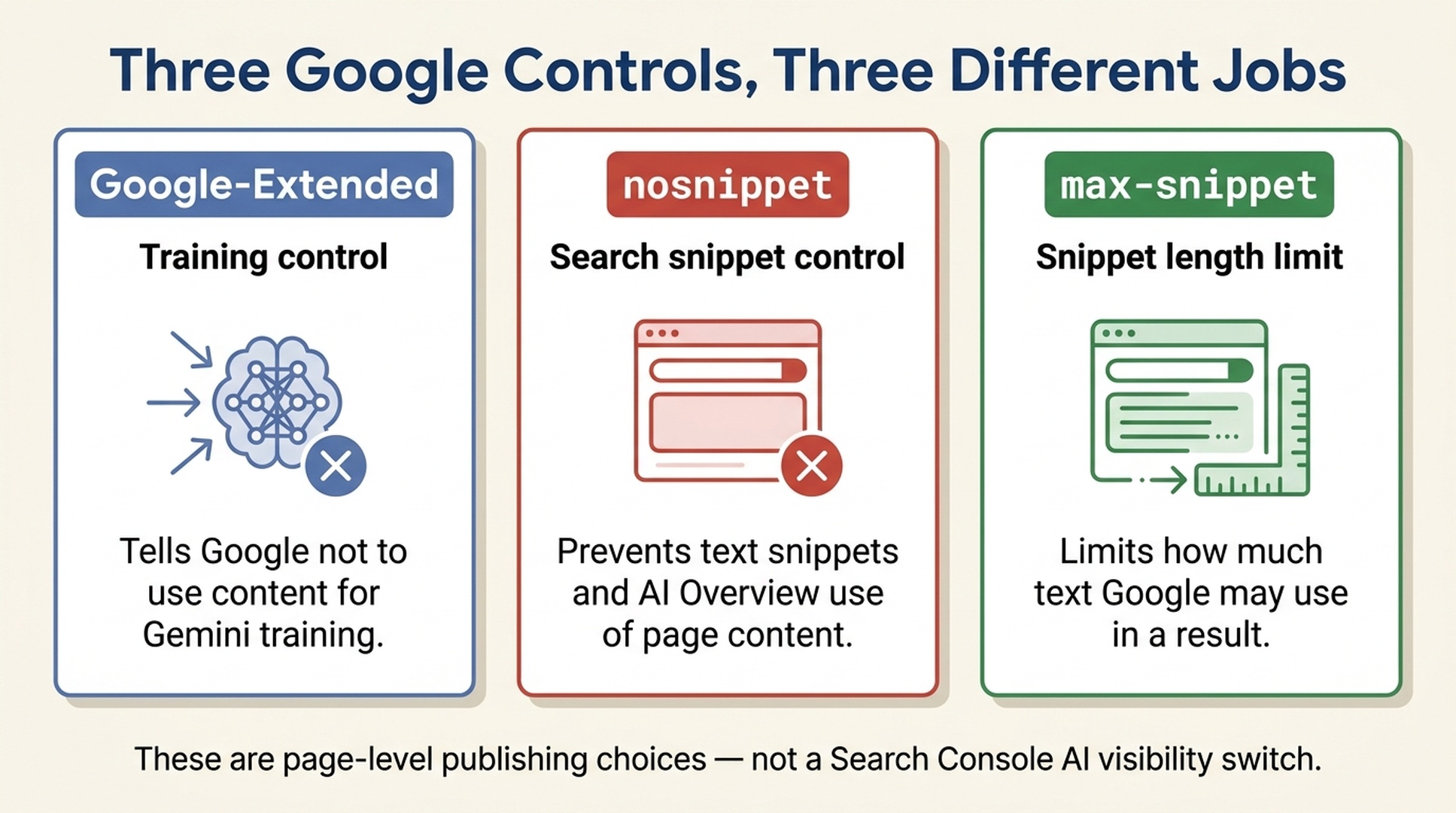
Control | What it controls | What it does not do |
|---|---|---|
| Whether Google may use crawled content to train Gemini models and improve generative APIs | It does not remove a page from Google Search or automatically block Search features |
| Text snippets in Search; Google says it also prevents content from being used as a direct input for AI Overviews and AI Mode | It is not a general training directive |
| The maximum text length Google may use in a snippet; Google says it also affects how much content may be used in AI features | It does not give you an AI-only reporting filter |
Apply these directives only after considering the trade-off for a specific page. A broad sitewide directive can change how your content is presented in ordinary Search as well as AI features.
A simple reporting template for stakeholders
Use a compact weekly note rather than a made-up AI dashboard:
Field | Example |
|---|---|
Query set | 30 commercial queries for product category X, US mobile and desktop |
Search Console signal | Web impressions down 8% week over week; clicks down 5% on the same query group |
SERP observation | AI Overviews appeared on 12 of 30 sampled queries, up from 8 last week |
Business outcome | Engaged sessions flat; demo requests from the affected landing pages up 3% |
Interpretation | AI feature presence may be part of the change; seasonality and rank movement need review |
Next action | Recheck ranks and query intent; update two pages with dated primary-source evidence |
This format is honest about what you know, useful to people making decisions, and easy to improve as Google expands reporting.
Sources and related reading
- Google: AI features and your website
- Google Search Console Performance report
- Google: snippet controls and AI features
- Using Google Search Console and Google Analytics data for SEO
For the technical foundations behind this workflow, read Auspia's technical SEO and GEO audit guide and content refresh process for SEO and GEO.
FAQ
Does Google Search Console have a separate AI Overview report?
Google's documentation says AI Overviews and AI Mode are included in the normal Performance report under the Web search type. It does not document a separate AI-only Performance report or filter.
Can I see the exact clicks from AI Overviews in Search Console?
Not as a separately isolated AI Overview metric in the standard Performance report. Use Search Console for Web trends and pair it with a controlled SERP sample and GA4 outcomes; do not treat correlation as exact AI attribution.
Do I need special schema or an llms.txt file to appear in Google AI features?
No. Google says there are no additional technical requirements or special schema for AI Overviews or AI Mode. A page still needs to be indexed, eligible for a Search snippet, and useful to searchers.
Does Google-Extended block my pages from AI Overviews?
No. Google-Extended controls use of crawled content for Gemini training and generative API improvement. It is separate from how Google Search can show indexed pages and links in Search features.
What is the safest way to report AI search performance to leadership?
Show the underlying sources separately: Search Console Web trends, a documented SERP sample, and GA4 outcomes. State the attribution limit in the report and list the next action as a test, not a guaranteed fix.
Author: Owen Hartwell, Google AI Overview Tracker Across 40+ Verticals at Auspia. Owen writes about Google AI search features, SERP shifts, and practical ways to measure AI visibility without overstating the data.


