What you will finish with
On September 8, 2026, Meta launched Muse, a personal AI agent that runs its own browser and completes multi-step tasks. On September 21, Shopify and Meta confirmed that Muse can search Shopify Catalog and complete checkout inside the Meta app using Shop Pay, with orders landing in the merchant's admin tagged to Meta.
Three weeks before that, Amazon blocked Muse from its own store, telling GeekWire that Meta never disclosed the access and that the agent did not identify itself while browsing. Amazon's stated concern was not that an agent shopped. It was that an agent shopped without a permissioned, identified path.
That contrast is why this workflow exists. Shopify opened a structured, merchant-level channel. Amazon shut an unstructured one. If you sell on Shopify you are already inside the open channel by default, and your job is making sure the data Muse reads is good enough to act on.
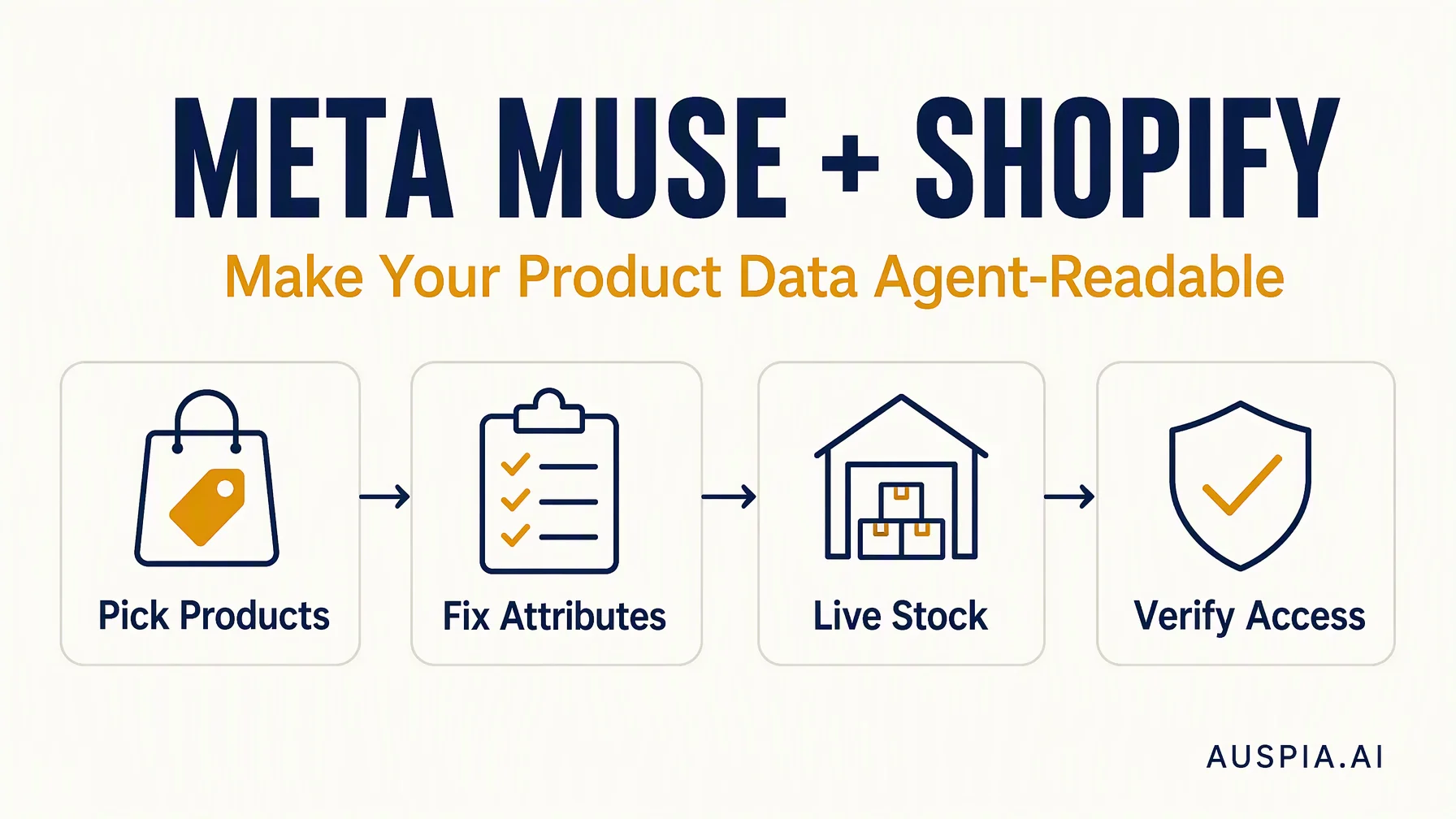
By the end of this walkthrough you will have:
- A shortlist of the 10 to 20 products most worth winning in an AI conversation
- Product titles, descriptions, and attributes rewritten so an agent can match them to a plain-language request
- Variant, inventory, and pricing data confirmed as live rather than stale
- A verification pass that shows what Muse and Shopify Catalog actually see
- Attribution and a review cadence so you can tell whether any of it worked
Who this is for: a Shopify merchant or agency operator who owns product content and can edit the admin. No developer required.
Prerequisites: Shopify admin access, permission to edit product data, and a Google Sheet or similar. A US-shipping catalog is required for Muse eligibility today; Muse is US-only at launch.
Time: about three hours for a first pass on 20 products, plus a 30-minute monthly review.
Done means: you can point to a specific product, name the buyer question it should answer, show the exact attribute Muse would match on, and prove the price and stock are current. If your answer is "the descriptions are fine," you are not done.
Auspia's view: the merchants who lose here will not lose to a better product. They will lose to a competitor whose attributes were complete enough for the agent to trust. Agentic commerce rewards data hygiene more than it rewards copywriting flair.
Before you start: what actually decides whether Muse picks you
Three things determine whether your product has a chance. Get these straight before you touch a product page, because two of them are not fully in your control.
Eligibility is mostly automatic. Shopify states that eligible products are listed in Shopify Catalog by default, with no separate integration or opt-in. Merchants who ship to eligible US locations and have products in Catalog are discoverable in Muse. There is no application to submit and no button that turns it on.
Ranking is not published. Shopify says ranking factors vary by platform and may include data quality, relevance, availability, pricing, and engagement signals. Meta has not said how Muse orders its recommendations. Anyone selling you a "Muse ranking formula" is guessing.
Catalog does part of the work for you. Shopify Catalog standardizes products into a universal taxonomy and infers extra attributes from transaction signals. A candle filed under home decor might get tagged as a popular gift based on purchase patterns. You cannot see or edit every inferred attribute.
What is left is the part Catalog cannot invent: accurate, specific, current product data. That is the job.
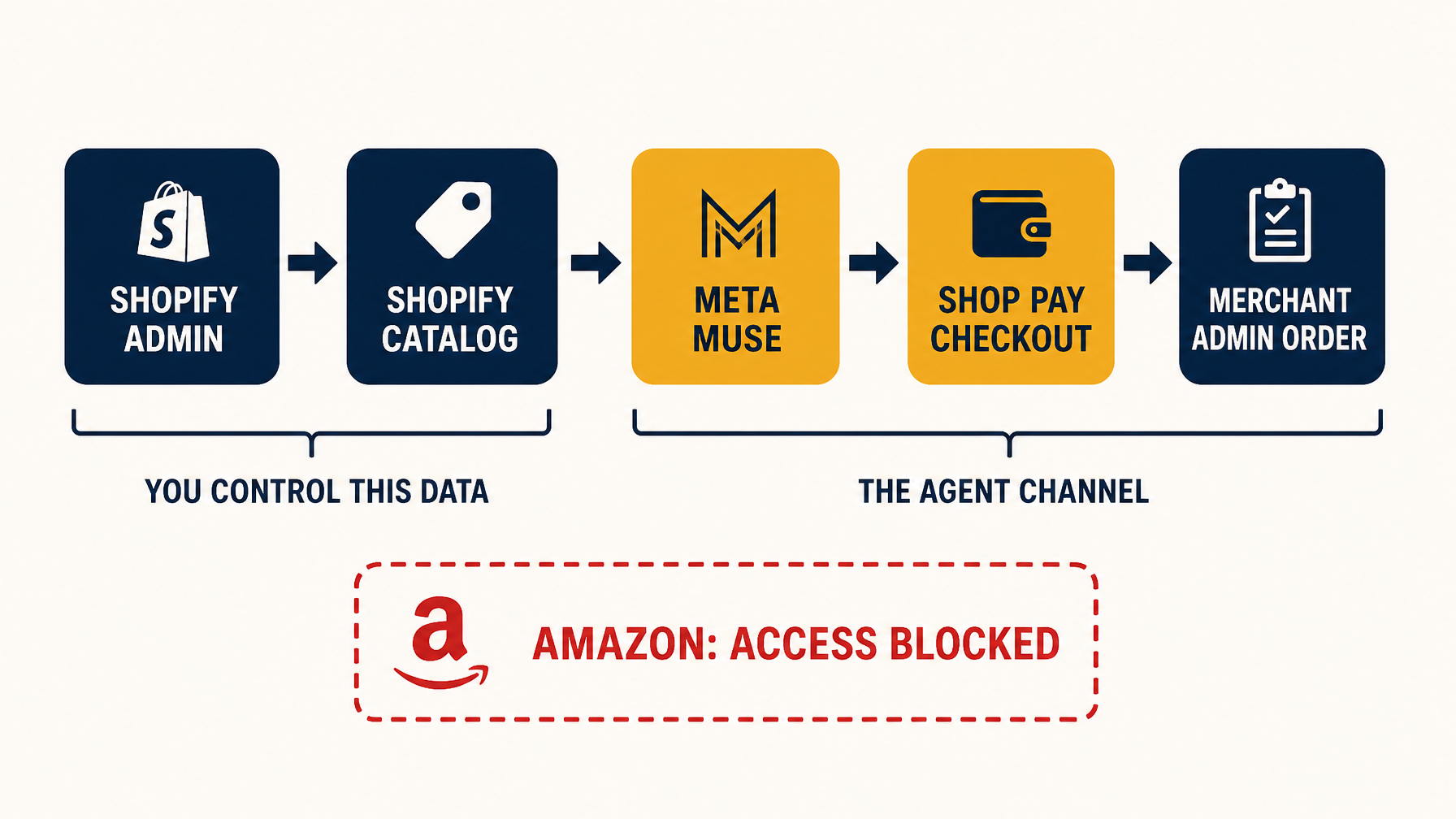
The path Muse uses on Shopify runs through data you control. Amazon's block sits on the unstructured path, not on the concept of an agent buying.
Step 1: Pick the products worth optimizing
Do not start with your full catalog. Start with the products an agent is most likely to be asked for.
Pull your last 90 days of orders and rank by revenue. Then mark the products that fit a conversational request rather than a brand-name search. "Find me a birthday gift for a 10-year-old who likes art" is a Muse-style prompt. "Buy the Acme Model 400" is not.
A product belongs on the shortlist if it meets at least two of these:
- It sells consistently and has margin to absorb a new channel
- It solves a problem a buyer would describe in a sentence, not a part number
- It has variants a buyer would need explained (size, scent, compatibility, color)
- It has enough stock to survive a demand spike
- It has reviews or a track record that supports a recommendation
Expected output: a list of 10 to 20 product handles in a sheet, with a one-line note on the buyer question each one should answer.
Quality check: read each note aloud. If it sounds like a keyword, rewrite it as a question a person would actually type or say.
Recovery path: if you cannot name a buyer question for a product, it is a poor fit for this pass. Move it to a later batch rather than forcing it.
Step 2: Rewrite the data an agent reads first
An agent does not browse your storefront. It reads structured fields and decides from those. The order of impact runs roughly like this:
Field | Why the agent depends on it | Common failure |
|---|---|---|
Title | Primary match against the buyer's request | Brand name first, product type buried or missing |
Product type and category | Places you in the taxonomy Muse searches | Left as the theme default or blank |
Description | Supplies the fit, use case, and differentiators | Marketing copy with no concrete attributes |
Variants | Determines whether the right option is even offered | Sizes or colors only in the image, not as options |
Price and inventory | Confirms the product is buyable right now | Stale feed or manual stock that drifts |
Images | Supports identification and reduces mismatch | Low resolution, wrong variant, missing alt text |
Rewrite titles so the product type comes before the brand. "Merino Wool Crew Socks, 3-Pack, Unisex, Charcoal" beats "ACME Signature Series." Keep the brand in the title, just not as the first thing an agent has to parse past.
Then write the description for matching, not for mood. Name the material, the dimensions, the use case, the compatibility, and who it is for. If a buyer would need to know it to make the decision, it belongs in a field, not in a lifestyle paragraph.
Expected output: every shortlisted product has a title led by product type, a filled product type field, and a description containing at least five concrete attributes.
Quality check: cover the product image and read only the title and description. Can you tell what it is, who it is for, and what makes it different? If not, the agent cannot either.
Recovery path: if you do not know a real attribute, do not invent one. Pull it from the supplier spec sheet or leave the field empty. A wrong attribute produces a wrong recommendation and a return.
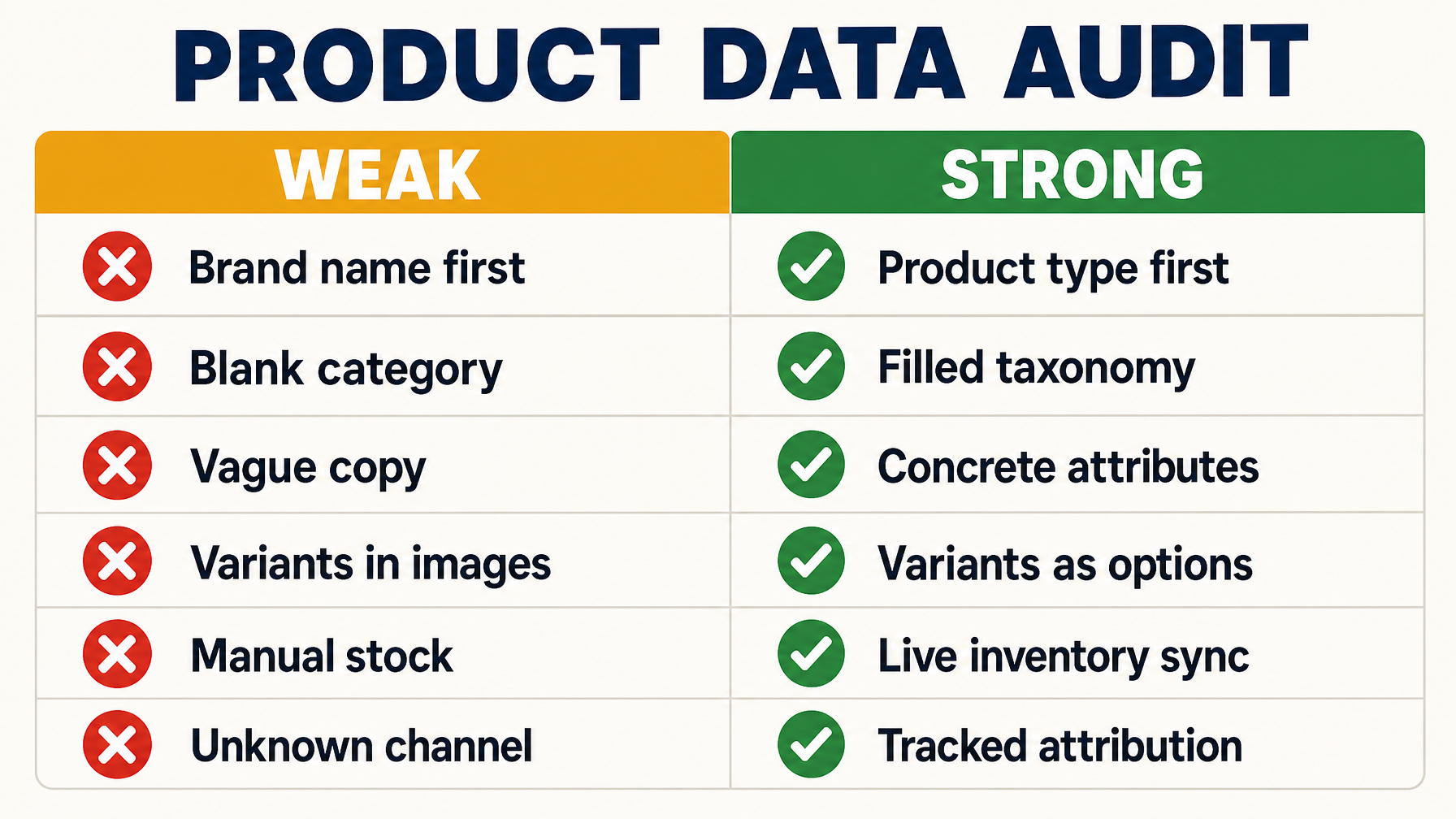
Run this comparison against your shortlist. The left column is what an agent cannot act on.
Step 3: Make variants and availability unambiguous
This is where most catalogs quietly fail. An agent asked for a size 10 in navy needs that exact variant to exist as a purchasable option. If navy lives only in a swatch image and size 10 is out of stock, the agent surfaces the product and then fails at checkout. That is worse than never surfacing it.
Work through the shortlist and confirm:
- Every variant that exists in reality exists as a Shopify option with its own price and stock
- Out-of-stock variants are marked as such rather than showing as available
- Inventory syncs from your actual source of truth, not a manual number someone updates weekly
- Pricing in Shopify Catalog matches your storefront, including any active discount logic
- Shipping speed and destination rules are accurate, since US eligibility is part of what makes you reachable
Shopify Catalog verifies pricing and inventory in real time and syndicates updates automatically, so the fix is upstream. Correct the product record once and the channel follows.
Expected output: a spot check of five variants per shortlisted product confirming the option exists, has a price, and reflects real stock.
Quality check: buy one variant yourself through a normal storefront checkout. If the variant is confusing to you, it is worse for an agent.
Recovery path: if inventory accuracy is a systemic problem, stop here and fix the source feed before optimizing copy. Polished descriptions on top of wrong stock produce failed checkouts and unhappy buyers.
Step 4: Check what the agent can actually read
You have now improved the data. Confirm it is reaching the channel.
Start with the free audit path. Shopify publishes a product-page audit tool that scans a product URL and reports on the structured data and robots.txt access AI shopping assistants need. Run it on three shortlisted products, not all twenty.
Then check the obvious blockers yourself:
- Your robots.txt does not block the crawlers that feed AI shopping surfaces
- Product pages render their core content without requiring JavaScript to execute first
- Structured data on the page matches what is in the admin, with no contradictions between the two
- Product URLs return 200 and are not orphaned or behind a redirect chain
If you want a second opinion on how your pages look to AI systems more broadly, Auspia's AI Search Visibility Checker runs a page against AI answer surfaces and shows where you are absent.
Expected output: a screenshot or note per product showing the audit result and any blocker found.
Quality check: if the audit reports a mismatch between page structured data and admin data, treat the page as the source of truth for what the agent sees and reconcile the admin.
Recovery path: if robots.txt or rendering is the blocker, that is a site-level fix, not a product fix. Escalate it before spending more time on copy.
Step 5: Set up attribution before you need it
Shopify states that orders from AI channels flow into the admin with attribution showing which channel drove the sale. Confirm you can see that, because a channel you cannot measure is a channel you will eventually defund by accident.
Do three things:
- Find where AI-channel attribution appears in your order data and confirm it is populating
- Add a saved view or report for AI-sourced orders so you are not hunting for it monthly
- Note the launch date as your baseline, so the first month's numbers have something to compare against
Do not expect volume yet. Muse is new, US-only, and consumer trust in agentic purchasing is thin. Fortune reported in September 2026 that most consumers say they do not trust AI enough to spend their money through an agent. Early numbers will be small and noisy.
Expected output: a working report or saved view for AI-channel orders, plus a written baseline date.
Quality check: place or find one test order and confirm it appears with channel attribution. If you cannot see the channel, your measurement is blind.
Recovery path: if attribution is not visible in your setup, contact Shopify support before assuming the channel is not working. Missing attribution and zero orders look identical in a dashboard.
Verify the finished result
Run this before you call the pass complete. It takes about fifteen minutes.
- Pick three shortlisted products at random.
- For each, read only the title, product type, and description, and write down what you think the product is.
- Compare your note against the actual product. Any gap is a data gap.
- Confirm the price and stock on the page match the admin.
- Run the product-page audit and confirm no new blocker appeared.
- Open your AI-channel order report and confirm it loads.
If all six pass, the data layer is sound. What you cannot verify is whether Muse will choose you, because Meta has not published its ranking logic. You have removed the reasons it would skip you. That is the realistic ceiling here.
Maintain it monthly
Agentic commerce is not a one-time cleanup. Catalog data drifts, and an agent acting on stale data produces a bad customer experience that gets attributed to your brand.
Put a 30-minute monthly review on the calendar:
- Re-run the shortlist against your last 30 days of orders and swap in any product that is now selling
- Check the five most recent AI-channel orders for anything odd, such as wrong variant or address issues
- Confirm inventory sync is still healthy after any platform or app change
- Re-run the audit on two products to catch new blockers
- Log the AI-channel order count and any pattern you notice
Keep the log even when the numbers are small. In a year, the merchants who can show a trend will be the ones who know which attributes actually correlate with agent recommendations. Nobody has that data yet.
FAQ
Do I need to apply or opt in to be in Muse?
No. Shopify states that eligible products are listed in Shopify Catalog by default with no separate integration. Merchants who ship to eligible US locations and have products in Catalog are discoverable in Muse.
Can I pay to rank higher in Muse?
There is no published paid placement for Muse recommendations. Shopify says ranking factors vary by platform and may include data quality, relevance, availability, pricing, and engagement signals. Treat any offer to guarantee placement as unverified.
Why did Amazon block Muse while Shopify allowed it?
Amazon told GeekWire that Meta never notified it about the access, that Muse did not identify itself as an automated agent while browsing, and that it had privacy concerns about credential handling. Shopify's channel runs through Shopify Catalog and Shop Pay, a permissioned path with the merchant in the loop. The difference is consent and structure, not the idea of an agent buying something.
Will this hurt my regular storefront SEO?
No. You are filling in structured fields and making titles more specific, which is the same work that helps traditional search and every other AI surface. The main risk is over-stuffing titles with attributes until they become unreadable to humans. Keep titles natural.
How long until I see orders?
Unknown, and anyone who gives you a number is guessing. Muse launched in September 2026 and is US-only. The honest position is that you are building the data foundation now so you are not retrofitting it when volume arrives.
Does this only apply to Shopify?
The workflow is Shopify-specific because Catalog handles taxonomy, pricing, and syndication automatically. If you are on another platform, the same principles apply but you own more of the plumbing, including feeding structured product data to each AI surface yourself.
Author: Eva Laurent, Ecommerce Search Strategist for 10k+ Product Pages at Auspia. Eva writes about product discovery, catalog data, and how AI shopping agents decide what to recommend.