


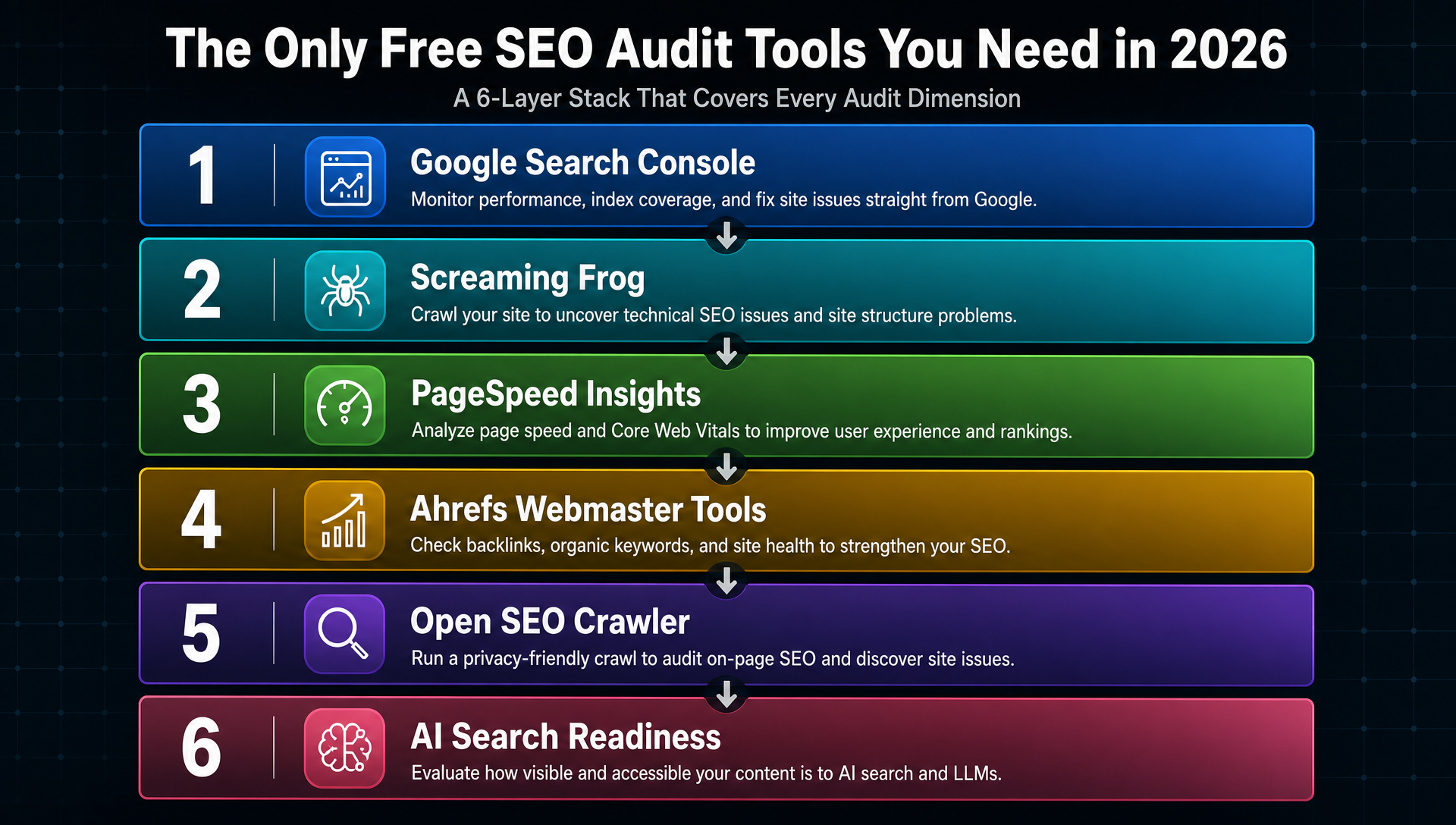
If you audit a site with just one tool, you miss roughly half of what matters. Google Search Console won't catch broken internal links. PageSpeed Insights can't show you which pages are orphaned. And no traditional crawler tells you whether ChatGPT or Perplexity can actually cite your content.
The fix is not paying for a $139/month platform. It is stacking the right free tools in the right order, each covering a layer the others cannot reach.
Here is the free six-tool stack we use for every audit, the exact order to run them, and what to do when free tools hit their limits.
The stack at a glance
Layer | Tool | Cost | What it answers |
|---|---|---|---|
1. Indexing and search health | Google Search Console | Free | Which pages Google indexed, why others were excluded, manual actions, AI Overview performance |
2. Deep crawl and technical | Screaming Frog SEO Spider | Free (500 URLs) | Broken links, redirect chains, missing metadata, canonicals, hreflang |
3. Core Web Vitals | Google PageSpeed Insights | Free | LCP, INP, CLS with actionable fix suggestions per URL |
4. Backlinks and off-page | Ahrefs Webmaster Tools | Free (verified sites) | Referring domains, lost backlinks, anchor text distribution, toxic link patterns |
5. Unlimited crawl and bulk audit | Open SEO Crawler | Free (open-source) | Unlimited URL crawl, CMS-aware checks, JS vs no-JS compare, AI-crawler block detection |
6. AI search readiness | Featureon.ai / VisRank / GeoScore | Free | Can AI engines cite your pages? Structured data, entity clarity, llms.txt |
Run them in this order. Each layer depends on the one before it. Fixing on-page tags before confirming Google can index the page is wasted effort.
Layer 1: Google Search Console (start here, every time)
GSC is the only tool in the stack with first-party Google data. No crawler, no API, no third-party estimate can replace it.
What it answers
- Is Google indexing your pages? If not, why?
- How much organic traffic are you getting, from which queries, at what CTR?
- Are there manual actions or security issues?
- How do your pages perform inside AI Overviews?
- What does Google see on mobile versus desktop?
What changed in 2026
GSC shipped three features that change how audits work.
AI Performance reports. A dedicated section now separates impressions and clicks from AI Overviews and AI Mode from traditional organic search. If your audit does not check this tab, you are blind to a chunk of your Google-surface visibility. How big depends on your vertical, but in spaces like health, SaaS comparisons, and B2B research, AI Overview impressions can account for 15 to 30% of total search visibility. Ignoring it means you are auditing three-quarters of your presence.
Branded queries filter. An AI classifier now splits branded and non-branded queries natively in the Performance report. This sounds small. It is not. For years, every SEO audit began with the same awkward conversation: "Traffic is up!" followed by "Wait, that is mostly people searching our company name." Now you flip one filter and see actual discovery performance. You will find pages that looked like winners but were coasting on brand recognition.
Platform properties. As of mid-2026, you can add Instagram, TikTok, X, and YouTube accounts as Search Console properties. If your brand publishes off-site, you can now see how social and video content performs inside Google Search, Discover, and News, from the same dashboard you use for your website.
How to use it in an audit
- Open the Pages report under Indexing. Sort by "Not indexed" reasons. The category that matters most is "Crawled, currently not indexed." It usually means Google found the page and decided it was not worth the index space. Fix quality or duplication issues before anything else. Nothing downstream matters if Google won't keep the page.
- Switch to the Performance report, apply the non-branded filter, and look for pages with high impressions but low CTR (under 2%). These are the fastest ranking wins you will find: the page already ranks, people see it, but the title tag or meta description isn't earning the click. A better title on a page sitting at position 8 with 5,000 monthly impressions can move it to position 5 within weeks.
- Check the AI Performance tab. If your pages get zero AI Overview impressions but rank for the same queries in organic, the content is probably missing the structured, extractable format that AI Overviews pull from. Bullet-pointed answers, tables, and clear definition sentences in the first 150 words make a measurable difference here.
- Open Crawl Stats under Settings. A crawl budget issue, where Googlebot spends time on low-value URLs while important pages wait days to be recrawled, is a silent traffic killer for sites above 10,000 pages. The chart will show you if Google is burning crawl budget on filtered faceted URLs, thin tag pages, or redirect chains.
Layer 2: Screaming Frog SEO Spider (the crawler GSC cannot replace)
GSC tells you what Google indexed. It does not tell you how your pages connect to each other, which internal links are broken, or where redirect chains waste crawl budget.
Screaming Frog crawls your site the way a search engine bot would, and gives you a spreadsheet-level view of every URL, every link, every status code, and every meta tag. It has been the industry standard desktop crawler for over a decade, and the free tier is genuinely useful.
Free tier capabilities
The free version crawls up to 500 URLs with full feature access. For a small business site, a SaaS landing page set, or a focused content project, that is often enough for a thorough audit. Key checks:
- Response codes. Sort by status code. Every 404 wastes link equity. Every 301 chain beyond two hops should be flattened.
- Page titles and meta descriptions. Missing, duplicate, too long, too short. All in one sortable column. Fix the high-impression pages first by cross-referencing with GSC.
- Canonical tags. A canonical pointing at the homepage from every blog post is a common migration artifact. Frog flags it instantly.
- H1 tags. Missing H1s, multiple H1s, or H1-H2 mismatches in one view.
- Internal links. The Internal tab shows every page's inbound internal link count. Pages with zero internal links are orphaned. Search engines may find them, but they pass no authority.
- Redirect chains. The Response Codes tab includes a redirect chain column. Any chain longer than two hops burns crawl budget.
- Images. Missing alt text, oversized images over 100 KB, and broken image URLs all show up in the Images tab.
The 500-URL limit workaround
Most sites over 500 pages have structural patterns. Instead of crawling every page, crawl each template type separately: your blog index, product category pages, tag pages. The issues you find on 500 product pages will be identical to the other 5,000. Fix the template and the fix cascades.
When you genuinely need unlimited crawling, Open SEO Crawler (Layer 5) fills that gap at zero cost.
Layer 3: Google PageSpeed Insights (speed matters for ranking and for keeping visitors)
PageSpeed Insights combines two data sources no other free tool provides together: lab data from Lighthouse, which simulates a load on a throttled connection, and field data from CrUX, which comes from real Chrome users visiting your page.
The three numbers that matter
Metric | What it measures | Target |
|---|---|---|
LCP (Largest Contentful Paint) | When the main content becomes visible | Under 2.5 seconds |
INP (Interaction to Next Paint) | How fast the page responds to clicks and taps | Under 200 milliseconds |
CLS (Cumulative Layout Shift) | Visual stability. Does content jump around? | Under 0.1 |
Audit workflow
- Test your homepage, one blog post, one product page, and one category or collection page. These four templates represent most of your traffic. Do not audit 50 URLs individually. Fix the template, measure again.
- Prioritize the field data over the lab data. If CrUX shows poor LCP for real users, your visitors are experiencing it regardless of what a clean lab test shows. I have seen lab scores of 95+ alongside field scores in the 40s. The field score is the truth.
- The Opportunities and Diagnostics sections below the scores are the most actionable part. They name specific files and resources slowing the page down. Unoptimized images, render-blocking JavaScript, excessive DOM size. Each item includes an estimated time savings.
- Run the same pages through GTmetrix for a waterfall chart. PageSpeed Insights gives you scores and suggestions. GTmetrix shows you the exact load order of every resource, which is what you need to debug a slow third-party script or a font that loads last and shifts the entire layout.
One caveat: PageSpeed Insights tests one URL at a time. For a site-wide speed audit, combine it with Screaming Frog's bulk PageSpeed Insights integration (paid) or spot-check your high-traffic templates.
Layer 4: Ahrefs Webmaster Tools (backlinks without the price tag)
Ahrefs Webmaster Tools (AWT) is the free tier of Ahrefs for verified site owners. Its most useful audit function is not the site crawl. Screaming Frog and Open SEO Crawler handle that at zero cost. It is the backlink data.
Why backlinks still matter
Google has de-emphasized links as a direct ranking factor in some verticals. They remain the strongest off-page confidence signal available. For an audit specifically, two things matter: broken backlinks are wasted authority, and toxic link patterns can trigger manual actions or algorithmic suppression.
Audit workflow in AWT
- Open the Backlinks report and sort by Best links (highest DR). Find linking domains or pages that point at dead URLs on your site. Each one is a 301 redirect waiting to reclaim authority. This is the single highest-leverage five-minute fix in any audit. I find at least one on almost every site I check.
- Check the Anchors report. If over 60% of your anchor text is branded or URL-only, you are not getting the topical relevance signal that descriptive anchors provide. If over 20% is exact-match commercial anchors, you look unnatural to both Google and users.
- Look at Referring domains over time. A sudden spike of low-DR domains with spammy anchors is a negative SEO signature. AWT's graph makes this pattern visible within seconds. Disavow only if you see a clear attack pattern. For most sites, Google ignores low-quality links automatically.
- Use Site Explorer to check competitor backlink profiles. Sort by Best links and filter for domains that link to multiple competitors but not to you. These are your highest-probability link prospects. The sites already demonstrate interest in your space.
AWT's Site Audit as a second opinion
AWT's built-in Site Audit crawls up to roughly 10,000 URLs per month on the free plan. It flags over 100 technical issues with fix recommendations. Use it as a second pass after Screaming Frog. AWT catches some issues Frog does not, particularly around hreflang implementation and schema validation. Set it to run weekly and get emailed when new issues appear.
Layer 5: Open SEO Crawler (unlimited, self-hosted, no ceiling)
Screaming Frog's 500-URL limit is the most common frustration in free audits. Open SEO Crawler removes that ceiling entirely.
An open-source, MIT-licensed desktop crawler that runs locally on macOS, Windows, and Linux. No accounts, no API keys, no cloud dependency. It crawls any website with no URL limit and exports to XLSX. The auto-update runs daily, so it stays current without manual patching.
When to use it over Screaming Frog
Situation | Use |
|---|---|
Site under 500 URLs | Screaming Frog. Better UI, more polished reports. |
Site over 500 URLs | Open SEO Crawler |
Need CMS-specific checks (Shopify, WordPress, Webflow) | Open SEO Crawler |
Need JS vs non-JS rendering comparison | Open SEO Crawler |
Need AI crawler block detection | Open SEO Crawler |
Need crawl budget analysis | Open SEO Crawler |
Beginner doing first audit | Screaming Frog |
Developer or technical SEO | Either. OSC gives more raw data. |
Features that earn their place in an audit
CMS-aware crawling. It knows Shopify collection pages, WordPress tag archives, and Webflow CMS list pages. Fewer false positives when checking for thin or duplicate content.
AI crawler block detection. It checks whether your robots.txt inadvertently blocks GPTBot, CCBot, Claude-Web, or PerplexityBot. A single mistaken Disallow rule makes your content invisible to AI answer engines even if Google can index it. I have found this on roughly one in ten sites I audit.
JS vs no-JS compare mode. Google renders JavaScript, but not always quickly. This mode crawls with and without JS and shows you what content Googlebot might miss during a first-pass crawl.
Soft 404 detection. Pages that return a 200 status code but contain "no results found" or similar empty-state text get flagged. This is everywhere on filtered ecommerce pages and on-site search result pages.
Install from the GitHub repo, run it with open-seo-crawler, point it at your domain. The first crawl is the slowest. Subsequent runs are faster because it caches known URLs.
Layer 6: AI search readiness (the layer most audits skip)
Traditional SEO audits answer one question: can Google find, index, and rank my pages?
An audit in 2026 needs to answer a second question: can ChatGPT, Perplexity, Claude, Gemini, and Google AI Overviews cite my content?
These are different questions with different checks. A page that ranks position 3 on Google can be completely invisible to AI answer engines. The reasons vary: missing structured data, weak entity signals, content buried in prose instead of built for extraction.
Three checks that actually move the needle
1. Can AI crawlers reach your content?
Open your robots.txt file and search for these user-agent tokens: GPTBot, CCBot, Claude-Web, PerplexityBot, Google-Extended, Anthropic-AI. If any appear under a Disallow directive, you are blocking AI engines from fetching your content. Some CMS platforms add these by default. Most teams do not know they are there.
2. Is your content structured for extraction?
AI answer engines pull from pages that make answers easy to isolate. Check your top 20 traffic pages:
- Is the main answer visible in the first 150 words?
- Are key claims in bullet points or a short table, not buried in paragraph three?
- Does each section heading actually describe what the section contains?
- Are statistics and definitions attributed to named sources?
3. Do you have structured data that AI systems can parse?
At minimum, every page should have Article or WebPage schema. FAQ pages should keep FAQPage schema even though Google removed FAQ rich results in May 2026. The schema still helps AI systems extract question-answer pairs. Product pages need Product schema. Local businesses need LocalBusiness schema.
Validate with Google's Rich Results Test. It is fast and free.
Free GEO and AEO audit tools
Tool | What it checks | Cost |
|---|---|---|
Featureon.ai | AI visibility score, semantic clarity, authority signals for answer engines | Free |
VisRank | 49 signals across SEO, AEO, security, and local presence in a 0 to 100 score | Free |
GeoScore | Full open-source audit: GEO prediction, llms.txt generator, EEAT scorecard | Free (self-hosted on Cloudflare) |
GEO Optimizer | 47 research-backed methods, 1,720 tests across 8 categories including AI citation history | Free (MIT license) |
Grow Predictably GEO Audit | Five-pillar GEO scoring: Authority, Readability, Structure, Answer Alignment, AEO Extractability | Free (3 audits per day) |
Run your homepage through at least one. You will usually find one or two high-impact fixes that take under ten minutes: a missing llms.txt file, a schema gap, a robots.txt block on AI crawlers. If you want a second data point, Auspia's free AI Search Visibility Checker scores your domain across similar dimensions with no signup required.
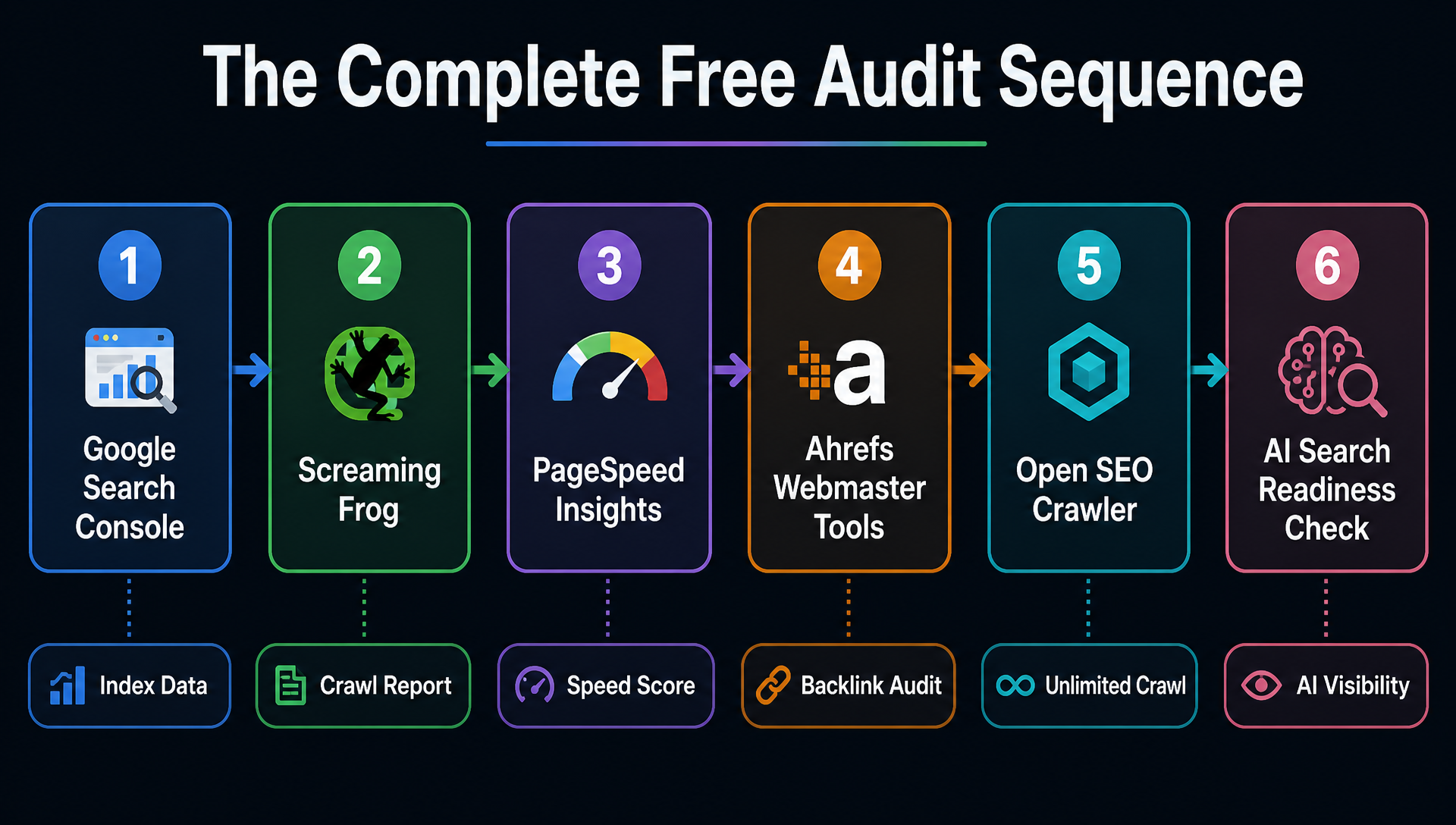
The complete audit sequence
The order matters. Run the tools in this sequence:
- Google Search Console. Check indexing, manual actions, AI Performance. Identify high-impression, low-CTR pages. Export the URL list.
- Screaming Frog (or Open SEO Crawler for sites over 500 URLs). Crawl for broken links, redirect chains, missing and duplicate meta tags, orphan pages, canonical errors.
- PageSpeed Insights and GTmetrix. Test your four key page templates. Collect the specific file-level recommendations from the Opportunities tab.
- Ahrefs Webmaster Tools. Check backlinks for broken inbound links, anchor text distribution, negative SEO patterns. Run the Site Audit as a second technical pass.
- Open SEO Crawler. If you used Screaming Frog for the initial crawl, run OSC for what Frog does not cover: AI crawler block detection, JS compare mode, CMS-specific issues, soft 404 detection.
- One GEO or AEO tool. Run Featureon.ai or VisRank on your homepage and top five traffic pages. Fix AI crawler blocks, missing structured data, extractability gaps.
Time estimate: two to three hours for a site under 500 pages, four to six hours for a larger site. Most of the time goes into analyzing output and deciding what to fix, not running the tools.
When free tools hit their limit
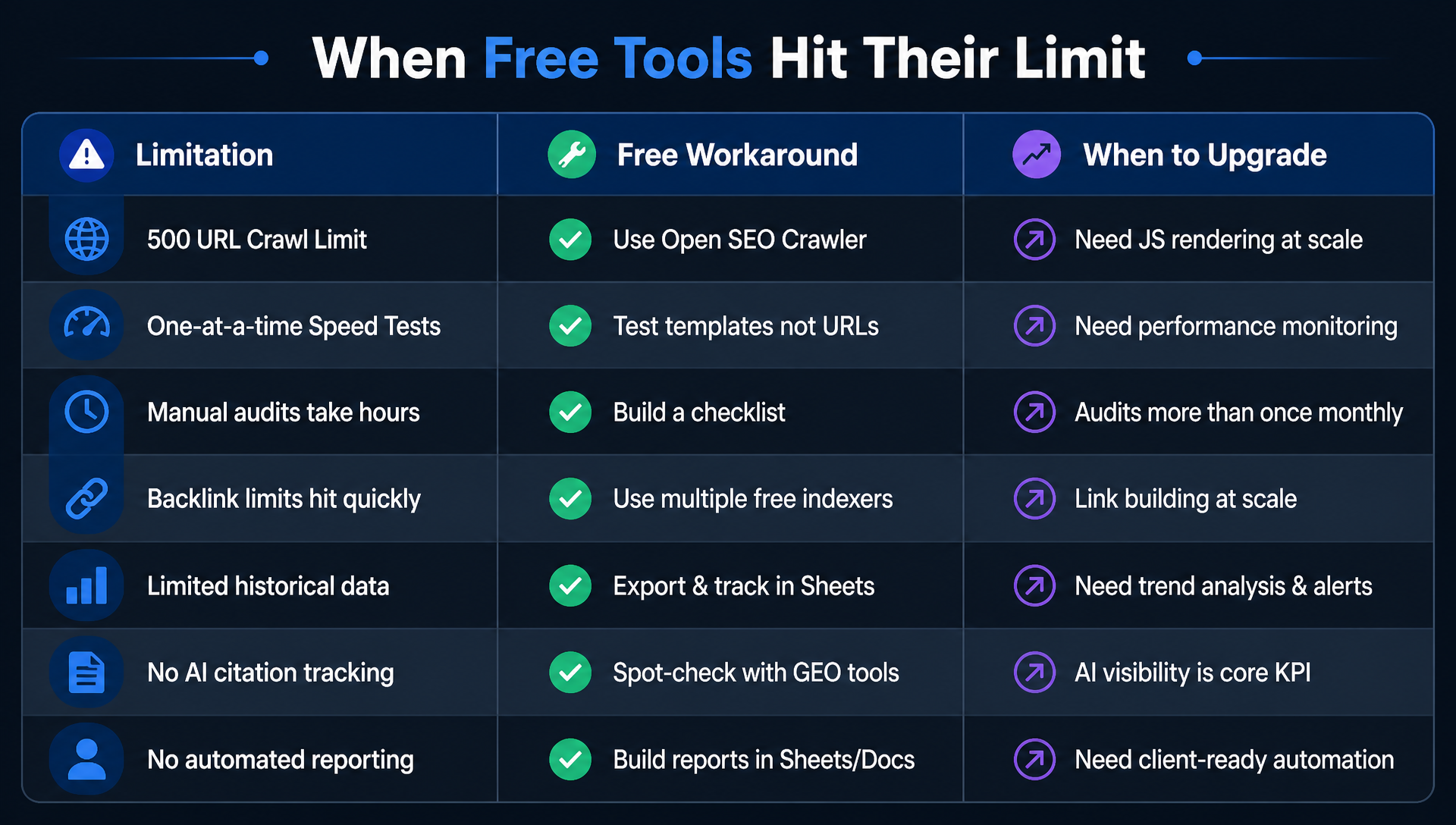
The free stack covers roughly 80% of what a paid audit platform delivers. Here is where it falls short and what to do about it.
Limitation | The free workaround | When to upgrade |
|---|---|---|
Crawling beyond 500 URLs (Screaming Frog) | Use Open SEO Crawler | When you need Frog's advanced features like custom extraction and JS rendering at scale |
One-at-a-time PageSpeed tests | Test templates, not URLs | When you need continuous performance monitoring across hundreds of pages |
Backlink data limited to your own sites (AWT) | Use competitor domain overlap analysis | When you need full competitive backlink research |
No rank tracking across keywords | Use GSC average position and query filtering | When you need daily rank tracking for hundreds of keywords |
Manual audit takes hours every time | Build a checklist and templatize | When you run audits more than once a month |
No AI citation monitoring over time | Spot-check with GEO tools | When AI visibility is a core KPI |
Finding issues is one thing, fixing them is another | Schedule tools and track actions in a spreadsheet | When you need automated monitoring and alerting that closes the loop |
The line between "free tools are enough" and "I need automation" is different for every team. One signal is reliable: when you find the same issues in three consecutive audits because nobody had time to fix them between audits, the bottleneck is not detection. It is execution.
When the audit loop needs to close itself
A free tool stack tells you what is broken. It does not fix it. It does not track whether the fix worked. It does not tell you what to prioritize next week.
Auspia fills that gap. It is not a replacement for Google Search Console or Screaming Frog. It sits above them: connecting to your GSC, crawling your site, reading your content, and running the audit-to-fix-to-measure loop daily instead of quarterly.
Here is how it works in practice.
You connect your domain. Auspia reads your existing pages, your GSC data, your product positioning, and your competitor landscape. No spreadsheet setup. No list of URLs to maintain.
Then, instead of a 140-issue audit report you will never fully address, you get one prioritized action per day. An indexing issue blocking a money page. A content gap a competitor just filled. A page decaying in rankings that needs a refresh.
After that, it tracks what happens. Published content gets monitored for indexing, ranking, and clicks. Pages that gain traction get expanded. Pages that flatline get replaced. Technical issues that appear between audits get flagged before they compound.
This is not "run a free audit and do the work yourself." It is the audit running continuously, with the highest-leverage action arriving in front of you daily.
For teams small enough that "who does the SEO audit" is a real question, the free stack in this article covers the diagnostic layer. Auspia covers the execution layer, on a daily loop, for under $200 a month.
Free audit scan to start. No credit card required.
Author: Julian Mercer, 14-Year Technical SEO Practitioner at Auspia. Julian writes about crawlability, site architecture, technical audit workflows, and the tools that make them fast enough to actually use.


