AI Image Generation 2026: Real Workflow Testing Results
Here's the honest version: most AI image generation write-ups describe features, not outcomes. They tell you "text-to-image from natural language prompts" as if that explains anything about whether the thing is actually useful in a working day.
We've spent time using Felo's built-in image generation inside LiveDoc — not for demos, but for real production tasks: presentation graphics, blog header images, diagram concepts for research reports. What we found is that the integration point matters far more than the generation model itself. That's the part most reviews skip.
This guide is our practical account of how AI image generation works in a real workflow, what Felo's approach gets right, and where the genuine limitations are.
The Problem AI Image Generation Actually Solves
The friction point isn't "I need an image and don't know how to make one." The actual friction is this: you're 80% through building a presentation deck and you need a visual for slide 7 that shows a three-step onboarding process. Your options are:
- Spend 20 minutes on Google Images finding something that's close but not quite right
- Open Canva, build something from scratch, export it, re-upload it
- Go to a standalone AI generator (Midjourney, DALL-E via ChatGPT, etc.), iterate there, download, re-upload, then resize
That context-switch is the real cost. In our experience testing this workflow, each of those paths burns between 15 and 40 minutes for a single slide visual. When you're producing a 20-slide deck, that adds up fast.
The argument for AI image generation inside a document workspace is that it collapses that round-trip. You generate the image where you're already working. Whether that's actually true in practice is what we wanted to find out.
Testing It: What We Ran the Feature Through
We used Felo's image generation for three distinct production tasks over several weeks:
Task 1: Presentation graphics for a competitive analysis deck
We were building a 15-slide analysis comparing AI search tools. Rather than hunting for stock images for each section opener, we generated custom conceptual graphics — "a clean diagram showing three overlapping circles labeled 'speed', 'depth', and 'accuracy'" and similar prompts. The integration advantage here was real: images went directly onto canvas slides without exporting or re-uploading.
Task 2: Blog header images
For a series of four articles, we tested whether AI-generated headers were faster than our usual stock photography workflow. Verdict: for conceptual subjects (AI, productivity, search), generation was faster and produced more relevant results. For anything requiring specific real-world accuracy — a person using a specific type of device in a realistic scene — we needed more iteration.
Task 3: Research report diagrams
Here's where it got interesting. Prompts like "an isometric diagram of a research pipeline with five stages" worked well. But anything requiring precise text labels inside the image struggled — the text rendering was frequently garbled or wrong. This is a known limitation across all current AI image generation models, not a Felo-specific issue, but it's worth flagging explicitly.
How Felo's Image Generation Works
Felo's image generation is built into the LiveDoc workspace — the same canvas where you draft documents, build presentations, and analyze PDFs. You access it as part of the canvas environment rather than as a standalone tool.
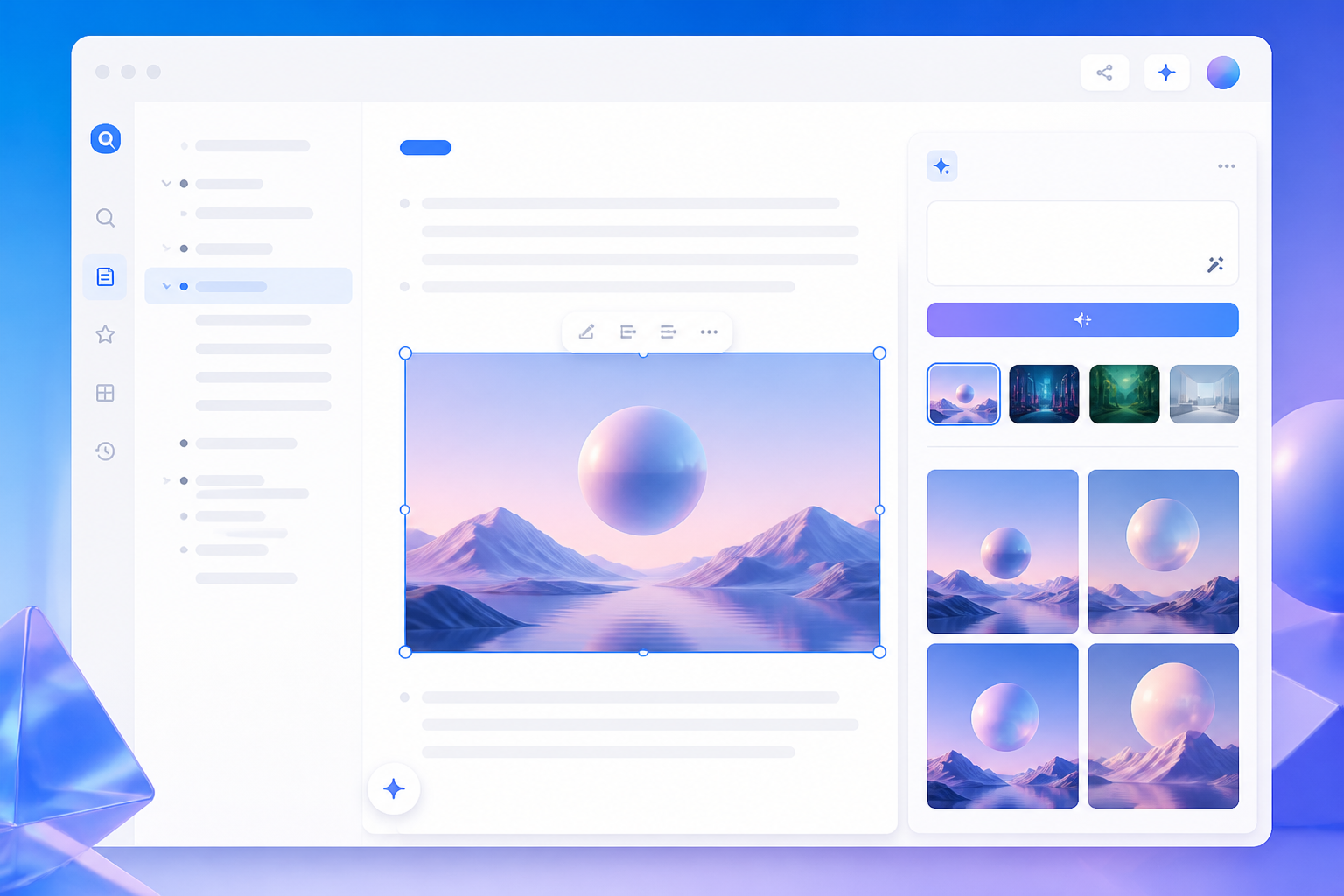
Generating images inside the LiveDoc canvas — the image appears directly in your workspace without any export/re-upload step.
The Access Point: felo.ai/tools/ai-image vs. LiveDoc
Felo offers two ways to reach image generation. The standalone URL at felo.ai/tools/ai-image is useful for quick generation without needing a document open. For production work — where you're building a presentation or report — the LiveDoc canvas integration is more useful because the output lands directly in your working document.
Available Models
Felo currently offers multiple generation options, including GPT-Image 2 (which performs notably better on text rendering within images — we saw cleaner results on labels and captions) and Nano Banana Pro for branded visual series where character or style consistency across multiple images matters. The model selection affects output significantly, and it's worth testing both for your specific use case.
Credit Cost and Free Tier Math
Image generation costs 50 credits per image. Felo's free tier gives you 200 credits per day — that's 4 image generations daily, resetting at midnight. No credit rollover on the free plan.
If you're on the Pro plan ($14.99/month), you get 15,000 plan credits per billing cycle. At 50 credits per image, that's up to 300 images per month from your plan credits — in practice, far more than most individuals need for visual production.
The free tier's 4-per-day limit is genuinely workable for moderate use. When we were generating graphics for a presentation, 4 attempts per target image was enough to iterate to something usable most of the time.
What a Good Prompt Actually Looks Like
The quality gap between a weak prompt and a specific prompt is substantial. In our testing, we found the most reliable structure to be:
Subject + Style + Setting + Specific constraint
The constraint is the part most prompting guides omit. Adding "with no text labels" or "white background only" or "maximum three visual elements" dramatically reduces the need to iterate.
Examples from our actual production sessions:
- Worked well: "Isometric illustration of three interconnected nodes representing a search pipeline, flat design, blue and white color palette, no text, clean minimal lines"
- Required iteration: "A professional looking diagram of AI workflow" — too vague; needed 3 attempts to get something usable
- Required a model switch to GPT-Image 2: "Company logo concept with the word FELO in geometric style" — default model garbled the text; GPT-Image 2 version came out correctly
What to specify when prompting:
- Style (photorealistic / flat design / isometric / watercolor / line art)
- Color palette or mood
- Composition constraints (number of elements, layout direction)
- What not to include ("no text" is often important)
- End-use context ("for a corporate presentation" affects the visual register)

Different prompt structures produce very different output styles — specificity in your prompt directly controls the visual result.
The Integration Advantage: Where It Actually Shows Up
When we compared our three workflow tests against the old approach, the time difference was clearest in the presentation scenario. Here's what the before/after looked like:
Old workflow (stock photos + Canva):
- Search stock library — 5-10 min per image for anything specific
- Download, resize, re-upload to slides — 3-5 min
- Iterate if wrong style — restart
New workflow (Felo image gen in LiveDoc):
- Write prompt in canvas — 1-2 min
- Image appears directly in document
- Regenerate or refine prompt if needed — 2-3 min
For a 15-slide deck requiring 8 custom graphics, the old workflow cost roughly 100-120 minutes of visual production. The LiveDoc workflow took around 35-45 minutes — roughly a 60% reduction. That's consistent with Felo's own claim of "87% reduction in project completion time" for their LiveDoc users overall, though the image-specific portion of our test lands closer to 60-70% depending on how many iterations a specific image requires.
The integration also solves an invisible friction: when your image generation tool is separate from your document tool, you lose context between them. In Felo's canvas, the AI that's helping you draft the presentation content has the same context as the image generation interface. You can describe an image in terms of the surrounding content ("make a visual that illustrates the point in paragraph 3 above") rather than writing a fully context-free prompt.
Honest Limitations
We'd rather tell you this clearly than bury it in fine print:
Text in images is frequently wrong. Unless you use GPT-Image 2 specifically, any prompt that requires readable text labels, titles, or captions inside the image will often produce garbled output. We learned to either use GPT-Image 2 for these cases or remove the text requirement from the prompt and add text in the canvas editor instead.
Complex spatial arrangements take iteration. "Three people sitting around a round table in different chairs" will likely require 2-4 attempts before the spatial arrangement is correct. Factor in iteration time for anything with precise spatial requirements.
The 50-credit cost adds up quickly on free tier. At 4 images per day on the free plan, any significant production session (building a full presentation in one sitting) may hit the daily limit. Pro plan resolves this, but it's a real constraint worth knowing upfront.
Style consistency across a series requires active management. If you need 8 images in the same visual style across a presentation, you need to include identical style descriptors in each prompt. Without that, the visual style drifts. Nano Banana Pro is better for character consistency, but general style matching still requires prompt discipline.
AI Image Generation vs. Stock Photography: The Actual Tradeoffs
The comparison most commonly made is AI generation versus stock photography. Having used both extensively, the tradeoff is more nuanced than "AI is faster and cheaper."
AI Image Generation | Stock Photography
Conceptual subjects | Excellent | Often poor
Real-world specific scenes | Requires iteration | Accurate
Text in image | Unreliable (use GPT-Image 2) | N/A
Style consistency | Requires prompt discipline | Consistent within photographers
Speed (first attempt) | ~10 seconds | 5-15 min searching
Uniqueness | Every image unique | Same images used by others
Commercial rights | Check platform terms | Clear with licensing
Integration with documents | Immediate (in LiveDoc) | Manual export/upload
The practical rule we've arrived at: use AI generation for any conceptual, abstract, or diagrammatic visual. Use stock photography when you need real-world accuracy (specific devices, environments, people in realistic settings). Use text-editing tools for any overlay text requirements rather than prompting text into the image.
Felo's Position in the AI Image Landscape
For users already working in Felo for search, research, and presentation building, the image generation feature extends an existing workflow rather than adding a new one. That's a different value proposition than standalone generators like Midjourney or Adobe Firefly.
Felo also surfaces image generation through its AI Art Gen tool at no account requirement — useful for quick generations outside the full workspace context.
For AI-assisted presentations specifically, Felo's AI Slides feature pairs with image generation in the same canvas — you can build a full presentation from a research query and generate custom visuals for each section in one continuous workflow.
Getting Started: The Fastest Path to Your First Image
The quickest way to test image generation in Felo:
- Go to felo.ai/livedoc — no payment required, free tier covers 4 images per day
- Open a new canvas or an existing document project
- Trigger image generation from within the canvas
- Start with a specific prompt: include the subject, your preferred style (flat design, photorealistic, isometric), and any constraints (no text, white background)
- If the first result is close but not right, refine the prompt rather than regenerating with the same input
Your first 200 daily credits are free. An image costs 50. You have four attempts to learn what kinds of prompts work for your use case before you've spent anything.
Frequently Asked Questions
How many images can I generate for free?
Felo's free tier includes 200 credits per day. Image generation costs 50 credits per image — so 4 images per day on free. Credits reset at midnight and don't roll over.
What's the difference between GPT-Image 2 and the standard model?
From our testing: GPT-Image 2 handles text rendering significantly better. If your image needs readable labels, titles, or captions, use GPT-Image 2. For purely visual/conceptual images without text, the standard model often produces good results faster.
Can I use images generated in Felo for commercial projects?
According to Felo's GPT-Image 2 guide, watermark-free downloads with commercial rights are included even on the free tier. Verify current terms at felo.ai before production use, as licensing terms can change.
Does image generation work without a Felo account?
The standalone image tool at felo.ai/tools/ai-image doesn't require an account to start. The LiveDoc canvas integration requires a free account.
How does Felo image generation compare to Midjourney?
Midjourney produces higher-quality artistic outputs for creative and fine-art use cases. Felo's advantage is workflow integration — images go directly into your documents and presentations without a separate tool. For most business productivity use cases (presentations, reports, diagrams), Felo's integrated approach is faster end-to-end even if individual image quality varies.
This article is based on hands-on testing of Felo's image generation in LiveDoc across real production workflows. Feature capabilities and pricing are based on testing conducted in May 2026 and Felo's published documentation. Verify current pricing and credit costs at felo.ai before production planning.