先說結論:把 Schema 視為「頁面事實的結構化副本」
如果你正在找一个能让 Codex 写 Schema JSON-LD 的 SKILL.md,下面有一份可以直接复制的版本。但先把原则说清楚:好的結構化数据不是“猜一个最丰满的 JSON”,而是把頁面已经向用户公开的事實,用合适的 Schema.org 類型表达出来。
这也是为什么 Codex 很适合这项工作。它可以先读頁面内容和项目代码,列出可证实的字段,再選擇類型、生成 JSON-LD,并把不确定的字段留空或标成待确认。让模型直接从一个模糊提示词开始编造 aggregateRating、price、author 或 datePublished,反而是最容易出问题的路径。
Google 建议在站点架构允许时使用 JSON-LD,因为它相对容易实现和维护。它同时强调:結構化数据必须描述所在頁面、内容要对用户可见、所用字段要准确且完整。即使 Rich Results Test 通过,富媒体结果也不是保证。
你想解决的问题 | 这份 Skill 的做法 | 不做什么 |
|---|---|---|
新頁面缺少 Schema | 依据可见内容推荐最具体的合适類型 | 不为了“覆盖率”叠加无关類型 |
现有 JSON-LD 混乱 | 找出重复、冲突、过期或无頁面依据的字段 | 不静默删除生产代码 |
想拿到富结果 | 按 Google 对具体功能的必填与推荐字段核对 | 不承诺富结果、排名或点击增长 |
团队需要可复用提示词 | 用 | 不暴露本机路径、密钥或私有上下文 |
先選頁面主要類型,再補充支援類型
不要从“我可以标记多少东西”开始。先问:用户打开这页,最主要在看什么?主類型应回答这个问题。随后才考虑面包屑、组织信息、视频等支持性对象。
頁面实际目的 | 通常优先考虑 | 常见支持類型 | 必须满足的頁面事實 |
|---|---|---|---|
一篇署名文章 |
|
| 标题、正文、作者/日期等字段应与頁面一致 |
产品或软件工具页 |
|
| 功能、价格、评分、操作系统等只在真实展示时填写 |
食谱 |
|
| 食材、步骤、时间等应当真实可见 |
教程步骤页 |
|
| 每一步和材料必须在正文中可见 |
有可见导航层级的内容页 | 頁面主類型不变 |
| 面包屑与頁面真实导航一致 |
Schema.org 的词汇很大,但 Google 的富结果支持范围更窄。为 Google Search 实现时,具体功能的 Google Search Central 文档优先级高于“Schema.org 有这个属性,所以我加上它”的直觉。
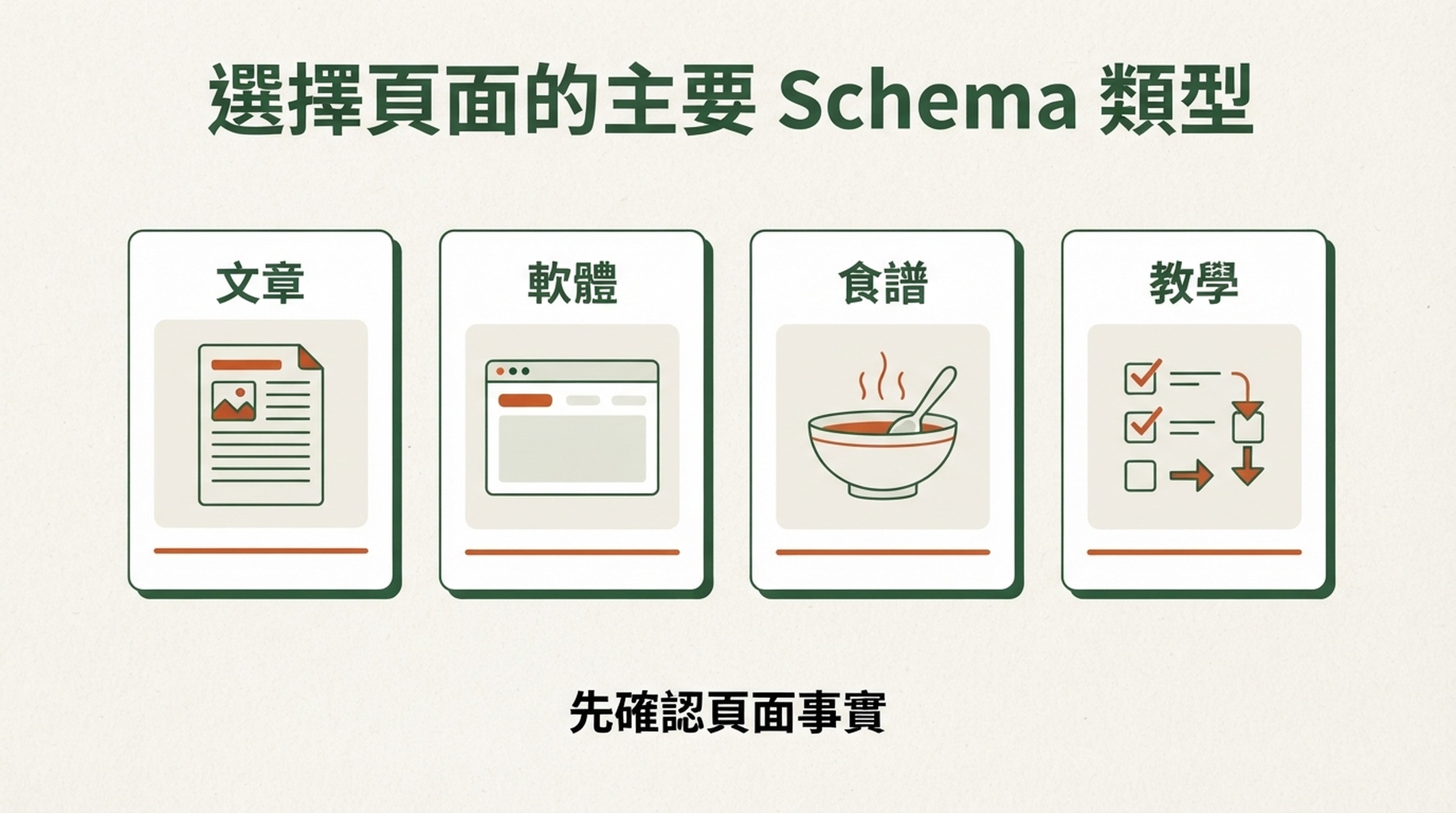
先确认頁面目的。類型应由可见事實决定,而不是反过来。
安全的 Codex 工作流程
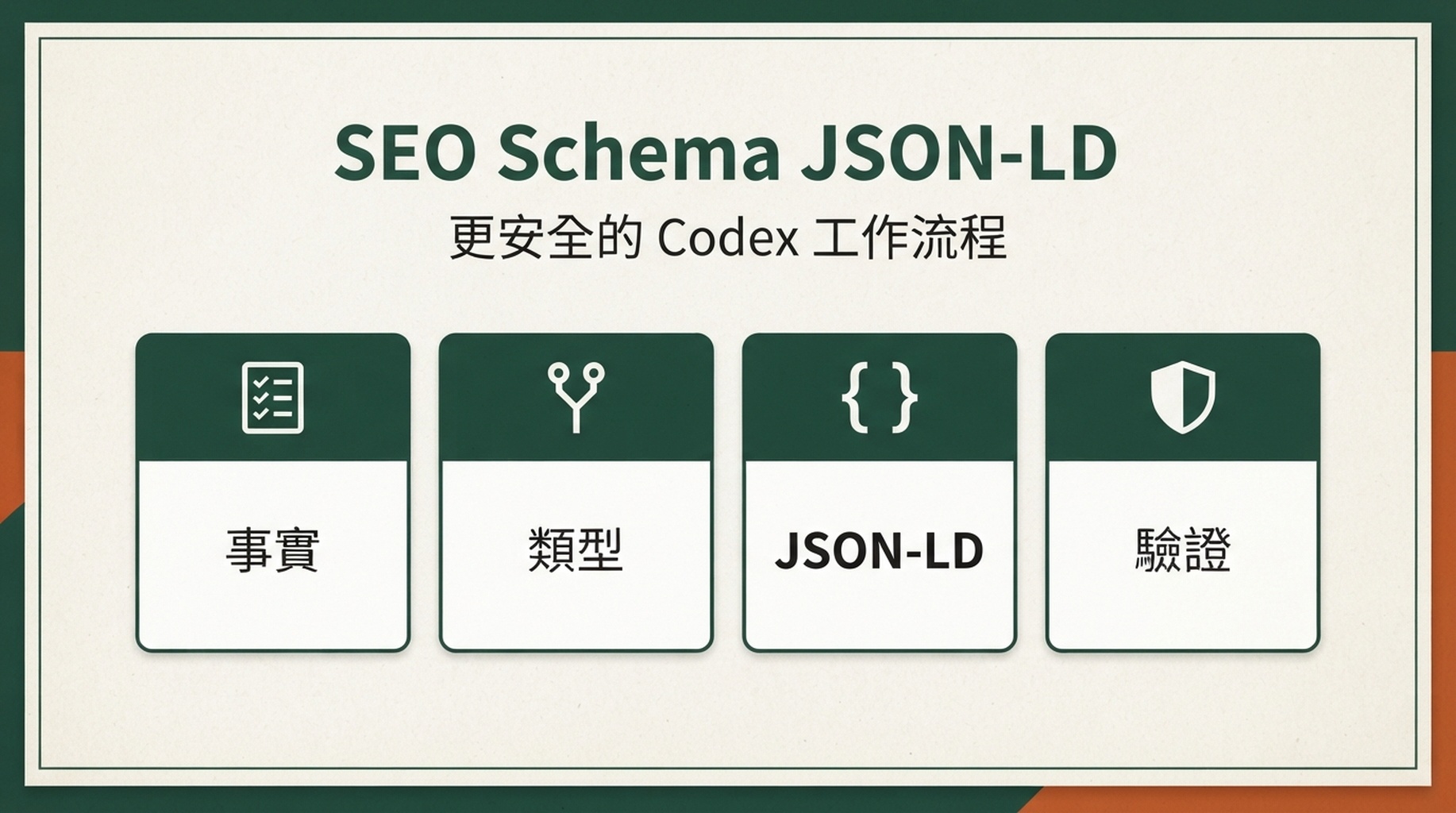
把任务拆成四个关卡,模型的输出会稳很多。
- 事實清单:从頁面可见正文、受信任 CMS 数据或现有组件 props 中提取字段。每个字段都附上来源位置或“未找到”。
- 類型决策:只選擇与頁面主目的相符的類型。若有两种可能,解释選擇理由和替代方案,而不是一起塞进頁面。
- 代码与映射:输出 JSON-LD,列出每一个值来自哪里;未知字段不生成占位假数据。
- 驗證与上线:檢查 JSON 语法、Google 对目标富结果的要求、渲染后的 DOM、URL Inspection 和 Search Console 报告。
下面这份模板把这四个关卡写进 Skill。它特意要求 Codex 先稽核再改动,避免“模型生成了能解析的 JSON,却不代表真实頁面”的常见失败。
可直接複製:SEO Schema JSON-LD Codex Skill (SKILL.md)
将以下内容保存为你自己的 Skill 配置文件。模板内不包含机器目录、用户名、访问令牌、环境变量值或任何私有路径;它也要求运行时输出对路径和密钥做脱敏处理。
---
name: seo-schema-jsonld
description: Audit visible page facts, recommend accurate Schema.org JSON-LD, implement it safely, and validate it against Google structured-data requirements.
---

# SEO Schema JSON-LD

Use this skill when a user asks to add, repair, review, or validate Schema.org JSON-LD / structured data for a website page, template, CMS entry, or component.

## Primary rule

Treat structured data as a structured representation of the page's user-visible facts. Never use it to invent, hide, exaggerate, or imply information that the page does not support.

## Privacy and output safety

- Never print absolute local paths, home directories, usernames, credentials, tokens, cookies, API keys, environment-variable values, private URLs, or repository-specific secrets.
- Refer to files with short, project-relative labels when needed, such as `src/pages/article.tsx` or `the page template`.
- Do not copy sensitive values into JSON-LD, examples, logs, commit messages, screenshots, or explanations.
- If input contains secrets or private identifiers, omit them and state that sensitive values were excluded.

## Required workflow

### 1. Inspect before generating

Read the relevant page, template, content data, and any existing structured data. Build a fact inventory using only:

- visible page text and user-visible UI;
- trusted CMS fields that are rendered on that page;
- verified product, organization, author, or breadcrumb data supplied by the user.

For every candidate property, label it `confirmed`, `missing`, or `needs human confirmation`. Do not infer missing values from brand names, URLs, conventions, or unrelated pages.

### 2. Choose the narrowest suitable type

Identify the page's primary purpose first. Recommend one primary Schema.org type that truthfully describes it. Add supporting objects only when they also describe user-visible information on the same page.

Explain:

- the recommended primary type;
- any supporting types;
- why each applies;
- types deliberately rejected and why.

For Google rich-result eligibility, consult the current Google Search Central documentation for the target feature. Schema.org support alone does not establish Google feature support.

### 3. Apply strict data guardrails

Never generate these values unless they are confirmed and visible or otherwise explicitly verified by the user:

- `aggregateRating`, `review`, or review counts;
- price, currency, availability, offer dates, shipping, or return policy;
- author, publisher, logo, address, phone, social profile, or `sameAs`;
- publication dates, modification dates, images, video duration, or interaction counts;
- FAQ questions and answers that are not visibly present;
- event, job, medical, financial, legal, or local-business claims.

Never add misleading `FAQPage`, fake reviews, hidden content, keyword lists, or unrelated types. Prefer fewer complete and accurate properties over many uncertain ones.

### 4. Produce the implementation

Return these sections in order:

1. `Fact inventory` — property, value or status, and visible source.
2. `Schema decision` — primary type, supporting types, assumptions, and exclusions.
3. `JSON-LD` — valid JSON inside one `application/ld+json` script block. Use placeholders only in a clearly labeled illustrative example; never present placeholders as production-ready values.
4. `Implementation note` — the safe insertion point for the site's framework or CMS, without exposing private paths.
5. `Validation checklist` — syntax, rendered-page check, Google Rich Results Test when applicable, Schema Markup Validator, URL Inspection after deployment, and Search Console monitoring.
6. `Open questions` — every field that needs a human decision.

If editing code is requested, make the smallest scoped change. Preserve existing valid markup, avoid duplicate entities, and explain any conflict before replacing it.

## JSON-LD quality checks

Before finalizing, verify all of the following:

- JSON parses and uses `https://schema.org` as `@context`.
- The main type matches the page's main user-visible purpose.
- Every emitted value has a page-level source or explicit user confirmation.
- Required fields for the intended Google feature are present and accurate.
- URLs are canonical, publicly reachable URLs when the property requires a URL.
- Dates use ISO 8601 where required.
- Multiple entities are connected deliberately, not duplicated accidentally.
- The markup remains available to crawlers in the rendered response.
- The result contains no secrets, local paths, private identifiers, or fabricated claims.

## Limitations to state plainly

Valid structured data can help search engines understand a page and make it eligible for certain search appearances. It does not guarantee rich results, rankings, traffic, citations, or inclusion in AI answers.
如何使用這份 Skill
Skill 准备好后,不要只说“给这个頁面加 Schema”。把頁面和验收条件交代完整,例如:
Use the SEO Schema JSON-LD skill to review this article page.

Goal: add accurate Article and BreadcrumbList JSON-LD if the visible content supports them.
First return the fact inventory and schema decision. Do not edit code until I approve the decision.
Do not create ratings, reviews, author details, dates, images, or organization fields that are absent from the page.
After approval, make the smallest implementation change and provide the validation checklist.
对于批量頁面,可以把“先输出事實清单和類型决策,待我批准后再修改”保留为固定门槛。这一点看似慢半步,却能避免 CMS 模板把错误字段扩散到数千个 URL。
從稽核到上線:30 分鐘最小流程
时间 | 动作 | 产出 | 质量门槛 |
|---|---|---|---|
0-8 分钟 | 选一个代表性 URL,读取正文、面包屑和已有 JSON-LD | 事實清单 | 每个值能回到頁面或已驗證数据 |
8-15 分钟 | 選擇主類型并对照 Google 对目标功能的文档 | 類型决策 | 不把“可能相关”当成“应当标记” |
15-22 分钟 | 由 Codex 生成或小范围修复代码 | JSON-LD diff | 无占位值、无重复实体、JSON 可解析 |
22-30 分钟 | 在预發布环境查看渲染结果并测试 | 驗證记录 | Rich Results Test 适用时通过;问题有明确归属 |
上线后还需要做两件事:用 URL Inspection 确认 Google 能访问并解析頁面;在 Search Console 的相应增强功能报告中观察规模化问题。前者驗證单页可访问性,后者更适合发现模板、部署或数据源造成的系统性故障。
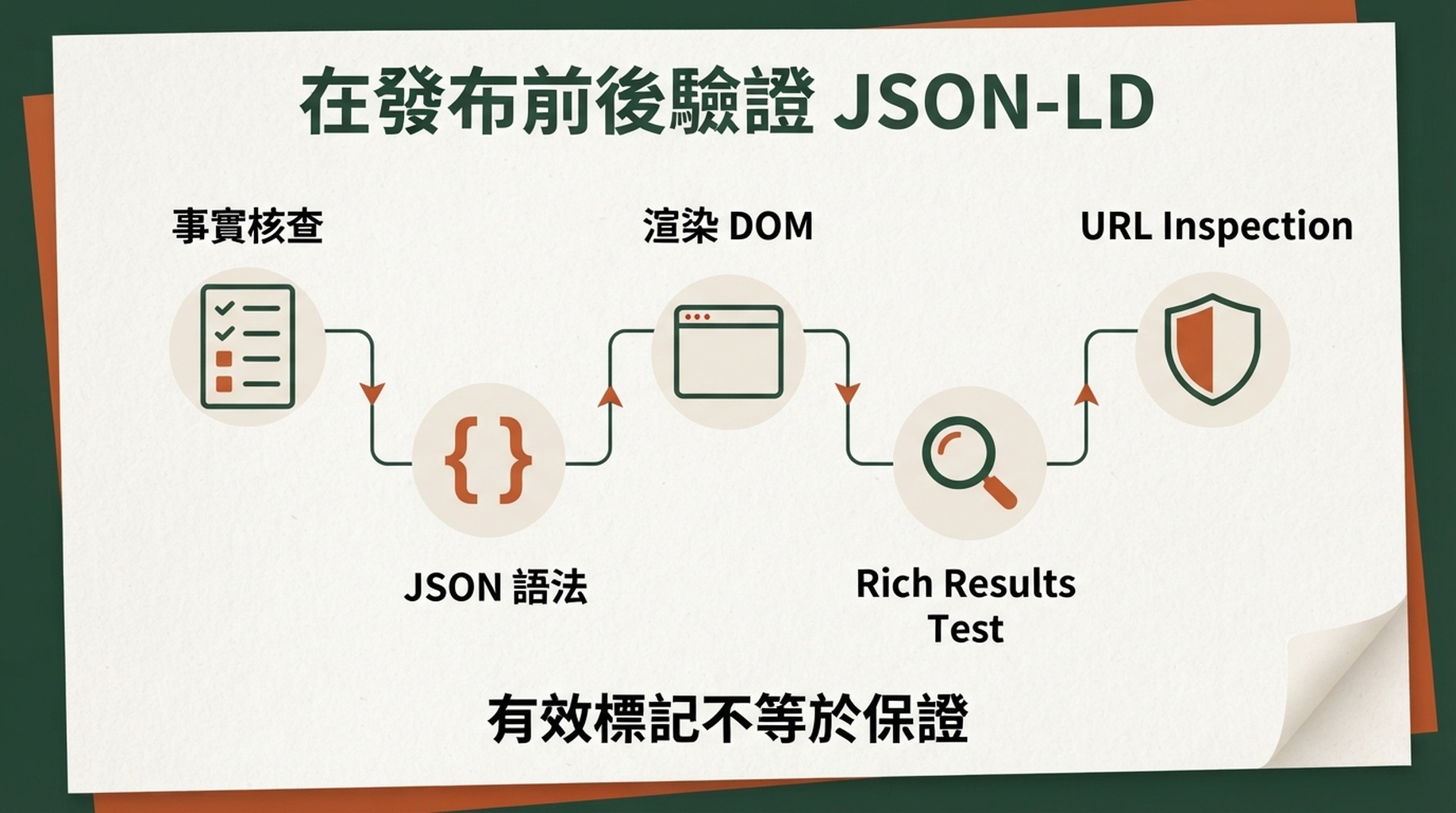
每一层会发现不同的错误。JSON 语法正确并不表示頁面事實或部署状态正确。
簡化的文章頁面範例
下面是示意代码,只展示 Article 与 BreadcrumbList 的结构形状。实际使用时,标题、描述、發布日期、作者、圖片和 URL 都必须替换成頁面中已确认的真实值;如果頁面没有这些值,就不要为了补全示例而输出它们。
这个例子刻意没有评分、作者、發布日期、圖片或發布者。它们不是“可选的 SEO 加分项”,而是需要真实数据支持的陈述。頁面中确实有,并且数据源可信,才由 Skill 写入。
最容易被忽略的五個問題
1. JSON 正确,不代表頁面正确
JSON 校验器只说明语法能解析。它无法替你判断頁面究竟是否真的有这些评论、价格或作者,也不能判断一个 Product 是否其实是普通服务介绍页。先做事實映射,能挡住大部分这类错误。
2. 一页有多个对象,不等于每个对象都该堆上去
一篇包含视频的食谱可以同时有 Recipe、VideoObject 与面包屑;但頁面主目的仍应清楚。把 Article、Product、FAQPage、HowTo 全部放进一个泛内容页,通常只会让维护变难,并提高不一致风险。
3. 可见性与数据新鲜度需要一起验收
Google 的通用指南要求結構化数据代表頁面内容,且时间敏感信息保持更新。任何价格、库存、活动日期、工作职位或评分都不适合靠一次人工粘贴长期维护。动态字段应连接受控数据源,并在模板更新时重新测试。
4. FAQPage 不是通用问答装饰
只有用户在頁面上真正能看到的问题和答案才有资格被标记,而且不同 Google 功能会有额外的适用条件。先保留真实、完整的 FAQ 内容,再查当前功能文档;不要因为想要结果样式而反向制造一组问答。
5. Schema 不能替代抓取、索引与頁面质量
被 noindex、访问控制或 robots 规则挡住的頁面,不会因为多了一段 JSON-LD 变成可展示的搜索结果。Schema 是技术 SEO 的一层,而不是绕过可抓取性、内容质量与頁面体验的捷径。需要从整站排查时,可在 Auspia 的 SEO 工具页中選擇合适的稽核工具。
發布前檢查清單
- [ ] 頁面主類型已写明,并能用一句话解释为什么适合。
- [ ] 每个 JSON-LD 值都能在頁面可见内容或受信任的数据源中找到依据。
- [ ] 没有虚构评分、评论、价格、库存、作者、日期、圖片或企业资料。
- [ ] 代码没有重复插入相同实体,也没有与现有插件或 CMS 输出冲突。
- [ ] JSON 语法通过,且在部署后的渲染 DOM 中仍能看到。
- [ ] 目标 Google 功能的必填字段已用官方文档核对。
- [ ] 已用 Rich Results Test(适用时)和 Schema Markup Validator 檢查。
- [ ] 已在 URL Inspection 和 Search Console 中安排上线后复查。
- [ ] 团队知道:有效标记是资格与理解信号,不是富结果或排名承诺。
常見問題
SKILL.md 能自动决定我的网站该用哪些 Schema 吗?
它可以根据頁面事實提出建议,并说明不确定项,但不该替代事實确认。尤其是产品价格、评论、组织资料、作者与發布日期,最好由頁面的数据源或业务负责人确认。
JSON-LD 应放在 <head> 还是 <body>?
Google 支持在 HTML 的 <head> 或 <body> 中放置 JSON-LD。实际项目中,選擇你的框架或 CMS 最稳定、最容易随頁面数据更新的位置。关键不是位置的“玄学”,而是部署后 Google 能抓取到与頁面一致的有效标记。
Rich Results Test 通过后,为什么搜索结果没有变化?
通过测试表示技术条件基本满足,并不保证 Google 展示富结果。Google 会结合查询、设备、位置、頁面质量与其他信号選擇结果样式。继续檢查内容一致性、索引状态和 Search Console,而不是添加不真实字段。
我应该把所有 Schema.org 属性都交给 Codex 填满吗?
不应该。Google 的建议是,较少但完整、准确的推荐属性,比大量不完整或不准确的属性更好。把这个约束写进 Skill,比追求字段数量更有价值。
官方參考資料
作者:Julian Mercer,Auspia 的 14-Year Technical SEO Practitioner。他关注可抓取性、渲染、結構化数据和让技术 SEO 规则可被团队稳定执行的方法。