


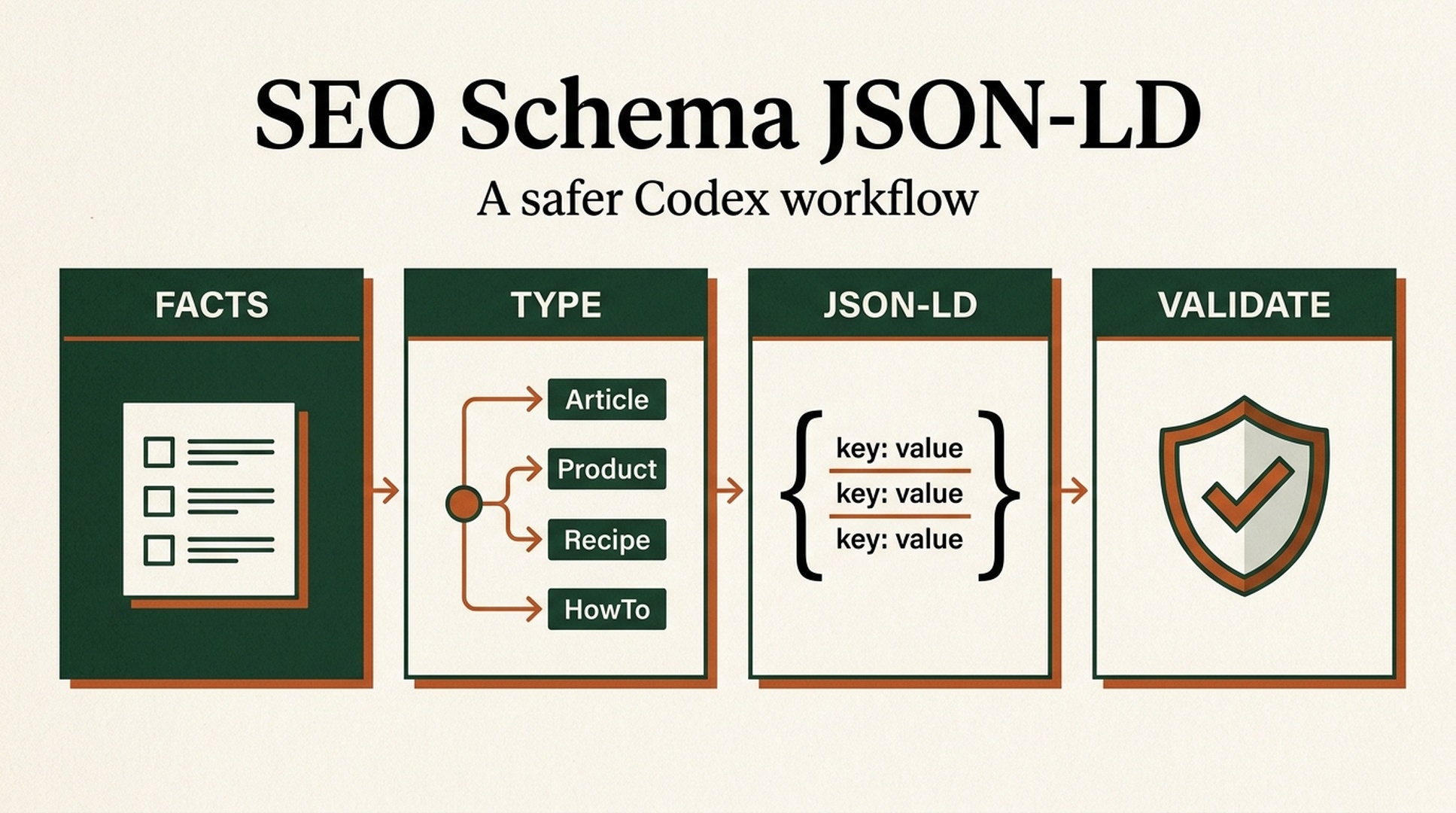
The short answer: Schema should be a structured copy of page facts
If you came here looking for a Codex SKILL.md prompt for SEO Schema JSON-LD, you can copy one below. The rule behind it matters more than the code: structured data should express facts that a visitor can already verify on the page. It is not a chance to write the most elaborate JSON object possible.
Codex is useful here because it can inspect the page, its content data, and existing markup before it suggests a type or writes JSON-LD. That order matters. A vague request such as "add all the schema you can" often produces invented aggregateRating, price, author, or publication-date fields. Those fields may parse cleanly and still misrepresent the page.
Google recommends JSON-LD where a site's setup allows it because it is usually easier to implement and maintain. Google's guidance is equally clear that the markup must describe the page it sits on, reflect content visible to users, and remain accurate. Passing the Rich Results Test does not guarantee a rich result.
Goal | What this Skill does | What it refuses to do |
|---|---|---|
A new page needs schema | Recommends the most specific type supported by visible facts | Adds unrelated types to inflate coverage |
Existing JSON-LD is messy | Flags duplicate, conflicting, stale, or unsupported properties | Quietly replaces production markup |
The team wants rich results | Checks the target Google's feature documentation | Promises rich results, rankings, or traffic |
A repeatable prompt is needed | Standardizes audit, generation, and QA output | Reveals local paths, credentials, or private context |
Choose the page's main type before adding supporting objects
Start with a plain question: what is the visitor principally looking at? The answer should determine the primary Schema.org type. Breadcrumbs, organization details, and video can support that main object when they describe information the visitor can see on the same page.
What the page actually does | Main type to consider first | Supporting objects to consider | Facts that must exist on the page |
|---|---|---|---|
Publishes a bylined editorial piece |
|
| Headline, body, and any supplied author/date details match the page |
Sells or explains a software product |
|
| Features, price, ratings, operating system, and offers only when actually shown |
Provides a recipe |
|
| Ingredients, steps, and timings are visible |
Teaches a complete physical task |
|
| Steps and materials are complete and visible |
Shows a visible site hierarchy | Keep the main type |
| Breadcrumb labels and destinations match navigation |
Schema.org has a much broader vocabulary than Google's rich-result features. For Google Search work, the current Google Search Central guide for the intended feature is more authoritative than the fact that a Schema.org property exists.
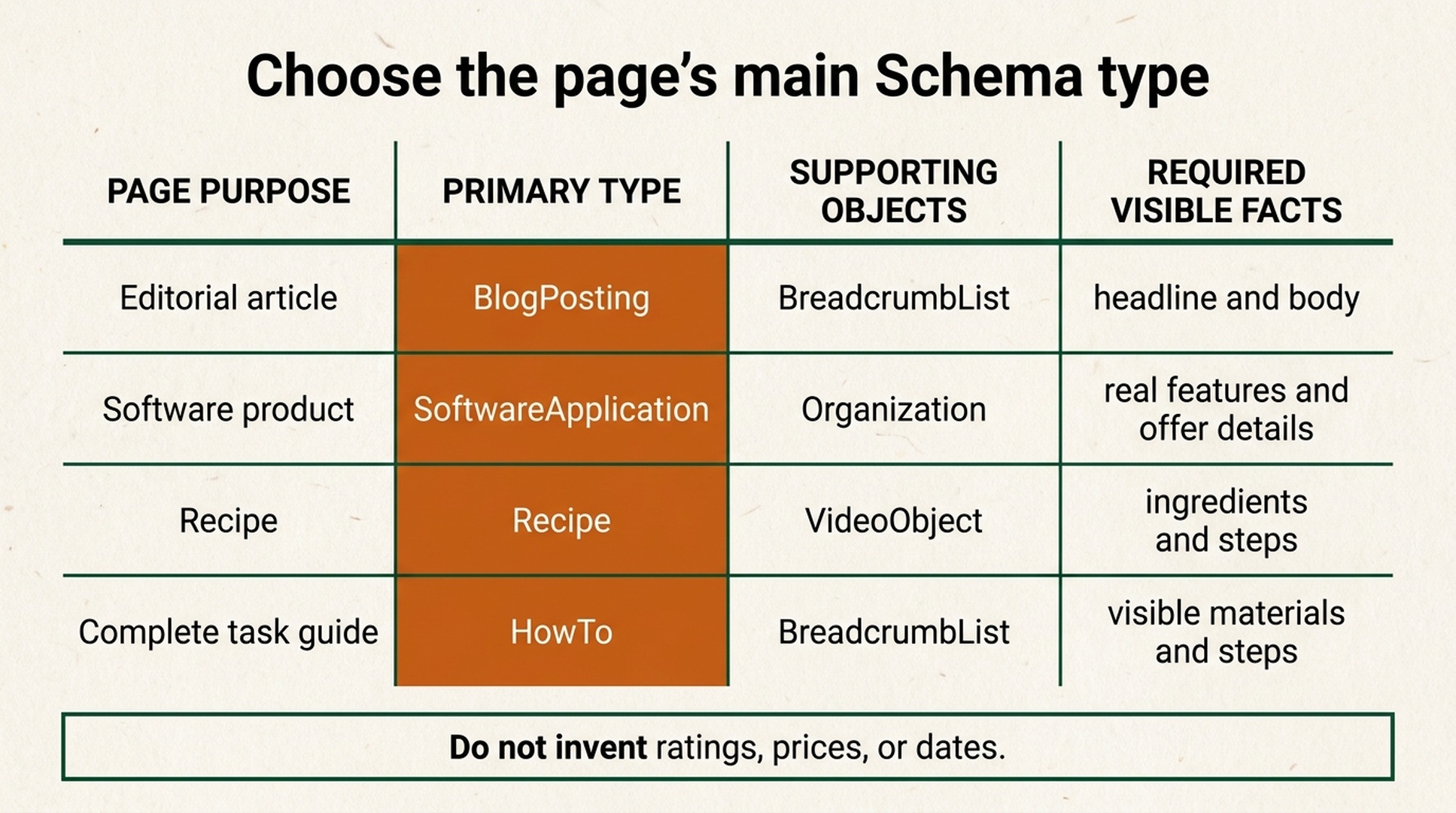
Start with the page's purpose. The type follows the visible facts, not the other way around.
A safer Codex workflow has four gates
- Fact inventory. Extract only from visible page copy, trusted CMS fields rendered on the page, or data a user has explicitly verified. Mark every candidate field as confirmed, missing, or needing confirmation.
- Type decision. Pick the primary type that matches the page's central purpose. Explain any alternative instead of stacking every plausible type into one response.
- Code and mapping. Produce JSON-LD with a source for each emitted value. Omit unknown properties rather than filling them with placeholders.
- Validation and release. Check JSON syntax, feature-specific requirements, the rendered DOM, URL Inspection, and the appropriate Search Console report.
The Skill below makes those gates explicit. It asks Codex to audit first and change code second, which is the simplest way to prevent valid-looking markup from drifting away from the page itself.
Copy this SEO Schema JSON-LD Codex Skill (SKILL.md)
Save this as your own Skill configuration. It contains no machine directory, username, access token, environment-variable value, or private path. It also tells Codex to remove sensitive context from its outputs.
---
name: seo-schema-jsonld
description: Audit visible page facts, recommend accurate Schema.org JSON-LD, implement it safely, and validate it against Google structured-data requirements.
---

# SEO Schema JSON-LD

Use this skill when a user asks to add, repair, review, or validate Schema.org JSON-LD / structured data for a website page, template, CMS entry, or component.

## Primary rule

Treat structured data as a structured representation of the page's user-visible facts. Never use it to invent, hide, exaggerate, or imply information that the page does not support.

## Privacy and output safety

- Never print absolute local paths, home directories, usernames, credentials, tokens, cookies, API keys, environment-variable values, private URLs, or repository-specific secrets.
- Refer to files with short, project-relative labels when needed, such as `src/pages/article.tsx` or `the page template`.
- Do not copy sensitive values into JSON-LD, examples, logs, commit messages, screenshots, or explanations.
- If input contains secrets or private identifiers, omit them and state that sensitive values were excluded.

## Required workflow

### 1. Inspect before generating

Read the relevant page, template, content data, and any existing structured data. Build a fact inventory using only:

- visible page text and user-visible UI;
- trusted CMS fields that are rendered on that page;
- verified product, organization, author, or breadcrumb data supplied by the user.

For every candidate property, label it `confirmed`, `missing`, or `needs human confirmation`. Do not infer missing values from brand names, URLs, conventions, or unrelated pages.

### 2. Choose the narrowest suitable type

Identify the page's primary purpose first. Recommend one primary Schema.org type that truthfully describes it. Add supporting objects only when they also describe user-visible information on the same page.

Explain the recommended primary type, supporting types, why each applies, and types deliberately rejected.

For Google rich-result eligibility, consult the current Google Search Central documentation for the target feature. Schema.org support alone does not establish Google feature support.

### 3. Apply strict data guardrails

Never generate these values unless they are confirmed and visible or otherwise explicitly verified by the user:

- `aggregateRating`, `review`, or review counts;
- price, currency, availability, offer dates, shipping, or return policy;
- author, publisher, logo, address, phone, social profile, or `sameAs`;
- publication dates, modification dates, images, video duration, or interaction counts;
- FAQ questions and answers that are not visibly present;
- event, job, medical, financial, legal, or local-business claims.

Never add misleading `FAQPage`, fake reviews, hidden content, keyword lists, or unrelated types. Prefer fewer complete and accurate properties over many uncertain ones.

### 4. Produce the implementation

Return these sections in order:

1. `Fact inventory` - property, value or status, and visible source.
2. `Schema decision` - primary type, supporting types, assumptions, and exclusions.
3. `JSON-LD` - valid JSON inside one `application/ld+json` script block. Use placeholders only in a clearly labeled illustrative example; never present placeholders as production-ready values.
4. `Implementation note` - the safe insertion point for the site's framework or CMS, without exposing private paths.
5. `Validation checklist` - syntax, rendered-page check, Google Rich Results Test when applicable, Schema Markup Validator, URL Inspection after deployment, and Search Console monitoring.
6. `Open questions` - every field that needs a human decision.

If editing code is requested, make the smallest scoped change. Preserve existing valid markup, avoid duplicate entities, and explain any conflict before replacing it.

## JSON-LD quality checks

Before finalizing, verify all of the following:

- JSON parses and uses `https://schema.org` as `@context`.
- The main type matches the page's main user-visible purpose.
- Every emitted value has a page-level source or explicit user confirmation.
- Required fields for the intended Google feature are present and accurate.
- URLs are canonical, publicly reachable URLs when the property requires a URL.
- Dates use ISO 8601 where required.
- Multiple entities are connected deliberately, not duplicated accidentally.
- The markup remains available to crawlers in the rendered response.
- The result contains no secrets, local paths, private identifiers, or fabricated claims.

## Limitations to state plainly

Valid structured data can help search engines understand a page and make it eligible for certain search appearances. It does not guarantee rich results, rankings, traffic, citations, or inclusion in AI answers.
Use the Skill with an approval gate
Do not stop at "add schema to this page." Give Codex the page and the acceptance criteria. This is a useful starting prompt:
Use the SEO Schema JSON-LD skill to review this article page.

Goal: add accurate Article and BreadcrumbList JSON-LD if the visible content supports them.
First return the fact inventory and schema decision. Do not edit code until I approve the decision.
Do not create ratings, reviews, author details, dates, images, or organization fields that are absent from the page.
After approval, make the smallest implementation change and provide the validation checklist.
For a large template, keep the "fact inventory and decision first" gate. It adds a short review step, but it can stop one bad assumption from spreading across thousands of URLs.
A 30-minute path from audit to deployment
Time | Action | Output | Quality gate |
|---|---|---|---|
0-8 minutes | Review one representative URL, visible copy, breadcrumbs, and current JSON-LD | Fact inventory | Every value traces to the page or verified data |
8-15 minutes | Select the primary type and check Google's feature guide | Type decision | "Possibly related" is not treated as "should be marked up" |
15-22 minutes | Generate or repair the smallest possible code change | JSON-LD diff | No placeholders, no duplicate entities, valid JSON |
22-30 minutes | Inspect the rendered staging page and test it | Validation record | The Rich Results Test passes when applicable; issues have an owner |
After release, use URL Inspection to confirm that Google can fetch and parse the page. Then use the relevant Search Console enhancement report to spot template, deployment, or data-source failures at scale. One checks an individual URL; the other is better at finding systemic breakage.
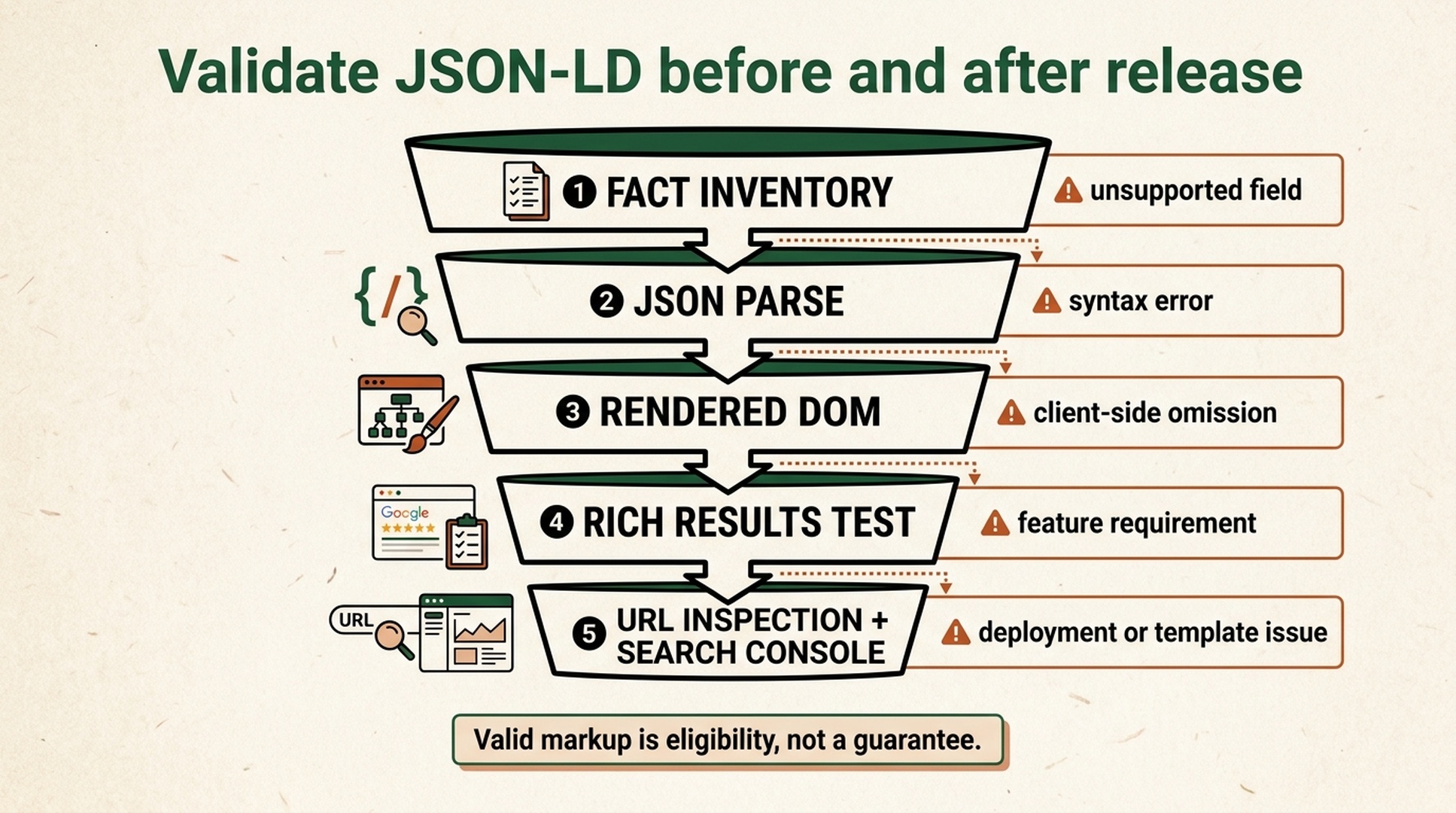
Each layer catches a different failure. A syntactically valid object can still fail the page-fact or deployment check.
A deliberately minimal article-page example
This is illustrative code, not a ready-to-paste production object. It shows the shape of BlogPosting and BreadcrumbList. Use real, page-confirmed values for the title, description, URL, author, date, and image. If the page does not have one of those facts, do not add it just to make the object look more complete.
The example intentionally has no rating, author, publication date, image, or publisher. Those are not optional SEO decorations. They are claims that need a reliable source.
Five ways technically valid markup still goes wrong
JSON parsing is not a truth test
A JSON validator can tell you whether the syntax parses. It cannot tell you whether the page has the reviews, price, or author you declared, or whether a Product is really just a service-description page. The fact inventory catches most of these failures early.
More objects do not mean better markup
A recipe page with a visible video can legitimately include Recipe, VideoObject, and breadcrumbs. Its main purpose should still be clear. Adding Article, Product, FAQPage, and HowTo to a general content page generally creates maintenance work and inconsistency risk.
Visibility and freshness need the same owner
Google's general guidance requires structured data to represent the page and time-sensitive information to stay current. Prices, stock, event dates, job listings, and ratings should not live as one-off pasted values. Connect dynamic facts to a controlled source and retest when the template changes.
FAQPage is not a generic question-and-answer decoration
Only questions and answers users can actually see belong in FAQ markup, and Google features can have additional eligibility conditions. Publish a genuine, complete FAQ first, then check the current feature guide. Do not reverse-engineer a list of questions solely to pursue a result treatment.
Schema does not bypass crawling, indexing, or page quality
An important page blocked by noindex, access controls, or crawl rules does not become eligible for search results because it contains JSON-LD. Schema is one technical SEO layer. It does not replace crawlability, useful content, or page experience. For a broader site check, use the Auspia SEO tools directory to select the right audit workflow.
Pre-publish checklist
- [ ] The page's primary type is stated and can be justified in one sentence.
- [ ] Every JSON-LD value has a visible page source or a trusted, rendered data source.
- [ ] No ratings, reviews, price, stock, author, date, image, or organization details were invented.
- [ ] The change does not duplicate entities already emitted by a CMS, plugin, or another component.
- [ ] JSON parses and the markup appears in the rendered production-like DOM.
- [ ] Required properties for the intended Google feature were checked against current official documentation.
- [ ] The Rich Results Test, when relevant, and Schema Markup Validator were used.
- [ ] A post-release URL Inspection and Search Console review are scheduled.
- [ ] The team understands that valid markup establishes eligibility and clarity, not a rich-result or ranking promise.
FAQ
Can a SKILL.md decide which schema my website needs?
It can make a recommendation from page facts and identify unknowns, but it should not replace fact confirmation. Product pricing, reviews, organization details, authors, and publication dates should come from a trusted page data source or the responsible owner.
Should JSON-LD go in the <head> or the <body>?
Google supports JSON-LD in either the HTML <head> or <body>. Use the stable location your framework or CMS can keep synchronized with the page. The meaningful test is whether Google can crawl valid markup that matches the rendered page.
Why did nothing change after the Rich Results Test passed?
A successful test confirms technical eligibility signals; it does not require Google to show a rich result. Google selects result treatments using many signals, including the query, device, location, and the page itself. Check content consistency and indexability instead of adding unsupported properties.
Should Codex fill every Schema.org property it can find?
No. Google's documentation favors fewer complete and accurate recommended properties over many incomplete or inaccurate ones. That constraint belongs in the Skill, not just in a one-off prompt.
Official references
- Google Search Central: Introduction to structured data markup
- Google Search Central: General structured data guidelines
- Google Rich Results Test
- Schema.org
Author: Julian Mercer, 14-Year Technical SEO Practitioner at Auspia. Julian writes about crawlability, rendering, structured data, and technical systems teams can run reliably.


